Canon PIXMA iP1600 - User Manual
Canon PIXMA iP1600 – User Manual, read for free online in PDF format. We hope this helps you resolve any issues you may have. If you have further questions, please contact us through the contact form.

Series
Photo Printer
Start Here
Easy Setup Instructions
1
Unpack the Printer
2
Prepare the Printer
3
Install the FINE Cartridges
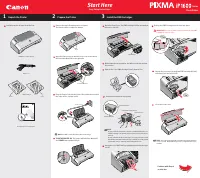
Carefully remove all items from the box.
Documentation and Software Kit
Power Cord
1
Remove the tapes from the printer as shown.
The tape position is subject to change.
Open the Paper Support and the Front Cover, then remove
the Protective Material on the right side.
Plug the Power Cord into the back of the printer and connect
the other end to a power outlet.
NOTE:
Do NOT connect the USB cable at this stage.
TURN THE PRINTER ON
. The printer will initialize. Wait until
the
POWER
lamp remains fully lit.
4
3
2
1
Open the Front Cover. The FINE Cartridge Holder automatical-
ly moves to the left.
Write down the serial number. You will need this to register
the product.
Remove the Color FINE Cartridge (CL-41) from its box.
Remove the Protective Tape gently.
NOTE:
·Do not touch the electrical contacts or Print Head Nozzles on
a FINE Cartridge. The printer may not print out properly if you
touch it.
·Do not reattach the Protective Tape once you have removed it.
·Handle the removed Protective Tape carefully to avoid getting
your hands dirty or staining surrounding work area.
Insert the Color FINE Cartridge slightly slanted into the right
slot (C).
5
4
3
2
1
Push up the FINE Cartridge until it clicks into place.
IMPORTANT:
For correct printer operation, make sure the FINE
Cartridge is secure in slots.
Repeat the procedure for the Black FINE Cartridge (PG-40),
inserting it into the left slot (B).
Close the Front Cover.
NOTE:
The printer will perform a Print Head Cleaning after the
cover is closed. Wait until the process is complete before pro-
ceeding.
8
7
6
Continue with Step 4
on side two.
PIXMA iP1600 Photo Printer
Photo Printer
Series
Quick Start Guide
Electrical Contacts
Protective Tape
To the FINE Cartridge Holder
Print Head Nozzles
FINE Cartridges
CL-41
PG-40
Tapes
Power Cord
Protective Material
Serial Number
"Loading the manual" means you need to wait until the file loads and becomes available for online reading. Some manuals are very large, and the time they take to appear depends on your internet speed.
Was this manual helpful?
About this manual
- Brand
- Canon
- Model
- PIXMA iP1600
- Document type
- User Manual
- Language(s)
- English
- Pages
- 2
- File size
- 1.6 MB
- Format
Ask a question
Related manuals
Popular Canon Other


More Canon Other models
 Canon PIXMA G4411 User Manual
 Canon PIXMA G4510 User Manual
 Canon PIXMA iP90 Manual
 Canon PIXMA iP100 User Manual
 Canon PIXMA iP110 User Manual
 Canon PIXMA iP1200 User Manual
 Canon PIXMA iP1700 Quick Guide
 Canon PIXMA iP2000 User Manual
 Canon Pixma iP2200 Manual
 Canon PIXMA iP2820 Quick Guide
 Canon PIXMA iP2840 User Manual
 Canon PIXMA iP2850 User Manual