Cadet TEP362DW - User Manual
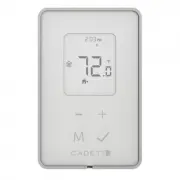
Cadet TEP362DW Thermostat – User Manual, read for free online in PDF format. We hope this helps you resolve any issues you may have. If you have further questions, please contact us through the contact form.

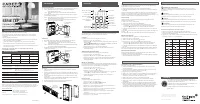
IMPORTANT INSTRUCTIONS
WARRANTY
TECHNICAL SPECIFICATIONS
TECHNICAL SUPPORT
CONTROL
INSTALLATION
TEP402DW
1. Connect the ‘L1’ thermostat wire to the live supply wire.
2. 240 V: Connect the ‘L2’ thermostat wire to the other live supply wire
and
the other live heater wire.
120 V: Connect the ‘L2’ thermostat wire to the neutral supply wire
and
the neutral heater wire.
3. Connect the ‘Load’ thermostat wire to the live heater wire.
TEP302DW, TEP362DW
1. Connect the
black
‘L1’ thermostat wire to the live supply wire.
2. 240 V: Connect the
red
‘L2’ thermostat wire to the other live supply wire.
120 V: Connect the
red
‘L2’ thermostat wire to the neutral supply wire.
3. Connect the
black
‘Load’ wire to the live heater wire.
4. 240 V: Connect the
red
‘Load’ thermostat wire to the other heater wire.
120 V: Connect the
red
‘Load’ thermostat wire to the neutral heater wire.
The thermostat should be mounted after the wiring connections have been
connected.
1. Remove the small screw at the bottom of the thermostat using a
Philips #1 screwdriver.
2.
Carefully insert a small flat head screwdriver in the slot between the
faceplate and the gray bezel, and gently pry apart.
3. Position the thermostat over the junction box, and secure it using the two
supplied screws.
Note: For models TEP302DW and TEP362DW, the protruding part from
the back will be recessed into the junction box
4. Reinstall the faceplate and insert the previously removed screw.
5.
Remove the protective film before use.
In case of loss of power, the thermostat will retain these settings. Follow the
instructions below to change the settings.
Language
Select your language preference (English or French):
1. Press
+
and
-
at the same time to enter the setup.
2. Press
M
. The days of the week will flash in the current language setting.
The letters
M T W T F S S
indicates the
English
setting.
L M M J V S D
indicates the
French
setting.
3. Use
+
or
-
to change the current setting.
4. The display will blink for 3 seconds before returning to the main screen.
Temperature Display
Select your preferred temperature display:
1. Press
+
and
-
at the same time to enter the setup.
2. Press
M
twice.
°C
or
°F
will flash.
3. Press
+
or
-
if you wish to change the temperature display.
4. The display will blink for 3 seconds before returning to the main screen.
Heat Mode
Select the mode that applies to your heater: If the incorrect setting is chosen,
your heater may short cycle or hold an inconsistent temperature.
1. Press
+
and
-
at the same time to enter the setup.
2. Press
M
3 times. or
will flash.
3. Press
+
or
-
to select the option suitable for your heater.
Select
for fan-forced heaters or
for convection heaters (including
baseboard heaters).
4. The display will blink for 3 seconds before returning to the main screen.
Time and Day
Set the current time and format.
1. Press
+
and
-
at the same time to enter the setup.
2. Press
M
6 times.
12hr
or
24hr
will flash.
3. Use
+
or
-
to change the time format.
4. Press
ü
to confirm. The
hour
digits will flash.
5. Adjust the hour using
+
or
-
.
6. Press
ü
to confirm. The
minute
digits will flash.
7. Adjust the minutes using
+
or
-
.
8. Press
ü
to confirm. The currently set day of the week will flash.
9. Use
+
or
-
to select the current day of the week.
10. Press
ü
to confirm.
Program Setup
To set the program:
1. Press
M
to enter the program setup. All the days of the week will flash.
2.
You will need to program the first event; Wake Up [
] for the 5 weekdays.
The two ‘hour’ digits will flash.
3. Adjust the hours using
+
or
-
.
4. Press
ü
to confirm. The two ‘minute’ digits will flash.
5. Adjust the minutes in 15-minute intervals using
+
or
-
.
6. Press
ü
to confirm. The set point temperature will flash.
7. Adjust the event temperature set point using
+
or
-
.
8. Press
ü
to confirm. The Wake Up event is now programmed.
9. Repeat steps 3-8 to program the remaining events: Away, Return, and
Sleep to complete the weekday setup. Once the weekday setup is
completed, you will continue to the programming of events for the weekend.
To exit program setup at any time, wait 10 seconds for the thermostat to
return to the main screen.
SETUP
WIRING INSTRUCTIONS
MOUNTING THE THERMOSTAT
PROGRAMMING
QUICK MODES
FUNCTIONS
DISPLAY
Time
Time format
Standby (OFF)
Days of the week
(English/French)
Heat Mode
(Fan, Convection/
Baseboard)
Quick Modes
(Early Start, Vacation, Comfort, Economy)
Lock
Temperature
Display
Temperature
Programmed Event
(Wake Up, Away,
Arrive, Sleep)
TEP302DW
TEP362DW
TEP402DW
Max. load
(at 120/240 V)
1500 W / 3000 W
1800 W / 3600 W
2000 W / 4000 W
Max. Amps
12.5
15
16.67
Wiring
Double pole, 4 wire
Double pole, 4 wire
Single pole, 3 wire
Electrical Rating
120/208/240 V 50-60Hz
Heater Compatibility
Compatible with fan-forced or convection heaters
and baseboards
Temperature range
Programmable 5 °C - 30 °C (41 °F - 86 °F)
Readable -40 °C - 70 °C (-40 °F - 158 °F)
LCD may degrade at 0 °C (32 °F)
Software
Class A
Certification
cULus
Impulse Voltage
2500
Pollution Degree
PD2
If the thermostat is deemed defective within 3 years of the
original date of purchase, Cadet will repair or replace the
product at its discretion.
Warranty is void in case of damage incurred from improper use
or installation.
See http://cadetheat.com/product-warranty for details.
This product must be installed by a qualified electrician.
In order to avoid fire, shock or death, shut off power supply at the circuit
breaker or fuse before wiring.
Before you begin:
• Verify that the heating appliance that is being connected is within the
specified load range.
•
Confirm voltage is within the device rating.
• For wiring, use copper conductors only.
•
Mount on a certified electrical box only.
Keep this user’s guide in a safe place for future reference.
Use quick modes to quickly and easily change the temperature using the
following presets:
Early Start
When the ‘Early start’ function is active, the thermostat will start heating the
room 30 minutes earlier than the set time for next programmed event.
Vacation
This mode will set the temperature at 10 °C (50 °F) to conserve energy while
you are away for long periods of time.
Comfort
This mode is used to slightly increase the temperature across all programmed
events to maintain a more comfortable temperature.
Economy
This mode is used to slightly decrease the temperature across all
programmed events to save energy.
To enable/disable a quick mode:
1. Press
M
once. One of the quick mode icons will appear.
2. Use the
+
or
-
to scroll through icons until the desired one is selected.
3. Press
ü
to turn the selected quick mode on or off.
More than one quick mode can be active at the same time. See the chart
below for compatibility.
Thank you for your purchase! Question or problem? Let us solve it
with a single phone call, email or online chat! We’ll save you a trip
back to the store!
Phone: 855.223.3887 (from US)
800.668.6663 (from Canada)
email: [email protected]
Live chat: cadetheat.com (contact us)
7216290100R00
To heater
To heater
L2 or
L2 or
Neutral
Neutral
L2 or
L2 or
Neutral
Neutral
L1
Load
Load
L1
L2
L1
To power supply
To power supply
I
n keeping with our policy of continuous product
improvement, we reserve the right to make
changes without notice.
© 2020 Glen Dimplex Americas
Insert small
flat head
screwdriver
here
Early Start
Comfort
Economy
Vacation
Setting the Temperature
The display will show the ambient temperature, except during temperature
adjustment, in which case it will show the set temperature. To adjust the set
temperature:
1. Press
+
or
-
to select the desired temperature.
2. The display will blink for 3 seconds before returning to the main screen.
When the temperature is changed from the scheduled set point for the current
event,
HOLd
will appear at the top of the screen, where the time is normally
displayed. This indicates that a temporary hold has been set. The next
scheduled event will override this temperature change.
Lock Function
Use the lock function to prevent the settings from being changed inadvertently.
1. Press
+
and
-
at the same time.
2. Press
M
5 times. The icon will blink.
3. Press
+
or
-
to toggle it on and off.
The icon blinks fast to indicate that it is enabled, and blinks slow to
indicate that it is disabled.
4. The display will blink for 3 seconds before returning to the main screen.
The icon will remain visible to indicate that the lock function is enabled.
To disable, press and hold
+
and
-
.
Standby (OFF)
Use the standby function to turn the heat off indefinitely.
1. Press
+
and
-
at the same time.
2. Press
M
4 times. The icon will blink.
3. Press
+
or
-
to toggle it on and off.
The
icon blinks fast to indicate that it is enabled, and blinks slow to
indicate that it is disabled.
4. The display will blink for 3 seconds before returning to the main screen.
When enabled, only the icon will remain visible on the screen. Repeat
steps 1-4 to turn the thermostat on again.
To disable, press and hold
+
and
-
.
Factory Reset
If thermostat settings need to be adjusted significantly, the thermostat can be
reset.
• Press and hold the
M
for 10 seconds. The display will flash and be reset to
the thermostat’s original configuration.
TEP SERIES
TEP SERIES
PROGRAMMABLE ELECTRONIC
PROGRAMMABLE ELECTRONIC
LINE VOLTAGE THERMOSTAT
LINE VOLTAGE THERMOSTAT
USER’S GUIDE
USER’S GUIDE
"Loading the manual" means you need to wait until the file loads and becomes available for online reading. Some manuals are very large, and the time they take to appear depends on your internet speed.


