Page 3 - About this Quick Start Guide
En 3 About this Quick Start Guide This document provides step-by-step instructions for installation and playback. Refer to the User Guide on the Yamaha website for more information.Visit the following website to see the latest User Guide. https://manual.yamaha.com/av/20/atsc200/ Thank you for purcha...
Page 4 - Supplied accessories
4 En Make sure you have received all of the following accessories: Supplied accessories Sound bar (ATS-C200) Spacers (A: ×2, B: ×2 on 1 sheet) Remote control Use when mounting the sound bar on a wall. Mounting template Power cord NOTE An HDMI cable is not included with this sound bar. Please consi...
Page 5 - Operating range of the remote control; Preparing the remote control; Installing the sound bar
En 5 Remove the battery insulating strip before attempting to use the remote control. NOTE A Lithium battery (CR2025) has already been inserted into the remote control. Operating range of the remote control Use the remote control within the range shown in the following illustration: Installed on a...
Page 6 - Connecting a TV; Is your TV equipped with an HDMI jack labeled as “ARC?”; Yes
6 En Depending on the type of TV, connect the TV to the sound bar as follows: Connect the TV using an ARC-compatible HDMI cable (sold separately). Connect the TV using an HDMI cable (sold separately) and digital optical audio cable (supplied). Be sure to use both cables to connect the TV. Connecting...
Page 8 - Turn on the sound bar.; Connecting to power
8 En After all connections are complete, connect the sound bar to power as follows: 1 Turn on the TV. When the TV is connected to the sound bar using an HDMI cable and the HDMI Control function of the TV is enabled, the sound bar will also turn on. In this case, go to Step 4 . 2 Turn on the sound ba...
Page 9 - Adjusting the sound to your preference
En 9 a Listening modes based on video or audio content (Sound mode) The following sound modes allow you to further enhance audio performance. Select the sound mode according to your content and individual preference: STANDARD This sound mode is the best suited for general content, such as sports, si...
Page 11 - À propos de ce Guide de démarrage rapide
Fr 11 À propos de ce Guide de démarrage rapide Ce document fournit des instructions étape par étape pour l’installation et la lecture. Reportez-vous au Mode d'emploi sur le site Web de Yamaha pour de plus amples informations.Visitez le site Web suivant pour accéder au Mode d'emploi le plus récent. h...
Page 12 - Accessoires fournis
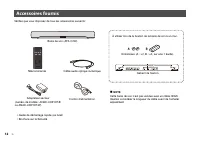
12 Fr Vérifiez que vous disposez de tous les accessoires suivants : Accessoires fournis Barre de son (ATS-C200) Entretoises (A : ×2, B : ×2, sur une 1 feuille) Télécommande À utiliser lors de la fixation de la barre de son à un mur. Gabarit de fixation Cordon d'alimentation NOTE Cette barre de son...
Page 13 - Rayon d’action de la télécommande; Préparation de la télécommande; Installation de la barre de son
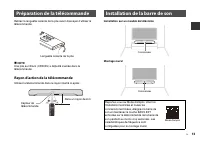
Fr 13 Retirez la languette isolante de la pile avant d’essayer d’utiliser la télécommande. NOTE Une pile au lithium (CR2025) a déjà été insérée dans la télécommande. Rayon d’action de la télécommande Utilisez la télécommande dans le rayon illustré ci-après : Installation sur un meuble de télévisio...
Page 14 - Raccordement d’un téléviseur; Votre téléviseur est-il équipé d’une prise HDMI étiquetée « ARC » ?; Oui
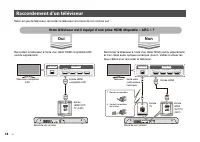
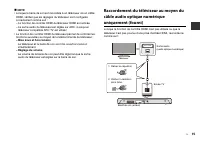
14 Fr Selon le type de téléviseur, raccordez le téléviseur à la barre de son comme suit : Raccordez le téléviseur à l’aide d’un câble HDMI compatible ARC (vendu séparément). Raccordez le téléviseur à l’aide d’un câble HDMI (vendu séparément) et d’un câble audio optique numérique (fourni). Veillez à ...
Page 16 - Raccordement à l’alimentation
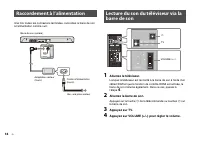
16 Fr Une fois toutes les connexions terminées, raccordez la barre de son à l’alimentation comme suit : 1 Allumez le téléviseur. Lorsque le téléviseur est raccordé à la barre de son à l’aide d’un câble HDMI et que la fonction de contrôle HDMI est activée, la barre de son s’allume également. Dans ce ...
Page 17 - Réglage du son selon vos préférences
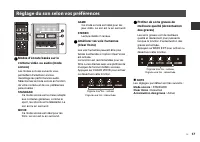
Fr 17 a Modes d’écoute basés sur le contenu vidéo ou audio (mode sonore) Les modes sonores suivants vous permettent d’améliorer encore davantage les performances audio. Sélectionnez le mode sonore en fonction de votre contenu et de vos préférences personnelles : STANDARD Ce mode sonore est le mieux ...
Page 19 - Über diese Schnellstartanleitung
De 19 Über diese Schnellstartanleitung Dieses Dokument enthält Schritt-für-Schritt-Anweisungen für Aufstellung und Wiedergabe. Weitergehende Informationen finden Sie in der Bedienungsanleitung auf der Yamaha-Website.Die neueste Bedienungsanleitung finden Sie auf der nachstehenden Website. https://ma...
Page 20 - Mitgeliefertes Zubehör
20 De Vergewissern Sie sich, dass die folgenden Zubehörteile im Lieferumfang enthalten sind: Mitgeliefertes Zubehör Sound-Bar (ATS-C200) Abstandhalter (A: ×2, B: ×2, auf 1 Blatt) Fernbedienung Bei Montage des Sound-Bars an einer Wand zu verwenden. Montageschablone Netzkabel HINWEIS Dieser Sound-Ba...
Page 21 - Wirkungsbereich der Fernbedienung; Vorbereiten der Fernbedienung; Installieren des Sound-Bars
De 21 Entfernen Sie den Batterie-Isolierstreifen vor dem ersten Gebrauch der Fernbedienung. HINWEIS Eine Lithiumbatterie (CR2025) sitzt bereits in der Fernbedienung. Wirkungsbereich der Fernbedienung Verwenden Sie die Fernbedienung innerhalb des in der nachstehenden Abbildung gezeigten Bereichs: A...
Page 22 - Anschließen eines Fernsehers; Nein
22 De Schließen Sie den Fernseher je nach Ausstattung wie folgt an den Sound-Bar an: Schließen Sie den Fernseher mit einem ARC-kompatiblen HDMI-Kabel (separat erhältlich) an. Schließen Sie den Fernseher mit einem HDMI-Kabel (separat erhältlich) und dem optisch digitalen Audiokabel (mitgeliefert) an....
Page 24 - Schalten Sie den Fernseher ein.; Netzanschluss
24 De Nachdem alle anderen Anschlüsse hergestellt wurden, schließen Sie den Sound-Bar wie folgt an: 1 Schalten Sie den Fernseher ein. Wenn der Fernseher mit einem HDMI-Kabel angeschlossen ist und die HDMI-Steuerfunktion des Fernsehers aktiviert wurde, wird der Sound-Bar gleichzeitig eingeschaltet. G...
Page 25 - Anpassen des Klangs
De 25 a Hörmodi für verschiedene Video- oder Audioinhalte (Soundmodus) Die nachstehenden Soundmodi erlauben eine weitere Verbesserung der Audio-Performance. Wählen Sie den für den jeweiligen Inhalt bevorzugten Soundmodus: STANDARD Dieser Soundmodus eignet sich für allgemeine Inhalte wie Sportprogram...
Page 26 - Wählen Sie Ihr Produkt in der angezeigten Liste.
26 De Audioinhalt von einem Bluetooth-Gerät (wie einem Smartphone) kann über den Sound-Bar wiedergegeben werden. 1 Drücken Sie BLUETOOTH um die Eingangsquelle auf Bluetooth umzuschalten. 2 Aktivieren Sie am Bluetooth-Gerät die Bluetooth-Funktion. 3 Wählen Sie Ihr Produkt in der angezeigten Liste. „Y...
Page 27 - Angående denna Snabbuppstartsguide
Sv 27 Angående denna Snabbuppstartsguide Detta dokument erbjuder steg för steg instruktioner för installering och uppspelning. Se Användarguide på Yamaha webbsida för mer information.Besök följande webbsida för att se senaste Användarguide. https://manual.yamaha.com/av/20/atsc200/ Tack för att du ha...
Page 28 - Medföljande tillbehör
28 Sv Se till att du har fått samtliga följande tillbehör: Medföljande tillbehör Soundbar (ATS-C200) Distanser (A: ×2, B: ×2, på 1 ark) Fjärrkontroll Använd vid montering av soundbaren på en vägg. Monteringsmall Nätsladd OBS! En HDMI-kabel medföljer inte denna soundbar. Tänk på längden när du köpe...
Page 29 - Fjärrkontrollens räckvidd; Förberedande av fjärrkontrollen; Montera soundbaren
Sv 29 Ta bort batteriets isoleringsremsa innan du försöker använda fjärrkontrollen. OBS! Ett litiumbatteri (CR2025) har redan satts in i fjärrkontrollen. Fjärrkontrollens räckvidd Använd fjärrkontrollen inom området som visas i följande illustration: Monterad på ett TV-ställ Väggmonterad Förbereda...
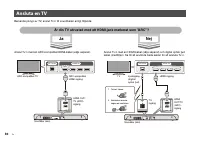
Page 30 - Ansluta en TV; Är din TV utrustad med ett HDMI-jack markerat som ”ARC”?; Nej
30 Sv Beroende på typ av TV, anslut Tv:n till soundbaren enligt följande: Anslut Tv:n med en ARC-kompatibel HDMI-kabel (säljs separat). Anslut Tv:n med en HDMI-kabel (säljs separat) och digital optisk ljud kabel (medföljer). Se till att använda båda kablar för att ansluta Tv:n. Ansluta en TV Är din ...
Page 32 - Anslutning till ström; Spelar Tv-ljud genom soundbaren
32 Sv Efter att alla anslutningar slutförts, anslut soundbaren till ström enligt följande: 1 Slå på Tv:n. När Tv:n är ansluten till soundbaren med en HDMI-kabel och HDMI-kontrollfunktionen på Tv:n är aktiverad kommer även soundbaren att slås på. I detta fall, gå till steg 4 . 2 Slå på soundbaren. Tr...
Page 33 - Justera ljudet enligt dina önskemål
Sv 33 a Lyssningslägen baserade på video- eller ljudinnehåll (ljudläge) Följande ljudlägen gör att du kan ytterligare förbättra ljudprestandan. Välj ljudläge med hänsyn till ditt innehåll och individuella önskemål: STANDARD Detta ljudläge passar bäst för allmänt innehåll så som sport, sitcoms och do...
Page 34 - Styra soundbaren med appen
34 Sv Ljudinnehåll från en Bluetooth-apparat (så som en smarttelefon) kan spelas genom soundbaren. 1 Tryck på BLUETOOTH för att växla ingångskällan till Bluetooth. 2 På Bluetooth-apparaten aktivera Bluetooth-funktionen. 3 Välj din produkt som visas i listan. ”Yamaha ATS-C200” eller ”YamahaAV” visas ...
Page 35 - Informazioni sulla presente Guida introduttiva
It 35 Informazioni sulla presente Guida introduttiva Questo documento fornisce istruzioni dettagliate per l'installazione e la riproduzione. Fare riferimento alla Guida dell'utente sul sito web Yamaha per ulteriori informazioni.Per la Guida dell'utente più recente, visitare il seguente sito web: htt...
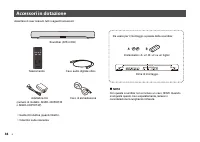
Page 36 - Accessori in dotazione
36 It Accertare di aver ricevuto tutti i seguenti accessori: Accessori in dotazione Soundbar (ATS-C200) Distanziatori (A: ×2, B: ×2 su un foglio) Telecomando Da usare per il montaggio a parete della soundbar. Dima di montaggio Cavo di alimentazione NOTA Con questa soundbar non è incluso un cavo HD...
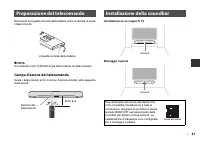
Page 37 - Campo d’azione del telecomando; Preparazione del telecomando; Installazione della soundbar
It 37 Rimuovere la linguetta isolante della batteria prima di tentare di usare il telecomando. NOTA Una batteria al litio (CR2025) è già stata inserita nel telecomando. Campo d’azione del telecomando Usare il telecomando entro il campo d’azione indicato nella seguente illustrazione: Installazione ...
Page 38 - Collegamento di un televisore; Il televisore è dotato di una presa HDMI etichettata “ARC?”; Sì
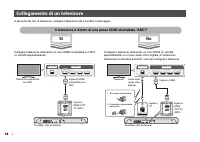
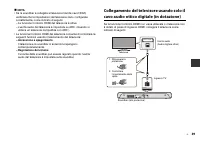
38 It A seconda del tipo di televisore, collegare il televisore alla soundbar come segue: Collegare il televisore utilizzando un cavo HDMI compatibile con ARC (in vendita separatamente). Collegare il televisore utilizzando un cavo HDMI (in vendita separatamente) e un cavo audio ottico digitale (in d...
Page 40 - Collegamento all’alimentazione
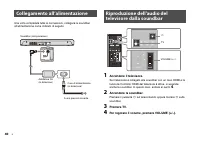
40 It Una volta completate tutte le connessioni, collegare la soundbar all’alimentazione come indicato di seguito: 1 Accendere il televisore. Se il televisore è collegato alla soundbar con un cavo HDMI e la funzione Controllo HDMI del televisore è attiva, si accende anche la soundbar. In questo caso...
Page 41 - Regolazione del suono in base alla proprie preferenze
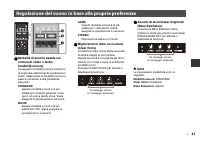
It 41 a Modalità di ascolto basate sul contenuto video o audio (modalità sonore) Le seguenti modalità sonore consentono di migliorare ulteriormente le prestazioni audio. Selezionare la modalità sonora in base al contenuto e alle preferenze personali: STANDARD Questa modalità sonora è la più adatta p...
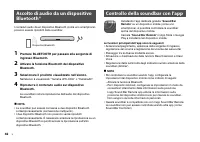
Page 42 - Selezionare il prodotto visualizzato nell’elenco.; Controllo della soundbar con l’app
42 It I contenuti audio da un dispositivo Bluetooth (come uno smartphone) possono essere riprodotti dalla soundbar. 1 Premere BLUETOOTH per passare alla sorgente di ingresso Bluetooth. 2 Attivare la funzione Bluetooth del dispositivo Bluetooth. 3 Selezionare il prodotto visualizzato nell’elenco. Nel...
Page 43 - Notas sobre esta Guía de inicio rápida
Es 43 Notas sobre esta Guía de inicio rápida En este documento se ofrecen instrucciones detalladas de instalación y reproducción. Consulte la Manual de usuario en el sitio web de Yamaha para obtener más información.Visite el siguiente sitio web para acceder a la Manual de usuario más reciente. https...
Page 44 - Accesorios incluidos
44 Es Asegúrese de haber recibido todos los accesorios que aparecen a continuación: Accesorios incluidos Barra de sonido (ATS-C200) Separadores (A: ×2, B: ×2 en 1 lámina) Mando a distancia Para montar la barra de sonido en una pared. Plantilla de montaje Cable de alimentación NOTA Con esta barra d...
Page 45 - Alcance operativo del mando a distancia; Preparación del mando a distancia; Instalación de la barra de sonido
Es 45 Quite la tira aislante de la pila antes de intentar utilizar el mando a distancia. NOTA El mando a distancia ya lleva dentro una pila de litio (CR2025). Alcance operativo del mando a distancia Use el mando a distancia dentro del alcance mostrado en la ilustración siguiente: Instalación en un...
Page 46 - Conexión a un televisor; ¿Cuenta su televisor con una toma HDMI etiquetada como “ARC”?; Sí
46 Es Según el tipo de televisor, conecte el televisor a la barra de sonido del siguiente modo: Conecte el televisor con un cable HDMI compatible con ARC (vendido por separado). Conecte el televisor con un cable HDMI (vendido por separado) y un cable de audio óptico digital (incluido). Asegúrese de ...
Page 48 - Conexión de la alimentación
48 Es Una vez realizadas todas las conexiones, conecte la barra de sonido a la alimentación del siguiente modo: 1 Encienda el televisor. Si el televisor está conectado a la barra de sonido con un cable HDMI y la función de control HDMI del televisor está activada, la barra de sonido también se encen...
Page 49 - Ajuste del sonido según sus preferencias
Es 49 a Modos de escucha en función del contenido de vídeo o audio (modo de sonido) Los modos de sonido siguientes le permiten mejorar aún más el rendimiento de audio. Seleccione el modo de sonido según el contenido y sus propias preferencias: STANDARD Este modo de sonido es idóneo para contenido ge...
Page 50 - Seleccione su producto mostrado en la lista.
50 Es El contenido de audio de un dispositivo Bluetooth (como un smartphone) se puede reproducir mediante la barra de sonido. 1 Pulse BLUETOOTH para cambiar la fuente de entrada a Bluetooth. 2 Active la función Bluetooth en el dispositivo Bluetooth. 3 Seleccione su producto mostrado en la lista. Se ...
Page 51 - Sobre este Guia de Iniciação Rápida
Pt 51 Sobre este Guia de Iniciação Rápida Este documento oferece instruções passo a passo para a instalação e reprodução. Consulte o Guia do Usuário no website da Yamaha para mais informações.Visite o seguinte website: para ver o Guia do Usuário mais recente. https://manual.yamaha.com/av/20/atsc200/...
Page 52 - Acessórios fornecidos
52 Pt Certifique-se de que recebeu todos os acessórios abaixo: Acessórios fornecidos Barra de som (ATS-C200) Espaçadores (A: ×2, B: ×2, em 1 folha) Telecomando Utilize quando montar a barra de som numa parede. Gabarito de montagem Cabo de alimentação OBSERVAÇÃO Não é fornecido um cabo HDMI com est...
Page 53 - Alcance de operação do telecomando; Preparação do telecomando; Instalação da barra de som
Pt 53 Retire a fita de isolamento de pilha antes de tentar utilizar o telecomando. OBSERVAÇÃO Uma pilha de lítio (CR2025) já vem colocada no telecomando. Alcance de operação do telecomando Utilize o telecomando dentro do alcance mostrado na seguinte ilustração Instalação num suporte de TV Montagem...
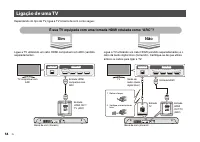
Page 54 - Ligação de uma TV; É sua TV equipada com uma tomada HDMI rotulada como “ARC”?; Sim
54 Pt Dependendo do tipo de TV, ligue a TV à barra de som como segue: Ligue a TV utilizando um cabo HDMI compatível com ARC (vendido separadamente). Ligue a TV utilizando um cabo HDMI (vendido separadamente) e o cabo de áudio digital ótico (fornecido). Certifique-se de que utiliza ambos os cabos par...
Page 56 - Ligue a barra de som.; Maneira de ligar a alimentação
56 Pt Uma vez concluídas todas as ligações, ligue a barra de som à fonte de energia como segue: 1 Ligue a TV. Se a TV estiver ligada à barra de som com um cabo HDMI e a função de Controlo de HDMI da TV estiver ativada, a barra de som também será ligada. Neste caso, prossiga para o Passo 4 . 2 Ligue ...
Page 57 - Ajuste do som para sua preferência
Pt 57 a Modos de audição baseados no conteúdo de vídeo ou áudio (Modo de som) Os seguintes modos de som permitem-lhe melhorar ainda mais o desempenho do áudio. Selecione o modo de som de acordo com o conteúdo e sua preferência individual: STANDARD Este modo de som é o mais adequado para conteúdos ge...
Page 59 - Over deze Snelstartgids
Nl 59 Over deze Snelstartgids Dit document geeft u stapsgewijze instructies voor de installatie en weergave. Raadpleeg de Gebruikershandleiding op de Yamaha-website voor meer informatie.Bezoek de volgende website om de nieuwste Gebruikershandleiding te bekijken. https://manual.yamaha.com/av/20/atsc2...
Page 60 - Meegeleverde accessoires
60 Nl Controleer of u alle volgende accessoires inderdaad ontvangen hebt: Meegeleverde accessoires Geluidsbalk (ATS-C200) Afstandshouders (A: ×2, B: ×2, op 1 vel) Afstandsbediening Voor wanneer u de geluidsbalk aan de wand wilt bevestigen. Bevestigingssjabloon Netsnoer OPMERKING Er wordt geen HDMI...
Page 61 - Werkingsbereik van de afstandsbediening; De geluidsbalk installeren
Nl 61 Verwijder de isolatiestrip van de batterij voor u probeert de afstandsbediening te gebruiken. OPMERKING Een lithiumbatterij (CR2025) is reeds in de afstandsbediening geplaatst. Werkingsbereik van de afstandsbediening Gebruik de afstandsbediening binnen het bereik dat staat aangegeven op de v...
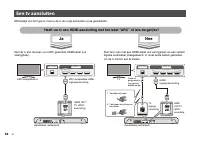
Page 62 - Een tv aansluiten; Nee
62 Nl Afhankelijk van het type tv, moet u de tv als volgt aansluiten op de geluidsbalk: Sluit de tv aan met een voor ARC geschikte HDMI-kabel (los verkrijgbaar). Sluit de tv aan met een HDMI-kabel (los verkrijgbaar) en een optisch digitale audiokabel (meegeleverd). U moet beide kabels gebruiken om d...
Page 64 - Zet de geluidsbalk aan.
64 Nl Nadat alle aansluitingen voltooid zijn, moet u de geluidsbalk als volgt aansluiten op de stroomvoorziening: 1 Zet de tv aan. Wanneer de tv is aangesloten op de geluidsbalk via een HDMI-kabel en de HDMI-bedieningsfunctie (HDMI Control) van de tv is ingeschakeld, zal de geluidsbalk ook worden in...
Page 65 - Het geluid aanpassen aan uw voorkeuren
Nl 65 a Luisterstanden op basis van het weergegeven video- of audiomateriaal (Weergavestand) De volgende weergavestanden stellen u in staat om de audioprestaties verder te verbeteren. Selecteer de weergavestand aan de hand van het weergegeven materiaal en uw persoonlijke voorkeur: STANDARD Deze weer...
Page 68 - Прилагаемые аксессуары
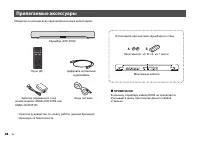
68 Ru Убедитесь в наличии всех перечисленных ниже аксессуаров: Прилагаемые аксессуары Саундбар (ATS-C200) Проставки (A: ×2, B: ×2, на 1 листе) Пульт ДУ Используйте при монтаже саундбара на стену. Монтажный шаблон Шнур питания ПРИМЕЧАНИЕ К данному саундбару кабель HDMI не прилагается. Учитывайте дл...
Page 69 - Диапазон работы пульта ДУ; Подготовка пульта ДУ; Установка саундбара
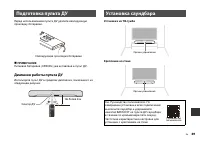
Ru 69 Перед использованием пульта ДУ удалите изолирующую прокладку батарейки. ПРИМЕЧАНИЕ Литиевая батарейка (CR2025) уже вставлена в пульт ДУ. Диапазон работы пульта ДУ Используйте пульт ДУ в пределах диапазона, показанного на следующем рисунке: Установка на ТВ-тумбе Крепление на стене Подготовка ...
Page 70 - Подключение телевизора; Оснащен ли ваш телевизор гнездом HDMI с обозначением “ARC?”; Да
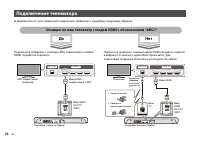
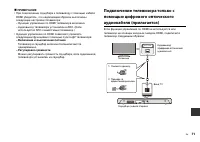
70 Ru В зависимости от типа телевизора подключите телевизор к саундбару следующим образом: Подключите телевизор с помощью ARC-совместимого кабеля HDMI (продается отдельно). Подключите телевизор с помощью кабеля HDMI (продается отдельно) и цифрового оптического аудиокабеля (прилагается). Для подключе...
Page 72 - Подключение к электропитанию
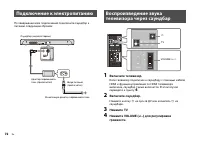
72 Ru По завершении всех подключений подключите саундбар к питанию следующим образом: 1 Включите телевизор. Если телевизор подключен к саундбару с помощью кабеля HDMI и функция управления по HDMI телевизора включена, саундбар также включится. В этом случае перейдите к пункту 4 . 2 Включите саундбар....
Page 73 - Регулировка звука в соответствии с вашими предпочтениями
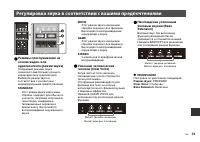
Ru 73 a Режимы прослушивания на основе видео- или аудиоконтента (режим звука) Следующие режимы звука позволяют еще больше улучшить характеристики аудиосигнала. Выберите режим звука в соответствии с контентом и индивидуальными предпочтениями: STANDARD Этот режим звука наилучшим образом подходит для о...
Page 74 - Выберите ваше изделие в отображенном списке.
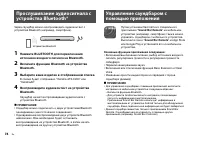
74 Ru Через саундбар можно воспроизводить аудиоконтент с устройства Bluetooth (например, смартфона). 1 Нажмите BLUETOOTH для переключения источника входного сигнала на Bluetooth. 2 Включите функцию Bluetooth на устройстве Bluetooth. 3 Выберите ваше изделие в отображенном списке. В списке будет отобр...
Page 75 - Yamaha
Zh-cn 75 关于本 快速启动指南 本文件提供逐步安装和播放的说明。有关更多信息,请参阅 Yamaha 网站上的 用户指南。 请访问以下网站以查看最新的 用户指南。 https://manual.yamaha.com/av/20/atsc200/ 感谢您购买本 Yamaha 产品。 • 为正确而安全地使用本产品,请在使用本机之前阅读本 快 速启动指南 和随附的小册子 “ 安全手册 ” 。 • 阅读本文件和 安全手册 之后,请确保将其存放在安全的 地方以备随时查阅。
Page 76 - 随附配件
76 Zh-cn 请确保您已收到下列所有配件: 随附配件 回音壁 ( ATS-C200 ) 垫片 ( A : ×2 , B : ×2 , 1 片) 遥控器 将回音壁安装在墙上时使用。 安装模板 电源线 注 此回音壁未随附 HDMI 缆线。单独购买此缆线时, 请考虑其长度。 数字光纤音频缆线 • 快速启动指南 (本册子) • 安全手册 AC 适配器 (型号: ANAD-420FIOT-B 或 ANAD-420FIOT-W )
Page 77 - 遥控器操作范围; 准备遥控器; BASS EXT
Zh-cn 77 在尝试使用遥控器前,请先取下电池绝缘片。 注 遥控器内已经插入锂电池 ( CR2025 )。 遥控器操作范围 请在下图所示的范围内使用遥控器: 安装在电视机底座上 壁挂式 准备遥控器 电池绝缘片 6 m 以内 遥控器传感器 安装回音壁 请参阅 用户指南。完成安装和所有连接 后,请关闭回音壁的电源,并按住回音壁遥控器上的 BASS EXT 至少五秒钟。 针对壁挂式安装配置频率特性。 控制器 控制器 用户指南
Page 78 - 连接电视; 您的电视是否配备了标有; “ARC”; 插孔?
78 Zh-cn 根据电视制式,请按照以下步骤将电视连接至回音壁: 使用兼容 ARC 的 HDMI 缆线 (另售)连接电视。 使用 HDMI 缆线 (另售)和数字光纤音频缆线 (随附)连接 电视。确保使用两条缆线连接电视。 连接电视 您的电视是否配备了标有 “ARC” 的 HDMI 插孔? 是 否 HDMI IN OPTICAL HDMI HDMI ARC 回音壁 (后部) HDMI OUT/TV (ARC) 输入 兼容 ARC 的电视 兼容 ARC 的 HDMI 输入 HDMI IN OPTICAL HDMI HDMI O O O O 回音壁 (后部) HDMI OUT/TV (ARC) 输...
Page 80 - 连接到电源; 通过回音壁播放电视声音
80 Zh-cn 完成所有连接后,请按照以下步骤将回音壁连接到电源: 1 打开电视。 如果使用 HDMI 缆线将电视连接至回音壁且启用电视的 HDMI 控制功能,则回音壁会同时开启。在这种情况下, 请转到步骤 4 。 2 打开回音壁。 按遥控器上的 z 按钮,或触摸回音壁上的 z 。 3 按 TV 。 4 按 VOLUME (+/−) 调节音量。 连接到电源 回音壁 (后部) 至交流墙壁电源插座 电源线 (随附) AC 适配器 (随附) 通过回音壁播放电视声音 TV VOLUME (+/−) z
Page 81 - CLEAR VOICE; 根据您的偏好调节声音
Zh-cn 81 a 基于视频或音频内容的聆听模式 (声音模式) 使用以下声音模式,可以进一步增强音频性能。根据您的内容和个人偏好选择声音模式: STANDARD 此声音模式最适合体育、情景喜剧和真人秀等一般性内容。进行环绕声播放。 MOVIE 此声音模式最适合电影。进行环绕声播放。 GAME 此声音模式最适合视频游戏。进行环绕声播放。 STEREO 2 声道立体声播放 b 增强人声 (清晰音质) 启用清晰音质后,可以更轻松地倾听人声。对于采用大量背景音乐和音响效果的电影或戏剧,建议使用此功能。按 CLEAR VOICE 启用或禁用此功 能。 c 享受增强的低音音效 (低音增强) 启用低音增强...
Page 82 - 聆听; 装置上的音频; 使用应用程序控制回音壁
82 Zh-cn 可以通过回音壁播放 Bluetooth 装置 (例如智能手机)上的音 频内容。 1 按 BLUETOOTH 将输入源切换为 Bluetooth 。 2 在 Bluetooth 装置上,启用 Bluetooth 功能。 3 选择列表中显示的产品。 列表中显示 “Yamaha ATS-C200” 或 “YamahaAV” 。 4 播放 Bluetooth 装置上的音频内容。 回音壁将开始播放 Bluetooth 装置上的音频。 注 • 回音壁可以同时连接至两台 Bluetooth 装置 (多点连接)。 • 无法同时播放两台 Bluetooth 装置上的内容。您需要先停止 播放...



















 Yamaha NS AW150
User Manual
Yamaha NS AW150
User Manual
 Yamaha NS AW350
User Manual
Yamaha NS AW350
User Manual
 Yamaha CLP 825
User Manual
Yamaha CLP 825
User Manual
 Yamaha CLP 835
User Manual
Yamaha CLP 835
User Manual
 Yamaha NS IW470WH
Installation Manual
Yamaha NS IW470WH
Installation Manual
 Yamaha CS500
User Manual
Yamaha CS500
User Manual
 Yamaha CS 800
Manual
Yamaha CS 800
Manual
 Yamaha NS F210BL
User Manual
Yamaha NS F210BL
User Manual
 Yamaha ATS C300
User Manual
Yamaha ATS C300
User Manual
 Yamaha PASC9
User Manual
Yamaha PASC9
User Manual