Page 2 - WARNING; Introduction
For assistance, please seewww.Toro.com/supportfor instructional videosor contact 1-888-384-9939before returning thisproduct. WARNING CALIFORNIA Proposition 65 Warning The power cord on this product contains lead, a chemical known to the State of California to cause birth defects or other reproductiv...
Page 3 - Safety; Read All Instructions
Safety-Alert Symbol The safety-alert symbol ( Figure 2 ) shown in this manual and on the machine identifies important safetymessages that you must follow to prevent accidents. g000502 Figure 2 Safety-alert symbol The safety-alert symbol appears above informationthat alerts you to unsafe actions or s...
Page 4 - IV. Maintenance and Storage
1 type of battery pack may create a risk of firewhen used with another battery pack. 7. Charge the battery pack in a well-ventilated areaonly. 8. Follow all charging instructions and donot charge the battery pack outside of thetemperature range specified in the instructions.Otherwise, you may damage...
Page 6 - Safety and Instructional Decals
Safety and Instructional Decals Safety decals and instructions are easily visible to the operator and are located near any areaof potential danger. Replace any decal that is damaged or missing. decal144-3098 144-3098 decal144-3096 144-3096 decal144-3094 144-3094 1. The battery pack ischarging. 3. Th...
Page 8 - Setup; Loose Parts; Procedure
Setup Loose Parts Use the chart below to verify that all parts have been shipped. Procedure Description Qty. Use 1 Allen wrench 1 Unfold the handle. Auxiliary handle assembly 1 2 Edger adjustment tool 1 Install the auxiliary handle. Important: The battery pack is not fully charged when you purchase ...
Page 10 - Installing the Auxiliary Handle
2 Installing the Auxiliary Handle Parts needed for this procedure: 1 Auxiliary handle assembly 1 Edger adjustment tool Procedure 1. Separate the auxiliary handle from the handle plate by removing the 4 screws (A of Figure 4 ). 2. Line up the auxiliary handle with auxiliary handle plate on the edger ...
Page 11 - Product Overview; Specifications; Appropriate Temperature Ranges; Attachments/Accessories
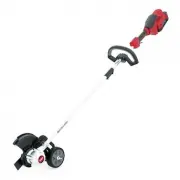
Product Overview g429628 Figure 5 1. Battery latch 5. Guard 2. Lockout button 6. Air venting areas 3. Auxiliary handle 7. Blade 4. Run trigger g330065 Figure 6 1. Battery charger Model88610 (included withModel 51833) 2. Battery pack Model 88620(included with Model51833) Specifications Model 51833 Bl...
Page 12 - Operation; Starting the Edger; Shutting Off the Edger
Operation Starting the Edger 1. Align the cavity in the battery pack with thetongue on the handle housing ( Figure 7 ). 2. Push the battery pack into the handle until thebattery locks into the latch ( Figure 7 ). g333238 Figure 7 1. Battery latch 3. To start the edger, pull back on the lockoutbutton...
Page 13 - Adjusting the Depth of Cut
Adjusting the Depth of Cut 1. Remove the battery from the edger. 2. Loosen the wing nut on the wheel and move itup or down in the track to increase or decreasethe depth ( Figure 10 ). g333293 Figure 10 3. Adjust the depth so that the blade barely touchesthe ground when the machine is held in a norma...
Page 14 - Charging the Battery Pack
Charging the Battery Pack Important: The battery pack is not fully charged when you purchase it. Before using the tool forthe first time, place the battery pack in the chargerand charge it until the LED display indicates thebattery pack is fully charged. Read all safetyprecautions. Important: Charge...
Page 15 - Operating Tips
Operating Tips • Hold the edger with your right hand on the rearhandle and your left hand on the front handle. • Keep a firm grip with both hands while in operation. • The edger should be held at a comfortable positionwith the rear handle at about hip height. • The edger will edge along sidewalks, d...
Page 16 - Maintenance; Replacing the Blade; Replacing the Wheel
Maintenance After each use of the edger, complete the following: 1. Remove the battery from the edger. 2. Wipe the edger clean with a damp cloth. Do nothose the edger down or submerge it in water. 3. Wipe or scrape clean the cutting head area anytime there is an accumulation of debris. 4. Check and ...
Page 17 - Replacing the Skid Plate; Storage
6. Tighten the wing nut to secure the wheel. Replacing the Skid Plate If the skid plate becomes worn or damaged, replaceit; contact your authorized Toro distributor. 1. Ensure that the battery is removed from themachine. 2. Remove the 2 screws securing the skid plate tothe edger ( Figure 12 ). g3446...
Page 18 - Troubleshooting
Troubleshooting Perform only the steps described in these instructions. All further inspection, maintenance, and repair workmust be performed by an authorized service center or a similarly qualified specialist if you cannot solve theproblem yourself. Always remove the battery from the tool when trou...
Page 20 - California Proposition 65 Warning Information
California Proposition 65 Warning Information What is this warning? You may see a product for sale that has a warning label like the following: WARNING: Cancer and Reproductive Harm—www.p65Warnings.ca.gov. What is Prop 65? Prop 65 applies to any company operating in California, selling products in C...