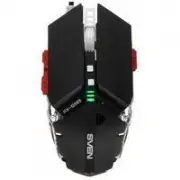
Page 2 - Congratulations on your purchase of the Sven mouse!
ENG 2 Gaming Mouse Congratulations on your purchase of the Sven mouse! COPYRIGHT © SVEN PTE. LTD. Version 1.0 (18.11.2021). This Manual and information contained in it are copyrighted. All rights reserved. TRADEMARKS All trademarks are the property of their legal holders. NOTICE OF RESPONSIBILITY RE...
Page 3 - SYSTEM REQUIREMENTS; Connect the gaming mouse to an available USB connector on the PC.; SETTINGS; at the top of the software.
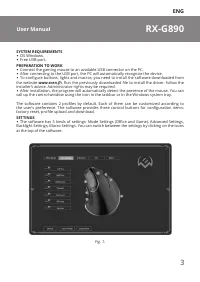
ENG 3 RX-G890 User Manual SYSTEM REQUIREMENTS • ОS Windows. • Free USB port. PREPARATION TO WORK • Connect the gaming mouse to an available USB connector on the PC. • After connecting to the USB port, the PC will automatically recognize the device. • To configure buttons, lights and macros, you need...
Page 4 - BUTTON CUSTOMIzATION
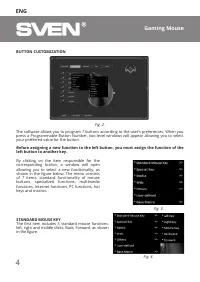
ENG 4 Gaming Mouse BUTTON CUSTOMIzATION Fig. 3. STANDARD MOUSE KEY The first item includes 5 standard mouse functions: left, right and middle clicks, Back, Forward, as shown in the figure. The software allows you to program 7 buttons according to the user’s preferences. When you press a Programmable...
Page 5 - SPECIAL KEY; Fire Key; MEDIA; Stop
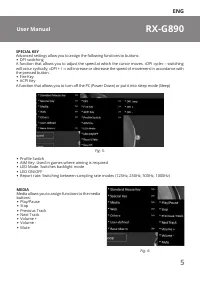
ENG 5 RX-G890 User Manual Fig. 5. SPECIAL KEY Advanced settings allow you to assign the following functions to buttons: • DPI switching A function that allows you to adjust the speed at which the cursor moves. «DPI cycle» – switching will occur cyclically, «DPI + / -» will increase or decrease the s...
Page 6 - enters search mode; COMPUTER CONTROL FUNCTIONS; Desktop. After assigning this function to a; KEYBOARD SHORTCUTS SELECTED; letters for the team name.
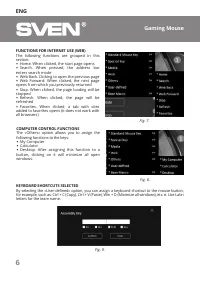
ENG 6 Gaming Mouse FUNCTIONS FOR INTERNET USE (WEB) The following functions are grouped in this section: • Home. When clicked, the start page opens • Search. When pressed, the address bar enters search mode • Web Back. Clicking to open the previous page • Web Forward. When clicked, the next page ope...
Page 7 - MACROS; Section «Advanced settings» consists of 5 main parts:
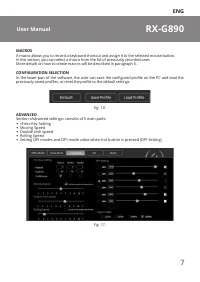
ENG 7 RX-G890 User Manual MACROS A macro allows you to record a keyboard shortcut and assign it to the selected mouse button. In this section, you can select a macro from the list of previously recorded ones. More details on how to create macros will be described in paragraph 6. CONFIGURATION SELECT...
Page 8 - «FIRE» BUTTON SETTINGS
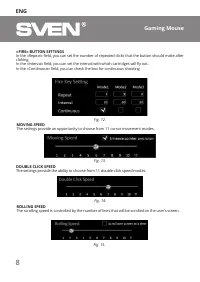
ENG 8 Gaming Mouse «FIRE» BUTTON SETTINGS In the «Repeat» field, you can set the number of repeated clicks that the button should make after clicking. In the «Interval» field, you can set the interval with which cartridges will fly out. In the «Continuous» field, you can check the box for continuous...
Page 9 - DPI MODE SETTINGS; mode corresponds to a color selected by the user.; COLOR SELECTION FOR DPI MODE; will start blinking in color corresponding to the selected mode.
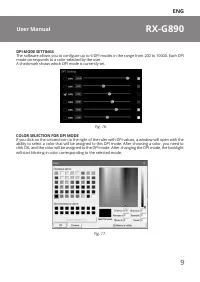
ENG 9 RX-G890 User Manual DPI MODE SETTINGS The software allows you to configure up to 6 DPI modes in the range from 200 to 10000. Each DPI mode corresponds to a color selected by the user. A checkmark shows which DPI mode is currently set. Fig. 16. COLOR SELECTION FOR DPI MODE If you click on the c...
Page 10 - BACKLIGHT SETTING; The tab consists of three sections:; CREATING AND USING MACROS
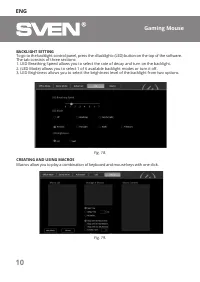
ENG 10 Gaming Mouse BACKLIGHT SETTING To go to the backlight control panel, press the «Backlight» (LED) button on the top of the software. The tab consists of three sections: 1. LED Breathing Speed allows you to select the rate of decay and turn on the backlight. 2. (LED Mode) allows you to select 1...
Page 11 - Выберите режим воспроизведения макроса:
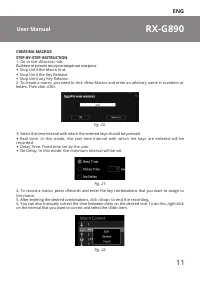
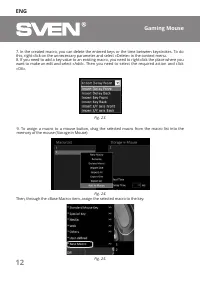
ENG 11 RX-G890 User Manual CREATING MACROSSTEP-BY-STEP INSTRUCTION 1. Go to the «Macros» tab. Выберите режим воспроизведения макроса: • Stop Until the Macro End. • Stop Until the Key Release. • Stop Until any Key Release. 2. To create a macro, you need to click «New Macro» and enter an arbitrary nam...
Page 13 - Delete Macro; TECHNICAL SPECIFICATIONS; USB
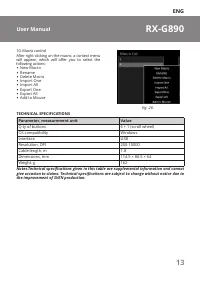
ENG 13 RX-G890 User Manual 10. Macro control After right-clicking on the macro, a context menu will appear, which will offer you to select the following actions: • New Macro • Rename • Delete Macro • Import One • Import All • Export One • Export All • Add to Mouse Fig. 26. TECHNICAL SPECIFICATIONS P...
Page 14 - Благодарим Вас за покупку мыши TM SVEN!
RUS 14 Игровая мышь Благодарим Вас за покупку мыши TM SVEN! АВТОРСКОЕ ПРАВО © SVEN PTE. LTD. Версия 1.0 (18.11.2021). Данное Руководство и содержащаяся в нем информация защищены авторским пра - вом. Все права защищены. ТОРГОВЫЕ МАРКИ Все торговые марки являются собственностью их законных владельцев....
Page 15 - СИСТЕМНЫЕ ТРЕБОВАНИЯ; Свободный разъем USB.; ПОДГОТОВКА К РАБОТЕ; Подключите манипулятор к свободному USB-разъёму ПК.; НАСТРОйКИ
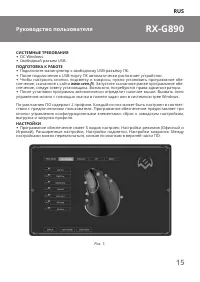
RUS 15 RX-G890 Руководство пользователя СИСТЕМНЫЕ ТРЕБОВАНИЯ • ОС Windows. • Свободный разъем USB. ПОДГОТОВКА К РАБОТЕ • Подключите манипулятор к свободному USB-разъёму ПК. • После подключения к USB-порту ПК автоматически распознает устройство. • Чтобы настроить кнопки, подсветку и макросы, нужно ус...
Page 16 - НАСТРОйКА КНОПОК
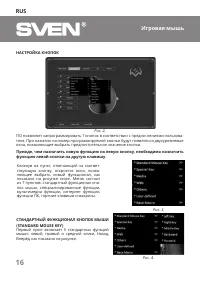
RUS 16 Игровая мышь НАСТРОйКА КНОПОК ПО позволяет запрограммировать 7 кнопок в соответствии с предпочтениями пользова - теля. При нажатии на номер программируемой кнопки будут появляться двухуровневые окна, позволяющие выбрать предпочтительное значение кнопки. Рис. 2. Прежде, чем назначить новую фун...
Page 17 - Переключение DPI
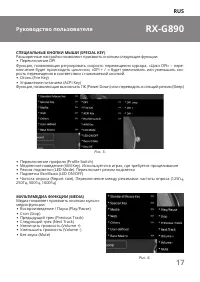
RUS 17 RX-G890 Руководство пользователя Рис. 5. СПЕЦИАЛьНЫЕ КНОПКИ МЫшИ (Special key) Расширенные настройки позволяют присвоить кнопкам следующие функции: • Переключение DPI Функция, позволяющая регулировать скорость перемещения курсора. «Цикл DPI» – пере - ключение будет происходить циклично, «DPI ...
Page 18 - фУНКЦИИ УПРАВЛЕНИЯ КОМПьЮТЕРОМ
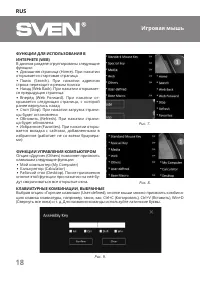
RUS 18 Игровая мышь фУНКЦИИ ДЛЯ ИСПОЛьЗОВАНИЯ В ИНТЕРНЕТЕ (Web) В данном разделе сгруппированы следующие функции: • Домашняя страница (Home). При нажатии открывается стартовая страница • Поиск (Search). При нажатии адресная строка переходит в режим поиска • Назад (Web Back). При нажатии открывает - ...
Page 19 - МАКРОСЫ
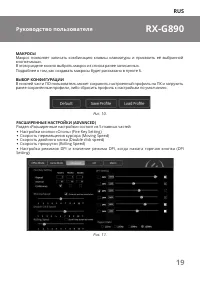
RUS 19 RX-G890 Руководство пользователя МАКРОСЫ Макрос позволяет записать комбинацию клавиш клавиатуры и присвоить её выбранной кнопке мыши. В этом разделе можно выбрать макрос из списка ранее записанных. Подробнее о том, как создавать макросы будет рассказано в пункте 6. ВЫБОР КОНфИГУРАЦИИ В нижней...
Page 20 - НАСТРОйКИ КНОПКИ «ОГОНь»; должна сделать кнопка после нажатия.; СКОРОСТь ПЕРЕМЕщЕНИЯ КУРСОРА (Moving Speed)
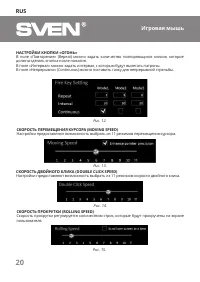
RUS 20 Игровая мышь НАСТРОйКИ КНОПКИ «ОГОНь» В поле «Повторение» (Repeat) можно задать количество повторяющихся кликов, которое должна сделать кнопка после нажатия. В поле «Интервал» можно задать интервал, с которым будут вылетать патроны. В поле «Непрерывно» (Continuous) можно поставить галку для н...
Page 21 - соответствует выбранный пользователем цвет.; ВЫБОР ЦВЕТА ДЛЯ РЕЖИМА dpi
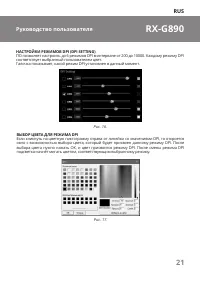
RUS 21 RX-G890 Руководство пользователя НАСТРОйКИ РЕЖИМОВ dpi (dpi SeTTing) ПО позволяет настроить до 6 режимов DPI в интервале от 200 до 10000. Каждому режиму DPI соответствует выбранный пользователем цвет. Галочка показывает, какой режим DPI установлен в данный момент. Рис. 16. ВЫБОР ЦВЕТА ДЛЯ РЕЖ...
Page 22 - НАСТРОйКА ПОДСВЕТКИ; Вкладка состоит из трёх разделов:; СОЗДАНИЕ И ИСПОЛьЗОВАНИЕ МАКРОСОВ
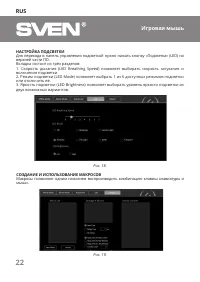
RUS 22 Игровая мышь НАСТРОйКА ПОДСВЕТКИ Для перехода в панель управления подсветкой нужно нажать кнопку «Подсветка» (LED) на верхней части ПО. Вкладка состоит из трёх разделов: 1. Скорость дыхания (LED Breathing Speed) позволяет выбирать скорость затухания и включения подсветки. 2. Режим подсветки (...
Page 24 - брать необходимое действие и нажать «ОК».
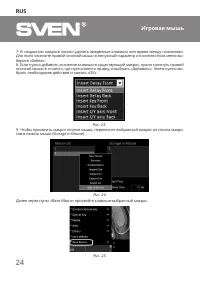
RUS 24 Игровая мышь 7. В созданном макросе можно удалить введённые клавиши или время между нажатиями. Для этого кликните правой кнопкой мыши в ненужный параметр и в контекстном меню вы - берите «Delete». 8. Если нужно добавить значение клавиши в существующий макрос, нужно кликнуть правой кнопкой мыш...
Page 25 - ТЕХНИЧЕСКИЕ ХАРАКТЕРИСТИКИ
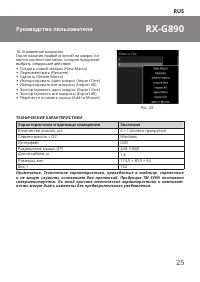
RUS 25 RX-G890 Руководство пользователя 10. Управление макросом После нажатия правой кнопкой на макрос по - явится контекстное меню, которое предложит выбрать следующие действия: • Создать новый макрос (New Macro) • Переименовать (Rename) • Удалить (Delete Macro) • Импортировать один макрос (Import ...
Page 26 - Дякуємо Вам за купівлю миші TM SVEN!
UKR 26 Ігрова миша Дякуємо Вам за купівлю миші TM SVEN! АВТОРСьКЕ ПРАВО © SVEN PTE. LTD. Версiя 1.0 (18.11.2021). Це Керівництво та інформація, що міститься в ньому, захищено авторським правом. Усі права застережені. ТОРГОВЕЛьНІ МАРКИ Усі торговельні марки є власністю їх законних власників. ПОПЕРЕДЖ...
Page 27 - СИСТЕМНІ ВИМОГИ; Підключіть маніпулятор до вільного USB-роз’єму ПК.; НАЛАшТУВАННЯ; верхній частині програмного забезпечення.
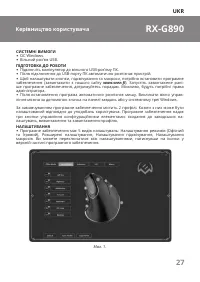
UKR 27 RX-G890 Керівництво користувача СИСТЕМНІ ВИМОГИ • ОС Windows. • Вільний роз’єм USB. ПІДГОТОВКА ДО РОБОТИ • Підключіть маніпулятор до вільного USB-роз’єму ПК. • Після підключення до USB-порту ПК автоматично розпізнає пристрій. • Щоб налаштувати кнопки, підсвічування та макроси, потрібно встано...
Page 28 - НАЛАшТУВАННЯ КНОПОК
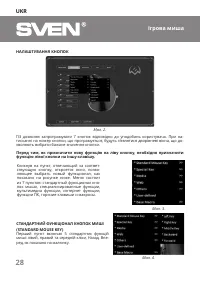
UKR 28 Ігрова миша НАЛАшТУВАННЯ КНОПОК ПЗ дозволяє запрограмувати 7 кнопок відповідно до уподобань користувача. При на - тисканні на номер кнопки, що програмується, будуть з’являтися дворівневі вікна, що до - зволяють вибрати бажане значення кнопки. Мал. 2. Перед тим, як призначити нову функцію на л...
Page 29 - Перемикання DPI
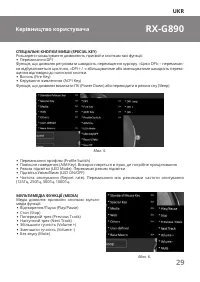
UKR 29 RX-G890 Керівництво користувача Мал. 5. СПЕЦІАЛьНІ КНОПКИ МИшІ (Special key) Розширені налаштування дозволяють присвоїти кнопкам такі функції: • Перемикання DPI Функція, що дозволяє регулювати швидкість переміщення курсору. «Цикл DPI» – перемикан - ня відбуватиметься циклічно, «DPI + / -» збі...
Page 30 - фУНКЦІЇ ДЛЯ ВИКОРИСТАННЯ В
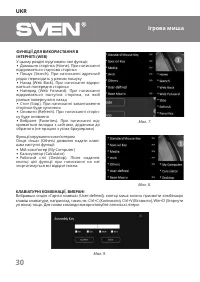
UKR 30 Ігрова миша фУНКЦІЇ ДЛЯ ВИКОРИСТАННЯ В ІНТЕРНЕТІ (Web) У цьому розділі згруповано такі функції: • Домашня сторінка (Home). При натисканні відкривається стартова сторінка • Пошук (Search). При натисканні адресний рядок переходить у режим пошуку • Назад (Web Back). При натисканні відкри - ваєть...
Page 31 - МАКРОСИ; У цьому розділі можна вибрати макрос зі списку раніше записаних.; ВИБІР КОНфІГУРАЦІй; Налаштування кнопки «Огонь» (Fire Key Setting)
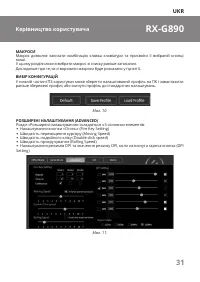
UKR 31 RX-G890 Керівництво користувача МАКРОСИ Макрос дозволяє записати комбінацію клавіш клавіатури та присвоїти її вибраній кнопці миші. У цьому розділі можна вибрати макрос зі списку раніше записаних. Докладніше про те, як створювати макроси буде розказано у пункті 6. ВИБІР КОНфІГУРАЦІй У нижній ...
Page 32 - НАЛАшТУВАННЯ КНОПКИ «ВОГОНь»; зробити кнопка після натискання.; шВИДКІСТь ПЕРЕМІщЕННЯ КУРСОРУ (Moving Speed)
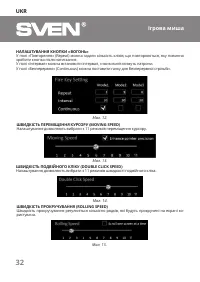
UKR 32 Ігрова миша НАЛАшТУВАННЯ КНОПКИ «ВОГОНь» У полі «Повторення» (Repeat) можна задати кількість кліків, що повторюються, яку повинна зробити кнопка після натискання. У полі «Інтервал» можна встановити інтервал, з яким вилітатимуть патрони. У полі «Безперервно» (Continuous) можна поставити галку ...
Page 33 - відповідає вибраний користувачем колір.; ВИБІР КОЛьОРУ ДЛЯ РЕЖИМУ dpi; почне блимати кольором, який відповідає вибраному режиму.
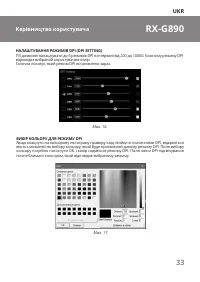
UKR 33 RX-G890 Керівництво користувача НАЛАшТУВАННЯ РЕЖИМІВ dpi (dpi SeTTing) ПЗ дозволяє налаштувати до 6 режимів DPI в інтервалі від 200 до 10000. Кожному режиму DPI відповідає вибраний користувачем колір. Галочка показує, який режим DPI встановлено зараз. Мал. 16. ВИБІР КОЛьОРУ ДЛЯ РЕЖИМУ dpi Якщ...
Page 34 - НАЛАшТУВАННЯ ПІДСВІТКИ; Вкладка складається з трьох розділів:; СТВОРЕННЯ ТА ВИКОРИСТАННЯ МАКРОСІВ
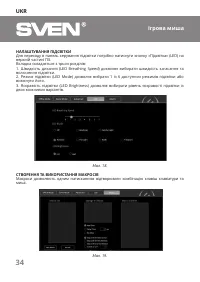
UKR 34 Ігрова миша НАЛАшТУВАННЯ ПІДСВІТКИ Для переходу в панель керування підсвітки потрібно натиснути кнопку «Підсвітка» (LED) на верхній частині ПЗ. Вкладка складається з трьох розділів: 1. Швидкість дихання (LED Breathing Speed) дозволяє вибирати швидкість загасання та включення підсвітки. 2. Реж...
Page 35 - Виберіть режим відтворення макросу:
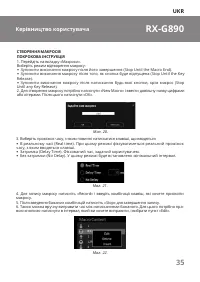
UKR 35 RX-G890 Керівництво користувача СТВОРЕННЯ МАКРОСІВПОКРОКОВА ІНСТРУКЦІЯ 1. Перейдіть на вкладку «Макроси». Виберіть режим відтворення макросу: • Зупинити виконання макросу після його завершення (Stop Until the Macro End). • Зупинити виконання макросу після того, як кнопка буде відпущена (Stop ...
Page 36 - ти необхідну дію та натиснути «ОК».
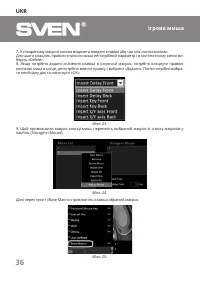
UKR 36 Ігрова миша 7. У створеному макросі можна видалити введені клавіші або час між натисканнями. Для цього клацніть правою кнопкою миші непотрібний параметр і в контекстному меню ви - беріть «Delete». 8. Якщо потрібно додати значення клавіші в існуючий макрос, потрібно клацнути правою кнопкою миш...
Page 37 - ТЕХНІЧНІ ХАРАКТЕРИСТИКИ
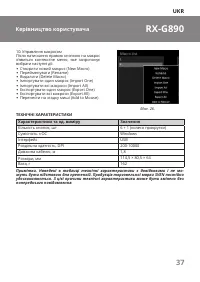
UKR 37 RX-G890 Керівництво користувача 10. Управління макросом Після натискання правою кнопкою на макрос з’явиться контекстне меню, яке запропонує вибрати наступні дії: • Створити новий макрос (New Macro) • Перейменувати (Rename) • Видалити (Delete Macro) • Імпортувати один макрос (Import One) • Імп...
Page 38 - Gaming Mouse; Produced under the control of Oy Sven Scan-; ® Registered Trademark of Oy SvEN
Gaming Mouse RX-G890 Model: RX-G890 Importer: Tiralana OY, Office 102, Kotolahden- tie 15, 48310 Kotka, Finland. Модель: RX-890 Импортер в России: OOO «Регард», 105082, г. Москва, ул. Фридриха Энгельса, д.75, стр. 5. Уполномоченная организация в России: ООО «РТ-Ф», 105082, г. Москва, ул. Фридриха Э...