Page 2 - Important Safeguards; RECOGNIZE SAFETY INFORMATION
Important Safeguards 4 The safety messages will inform you of potential hazards, on how to avoid the risk of injury and what can occur if the instructions are not followed. IMPORTANT: Observe all codes and ordinances in force. Do not store or use gasoline or other flammable vapors, liquids or materi...
Page 3 - ENENEN; WARNING
Important Safeguards 5 ENENEN Follow all safety precautions to ensure safe use of the appliance.• Before using the appliance, read this user manual carefully. • Do not use the appliance outdoors.• This appliance is for household use only.• Do not use the appliance for other than its intended use. • ...
Page 4 - For this appliance; SAVE THESE INSTRUCTIONS
Important Safeguards 6 • Do not touch hot surfaces. Use handles and knobs. • Do not place the appliance near faucets or sinks. • Never attempt to repair the appliance yourself or without the help of a qualified technician. Failing to do this will void the warranty. • In case of malfunction, have the...
Page 5 - The marked electrical rating of the
Important Safeguards 7 ENENEN Electrical Cord: a) A short power-supply cord (or detachable power-supply cord) is provided to reduce risks resulting from becoming entangled in or tripping over a longer cord. b) Longer detachable power-supply cords or extension cords are available and may be used if c...
Page 6 - Instructions; This user’s manual; Warnings
Important Safeguards 8 1 Instructions 1.1 Introduction Key information for the user: 1.2 This user’s manual This user’s manual is an integral part of the appliance and must be kept intact and available to the user throughout its life cycle. 1.3 Intended use • The appliance is for indoor use only.• T...
Page 7 - Old electrical equipment must not be
Important Safeguards 9 ENENEN 1.4 Manufacturer’s liability The manufacturer accepts no liability for damage to persons and property caused by:• using the appliance in ways other than those provided; • not reading the user's manual;• tampering with any part of the appliance; • using non-original part...
Page 8 - Description; Product Description
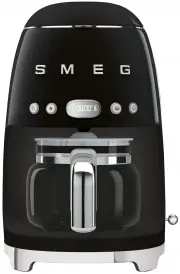
Description 10 2 Description 2.1 Product Description Drip coffee maker 1 Lid 2 Water tank (1.4 liters) 3 Filter holder with anti-drip valve system 4 Permanent filter 5 ON/OFF button 6 AROMA setting button 7 Time/settings display 8 4 CUPS function button 9 AUTO START button 10 Grouphead 11 Carafe lid...
Page 9 - Use; Risk of damage
Use 11 ENENEN 3 Use 3.1 Before first use 1. Remove all labels and stickers from the drip coffee maker. 2. Thoroughly wash and dry the drip coffee maker’s parts (see “4 Cleaning and maintenance”). 3. Lift the lid ( 1 ) by pulling up on the tab ( 2 ). 4. Fill the tank ( 3 ) with cold and clean water, ...
Page 10 - OK; How to access the settings menu
Use 12 3.2 First use 1. Insert the plug into an electrical socket. 2. Press the ON /OFF button. The display shows the flashing symbols. 3. Set the time using the lever ( 1 ). 4. Set the hour value by moving the lever up ( + ) to increase the value or down ( - ) to decrease the value. 5. Confirm the ...
Page 11 - OFF
Use 13 ENENEN Clock format settings menu The clock format can be set after turning the appliance on for the first time:1. Open the settings menu and select SE01 . 2. Move the lever to select the desired format (12-hour or 24-hour clock). 3. Move the lever to the central position and press ( OK ) to ...
Page 12 - ON; How to make coffee
Use 14 To enable audible signals:1. Open the settings menu and select SE03 . 2. Move the lever up or down until you see the word ON . 3. Move the lever to the central position and press ( OK ) to confirm. The selection will blink for 2 seconds and the setting will then be saved. Rinsing the internal...
Page 13 - BREW
Use 15 ENENEN 4. Close the lid ( 1 ) by lowering the tab. 5. Place the carafe ( 5 ) with the lid ( 6 ) on the special Keep Warm plate ( 7 ) . Make sure that the lid fits perfectly with the anti-drip valve ( 8 ). 6. Press the ON/OFF button to activate BREW mode : the LED on the ON/OFF button lights u...
Page 14 - KEEP WARM mode
Use 16 KEEP WARM mode The KEEP WARM mode is activated automatically after the coffee has been brewed, keeping the Keep Warm plate on for 60 minutes. In this way, the coffee will be hot for 60 minutes after the coffee has been brewed. In KEEP WARM mode, the LED of the ON/ OFF button flashes slowly, t...
Page 15 - AROMA setting
Use 17 ENENEN AROMA setting This setting allows you to choose the intensity of the aroma for your coffee from two levels: DELICATE AROMA or INTENSE AROMA . The appliance is set by default to DELICATE aroma: the LED of the aroma setting button is off, and on the display only the lower bean of the ico...
Page 16 - Setting the time for AUTO START mode
Use 18 Setting the time for AUTO START mode Use this setting to program the appliance to switch on automatically to prepare the drip coffee at a time selected by the user. To set the auto start time, proceed as follows: 1. Check that the displayed time is correct. If not, set the current time as des...
Page 17 - Cleaning and maintenance; Warnings; Misuse
Cleaning and maintenance 19 ENENEN 4 Cleaning and maintenance 4.1 Warnings 4.2 Cleaning the drip coffee maker To maintain the outer surfaces, you must clean them regularly after each use after letting them cool down. Clean with a soft, damp cloth. 4.3 Cleaning the parts of the drip coffee maker Clea...
Page 18 - Cleaning the carafe
Cleaning and maintenance 20 Cleaning the carafe 1. Empty the carafe after each use to avoid stains caused by coffee residues. 2. Wash the carafe in hot, soapy water with a soft brush. 3. Rinse and dry thoroughly. 4.4 Descaling Depending on the set water hardness, the appliance automatically signals ...
Page 19 - Warning
Cleaning and maintenance 21 ENENEN 4. Rinse the appliance by running it with only water for at least 2 times, filling the tank up to the maximum limit (1.4 liters). Warning • Coffee may be brewed even in the presence of a DESCALING alarm. • Carry out the clean cycle when signaled by the appliance. •...
Page 20 - Problem
Cleaning and maintenance 22 4.5 What to do if... Problem Possible cause Solution The coffee does not come out No water in the tank. Fill the tank. Presence of limescale. Run the descaling cycle. Coffee takes a long time to come out Presence of limescale. Run the descaling cycle. The coffee has an ac...
Page 21 - No ground coffee in the filter.
Cleaning and maintenance 23 ENENEN Only water comes out of the drip coffee maker No ground coffee in the filter. Add the desired quantity of coffee to the filter. Problem Possible cause Solution If the problem has not been resolved or there are other types of faults, contact your local authorized se...