Page 3 - Â Ã À Á Å Æ
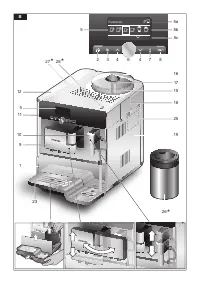
B Espresso Ë Í Â Ã À Á Å Æ 2 23 3 4 6 4 7 8 5a5b 5c 9 10 1 11 5 5 12 25 18 15 17 16 19 * 27 * 28 * 26
Page 6 - Inhalt
2 de Inhalt Sehr geehrte Kaffeeliebhaberin, sehr geehrter Kaffeeliebhaber, herzlichen Glückwunsch zum Kauf dieses Kaffeevollautomaten aus dem Hause Siemens. Diese Gebrauchsanleitung beschreibt verschiedene Gerätevarianten, die sich im Detail unterscheiden. Bitte auch die beiliegende Kurzanleitung be...
Page 7 - Sicherheitshinweise
3 de Sicherheitshinweise Die Gebrauchsanleitung bitte sorgfältig durchlesen, danach handeln und auf bewahren! Bei Weitergabe des Geräts diese Anleitung beilegen. Dieses Gerät ist für die Verarbeitung haushaltsüblicher Mengen im Haushalt oder in haushaltsähnlichen, nicht-gewerblichen Anwendungen best...
Page 9 - start; Auf einen Blick
5 de 1 Netzschalter O / I 2 Taste á (Personalisierung) 3 Taste à (Service-Programme) 4 Wähltasten < > 5 Display a) Statuszeile b) Auswahlzeile c) Navigationszeile 6 Drehknopf für Einstellungen Display 7 Taste j (Info-Menü) 8 Taste start (Getränke / Programme) 9 Kaffeeauslauf, höhenverstellbar ...
Page 10 - Vor dem ersten Gebrauch
6 de Vor dem ersten Gebrauch Allgemeines Nur reines, kaltes Wasser ohne Kohlensäure und ausschließlich geröstete Bohnen (vor- zugsweise Espresso- oder Vollautomaten- Bohnenemischungen) in die entsprechenden Behälter füllen. Keine glasierten, karamel- lisierten oder mit sonstigen zuckerhaltigen Zusät...
Page 11 - Ë Ë; Auto Off in; Bedienelemente
7 de ● Das Gerät ist betriebsbereit, wenn im Display 5 die Symbole für die Getränke- aus wahl und Taste 8 start leuchten. Espresso Ë Ë Í Â Ã À Á Å Æ Info: Der Kaffeevollautomat ist ab Werk mit den Standardeinstellungen für optimalen Betrieb programmiert. Das Gerät schaltet nach einer ausgewähl- ten ...
Page 12 - Filterwechsel in
8 de Display Das Display 5 zeigt durch Symbole Auswahl- möglichkeiten, Kaffeestärke und Füllmenge sowie durch Texte Ein stel lungen, laufende Vorgänge und Meldungen an. Mit Drehknopf 6 und Wähl tasten 4 können hier Einstellun- gen vorgenommen werden. Die gewählte Einstellung wird durch einen Rahmen ...
Page 13 - Mahlgrad einstellen; Bit te Mahlgrad gröber stellen!; Displayanzeigen; Displaymeldungen; Wassertank füllen
9 de Mahlgrad einstellen Mit dem Drehwähler 17 für Mahlgradein- stellung kann die gewünschte Feinheit des Kaffeepulvers eingestellt werden. ¡ Achtung! Den Mahlgrad nur bei laufendem Mahlwerk verstellen! Das Gerät kann sonst beschä- digt werden. Nicht in das Mahlwerk greifen. ● Bei laufendem Mahlwerk...
Page 14 - Displayeinstellungen; Getränkeauswahl; Füllmenge; Persönliche Füllmenge einstellen; Einstellungen – Getränkeauswahl:; åå
10 de Displayeinstellungen Durch Drücken der Wähltasten 4 < und > können in den Menüebenen folgende Aus- wahlmenüs aufgerufen werden: Getränkeauswahl Espresso Ë Í Â Ã À Á Å Æ Kaffeestärke (nur für Kaffeegetränke) Espresso Ë Í 5 55 555 Füllmenge Espresso Ë Í Î Ð Ò Persönliche Füllmenge einstell...
Page 15 - Café Crème; Cappuccino; Personalisierung; Benutzereinstellungen; Name ändern; BCDEFGHIJKLMNOPQ
11 de Einstellungen – Füllmenge � klein Ð mittel Ò groß Einstellungen – Persönliche Füllmenge Durch Drehen des Drehknopfs 6 kann die vorgegebene Füllmenge � , Ð oder Ò individuell an die vorhandene Tassengröße angepasst werden. Die Füllmenge ist passend zum ausgewählten Getränk einstellbar. Im Displ...
Page 16 - Benutzer auswählen; start; Macchiato; À Á Å Æ; Profil verl assen; Kindersicherung
12 de Zum Löschen des Benutzers mit der Wähl- taste Name löschen start auswählen und Taste 8 start drücken. Temperaturen speichern ● Mit der Wähltaste K affee Temp. oder Heissw. Temp. auswählen. ● Mit dem Drehknopf 6 die gewünschte Einstellung auswählen. ● Taste 2 á drücken. Die Einstellungen sind...
Page 17 - Menüeinstellungen; Folgende Einstellungen können; Sprache
13 de Menüeinstellungen ● Taste 7 j mindestens 3 Sekunden gedrückt halten. Es erscheinen nun die verschiedenen Einstellmöglichkeiten. Einstellungen Kaffee Temp. Heissw. Temp <85°C Profil verl assen Mit den Wähltasten 4 < und > können die verschiedenen Einstellmöglichkeiten aus- gewählt werd...
Page 19 - À Á Å Æ È É
15 de Zubereitung mit Kaffeebohnen Dieser Kaffeevollautomat mahlt für jeden Brühvorgang frischen Kaffee. Vor zugsweise Espresso- oder Vollautomaten-Bohnen- mischungen verwenden. Für eine optimale Qualität die Bohnen kühl und verschlossen aufbewahren oder tiefgefrieren. Die Kaffee- bohnen können auch...
Page 21 - Milch schaum; Heißwasser beziehen; Heiss wasser
17 de Milchschaum und warme Milch zubereiten ¡ Verbrennungsgefahr! Der Milchschäumer 10 wird sehr heiß. Nach Benutzung zuerst abkühlen lassen und erst dann berühren. Das Gerät muss betriebsbereit sein. ● Das Ansaugrohr 10d des Milchschäumers 10 in den Milchbehälter 26 einführen. ● Die vorgewärmte Ta...
Page 22 - nicht in den
18 de Pflege und tägliche Reinigung ¡ Stromschlaggefahr! Vor der Reinigung den Netzstecker ziehen. Das Gerät niemals in Wasser tauchen. Keinen Dampfreiniger benutzen. ● Das Gehäuse mit einem weichen, feuchten Tuch abwischen. ● Keine alkohol- oder spiritushaltigen Reinigungsmittel verwenden. ● Keine ...
Page 24 - Kurzspülen Milchsystem; Speziell entwickelte und geeignete
20 de ● Die Abdeckung 20b der Brüheinheit abnehmen und die Brüheineit 20 unter fließendem Wasser gründlich reinigen. ● Das Sieb der Brüheinheit unter dem Wasserstrahl gründlich reinigen. Wichtig: Ohne Spülmittel reinigen und nicht in den Geschirrspüler geben. ● Den Geräteinnenraum mit einem feuch- t...
Page 27 - Milchsystem
23 de Tropfschale leeren Tropfschale einsetzen ● Tropfschale 23 leeren und wieder einsetzen. Das Gerät ist fertig gereinigt und wieder betriebsbereit. calc‘nClean Dauer: ca. 36 Minuten. calc‘nClean kombiniert die Einzel funktionen Entkalken und Reinigen. Liegt die Fälligkeit der beiden Programme nah...
Page 28 - Tipps zum Energiesparen
24 de ● Die Taste 8 start drücken, das Ent kal kungs- programm läuft jetzt noch ca. 1 Minute und anschließend das Reinigungs programm ca. 7 Minuten und spült das Gerät. Entk alkungsprogramm l äuf t Reinigungsprogramm l äuf t Tropfschale leeren Tropfschale einsetzen ● Tropfschale 23 leeren und wieder...
Page 29 - Zubehör; Entsorgung
25 de Zubehör Folgendes Zubehör ist über den Handel und Kundendienst erhältlich. Zubehör Bestell nummer Handel / Kundendienst Reinigungstabletten TZ60001 00310575 Entkalkungstabletten TZ80002 00576693 Wasserfilter TZ70003 00575491 Pflegeset TZ80004 00576330 Milchbehälter mit „Fresh Lock“ Deckel TZ80...
Page 30 - Einfache Probleme selbst beheben; Problem; Bohnenbehälter füllen
26 de Einfache Probleme selbst beheben Problem Ursache Abhilfe Displayanzeige Bohnenbehälter füllen trotz gefülltem Bohnen- behälter 15 oder Mahlwerk mahlt keine Kaffeebohnen. Bohnen fallen nicht ins Mahl werk (zu ölige Bohnen). Leicht an den Bohnen behälter 15 klopfen. Eventuell Kaffee- sorte wechs...
Page 31 - Störung
27 de Problem Ursache Abhilfe Der Kaffee ist zu „bitter“. Der Mahlgrad ist zu fein eingestellt oder das Kaffee- pulver ist zu fein. Mahlgrad gröber stellen oder gröberes Kaffeepulver verwenden. Ungeeignete Kaffeesorte. Kaffeesorte wechseln. Der Kaffee schmeckt „verbrannt“. Zu hohe Brühtemperatur Tem...
Page 32 - Contents
28 en Contents Dear Coffee Connoisseur, Congratulations on purchasing this fully automatic espresso machine from Siemens. These operating instructions describe various appliance designs, which differ in detail. Please also refer to the quick reference guide. This can be kept in a special storage com...
Page 33 - Safety instructions
29 en Safety instructions Please read and follow the operating instructions carefully and keep them for later reference. Enclose these instructions when you give this appliance to someone else. This appliance is designed for the preparation of normal household quantities in the home, or in household...
Page 34 - Depending on the model:; The cup warmer
30 en ¡ Risk of suffocation! Do not allow children to play with packaging material. ¡ Risk of scalding! The milk frother 10 for milk / hot water gets very hot. After use, allow to cool down first before touching. ¡ Risk of injury! Do not reach into the grinding unit. Depending on the model: ¡ Warnin...
Page 35 - Included in delivery
31 en 1 Power on/off switch O / I 2 Customising button á 3 Service programmes button à 4 Selection buttons < > 5 Display a) Status line b) Selection line c) Navigation line 6 Rotary knob for display settings 7 Info menu button j 8 start button (drinks / programmes) 9 Coffee outlet, height-adju...
Page 37 - Auto Off after; Controls
33 en ● The appliance is ready for use when the symbols for the drink selection and the start button 8 light up in the display 5 . Espresso Ë Ë Í Â Ã À Á Å Æ Info: The factory settings of the fully auto- matic espresso machine are programmed for optimal performance. The appliance switches off automa...
Page 38 - Clean after
34 en Display The display 5 uses symbols to indicate the selection options, coffee strength and per-cup quantity, and uses text to indicate settings, ongoing processes and messages. The rotary knob 6 and selection buttons 4 can be used to change settings. The selected setting is highlighted by a fra...
Page 39 - Adjusting the grinding unit; Please adjust; Cup warming function; Displays; Display messages; Refill water tank
35 en Adjusting the grinding unit The rotary selector 17 adjusts the grind settings from coarse to fine. ¡ Warning! Adjust the grinding unit only while it is run- ning! Otherwise the appliance may be dam- aged. Do not reach into the grinding unit. ● While the grinding unit is running, adjust the rot...
Page 40 - Display settings; Drink selection; Select your personal per-cup quantity; ml; Settings – Drink selection:
36 en Display settings Press the selection buttons < and > 4 to select the following selection menus in the menu levels: Drink selection Espresso Ë Í Â Ã À Á Å Æ Coffee strength (only for coffee drinks) Espresso Ë Í 5 55 555 Per-cup quantity Espresso Ë Í Î Ð Ò Select your personal per-cup quan...
Page 41 - Customising; User set tings; Edit name
37 en Settings – Per-cup quantity � small Ð medium Ò large Settings – Personal per-cup quantity The preset per-cup quantity � , Ð or Ò can be individually adjusted to the size of the cup in use by turning the rotary knob 6 . The per-cup quantity can be adjusted accord- ing to the drink selected. An ...
Page 42 - Select a profile; Exit
38 en There are 6 characters available for the user name. To delete entries made, select the symbol â and press the start button 8 . Note: Press the selection button > to save your entry. Press the selection button < to cut the process short. Info: The entry can be overwritten at any time. To ...
Page 43 - Menu settings; Exit profile; The following settings can be selected:
39 en Menu settings ● Hold down the j button 7 for at least 3 seconds. The different setting options are now displayed. Set tings Coffee temp. Hot water temp. <85°C Exit profile The different setting options can be selected with the selection buttons < and > 4 . Note: The changes you have m...
Page 45 - x Espresso
41 en Preparation using coffee beans This fully automatic espresso machine grinds beans freshly for each brew. If pos- sible, use only beans for fully automatic coffee and espresso machines. For optimal quality, deep-freeze the beans or store in a cool place in sealed containers. Coffee beans can be...
Page 47 - Dispensing hot water; Hot; Maintenance and
43 en Info: When preparing warm milk, you may hear a whistling sound. This is caused by the milk frother for technical reasons. Tip: For optimal milk froth quality, use cold milk with a fat content of at least 1.5 % if possible. Important: Dried milk residue is difficult to remove, so the milk froth...
Page 48 - Cleaning the milk system
44 en ● Remove powder compartment 18 and rinse under running water. ● Wipe out the inside of the tray holders. Important: Drip tray 23 and coffee grounds container 23c should be emptied and cleaned daily to prevent mould from developing. Note: If the appliance is cold when switched on, or if it is s...
Page 49 - Service Programmes; Short rinse milk system
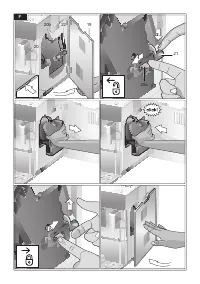
45 en Cleaning the brewing unit (Fig. F) (refer also to the quick reference guide) In addition to the automatic cleaning programme, the brewing unit 20 should be removed regularly for cleaning. ● Switch the appliance off completely at the power on/off switch 1 O / I ; no buttons are lit. ● Take hold...
Page 54 - Accessories; Technical specifications; Disposal
50 en Accessories The following accessories are available from retailers or from customer service: Accessories Ordering number Retail / Customer service Cleaning tablets TZ60001 00310575 Descaling tablets TZ80002 00576693 Water filter TZ70003 00575491 Care set TZ80004 00576330 Milk container with “F...
Page 55 - Simple troubleshooting; Refill bean container; If you are unable to solve the problem, always call the hotline!
51 en Simple troubleshooting Problem Cause Solution Display shows Refill bean container although the bean container 15 is full, or the grinding unit does not grind the beans. Beans are not falling into the grinding unit (beans too oily). Gently tap the bean container 15 . Change the type of coffee i...
Page 56 - Error
52 en Problem Cause Solution The coffee tastes “burnt”. Brewing temperature too high Reduce the temperature, see “Menu settings – Coffee temp. ” The grinding setting is too fine or the preground coffee is too fine. Adjust the grinding unit to a coarser setting or use coarser pre-ground coffee. Unsu...
Page 57 - Table des matières
53 fr Table des matières Chère amatrice de café, cher amateur de café, Nous vous félicitons pour l’achat de cette machine à expresso automatique Siemens. Ce mode d’emploi décrit les différents modèles d’appareils qui se distinguent par des détails. Veuillez également tenir compte du Mémento joint. U...
Page 58 - Consignes de sécurité; effectuées que par notre SAV afi n d’éliminer tout danger.
54 fr Consignes de sécurité Lire attentivement ce mode d’emploi, s’y conformer lors de l’utilisation et le conserver ! Veuillez joindre ce mode d’emploi si vous passez l’appareil à quelqu’un d’autre. Cet appareil est conçu pour la préparation de quantités usuelles, dans le cadre d’un foyer ou d’un u...
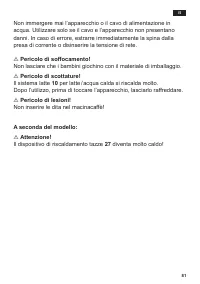
Page 59 - immédiatement la fi che secteur ou couper la tension du réseau.; Risque d’étouffement !
55 fr Ne jamais plonger l’appareil ou le cordon électrique dans l’eau. N’utiliser la machine que lorsque le cordon électrique et l’appareil ne présentent aucun dommage. En cas de défaut, débrancher immédiatement la fi che secteur ou couper la tension du réseau. ¡ Risque d’étouffement ! Ne pas laisse...
Page 60 - Présentation
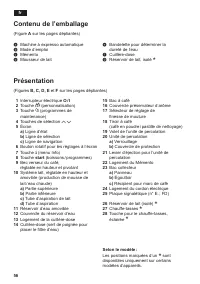
56 fr 1 Interrupteur électrique O / I 2 Touche á (personnalisation) 3 Touche à (programmes de maintenance) 4 Touches de sélection < > 5 Écran a) Ligne d’état b) Ligne de sélection c) Ligne de navigation 6 Bouton rotatif pour les réglages à l’écran 7 Touche j (menu Info) 8 Touche start (boisson...
Page 62 - AR auto dans; Éléments de commande
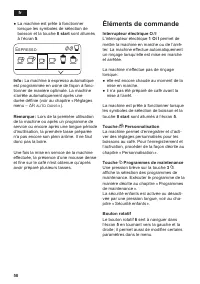
58 fr ● La machine est prête à fonctionner lorsque les symboles de sélection de boisson et la touche 8 start sont allumés à l’écran 5 . Espresso Ë Ë Í Â Ã À Á Å Æ Info : La machine à expresso automatique est programmée en usine de façon à fonc- tionner de manière optimale. La machine s’arrête automa...
Page 63 - Net toyer
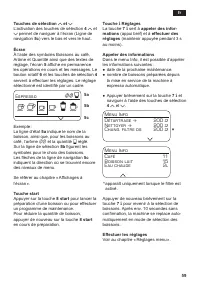
59 fr Touches de sélection < et > L’activation des touches de sélection 4 < et > permet de naviguer à l’écran (Ligne de navigation 5c ) vers le bas et vers le haut. Écran À l’aide des symboles Boissons au café, Arôme et Quantité ainsi que des textes de réglage, l’écran 5 affiche en perma...
Page 64 - Régler la finesse de la mouture; Moudre moins; Messages à l’écran; Remplir le
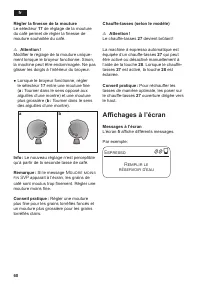
60 fr Régler la finesse de la mouture Le sélecteur 17 de réglage de la mouture du café permet de régler la finesse de mouture souhaitée du café. ¡ Attention ! Modifier le réglage de la mouture unique - ment lorsque le broyeur fonctionne. Sinon, la machine peut être endommagée. Ne pas glisser les doi...
Page 65 - Réglages de l’écran
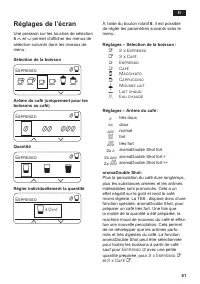
61 fr Réglages de l’écran Une pression sur les touches de sélection 4 < et > permet d’afficher les menus de sélection suivants dans les niveaux de menu : Sélection de la boisson Espresso Ë Í Â Ã À Á Å Æ Arôme du café (uniquement pour les boissons au café) Espresso Ë Í 5 55 555 Quantité Espress...
Page 66 - Personnalisation
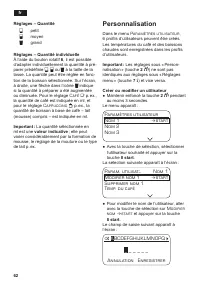
62 fr Réglages – Quantité � petit Ð moyen Ò grand Réglages – Quantité individuelle À l’aide du bouton rotatif 6 , il est possible d’adapter individuellement la quantité à pré- parer prédéfinie � , Ð ou Ò à la taille de la tasse. La quantité peut être réglée en fonc- tion de la boisson sélectionnée. ...
Page 67 - Sélectionner un profil; Quit ter profil; Sécurité enfants
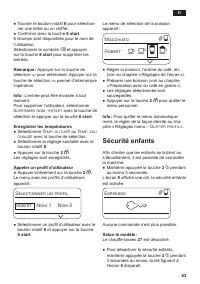
63 fr ● Tourner le bouton rotatif 6 pour sélection- ner une lettre ou un chiffre. ● Confirmer avec la touche 8 start . 6 champs sont disponibles pour le nom de l’utilisateur. Sélectionner le symbole â et appuyer sur la touche 8 start pour supprimer les entrées. Remarque : Appuyer sur la touche de sé...
Page 68 - Réglages menu; Il est possible d’effectuer les
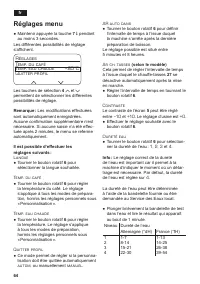
64 fr Réglages menu ● Maintenir appuyée la touche 7 j pendant au moins 3 secondes. Les différentes possibilités de réglage s’affichent. Régl ages Temp. du café Temp. eau chaude <85°C Quit ter profil Les touches de sélection 4 < et > permettent de sélectionner les différentes possibilités de...
Page 70 - Préparation de boissons sans lait
66 fr Préparation avec du café en grains Cette machine à expresso automatique mout du café frais pour chaque préparation. Utiliser de préférence un mélange de café en grains pour expresso ou percolateur. Pour assurer aux grains une qualité opti- male, les conserver au frais dans un réci- pient fermé...
Page 72 - Préparer de la mousse; Préparer de l’eau chaude
68 fr Remarque : Pour préparer une autre tasse à partir de café moulu / lait, répéter l’opéra- tion. Si vous ne versez pas de café dans un délai de 90 s, la chambre de percolation se vide automatiquement afin d’empêcher un débordement. La machine effectue un rinçage. Préparer de la mousse de lait et...
Page 73 - Risque de chocs électriques !; suivants
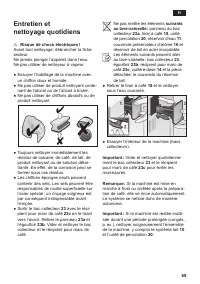
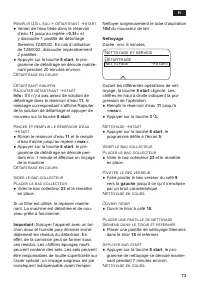
69 fr Entretien et nettoyage quotidiens ¡ Risque de chocs électriques ! Avant tout nettoyage, débrancher la fiche secteur. Ne jamais plonger l’appareil dans l’eau. Ne pas utiliser de nettoyeur à vapeur. ● Essuyer l’habillage de la machine avec un chiffon doux et humide. ● Ne pas utiliser de produit ...
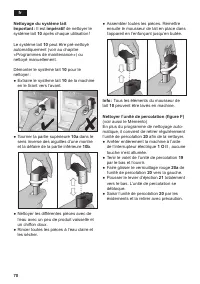
Page 74 - Nettoyer l’unité de percolation (figure F)
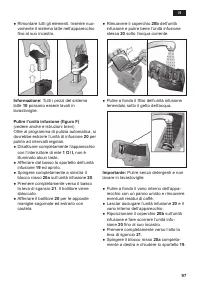
70 fr Nettoyage du système lait Important : Il est impératif de nettoyer le système lait 10 après chaque utilisation ! Le système lait 10 peut être pré-nettoyé automatiquement (voir au chapitre « Programmes de maintenance ») ou nettoyé manuellement. Démonter le système lait 10 pour le nettoyer : ● E...
Page 75 - Programmes de; Des pastilles de détartrage et de
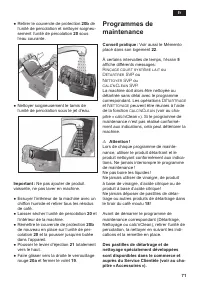
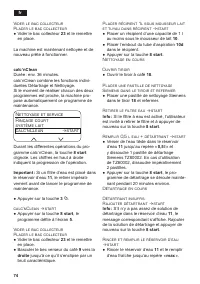
71 fr ● Retirer le couvercle de protection 20b de l’unité de percolation et nettoyer soigneu- sement l’unité de percolation 20 sous l’eau courante. ● Nettoyer soigneusement le tamis de l’unité de percolation sous le jet d’eau. Important : Ne pas ajouter de produit vaisselle, ne pas laver en machine....
Page 79 - Conseils pour; Rangement des
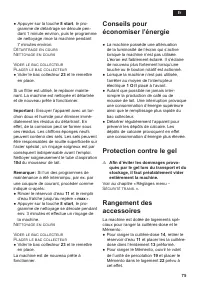
75 fr ● Appuyer sur la touche 8 start , le pro- gramme de détartrage se déroule pen- dant 1 minute environ, puis le programme de nettoyage rince la machine pendant 7 minutes environ. Détartrage en cours Net toyage en cours Vider le bac collecteur Pl acer le bac collecteur ● Vider le bac collecteur 2...
Page 80 - Accessoires; Mise au rebut; Garantie; Caractéristiques techniques
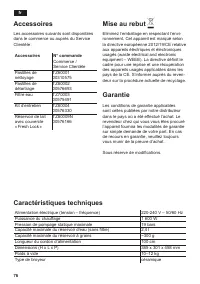
76 fr Accessoires Les accessoires suivants sont disponibles dans le commerce ou auprès du Service Clientèle : Accessoires N° commande Commerce / Service Clientèle Pastilles de nettoyage TZ60001 00310575 Pastilles de détartrage TZ80002 00576693 Filtre eau TZ70003 00575491 Kit d’entretien TZ80004 0057...
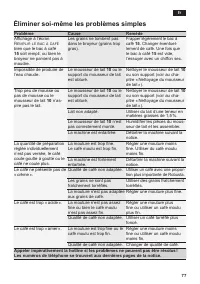
Page 81 - Éliminer soi-même les problèmes simples; Problème; Remplir le bac à café
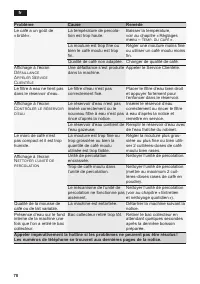
77 fr Éliminer soi-même les problèmes simples Problème Cause Remède Affichage à l’écran Remplir le bac à café bien que le bac à café 15 soit rempli, ou bien le broyeur ne parvient pas à moudre. Les grains ne tombent pas dans le broyeur (grains trop gras). Frapper légèrement le bac à café 15 . Change...
Page 83 - Indice
79 it Indice A tutti gli intenditori e amanti del caffè, congratulazioni per avere acquistato questa macchina automatica per espresso della società Siemens. Le presenti istruzioni per l’uso descrivono diversi modelli di apparecchio, che sono diversi nelle caratterisitiche. Si prega di osservare anch...
Page 84 - Avvertenze di sicurezza
80 it Avvertenze di sicurezza Leggere, osservare e conservare le istruzioni con cura! Se l’apparecchio viene ceduto, allegare anche le presenti istruzioni. Questo apparecchio e destinato alla lavorazione di quantità adeguate all’utilizzo domestico, e in generale per usi domestici e non professionali...
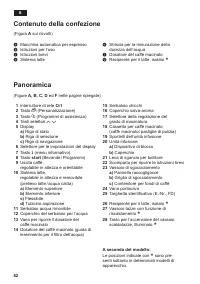
Page 86 - Panoramica
82 it 1 Interruttore di rete O / I 2 Tasto á (Personalizzazione) 3 Tasto à (Programmi di assistenza) 4 Tasti selettori < > 5 Display a) Riga di stato b) Riga di selezione c) Riga di navigazione 6 Selettore per le impostazioni del display 7 Tasto j (menu informativo) 8 Tasto start (Bevande / Pr...
Page 87 - Al primo impiego
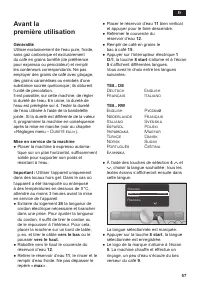
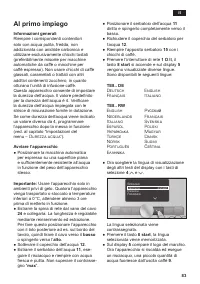
83 it Al primo impiego Informazioni generali Riempire i corrispondenti contenitori solo con acqua pulita, fredda, non addizionata con anidride carbonica e utilizzare esclusivamente chicchi tostati (preferibilmente miscele per macchine automatiche da caffè o macchine per caffè espresso). Non usare ch...
Page 88 - Elementi di comando
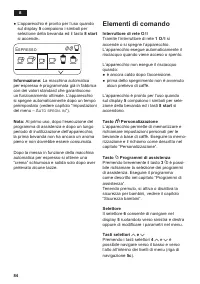
84 it ● L’apparecchio è pronto per l’uso quando sul display 5 compaiono i simboli per selezione della bevanda ed il tasto 8 start si accende.. Espresso Ë Ë Í Â Ã À Á Å Æ Informazione: La macchina automatica per espresso è programmata già in fabbrica con dei valori standard che garantiscono un funzio...
Page 89 - Cambio filtro tra
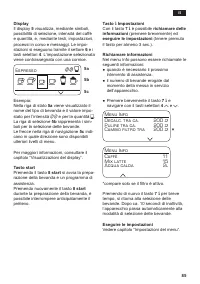
85 it Display Il display 5 visualizza, mediante simboli, possibilità di selezione, intensità del caffè e quantità, e, mediante testi, impostazioni, processi in corso e messaggi. Le impo- stazioni si eseguono tramite il settore 6 e i tasti selettori 4 . Lʼimpostazione selezionata viene contrassegnata...
Page 90 - Regolare il grado di macinatura; Aumentare il grado di macinatura; Riscaldamento tazze; Visualizzazioni del display; Messaggi sul display; Riempire serbatoio acqua
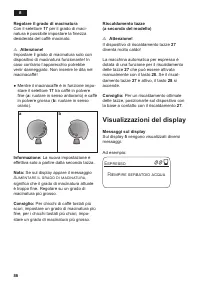
86 it Regolare il grado di macinatura Con il selettore 17 per il grado di maci- natura è possibile impostare la finezza desiderata del caffè macinato. ¡ Attenzione! Impostare il grado di macinatura solo con dispositivo di macinatura funzionante! In caso contrario lʼapparecchio potrebbe venir dannegg...
Page 91 - Impostazioni del display
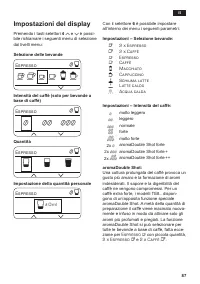
87 it Impostazioni del display Premendo i tasti selettori 4 < e > è possi- bile richiamare i seguenti menu di selezione dai livelli menu: Selezione delle bevande Espresso Ë Í Â Ã À Á Å Æ Intensità del caffè (solo per bevande a base di caffè) Espresso Ë Í 5 55 555 Quantità Espresso Ë Í Î Ð Ò Im...
Page 92 - Personalizzazione; Impostazioni utente; Cambia nome
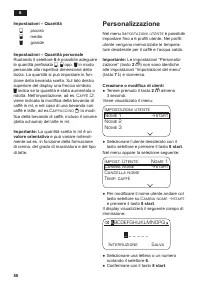
88 it Impostazioni – Quantità � piccolo Ð medio Ò grande Impostazioni – Quantità personale Ruotando il selettore 6 è possibile adeguare la quantità prefissata � , Ð opp. Ò in modo personale alla rispettiva dimensione della tazza. La quantità si può impostare in fun- zione della bevanda scelta. Sul l...
Page 93 - Seleziona utente; Uscita menu; Sicurezza bambini
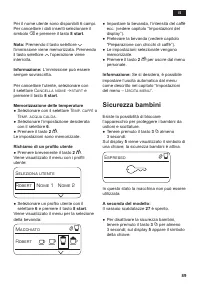
89 it Per il nome utente sono disponibili 6 campi. Per cancellare i dati inseriti selezionare il simbolo â e premere il tasto 8 start . Nota: Premendo il tasto selettore > lʼimmissione viene memorizzata. Premendo il tasto selettore < lʼoperazione viene interrotta. Informazione: Lʼimmissione pu...
Page 94 - Impostazioni del menu; È possibile effettuare le
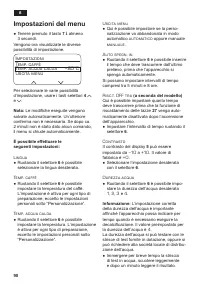
90 it Impostazioni del menu ● Tenere premuto il tasto 7 j almeno 3 secondi. Vengono ora visualizzate le diverse possibilità di impostazione. Impostazioni Temp. caffè Temp. acqua calda <85°C Uscita menu Per selezionare le varie possibilità dʼimpostazione, usare i tasti selettori 4 < e > . No...
Page 95 - Filtro acqua; max; Cambiare filtro
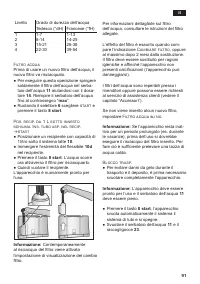
91 it Livello Grado di durezza dellʼacqua Tedesco (°dH) Francese (°fH) 1 2 3 4 1-7 8-14 15-21 22-30 1-13 14-25 26-38 39-54 Filtro acqua Prima di usare un nuovo filtro dellʼacqua , il nuovo filtro va risciacquato. ● Per eseguire questa operazione spingere saldamente il filtro dellʼacqua nel serba - t...
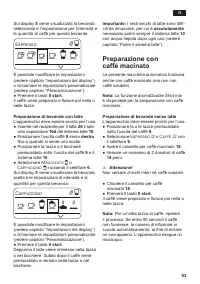
Page 96 - Preparazione con; Preparazione di bevande senza latte; x Espresso
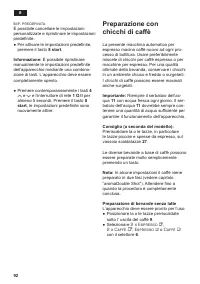
92 it Imp. predefinita È possibile cancellare le impostazioni personalizzate e ripristinare le impostazioni predefinite. ● Per attivare le impostazioni predefinite, premere il tasto 8 start . Informazione: È possibile ripristinare manualmente le impostazioni predefinite dellʼapparecchio mediante una...
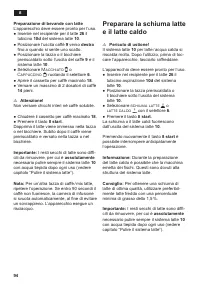
Page 98 - Preparare la schiuma latte; schiuma l at te
94 it Preparazione di bevande con latte L’apparecchio deve essere pronto per l’uso. ● Inserire nel recipiente per il latte 26 il tubicino 10d del sistema latte 10 . ● Posizionare lʼuscita caffè 9 verso destra fino a quando si sente uno scatto. ● Posizionare la tazza o il bicchiere preriscaldato sott...
Page 99 - Prelievo di acqua calda; Acqua calda; Estrarre il tubo aspiratore del l at te; Cura e pulizia quotidiana; Rischio di scossa elettrica!
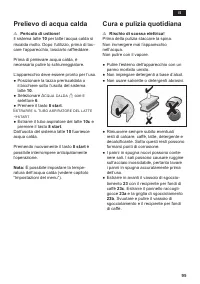
95 it Prelievo di acqua calda ¡ Pericolo di ustione! Il sistema latte 10 per latte / acqua calda si riscalda molto. Dopo l’utilizzo, prima di toc- care l’apparecchio, lasciarlo raffreddare. Prima di prelevare acqua calda, è necessario pulire lo schiumeggiatore. L’apparecchio deve essere pronto per l...
Page 102 - Programmi di assistenza; sistema l at te
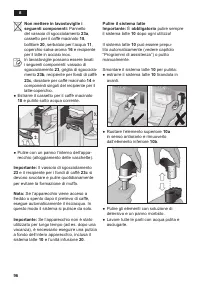
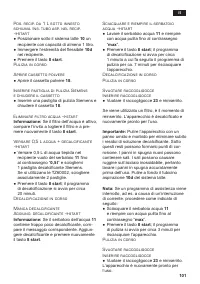
98 it Programmi di assistenza Consiglio: Vedere anche le istruzioni brevi nell’apposito scomparto 22 . A determinati intervalli di tempo sul display 5 compare Risciacquo breve sistema l at te o Decalcificare o Eseguire pulizia o calc‘nClean . L’apparecchio dovrebbe essere immediata- mente pulito e d...
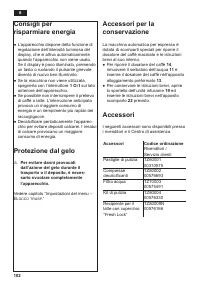
Page 106 - Per evitare danni provocati
102 it Consigli per risparmiare energia ● L’apparecchio dispone della funzione di regolazione dell’intensità luminosa del display, che si attiva automaticamente quando l’apparecchio non viene usato. Se il display è poco illuminato, premendo un tasto o ruotando il pulsante girevole diventa di nuovo b...
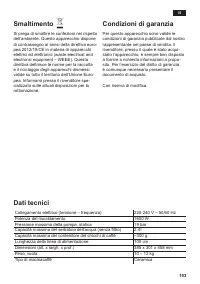
Page 107 - Smaltimento; Condizioni di garanzia; Dati tecnici
103 it Smaltimento Si prega di smaltire le confezioni nel rispetto dell’ambiente. Questo apparecchio dispone di contrassegno ai sensi della direttiva euro- pea 2012/19/CE in materia di apparecchi elettrici ed elettronici (waste electrical and electronic equipment – WEEE). Questa direttiva definisce ...
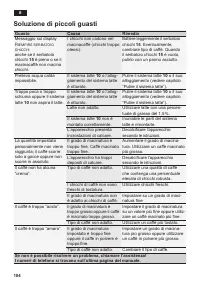
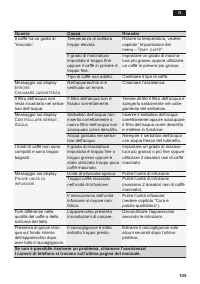
Page 108 - Soluzione di piccoli guasti; Guasto; Riempire serbatoio; Se non è possibile risolvere un problema, chiamare l’assistenza!
104 it Soluzione di piccoli guasti Guasto Causa Rimedio Messaggio sul display Riempire serbatoio chicchi anche se il serbatoio chicchi 15 è pieno o se il macinacaffè non macina chicchi. I chicchi non cadono nel macinacaffè (chicchi troppo oleosi). Battere leggermente il serbatoio chicchi 15 . Eventu...
Page 114 - Garantiebedingungen; Siemens Info Line
Garantiebedingungen DEUTSCHLAND (DE) Die nachstehenden Bedingungen, die Voraussetzungen und Umfang unserer Garantieleistung beschreiben, lassen die Gewährleistungsverpflichtungen des Verkäufers aus dem Kaufvertrag mit dem Endabnehmer unberührt. Für dieses Gerät leisten wir Garantie gemäß nachstehen...






 Siemens HF35M630/01
User Manual
Siemens HF35M630/01
User Manual
 Siemens 1015N-2MFM-1A
Manual
Siemens 1015N-2MFM-1A
Manual
 Siemens 108
User Manual
Siemens 108
User Manual
 Siemens 11
User Manual
Siemens 11
User Manual
 Siemens 1168
User Manual
Siemens 1168
User Manual
 Siemens 120 Series
User Manual
Siemens 120 Series
User Manual
 Siemens 125-1957
User Manual
Siemens 125-1957
User Manual
 Siemens 125-3584T
User Manual
Siemens 125-3584T
User Manual
 Siemens 125-5033
User Manual
Siemens 125-5033
User Manual
 Siemens 140
User Manual
Siemens 140
User Manual
 Siemens 175V
User Manual
Siemens 175V
User Manual
 Siemens 18inc Freezer Tower with Dispenser
User Manual
Siemens 18inc Freezer Tower with Dispenser
User Manual
 Siemens 18inc Wine Tower
User Manual
Siemens 18inc Wine Tower
User Manual
 Siemens 1G03QB 630G
User Manual
Siemens 1G03QB 630G
User Manual
 Siemens 2 D SP
User Manual
Siemens 2 D SP
User Manual
 Siemens 2000
User Manual
Siemens 2000
User Manual
 Siemens 2010 Tango
User Manual
Siemens 2010 Tango
User Manual