Page 3 - Table of Contents
Page 3 Table of Contents 1. Welcome ____________________________________________________________________ 2 2. Important safety information ___________________________________________________ 4 3. Description __________________________________________________________________ 7 4. Installation _______...
Page 4 - Important safety information; Any damage must be reported within 48 hours.
Page 4 2. Important safety information Please read the instructions carefully. Only then will you be able to operate your appliance safely and correctly. Retain the instruction manual for future use or for subsequent owners. Check the appliance for damage after unpacking it. Do not connect or instal...
Page 5 - Before Installation; Before installing the electrical connections, you should:
Page 5 2. Important safety information Before Installation We recommend this appliance be installed or repaired by a qualified Schweigen Home Appliances technician. Please see our website www.schweigen.com.au for a list of our recommended installers. It is dangerous to modify any part of this applia...
Page 6 - INADEQUATE; Match the Rangehood Size to your Cooktop
Page 6 2. Important safety information Rangehood smaller than cooking zone INADEQUATE Rangehood same size as cooking zone ADEQUATE Rangehood larger than cooking zone OPTIMAL Match the Rangehood Size to your Cooktop Product Use The Rangehood has one mode of operation: Air extraction: The air is drawn...
Page 7 - Rangehood
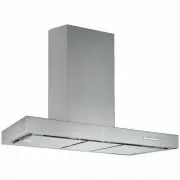
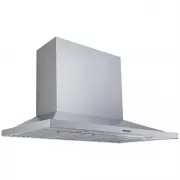
Page 7 3. Description Rangehood Flue Wall Mounting Bracket Extension Flue Main Flue Single Outlet 200mm PCB (computer) Board Connect to the Isodrive motor system Male Plug (Connect to Mains Power 240V 10 Amp) Reducer Filters Screw Pack NOTE: Filter and light type quantity may vary from model to mode...
Page 8 - DO NOT crush or kink the ducting.
Page 8 4. Installation DANGER All electrical wiring from the motor to the rangehood should be kept inside the roof space. System Overview 1. Isodrive Motor 2. Roof Seal Kit (Dektite)* 3. Support Straps* 4. Attach Flexi Duct to Bell-Mouth Adaptor using cable tie or ring clamp. Please DO NOT rip the d...
Page 9 - Mounting Laws and Regulations; Type of Cooktop Min. Height; Electric; Gas; installation height for Induction Cooktop; Notes; Induction; DANGER
Page 9 4. Installation Mounting Laws and Regulations • The location of the installation must have permanent openings for ventilation. • Regulations concerning the expelling of air must be fulfilled. • It is STRONGLY RECOMMENDED that the rangehood be installed centrally over the cooktop, this will gr...
Page 10 - Attaching the Computer Board and wiring BRACKET; NOTE: Some of the models only have two screw holes.; Figure A
Page 10 4. Installation Attaching the Computer Board and wiring BRACKET (Certain models only) Before you install the rangehood, you may need to connect the computer board and wiring bracket to the main body of the rangehood. 1. Attach the computer board to the outlet box using the screws provided. 2...
Page 11 - Installing the rangehood
Page 11 4. Installation Installing the rangehood A — Rangehood levelling screw points B — Main support bracket, wall screw points C — Second rangehood screw points D — Main support bracket NOTE: Some models might need the computer board and wiring bracket to be attached, see page 10 . B A D C Step 1...
Page 12 - Inner flue cover
Page 12 4. Installation Step 3 Using a leveller, level the rangehood using screws (A). Once levelled, secure it firmly to the wall (C) using the appropriate screws. Step 4 Feed through and secure the flexi ducting from the rangehood outlet to the Isodrive motor. • The reducer is to be placed on top ...
Page 13 - Install the wall flue bracket.
Page 13 4. Installation Figure 3 Figure 2 Important Please ensure all plastic protection on the rangehood and filters is removed before use. Figure 1 Fold along these lines Fold in 90º Wall Mount Bracket for Flue Step 6 Install the wall flue bracket. 1. Fold both ends to 90° as shown figure 1. 2. In...
Page 14 - protection on the rangehood and
Page 14 4. Installation Isodrive Motor Setup NOTE Please refer to the Isodrive motor installation guide for more details on flexi ducting and Isodrive motor installation. Flexible Ducting Installation Please do not crush or kink flexi ducting, as it will reduce air flow and may cause noise to occur ...
Page 15 - Electronic Controls
Page 15 5. Operation To obtain the best performance, switch the rangehood on a few minutes prior to cooking and leave it running for at least 10 minutes after you have finished cooking. The buttons have the following functions: A.- Timer: When this function is activated, the blue light will flash on...
Page 16 - Cleaning and maintenance; Filters; WARNING; Catch A; Figure 1
Page 16 6. Cleaning and maintenance Filters • For this appliance to function effectively, regular maintenance is a must. • The function of the filter is to absorb the grease particles emitted during cooking. • Blocked filters and heavy oil deposits restrict airflow and may cause the motor to overhea...
Page 17 - Surfaces; Cleaning the Interior
Page 17 6. Cleaning and maintenance The Balanced Aspiration plate can be removed by taking out the 6 screws shown in figure 2. Please make sure it is fully dry before installing back to the rangehood. • For an induction cooktop, please aim to clean the filters at least every 10 days, depending on fr...
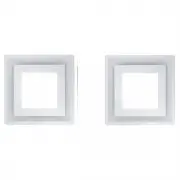
Page 18 - REPLACING THE LED BULB; Type 1 – GLED Square; REPLACING THE HALOGEN OR LED; Type 3 – Halogen G4 HD, LED G4; Replacing the Lights
Page 18 6. Cleaning and maintenance TYPE 1 (GLED Square): REPLACING THE LED BULB The life span of an LED bulb is at least 10 times that of a halogen bulb. If the globe needs to be replaced, proceed as follows: 1. Unplug the respective connector (A). 2. Press the tabs (B) inside the rangehood. 3. Rem...
Page 20 - IMPORTANT
Page 20 7. Troubleshooting Before you contact the technical service department, make sure that the product is plugged in and power is supplied. • Do not take any action that will damage the product. IMPORTANT Never attempt to repair this appliance by yourself. Always refer to a qualified Service Tec...
Page 21 - Faulty Installation
Page 21 7. Troubleshooting Calling the Technical Assistance Service Hotline In the event that the failure is not due to the faults mentioned in Trouble Shooting, contact Customer Service. In Australia, Customer Service 1300 829 066 In New Zealand, Customer Service 0800 200 510 Lodging an online Serv...
Page 22 - Technical specifications; Max Lamp Power: 3 x GLED Square 55 x 55mm
Page 22 8. Technical specifications Model: WM-EX90S Feeding Voltage: 220-240V 50Hz Max Lamp Power: 3 x GLED Square 55 x 55mm 2.1 Watts 12V 4000k