Page 2 - Contents
2 English C ontents Contents Contents Using this manual 3 The following symbols are used in this User Manual: 3 Model name & serial number 3 Safety instructions 3 Disposing of the packaging material 6 Proper disposal of your old appliance 6 Correct Disposal of This Product (Waste Electrical &...
Page 3 - Using this manual; The following symbols are used in this User Manual:; Model name & serial number; Safety instructions; WARNING
English 3 Using this manual Using this manual Please take the time to read this owner’s manual, paying particular attention to the safety information contained in the following section, before using your appliance. Keep this manual for future reference. If transferring ownership of the appliance, pl...
Page 4 - The surfaces are liable to get hot during use.
4 English Safety ins truc tions Safety instructions The appliance is not intended to be operated by means of an external timer or separate remote-control system. CAUTION: The cooking process has to be supervised. A short term cooking process has to be supervised continuously. The appliance must not ...
Page 5 - switch off all cooking zones
English 5 Safety ins truc tions Flush - mounted appliances may be operated only after they have been installed in cabinets and workplaces that conform to the relevant standards. This ensures sufficient protection against contact for electrical units as required by the essential safety standards.If y...
Page 6 - Disposing of the packaging material; Proper disposal of your old appliance
6 English Safety ins truc tions Safety instructions Users with Pacemakers and Active Heart Implants must keep their upper body at a minimum distance of 30 cm from induction cooking zones when turned on. If in doubt, you should consult the manufacturer of your device or your doctor. (Induction hob mo...
Page 7 - Installing the hob; Safety instructions for the installer
English 7 Installing the hob Installing the hob WARNING Be sure the new appliance is installed and grounded only by qualified personnel. Please observe this instruction. The warranty will not cover any damage that may occur as a result of improper installation. Technical data is provided at the end ...
Page 8 - Connecting to the mains power supply
8 English Installing the hob Installing the hob 01 02 03 04 06 05 L N 1N~ (32A) 01 220-240 V ~ 04 Blue 02 Brown 05 Gray 03 Black 06 Green/Yellow 01 02 03 04 05 07 06 L1 L2 N 2N~ (16A): Separate the 2-phase wires (L1 and L2) before connection. 01 220-240 V ~ 05 Blue 02 380-415 V ~ 06 Gray 03 Brown 07...
Page 9 - Installing into the countertop
English 9 Installing the hob 04 05 06 07 08 09 10 11 12 02 03 01 No. Explanation Size 01 Check 4 Point 02 Drill diameter Ø 6 03 Right angle of cutting point 90 ° 04 Cutting Width Size 560±1 mm 05 Cutting Depth Size 490±1 mm 06 Curve Size R3 07 Size of table thickness Max 50 mm, Min 20 mm 08 Distance...
Page 11 - Parts and features; Cooking zones
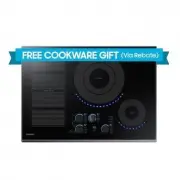
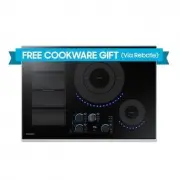
English 11 P ar ts and f eatur es Parts and features Cooking zones 01 02 03 04 01 Induction Flex zone Plus 3300 W with Power Boost 3600 W 02 Induction cooking zone 1400 W with Power Boost 2000 W 03 Induction cooking zone 2200 W with Power Boost 3200 W 04 Control Panel NZ64K7757BK_EF_DG68-00804A-03_E...
Page 12 - Components; Control panel
12 English P ar ts and f eatur es Parts and features Components Induction hob Bracket Spring Induction heating A B C A. Induction coil B. Induced currents C. Electronic circuits • The Principle of Induction Heating : When you place your cookware on a cooking zone and you turn it on, the electronic c...
Page 13 - The key features of your appliance
English 13 P ar ts and f eatur es • Flex zone Plus sensor : Use this function to expand cooking zone into complete left side. • Flex zone Plus : The Flex zone Plus is a large, rectangle-shaped area designed for cooking multiple dishes. • Quick Stop : This option reduces the step and time it takes to...
Page 14 - Flex zone Plus; Safety shutoff
14 English P ar ts and f eatur es Parts and features Flex zone Plus Cooking Zone 4 Cooking Zone 3 Cooking Zone 2 Cooking Zone 1 The Flex zone is the large cooking area located on the left side of the hob (see the figure below) that is specially designed to accommodate multiple pots and pans of varyi...
Page 15 - Hob use; Initial cleaning; Residual heat indicator
English 15 Hob use Hob use Initial cleaning Wipe the ceramic glass surface with a damp cloth and ceramic cooktop glass cleaner. WARNING Do not use caustic or abrasive cleaners. The surface could be damaged. Cookware for induction cooking zones The induction hob can only be turned on when cookware wi...
Page 16 - Size of pans; Suitability test
16 English Hob use Hob use Size of pans Induction cooking zones adapt automatically to the size of the bottom of the cookware up to a certain limit. However the magnetic part of the bottom of the cookware must have a minimum diameter depending upon the size of the cooking zone. Cooking zones Minimum...
Page 17 - Using the touch control sensors; Using suitable cookware
English 17 Hob use NOTE Do not use one piece of cookware on both the left and right cooking zones. Using the touch control sensors To operate the touch control sensors, touch the desired panel with the tip of your pointed finger until the relevant displays illuminate or go out, or until the desired ...
Page 18 - Switching the appliance off; Quick stop; Select cooking zone and heat setting
18 English Hob use Hob use Switching the appliance off To completely switch off the appliance, use the On/Off control sensor. Touch the On/Off control sensor for approximately 1~2 seconds. NOTE After switching off a single cooking zone or the entire cooking surface, the presence of residual heat wil...
Page 19 - Using the child safety lock
English 19 Hob use Timer (Count down) Using the timer as a safety shutoff : If a specific time is set for a cooking zone, the cooking zone will shut itself off once this period of time has elapsed. This function can be used for multiple cooking zones simultaneously. Setting the safety shutoff The co...
Page 21 - Power boost control; Using keep warm
English 21 Hob use Power boost control The Power Boost function makes additional power available to the each cooking zones. (example : bring a large volume of water to the boil) Cooking zones Max Boost time 145 mm 10 min 210 mm 10 min Front or Rear Flex Plus 10 min Complete Flex Plus 5 min After the...
Page 22 - Flex control
22 English Hob use Hob use Flex control The Flex function can operate complete left side cooking zone for using large size cookware. (example : oval cookware, fish kettle) 1. Touch the Flex zone Plus sensor. 2. For setting and adjusting the power level, touch the Heat setting sensor. NOTE • If you t...
Page 23 - Suggested settings for cooking specific foods
English 23 Hob use Suggested settings for cooking specific foods The figures in the table below are guidelines. The heat settings required for various cooking methods depend on a number of variables, including the quality of the cookware being used and the type and amount of food being cooked. Switc...
Page 24 - Cleaning and care; Hob; Light soiling; Stubborn soiling
24 English Cleaning and c ar e Cleaning and care Cleaning and care Hob WARNING Cleaning agents must not come into contact with a heated ceramic glass surface: All cleaning agents must be removed with adequate amounts of clean water after cleaning because they can have a caustic effect when the surfa...
Page 25 - To avoid damaging your appliance; Problem dirt
English 25 Cleaning and c ar e Hob frame (option) WARNING Do not use vinegar, lemon juice or scale remover on the hob frame; otherwise dull blemishes will appear. 1. Wipe the frame with a damp cloth. 2. Moisten dried debris with a wet cloth. Wipe and rub dry. To avoid damaging your appliance • Do no...
Page 26 - FAQs and troubleshooting
26 English W arranty and servic e Warranty and service Warranty and service FAQs and troubleshooting A fault may result from a minor information that you can correct yourself with the help of the following instructions. Do not attempt any further repairs if the following instructions do not help in ...
Page 27 - Service
English 27 W arranty and servic e Service Before calling for assistance or service, please check the section “Troubleshooting”. If you still need help, follow the instructions below. Is it a technical fault? If so, please contact your customer service centre.Always prepare in advance for the discuss...
Page 28 - Technical data; Product information
28 English Technic al dat a Technical data Technical data Technical data Appliance dimensions Width 600 mm Depth 520 mm Height 56 mm Worktop cut - out dimensions Width 560 mm Depth 490 mm Height 72 mm Corner radius 3 mm Connection voltage 220 - 240 V ~ 50 / 60 Hz Maximum connected load power 7.2 kW ...
Page 29 - Memo
Memo NZ64K7757BK_EF_DG68-00804A-03_EN.indd 29 7/6/2018 7:03:47 PM