Samsung NZ36K6430RS - User Manual
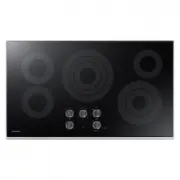
A user manual for Samsung’s Smart Home oven and cooktop integration, this guide primarily covers how users can remotely control and monitor their appliances through the company’s mobile application. The document highlights setup procedures–such as downloading, installing, and linking the app to compatible devices–along with key functionalities like adjusting cooking settings, starting/stopping operations, and monitoring temperature or hood status. It also includes troubleshooting sections for common connectivity issues, network compatibility requirements, and safety considerations for remote operation.






Table of Contents:
- Page 2 – Application Installation and Device Connection
- Page 3 – Remote Control and Safety Features
- Page 4 – Application and Network Troubleshooting
- Page 6 – Application Setup Instructions
- Page 7 – Detailed Remote Control Functions
- Page 8 – Troubleshooting Connectivity Issues
- Page 10 – Application Setup Instructions
- Page 11 – Oven and Stovetop Remote Operation Details
- Page 12 – Troubleshooting Connectivity Issues
Oven / Cooktop
Samsung Smart Home app
Instruction Manual
Smart_home_App_DG68-00833A-00_EN+MES+CFR.indb 1
7/6/2016 4:24:00 PM
"Loading the manual" means you need to wait until the file loads and becomes available for online reading. Some manuals are very large, and the time they take to appear depends on your internet speed.
Was this manual helpful?
About this manual
- Brand
- Samsung
- Model
- NZ36K6430RS
- Document type
- User Manual
- Category
- Hob
- Language(s)
- English, Spanish, French
- Pages
- 12
- File size
- 2.4 MB
- Format
Summary
Instructions for downloading and installing the application, registering a Samsung account, connecting the app to an oven or cooktop, and monitoring appliance status, including system requirements for Android and iOS devices.
Managing oven settings, starting/stopping cooking cycles, monitoring temperature remotely, controlling the hood status, fan speed, and light brightness via the mobile application, along with operational limitations and safety notes for remote operation.
Guidance for resolving issues related to app installation, connection failures, login errors, wireless network compatibility, and router requirements.
Ask a question
Related manuals
Popular Samsung Hobs




More Samsung Hobs models
 Samsung NZ30K7570RG User Manual
 Samsung NZ30K7570RS User Manual
 Samsung NZ30K7880UG User Manual
 Samsung NZ30K7880US User Manual
 Samsung NZ30R5330RK User Manual
 Samsung NZ36C3060UK User Manual
 Samsung NZ36K7570RG User Manual
 Samsung NZ36K7570RS User Manual
 Samsung NZ36K7880US User Manual
 Samsung NZ36K7880US/AA User Manual
 Samsung NZ63K7777BK User Manual
- Samsung NZ63M3NM1BB User Manual