Page 2 - circuit than the radio or TV.; Regulatory Notice; CAUTION; Any changes or modifications not expressly approved
2 English FCC STATEMENT: This equipment has been tested and found to comply within the limits for a Class B digital device, pursuant to part 15 of the FCC Rules. These limits are designed to provide reasonable protection against harmful interference in a residential installation.This equipment gener...
Page 3 - FCC RADIATION EXPOSURE STATEMENT:
English 3 FCC RADIATION EXPOSURE STATEMENT: This equipment complies with FCC radiation exposure limits set forth for an uncontrolled environment. This equipment should be installed and operated so there is at least 8 inches (20 cm) between the radiator and your body. This device and its antenna(s) m...
Page 4 - Contents
4 English Contents Contents Contents Important safety instructions 5 Before you start 15 About surface cooking 15 Location of the surface elements and controls 16 Operations 18 Switching the appliance on 18 Select the cooking zone and heat setting 18 Switching the appliance off 21 Using the child lo...
Page 5 - SAVE THESE INSTRUCTIONS; Important safety instructions; This guide does not cover all possible; Important safety symbols and precautions; What the icons and signs in this user manual mean:; WARNING; Hazards or unsafe practices that may result in
English 5 SAVE THESE INSTRUCTIONS SAVE THESE INSTRUCTIONS Important safety instructions Important safety instructions Read and follow all instructions before using your cooktop to prevent the risk of fire, electric shock, personal injury, or damage when using the cooktop. This guide does not cover a...
Page 6 - FOR YOUR SAFETY
6 English Important safety instructions SAVE THESE INSTRUCTIONS SAVE THESE INSTRUCTIONS Important safety instructions STATE OF CALIFORNIA PROPOSITION 65 WARNING (US ONLY) WARNING: This product contains chemicals known to the State of California to cause cancer and birth defects or other reproductive...
Page 7 - SURFACE COOKING UNITS; Never leave surface units unattended at high heat settings.
English 7 SAVE THESE INSTRUCTIONS SAVE THESE INSTRUCTIONS Important safety instructions • Teach children not to play with the controls or any other part of the cooktop. • Be sure your appliance is properly installed and grounded by a qualified technician. • Avoid scratching or striking the cooktop. ...
Page 8 - Do not operate the cooktop without cookware.
8 English Important safety instructions SAVE THESE INSTRUCTIONS SAVE THESE INSTRUCTIONS Important safety instructions • Cookware Handles Should Be Turned Inward and Not Extend Over Adjacent Surface Units – To reduce the risk of burns, ignition of flammable materials, or spillage due to unintentional...
Page 9 - ELECTRICAL SAFETY; CHILD SAFETY
English 9 SAVE THESE INSTRUCTIONS SAVE THESE INSTRUCTIONS Important safety instructions ELECTRICAL SAFETY Use factory installed flexible cord to connect to power supply only, do not use power supply cord kit. • The cooktop should be serviced only by qualified service personnel. Repairs carried out b...
Page 10 - VENTILATING HOOD; Clean ventilating hoods frequently.; GLASS/CERAMIC COOKING SURFACES; DO NOT TOUCH SURFACE UNITS OR AREAS NEAR UNITS.; CRITICAL INSTALLATION WARNINGS
10 English Important safety instructions SAVE THESE INSTRUCTIONS SAVE THESE INSTRUCTIONS Important safety instructions VENTILATING HOOD • Clean ventilating hoods frequently. Do not let grease accumulate on the hood or filter. • When flaming foods under the hood, turn the fan on. GLASS/CERAMIC COOKIN...
Page 11 - CRITICAL USAGE WARNING
English 11 SAVE THESE INSTRUCTIONS SAVE THESE INSTRUCTIONS Important safety instructions • Install the cooktop on a sturdy, level cabinet that can support its weight.- Failing to do so may result in problems with the cooktop. • This appliance must be properly grounded.• Do not ground the appliance t...
Page 13 - USAGE CAUTIONS
English 13 SAVE THESE INSTRUCTIONS SAVE THESE INSTRUCTIONS Important safety instructions • Do not insert fingers, foreign substances, or metal objects such as pins or needles into inlets, outlets, or holes. If foreign substances are inserted into any of these holes, contact your product provider or ...
Page 15 - CRITICAL CLEANING WARNINGS; • Do not clean the appliance by spraying water directly on to; Before you start; About surface cooking
English 15 Before you start CRITICAL CLEANING WARNINGS CAUTION • Do not clean the appliance by spraying water directly on to it. • Do not use benzene, thinner, or alcohol to clean the appliance.- This may result in discoloration, deformation, damage, electric shock, or fire. • Take care not to hurt ...
Page 16 - Location of the surface elements and controls
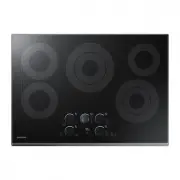
16 English Before you start Before you start CAUTION AFTER COOKING • Do not touch the surface units until they have cooled down.• The surface may be still be hot and burns may occur if you touch the glass surface before it has cooled down sufficiently. • Immediately clean spills on the cooking area ...
Page 18 - Operations; Switching the appliance on; Select the cooking zone and heat setting
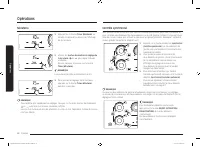
18 English Operations Residual heat indicator When an individual cooking zone or the cooktop is turned off, the presence of residual heat is shown with an (for “hot”) in the digital display of the appropriate cooking zone. The residual heat indicator goes out only after the cooking zone has cooled.Y...
Page 21 - Switching the appliance off
English 21 Operations Switching the appliance off Touch the ON/OFF key for the currently operating element, or set the power level to 0 to turn the element off. To completely switch off the appliance, touch the POWER key for 1 second. NOTE After you switch off a single cooking zone or the entire coo...
Page 22 - Timer
22 English Operations Operations Timer 1. Press the Timer key. The number 10 will be displayed above the timer display. 2. Use the Timer setting selectors ( or ) to set the desired amount of time. Then, press Timer key again. NOTE The timer can be adjusted from 0 to 99. 3. To cancel the timer settin...
Page 23 - Using the proper cookware
English 23 Operations Sound on/off 1. Touch the POWER key for approximately 1 second. 2. Touch the key for 3 seconds within 10 seconds of pressing the POWER key. 3. Sound will turn off and will appear in the Timer display. 4. To change the Sound setting, repeat Steps 1 and 2. Sound will turn on and ...
Page 24 - Choosing the proper cookware
24 English Operations Operations Choosing the proper cookware What your cookware is made of determines how evenly and quickly heat is transferred from the surface element to the pan bottom.• ALUMINUM - Excellent heat conductor. Some types of food will cause the aluminum to darken. (Anodized aluminum...
Page 25 - Using the smart connect feature; Using the hood control feature
English 25 Operations Using the smart connect feature The cooktop has built in a Wi-Fi module that you can use to sync the cooktop with the Samsung Smart Home app. On the smartphone app, you can: • monitor the operating status and the power level settings of the cooktop elements. • check and change ...
Page 26 - Maintenance; Care and cleaning of the glass cooktop
26 English Maintenance Maintenance Maintenance Care and cleaning of the glass cooktop Normal daily use cleaning Use only a ceramic cooktop cleaner. Other creams may not be as effective.By following these steps, you can maintain and protect the surface of your glass cooktop. 1. Before using the cookt...
Page 28 - Troubleshooting; Troubleshooting
28 English Troubleshooting Troubleshooting Troubleshooting Troubleshooting Samsung works hard to ensure that you don’t have problems with your new cooktop. If you run into unexpected trouble, look first for a solution in the tables below. If you’re still having trouble after trying the suggested sol...
Page 29 - Information codes
English 29 Troubleshooting Problem Possible cause Solution Brown streaks or specks. Boilovers have been cooked onto the surface. • Wait until the surface cools down. Then, use a single-edge razor-blade scraper at approximately a 45° angle against the glass surface to remove the soil. • See the secti...
Page 33 - Appendix; Open Source Announcement
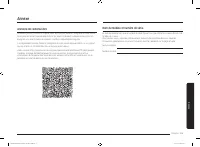
English 33 Appendix Appendix Open Source Announcement The software included in this product contains open source software. You may obtain the complete corresponding source code for a period of three years after the last shipment of this product by sending an email to mailto:[email protected]. ...
Page 34 - Memo
Memo NZ30K7570R_DG68-00821B-02_EN+MES+CFR.indb 34 2016-09-30 12:02:13
Page 37 - Cubierta eléctrica; Manual del usuario
Cubierta eléctrica Manual del usuario NZ30K7570R* NZ30K7570R_DG68-00821B-02_EN+MES+CFR.indb 1 2016-09-30 12:02:15
Page 38 - DECLARACIÓN DE LA FCC:; Aviso sobre regulaciones; PRECAUCIÓN; PRECAUCIÓN DE LA FCC:
2 Español DECLARACIÓN DE LA FCC: Este equipo ha sido sometido a pruebas y se ha determinado que se encuentra dentro de los límites para los dispositivos digitales clase B, de acuerdo con la sección 15 de las Normas de la FCC. Estos límites están destinados a ofrecer una protección razonable contra i...
Page 39 - DECLARACIÓN DE LA FCC SOBRE LA EXPOSICIÓN A LA RADIACIÓN:
Español 3 DECLARACIÓN DE LA FCC SOBRE LA EXPOSICIÓN A LA RADIACIÓN: Este equipo cumple con los límites de exposición a la radiación establecidos para un entorno no controlado. Este equipo debe ser instalado y operado a una distancia mínima de 8 pulgadas (20 cm) entre su cuerpo y el radiador. Este di...
Page 40 - Contenido
4 Español Contenido Contenido Instrucciones de seguridad importantes 5 Antes de comenzar 15 Acerca de la superficie de cocción 15 Ubicación de los controles y elementos de la superficie 16 Funcionamiento 18 Encendido del electrodoméstico 18 Selección de la zona de cocción y regulación de calor 18 Ap...
Page 41 - CONSERVE ESTAS INSTRUCCIONES; Instrucciones de seguridad importantes; Esta guía no cubre todas; Símbolos y precauciones de seguridad importantes; Significado de iconos y símbolos en este manual del usuario:; ADVERTENCIA; Prácticas peligrosas o inseguras que pueden provocar
Español 5 CONSERVE ESTAS INSTRUCCIONES CONSERVE ESTAS INSTRUCCIONES Instruccione s de seg uridad impor tantes Instrucciones de seguridad importantes Lea y siga todas las instrucciones antes de utilizar su cubierta con el fin de evitar riesgos de incendio, descargas eléctricas, lesiones personales o ...
Page 42 - PARA SU SEGURIDAD
6 Español Instrucciones de seguridad importantes CONSERVE ESTAS INSTRUCCIONES CONSERVE ESTAS INSTRUCCIONES Instruccione s de seg uridad impor tantes ADVERTENCIA SOBRE LA STATE OF CALIFORNIA PROPOSITION 65 (SOLO EE.UU.) ADVERTENCIA: Este producto contiene productos químicos reconocidos en el estado d...
Page 43 - Utilice solamente agarradores aislantes secos.; UNIDADES DE SUPERFICIE DE COCCIÓN; Nunca deje sin atención unidades de superficie reguladas a
Español 7 CONSERVE ESTAS INSTRUCCIONES CONSERVE ESTAS INSTRUCCIONES Instruccione s de seg uridad impor tantes • Utilice solamente agarradores aislantes secos. Colocar agarradores aislantes mojados o húmedos sobre superficies calientes podría producir quemaduras por vapor. No permita que el agarrador...
Page 45 - SEGURIDAD ELÉCTRICA; SEGURIDAD DE LOS NIÑOS
Español 9 CONSERVE ESTAS INSTRUCCIONES CONSERVE ESTAS INSTRUCCIONES Instruccione s de seg uridad impor tantes SEGURIDAD ELÉCTRICA Utilice solo el cable flexible instalado de fábrica para enchufar el electrodoméstico, no utilice el kit de cable de alimentación. • La cubierta debe ser reparada únicame...
Page 46 - CAMPANAS DE VENTILACIÓN
10 Español Instrucciones de seguridad importantes CONSERVE ESTAS INSTRUCCIONES CONSERVE ESTAS INSTRUCCIONES Instruccione s de seg uridad impor tantes CAMPANAS DE VENTILACIÓN • Limpie con frecuencia las campanas de ventilación. No deje que se acumule grasa en la campana o el filtro. • Cuando flambee ...
Page 47 - ADVERTENCIA FUNDAMENTAL PARA EL USO
Español 11 CONSERVE ESTAS INSTRUCCIONES CONSERVE ESTAS INSTRUCCIONES Instruccione s de seg uridad impor tantes • Instale la cubierta en un gabinete sólido y nivelado que pueda soportar su peso.- No hacerlo puede provocar problemas con la cubierta. • Este electrodoméstico debe conectarse a tierra cor...
Page 49 - PRECAUCIONES PARA EL USO
Español 13 CONSERVE ESTAS INSTRUCCIONES CONSERVE ESTAS INSTRUCCIONES Instruccione s de seg uridad impor tantes • No introduzca los dedos, sustancias extrañas ni objetos metálicos como alfileres o agujas en las entradas, tomacorrientes u orificios. Si se introducen sustancias extrañas en alguno de es...
Page 51 - Antes de comenzar; Acerca de la superficie de cocción
Español 15 Antes de c omenz ar ADVERTENCIAS FUNDAMENTALES PARA LA LIMPIEZA PRECAUCIÓN • No rocíe agua directamente sobre el electrodoméstico para limpiarlo. • No utilice benceno, diluyente ni alcohol para limpiar el electrodoméstico.- Esto puede provocar decoloración, deformación, daños, descarga el...
Page 52 - Ubicación de los controles y elementos de la superficie
16 Español Antes de comenzar Antes de c omenz ar PRECAUCIÓN DESPUÉS DE COCINAR • No toque las unidades de superficie hasta que se hayan enfriado.• La superficie podría estar caliente aún y producirle quemaduras si toca la superficie de vidrio antes de que se haya enfriado lo suficiente. • Limpie inm...
Page 54 - Funcionamiento; Encendido del electrodoméstico; Selección de la zona de cocción y regulación de calor
18 Español Funcionamient o Indicador de calor residual Cuando se apaga una zona de cocción individual o toda la cubierta, la presencia de calor residual se muestra con una (para “hot (caliente)”) en la pantalla digital de las zonas de cocción correspondientes. El indicador de calor residual se apaga...
Page 57 - Apagado del electrodoméstico; Uso del bloqueo para niños
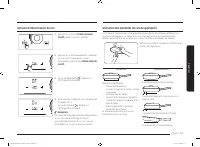
Español 21 Funcionamient o Apagado del electrodoméstico Toque la tecla ON/OFF (ACTIVAR/DESACTIVAR) para el elemento que está en funcionamiento, o ajuste el nivel de potencia en 0 para apagar el elemento. Para apagar completamente el electrodoméstico, toque la tecla POWER (ENCENDER/APAGAR) durante 1 ...
Page 58 - Temporizador
22 Español Funcionamiento Funcionamient o Temporizador 1. Presione la tecla Timer (Temporizador) . Aparecerá el número 10 arriba de la pantalla del temporizador. 2. Use los selectores para la configuración del temporizador ( o ) para configurar la cantidad de tiempo deseada. Luego, vuelva a presiona...
Page 59 - Activar o desactivar las señales sonoras; Utilización de los recipientes de cocción correctos
Español 23 Funcionamient o Activar o desactivar las señales sonoras 1. Toque la tecla POWER (ENCENDER/APAGAR) durante aproximadamente 1 segundo. 2. Toque la tecla durante 3 segundos dentro de los 10 segundos tras haber presionado la tecla POWER (ENCENDER/APAGAR) . 3. El sonido se desactivará y apare...
Page 60 - Selección de los recipientes de cocción correctos
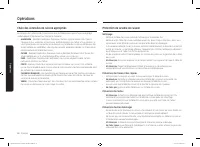
24 Español Funcionamiento Funcionamient o Selección de los recipientes de cocción correctos El material del que están hechos sus recipientes de cocción determina que tan rápida y parejamente se transfiere el calor del elemento calentador de la superficie al fondo del recipiente.• ALUMINIO - Excelent...
Page 61 - Uso de la función de conexión inteligente; Uso de la función de control de campana
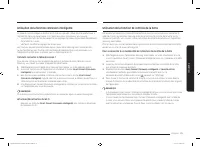
Español 25 Funcionamient o Uso de la función de conexión inteligente La cubierta lleva un módulo Wi-Fi incorporado que se puede utilizar para sincronizarla con la aplicación Samsung Smart Home. En la aplicación del teléfono inteligente, podrá: • supervisar el estado operativo y la configuración del ...
Page 62 - Mantenimiento; Cuidado y limpieza de la cubierta de vidrio
26 Español Mant enimient o Mantenimiento Cuidado y limpieza de la cubierta de vidrio Limpieza en el uso normal diario Use solo un producto de limpieza para cubiertas vitrocerámicas. Otras cremas podrían resultar menos efectivas.Seguir estos pasos le permitirá mantener y proteger la superficie de su ...
Page 64 - Resolución de problemas
28 Español Re solución de pr oblemas Resolución de problemas Resolución de problemas Samsung hace grandes esfuerzos para asegurar que usted no experimente problemas con su nueva cubierta. Si se encuentra con problemas inesperados, como primera medida busque la solución en las siguientes tablas. Si a...
Page 65 - Códigos de información
Español 29 Re solución de pr oblemas Problema Causa posible Solución Pintas o vetas pardas. Ocurrieron derrames que fueron cocinados hasta adherirse a la superficie. • Espere hasta que la superficie se enfríe. Luego, utilice una rasqueta de navaja de un solo filo a un ángulo de aproximadamente 45° s...
Page 69 - Apéndice; Anuncio de código abierto
Español 33 Apéndic e Apéndice Anuncio de código abierto El software incluido en este producto contiene software de código abierto. Puede obtener el código fuente correspondiente completo por un período de tres años a partir del último envío de este producto mandando un correo electrónico a mailto:[e...
Page 70 - Notas
Notas NZ30K7570R_DG68-00821B-02_EN+MES+CFR.indb 34 2016-09-30 12:02:20
Page 73 - Table de cuisson électrique; Manuel d’utilisation
Table de cuisson électrique Manuel d’utilisation NZ30K7570R* NZ30K7570R_DG68-00821B-02_EN+MES+CFR.indb 1 2016-09-30 12:02:22
Page 74 - DÉCLARATION DE LA FCC :; Informations relatives à la réglementation; ATTENTION; MISE EN GARDE DE LA FCC :
2 Français DÉCLARATION DE LA FCC : Cet appareil a été testé ; il est conforme aux limitations applicables aux appareils numériques de classe B, selon le paragraphe 15 de la réglementation FCC. Ces limites sont destinées à assurer une protection suffisante contre les interférences néfastes dans une z...
Page 76 - Table des matières
4 Français Table de s matièr es Table des matières Consignes de sécurité importantes 5 Avant de commencer 15 A propos de la table de cuisson 15 Emplacement des foyers et des commandes 16 Opérations 18 Mise sous tension de l'appareil 18 Sélectionner la zone de cuisson et le réglage de la température ...
Page 77 - CONSERVEZ PRÉCIEUSEMENT CES INSTRUCTIONS; Consignes de sécurité importantes; Le présent guide; Symboles de sécurité importants et précautions; Signification des icônes et des symboles utilisés dans ce manuel :; AVERTISSEMENT; Risques ou manipulations dangereuses susceptibles d'entraîner
Français 5 CONSERVEZ PRÉCIEUSEMENT CES INSTRUCTIONS CONSERVEZ PRÉCIEUSEMENT CES INSTRUCTIONS Consigne s de sécurit é impor tantes Consignes de sécurité importantes Lisez et suivez toutes les consignes avant d'utiliser votre table de cuisson afin d'éviter tout risque d'incendie, d'électrocution, de b...
Page 78 - AVERTISSEMENT CONCERNANT LA; Ne rangez pas d'objets susceptibles d'éveiller l'intérêt des
6 Français Consignes de sécurité importantes CONSERVEZ PRÉCIEUSEMENT CES INSTRUCTIONS CONSERVEZ PRÉCIEUSEMENT CES INSTRUCTIONS Consigne s de sécurit é impor tantes AVERTISSEMENT CONCERNANT LA PROPOSITION 65 DE L’ÉTAT DE LA CALIFORNIE (ÉTATS-UNIS UNIQUEMENT) AVERTISSEMENT : Cet Cet appareil contient ...
Page 79 - TABLES DE CUISSON; Ne laissez jamais la table de cuisson sans surveillance
Français 7 CONSERVEZ PRÉCIEUSEMENT CES INSTRUCTIONS CONSERVEZ PRÉCIEUSEMENT CES INSTRUCTIONS Consigne s de sécurit é impor tantes • Apprenez aux enfants à ne pas jouer avec les commandes ou les autres éléments de la table de cuisson. • Assurez-vous que votre appareil est correctement installé et mis...
Page 81 - SÉCURITÉ ÉLECTRIQUE; SÉCURITÉ ENFANTS
Français 9 CONSERVEZ PRÉCIEUSEMENT CES INSTRUCTIONS CONSERVEZ PRÉCIEUSEMENT CES INSTRUCTIONS Consigne s de sécurit é impor tantes SÉCURITÉ ÉLECTRIQUE Utilisez un cordon flexible installé en usine uniquement pour raccorder l'appareil à l'alimentation ; n'utilisez pas de kit de cordons d'alimentation....
Page 82 - Nettoyez fréquemment la hotte d'aspiration.; SURFACES DE CUISSON EN VITROCÉRAMIQUE; NE TOUCHEZ PAS LES FOYERS OU LES ZONES SITUÉES À
10 Français Consignes de sécurité importantes CONSERVEZ PRÉCIEUSEMENT CES INSTRUCTIONS CONSERVEZ PRÉCIEUSEMENT CES INSTRUCTIONS Consigne s de sécurit é impor tantes HOTTE D'ASPIRATION • Nettoyez fréquemment la hotte d'aspiration. Ne laissez pas la graisse s'accumuler sur la hotte ou le filtre. • Si ...
Page 85 - AVERTISSEMENTS RELATIFS À L'UTILISATION
Français 13 CONSERVEZ PRÉCIEUSEMENT CES INSTRUCTIONS CONSERVEZ PRÉCIEUSEMENT CES INSTRUCTIONS Consigne s de sécurit é impor tantes • N'insérez pas vos doigts, de substances étrangères ou d'objets métalliques tels que des épingles ou des aiguilles dans l'entrée, la sortie et les orifices de l'apparei...
Page 87 - Avant de commencer; A propos de la table de cuisson
Français 15 Av ant de c ommenc er AVERTISSEMENTS IMPORTANTS RELATIFS AU NETTOYAGE ATTENTION • Ne nettoyez pas l'appareil en pulvérisant directement de l'eau dessus. • N'utilisez pas de benzène, de diluant ou d'alcool pour nettoyer l'appareil.- Cela pourrait entraîner une décoloration, une déformatio...
Page 88 - Emplacement des foyers et des commandes
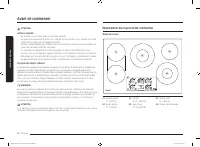
16 Français Avant de commencer Av ant de c ommenc er ATTENTION APRÈS LA CUISSON • Ne touchez pas les foyers avant qu'ils n'aient refroidi.• Le foyer peut encore être chaud et vous risquez de vous brûler si vous touchez la surface vitrée avant qu'elle n'ait suffisamment refroidi. • Nettoyez immédiate...
Page 90 - Opérations; Mise sous tension de l'appareil; Sélectionner la zone de cuisson et le réglage de la température
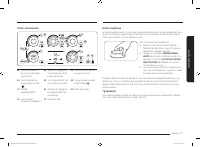
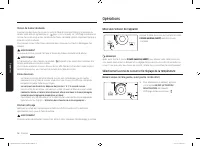
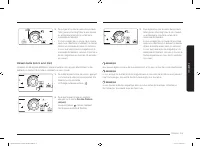
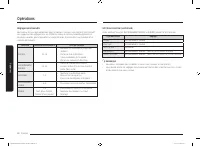
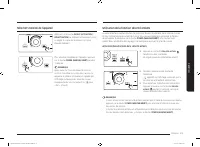
18 Français Opér ations Témoin de chaleur résiduelle Lorsque l’une des zones de cuisson ou toute la table de cuisson est éteinte, la présence de chaleur résiduelle est signalée par un (pour « hot » (chaud)) sur l'affichage numérique de la zone de cuisson en question. Le témoin de chaleur résiduelle ...
Page 93 - Mise hors tension de l'appareil; Utilisation de la fonction sécurité enfants
Français 21 Opér ations Mise hors tension de l'appareil Appuyez sur la touche ON/OFF (ACTIVATION/ DÉSACTIVATION) de l'élément actuellement utilisé ou réglez le niveau de puissance sur 0 pour éteindre l'élément. Pour éteindre complètement l'appareil, appuyez sur la touche POWER (MARCHE/ARRÊT) pendant...
Page 94 - Minuterie
22 Français Opérations Opér ations Minuterie 1. Appuyez sur la touche Timer (Minuterie) . Le nombre 10 apparaît au-dessus de l'affichage de la minuterie. 2. Utilisez les touches de sélection du réglage de la minuterie ( ou ) pour régler la durée souhaitée. Ensuite, appuyez à nouveau sur la touche Ti...
Page 95 - Activation/désactivation du son
Français 23 Opér ations Activation/désactivation du son 1. Appuyez sur la touche POWER (MARCHE/ ARRÊT) pendant environ 1 seconde. 2. Appuyez sur la touche pendant 3 secondes au cours des 10 secondes qui suivent l'actionnement de la touche POWER (MARCHE/ ARRÊT) . 3. Le son est désactivé et apparaît s...
Page 96 - Choix des ustensiles de cuisine appropriés
24 Français Opérations Opér ations Choix des ustensiles de cuisine appropriés Le matériau de l'ustensile de cuisine assure que la chaleur émise par le foyer se propage uniformément et rapidement au fond de la casserole.• ALUMINIUM - Excellent conducteur thermique. Certains types d'aliments font noir...
Page 97 - Utilisation de la fonction connexion intelligente; Utilisation de la fonction de contrôle de la hotte
Français 25 Opér ations Utilisation de la fonction connexion intelligente La table de cuisson intègre un module Wi-Fi que vous pouvez utiliser pour la synchroniser à l'application Samsung Smart Home. Sur l'application pour smartphone, vous pouvez : • surveiller le statut de fonctionnement et les rég...
Page 98 - Entretien; Entretien et nettoyage de la table de cuisson vitrée
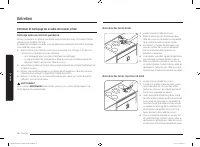
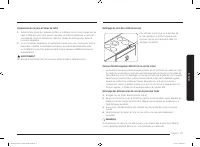
26 Français Entretien Entretien Entretien et nettoyage de la table de cuisson vitrée Nettoyage après une utilisation quotidienne Utilisez uniquement un nettoyant céramique pour la table de cuisson. L'utilisation d'autres crèmes n'a pas la même efficacité.En respectant les étapes suivantes, vous parv...
Page 100 - Dépannage
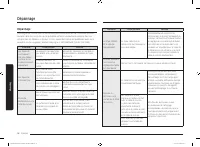
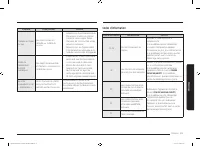
28 Français Dépannag e Dépannage Dépannage Samsung veille à ce que vous ne rencontriez pas de problèmes lors de l'utilisation de votre nouvelle table de cuisson. En cas de problème inattendu, recherchez en premier lieu une solution dans les tableaux ci-dessous. Si vous rencontrez encore des problème...
Page 105 - Annexe; Annonce de contenu libre
Français 33 Anne xe Annexe Annonce de contenu libre Le présent produit contient un logiciel libre. Vous pouvez obtenir l’intégralité du code source correspondant durant une période de trois ans après la dernière livraison de ce produit en envoyant un e-mail à l’adresse suivante : mailto:[email prote...
Page 106 - Notes
Notes NZ30K7570R_DG68-00821B-02_EN+MES+CFR.indb 34 2016-09-30 12:02:28












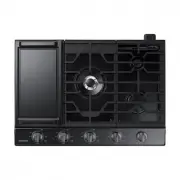 Samsung NA30N6555TG
User Manual
Samsung NA30N6555TG
User Manual
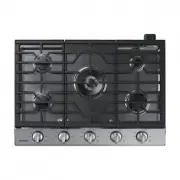 Samsung NA30N6555TS
User Manual
Samsung NA30N6555TS
User Manual
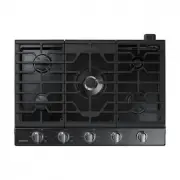 Samsung NA30N7755TG
User Manual
Samsung NA30N7755TG
User Manual
 Samsung NA30N7755TS
User Manual
Samsung NA30N7755TS
User Manual
 Samsung NA30R5310FS
User Manual
Samsung NA30R5310FS
User Manual
 Samsung NA36N6555TS
User Manual
Samsung NA36N6555TS
User Manual
 Samsung NA36N7755TG
User Manual
Samsung NA36N7755TG
User Manual
 Samsung NA36N7755TS
User Manual
Samsung NA36N7755TS
User Manual
 Samsung NA36R5310FS
User Manual
Samsung NA36R5310FS
User Manual
 Samsung NZ30A3060UK
User Manual
Samsung NZ30A3060UK
User Manual
 Samsung NZ30A3060UK/AA
User Manual
Samsung NZ30A3060UK/AA
User Manual
 Samsung NZ30K6330RG
User Manual
Samsung NZ30K6330RG
User Manual
 Samsung NZ30K6330RS
User Manual
Samsung NZ30K6330RS
User Manual
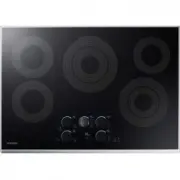 Samsung NZ30K7570RS
User Manual
Samsung NZ30K7570RS
User Manual
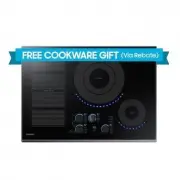 Samsung NZ30K7880UG
User Manual
Samsung NZ30K7880UG
User Manual
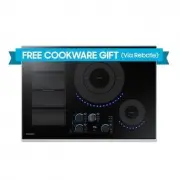 Samsung NZ30K7880US
User Manual
Samsung NZ30K7880US
User Manual
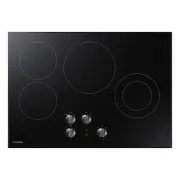 Samsung NZ30R5330RK
User Manual
Samsung NZ30R5330RK
User Manual
 Samsung NZ36C3060UK
User Manual
Samsung NZ36C3060UK
User Manual
 Samsung NZ36K6430RS
User Manual
Samsung NZ36K6430RS
User Manual
 Samsung NZ36K7570RG
User Manual
Samsung NZ36K7570RG
User Manual