Page 2 - Contents
2 English Contents Contents Safety instructions 3 General safety 5 Microwave operation precautions 6 Limited warranty 6 Product group definition 6 Correct Disposal of This Product (Waste Electrical & Electronic Equipment) 7 Cooking instructions on food packaging 7 Cooking instructions 7 Installa...
Page 3 - IMPORTANT SAFETY INSTRUCTIONS; WARNING
English 3 Safety instructions IMPORTANT SAFETY INSTRUCTIONS READ CAREFULLY AND KEEP FOR FUTURE REFERENCE. WARNING : If the door or door seals are damaged, the oven must not be operated until it has been repaired by a competent person. WARNING : It is hazardous for anyone other than a competent perso...
Page 5 - General safety; Microwave warning; Microwave oven precautions
English 5 Safety instructions General safety Any modifications or repairs must be performed by qualified personnel only.Do not heat food or liquids sealed in containers for the microwave function.Do not use benzene, thinner, alcohol, or steam or high-pressure cleaners to clean the oven.Do not instal...
Page 6 - Microwave operation precautions; Limited warranty
Safety instructions 6 English Safety instructions Install the oven in compliance with the clearances in this manual. (See Installing your microwave oven.)Use caution when connecting other electrical appliances to sockets near the oven. Microwave operation precautions Failure to observe the following...
Page 7 - Cooking instructions on food packaging; Cooking instructions
English 7 Safety instructions Correct Disposal of This Product (Waste Electrical & Electronic Equipment) (Applicable in countries with separate collection systems) This marking on the product, accessories or literature indicates that the product and its electronic accessories (e.g. charger, head...
Page 8 - Accessories; DO NOT; Turntable
8 English Installation Accessories Depending on the model that you have purchased, you are supplied with several accessories that can be used in a variety of ways. 01 Roller ring , to be placed in the centre of the oven.The roller ring supports the turntable. 02 Turntable , to be placed on the rolle...
Page 9 - Cleaning; To clean inside swing-heater models; Care against an extended period of disuse
English 9 Maintenance Cleaning Clean the oven regularly to prevent impurities from building up on or inside the oven. Also pay special attention to the door, door sealing, and turntable and roller ring (applicable models only).If the door won’t open or close smoothly, first check if the door seals h...
Page 10 - Oven
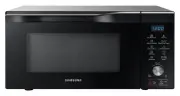
10 English Oven features Oven 01 04 08 09 07 02 03 05 06 01 Door latches 02 Ventilation holes 03 Light 04 Door 05 Turntable 06 Coupler 07 Roller ring 08 Safety interlock holes 09 Control panel Control panel 01 03 05 07 09 11 13 02 04 06 08 10 12 14 01 Sensor Cook 02 Auto Cook 03 Quick Defrost 04 Kee...
Page 11 - Oven use; How a microwave oven works; Checking that your oven is operating correctly
English 11 Oven use How a microwave oven works Microwaves are high-frequency electromagnetic waves; the energy released enables food to be cooked or reheated without changing either the form or the colour.You can use your microwave oven to:• Defrost• Reheat• Cook Cooking principle. 1. The microwaves...
Page 12 - Setting the time
Oven use 12 English Oven use Cooking/Reheating The following procedure explains how to cook or reheat food. CAUTION • ALWAYS check your cooking settings before leaving the oven unattended.• The maximum Microwave time is 99 minutes. Open the door. Place the food in the centre of the turntable. Close ...
Page 13 - Power levels and time variations
English 13 Oven use Power levels and time variations The power level function enables you to adapt the amount of energy dissipated and thus the time required to cook or reheat your food, according to its type and quantity. You can choose between six power levels. Power level Percentage Output HIGH 1...
Page 14 - Stopping the cooking; Auto energy saving function; Using the sensor cook features
Oven use 14 English Oven use Stopping the cooking You can stop cooking at any time so that you can:• Check the food• Turn the food over or stir it• Leave it to stand To stop the cooking... Then... Temporarily • Open the door or press the STOP/ECO button once. Cooking stops. • To resume cooking, clos...
Page 16 - Auto sensor cooking instructions
Oven use 16 English Oven use Auto sensor cooking instructions The Auto Sensor allows you to cook your food automatically by detecting the amount of gases generated from the food while cooking.• When cooking food, many kinds of gases are generated. The Auto Sensor determines the proper time and power...
Page 19 - Using the quick defrost features
English 19 Oven use Using the quick defrost features The Quick Defrost features enable you to defrost meat, poultry, fish, frozen vegetable and frozen bread. The defrost time and power level are set automatically. You simply select the programme and the weight. NOTE Use only containers that are micr...
Page 20 - Using the keep warm features
Oven use 20 English Oven use Code Food Serving size Instructions 3 Fish 200-1500 g Shield the tail of a whole fish with aluminium foil. Turn the fish over, when the oven beeps. And then press the START/+30s button. This programme is suitable for whole fishes as well as for fish fillets. Stand for 20...
Page 21 - Using the deodorization features
English 21 Oven use Using the deodorization features Use this features after cooking odorous food or when there is a lot of smoke in the oven interior. First clean the oven interior. 1 1. Press the Deodorization button. 2 3 2. Pressing the Up or Down button, if you want to set the deodorization time...
Page 22 - To use the favorite setting; Using the child lock features; Switching the beeper off
Oven use 22 English Oven use To use the favorite setting First, place the food in the centre of the turntable and close the door. 1 1 1. Press Favorite button, then select the program by pressing the Up or Down button.• P1 : First setting • P2 : Second setting 2 2. Press the START/+30s button. The f...
Page 24 - Microwaves; Cookware for microwave cooking:
24 English Cooking guide Microwaves Microwave energy actually penetrates food, attracted and absorbed by its water, fat and sugar content. The microwaves cause the molecules in the food to move rapidly. The rapid movement of these molecules creates friction and the resulting heat cooks the food. Coo...
Page 27 - Cautions for installation; Information code
English 27 Troubleshooting Problem Cause Action The turn table rattles while turning and is noisy. Food residue is stuck to the bottom of the oven. Remove any food residue stuck to the bottom of the oven. Cautions for installation While installing microwave oven, the ventilation opening of 50 mm at ...
Page 28 - Technical specifications
28 English Technical specifications SAMSUNG strives to improve its products at all times. Both the design specifications and these user instructions are thus subject to change without notice. Model MS22M8074A* Power source 230 V – 50 Hz AC Power consumption Microwave 1250 W Output power 100 W / 850 ...
Page 29 - Memo