Page 2 - Canada
Canada English: This digital apparatus does not exceed the Class B limits for r adio noise emissions from digital appar atus as set out in the Radio Interference R e g u l a t i o n s o f t h e C a n a d i a n D e p a r t m e n t o f Communications.This Class B digital appar atus complies with Canad...
Page 5 - Contents
3 English EN Contents 1 Important 4 Safety 4Notice 5 2 Your Micro Hi-Fi 6 Introduction 6What’s in the box 6 Over view of the main unit 7 Over view of the remote control 8 3 Connect 10 Connect speakers 10 Connect power 10 4 Get started 11 Prepare the remote control 11 Auto install radio stations 11 S...
Page 6 - Important; Safety
4 manufacturer or sold with the apparatus. When a cart is used, use caution when moving the cart/apparatus combination to avoid injury from tip-over. m Unplug this apparatus during lightning storms or when unused for long periods of time. n Refer all servicing to qualifi ed service personnel. Servici...
Page 7 - Notice; Hearing safety
5 Be sure to use your equipment reasonably • and take appropriate breaks. Be sure to observe the following guidelines when using your headphones. Listen at reasonable volumes for • reasonable periods of time.Be careful not to adjust the volume as your • hearing adapts.Do not turn up the volume so hi...
Page 8 - What’s in the box; Introduction
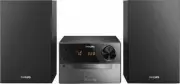
6 What’s in the box Check and identify the contents of your package: Main unit • Loudspeaker boxes x 2 • Remote control • MP3 link cable • 2 Your Micro Hi- Fi Congratulations on your purchase, and welcome to Philips! To fully benefi t from the suppor t that Philips offers, register your product at ww...
Page 9 - Overview of the main unit
7 Program radio stations. • Select 12 hour or 24 hour format. • d CLOCK Set the clock. • View the clock. • During play, select display information. • Overview of the main unit a Display panel Show current status. • b SOURCE Select a source: Disc, TUNER, USB or • MP3 LINK. c PROG Program tracks. • En...
Page 12 - Connect power; Connect; Connect speakers
10 Connect power Caution Risk of product damage! Ensure that the power supply • voltage corresponds to the voltage printed on the back or the underside of the Micro Hi-Fi.Before connecting the AC power cord, ensure you have • completed all other connections. 1 Connect the AC power cord to the wall s...
Page 13 - started; Prepare the remote control
11 Auto install radio stations When you connect the Micro Hi-Fi to the power supply for the fi rst time, or no radio station is stored in this Micro Hi-Fi, Plug and Play is activated to store all available radio stations automatically. 1 Connect the Micro Hi-Fi to the power supply. [AUTO INSTALL - PR...
Page 14 - Turn on; Switch to standby
12 Tip To view the clock during play, press • CLOCK/DISPLAY repeatedly until the clock is displayed. Turn on 1 Press POWER . The Micro Hi-Fi switches to the last » selected source. Switch to standby 1 Press POWER to switch the Micro Hi-Fi to standby mode. The backlight on the display panel is » redu...
Page 15 - Play; Play disc; Play from USB
13 3 Press ALB/PRESET+/- to select a folder. 4 Press / to select a fi le. 5 Press to star t play. 5 Play disc/USB Play disc 1 Press DISC to select the disc source. 2 Lift the lid of the CD compar tment. 3 Inser t a disc with the printed side facing up, then close the disc tray. 4 Press to star t play...
Page 16 - Play all tracks or an album repeatedly; Play; Play a track repeatedly
14 Play all tracks or an album repeatedly 1 During play, press REP ALL repeatedly to select: [REP ALL] (repeat all) is displayed: all » tracks are played repeatedly. [REP ALB] (repeat album) is displayed » (for MP3 and USB only): the current album is played repeatedly. 2 To return to normal play, pr...
Page 17 - Enhance bass; Mute sound; Adjust; Adjust volume level
15 Enhance bass 1 During play, press DBB to turn or or off dynamic bass enhancement. If DBB is activated, DBB is displayed. » Mute sound 1 During play, press MUTE to mute/unmute sound. 7 Adjust volume level and sound effect Adjust volume level 1 During play, press VOL +/- to increase/ decrease the v...
Page 18 - Select a preset radio station; Receive; Tune to a radio station
16 Program radio stations manually Note You can program a maximum of 40 preset radio • stations. 1 Tune to a radio station. 2 Press PROG to activate program mode. [PROG] (program) blinks on the » display. 3 Press ALB/PRESET+/- to allocate a number (1 to 40) to this radio station, then press PROG to ...
Page 19 - Other; Set the alarm timer; Activate and deactivate alarm timer
17 Set the sleep timer This Micro Hi-Fi can switch to standby automatically after a set period of time. 1 When the Micro Hi-Fi is turned on, press SLEEP repeatedly to select a set period of time (in minutes). When sleep timer is activated, the » display shows . To deactivate sleep timer 1 Press SLEE...
Page 20 - Speakers; information; Specifi cations; Amplifi er
18 FM Sensitivity - Mono, 26dB S/N Ratio - Stereo, 46dB S/N Ratio < 22 dBf< 43 dBf Search Selectivity > 28 dBf Total Harmonic Distor tion < 3% Signal to Noise Ratio > 55 dB Speakers Speaker Impedance 4 ohm Speaker Driver 3.5”woofer + 0.8” tweeter Sensitivity > 82 dB/m/W General inf...
Page 22 - 1 Troubleshooting
20 Inser t the batteries with its polarities (+/– • signs) aligned as indicated.Replace the batteries. • Aim the remote control directly at the • sensor on the front of the Micro Hi-Fi. No disc detected Inser t a disc. • Check if the disc is inser ted upside down. • Wait until the moisture condensat...