Page 3 - Contents
1 EN Contents 1 Safety 2 Know these safety symbols 2 Impor tant safety instructions 2 Hearing safety 3 2 Your micro music system 4 Introduction 4 What's in the box 4 Over view of the main unit 4 Over view of the remote control 5 3 Before use 7 Connect the FM antenna 7 Connect power 7 Install the rem...
Page 4 - Safety; Know these safety symbols
2 EN 1 Safety Read and understand all instructions before you use this micro music system. If damage is caused by failure to follow the instructions, the warranty does not apply. Know these safety symbols This 'bolt of lightning' indicates uninsulated material within your unit may cause an electric ...
Page 5 - Hearing safety
3 EN Risk of contamination! • Remove the batter y if it is exhausted or if the remote control is not to be used for an extended period of time. • Batteries contain chemical substances, they should be disposed of properly. Warning • Never remove the casing of this apparatus. • Never lubricate any par...
Page 6 - Introduction
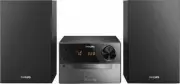
4 EN 2 Your micro music system Congratulations on your purchase, and welcome to Philips! To fully benefit from the suppor t that Philips offers, register your product at www.philips.com/welcome. If you contact the Consumer Care, you will be asked for the model and serial number of this apparatus. Th...
Page 9 - Before use; Connect the FM antenna; Connect power; Install the remote control
7 EN 3 Before use Connect the FM antenna Note • For optimal reception, fully extend the antenna and adjust its position, or connect an outdoor antenna. • This product does not suppor t AM (amplitude modulation) radio reception. Connect the FM antenna to the product. Connect power Note • Before you c...
Page 10 - Get started; Turn on; Switch modes; Set the clock; Select a source
8 EN 4 Get started Caution • Use of controls or adjustments or performance of procedures other than herein may result in hazardous radiation exposure or other unsafe operation. Always follow the instructions in this chapter in sequence. Turn on Press . » This product switches to the last selected so...
Page 11 - Play from hard; Play a disc; Play from a USB storage
9 EN • : the disc in the disc compar tment • : .mp3 files stored on the connected USB storage device • : the FM tuner You can also press source buttons on the remote control to select a source. • FM / CD : the FM tuner or the disc in the disc compar tment • DOCK : the playlist on the connected iPhon...
Page 12 - Control play; Program tracks
10 EN Note • WOOX Innovations does not guarantee compatibility with all USB storage devices. • NTFS (New Technology File System) file system is not suppor ted. 1 Connect the USB storage device to the socket. 2 Press USB or SOURCE to switch the source to . » Play star ts automatically. If play does n...
Page 13 - Use the dock; models
11 EN 6 Use the dock You can enjoy audio from iPod/iPhone/iPad through this product. Note • There is no audio output from the headphone socket of the connected iPod/iPhone/iPad. Compatible iPod/iPhone/iPad models This product suppor ts the following iPod, iPhone, and iPad models. • iPod nano (2nd, 3...
Page 16 - Adjust sound; Select a preset sound effect; Other features; Use the alarm timer
14 EN 8 Adjust sound The following operations are applicable to all suppor ted media. Select a preset sound effect • Press SOUND repeatedly to select a preset sound effect. • DSC1 , DSC2 , DSC3 , DSC4 , and DSC5 Adjust volume level • On the remote control, press VOL +/- repeatedly. • On the main uni...
Page 17 - Stop an alarm; Use the sleep timer
15 EN Deactivate/Re-activate the alarm timer In standby mode, press SLEEP / TIMER . » If TIMER disappears, the alarm timer is deactivated. » If TIMER is displayed, the alarm timer is activated. Stop an alarm When an alarm rings, press or SLEEP / TIMER to stop it. Note • If you do not stop an alarm, ...
Page 18 - Charge your USB device; information; General information
16 EN Charge your USB device You can charge your USB device, for example, smar t phone, with this product. Note • The output voltage through the USB socket is 5 V with output currency 0.5 A. • WOOX Innovations does not guarantee the compatibility with all USB devices. Connect your USB device to this...
Page 19 - USB playability information; Supported MP3 disc formats
17 EN Disc Laser type Semiconductor Disc diameter 12 cm Suppor t discs CD-DA, CD-R, CD-RW, MP3-CD Audio DAC 24 Bits, 44.1 kHz Total harmonic distor tion < 1.5% (1 kHz) Frequency response 60 Hz - 16 kHz (44.1 kHz) S/N Ratio > 55 dB Tuner (FM) Tuning range 87.5 - 108 MHz Tuning grid 50 kHz Sensi...
Page 20 - 1 Troubleshooting
18 EN • Do not use solvents such as benzene, thinner, commercially available cleaners, or antistatic spray intended for analogue records. Clean the disc lens • After prolonged use, dir t or dust may accumulate at the disc lens. To ensure good play quality, clean the disc lens with Philips CD lens cl...
Page 21 - Compliance; Care of the environment
19 EN Problem Solution Remote control does not work. Before you press any function button, select the correct source with the remote control instead of the main unit.Reduce the distance between the remote control and the main unit.Insert the battery with its polarity (+/– signs) aligned as indicated...
Page 22 - Trademark notice; Copyright
20 EN When this crossed-out wheeled bin symbol is attached to a product it means that the product is covered by the European Directive 2002/96/ EC. Please inform yourself about the local separate collection system for electrical and electronic products. Please act according to your local rules and d...