Page 3 - Table of contents
2 Table of contents 1. Getting Started ................................. 4 Insert the SIM card .......................................... 4Switch on the phone ....................................... 5Charge the battery .......................................... 6 2. Calling ............................
Page 5 - Getting Started; Insert the SIM card; Remove the back cover
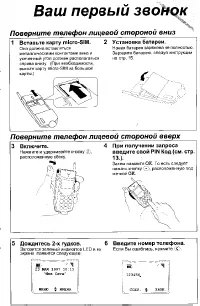
4 Getting Started 1. Getting Started Please read the safety instructions in the “Precautions”section before using your phone. To use your phone, you must insert a valid SIM cardsupplied by your GSM operator or retailer. The SIMcard contains your subscription information, yourmobile phone number and ...
Page 6 - Switch on the phone
Getting Started 5 Insert the SIM card Make sure the clipped corner of the SIM card is facingthe correct direction and the metallic contacts facingdownwards. Slide the SIM card into the SIM card slotuntil it stops. Replace the battery Slide the battery back to its slot, with the gold contactsfacing d...
Page 7 - Charge the battery
6 Getting Started Charge the battery Your phone is powered by a rechargeable battery. Anew battery is partially charged and an alarm will warnyou when the battery level is low. If the battery isempty, it needs to be charged for 2 or 3 minutesbefore the battery symbol indicators flash. Plug thecharge...
Page 8 - Calling; Make a call; From idle screen; Using the phonebook; Make an Emergency call; Options during a call
Calling 7 2. Calling Make a call From idle screen 1. In idle mode, enter the phone number using thekeypad. To correct an error, press R . 2. Press ( to dial the number. 3. Press ) to hang up. To make an international call, long press 0 to insert the international prefix “+”. Using the phonebook 1. P...
Page 9 - Adjust earpiece volume; Make a second call
8 Calling Adjust earpiece volume During a call, press + or - navigation key to increase or decrease the volume. Handle multiple calls You can handle two or more calls at the same time, aswell as make conference calls using your phone. Theavailability of this feature is dependent on yournetwork opera...
Page 10 - Text or number Entry; Input Method; Function keys; Key
Text or number Entry 9 3. Text or number Entry Input Method Your phone supports 3 types of input methods:Multitap ABC/Abc/abcNumericSymbols During text editing, short press # to switch between multitap and numeric mode. The status bar at the topof the screen will display the current input method. , ...
Page 11 - Numeric input
10 Text or number Entry Numeric input 1. Short press # to toggle between input method and to enter the numeric mode. 2. To delete a number, press R . Symbol Input Press * to enter punctuation or symbols. Use the navigation keys to select the desired punctuation orsymbol and press L OK to enter it. 4...
Page 12 - Messaging; SMS; New SMS
Messaging 11 4. Messaging SMS This menu allows you to send text messages usingShort Messaging Service (SMS), as well as manage themessages you have sent and received. New SMS To compose and send an SMS, select New SMS . When you finish writing your message, press L Options access the next options: W...
Page 13 - Drafts
12 Messaging When you are in the Outbox list, select a message andpress L OK to read it. Then press L Options to access the following options: Drafts This menu lists all SMS you have saved but not sent.When you are in the Drafts list, select a message andpress L OK to read it. Then press L Options t...
Page 14 - Memory status
Messaging 13 Memory status Displays the memory status of the messages saved inthe SIM card and the phone. Autosave SMS When On , this option will automatically save the SMS sentunder Outbox. Delivery Report When On , this option will notify you via SMS whether your recipienthas received your SMS. Th...
Page 15 - Contacts; Create new contacts
14 Contacts 5. Contacts Contacts are stored in one of the two availablephonebooks: SIM phonebook (located on your SIMcard, by which the number of entries you can storedepends on the card capacity) or the SmartPhonebook (located on your phone, which allows youto store up to 100 names). When adding ne...
Page 16 - Special Numbers; My Numbers; Service Dialing Number; Advanced; Flash Dial; Setting a Speed Dial contact
Contacts 15 Special Numbers My Numbers The option My Numbers should contain your own phone number. If not, we recommend that you enteryour own mobile phone number and other relevantinformation. Voice mail This menu allows you to view voice mail servernumber and listen to voice mail. When you receive...
Page 17 - Default Contact List; Memory Status
16 Contacts Default Contact List Select SIM Only or Phone Only as the default memory. If you select All Contacts , all of your contacts stored in your SIM and phone will be displayed under View Contacts . Select SIM or Phone as default memory. Copy to phone/SIM You can copy all the contacts in your ...
Page 18 - Calls; Incoming calls
Calls 17 6. Calls Your mobile phone can provide you with a list ofoutgoing and incoming calls, attempts at auto re-dialling, as well as call details. The different types ofcalls ( Incoming calls , Outgoing calls , Missed calls and Call Duration ) are displayed in chronological order with the most re...
Page 19 - Tools; Alarm; Calculator
18 Tools 7. Tools This menu contains features and options designed foryour personal use. Alarm Your mobile phone has a built-in alarm clock. Youcan set up to three separate alarms. To set an alarm,follow the steps below. 1. Select an alarm and press L OK . 2. Select the status and period: Off / Once...
Page 20 - Creating a new event; View events
Tools 19 Creating a new event 1. Select in the calendar the date of the event youwant to create. 2. Select L Options > Add new event . 3. Enter the subject and the location. Press L Edit and L OK to confirm 4. Enter the starting and ending time of the eventand set a frequency. View events To view...
Page 21 - Settings; General; Language; PIN Protection
20 Settings 8. Settings This menu allows you to change the settingsassociated with each available option in your phone. General Language Allows you to select a language for all the menu texts.Press + or - to browse the list of languages and press L OK . Time and Date Allows you to set the time and d...
Page 22 - Phone Lock; Keypad Lock; Display; Idle Display
Settings 21 Phone Lock Allows you to set the phone protection to prevent theunauthorized use of your phone. When On , you will be asked to select Verify when Power-On or Verify with New SIM . Then you will be asked to enter the phone lock password. The default phone lock password is 0000. Keypad Loc...
Page 23 - Sounds; Call Divert; Call barring
22 Settings Sounds This menu allows you to set the ring of the incomingcall, new message and so on. It also allows you to setthe ringtone, volume of the ring and the alert type sothat your phone fits all kinds of environments. Select Sounds to access the following options: Call Setup Call Divert Thi...
Page 24 - Caller ID; Network Setup
Settings 23 Caller ID Allows you to show Hide Identity or Show Identity (i.e. your phone number to your correspondent). You canalso select to have this option Set by Network . Network Setup This menu allows you to select the service network.You can select: You can select a network other than your ho...
Page 25 - STK Applications
24 STK Applications 9. STK Applications The structure and name under this menu areconfigured by your network operator and stored in theSIM card. The services differ according to the STKprovider. This menu provides value-added services which differaccording to the operator. Please check with youroper...
Page 27 - Precautions; Radio Waves
26 Precautions Radio Waves Your cellular mobile phone is a low power radio transmitter and receiver . When it is operating, it sends and receives radio waves.The radio waves carry your voice or data signal to a base station that is connected to thetelephone network. The network controls the powerat ...
Page 29 - Battery information; Your mobile phone and your car
28 For the optimal and satisfactory operation ofthe phone you are recommended to use thephone in the normal operating position(when not using in hands-free mode or witha hands-free accessory). • Do not expose your phone to extreme temperatures.• Treat the phone with care. Any misuse will void the In...
Page 30 - Disposal of your old product
29 • Give your full attention to driving. Pull off the road and park before using the phone. • Respect the local regulations in countries where you drive and use your GSM phone. • If you want to use your phone in a vehicle, install the hands-free car kit which is designed for thatpurpose. • Ensure t...
Page 32 - Troubleshooting
31 Troubleshooting The phone does not switch on Remove/reinstall the battery. Then charge the phoneuntil the battery icon stops scrolling. Unplug fromcharger and try to switch the mobile on. Your phone doesn’t return to the idle screen Long press the hangup key or switch off the phone,check that the...
Page 34 - Charger
33 Philips Authentic Accessories Some accessories, such as a battery and a charger, areincluded as standard in the package of your mobilephone. Additional accessories may also be provided orsold separately. Package contents may therefore vary. To maximise the performance of your Philips mobilephone ...
Page 35 - SAR Information - International
34 SAR Information - International (ICNIRP) SAR Information - International (ICNIRP) THIS MOBILE PHONE MEETS THE INTERNATIONAL RECOMMENDATIONS FOR EXPOSURE TO RADIO WAVES Your mobile phone is a radio transmitter and receiver. It is designed and manufactured not to exceed the limits forexposure to ra...
Page 36 - Limited warranty
35 Limited warranty 1. What Does This Limited Warranty Cover? Philips warrants to the original retail purchaser(“Consumer” or “You”) that this Philips cellularproduct and all accessories originally provided byPhilips in the sales package (“Product”) are freefrom defects in materials, design andworkm...