Page 2 - COOK PROCESSOR INSTRUCTIONS
2 COOK PROCESSOR INSTRUCTIONS W10832404A_EN_v01.indd 2 12/18/15 9:33 AM
Page 3 - English; TABLE OF CONTENTS
3 English COOK PROCESSOR INSTRUCTIONS COOK PROCESSOR SAFETY Important safeguards .......................................................................................... 4 Electrical requirements ...................................................................................... 6 Electrical eq...
Page 4 - IMPORTANT SAFEGUARDS; When using electrical appliances, basic safety precautions
4 COOK PROCESSOR SAFETY COOK PROCESSOR SAFETY IMPORTANT SAFEGUARDS When using electrical appliances, basic safety precautions should always be followed to reduce the risk of fire, electric shock, and/or injury to persons including the following:1. Read all instructions. 2. To protect against risk of...
Page 5 - COOK PROCESSOR SAFETY; SAVE THESE INSTRUCTIONS
5 English COOK PROCESSOR SAFETY COOK PROCESSOR SAFETY 9. Appliances can be used by persons with reduced physical, sensory or mental capabilities or lack of experience and knowledge if they have been given supervision or instruction concerning use of the appliance in a safe way and if they understand...
Page 6 - Electrical requirements; NOTE: This product has a grounded; Electrical equipment waste disposal
6 COOK PROCESSOR SAFETY PARTS AND FEATURES Electrical requirements Voltage: 220–240 VACFrequency: 50-60 HzWattage: 1050 Watts Motor: 450 Watts NOTE: This product has a grounded (earthed) plug. To reduce the risk of electrical shock, this plug will fit in an outlet only one way. If the plug does not ...
Page 7 - Parts and features; PARTS AND FEATURES
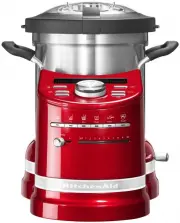
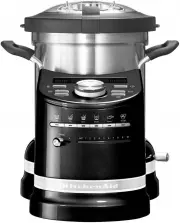
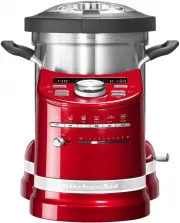
7 English COOK PROCESSOR SAFETY Parts and features 4.5 L stainless steel cooking bowl Control panel PARTS AND FEATURES Removable lid Removable measuring cup Speed indicator lights On/Off (I/O) switch (not shown) Automatic Cooking Mode buttons Bowl release lever Speed selector W10832404A_EN_v01.indd ...
Page 8 - Accessories; Steamer Capacity; Control panel; Stew
8 Accessories Upper steamer basket Lower steamer basket PARTS AND FEATURES PARTS AND FEATURES Steamer lid Inner steamer basket Steamer Capacity Basket Capacity (examples) Upper 3-4 small fish Lower 500 g chopped or sliced vegetables3-4 large potatoes or 6-8 small potatoes Inner 6-8 medium-sized shri...
Page 10 - ICONS EXPLORATION; ICONS EXPLORATION; Fry; Automatic cooking modes
10 COOKING MODES GUIDE COOKING MODES GUIDE Your Cook Processor features 6 automatic cooking modes, each with specialty modes, designed for a variety of cooking tasks. The included recipe book features a selection of recipes optimized to work with these cooking modes.Refer to the provided cookbook fo...
Page 11 - COOKING MODES GUIDE; Steam; Puree; Dough
11 English COOKING MODES GUIDE COOKING MODES GUIDE Temperatures, times, and speeds for multistep cooking modes are indicated with an g to show the value for each step. Cooking Mode Temp (°C) Time (minutes) Speed Recipes (see included recipe book for details) fry stew boil steam puree dough making Mc...
Page 12 - Timer option; Turn the dial clockwise to increase the; ADDITIONAL FUNCTIONS
12 AUTOMATIC COOKING MODES ADDITIONAL FUNCTIONS Timer option The timer can be used as a cooking timer, or as a kitchen timer. For use with cooking modes, see Manual Cooking section.To use as a kitchen timer:1. Press (time). The time indicator will blink 00:00. 2. Turn the dial clockwise to increase ...
Page 13 - AUTOMATIC COOKING MODES; Quick Stir; Mini Bowl and Mini MultiBlade
13 English AUTOMATIC COOKING MODES ADDITIONAL FUNCTIONS Quick Stir Pulse Press PULSE to run the installed attachment at high speed. Release to stop. The timer will count up as long as PULSE is held down.IMPORTANT: To avoid splashing or excess vibration, do not use PULSE with StirAssist. Always follo...
Page 14 - Preparing the Cook Processor for use; Be sure to provide enough room above; Measuring Cup; HOT SURFACE! Touch only the centre grip
14 GETTING STARTED GETTING STARTED Preparing the Cook Processor for use 1. Place the Cook Processor on a dry, flat, level surface such as a countertop or table. 2. Be sure to provide enough room above the Cook Processor to open lid and remove bowl. 3. Remove all packaging materials, if present.4. Wa...
Page 15 - GETTING STARTED; Using the Cook Processor
15 English GETTING STARTED GETTING STARTED Using the Cook Processor 1 Plug into an earthed (grounded) outlet. The Cook Processor should be the only appliance operating on the circuit. The Cook Processor is now ready to use. 2 Turn the main power switch to I (ON). ADDITIONAL FUNCTIONS W10832404A_EN_v...
Page 16 - START UP AND CONTROL SETUP; Changing between degrees Fahrenheit and Celsius; Welcome screen; USING AUTOMATIC COOKING MODES
16 START UP AND CONTROL SETUP Changing between degrees Fahrenheit and Celsius The default setting for the Cook Processor temperature is degrees Celsius. To change between Celsius (°C) and Fahrenheit (°F): 1. Press and hold the (Temperature) button for 3 seconds to switch between Celsius and Fahrenhe...
Page 18 - Keep Warm
18 USING AUTOMATIC COOKING MODES Pulse ˚C ˚F H M S Quick Stir Stew P7:Step 2 8 Once the first step is complete, a tone will sound and the settings for the next step will blink in the display. Pulse ˚C ˚F H M S Quick Stir Stew P7 Pulse ˚C ˚F H M S Quick Stir ˚C ˚F H M S Stew P7:Step 1 7 Press (Start)...
Page 19 - WARNING! Hot surface during
19 English USING AUTOMATIC COOKING MODES USING AUTOMATIC COOKING MODES 12 Using oven mitts or pot holders, release the locking lever, then unlatch and open the lid. Remove any accessory before removing the bowl and serving. 13 Turn the main power switch to O (OFF). IMPORTANT: To avoid splashing, alw...
Page 20 - Using the round internal steamer basket; USING STEAMER BASKETS
20 1 Place the bowl on the base, making sure it locks into place. If the bowl is not locked in place, UNLOCKED will show in the display. 2 Open the lid of the bowl and remove any food processing attachments, if installed. The Cook Processor includes two different types of steamer baskets that can be...
Page 21 - Using the upper and lower steamer baskets
21 English USING STEAMER BASKETS USING STEAMER BASKETS 1 Place the bowl on the base, making sure it locks into place. If the bowl is not locked in place, UNLOCKED will show in the display. 2 Remove the lid by opening it, then disconnecting it from the hinge. Using the upper and lower steamer baskets...
Page 22 - Steamer basket cooking recommendations; USING MANUAL COOKING MODES
22 Accessory Food Preparation Max. Quantity Operating time Lower steamer basketAdd 700 ml of water in the bowl and select STEAM P1 function VEGETABLE Carrot Slices of 0.5 cm 400 g 15 min Sticks of 5 cm 400 g 17 min Potatoes Cubes or segments 1 kg 25 min Whole potato of ± 150 g 8 units 35 min Green b...
Page 23 - Accessory operation guide
23 English USING STEAMER BASKETS USING MANUAL COOKING MODES Refer to the guide below for recommended speeds and quantities for accessories when using manual cooking modes. IMPORTANT: To avoid splashing or excess vibration, always follow recommended speeds shown on the StirAssist and Egg Whip. Access...
Page 24 - Cooking with manual settings
24 USING MANUAL COOKING MODES Cooking with manual settings Pulse ˚C ˚F H M S Quick Stir Pulse ˚C ˚F H M S Quick Stir hold 3 sec C/F 6 Press (Temperature) and use the dial to set the desired cooking temperature. 1 Place the bowl on the base, making sure it locks into place. 2 OPTIONAL: Insert the des...
Page 26 - CARE AND CLEANING
26 9 When the timer reaches 00:00, a tone will sound and the Cook Processor will turn off. Using oven mitts or pot holders, release the locking lever, then unlatch and open the lid. Remove any accessory before removing the bowl and serving. 10 Turn the main power switch to O (OFF). USING MANUAL COOK...
Page 27 - Cleaning your Cook Processor; Lid and Inner Lid Seal:
27 English USING MANUAL COOKING MODES CARE AND CLEANING Cleaning your Cook Processor The bowl and lid are dishwasher safe, however hand washing is recommended.Unplug your Cook Processor from the wall socket before cleaning.• Allow Cook Processor and accessories to cool completely before cleaning. Ex...
Page 28 - Storing accessories; To reinstall the inner lid seal:; TROUBLESHOOTING
28 2 The Storage Case nests with the upper and lower Steamer Baskets and steamer lid. 1 2 3 4 1 The Egg Whip (1), StirAssist (2), Dough Blade (3), and MultiBlade (4) fit into the storage case, as shown. Storing accessories CARE AND CLEANING To reinstall the inner lid seal: 1 Insert the front edge un...
Page 29 - If your Cook Processor malfunctions or fails to operate
29 English CARE AND CLEANING • Is the Cook Processor plugged into a grounded outlet? Plug the Cook Processor into a grounded outlet. • Is the fuse in the circuit to the Cook Processor in working order? If you have a circuit breaker box, make sure the circuit is closed. Try unplugging the Cook Proces...