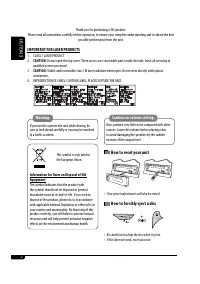
Page 2 - How to reset your unit; How to forcibly eject a disc; IMPORTANT FOR LASER PRODUCTS
2 ENGLISH Caution on volume setting: Discs produce very little noise compared with other sources. Lower the volume before playing a disc to avoid damaging the speakers by the sudden increase of the output level. How to reset your unit • Your preset adjustments will also be erased. How to forcibly ej...
Page 3 - ENGLISH; How to use the M MODE button; Detaching the control panel; CONTENTS; Control panel —
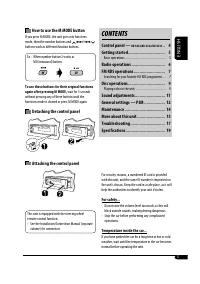
ENGLISH 3 How to use the M MODE button If you press M MODE, the unit goes into functions mode, then the number buttons and ¢ / 4 buttons work as different function buttons. Ex.: When number button 2 works as MO (monaural) button. To use these buttons for their original functions again after pressing...
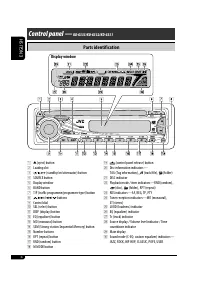
Page 4 - Parts identification; Display window
4 ENGLISH o (control panel release) button ; Disc information indicators— TAG (Tag information), (track/file), (folder) a DISC indicator s Playback mode / item indicators—RND (random), (disc), (folder), RPT (repeat) d RDS indicators—AF, REG, TP, PTY f Tuner reception indicators—MO (monaural), ST (st...
Page 5 - Basic settings; Canceling the display demonstrations; Getting started; Basic operations; To turn off the power
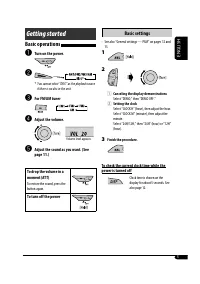
ENGLISH 5 Basic settings • See also “General settings — PSM” on pages 12 and 13. 1 2 1 Canceling the display demonstrations Select “DEMO,” then “DEMO OFF.” 2 Setting the clock Select “CLOCK H” (hour), then adjust the hour. Select “CLOCK M” (minute), then adjust the minute. Select “24H/12H,” then “24...
Page 6 - To restore the stereo effect,; Storing stations in memory; FM station automatic presetting —; Select the FM band (FM1 – FM3) you want to; Manual presetting; Radio operations; Start searching for a station.; Select a desired station frequency.
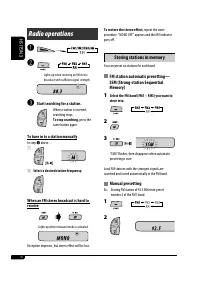
6 ENGLISH To restore the stereo effect, repeat the same procedure. “MONO OFF” appears and the MO indicator goes off. Storing stations in memory You can preset six stations for each band. FM station automatic presetting — SSM (Strong-station Sequential Memory) 1 Select the FM band (FM1 – FM3) you wan...
Page 7 - Start searching for your favorite; Storing your favorite programme; Listening to a preset station; FM RDS operations; What you can do with RDS; Frequency
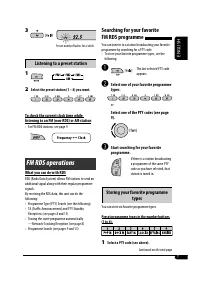
7 ENGLISH Searching for your favorite FM RDS programme You can tune in to a station broadcasting your favorite programme by searching for a PTY code.• To store your favorite programme types, see the following. ~ The last selected PTY code appears. Ÿ Select one of your favorite programme types. or Se...
Page 8 - PTY Standby Reception; Tracing the same programme—; TA Standby Reception
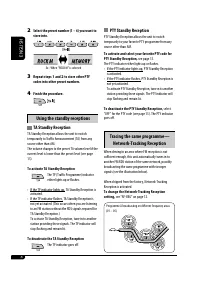
8 ENGLISH PTY Standby Reception PTY Standby Reception allows the unit to switch temporarily to your favorite PTY programme from any source other than AM. To activate and select your favorite PTY code for PTY Standby Reception, see page 13. The PTY indicator either lights up or flashes.• If the PTY i...
Page 9 - Automatic station selection—; PTY codes; Disc operations; Playing a disc in the unit; Station
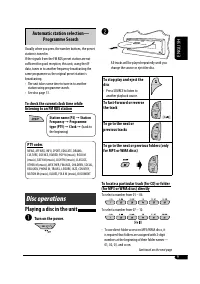
9 ENGLISH Automatic station selection— Programme Search Usually when you press the number buttons, the preset station is tuned in.If the signals from the FM RDS preset station are not sufficient for good reception, this unit, using the AF data, tunes in to another frequency broadcasting the same pro...
Page 10 - Prohibiting disc ejection; Changing the display information; While playing an audio CD or a CD; Selecting the playback modes
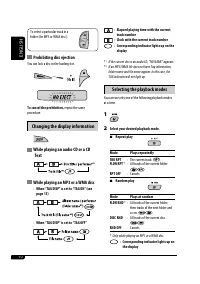
10 ENGLISH To select a particular track in a folder (for MP3 or WMA disc): Prohibiting disc ejection You can lock a disc in the loading slot. To cancel the prohibition, repeat the same procedure. Changing the display information While playing an audio CD or a CD Text While playing an MP3 or a WMA di...
Page 11 - Sound adjustments; Adjusting the sound
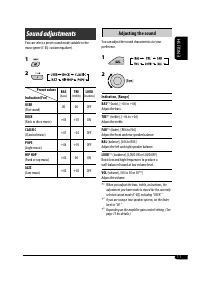
11 ENGLISH Sound adjustments You can select a preset sound mode suitable to the music genre (C-EQ: custom equalizer). 1 2 Indication (For) BAS (bass) TRE (treble) LOUD (loudness) USER (Flat sound) 00 00 OFF ROCK (Rock or disco music) +03 +01 ON CLASSIC (Classical music) +01 –02 OFF POPS (Light music...
Page 12 - General settings — PSM
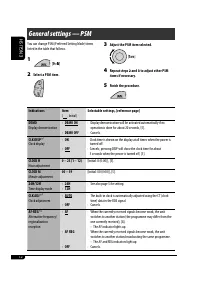
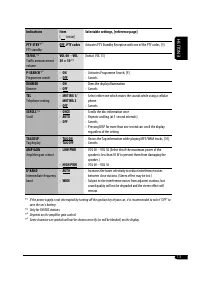
12 ENGLISH Indications Item ( : Initial) Selectable settings, [reference page] DEMO Display demonstration • DEMO ON • DEMO OFF : Display demonstration will be activated automatically if no operation is done for about 20 seconds, [5]. : Cancels. CLK DISP * 1 Clock display • ON • OFF : Clock time is s...
Page 14 - Maintenance; How to clean the connectors; When storing a disc into its case,; To keep discs clean; Do not use the following discs:
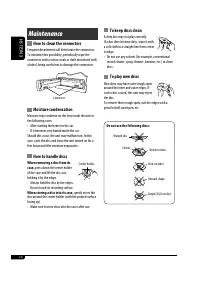
14 ENGLISH Maintenance How to clean the connectors Frequent detachment will deteriorate the connectors.To minimize this possibility, periodically wipe the connectors with a cotton swab or cloth moistened with alcohol, being careful not to damage the connectors. Moisture condensation Moisture may con...
Page 15 - More about this unit
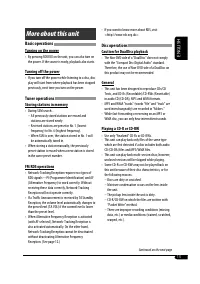
ENGLISH 15 • If you want to know more about RDS, visit <http://www.rds.org.uk>. Disc operations Caution for DualDisc playback • The Non-DVD side of a “DualDisc” does not comply with the “Compact Disc Digital Audio” standard. Therefore, the use of Non-DVD side of a DualDisc on this product may ...
Page 16 - General settings—PSM
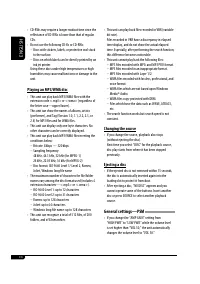
16 ENGLISH • CD-RWs may require a longer readout time since the reflectance of CD-RWs is lower than that of regular CDs. • Do not use the following CD-Rs or CD-RWs: – Discs with stickers, labels, or protective seal stuck to the surface. – Discs on which labels can be directly printed by an ink jet p...
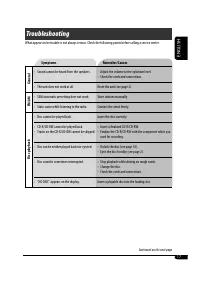
Page 17 - Symptoms; Troubleshooting
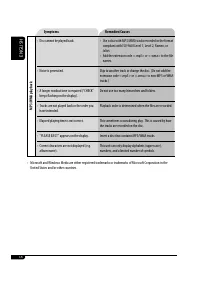
ENGLISH 17 Symptoms Remedies/Causes General • Sound cannot be heard from the speakers. • Adjust the volume to the optimum level.• Check the cords and connections. • The unit does not work at all. Reset the unit (see page 2). FM/AM • SSM automatic presetting does not work. Store stations manually. • ...
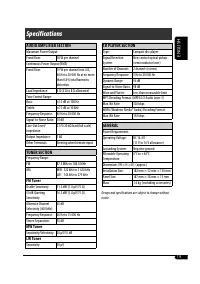
Page 19 - Specifications; AUDIO AMPLIFIER SECTION; FM Tuner; CD PLAYER SECTION
ENGLISH 19 Specifications AUDIO AMPLIFIER SECTION Maximum Power Output: Front/Rear: 50 W per channel Continuous Power Output (RMS): Front/Rear: 19 W per channel into 4 Ω, 40 Hz to 20 000 Hz at no more than 0.8% total harmonic distortion. Load Impedance: 4 Ω (4 Ω to 8 Ω allowance) Tone Control Range:...
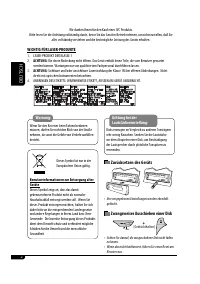
Page 20 - DEUTSCH; Zurücksetzen des Geräts; WICHTIG FÜR LASER-PRODUKTE
2 DEUTSCH Achtung bei der Lautstärkeeinstellung: Disks erzeugen im Vergleich zu anderen Tonträgern sehr wenig Rauschen. Senken Sie die Lautstärke vor dem Abspielen einer Disk, um Beschädigung der Lautsprecher durch plötzliche Tonspitzen zu vermeiden. Zurücksetzen des Geräts • Ihre vorgegebenen Einst...
Page 21 - Wie Sie die M MODE-Taste verwenden; Abnehmen des Bedienfelds; INHALT; Bedienfeld —
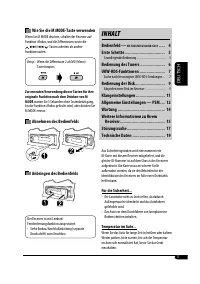
DEUTSCH 3 Wie Sie die M MODE-Taste verwenden Wenn Sie M MODE drücken, schaltet der Receiver auf Funktion-Modus, und die Zifferntasten sowie die ¢ / 4 -Tasten arbeiten als andere Funktionstasten. Beisp.: Wenn die Zifferntaste 2 als MO (Mono)- Taste fungiert. Zur erneuten Verwendung dieser Tasten für ...
Page 22 - Beschreibung der Teile; Displayfenster
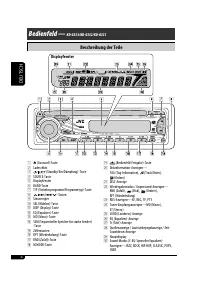
4 DEUTSCH o (Bedienfeld-Freigabe)-Taste ; Diskinformation-Anzeigen— TAG (Tag-Information), (Track/Datei), (Ordner) a DISC-Anzeige s Wiedergabemodus / Gegenstand-Anzeigen— RND (Zufall), (Disk), (Ordner), RPT (Wiederholung) d RDS-Anzeigen—AF, REG, TP, PTY f Tuner-Empfangsanzeigen—MO (Mono), ST (Stereo...
Page 23 - Grundlegende Einstellungen; Abbrechen der Display-Demonstrationen; Einstellung der Uhr; Beenden Sie den Vorgang.; Erste Schritte; Grundlegende Bedienung; Stellen Sie die Lautstärke ein.
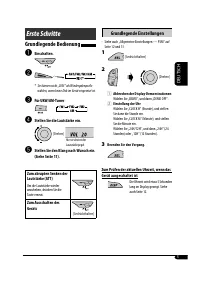
DEUTSCH 5 Grundlegende Einstellungen • Siehe auch „Allgemeine Einstellungen — PSM“ auf Seite 12 und 13. 1 2 1 Abbrechen der Display-Demonstrationen Wählen Sie „DEMO“, und dann „DEMO OFF“. 2 Einstellung der Uhr Wählen Sie „CLOCK H“ (Stunde), und stellen Sie dann die Stunde ein. Wählen Sie „CLOCK M“ (...
Page 24 - Zum Wiederherstellen des Stereoeffekts,; Speichern von Sendern; Automatische Voreinstellung von; Wählen Sie den UKW-Frequenzbereich (FM1; Manuelle Voreinstellung; Bedienung des Tuners; Starten Sie den Sendersuchlauf.; Um den Suchlauf zu stoppen,; So stellen Sie manuell Sender ein; Wählen Sie eine gewünschte Senderfrequenz.
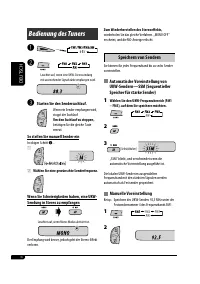
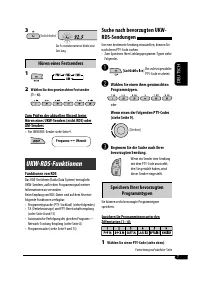
6 DEUTSCH Zum Wiederherstellen des Stereoeffekts, wiederholen Sie das gleiche Verfahren. „MONO OFF“ erscheint, und die MO-Anzeige erlischt. Speichern von Sendern Sie können für jedes Frequenzband bis zu sechs Sender voreinstellen. Automatische Voreinstellung von UKW-Sendern—SSM (Sequentieller Speich...
Page 25 - Beginnen Sie die Suche nach Ihrer; Speichern Ihrer bevorzugten; Wählen Sie den gewünschten Festsender; Funktionen von RDS; Frequenz
7 DEUTSCH [Gedrückthalten] Suche nach bevorzugten UKW-RDS-Sendungen Um eine bestimmte Sendung einzustellen, können Sie nach deren PTY-Code suchen.• Zum Speichern Ihrer Lieblingsprogramm-Typen siehe Folgendes. ~ Der zuletzt gewählte PTY-Code erscheint. Ÿ Wählen Sie einen ihres gewünschten Programmtyp...
Page 26 - Verfolgen des gleichen Programms
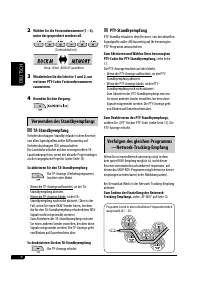
8 DEUTSCH PTY-Standbyempfang PTY-Standby erlaubt es dem Receiver, von der aktuellen Signalquelle außer AM kurzzeitig auf Ihr bevorzugtes PTY-Programm umzuschalten. Zum Aktivieren und Wählen Ihres bevorzugten PTY-Codes für PTY-Standbyempfang, siehe Seite 13.Die PTY-Anzeige leuchtet auf oder blinkt.• ...
Page 27 - Automatische Senderauswahl; Bedienung der Disk; Abspielen einer Disk im Receiver; Senderfrequenz
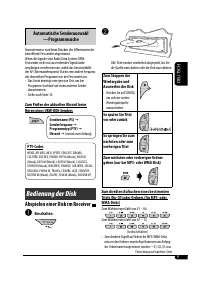
9 DEUTSCH Automatische Senderauswahl —Programmsuche Normalerweise wird beim Drücken der Zifferntasten der betreffende Festsender abgestimmt.Wenn die Signale vom Radio Data System-UKW-Festsender nicht mit ausreichender Signalstärke empfangen werden können, wählt das Gerät mithilfe der AF (Alternativf...
Page 28 - Auswurfsperre; Ändern der Displayinformation; Beim Einsetzen einer Audio-CD oder; Auswählen von Wiedergabemodi
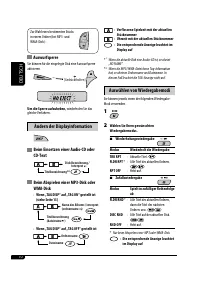
10 DEUTSCH Zur Wahl eines bestimmten Stücks in einem Ordner (bei MP3- und WMA-Disk): Auswurfsperre Sie können für die eingelegte Disk eine Auswurfsperre aktivieren. Um die Sperre aufzuheben, wiederholen Sie das gleiche Verfahren. Ändern der Displayinformation Beim Einsetzen einer Audio-CD oder CD-Te...
Page 29 - Klangeinstellungen; Einstellen des Klangs
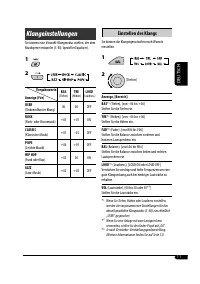
11 DEUTSCH Klangeinstellungen Sie können eine Vorwahl-Klangmodus wählen, der dem Musikgenre entspricht (C-EQ: Spezieller Equalizer). 1 2 Anzeige (Für) BAS (Tiefen) TRE (Höhen) LOUD (Loudness) USER (Unbeeinflusster Klang) 00 00 OFF ROCK (Rock- oder Discomusik) +03 +01 ON CLASSIC (Klassische Musik) +0...
Page 30 - Allgemeine Einstellungen — PSM
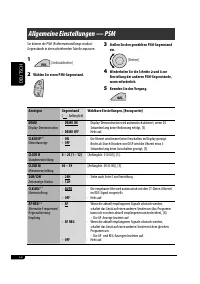
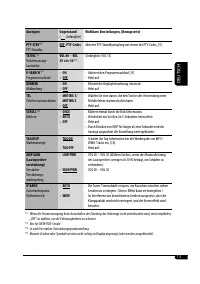
12 DEUTSCH Anzeigen Gegenstand ( : Anfänglich) Wählbare Einstellungen, [Bezugsseite] DEMO Display-Demonstration • DEMO ON • DEMO OFF : Display-Demonstration wird automatisch aktiviert, wenn 20 Sekunden lang keine Bedienung erfolgt, [5]. : Hebt auf. CLK DISP * 1 Uhrzeitanzeige • ON • OFF : Die Uhrzei...
Page 32 - Wartung; Reinigen der Anschlüsse; Beim Einsetzen einer Disk in ihre Hülle die Disk; Sauberhalten der Disks
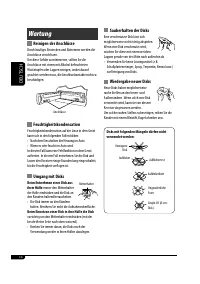
14 DEUTSCH Wartung Reinigen der Anschlüsse Durch häufiges Einstecken und Abtrennen werden die Anschlüsse verschlissen.Um diese Gefahr zu minimieren, sollten Sie die Anschlüsse mit einem mit Alkohol befeuchteten Wattetupfer oder Lappen reinigen, wobei darauf geachtet werden muss, die Anschlusskontakt...
Page 33 - Achtung bei DualDisc-Wiedergabe; Einschalten
DEUTSCH 15 • Wenn Sie mehr über RDS erfahren wollen, besuchen Sie <http://www.rds.org.uk>. Bedienung der Disk Achtung bei DualDisc-Wiedergabe • Die Nicht-DVD-Seite einer „DualDisc“ entspricht nicht dem „Compact Disc Digital Audio“-Standard. Deshalb wird die Verwendung der Nicht-DVD-Seite einer...
Page 34 - Allgemeine Einstellungen—PSM
16 DEUTSCH • CD-RWs können eine längere Auslesezeit erfordern, da die Reflektanz von CD-RWs niedriger als die normaler CDs ist. • Verwenden Sie nicht die folgenden CD-Rs oder CD-RWs: – Disks mit Aufklebern, Etiketten oder Schutzsiegeln auf der Oberfläche. – Disks, auf denen Beschriftungen direkt mit...
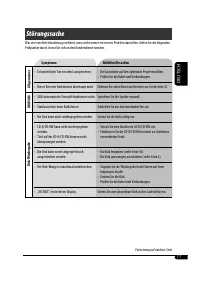
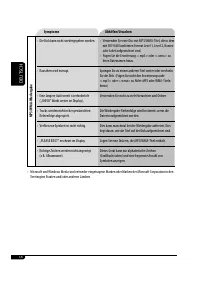
Page 35 - Symptome; Störungssuche
DEUTSCH 17 Symptome Abhilfen/Ursachen Allgemeines • Es kommt kein Ton von den Lautsprechern. • Die Lautstärke auf den optimalen Pegel einstellen.• Prüfen Sie die Kabel und Verbindungen. • Dieser Receiver funktioniert überhaupt nicht. Nehmen Sie einen Reset am Receiver vor (siehe Seite 2). UKW/AM • S...
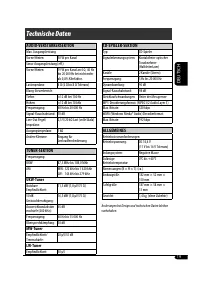
Page 37 - Technische Daten; AUDIO-VERSTÄRKERSEKTION; ALLGEMEINES
DEUTSCH 19 Technische Daten AUDIO-VERSTÄRKERSEKTION Max. Ausgangsleistung:Vorne/Hinten: 50 W pro Kanal Sinus-Ausgangsleistung (eff.):Vorne/Hinten: 19 W pro Kanal an 4 Ω, 40 Hz bis 20 000 Hz bei nicht mehr als 0,8% Klirrfaktor. Lastimpedanz: 4 Ω (4 Ω bis 8 Ω Toleranz) Klang-Steuerbereich:Tiefen: ±12 ...
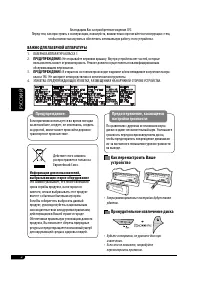
Page 38 - РУCCKИЙ; Как перенастроить Ваше; ВАЖНО ДЛЯ ЛАЗЕРНОЙ АППАРАТУРЫ
2 РУCCKИЙ Предостережение, касающееся настройки громкости: По сравнению с другими источниками звука диски создают незначительный шум. Уменьшите громкость перед воспроизведением диска, чтобы предотвратить повреждение динамиков из-за внезапного повышения уровня громкости на выходе. Как перенастроить В...
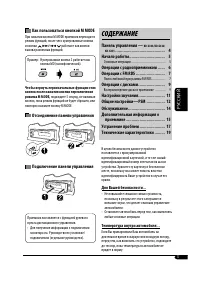
Page 39 - Как пользоваться кнопкой M MODE; CОДЕРЖАНИЕ; Панель управления —
РУCCKИЙ 3 Как пользоваться кнопкой M MODE При нажатии кнопки M MODE приемник переходит в режим функций, после чего нумерованные кнопки и кнопки ¢ / 4 работают как кнопки вызова различных функций. Пример: Нумерованная кнопка 2 работает как кнопка МО (монофонический). Чтобы вернуть первоначальные функ...
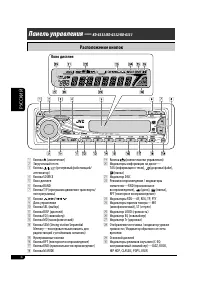
Page 40 - Расположение кнопок; Окно дисплея
4 РУCCKИЙ o Кнопка (снятие панели управления) ; Индикаторы информации на диске— TAG (информация о тегах), (дорожка/файл), (папка) a Индикатор DISC s Режим воспроизведения / индикаторы элементов—RND (произвольное воспроизведение), (диск), (папка), RPT (повторное воспроизведение) d Индикаторы RDS—AF, ...
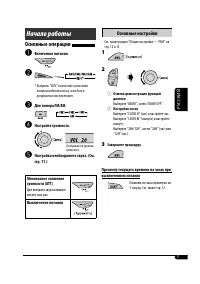
Page 41 - Основные настройки; Настройка часов; Начало работы; Основные операции; Настройте громкость.
РУCCKИЙ 5 Основные настройки • См. также раздел “Общие настройки — PSM” на стр. 12 и 13. 1 2 1 Отмена демонстрации функций дисплея Выберите “DEMO”, затем “DEMO OFF”. 2 Настройка часов Выберите “CLOCK H” (час) и настройте час. Выберите “CLOCK M” (минута) и настройте минуту. Выберите “24H/12H”, затем ...
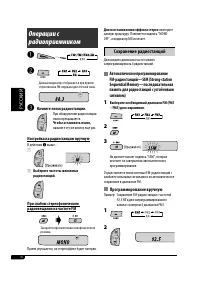
Page 42 - Для восстановления эффекта стерео; Сохранение радиостанций; Автоматическое программирование; Выберите необходимый диапазон FM (FM1; Программирование вручную; Начните поиск радиостанции.; Чтобы остановить поиск,; Настройка на радиостанцию вручную
6 РУCCKИЙ Для восстановления эффекта стерео повторите данную процедуру. Появляется надпись “MONO OFF”, а индикатор MO исчезает. Сохранение радиостанций Для каждого диапазона частот можно запрограммировать 6 радиостанций. Автоматическое программирование FM-радиостанций—SSM (Strong-station Sequential ...
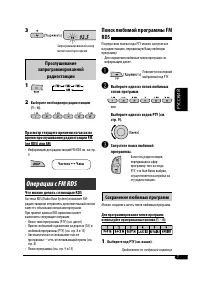
Page 43 - Запустите поиск любимой; Сохранение любимых программ; Прослушивание; Выберите необходимую радиостанцию; Операции с FM RDS; Что можно делать с помощью RDS; Частота
7 РУCCKИЙ Поиск любимой программы FM RDS Посредством поиска кода PTY можно настроиться на радиостанцию, передающую Вашу любимую программу.• Для сохранения любимых типов программ см. информацию далее. ~ Появляется последний выбранный код PTY. Ÿ Выберите один из типов любимых типов программ. или Выбер...
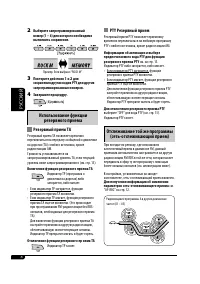
Page 44 - PTY Резервный прием; Отслеживание той же программы; Резервный прием TA
8 РУCCKИЙ PTY Резервный прием Резервный прием PTY позволяет приемнику временно переключаться на любимую программу PTY с любого источника, кроме радиостанции AM. Информацию об активации и выборе предпочитаемого кода PTY для функции резервного приема PTY см. на стр. 13. Индикатор PTY либо загорается, ...
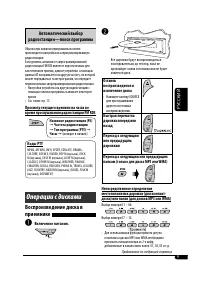
Page 45 - Автоматический выбор; Коды PTY; Операции с дисками; Включение питания.; Частота радиостанции
9 РУCCKИЙ Автоматический выбор радиостанции—поиск программы Обычно при нажатии нумерованных кнопок производится настройка на запрограммированную радиостанцию.Если уровень сигналов от запрограммированной радиостанции FM RDS является недостаточным для качественного приема, данное устройство с помощью ...
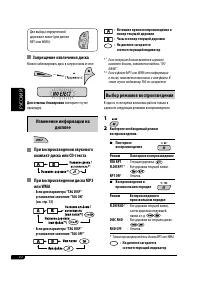
Page 46 - Выбор режимов воспроизведения; Запрещение извлечения диска; Изменение информации на; При воспроизведении звукового
10 РУCCKИЙ : Истекшее время воспроизведения и номер текущей дорожки : Часы и номер текущей дорожки : На дисплее загорается соответствующий индикатор * 1 Если текущим диском является звуковой компакт-диском, появляется надпись “NO NAME”. * 2 Если в файле MP3 или WMA нет информации о тегах, появляется...
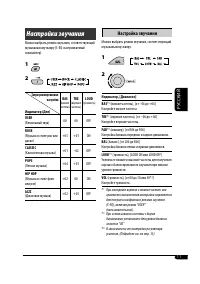
Page 47 - Настройки звучания; Настройка звучания
11 РУCCKИЙ Настройки звучания Можно выбрать режим звучания, соответствующий музыкальному жанру (C-EQ: настраиваемый эквалайзер). 1 2 Индикатор (Для) BAS (низкие частоты) TRE (верхние частоты) LOUD (громкость) USER (Бемольный звук) 00 00 OFF ROCK (Музыка в стиле рок или диско) +03 +01 ON CLASSIC (Кла...
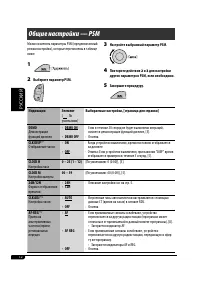
Page 48 - Общие настройки — PSM
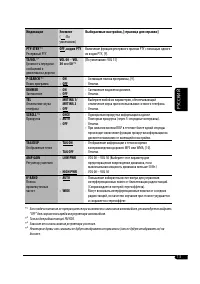
12 РУCCKИЙ Индикация Элемент ( : По умолчанию) Выбираемые настройки, [страница для справки] DEMO Демонстрация функций дисплея • DEMO ON • DEMO OFF : Если в течение 20 секунд не будет выполнено операций, начнется демонстрация функций дисплея, [5]. : Отмена. CLK DISP * 1 Отображение часов • ON • OFF :...
Page 50 - Обслуживание; Очистка разъемов; Чтобы поместить диск в футляр,; Хранение дисков в чистом виде; Не используйте следующие диски:
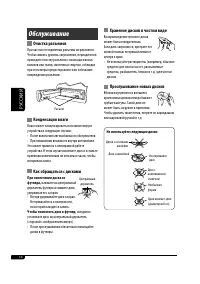
14 РУCCKИЙ Обслуживание Очистка разъемов При частом отсоединении разъемы загрязняются.Чтобы снизить уровень загрязнения, периодически проводите очистку разъемов с помощью ватных валиков или ткани, смоченных спиртом, соблюдая при этом меры предосторожности во избежание повреждения разъемов. Конденсац...
Page 51 - Общие сведения; Включение питания; Операции с тюнером
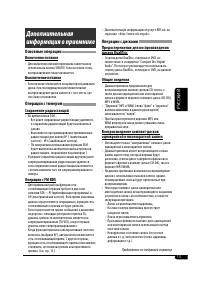
15 РУCCKИЙ • Дополнительную информацию об услуге RDS см. на стран ице <http://www.rds.org.uk>. Операции с дисками Предостережение для воспроизведения дисков DualDisc • Сторона диска DualDisc, отличная от DVD, не совместима со стандартом “Compact Disc Digital Audio”. Поэтому не рекомендуется ис...
Page 52 - Общие настройки—PSM
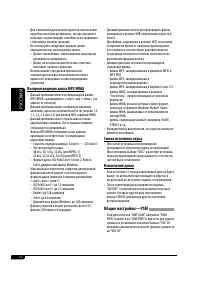
16 РУCCKИЙ • Для считывания дисков многократной записи может потребоваться больше времени, так как они имеют меньшую отражательную способность по сравнению с обычными компакт-дисками. • Не используйте следующие компакт-диски однократной или многократной записи: – Диски с наклейками, этикетками или з...
Page 53 - Симптомы; Устранение проблем
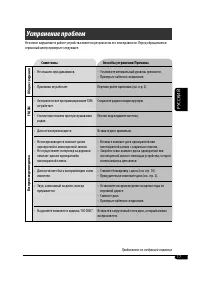
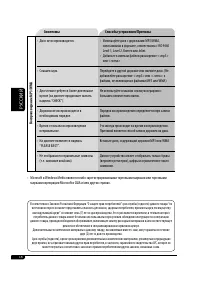
17 РУCCKИЙ Симптомы Способы устранения/Причины Общие сведения • Не слышен звук динамиков. • Установите оптимальный уровень громкости.• Проверьте кабели и соединения. • Приемник не работает. Перенастройте приемник (см. стр. 2). FM/AM • Автоматическое программирование SSM не работает. Сохраните радиос...
Page 55 - Технические характеристики; БЛОК УСИЛИТЕЛЕЙ ЗВУКА; БЛОК РАДИОПРИЕМНИКА; Радиоприемник в диапазоне FM; ОБЩИЕ ТРЕБОВАНИЯ
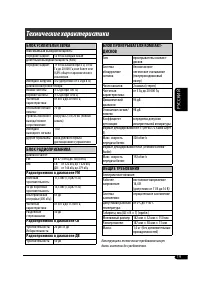
19 РУCCKИЙ Технические характеристики БЛОК УСИЛИТЕЛЕЙ ЗВУКА Максимальная выходная мощность:Передние/Задние: 50 Вт на каждый канал Длительная выходная мощность (RMS):Передние/Задние: 19 Вт на канал в при 4 Ω, от 40 Гц до 20 000 Гц и не более чем 0,8% общего гармонического искажения. Импеданс нагрузки...
Page 56 - Having TROUBLE with operation?; Please reset your unit; Refer to page of How to reset your unit; Haben Sie PROBLEME mit dem Betrieb?; Bitte setzen Sie Ihr Gerät zurück; Siehe Seite Zurücksetzen des Geräts; Затруднения при эксплуатации?; Пожалуйста, перезагрузите Ваше устройство; соответствующую страницу
EN, GE, RU 0906DTSMDTJEIN Having TROUBLE with operation? Please reset your unit Refer to page of How to reset your unit Haben Sie PROBLEME mit dem Betrieb? Bitte setzen Sie Ihr Gerät zurück Siehe Seite Zurücksetzen des Geräts Затруднения при эксплуатации? Пожалуйста, перезагрузите Ваше устройство Дл...


 JVC KD-AV7001
User Manual
JVC KD-AV7001
User Manual
 JVC KD-AVX1
Manual
JVC KD-AVX1
Manual
 JVC KD-AVX11
User Manual
JVC KD-AVX11
User Manual
 JVC KD-AVX12
User Manual
JVC KD-AVX12
User Manual
 JVC KD-AVX2
User Manual
JVC KD-AVX2
User Manual
 JVC KD-AVX20
User Manual
JVC KD-AVX20
User Manual
 JVC KD-AVX22
User Manual
JVC KD-AVX22
User Manual
 JVC KD-AVX33
User Manual
JVC KD-AVX33
User Manual
 JVC KD-AVX40
User Manual
JVC KD-AVX40
User Manual
 JVC KD-AVX44
User Manual
JVC KD-AVX44
User Manual
 JVC KD-AVX55
User Manual
JVC KD-AVX55
User Manual
 JVC KD-AVX77
User Manual
JVC KD-AVX77
User Manual
 JVC KD-BT1
User Manual
JVC KD-BT1
User Manual