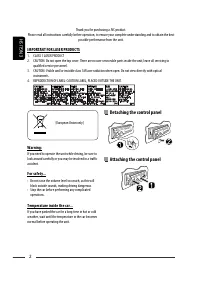
Page 2 - Detaching the control panel
ENGLISH 2 Thank you for purchasing a JVC product. Please read all instructions carefully before operation, to ensure your complete understanding and to obtain the best possible performance from the unit. IMPORTANT FOR LASER PRODUCTS 1. CLASS 1 LASER PRODUCT2. CAUTION: Do not open the top cover. Ther...
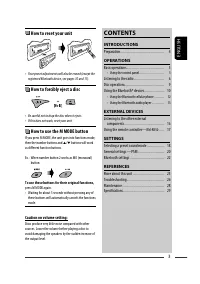
Page 3 - ENGLISH; How to reset your unit; How to use the M MODE button; Caution on volume setting:; CONTENTS; INTRODUCTIONS; Listening to the other external; SETTINGS
ENGLISH 3 How to reset your unit • Your preset adjustments will also be erased (except the registered Bluetooth device, see pages 10 and 11). How to forcibly eject a disc • Be careful not to drop the disc when it ejects. • If this does not work, reset your unit. How to use the M MODE button If you p...
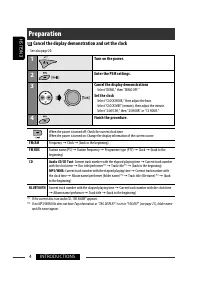
Page 4 - Preparation; Cancel the display demonstration and set the clock; Enter the PSM settings.
ENGLISH 4 INTRODUCTIONS Preparation Cancel the display demonstration and set the clock • See also page 20. 1 Turn on the power. 2 Enter the PSM settings. 3 Cancel the display demonstrations Select “DEMO,” then “DEMO OFF.” Set the clock Select “CLOCK HOUR,” then adjust the hour. Select “CLOCK MIN” (m...
Page 5 - Basic operations; Using the control panel
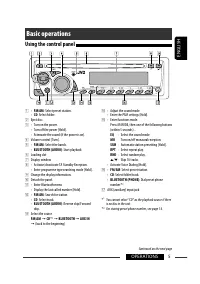
ENGLISH 5 OPERATIONS Basic operations Using the control panel r • Adjust the sound mode. • Enter the PSM settings [Hold]. t • Enter functions mode. Press M MODE, then one of the following buttons (within 5 seconds)... EQ : Select the sound mode. MO : Turn on/off monaural reception. SSM : Automatic s...
Page 6 - Listening to the radio; Search for a station to listen—Auto Search.
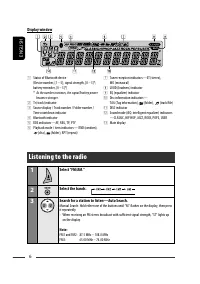
ENGLISH 6 Display window 1 Status of Bluetooth device (Device number, [1 – 5]; signal strength, [0 – 3]*; battery reminder, [0 – 3]*) * As the number increases, the signal/battery power becomes stronger. 2 Tr (track) indicator 3 Source display / Track number / Folder number / Time countdown indicato...
Page 8 - Storing your favorite programme
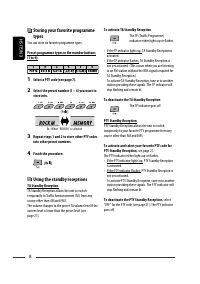
ENGLISH 8 Storing your favorite programme types You can store six favorite programme types. Preset programme types in the number buttons (1 to 6): 1 Select a PTY code (see page 7). 2 Select the preset number (1 – 6) you want to store into. 3 Repeat steps 1 and 2 to store other PTY codes into other p...
Page 9 - Tracing the same programme—; PTY codes; Prohibiting disc ejection; Disc operations
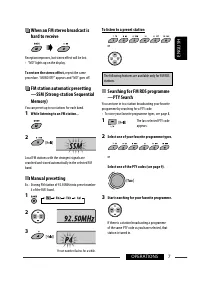
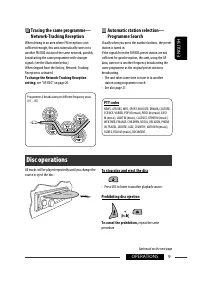
ENGLISH 9 OPERATIONS Tracing the same programme— Network-Tracking Reception When driving in an area where FM reception is not sufficient enough, this unit automatically tunes in to another FM RDS station of the same network, possibly broadcasting the same programme with stronger signals (see the ill...
Page 10 - Using the Bluetooth ® devices; Bluetooth profile; Features
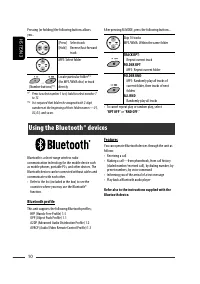
ENGLISH 10 Using the Bluetooth ® devices Bluetooth is a short-range wireless radio communication technology for the mobile device such as mobile phones, portable PCs, and other devices. The Bluetooth devices can be connected without cables and communicate with each other.• Refer to the list (include...
Page 11 - Connecting a Bluetooth device for; Pairing and PIN code
ENGLISH 11 OPERATIONS Connecting a Bluetooth device for the first time Pairing and PIN code When you connect a Bluetooth device to the unit for the first time, make pairing between the unit and the device. Pairing allows Bluetooth devices to communicate with each other.To make pairing, you may need ...
Page 12 - Using the Bluetooth cellular phone; Establish the connection with a device.
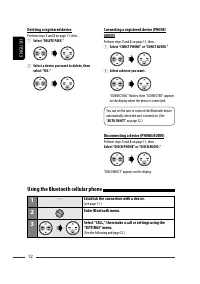
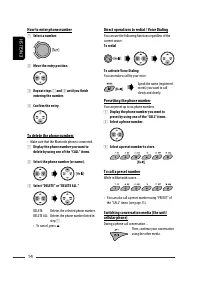
ENGLISH 12 Connecting a registered device (PHONE/AUDIO) Perform steps 1 and 2 on page 11, then... 1 Select “CNNCT PHONE” or “CNNCT AUDIO.” 2 Select a device you want. “CONNECTING” flashes, then “CONNECTED” appears on the display when the device is connected. You can set the unit to connect the Bluet...
Page 13 - Making a call
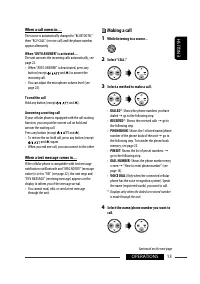
ENGLISH 13 OPERATIONS When a call comes in.... The source is automatically changed to “BLUETOOTH,” then “RCV CALL” (receive call) and the phone number appear alternately. When “AUTO ANSWER” is activated.... The unit answers the incoming calls automatically, see page 22.• When “AUTO ANSWER” is deacti...
Page 15 - Using the Bluetooth audio player; Establish the connection with a Bluetooth audio player.
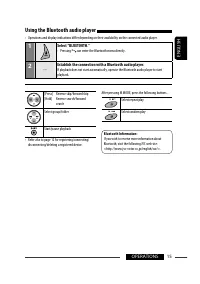
ENGLISH 15 OPERATIONS Using the Bluetooth audio player • Operations and display indications differ depending on their availability on the connected audio player. 1 Select “BLUETOOTH.” • Pressing can enter the Bluetooth menu directly. 2 — Establish the connection with a Bluetooth audio player. If pla...
Page 16 - Listening to the other external components; Turn on the connected component and start playing the source.
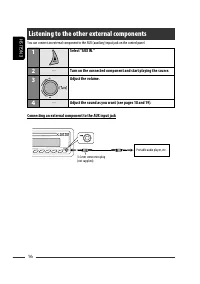
ENGLISH 16 Listening to the other external components You can connect an external component to the AUX (auxiliary) input jack on the control panel. 1 Select “AUX IN.” 2 — Turn on the connected component and start playing the source. 3 Adjust the volume. 4 — Adjust the sound as you want (see pages 18...
Page 17 - Using the remote controller —
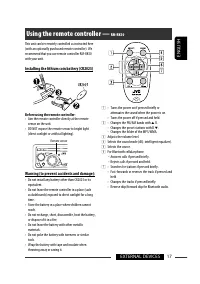
ENGLISH 17 EXTERNAL DEVICES This unit can be remotely controlled as instructed here (with an optionally purchased remote controller). We recommend that you use remote controller RM-RK50 with your unit. Installing the lithium coin battery (CR2025) Before using the remote controller: • Aim the remote ...
Page 18 - Selecting a preset sound mode; Enter functions mode.; Storing your own sound mode
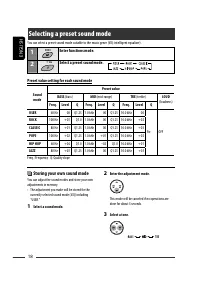
ENGLISH 18 Selecting a preset sound mode You can select a preset sound mode suitable to the music genre (iEQ: intelligent equalizer). 1 Enter functions mode. 2 Select a preset sound mode. Preset value setting for each sound mode Sound mode Preset value BASS (bass) MID (mid-range) TRE (treble) LOUD (...
Page 19 - Adjusting the sound
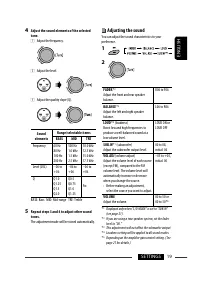
ENGLISH 19 SETTINGS 4 Adjust the sound elements of the selected tone. 1 Adjust the frequency. 2 Adjust the level. 3 Adjust the quality slope (Q). Sound elements Range/selectable items BASS MID TRE Frequency 60 Hz80 Hz100 Hz200 Hz 500 Hz1.0 kHz1.5 kHz2.5 kHz 10.0 kHz12.5 kHz15.0 kHz17.5 kHz Level (LV...
Page 20 - General settings — PSM
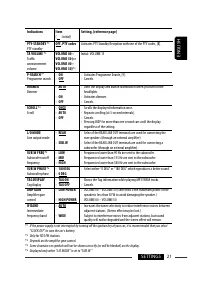
ENGLISH 20 3 Adjust the PSM item selected. 4 Repeat steps 2 and 3 to adjust other PSM items if necessary. 5 Finish the procedure. You can change PSM (Preferred Setting Mode) items listed in the table below and pages 21. 1 Enter the PSM settings. 2 Select a PSM item. General settings — PSM Indication...
Page 22 - Bluetooth settings
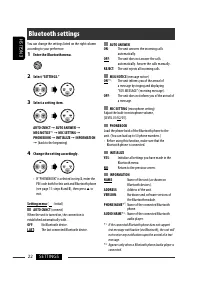
ENGLISH 22 SETTINGS You can change the settings listed on the right column according to your preference. 1 Enter the Bluetooth menu. 2 Select “SETTINGS.” 3 Select a setting item. AUTO CNNCT = AUTO ANSWER = MSG NOTICE * 1 = MIC SETTING = PHONEBOOK = INITIALIZE = INFORMATION = (back to the beginning) ...
Page 23 - More about this unit
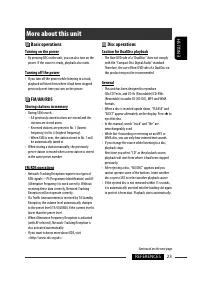
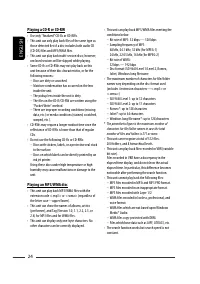
ENGLISH 23 REFERENCES Basic operations Turning on the power • By pressing SRC on the unit, you can also turn on the power. If the source is ready, playback also starts. Turning off the power • If you turn off the power while listening to a track, playback will start from where it had been stopped pr...
Page 25 - Bluetooth operations; General; General settings—PSM
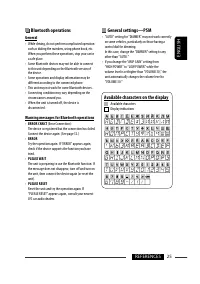
ENGLISH 25 REFERENCES Bluetooth operations General • While driving, do not perform complicated operation such as dialing the numbers, using phone book, etc. When you perform these operations, stop your car in a safe place. • Some Bluetooth devices may not be able to connect to this unit depending on...
Page 26 - Troubleshooting
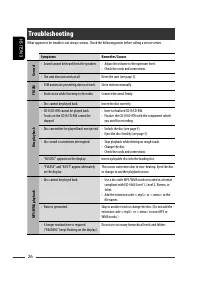
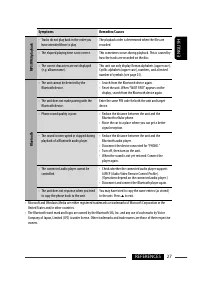
ENGLISH 26 Troubleshooting What appears to be trouble is not always serious. Check the following points before calling a service center. Symptoms Remedies/Causes General • Sound cannot be heard from the speakers. • Adjust the volume to the optimum level.• Check the cords and connections. • The unit ...
Page 28 - How to clean the connectors; To keep discs clean; Maintenance
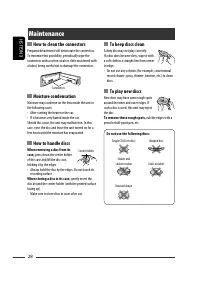
ENGLISH 28 How to clean the connectors Frequent detachment will deteriorate the connectors.To minimize this possibility, periodically wipe the connectors with a cotton swab or cloth moistened with alcohol, being careful not to damage the connectors. Moisture condensation Moisture may condense on the...
Page 29 - Specifications; AUDIO AMPLIFIER SECTION; CD PLAYER SECTION
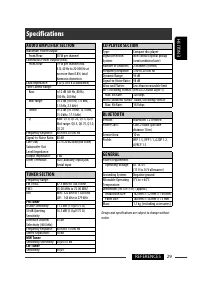
ENGLISH 29 REFERENCES Specifications AUDIO AMPLIFIER SECTION Maximum Power Output: Front/Rear: 50 W per channel Continuous Power Output (RMS): Front/Rear: 19 W per channel into 4 Ω, 40 Hz to 20 000 Hz at no more than 0.8% total harmonic distortion. Load Impedance: 4 Ω (4 Ω to 8 Ω allowance) Tone Con...
Page 30 - РУCCKИЙ; ВАЖНО ДЛЯ ЛАЗЕРНОЙ АППАРАТУРЫ; Отсоединение панели
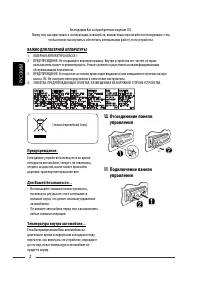
2 РУCCKИЙ Благодарим Вас за приобретение изделия JVC. Перед тем, как приступать к эксплуатации, пожалуйста, внимательно прочитайте все инструкции с тем, чтобы полностью изучить и обеспечить оптимальную работу этого устройства. ВАЖНО ДЛЯ ЛАЗЕРНОЙ АППАРАТУРЫ 1. ЛАЗЕРНАЯ АППАРАТУРА КЛАССА 12. ПРЕДУПРЕЖ...
Page 31 - Как перенастроить Ваше; Как пользоваться кнопкой M MODE; CОДЕРЖАНИЕ; ВВЕДЕНИЕ; Прослушивание с других внешних; НАСТРОЙКИ; Выбор запрограммированного режима; СПРАВОЧНАЯ ИНФОРМАЦИЯ; Дополнительная информация о
3 РУCCKИЙ Как перенастроить Ваше устройство • Запрограммированные настройки будут также удалены (за исключением зарегистрированного устройства Bluetooth, см. стр. 10 и 11). Принудительное извлечение диска • Будьте осторожны, не уроните диск при извлечении. • Если это не поможет, попробуйте перенастр...
Page 32 - Подготовка; Отмена демонстрации функций дисплея и настройка часов; Войдите в настройки PSM.
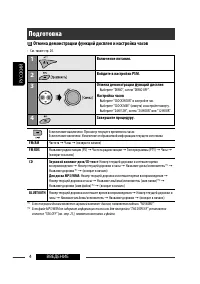
4 ВВЕДЕНИЕ РУCCKИЙ Подготовка Отмена демонстрации функций дисплея и настройка часов • См. также стр. 20. 1 Включение питания. 2 Войдите в настройки PSM. 3 Отмена демонстрации функций дисплея Выберите “DEMO”, затем “DEMO OFF”. Настройка часов Выберите “CLOCK HOUR” и настройте час. Выберите “CLOCK MIN...
Page 33 - Основные операции; Использование панели управления
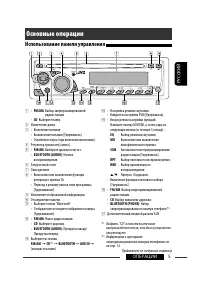
5 ОПЕРАЦИИ РУCCKИЙ Основные операции Использование панели управления r • Настройка режима звучания. • Войдите в настройки PSM [Удерживать]. t • Вход в режим настройки функций. Нажмите кнопку M MODE, а затем одну из следующих кнопок (в течение 5 секунд)... EQ : Выбор режимов звучания. MO : Включение ...
Page 34 - Прослушивание радио; Выберите диапазон частот.
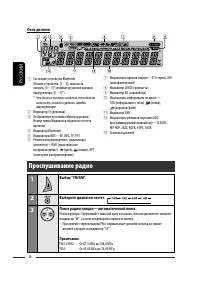
6 РУCCKИЙ Окно дисплея 1 Состояние устройства Bluetooth (Номер устройства, [1 – 5]; мощность сигнала, [0 – 3]*; индикатор уровня зарядки аккумулятора, [0 – 3]*) * Чем больше числовое значение, тем больше мощность сигнала и уровень зарядки аккумулятора. 2 Индикатор Tr (дорожка) 3 Отображение источник...
Page 36 - Сохранение любимых программ
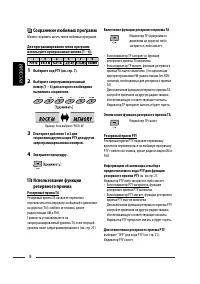
8 РУCCKИЙ Сохранение любимых программ Можно сохранить шесть типов любимых программ. Для программирования типов программ используйте нумерованные кнопки (1 – 6): 1 Выберите код PTY (см. стр. 7). 2 Выберите запрограммированный номер (1 – 6) для которого необходимо выполнить сохранение. 3 Повторите дей...
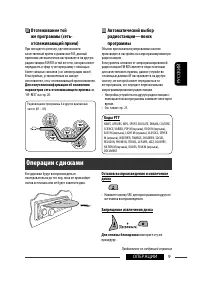
Page 37 - Отслеживание той; Коды PTY; Запрещение извлечения диска; Операции с дисками
9 ОПЕРАЦИИ РУCCKИЙ Отслеживание той же программы (сеть-отслеживающий прием) При поездке по региону, где невозможен качественный прием в диапазоне FM, данный приемник автоматически настраивается на другую радиостанцию FM RDS в той же сети, которая может передавать в эфир ту же программу с помощью бол...
Page 38 - Использование устройств Bluetooth®; Профили Bluetooth; Функции
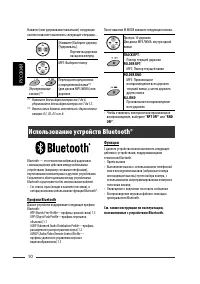
10 РУCCKИЙ Использование устройств Bluetooth® Bluetooth — это технология мобильной радиосвязи с малым радиусом действия между мобильными устройствами (например сотовыми телефонами), портативными компьютерами и другими устройствами. Соединение и обмен данными между устройствами Bluetooth осуществляет...
Page 39 - Первое подключение устройства
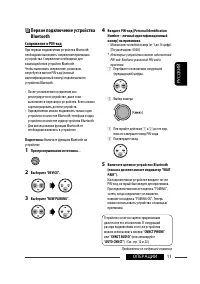
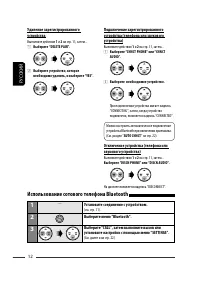
11 ОПЕРАЦИИ РУCCKИЙ Первое подключение устройства Bluetooth Сопряжение и PIN-код При первом подключении устройства Bluetooth необходимо выполнить сопряжение приемника и устройства. Сопряжение необходимо для взаимодействия устройств Bluetooth.Чтобы выполнить сопряжение, возможно, потребуется ввести P...
Page 40 - Использование сотового телефона Bluetooth; Установите соединение с устройством.
12 РУCCKИЙ Подключение зарегистрированного устройства (телефона или звукового устройства) Выполните действия 1 и 2 на стр. 11, затем... 1 Выберите “CNNCT PHONE” или “CNNCT AUDIO”. 2 Выберите необходимое устройство. При подключении устройства мигает надпись “CONNECTING”, затем, когда устройство подкл...
Page 41 - Выполнение вызова
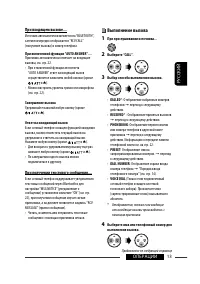
13 ОПЕРАЦИИ РУCCKИЙ При входящем вызове.... Источник автоматически меняется на “BLUETOOTH”, затем поочередно отображается “RCV CALL” (получение вызова) и номер телефона . При включенной функции “AUTO ANSWER”.... Приемник автоматически отвечает на входящие вызовы, см. стр. 22.• При отключенной функци...
Page 42 - Программирование номера телефона
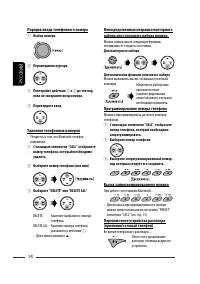
14 РУCCKИЙ Порядок ввода телефонного номера 1 Выбор номера. 2 Перемещение курсора. 3 Повторяйте действия 1 и 2 до тех пор, пока не завершите ввод номера. 4 Подтвердите ввод. Удаление телефонных номеров • Убедитесь в том, что Bluetooth-телефон подключен. 1 С помощью элементов “CALL” отобразите номер ...
Page 43 - Использование аудиопроигрывателя Bluetooth; Выберите “BLUETOOTH”.
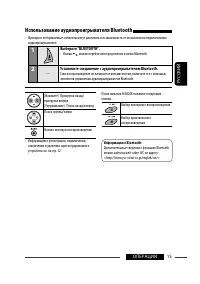
15 ОПЕРАЦИИ РУCCKИЙ Использование аудиопроигрывателя Bluetooth • Функции и отображаемые элементы могут различаться в зависимости от их наличия на подключенном аудиопроигрывателе . 1 Выберите “BLUETOOTH”. • Нажав , можно перейти непосредственно в меню Bluetooth. 2 — Установите соединение с аудиопроиг...
Page 44 - Прослушивание с других внешних устройств; Подключение внешнего устройства к входному разъему AUX
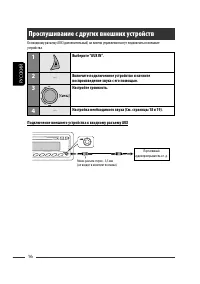
16 РУCCKИЙ Прослушивание с других внешних устройств Ко входному разъему AUX (дополнительный) на панели управления могут подключаться внешние устройства. 1 Выберите “AUX IN”. 2 — Включите подключенное устройство и начните воспроизведение звука с его помощью. 3 Настройте громкость. 4 — Настройка необх...
Page 45 - Использование пульта дистанционного управления —
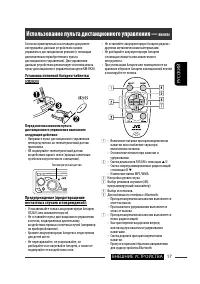
17 ВНЕШНИЕ УСТРОЙСТВА РУCCKИЙ Согласно приведенным в настоящем документе инструкциям, данным устройством можно управлять в дистанционном режиме (с помощью дополнительно приобретенного пульта дистанционного управления). Для управления данным устройством рекомендуется использовать пульт дистанционного...
Page 46 - Выбор запрограммированного режима звучания; Вход в режим настройки функций.; Сохранение собственного
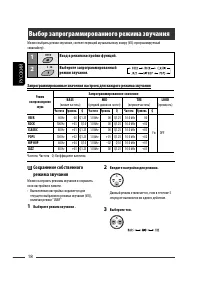
18 РУCCKИЙ Выбор запрограммированного режима звучания Можно выбрать режим звучания, соответствующий музыкальному жанру (iEQ: программируемый эквалайзер). 1 Вход в режим настройки функций. 2 Выберите запрограммированный режим звучания. Запрограммированные значения настроек для каждого режима звучания...
Page 47 - Настройка звучания
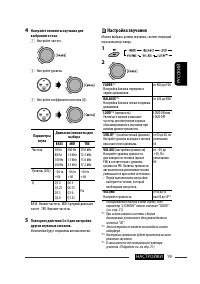
19 НАСТРОЙКИ РУCCKИЙ 4 Настройте элементы звучания для выбранного тона. 1 Настройте частоту. 2 Настройте уровень. 3 Настройте коэффициент качества (Q). Параметры звука Диапазон/элементы для выбора BASS MID TRE Частота 60 Hz80 Hz100 Hz200 Hz 500 Hz1.0 kHz1.5 kHz2.5 kHz 10.0 kHz12.5 kHz15.0 kHz17.5 kH...
Page 48 - Общие настройки—PSM
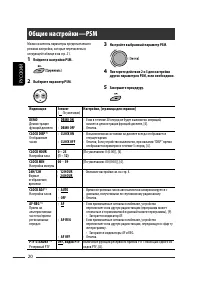
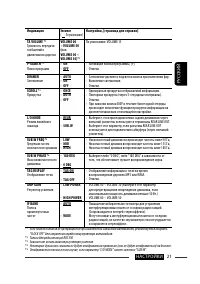
20 РУCCKИЙ 3 Настройте выбранный параметр PSM. 4 Повторите действия 2 и 3 для настройки других параметров PSM, если необходимо. 5 Завершите процедуру. Можно изменять параметры предпочитаемого режима настройки, которые перечислены в следующей таблице и на стр. 21. 1 Войдите в настройки PSM. 2 Выберит...
Page 50 - Настройки Bluetooth
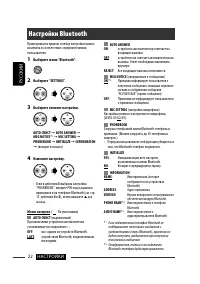
22 НАСТРОЙКИ РУCCKИЙ AUTO ANSWER ON : устройство автоматически отвечает на входящие вызовы. OFF : устройство не отвечает автоматически на вызовы. Ответ необходимо выполнять вручную. REJECT : Все входящие вызовы отклоняются. MSG NOTICE (уведомление о сообщении) ON * 1 : Приемник информирует пользоват...
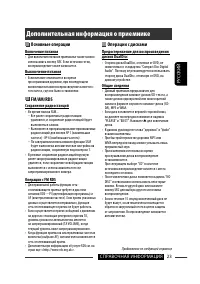
Page 51 - Включение питания; Общие сведения; Дополнительная информация о приемнике
23 СПРАВОЧНАЯ ИНФОРМАЦИЯ РУCCKИЙ Основные операции Включение питания • Для включения питания приемника также можно использовать кнопку SRC. Если источник готов, воспроизведение также начинается. Выключение питания • Если питание отключается во время прослушивания дорожки, при последующем включении п...
Page 53 - Операции Bluetooth
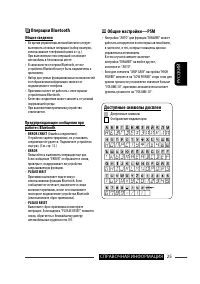
25 СПРАВОЧНАЯ ИНФОРМАЦИЯ РУCCKИЙ Операции Bluetooth Общие сведения • Во время управления автомобилем не следует выполнять сложные операции (набор номеров, использование телефонной книги и т.д.). При выполнении этих операций остановите автомобиль в безопасном месте. • В зависимости от версии Bluetoot...
Page 54 - Устранение проблем
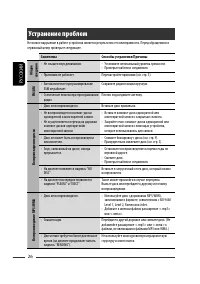
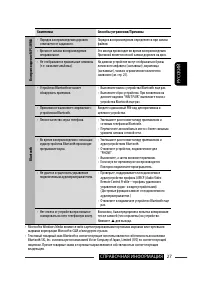
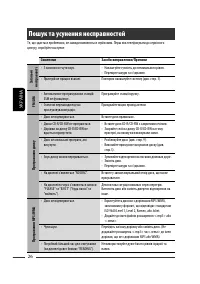
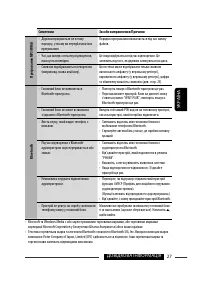
26 РУCCKИЙ Устранение проблем Не всякое нарушение в работе устройства является результатом его неисправности. Перед обращением в сервисный центр проверьте следующее. Симптомы Способы устранения/Причины Общие сведения • Не слышен звук динамиков. • Установите оптимальный уровень громкости.• Проверьте ...
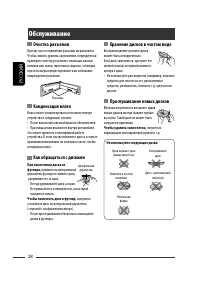
Page 56 - Очистка разъемов; Хранение дисков в чистом виде; Обслуживание
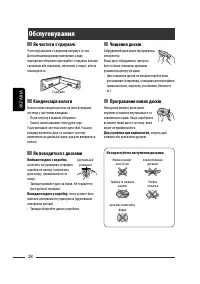
28 РУCCKИЙ Очистка разъемов При частом отсоединении разъемы загрязняются.Чтобы снизить уровень загрязнения, периодически проводите очистку разъемов с помощью ватных валиков или ткани, смоченных спиртом, соблюдая при этом меры предосторожности во избежание повреждения разъемов. Конденсация влаги Влаг...
Page 57 - Технические характеристики; БЛОК УСИЛИТЕЛЕЙ ЗВУКА; БЛОК ПРОИГРЫВАТЕЛЯ КОМПАКТ-ДИСКОВ
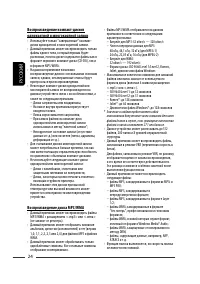
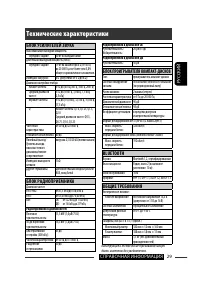
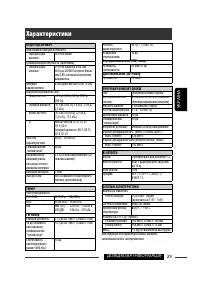
29 СПРАВОЧНАЯ ИНФОРМАЦИЯ РУCCKИЙ Технические характеристики БЛОК УСИЛИТЕЛЕЙ ЗВУКА Максимальная выходная мощность: Передние/Задние: 50 Вт на каждый канал Длительная выходная мощность (RMS): Передние/Задние: 19 Вт на канал в при 4 Ω, от 40 Гц до 20 000 Гц и не более чем 0,8% общего гармонического иска...
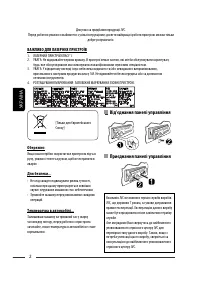
Page 58 - УКРАЇНА; ВАЖЛИВО ДЛЯ ЛАЗЕРНИХ ПРИСТРОЇВ; Від’єднання панелі управління
2 УКРАЇНА Дякуємо за придбання продукції JVC. Перед роботою уважно ознайомтеся з усіма інструкціями; досягти найкращої роботи пристрою можна тільки добре розуміючи їх. ВАЖЛИВО ДЛЯ ЛАЗЕРНИХ ПРИСТРОЇВ 1. ЛАЗЕРНИЙ ПРИСТРІЙ КЛАСУ 12. УВАГА: Не відкривайте верхню кришку. В пристрої немає частин, які міг ...
Page 59 - Як повторно налаштувати; Як користуватися кнопкою; Попередження щодо настройок гучності:; ЗМІСТ; ПЕРЕДМОВА; Прослуховування інших зовнішніх; НАЛАШТУВАННЯ; Вибір запрограмованих режимів; ДОВІДКОВА ІНФОРМАЦІЯ
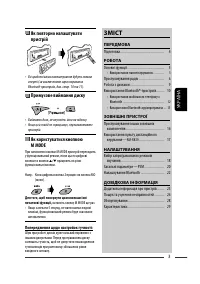
3 УКРАЇНА Як повторно налаштувати пристрій • Всі зроблені вами налаштування будуть також стерті (за виключенням зареєстрованих Bluetooth-пристроїв, див. стор. 10 та 11). Примусове виймання диску • Виймаючи диск, не впустіть його на підлогу. • Якщо цей спосіб не спрацьовує, перезавантажте пристрій. Я...
Page 60 - Підготовка; Відміна демонстрації функцій дисплею та встановлення часу на; Увійдіть у режим налаштування PSM.
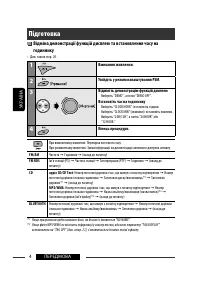
4 ПЕРЕДМОВА УКРАЇНА Підготовка Відміна демонстрації функцій дисплею та встановлення часу на годиннику • Див. також стор. 20. 1 Вмикання живлення. 2 Увійдіть у режим налаштування PSM. 3 Відмініть демонстрацію функцій дисплею Виберіть “DEMO”, а потім “DEMO OFF”. Встановіть час на годиннику Виберіть “C...
Page 61 - Основні функції; Використання панелі керування
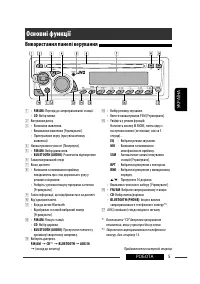
5 РОБОТА УКРАЇНА Основні функції Використання панелі керування r • Вибір режиму звучання. • Ввести налаштування PSM [Утримувати]. t • Увійдіть у режим функцій. Натисніть кнопку M MODE, потім одну з наступних кнопок (не пізніше, ніж за 5 секунд)... EQ : Вибрати режим звучання. MO : Вмикання та вимика...
Page 62 - Прослуховування радіо; Пошук станції для прослуховування—Автоматичний пошук.
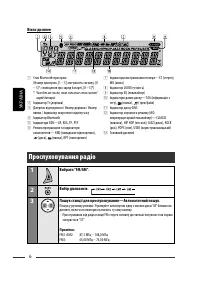
6 УКРАЇНА Вікно дисплея 1 Стан Bluetooth-пристрою (Номер пристрою, [1 – 5]; потужність сигналу, [0 – 3]*; сповіщення про заряд батареї, [0 – 3]*) * Чим більше число, тим сильніше стає сигнал/заряд батареї. 2 Індикатор Tr (доріжка) 3 Джерело відтворення / Номер доріжки / Номер папки / Індикатор зворо...
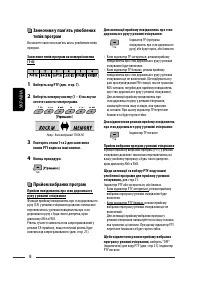
Page 64 - Занесення у пам’ять улюблених; Прийом вибраних програм
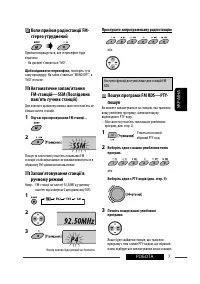
8 УКРАЇНА Занесення у пам’ять улюблених типів програм Ви можете занести в пам’ять шість улюблених типів програм. Занесення типів програм на номерні кнопки (1-6): 1 Виберіть код PTY (див. стор. 7). 2 Виберіть номерну кнопку (1 – 6) на яку ви хочете занести тип програми. 3 Повторіть етапи 1 та 2 для з...
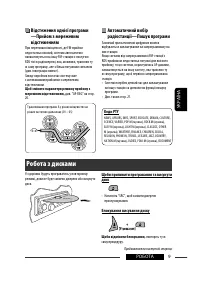
Page 65 - Відстеження однієї програми; Коди PTY; Блокування висування диску; Робота з дисками
9 РОБОТА УКРАЇНА Відстеження однієї програми —Прийом з мережевим відстеженням При перетинанні місцевості, де FM-прийом недостатньо якісний, система автоматично налаштовується на іншу FM-станцію з послугою RDS тієї ж радіомережі, яка, можливо, транслює ту ж саму програму, але з більш потужним сигнало...
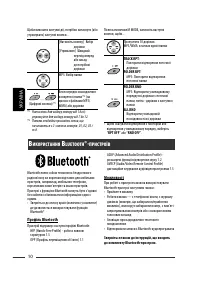
Page 66 - ИКОРИСТАННЯ; Профіль Bluetooth
10 УКРАЇНА Щоби виконати наступні дії, потрібно натиснути (або утримувати) наступні кнопки... [Натисніть кнопку] Вибір доріжки [Утримання] Швидкий перехід вперед або назад до потрібної доріжки MP3: Вибір папки (Цифрові кнопки) * 1 Безпосереднє знаходження конкретної папки * 2 (на дисках з файлами MP...
Page 67 - Первинне підключення
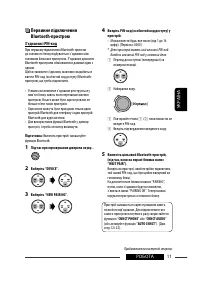
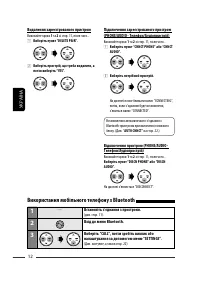
11 РОБОТА УКРАЇНА Первинне підключення Bluetooth-пристрою З’єднання і PIN-код При першому підключенні Bluetooth-пристою до головного блоку відбувається з’єднання між головним блоком и пристроєм. З’єднання дозволяє Bluetooth-пристроям обмінюватися даними один з одним.Щоб встановити з’єднання, можливо...
Page 68 - Використання мобільного телефону з Bluetooth; Встановіть з’єднання з пристроєм.
12 УКРАЇНА Підключення зареєстрованого пристрою (PHONE/AUDIO - Телефон/Аудіопристрій) Виконайте кроки 1 та 2 зі стор. 11, після чого... 1 Виберіть пункт “CNNCT PHONE” або “CNNCT AUDIO”. 2 Виберіть потрібний пристрій. На дисплеї почне блимати напис “CONNECTING”, потім, коли з’єднання буде встановлено...
Page 69 - Виклик
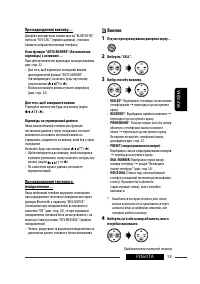
13 РОБОТА УКРАЇНА При надходженні виклику.... Джерело автоматично змінюється на “BLUETOOTH,” потім на “RCV CALL” (прийом дзвінка), і починає блимати зображення номера телефону. Коли функція “AUTO ANSWER” (Автоматична відповідь) є активною.... Пристрій автоматично відповідає на вхідні виклики, див. с...
Page 70 - Занесення телефонного номеру у пам’ять
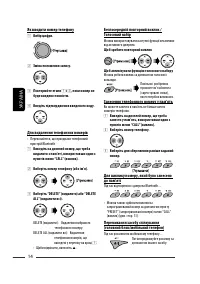
14 УКРАЇНА Як вводити номер телефону 1 Вибір цифри. 2 Зміна положення запису. 3 Повторюйте етапи 1 і 2 , поки номер не буде введено повністю. 4 Введіть підтвердження введеного коду. Для видалення телефонних номерів • Переконайтеся, що приєднано телефонний пристрій Bluetooth. 1 Виведіть на дисплей но...
Page 71 - Використання Bluetooth-аудіопрогравача; Виберіть пункт “BLUETOOTH”.; Встановіть з’єднання з аудіопрогравачем Bluetooth.
15 РОБОТА УКРАЇНА Використання Bluetooth-аудіопрогравача • Функції та повідомлення на дисплеї можуть відрізнятися в залежності від того чи можна їх застосувати для приєднаного аудіопрогравача. 1 Виберіть пункт “BLUETOOTH”. • Якщо натиснути на кнопку , можна безпосередньо увійти до меню Bluetooth. 2 ...
Page 72 - Прослуховування інших зовнішніх компонентів; Виберіть пункт “AUX IN”.
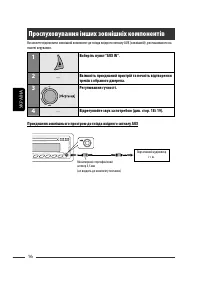
16 УКРАЇНА Прослуховування інших зовнішніх компонентів Ви можете підключити зовнішній компонент до гнізда вхідного сигналу AUX (зовнішній), розташованого на панелі керування. 1 Виберіть пункт “AUX IN”. 2 — Ввімкніть приєднаний пристрій та почніть відтворення треків з обраного джерела. 3 Регулювання ...
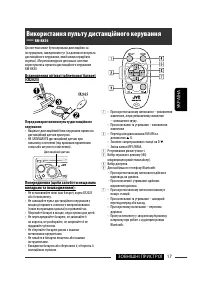
Page 73 - Використання пульту дистанційного керування
17 ЗОВНІШНІ ПРИСТРОЇ УКРАЇНА Ця система може бути керована дистанційно за інструкціями, наведеними тут (за допомогою пульта дистанційного керування, який можна придбати окремо). Ми рекомендуємо для вашої системи користуватись пультом дистанційного керування RM-RK50. Встановлення літієвої таблеткової...
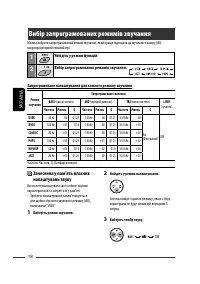
Page 74 - Вибір запрограмованих режимів звучання; Увійдіть у режим функцій.; Занесення у пам’ять власних
18 УКРАЇНА Вибір запрограмованих режимів звучання Можна вибрати запрограмований режим звучання, який краще підходить до музичного жанру (iEQ: мікропроцесорний еквалайзер). 1 Увійдіть у режим функцій. 2 Вибір запрограмованих режимів звучання. Запрограмоване налаштування для кожного режиму звучання Ре...
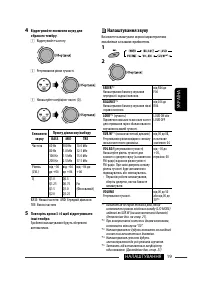
Page 75 - Налаштування звуку
19 НАЛАШТУВАННЯ УКРАЇНА 4 Відрегулюйте елементи звуку для обраного тембру. 1 Відрегулюйте частоту. 2 Регулювання рівня гучності. 3 Налаштуйте коефіцієнт якості (Q). Елементи звуку Пункту діапазону/вибору BASS MID TRE Частота 60 Hz80 Hz100 Hz200 Hz 500 Hz1.0 kHz1.5 kHz2.5 kHz 10.0 kHz12.5 kHz15.0 kHz...
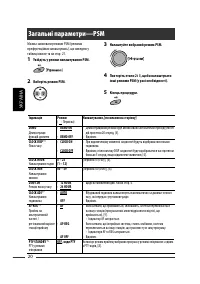
Page 76 - Загальні параметри—PSM
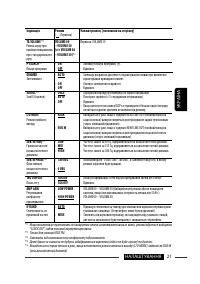
20 УКРАЇНА 3 Налаштуйте вибраний режим PSM. 4 Повторіть етапи 2 і 3, щоби налаштувати інші режими PSM (у разі необхідності). 5 Кінець процедури. Можна змінювати режими PSM (режими преференційних налаштувань), що наведені у таблиці нижче та на стор. 21. 1 Увійдіть у режим налаштування PSM. 2 Виберіть...
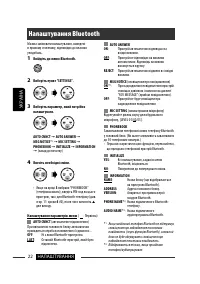
Page 78 - Налаштування Bluetooth
22 НАЛАШТУВАННЯ УКРАЇНА AUTO ANSWER ON : Пристрій автоматично відповідає на вхідні виклики. OFF : Пристрій не відповідає на виклики автоматично. Відповідь на виклик виконується вручну. REJECT : Пристрій автоматично відхиляє всі вхідні виклики. MSG NOTICE (сповіщення про повідомлення) ON * 1 : Про на...
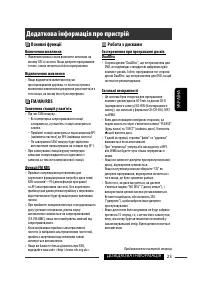
Page 79 - Включення живлення; Загальні несправності; Додаткова інформація про пристрій
23 ДОВІДКОВА ІНФОРМАЦІЯ УКРАЇНА Основні функції Включення живлення • Живлення можна також включити натиском на кнопку SRC в системі. Якщо джерело програвання готове, також почнеться й його програвання. Відключення живлення • Якщо відключити живлення під час прослуховування доріжки, то після наступно...
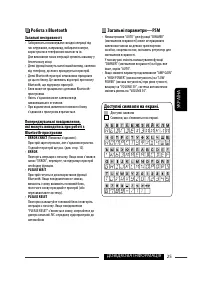
Page 81 - Робота з Bluetooth
25 УКРАЇНА ДОВІДКОВА ІНФОРМАЦІЯ Робота з Bluetooth Загальні несправності • Забороняється виконувати складні операції під час керування, наприклад, набирати номери, користуватися телефонною книгою та ін. Для виконання таких операцій зупиніть машину у безпечному місці. • Деякі функції можуть мати інши...
Page 82 - Пошук та усунення несправностей
26 УКРАЇНА Пошук та усунення несправностей Те, що здається проблемою, не завжди виявляється серйозним. Перш ніж телефонувати до сервісного центру, спробуйте наступне. Симптоми Засоби виправлення/Причини Загальні несправності • З колонок не чути звук. • Налаштуйте гучність до оптимального рівня.• Пер...
Page 84 - Як чистити з’єднувачі; Чищення дисків; Обслуговування
28 УКРАЇНА Як чистити з’єднувачі Часте від’єднання з’єднувачів погіршує їх стан.Для зменшення ризику виведення з ладу періодично обережно протирайте з’єднувачі ватним тампоном або тканиною, змоченою у спирті, аби не пошкодити їх. Конденсація вологи Волога може конденсуватись на лінзі всередині систе...
Page 85 - Характеристики
29 УКРАЇНА ДОВІДКОВА ІНФОРМАЦІЯ Характеристики АУДІО ПІДСИЛЮВАЧ Максимальна вихідна потужність: Передні/задні колонки: 50 Вт на канал Тривала вихідна потужність (ефективна): Передні/задні колонки: 19 Вт на канал на 4 Ом, від 40 Гц до 20 000 Гц при не більш ніж 0,8% загальних нелінійних викривлень. І...
Page 86 - Having TROUBLE with operation?; Please reset your unit; Refer to page of How to reset your unit; Затруднения при эксплуатации?; Пожалуйста, перезагрузите Ваше устройство; Для получения информации о перезагрузке Вашего устройства; Маєте ПРОБЛЕМУ з функціонуванням?; Повторно налаштуйте систему; Див. сторінку “Як повторно налаштувати пристрій”
EN, RU, UK 1207DTSMDTJEIN Having TROUBLE with operation? Please reset your unit Refer to page of How to reset your unit Затруднения при эксплуатации? Пожалуйста, перезагрузите Ваше устройство Для получения информации о перезагрузке Вашего устройства обратитесь на соответствующую страницу Маєте ПРОБЛ...







 JVC KD-AV7001
User Manual
JVC KD-AV7001
User Manual
 JVC KD-AVX1
Manual
JVC KD-AVX1
Manual
 JVC KD-AVX11
User Manual
JVC KD-AVX11
User Manual
 JVC KD-AVX12
User Manual
JVC KD-AVX12
User Manual
 JVC KD-AVX2
User Manual
JVC KD-AVX2
User Manual
 JVC KD-AVX20
User Manual
JVC KD-AVX20
User Manual
 JVC KD-AVX22
User Manual
JVC KD-AVX22
User Manual
 JVC KD-AVX33
User Manual
JVC KD-AVX33
User Manual
 JVC KD-AVX40
User Manual
JVC KD-AVX40
User Manual
 JVC KD-AVX44
User Manual
JVC KD-AVX44
User Manual
 JVC KD-AVX55
User Manual
JVC KD-AVX55
User Manual
 JVC KD-AVX77
User Manual
JVC KD-AVX77
User Manual
 JVC KD-BT1
User Manual
JVC KD-BT1
User Manual