Page 2 - Table of contents
2 Dear customer! Thank you for purchasing our product. For safety, it is strongly recommended to read this manual carefully before connecting, operating and/or adjusting the product and keep the manual for reference in the future. Table of contents Table of contents ....................................
Page 3 - Important safeguards; Using the device at temperature below -10o
3 Important safeguards • Using the device at temperature below -10º С may cause the breakage of the device. BEFORE USING PLEASE HEAT UP THE PASSENGER COMPARTMENT TO THE RECOMMENDED TEMPERATURE! • Read carefully through this manual to familiarize yourself with this high-quality sound system. • Discon...
Page 4 - Installation/ connection; Installation way
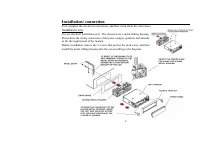
4 Installation/ connection First complete the electrical connections, and then check them for correctness. Installation way It is an anti-theft installation way. The chassis wear a metal sliding housing. Please have the wiring connection of the power supply, speakers and antenna as for the requireme...
Page 5 - Electrical connection
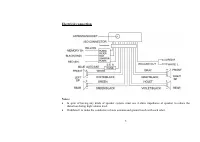
5 Electrical connection Notes: • In spite of having any kinds of speaker system, must use 4 ohms impedance of speaker to reduce the distortion during high volume level. • Prohibited t to make the conductors of auto antenna and ground touch with each other.
Page 6 - Using the ISO Connector; Location; Connector A
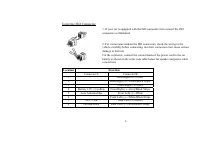
6 Using the ISO Connector 1. If your car is equipped with the ISO connector, then connect the ISO connectors as illustrated. 2. For connections without the ISO connectors, check the wiring in the vehicle carefully before connecting, incorrect connection may cause serious damage to this unit. Cut the...
Page 7 - Panel controls; Front panel; button
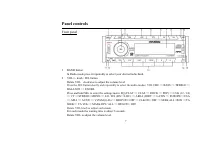
7 Panel controls Front panel 1 BAND button In Radio mode press it repeatedly to select your desired radio band. 2 VOL+/- knob / SEL button Rotate VOL clockwise to adjust the volume level. Press the SEL button shortly and repeatedly to select the audio modes: VOLUME => BASS => TREBLE => BALA...
Page 9 - Inner panel with disk slot
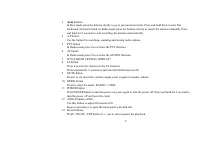
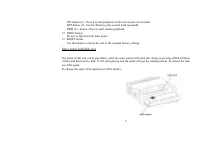
9 INT button (2) - Press it to start playback of first 10 second of each track. RPT button (3)- Use this button to play current track repeatedly. RDM (4) - button - Press to start random playback. 14 OPEN button Press it to flip down the front panel. 15 RESET button Use the button to restore the uni...
Page 10 - General operations; Reset the unit; unit on it will resume the stored status which you set.; Volume control; buttons to adjust BALANCE and rotate VOL knob to
10 General operations Reset the unit Press the RESET button on the front panel with thin hard object to restore the unit to the original factory settings. Power button Press any button to turn the unit on. Press the POWER button shortly to turn off the unit but the electronic clock. Press and hold P...
Page 11 - Adjusting the system menu; Volume PGM
11 Adjusting the system menu Press and hold for 2 seconds the SEL button, press it or the ► button repeatedly to select the system menu settings: EQ (FLAT => CLAS => ROCK => POP) => CLK (12 / 24) => CT =>STEREO / MONO => LO / DX (DX=>LOC) => AREA (OIRT => LATIN => EU...
Page 13 - Digital tuner operations; Band selection
13 Digital tuner operations Note: RDS (Radio Data System) service availability varies with areas. Please understand if RDS service is not available in you area, the following service is not available, either. Band selection Press the MODE button to select RADIO. Press BAND once or more to select: FM...
Page 14 - Press the TA button shortly to turn on or turn off the TA function.
14 Preset scan Select a band. Press A.P button to scan all preset stations in the memories of the current band and stay on each memory stations for about 7 seconds. To stop preset scan, press the button again. EON function This unit is equipped with the latest technology of EON control, so that when...
Page 16 - CD operations; Discs for playback; During playback press the; Selecting the previous/ next folder
16 CD operations Discs for playback This unit can play disc types: CD/CD-R/-RW. Compatible with formats: MP3/WMA/CDDA. Loading / unloading a disc 1. Turn the power on. 2. Long press the ANGLE button to tilt the front panel and here is the disk slot to insert a disk. 3. Insert the disc with the print...
Page 17 - Fast forward and backward playback; Press and hold for 2 seconds the; Repeat playback; will show “TRACK” indication.
17 Fast forward and backward playback Press and hold for 2 seconds the / buttons to fast the playing in backward or forward direction. Release the button when the desired location is found. Scanning (intro) You can play the beginning of every track for 10 seconds in sequence. Press the INT button sh...
Page 18 - Displaying the ID3 information; MP3 overview; The unit may not play tracks in the order of Track numbers.
18 Displaying the ID3 information Under MP3 mode press the A.P button repeatedly, the folder name, file name, title, artist and album information will be scrolling on the LCD display. As long as the current playing MP3 music contains relevant ID3 tag information in version 1.0/2.0 format, the 3 item...
Page 19 - Notes on creating your own CD-R or CD-RW containing MP3 files:; DO NOT store more than 256 MP3 files per disc.
19 Notes on creating your own CD-R or CD-RW containing MP3 files: • To enjoy high quality sound, we recommend converting to MP3 files with a sampling frequency of 44.1 kHz and a fixed bit rate o f 128 kbps. • DO NOT store more than 256 MP3 files per disc. • For ISO 9660 - compliant format, the maxim...
Page 20 - the control panel must be attached into the T-Joint.
20 Anti-theft system Removing the panel 1. Press POWER button to switch off the power of the unit. 2. Press OPEN button to flip down the panel (the right side of it will get detached). 3. Push the panel to the left and take it. 4. Use a special case when you get out of the car and take it with you. ...
Page 21 - Handling discs; Dirty, scratched or warped discs may cause skip ping or noise.; Cleaning; Cleaning the cabinet
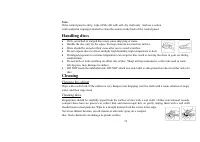
21 Note: If the control panel is dirty, wipe off the dirt with soft, dry cloth only. And use a cotton swab soaked in isopropyl alcohol to clean the socket on the back of the control panel. Handling discs • Dirty, scratched or warped discs may cause skip ping or noise. • Handle the disc only by the e...
Page 22 - Troubleshooting guide; Symptom
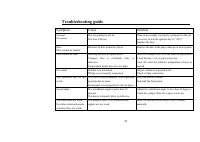
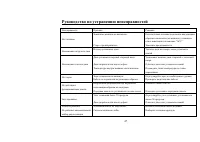
22 Troubleshooting guide Symptom Cause Solution General No power The car ignition is not on. The fuse is blown. If the power supply is properly connected to the car accessory switch the ignition key to “ACC”. Replace the fuse. Disc Disc cannot be loaded. Presence of disc inside the player. Remove th...
Page 23 - Specification; General; Current consumption:; FM Stereo Radio; MW and LW section; Preset memory stations:; Audio specification
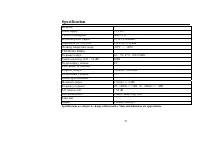
23 Specification Specifications are subject to change without notice. Mass and dimension are approximate. General Power supply: 12 V DC Current consumption: max. 15 A Maximum power output: 50 W x 4 channels Dimensions (W x H x D): 178 x 165 x 50 mm Working temperature range: -10º С - +60º С FM Stere...
Page 24 - Содержание
24 Уважаемый покупатель ! Благодарим Вас за покупку нашего изделия . Для обеспечения безопасности рекомендуется тщательно изучить настоящее руководство перед подключением , эксплуатацией и / или регулировкой изделия , и сохраняйте руководство для использования в будущем . Содержание Содержание ........
Page 26 - Способ
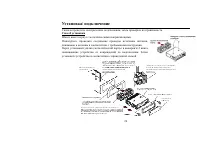
26 Установка / подключение Сначала проведите электрические подключения , затем проверьте их правильность . Способ установки Шасси имеет корпус с металлическими направляющими . Пожалуйста , проведите соединение проводов источника питания , динамиков и антенны в соответствии с требованиями инструкции ...
Page 27 - Внимание
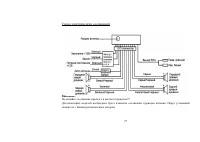
27 Схема электрических соединений Внимание : Не меняйте соединение красного и желтого проводов !!! Для некоторых моделей необходимо будет изменить соединение проводов питания . Перед установкой свяжитесь с Вашим региональным дилером .
Page 28 - ISO
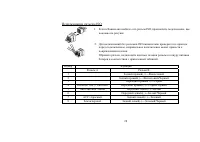
28 Использование разъема ISO 1. Если в Вашем автомобиле есть разъем ISO, произведите подключение , как показано на рисунке . 2. Для подключений без разъемов ISO внимательно проверьте все провода перед подключением , неправильное подключение может привести к повреждениям изделия . Обрежьте разъем , п...
Page 29 - Передняя; BND
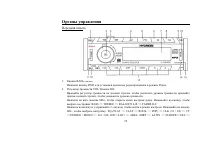
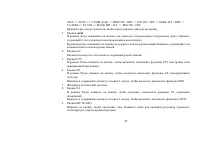
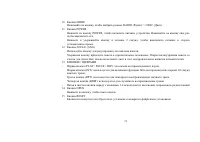
29 Органы управления Передняя панель 1. Кнопка B А ND (BND) Нажмите кнопку BND для установки диапазона радиоприемника в режиме Радио . 2. Регулятор громкости VOL/ Кнопка SEL Вращайте регулятор громкости по часовой стрелке , чтобы увеличить уровень громкости , вращайте против часовой стрелки , чтобы ...
Page 34 - EQ OFF; CLK; LOC
34 Регулировка других настроек Нажмите и удерживайте в течение 2 секунд кнопку SEL, чтобы выбрать настройку меню : EQ (FLAT => CLAS => ROCK => POP) => CLK (12 / 24) => CT =>STEREO / MONO => LO / DX (DX=>LOC) => AREA (OIRT => LATIN => EUROPE=>USA => ASIA => A...
Page 35 - SEEK; Режим; AF
35 показатель в память магнитолы , при каждом последующем включении уровень громкости будет настраиваться на этот показатель . • Режим BEEP Вращайте регулятор громкости , чтобы выбрать режим : BEEP ON ( звуковое сопровождение при нажатии на кнопки на панели ) или BEEP OFF ( звуковое сопровождение вы...
Page 36 - Цифровой; RDS
36 • Region: включите или выключите функцию регионального кода . Выключение звука Нажмите на кнопку MU ТЕ , чтобы выключить звук . Нажмите на кнопку еще раз или вращайте регулятор громкости , чтобы включить звук . Выбор режима работы Нажмите на кнопку MOD Е , чтобы выбрать режим работы устройства : ...
Page 38 - EON; CD
38 Функция автоматического предпрослушивания станций Выберите диапазон . Нажмите на кнопку А . Р , чтобы прослушать все сохраненные в текущем диапазоне станции в течение 7 секунд . Во время прослушивания номер каждой станции будет мигать на дисплее . Чтобы остановить прослушивание , снова нажмите на...
Page 39 - Воспроизведение
39 искать другую частоту с этой программой . По умолчанию функция включена . Функция PTY ( Тип программы ) Нажмите кнопку PTY отрывисто несколько раз , чтобы активизировать функцию PTY, при этом на экране появится индикация “PTY” и “NEWS”. Вращая регулятор громкости , выберите одну из предлагаемых P...
Page 40 - Intro
40 4. Для извлечения диска нажмите кнопку ANGLE (ANG) и приведите панель в горизонтальное положение . Воспроизведение / Пауза Когда диск в устройстве , начинается автоматическое воспроизведение первого трека . Чтобы обеспечить высокое качество воспроизведения , дождитесь , пока плеер закончит читать...
Page 41 - SEL
41 Во время воспроизведения треков нажмите на кнопку INT, чтобы начать воспроизведение всех треков . Нажмите еще раз для отмены . Во время воспроизведения MP3/WMA файлов нажмите и удерживайте в течение 2 секунд кнопку INT, чтобы начать воспроизведение треков в текущей папке . Повтор воспроизведения ...
Page 42 - Замечания; MPEG 3
42 Обзор МР 3 Замечания по МР 3: • МР 3 это краткое обозначение аудио слоя MPEG 3 и относится к стандарту технологии сжатия звука . • Данное изделие позволяет воспроизводить файлы МР 3 на дисках CD-ROM, CD-R или CD-RW. • Изделие может считывать файлы МР 3, записанные в формате , соответствующем ISO ...
Page 44 - Снятие
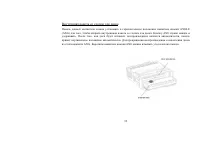
44 Система против кражи Снятие панели 1. Нажмите на кнопку POWER, чтобы выключить питание устройства . 2. Нажмите на кнопку OPEN, чтобы снять панель ( правая сторона панели отсоединится ). 3. Сдвиньте панель в левую сторону и снимите ее . 4. Положите панель в специальный футляр и возьмите его с собо...
Page 45 - Обращение
45 Выемка магнитолы 1. Снимите панель . 2. Вставьте два Т - образных ключа в отверстие лицевой стороны , пока не услышите щелчок . 3. Выньте изделие . Обращение с дисками • Грязные , поцарапанные или погнутые диски могут вызвать искажение звука или шумы • Держите диск только за края ( как показано н...
Page 46 - Чистка
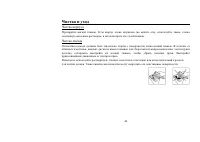
46 Чистка и уход Чистка корпуса Протирайте мягкой тканью . Если корпус очень загрязнен ( не мочите его ), используйте ткань , слегка смоченную мыльным раствором , и затем вытрите его сухой тканью . Чистка дисков Отпечатки пальцев должны быть тщательно стерты с поверхности диска мягкой тканью . В отл...
Page 48 - FM; DSP
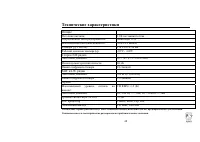
48 Технические характеристики Технические характеристики могут быть изменены заводом - изготовителем без предварительного уведомления . Указанные масса и геометрические размеры имеют приблизительные значения . Общие Источник питания : 12 В постоянного тока Потребляемый ток / Предохранитель : Максиму...