Page 2 - Table of contents
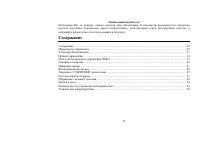
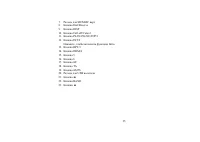
2 Dear customer! Thank you for purchasing our product. For safety, it is strongly recommended to read this manual carefully before connecting, operating and/or adjusting the product and keep the manual for reference in the future. Table of contents Table of contents.....................................
Page 3 - Important safeguards; Using the device at temperature below -10o
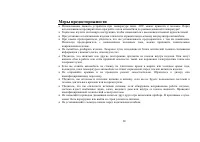
3 Important safeguards • Using the device at temperature below -10º С may cause the breakage of the device. Before using please heat up the passenger compartment to the recommended temperature! • Read carefully through this manual to familiarize yourself with this high-quality sound system. • Discon...
Page 4 - Installation/Connections; Remove these two
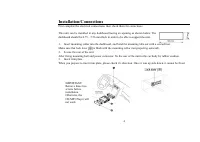
Installation/Connections First complete the electrical connections, then check them for correctness. This unit can be installed in any dashboard having an opening as shown below. The dashboard should be 4.75 – 5.56 mm thick in order to be able to support the unit. 1. Insert mounting collar into the ...
Page 5 - Electrical connections
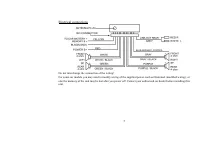
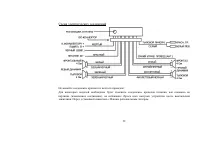
Electrical connections Do not interchange the connection of the wiring! For some car models you may need to modify wiring of the supplied power cord as illustrated (modified wiring), or else the memory of the unit may be lost after you power off. Contact your authorized car dealer before installing ...
Page 6 - Using the ISO Connector; Function
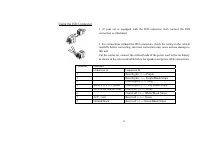
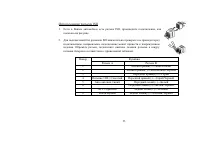
Using the ISO Connector 1. If your car is equipped with the ISO connector, then connect the ISO connectors as illustrated. 6 2. For connections without the ISO connectors, check the wiring in the vehicle carefully before connecting, incorrect connection may cause serious damage to this unit. Cut the...
Page 7 - Panel controls; Front panel
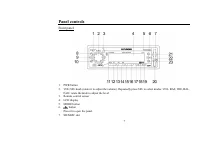
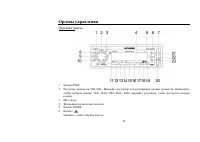
Panel controls Front panel 1. PWR button 2. VOL/SEL knob (rotate it to adjust the volume). Repeatedly press SEL to select modes: VOL, BAS, TRE, BAL, FAD; rotate the knob to adjust the level. 3. Remote control sensor 4. LCD display 5. MODE button 6. button Press it to open the panel. 7. SD/MMC slot 7
Page 9 - Back of the front panel
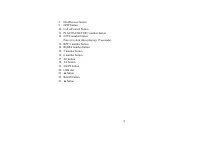
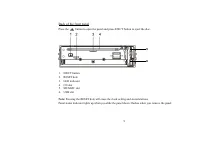
Back of the front panel Press the button to open the panel and press EJECT button to eject the disc. 5 6 1. EJECT button 2. RESET hole 3. LED indicator 4. CD slot 5. SD/MMC slot 6. USB slot Note: Pressing the RESET hole will erase the clock setting and stored stations. Panel status indicator lights ...
Page 10 - buttons; Battery information of RC; Press the catch and at the same time pull out the battery tray.
Remote controller (RC) 10 1. PWR button 2. Numeric pad 3. Dial/Receive call 4. Call off/cancel 5. / buttons 6. MODE button 7. VOL+/- buttons Battery information of RC 1. Press the catch and at the same time pull out the battery tray. 2. Insert the 1 x lithium battery, type CR 2025 3V battery with th...
Page 11 - General operation; Source select; button on the; VOL/SEL knob functions; control
General operation Power on/off Press PWR button on the front panel or RC to turn the unit on. To turn the unit off press PWR button on the front panel once more or press and hold PWR button on the RC. When you switch off the system or car ignition, the settings, tuner presets and the volume level wi...
Page 13 - Turning the sound off
13 • CONNT A mode: bluetooth is connected automatically. • CONNT M mode: bluetooth is connected manually. Turning the sound off Short press the PWR button to turn the sound off. Press it again or use the VOLUME buttons to turn the sound on. Adjusting clock Press and hold DISP button for more than 2 ...
Page 14 - Digital tuner; Band selection
Digital tuner Note: RDS (Radio Data System) service availability varies with areas. Please understand if RDS service is not available in you area, the following service is not available, either. Band selection Press PWR to turn the power on, then press the MODE button once or more to select TUNER. P...
Page 16 - Folk
16 AF: The frequency list of preset RDS stations is updated by EON data. EON enables the radio to make fuller use of RDS information. It constantly updates the AF list of preset stations, including the one that currently tuned into. If you preset a station around the area at your home, you will late...
Page 17 - Disc operations; Loading a disc; For CD, the CD icon will appear on the display.; Pausing playback; Press
Disc operations Loading a disc 1. Press button on the panel to slide down the panel. Insert the disc with the printed side facing upward into the slot. 2. Press button to slide down the panel. Press EJECT button on the panel to eject the disc. Playing a disc 1. When disc inserted, display shows READ...
Page 18 - or forward skip during playback.; Intro playing
18 ID3 tags display Press BAND button repeatedly during playback to access the ID3 information manually. The display will show following track information: folder name, file name, track title, artist name, album name, if available. Scanning forward and backward 1. Press and hold / buttons for more t...
Page 19 - appear on the display.
19 appear on the display. • Press RDM/4 button again to select RDM FOLD and randomly play all the files in the current folder. • To turn off random playback, press RDM/4 button again. The same operations are performed by pressing the “4” numeric button on the RC. Direct track search (for WMA/MP3) 1....
Page 22 - Bluetooth operations; Pairing; Press and hold BAND button to reconnect manually.; Call answering
22 Bluetooth operations Pairing Turn on Bluetooth function of your mobile phone. Press and hold MODE button more than two seconds to enter pairing mode, if you want to terminate pairing process, press Call off/Cancel button. Keep phone within 3 meters to the unit, enter mobile phone’s bluetooth setu...
Page 24 - Removing the panel; button to slide down the panel.; Install the panel
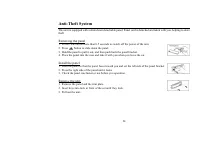
Anti-Theft System This unit is equipped with a slide-down detachable panel. Panel can be detached and taken with you, helping to deter theft. Removing the panel 1. Press PWR button more than 0.5 seconds to switch off the power of the unit. 2. Press button to slide down the panel. 3. Hold the panel t...
Page 25 - Handling discs; Dirty, scratched or warped discs may cause skip ping or noise.; Cleaning; Cleaning the cabinet
Handling discs • Dirty, scratched or warped discs may cause skip ping or noise. • Handle the disc only by the edges. To keep clean do not touch its surface. • Discs should be stored in their cases after use to avoid scratches. • Do not expose discs to direct sunlight, high humidity, high temperature...
Page 26 - Troubleshooting guide; Symptom
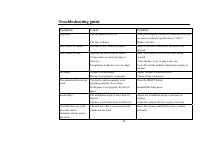
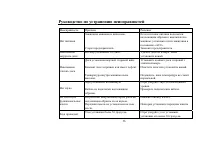
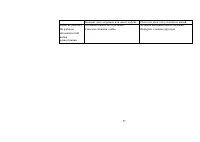
26 Troubleshooting guide Symptom Cause Solution No power The car ignition is not on. The fuse is blown. If the power supply is properly connected to the car accessory switch the ignition key to “ACC”. Replace the fuse. Disc cannot be loaded. Presence of disc inside the player. Remove the disc in the...
Page 27 - Specification
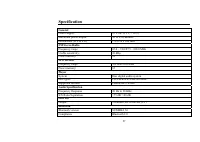
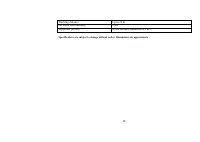
27 Specification General Power supply: 12 V DC (11 V – 16 V) Maximum power output: 50 W x 4 channels Dimensions (W x H x D) 178 x 50 x 166 mm FM Stereo Radio Frequency range: 65.0 – 74.0/87.5 - 108.0 MHz Usable sensitivity: 10 dBµ Preset memory: 18 MW Section Frequency range: 522 kHz-1620 kHz Preset...
Page 29 - Содержание
29 Уважаемый покупатель ! Благодарим Вас за покупку нашего изделия . Для обеспечения безопасности рекомендуется тщательно изучить настоящее руководство перед подключением , эксплуатацией и / или регулировкой изделия , и сохраняйте руководство для использования в будущем . Содержание Содержание ........
Page 31 - Внимание
Установка / Подключение Данное изделие может быть установлено в приборную панель , имеющую показанное ниже отверстие . Приборная панель должна иметь толщину 4,75 – 5,56 мм , чтобы быть способной поддерживать изделие . 1. Вставьте установочную втулку в приборную панель и отогните установочные петли н...
Page 33 - ISO
Использование разъема ISO 1. Если в Вашем автомобиле есть разъем ISO, произведите подключение , как показано на рисунке . 2. Для подключений без разъемов ISO внимательно проверьте все провода перед подключением , неправильное подключение может привести к повреждениям изделия . Обрежьте разъем , подк...
Page 34 - Передняя; PWR
Органы управления Передняя панель 1. Кнопка PWR 2. Регулятор громкости VOL/SEL. Вращайте регулятор для регулировки уровня громкости . Нажимайте , чтобы выбрать режим : VOL, BAS, TRE, BAL, FAD; вращайте регулятор , чтобы настроить каждый режим . 3. ИК сенсор 4. Жидкокристаллический дисплей 5. Кнопка ...
Page 36 - EJECT; RESET
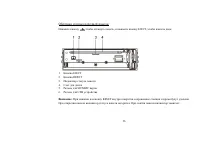
Обратная сторона передней панели Нажмите кнопку , чтобы откинуть панель , и нажмите кнопку EJECT, чтобы извлечь диск . 1. Кнопка EJECT 2. Кнопка RESET 3. Индикатор статуса панели 4. Слот для диска 5. Разъем для SD/MMC карты 6. Разъем для USB устройства Внимание : При нажатии на кнопку RESET внутри о...
Page 37 - Замена; Примечание
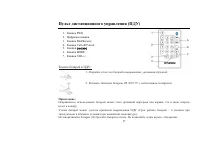
Пульт дистанционного управления ( ПДУ ) 1. Кнопка PWR 2. Цифровые кнопки 3. Кнопка Dial/Receive 4. Кнопка Call off/Cancel 5. Кнопки / 6. Кнопка MODE 7. Кнопки VOL+/- Замена батарей в ПДУ : 1. Откройте отсек для батарей в направлении , указанном стрелкой . 2. Вставьте литиевую батарею CR 2025 3V с со...
Page 38 - Кнопка
Основные операции Включение / выключение питания Нажмите кнопку PWR, чтобы включить устройство . Нажмите кнопку PWR на передней панели или нажмите и удерживайте кнопку PWR на ПДУ , чтобы выключить устройство . Когда вы выключаете систему или зажигание автомобиля , установки , предустановки тюнера и ...
Page 40 - CONNT A; Выключение; Установка
40 BEEP: включает или выключает звуковые сигналы , когда заданная функция выполнена . CONNT: вращайте регулятор , чтобы выбрать CONNT A или CONNT M. • CONNT A: автоматическое подключение bluetooth. • CONNT M: bluetooth подключается вручную . Выключение звука Нажмите кнопку PWR, чтобы выключить звук ...
Page 41 - RDS
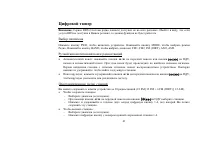
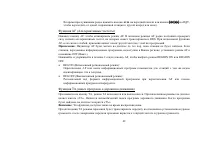
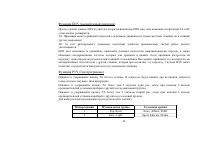
Цифровой тюнер Внимание : Сервис RDS ( Система радио данных ) доступен не во всех регионах . Имейте в виду , что если услуга RDS не доступна в Вашем регионе , то данная функция не будет работать . Выбор диапазона Нажмите кнопку PWR, чтобы включить устройство . Нажимайте кнопку MODE, чтобы выбрать ре...
Page 45 - CD
Воспроизведение дисков Загрузка диска 1. Нажмите кнопку , чтобы открыть панель . Вставьте диск в слот отпечатанной стороной вверх . 2. Нажмите кнопку , чтобы открыть панель . Нажмите кнопку EJECT, выньте диск из слота . Воспроизведение диска 1. Когда диск в устройстве , на дисплее отображается надпи...
Page 46 - ID; BAND; Intro
46 воспроизведение начнется с начала текущего трека или с начала следующего трека . Отображение ID № тэгов Нажимайте кнопку BAND во время воспроизведения , чтобы на дисплее отобразилась информация ID3 тэгов . Может быть отображена следующая информация : имя папки , имя файла , название трека , имя а...
Page 49 - LCD; USB; USB
49 Операции с USB/SD/MMC носителями Загрузка SD/MMC карты Вставьте карту SD/MMC в слот . Устройство автоматически переключится в режим MEM-CARD и на LCD отобразится надпись «CARD» и символ SD. Извлечение SD/MMC карты Нажмите кнопку MODE, чтобы переключить устройство на другой режим , затем нажмите н...
Page 51 - BAND –; BT; Advanced Audio Distribution Profile (A2DP)
51 произойдет автоматически через 2 секунды . Устройство не может удерживать первый звонок . Чтобы завершить разговор по второму звонку , нажмите кнопку Call off/Cancel. Набор номера с помощью ПДУ Нажмите кнопку Dial/Receive, затем наберите номер с помощью цифровых кнопок ПДУ . Для набора можно испо...
Page 54 - Чистка
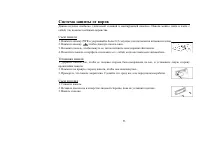
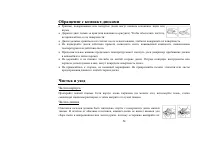
Обращение с компакт - дисками • Грязные , поцарапанные или погнутые диски могут вызвать искажение звука или шумы • Держите диск только за края ( как показано на рисунке ). Чтобы обеспечить чистоту , не прикасайтесь к его поверхности . • Диски должны храниться в их чехлах после использования , чтобы ...
Page 58 - FM; Bluetooth
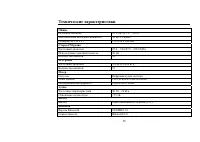
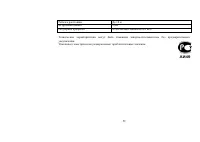
58 Технические характеристики Общие Источник питания : 12 V DC (11 V – 16 V) Максимальная выходная мощность : 50 Вт x 4 канал Размеры ( Ш x В x Г ) 178 x 50 x 166 мм Стерео FM радио Частотный диапазон : 65.0 – 74.0/87.5 - 108.0 МГц Используемая чувствительность : 10 дБ Количество каналов : 18 MW рад...