Page 2 - SAFETY DEFINITIONS; CAUTION; NOTICE; INSTALLER: LEAVE THIS MANUAL WITH THE OWNER OF THE APPLIANCE.; TIP OVER HAZARD; READ THESE INSTRUCTIONS CAREFULLY AND COMPLETELY BEFORE; this or any other appliance.; IF THE INFORMATION IN THIS MANUAL IS NOT FOLLOWED EXACTLY,
SAFETY DEFINITIONS THIS INDICATES THAT DEATH OR SERIOUS INJURY MAY OCCUR AS A RESULT OF NOT OBSERVING THIS WARNING.THIS INDICATES THAT MINOR OR MODERATE INJURY MAY OCCUR AS A RESULT OF NOT OBSERVING THIS WARNING.THIS INDICATES THAT DAMAGE TO THE APPLIANCE OR PROPERTY MAY OCCUR AS A RESULT OF NOT OBS...
Page 3 - Message from Hestan
© 2021 Hestan Commercial Corporation 1 EN Message from Hestan Message from Hestan Hestan’s award-winning culinary innovations and purpose-built features reinvented the restaurant kitchen and redefined culinary experience in some of America’s most acclaimed restaurants. Hestan now takes this performa...
Page 5 - SAFETY PRECAUTIONS - BEFORE YOU BEGIN; ELECTRICAL SHOCK HAZARD; TABLE OF CONTENTS
© 2021 Hestan Commercial Corporation 3 EN When properly cared for, your Hestan appliance will provide safe, reliable service for many years. When using this appliance, basic safety practices must be followed as outlined below.INSTALLER: Please leave these Installation Instructions with the owner.OWN...
Page 6 - ELECTRICAL SUPPLY; instructions are included with the backguard kit.; or other heat-sensitive items nearby which could melt or burn.; VENTILATION REQUIREMENTS; CONSULT WITH YOUR HESTAN DEALER ON SELECTING THE APPROPRIATE; IN CASE OF POWER OUTAGE; CHILD SAFETY
©2021 Hestan Commercial Corporation 4 EN SAFETY PRECAUTIONS - BEFORE YOU BEGIN (CONTINUED) ELECTRICAL SUPPLY ELECTRICAL SUPPLY This appliance must be connected to a dedicated circuit, 240 VAC, Single Phase, 60 Hz, with a current rating as shown in the model number listing on page 8. Have the install...
Page 7 - result in severe burns or injury.; TECHNICAL SAFETY
© 2021 Hestan Commercial Corporation 5 EN SAFETY PRECAUTIONS - BEFORE YOU BEGIN (CONTINUED) BURN HAZARD - Cookware and all parts of the range can get very hot during operation. The oven door glass and areas surrounding the door get very hot, especially during self-cleaning operations. Do not let chi...
Page 8 - FIRE SAFETY; fabrics are highly flammable and could ignite.; IF THE FLAMES DO NOT GO OUT - EVACUATE AND CALL THE FIRE; SAFETY DURING CLEANING; produce noxious fumes if applied to a hot surface.
©2021 Hestan Commercial Corporation 6 EN SAFETY PRECAUTIONS - BEFORE YOU BEGIN (CONTINUED) Do not allow anyone to climb, stand, step on, lean against, or sit on any part of the appliance, especially the oven door. This may result in damage to the appliance, or personal injury. FIRE SAFETY FIRE SAFET...
Page 9 - PROPER USAGE; REGULATORY / CODE REQUIREMENTS; codes with the National Electrical Code
© 2021 Hestan Commercial Corporation 7 EN PROPER USAGE PROPER USAGE Do not let food sit in the oven for more than one hour before or after cooking. Doing so may result in food poisoning or illness.Do not heat unopened containers (cans) on the rangetop or in the oven. Pressure may build up causing th...
Page 10 - MODEL NUMBERS; RANGE MODELS
©2021 Hestan Commercial Corporation 8 EN RATING LABEL MODEL NUMBERS RATING LABEL The rating label contains important information about your Hestan appliance such as the model and serial number, electrical rating, and the minimum installation clearances.The rating label is located in one of two place...
Page 11 - GETTING STARTED WITH YOUR APPLIANCE; COMPONENT IDENTIFICATION; Controls; range
© 2021 Hestan Commercial Corporation 9 EN GETTING STARTED WITH YOUR APPLIANCE COMPONENT IDENTIFICATION COMPONENT IDENTIFICATION Use the images below to familiarize yourself with the various parts of the induction rangetop and oven. KRI30, KRI36 KRI30, KRI361. Island Trim Backguard (included)*2. Indu...
Page 14 - HOW INDUCTION HEATING WORKS
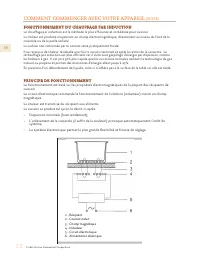
©2021 Hestan Commercial Corporation 12 EN 1 - Recipient2 - Induced current3 - Magnetic field4 - Inductor5 - Electronic circuit6 - Electricity supply GETTING STARTED WITH YOUR APPLIANCE (CONTINUED) HOW INDUCTION HEATING WORKS HOW INDUCTION HEATING WORKS Heating by induction is the most efficient form...
Page 15 - FIRST TIME OPERATION - INDUCTION RANGETOP; COOKWARE RECOMMENDATIONS on page 14.; POWER SHARING
© 2021 Hestan Commercial Corporation 13 EN FIRST TIME OPERATION - INDUCTION RANGETOP FIRST TIME OPERATION - INDUCTION RANGETOP All products are wiped clean with solvents at the factory to remove any visible signs of dirt, oil, and grease which may have remained from the manufacturing process. Ensure...
Page 16 - COOKWARE RECOMMENDATIONS
©2021 Hestan Commercial Corporation 14 EN 2 1 3 4 5 1 2 3 4 30” Wide Rangetop The minimum pan diameter is shown for each cooking element. Position Minimum pan diameter 1 2 3 4 5-3/4” [145 mm] 5-3/4” [145 mm] 5-3/4” [145 mm] 5-3/4” [145 mm] 4 5 2 3 1 6 1 2 3 4 5 Position Minimum pan diameter 36” Wide...
Page 17 - OVEN RACKS; PLACING THE OVEN RACKS
© 2021 Hestan Commercial Corporation 15 EN GETTING STARTED WITH YOUR APPLIANCE (CONTINUED) OVEN RACKS OVEN RACKS BURN HAZARD - To help prevent burns, never remove or reposition the oven racks when the oven is in operation, or is cooling. For safety considerations, NEVER cover any slots, holes, or pa...
Page 18 - FIRST TIME OPERATION - OVEN; USER INSTRUCTIONS - INDUCTION RANGETOP; USING THE INDUCTION RANGETOP / GENERAL INFORMATION; GENERAL
©2021 Hestan Commercial Corporation 16 EN GETTING STARTED WITH YOUR APPLIANCE (CONTINUED) FIRST TIME OPERATION - OVEN FIRST TIME OPERATION - OVEN Ensure there are no packaging materials inside the oven. Remove any labels or plastic film from the outside of the appliance. Before using your oven for t...
Page 19 - PAN DETECTION
© 2021 Hestan Commercial Corporation 17 EN cooking zone or the timer, the touch control automatically returns to stand-by mode. Any running timers will continue their countdown, and the residual heat indicator will also work. ACOUSTIC SIGNAL ACOUSTIC SIGNAL During use, the following activities are s...
Page 20 - PRECAUTIONS; Yes
©2021 Hestan Commercial Corporation 18 EN • The ON/OFF key takes priority over all other keys, so the touch control can be switched off at any time, even in the case of multiple or continuous activation of the keys. • In stand-by mode, continuous activation of the keys will have no effect. However, ...
Page 21 - SPECIAL FUNCTIONS; BOOSTER AND POWER MANAGEMENT
© 2021 Hestan Commercial Corporation 19 EN SPECIAL FUNCTIONS SPECIAL FUNCTIONS BOOSTER AND POWER MANAGEMENT BOOSTER AND POWER MANAGEMENT The power of a cooking zone can be “boosted” for a certain period of time. With Booster enabled, an individual cooking zone is heated with power that is significan...
Page 22 - PAUSE; PAUSE
©2021 Hestan Commercial Corporation 20 EN AUTOMATIC HEATING (OR “HEAT-UP” FUNCTION) AUTOMATIC HEATING (OR “HEAT-UP” FUNCTION) This feature makes cooking easier by adding ‘boil and reduce’ functionality to the elements. The surface automatically heats up at Full Power and then returns to the selected...
Page 23 - RECALL; KEY LOCK
© 2021 Hestan Commercial Corporation 21 EN RECALL RECALL If the rangetop was inadvertently switched off, or after a power outage, the RECALL function enables the user to recover all previous settings (power levels, automatic warming, and timers). ACTIVATING RECALL ACTIVATING RECALL 1. If the rangeto...
Page 24 - CHEF COOK FUNCTION; LEVEL; DEACTIVATING WARMING FUNCTION
©2021 Hestan Commercial Corporation 22 EN CHEF COOK FUNCTION CHEF COOK FUNCTION This feature enables all cooking zones with different heating power levels. Starting from left to right, the following power levels are set and dissipated as soon as suitable cookware is placed on the cooking zones. Left...
Page 25 - TIMER FUNCTION; COOKING ZONE TIMER
© 2021 Hestan Commercial Corporation 23 EN TIMER FUNCTION TIMER FUNCTION The user interface has 2 different types of timers which are explained in detail below. If more than one timer is set, the timer will always display the lowest remaining time. The timer is only intended as an acoustic advisor t...
Page 26 - USER INSTRUCTIONS - OVEN; OVEN FEATURES
©2021 Hestan Commercial Corporation 24 EN USER INSTRUCTIONS - OVEN (CONT.) 3. Touch the timer icon (6). The display flashes “ 000 ” for the next 10 sec and the timer clock indicator (7) above the cooking zone starts pulsating. 4. Adjust the desired start time digit for digit with +/- icons (6) above...
Page 27 - RACK POSITION / BEFORE BAKING
© 2021 Hestan Commercial Corporation 25 EN • Remember that different bakeware and pans cook and heat differently.• Light-colored non-stick pans result in golden crust that is tender.• Dark-colored non-stick pans result in a more brown, crisp crust.• Generally, when using any Convection mode, it is s...
Page 28 - APPROPRIATE BAKEWARE /
©2021 Hestan Commercial Corporation 26 EN USER INSTRUCTIONS - OVEN (CONT.) PRE-HEATING PRE-HEATING Many recipes call for a pre-heated oven. Refer to your recipe for instructions. Pre-heating time depends on the Mode and Temperature selected, as well as the number of racks inside the oven. APPROPRIAT...
Page 29 - COOKING WITH THE OVEN
© 2021 Hestan Commercial Corporation 27 EN USER INSTRUCTIONS - OVEN (CONT.) COOKING WITH THE OVEN COOKING WITH THE OVEN The following pages will help you with the various oven controls. Your recipe will guide you on which cooking modes are best. However, food safety (handling, cooking, storage) is v...
Page 30 - OVEN CONTROLS; DISPLAY LAYOUT / KNOB ICONS; Bake
©2021 Hestan Commercial Corporation 28 EN OVEN CONTROLS DISPLAY LAYOUT / KNOB ICONS DISPLAY LAYOUT / KNOB ICONS 30”, 36” Oven OVEN MODE SELECT OVEN MODE SELECT OVEN TEMPERATURE OVEN TEMPERATURE TOUCH SCREEN TOUCH SCREEN TrueConvection Bake ConvectionBake Roast ConvectionRoast Broil ConvectionBroil P...
Page 31 - DISPLAY ACTIVATION
© 2021 Hestan Commercial Corporation 29 EN OVEN CONTROLS (CONTINUED) DISPLAY ACTIVATION DISPLAY ACTIVATION When inactive, the display will be dark. Turning any control knob, or touching anywhere on the screen for 2 or more seconds will activate the display. After more than 1 minute of inactivity, th...
Page 32 - SETTING THE CLOCK
©2021 Hestan Commercial Corporation 30 EN OVEN CONTROLS (CONTINUED) SETTING THE CLOCK SETTING THE CLOCK 1. Activate the display by touching and holding for 2 or more seconds. At first power-up, or after a power failure, the display will flash 00:00. Press the Menu icon. 2. Touch the CLOCK button. 3....
Page 33 - SETTING THE TIMER; Menu
© 2021 Hestan Commercial Corporation 31 EN OVEN CONTROLS (CONTINUED) SETTING THE TIMER SETTING THE TIMER 1. Activate the display by touching and holding for 2 seconds. Touch the Menu icon. 2. Touch the TIMER button. 3. Touch the UP and DOWN arrows to set the desired amount of hours, then touch HOUR ...
Page 34 - SETTING THE PROBE TEMPERATURE
©2021 Hestan Commercial Corporation 32 EN OVEN CONTROLS (CONTINUED) SETTING THE PROBE TEMPERATURE SETTING THE PROBE TEMPERATURE 1. Activate the display by touching and holding for 2 seconds. Touch the Menu icon. 2. Touch the PROBE button. 3. Touch the UP and DOWN arrows to set the desired cooking pr...
Page 35 - SETTING FAHRENHEIT / CELSIUS
© 2021 Hestan Commercial Corporation 33 EN OVEN CONTROLS (CONTINUED) SETTING FAHRENHEIT / CELSIUS SETTING FAHRENHEIT / CELSIUS 1. Activate the display by touching and holding for 2 seconds. Touch the Menu icon. 2. Touch the ADVANCED button. 3. Touch the °F / °C button. 4. Touch the °F or °C button a...
Page 36 - SETTING COOK TIME
©2021 Hestan Commercial Corporation 34 EN OVEN CONTROLS (CONTINUED) SETTING COOK TIME SETTING COOK TIME 1. Activate the display by touching and holding for 2 seconds. Touch the Menu icon. 2. Touch the ADVANCED button. 3. Touch the COOK TIME button. 4. Touch the UP and DOWN arrows to set the amount o...
Page 37 - SETTING DELAYED START
© 2021 Hestan Commercial Corporation 35 EN OVEN CONTROLS (CONTINUED) SETTING DELAYED START SETTING DELAYED START 1. Activate the display by touching and holding for 2 seconds. Touch the Menu icon. 2. Touch the ADVANCED button. 3. Touch the DELAY SRT button. 4. Touch the UP and DOWN arrows to set the...
Page 38 - SETTING SABBATH MODE
©2021 Hestan Commercial Corporation 36 EN OVEN CONTROLS (CONTINUED) SETTING SABBATH MODE SETTING SABBATH MODE 1. Activate the display by touching and holding for 2 seconds. Touch the Menu icon. 2. Touch the ADVANCED button. 3. Touch the SABBATH button. 4. The Oven Mode knob must be set to BAKE. “SET...
Page 40 - TRUE CONVECTION COOKING MODE
©2021 Hestan Commercial Corporation 38 EN OVEN CONTROLS (CONTINUED) 1. Turn the Mode Select knob to the TRUE CONVECTION setting. 2. Set the Temperature knob to the desired cooking temperature. In this example, it has been set to 350°F which is also displayed. 3. The display will now show “PRE” indic...
Page 41 - BAKE COOKING MODE
© 2021 Hestan Commercial Corporation 39 EN OVEN CONTROLS (CONTINUED) NOTES: a. Once settings for Timed Cook or Probe Cook have been entered, the user has 2 minutes to set the cooking mode and temperature before the unit will revert back to the default and re-entering the settings will be required. B...
Page 42 - CONVECTION BAKE COOKING MODE
©2021 Hestan Commercial Corporation 40 EN OVEN CONTROLS (CONTINUED) NOTES: a. Once settings for Timed Cook or Probe Cook have been entered, the user has 2 minutes to set the cooking mode and temperature before the unit will revert back to the default and re-entering the settings will be required. b....
Page 43 - ROAST COOKING MODE
© 2021 Hestan Commercial Corporation 41 EN OVEN CONTROLS (CONTINUED) NOTES: a. Once settings for Timed Cook or Probe Cook have been entered, the user has 2 minutes to set the cooking mode and temperature before the unit will revert back to the default and re-entering the settings will be required. R...
Page 44 - CONVECTION ROAST COOKING MODE
©2021 Hestan Commercial Corporation 42 EN OVEN CONTROLS (CONTINUED) NOTES: a. Once settings for Timed Cook or Probe Cook have been entered, the user has 2 minutes to set the cooking mode and temperature before the unit will revert back to the default and re-entering the settings will be required. b....
Page 45 - BROIL COOKING MODE
© 2021 Hestan Commercial Corporation 43 EN OVEN CONTROLS (CONTINUED) NOTE: a. Timed Cook or Probe Cook should not be used in the BROIL mode. BROIL COOKING MODE BROIL COOKING MODE 1. Turn the Mode Select knob to the BROIL setting. 2. Set the Temperature knob to the BROIL setting. The display will sho...
Page 46 - CONVECTION BROIL COOKING MODE
©2021 Hestan Commercial Corporation 44 EN OVEN CONTROLS (CONTINUED) NOTES: a. Timed Cook or Probe Cook should not be used in the CONVECTION BROIL mode. b. In general, convection cooking should be done using low, shallow bakeware or pans to allow the heated air to circulate around the food. Removal o...
Page 47 - PROOF COOKING MODE
© 2021 Hestan Commercial Corporation 45 EN OVEN CONTROLS (CONTINUED) NOTE: a. The PROOF setting is a very low oven temperature around 100°F [38°C] for assisting yeast-leavened breads and other baked goods to rise. b. It is best to start with a cool oven when using this setting. PROOF COOKING MODE PR...
Page 49 - ADDITIONAL ITEMS; COOLING BLOWERS
© 2021 Hestan Commercial Corporation 47 EN ADDITIONAL ITEMS COOLING BLOWERS COOLING BLOWERS The range has a cooling blower to protect the electronic components. The blower(s) activate when the oven reaches a temperature around 300°F [149°C], and will stay on throughout any oven cooking cycle. After ...
Page 50 - OVEN LATCH; OVEN
©2021 Hestan Commercial Corporation 48 EN CARE & MAINTENANCE (CONTINUED) OVEN LATCH OVEN LATCHThe self-clean cycle will engage an automatic door latch to prevent the user from opening the oven door and being exposed to the high heat. When you see the lock icon displayed, check the door to be sur...
Page 51 - LADDER RACKS / OVEN RACKS; INDUCTION ELEMENTS / CERAMIC GLASS TOP
© 2021 Hestan Commercial Corporation 49 EN CARE & MAINTENANCE (CONTINUED) LADDER RACKS / OVEN RACKS LADDER RACKS / OVEN RACKSThe oven racks and the left & right ladder racks can be removed from the oven for cleaning. DO NOT clean these items in a self-cleaning oven. The racks may be cleaned ...
Page 52 - EXTERIOR SURFACES
©2021 Hestan Commercial Corporation 50 EN CARE & MAINTENANCE (CONTINUED) SUGGESTED CLEANERS: Cerama Bryte® Carbona® Hope’s® Cooktop Cleaning Cream Affresh® Cooktop Cleaner Weiman® Cooktop Cleaning Cream Easy-Off® 3-in-1 Glass Top Cleaner Spray EXTERIOR SURFACES EXTERIOR SURFACES Do not allow foo...
Page 53 - fully into the socket.
© 2021 Hestan Commercial Corporation 51 EN CARE & MAINTENANCE (CONTINUED) 5. While still using a cloth or tissue paper, insert the new bulb in the lamp housing. Push the bulb fully into the socket. 6. Re-install the glass lens taking note of the cutaway in the glass which aligns with the bulb so...
Page 54 - SYMPTOM; TROUBLESHOOTING GUIDE; OVEN ERROR CODES
©2021 Hestan Commercial Corporation 52 EN SYMPTOM SYMPTOM POSSIBLE CAUSE POSSIBLE CAUSE SOLUTION SOLUTION Range does not operate(no display, knob lights, interior lights, etc.). Power cord not plugged in, or no power to receptacle, or breaker tripped. Check breaker. Call for service for other issues...
Page 55 - INDUCTION RANGETOP ERROR CODES
© 2021 Hestan Commercial Corporation 53 EN TROUBLESHOOTING GUIDE (CONTINUED) Problem Cause Possible Remedy Nothing works Appliance not connected to proper electrical circuit. Fuse is blown or circuit breaker is tripped. Have electrician verify that the proper rated voltage is being supplied to the a...
Page 56 - SERVICE; WHAT THIS LIMITED WARRANTY COVERS:
©2021 Hestan Commercial Corporation 54 EN SERVICE All warranty and non-warranty repairs should be performed by qualified service personnel. To locate an authorized service agent in your area, contact your Hestan dealer, local representative, or Hestan. Before you call, please have the model number a...
Page 57 - LIMITED WARRANTY; WHAT THIS LIMITED WARRANTY DOES NOT COVER:
© 2021 Hestan Commercial Corporation 55 EN LIMITED WARRANTY (CONTINUED) and is limited to replacement of the defective part(s), with the Purchaser paying all other costs, including labor, shipping and handling, as applicable. WHAT THIS LIMITED WARRANTY DOES NOT COVER: WHAT THIS LIMITED WARRANTY DOES...
Page 58 - INTERACTION OF LAWS WITH THIS LIMITED WARRANTY:
©2021 Hestan Commercial Corporation 56 EN LIMITED WARRANTY (CONTINUED) No oral or written representation or commitment given by anyone, including but not limited to, an employee representative or agent of HCC will create a warranty or in any way increase the scope of this express Limited Three Year ...
Page 59 - NOTES
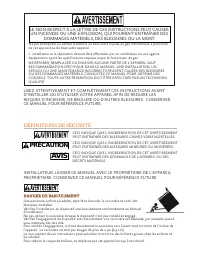
Page 60 - DÉFINITIONS DE SÉCURITÉ; LISEZ ATTENTIVEMENT ET COMPLÈTEMENT CES INSTRUCTIONS AVANT; PRÉCAUTION; AVIS; PROPRIÉTAIRE: CONSERVEZ CE MANUEL POUR RÉFÉRENCE FUTURE.; LE NON-RESPECT À LA LETTRE DE CES INSTRUCTIONS PEUT CAUSER; DANGER DE BASCULEMENT
DÉFINITIONS DE SÉCURITÉ CECI INDIQUE QUE L’INOBSERVATION DE CET AVERTISSEMENT PEUT ENTRAÎNER DES BLESSURES GRAVES VOIRE MORTELLES. CECI INDIQUE QUE L’INOBSERVATION DE CET AVERTISSEMENT PEUT ENTRAÎNER DES BLESSURES MINEURES OU MODÉRÉES. CECI INDIQUE QUE L’INOBSERVATION DE CET AVERTISSEMENT PEUT ENTRA...
Page 61 - Un message d’Hestan
FR © 2021 Hestan Commercial Corporation 1 Un message d’Hestan Un message d’Hestan Les innovations culinaires primées de Hestan et les caractéristiques spéciales ont réinventé la cuisine du restaurant et redéfini l’expérience culinaire dans certains des restaurants les plus acclamés de l’Amérique. He...
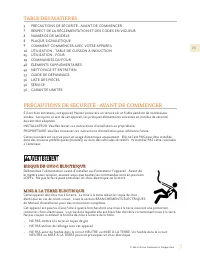
Page 63 - PRÉCAUTIONS DE SÉCURITÉ - AVANT DE COMMENCER; RISQUE DE CHOC ÉLECTRIQUE; NEUTRE ou MISE À LA TERRE pourrait provoquer un choc électrique.; TABLE DES MATIÈRES
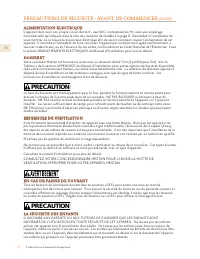
FR © 2021 Hestan Commercial Corporation 3 S’il est bien entretenu, cet appareil Hestan procurera un service sûr et fiable pendant de nombreuses années. Lorsqu’on se sert de cet appareil, les pratiques élémentaires suivantes en matière de sécurité doivent être adoptées.INSTALLATEUR: Veuillez laisser ...
Page 64 - ALIMENTATION ÉLECTRIQUE; instructions d’installation accompagnent le kit de dosseret.; EXIGENCES DE VENTILATION; CONSULTEZ VOTRE CONCESSIONNAIRE HESTAN POUR CHOISIR LA HOTTE DE; EN CAS DE PANNE DE COURANT; LA SÉCURITÉ DES ENFANTS
FR © 2021 Hestan Commercial Corporation 4 PRÉCAUTIONS DE SÉCURITÉ - AVANT DE COMMENCER (SUITE) ALIMENTATION ÉLECTRIQUE ALIMENTATION ÉLECTRIQUE L’appareil doit avoir son propre circuit distinct - 240 VAC, monophasé, 60 Hz, avec une ampérage nominale telle qu’indiquée dans la liste des numéros de modè...
Page 65 - SÉCURITÉ TECHNIQUE; qu’en la tenant par ses côtés.; SÉCURITÉ DE L’UTILISATEUR; des objets inflammables à proximité.
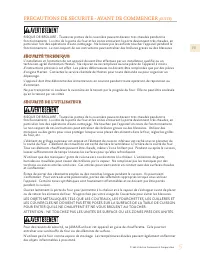
FR © 2021 Hestan Commercial Corporation 5 PRÉCAUTIONS DE SÉCURITÉ - AVANT DE COMMENCER (SUITE) RISQUE DE BRÛLURE - Toutes les parties de la cuisinière peuvent devenir très chaudes pendant le fonctionnement. La vitre de la porte du four et les zones entourant la porte deviennent très chaudes, en part...
Page 66 - SÉCURITÉ CONTRE L’INCENDIE; sont hautement inflammables et pourraient s’enflammer.; SÉCURITÉ PENDANT LE NETTOYAGE; sous l’effet de la chaleur intense.
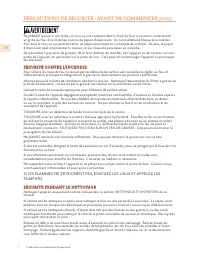
FR © 2021 Hestan Commercial Corporation 6 PRÉCAUTIONS DE SÉCURITÉ - AVANT DE COMMENCER (SUITE) Ne JAMAIS recouvrir une fente, un trou ou une conduite dans le fond du four ni recouvrir entièrement un grille du four d’un matériau comme du papier d’aluminium. Un tel revêtement bloque la circulation d’a...
Page 67 - UTILISATION APPROPRIÉE; contenu chaud qui pourrait vous brûler, ou provoquer un incendie.; RESPECT DE LA RÉGLEMENTATION ET DES CODES EN VIGUEUR
FR © 2021 Hestan Commercial Corporation 7 Ne frottez, remuez ni n’endommagez pas le joint d’étanchéité tressé de la porte. Si le joint est endommagé, il devra être remplacé.Ne versez pas d’eau froide sur les surfaces chaudes à l’intérieur du four. La vapeur peut causer de graves brûlures. Le brusque...
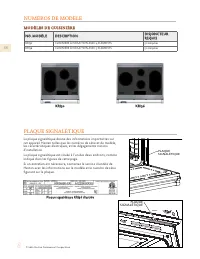
Page 68 - NUMÉROS DE MODÈLE; MODÈLES DE CUISINIÈRE; DESCRIPTION; PLAQUE SIGNALÉTIQUE; La plaque signalétique donne des informations importantes sur
FR © 2021 Hestan Commercial Corporation 8 NUMÉROS DE MODÈLE MODÈLES DE CUISINIÈRE MODÈLES DE CUISINIÈRE NO. MODÉLE NO. MODÉLE DESCRIPTION DESCRIPTION DISJONCTEUR DISJONCTEUR REQUIS REQUIS KRI30 CUISINIÈRE À INDUCTION AVEC 4 ÉLÉMENTS 50 Ampères KRI36 CUISINIÈRE À INDUCTION AVEC 5 ÉLÉMENTS 50 Ampères ...
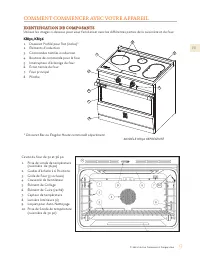
Page 69 - COMMENT COMMENCER AVEC VOTRE APPAREIL; IDENTIFICATION DE COMPOSANTS; * Dosseret Bas ou Étagère Haute commandé séparément.
FR © 2021 Hestan Commercial Corporation 9 COMMENT COMMENCER AVEC VOTRE APPAREIL IDENTIFICATION DE COMPOSANTS IDENTIFICATION DE COMPOSANTS Utilisez les images ci-dessous pour vous familiariser avec les différentes parties de la cuisinière et du four. KRI30, KRI36 KRI30, KRI36 1. Dosseret Profilé pour...
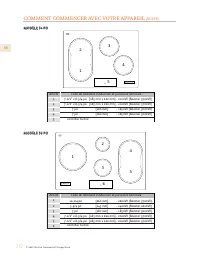
Page 70 - MODÈLE
FR © 2021 Hestan Commercial Corporation 10 COMMENT COMMENCER AVEC VOTRE APPAREIL (SUITE) MODÈLE MODÈLE 330 0 PO PO MODÈLE MODÈLE 336 PO 6 PO Article 12345 7-1/2” x 8-3/4 po [185 mm x 220 mm] - 2100W (Booster 3700W)7-1/2” x 8-3/4 po [185 mm x 220 mm] - 2100W (Booster 3700W) 7 po [180 mm] - 1850W (Boo...
Page 72 - FONCTIONNEMENT DU CHAUFFAGE PAR INDUCTION; casserole ou de la poêle utilisée.; PRINCIPE DE FONCTIONNEMENT
FR © 2021 Hestan Commercial Corporation 12 COMMENT COMMENCER AVEC VOTRE APPAREIL (SUITE) FONCTIONNEMENT DU CHAUFFAGE PAR INDUCTION FONCTIONNEMENT DU CHAUFFAGE PAR INDUCTION Le chauffage par induction est la méthode la plus efficiente et immédiate pour cuisiner.La chaleur est produite moyennant un ch...
Page 73 - PREMIÈRE OPÉRATION - TABLE DE CUISSON À INDUCTION; RECOMMANDATIONS POUR LES USTENSILES DE CUISINE à la page 14.; PARTAGE DE PUISSANCE
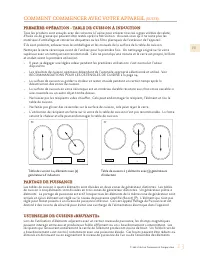
FR © 2021 Hestan Commercial Corporation 13 PREMIÈRE OPÉRATION - TABLE DE CUISSON À INDUCTION PREMIÈRE OPÉRATION - TABLE DE CUISSON À INDUCTION Tous les produits sont essuyés avec des solvants à l’usine pour enlever tous les signes visibles de saleté, d’huile ou de graisse qui peuvent être restés apr...
Page 74 - RECOMMANDATIONS POUR LES
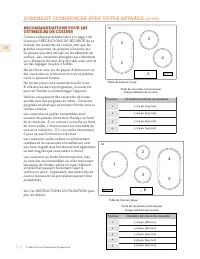
FR © 2021 Hestan Commercial Corporation 14 COMMENT COMMENCER AVEC VOTRE APPAREIL (SUITE) RECOMMANDATIONS POUR LES RECOMMANDATIONS POUR LES USTENSILES DE CUISINE USTENSILES DE CUISINE Comme indiqué précédemment à la page 7 de la section PRÉCAUTIONS DE SÉCURITÉ de ce manuel, les ustensiles de cuisson,...
Page 75 - GRILLES DU FOUR; PLACEMENT DES GRILLES DE FOUR
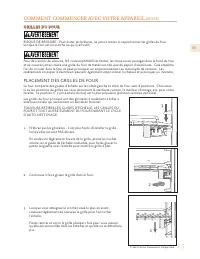
FR © 2021 Hestan Commercial Corporation 15 COMMENT COMMENCER AVEC VOTRE APPAREIL (SUITE) GRILLES DU FOUR GRILLES DU FOUR RISQUE DE BRÛLURE - Pour éviter les brûlures, ne jamais retirer ni repositionner les grilles du four lorsque le four est en marche ou qu’il refroidit. Pour des raisons de sécurité...
Page 76 - PREMIÈRE OPÉRATION - FOUR; UTILISATION - TABLE DE CUISSON À INDUCTION; GÉNÉRAL; de la vitrocéramique foncée.; ALLUMER ET ÉTEINDRE LA TABLE DE CUISSON
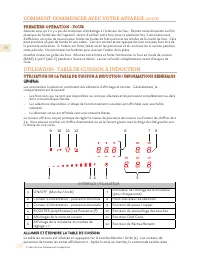
FR © 2021 Hestan Commercial Corporation 16 COMMENT COMMENCER AVEC VOTRE APPAREIL (SUITE) PREMIÈRE OPÉRATION - FOUR PREMIÈRE OPÉRATION - FOUR Assurez-vous qu’il n’y a pas de matériaux d’emballage à l’intérieur du four. Retirez toute étiquette ou film plastique de l’extérieur de l’appareil. Avant d’ut...
Page 77 - DÉTECTION DE CASSEROLE
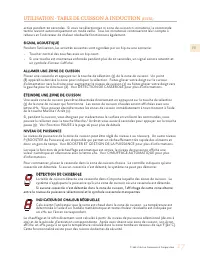
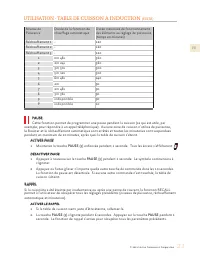
FR © 2021 Hestan Commercial Corporation 17 active pendant 20 secondes. Si vous ne sélectionnez ni zone de cuisson ni minuterie, la commande tactile revient automatiquement en mode veille. Tous les minuteries continueront leur compte à rebours et l’indicateur de chaleur résiduelle fonctionnera égalem...
Page 78 - PROTECTION EN CAS DE MISE EN MARCHE ACCIDENTELLE
FR © 2021 Hestan Commercial Corporation 18 PROTECTION EN CAS DE MISE EN MARCHE ACCIDENTELLE PROTECTION EN CAS DE MISE EN MARCHE ACCIDENTELLE Si une touche est activée en continu pendant environ 10 secondes, elle s’éteint automatiquement. Un vibreur commence à retentir pour avertir l’utilisateur de l...
Page 79 - CASSEROLES; FONCTIONS SPÉCIALES; BOOSTER ET GESTION DE LA PUISSANCE; Oui
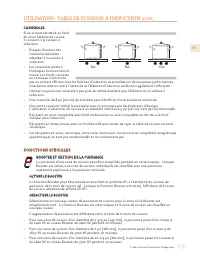
FR © 2021 Hestan Commercial Corporation 19 CASSEROLES CASSEROLES Si un aimant est attiré au fond de votre batterie de cuisine, il convient à la cuisson à induction.• Essayez d’utiliser des casseroles déclarées adaptées à la cuisson à induction. • Les casseroles plates à fond épais fonctionnent le mi...
Page 80 - FONCTION DE PONTAGE (POUR LES GRANDES CASSEROLES); CHAUFFAGE AUTOMATIQUE (OU FONCTION «CHAUFFAGE»)
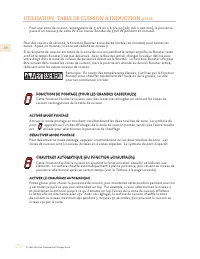
FR © 2021 Hestan Commercial Corporation 20 • Pour une zone de cuisson rectangulaire de 7-1/2 po x 8-3/4 po [185 mm x 220 mm], la puissance passe d’un niveau 9 de 2100 W à un niveau Booster de 3700 W pendant 10 minutes. Pour des raisons de sécurité, la fonction Booster a une durée limitée (10 minutes...
Page 82 - VERROU DE SÉCURITÉ POUR ENFANTS; VERROU DES TOUCHES; FONCTION CHEF CUISINIER
FR © 2021 Hestan Commercial Corporation 22 VERROU DE SÉCURITÉ POUR ENFANTS VERROU DE SÉCURITÉ POUR ENFANTS Il ne peut être activé que lorsque l’appareil est en marche mais qu’aucune zone de cuisson n’est en fonctionnement. La sécurité enfants reste active même après une coupure de courant. Il doit ê...
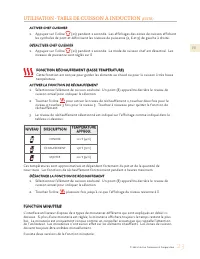
Page 83 - FONCTION RÉCHAUFFEMENT (BASSE TEMPÉRATURE); NIVEAU; DÉS; FONCTION MINUTERIE
FR © 2021 Hestan Commercial Corporation 23 ACTIVER CHEF CUISINIER ACTIVER CHEF CUISINIER 1. Appuyez sur l’icône (11) pendant 1 seconde. Les affichages des zones de cuisson affichent les symboles de pont et définissent les niveaux de puissance (2, 6 et 9) de gauche à droite. DÉSACTIVER CHEF CUISINIER...
Page 84 - MINUTERIE DE LA ZONE DE CUISSON
FR © 2021 Hestan Commercial Corporation 24 UTILISATION - TABLE DE CUISSON À INDUCTION (SUITE) • Un minuteur indépendant (semblable à un sablier) avec une portée de 1 min. à 9h 59 min. OU à partir de 1 h 59 min. À moins de 10 minutes, l’affichage fera un compte à rebours précis à la seconde. Une fois...
Page 85 - CARACTÉRISTIQUES DU FOUR; des grilles et les réglages de température.
FR © 2021 Hestan Commercial Corporation 25 UTILISATION - TABLE DE CUISSON À INDUCTION (SUITE) 4. Ajustez le chiffre de l’heure de début souhaité pour le chiffre avec les icônes +/- (6) au-dessus et en dessous des chiffres. 5. N’effectuez aucune action pendant environ 5 secondes.6. La minuterie comme...
Page 86 - POSITION DES GRILLES / AVANT DE CUIRE
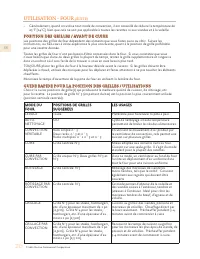
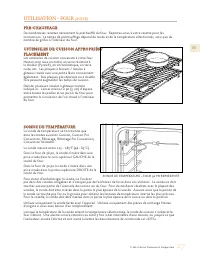
FR © 2021 Hestan Commercial Corporation 26 UTILISATION - FOUR (SUITE) • Généralement, quand on utilise tout mode de convection, il est conseillé de réduire la température de 25°F [14°C], bien que cela ne soit pas applicable à toutes les recettes ni aux viandes et à la volaille. POSITION DES GRILLES ...
Page 87 - USTENSILES DE CUISSON APPROPRIÉS /
FR © 2021 Hestan Commercial Corporation 27 UTILISATION - FOUR (SUITE) PRE-CHAUFFAGE PRE-CHAUFFAGE De nombreuses recettes nécessitent le préchauffé du four. Reportez-vous à votre recette pour les instructions. Le temps de préchauffage dépend du mode et de la température sélectionnés, ainsi que du nom...
Page 88 - CUISSON AU FOUR; PRODUIT ALIMENTAIRE
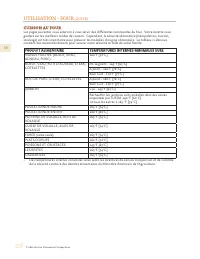
FR © 2021 Hestan Commercial Corporation 28 UTILISATION - FOUR (SUITE) CUISSON AU FOUR CUISSON AU FOUR Les pages suivantes vous aideront à vous servir des différentes commandes du four. Votre recette vous guidera sur les meilleurs modes de cuisson. Cependant, la sécurité alimentaire (manipulation, cu...
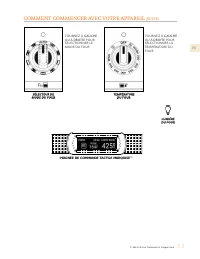
Page 89 - COMMANDES DU FOUR; FORMAT DE L’AFFICHAGE / ICÔNES DES BOUTONS; Cuisson
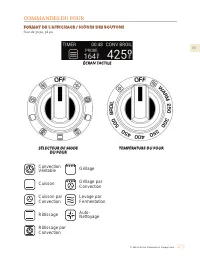
FR © 2021 Hestan Commercial Corporation 29 COMMANDES DU FOUR FORMAT DE L’AFFICHAGE / ICÔNES DES BOUTONS FORMAT DE L’AFFICHAGE / ICÔNES DES BOUTONS Four de 30 po, 36 po SÉLECTEUR DE MODE SÉLECTEUR DE MODE DU FOUR DU FOUR TEMPÉRATURE DU FOUR TEMPÉRATURE DU FOUR ÉCRAN TACTILE ÉCRAN TACTILE ConvectionVé...
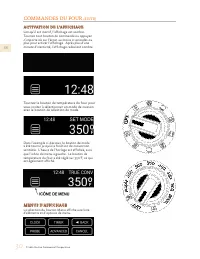
Page 90 - ACTIVATION DE L’AFFICHAGE; Tournez le bouton de température du four pour; MENUS D’AFFICHAGE
FR © 2021 Hestan Commercial Corporation 30 COMMANDES DU FOUR (SUITE) ACTIVATION DE L’AFFICHAGE ACTIVATION DE L’AFFICHAGE Lorsqu’il est inactif, l’affichage est sombre. Tournez tout bouton de commande ou appuyez n’importe où sur l’écran au moins 2 secondes ou plus pour activer l’affichage. Après plus...
Page 91 - RÉGLAGE DE L’HORLOGE
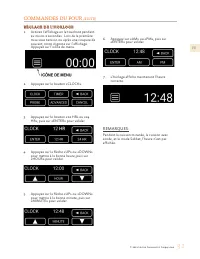
FR © 2021 Hestan Commercial Corporation 31 COMMANDES DU FOUR (SUITE) RÉGLAGE DE L’HORLOGE RÉGLAGE DE L’HORLOGE 1. Activez l’affichage en le touchant pendant au moins 2 secondes. Lors de la première mise sous tension ou après une coupure de courant, 00:00 clignote sur l’affichage. Appuyez sur l’icône...
Page 92 - RÉGLAGE DE LA MINUTERIE
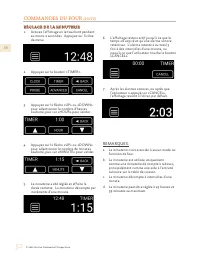
FR © 2021 Hestan Commercial Corporation 32 COMMANDES DU FOUR (SUITE) RÉGLAGE DE LA MINUTERIE RÉGLAGE DE LA MINUTERIE 1. Activez l’affichage en le touchant pendant au moins 2 secondes. Appuyez sur l’icône de menu. 2. Appuyez sur le bouton « TIMER ». 3. Appuyez sur la flèche «UP» ou «DOWN» pour sélect...
Page 93 - RÉGLAGE DE TEMPÉRATURE POUR LA SONDE (PROBE COOK)
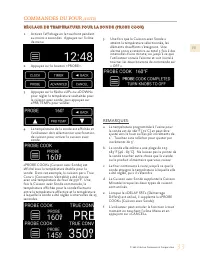
FR © 2021 Hestan Commercial Corporation 33 COMMANDES DU FOUR (SUITE) 1. Activez l’affichage en le touchant pendant au moins 2 secondes. Appuyez sur l’icône de menu. 2. Appuyez sur le bouton « PROBE ». 3. Appuyez sur la flèche «UP» ou «DOWN» pour régler la température souhaitée pour la cuisson avec s...
Page 94 - RÉGLAGE FAHRENHEIT / CELSIUS
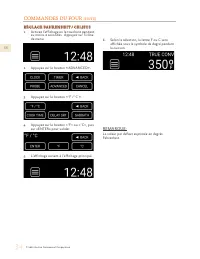
FR © 2021 Hestan Commercial Corporation 34 COMMANDES DU FOUR (SUITE) RÉGLAGE FAHRENHEIT / CELSIUS RÉGLAGE FAHRENHEIT / CELSIUS 1. Activez l’affichage en le touchant pendant au moins 2 secondes. Appuyez sur l’icône de menu. 2. Appuyez sur le bouton « ADVANCED ». 3. Appuyez sur le bouton « °F / °C » ....
Page 95 - RÉGLAGE POUR CUISSON MINUTÉE (TIMED COOK)
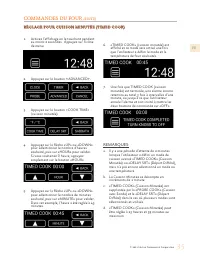
FR © 2021 Hestan Commercial Corporation 35 COMMANDES DU FOUR (SUITE) 1. Activez l’affichage en le touchant pendant au moins 2 secondes. Appuyez sur l’icône de menu. 2. Appuyez sur le bouton « ADVANCED ». 3. Appuyez sur le bouton « COOK TIME » ( cuisson minutée). 4. Appuyez sur la flèche «UP» ou «DOW...
Page 96 - menu; RÉGLAGE POUR CUISSON À DÉMARRAGE
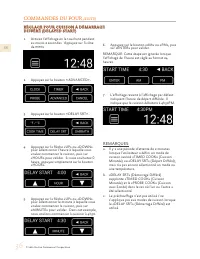
FR © 2021 Hestan Commercial Corporation 36 COMMANDES DU FOUR (SUITE) 1. Activez l’affichage en le touchant pendant au moins 2 secondes. Appuyez sur l’icône de menu . 2. Appuyez sur le bouton « ADVANCED ». 3. Appuyez sur le bouton « DELAY SRT ». 4. Appuyez sur la flèche «UP» ou «DOWN» pour sélectionn...
Page 97 - RÉGLAGE DU MODE SABBAT
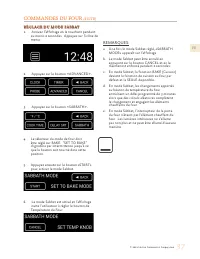
FR © 2021 Hestan Commercial Corporation 37 COMMANDES DU FOUR (SUITE) RÉGLAGE DU MODE SABBAT RÉGLAGE DU MODE SABBAT 1. Activez l’affichage en le touchant pendant au moins 2 secondes. Appuyez sur l’icône de menu . 2. Appuyez sur le bouton « ADVANCED ». 3. Appuyez sur le bouton « SABBATH ». 4. Le sélec...
Page 98 - REMARQUES SUPPLÉMENTAIRES:
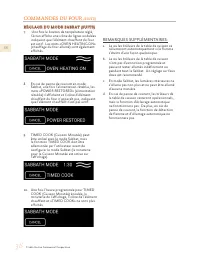
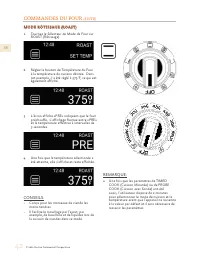
FR © 2021 Hestan Commercial Corporation 38 COMMANDES DU FOUR (SUITE) 7. Une fois le bouton de température réglé, l’écran affiche une icône de lignes ondulées indiquant que l’élément chauffant du four est actif. Les mots «OVEN HEATING ON» (chauffage du four allumé) sont également affichés. 8. En cas ...
Page 99 - MODE CONVECTION VÉRITABLE (TRUE CONVECTION)
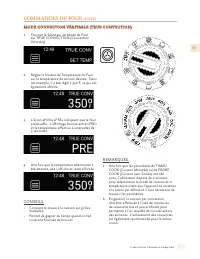
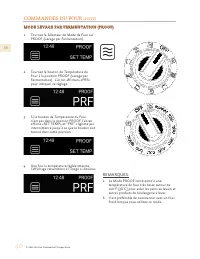
FR © 2021 Hestan Commercial Corporation 39 COMMANDES DU FOUR (SUITE) 1. Tournez le Sélecteur de Mode de Four sur TRUE CONVECTION (Convection Véritable). 2. Réglez le bouton de Température du Four sur la température de cuisson désirée. Dans cet exemple, il a été réglé à 350°F, ce qui est également af...
Page 101 - MODE CUIRE PAR CONVECTION (CONVECTION BAKE)
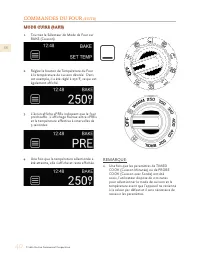
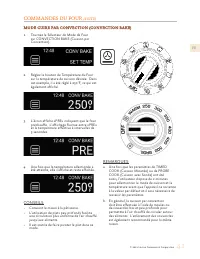
FR © 2021 Hestan Commercial Corporation 41 COMMANDES DU FOUR (SUITE) REMARQUES: a. Une fois que les paramètres de TIMED COOK (Cuisson Minutée) ou de PROBE COOK (Cuisson avec Sonde) ont été saisis, l’utilisateur dispose de 2 minutes pour sélectionner le mode de cuisson et la température avant que l’a...
Page 103 - MODE RÔTISSAGE PAR CONVECTION (CONVECTION ROAST)
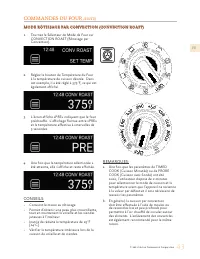
FR © 2021 Hestan Commercial Corporation 43 COMMANDES DU FOUR (SUITE) REMARQUES: a. Une fois que les paramètres de TIMED COOK (Cuisson Minutée) ou de PROBE COOK (Cuisson avec Sonde) ont été saisis, l’utilisateur dispose de 2 minutes pour sélectionner le mode de cuisson et la température avant que l’a...
Page 104 - Sonde) ne doit pas être utilisée en mode
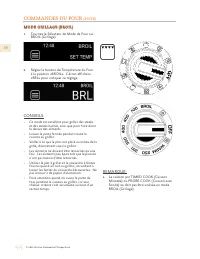
FR © 2021 Hestan Commercial Corporation 44 COMMANDES DU FOUR (SUITE) REMARQUE: a. La cuisson par TIMED COOK (Cuisson Minutée) ou PROBE COOK (Cuisson avec Sonde) ne doit pas être utilisée en mode BROIL (Grillage). MODE GRILLAGE (BROIL) MODE GRILLAGE (BROIL) 1. Tournez le Sélecteur de Mode de Four sur...
Page 105 - MODE GRILLAGE PAR CONVECTION (CONVECTION BROIL)
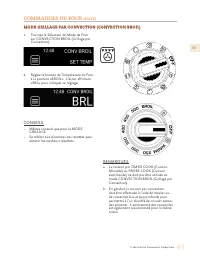
FR © 2021 Hestan Commercial Corporation 45 COMMANDES DU FOUR (SUITE) REMARQUES: a. La cuisson par TIMED COOK (Cuisson Minutée) ou PROBE COOK (Cuisson avec Sonde) ne doit pas être utilisée en mode CONVECTION BROIL (Grillage par Convection). b. En général, la cuisson par convection doit être effectuée...
Page 107 - Voir la section NETTOYAGE ET ENTRETIEN de ce manuel pour
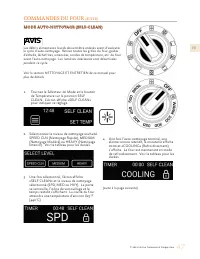
FR © 2021 Hestan Commercial Corporation 47 COMMANDES DU FOUR (SUITE) 1. Tournez le Sélecteur de Mode et le bouton de Température sur la position SELF CLEAN. L’écran affiche «SELF CLEAN» pour indiquer ce réglage. 2. Sélectionnez le niveau de nettoyage souhaité: SPEED CLN (Nettoyage Rapide), MEDIUM (N...
Page 108 - attendre que le four refroidisse complètement à température; ÉLÉMENTS SUPPLÉMENTAIRES; VENTILATEURS DE REFROIDISSEMENT
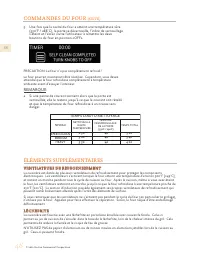
FR © 2021 Hestan Commercial Corporation 48 COMMANDES DU FOUR (SUITE) 5. Une fois que la cavité du four a atteint une température sûre (550°F / 288°C), la porte se déverrouille, l’icône de verrouillage s’éteint et l’écran invite l’utilisateur à remettre les deux boutons du four en position «OFF». PRE...
Page 109 - même lorsqu’il n’est pas en service.; NETTOYAGE ET ENTRETIEN
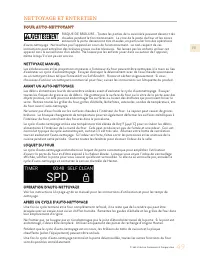
FR © 2021 Hestan Commercial Corporation 49 FOUR AUTO-NETTOYANT FOUR AUTO-NETTOYANT RISQUE DE BRÛLURE - Toutes les parties de la cuisinière peuvent devenir très chaudes pendant le fonctionnement. La vitre de la porte du four et les zones entourant la porte deviennent très chaudes, en particulier lors...
Page 110 - FOUR EXTÉRIEUR / VERRE; ÉVENTS
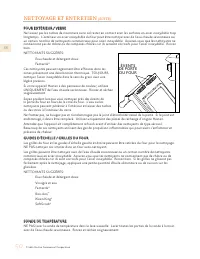
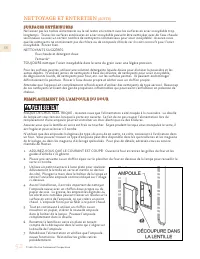
FR © 2021 Hestan Commercial Corporation 50 NETTOYAGE ET ENTRETIEN (SUITE) FOUR EXTÉRIEUR / VERRE FOUR EXTÉRIEUR / VERRE Ne laissez pas les taches de nourriture ou le sel rester en contact avec les surfaces en acier inoxydable trop longtemps. L’extérieur en acier inoxydable du four peut être nettoyé ...
Page 111 - ÉLÉMENTS À INDUCTION / SURFACE EN VERRE CÉRAMIQUE; PAS DE NETTOYANTS À VAPEUR.
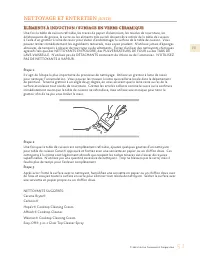
FR © 2021 Hestan Commercial Corporation 51 NETTOYAGE ET ENTRETIEN (SUITE) ÉLÉMENTS À INDUCTION / SURFACE EN VERRE CÉRAMIQUE ÉLÉMENTS À INDUCTION / SURFACE EN VERRE CÉRAMIQUE Une fois la table de cuisson refroidie, les traces de papier d’aluminium, les résidus de nourriture, les éclaboussures de grai...
Page 112 - SURFACES EXTÉRIEURES
FR © 2021 Hestan Commercial Corporation 52 NETTOYAGE ET ENTRETIEN (SUITE) SURFACES EXTÉRIEURES SURFACES EXTÉRIEURES Ne laissez pas les taches alimentaires ou le sel rester en contact avec les surfaces en acier inoxydable trop longtemps. Toutes les surfaces extérieures en acier inoxydable peuvent êtr...
Page 113 - INDICATIONS D’ERREUR DU FOUR; SYMPTÔME; GUIDE DE DÉPANNAGE
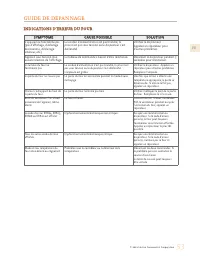
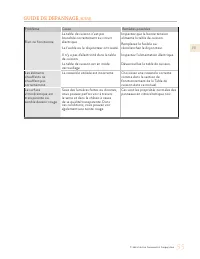
FR © 2021 Hestan Commercial Corporation 53 INDICATIONS D’ERREUR DU FOUR INDICATIONS D’ERREUR DU FOUR SYMPTÔME SYMPTÔME CAUSE POSSIBLE CAUSE POSSIBLE SOLUTION SOLUTION L’appareil ne fonctionne pas (pas d’affichage, d’éclairage des boutons, d’éclairage intérieur, etc.) Le cordon d’alimentation n’est p...
Page 114 - INDICATIONS D’ERREUR - TABLE DE CUISSON À INDUCTION
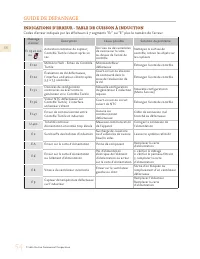
FR © 2021 Hestan Commercial Corporation 54 GUIDE DE DÉPANNAGE INDICATIONS D’ERREUR - TABLE DE CUISSON À INDUCTION INDICATIONS D’ERREUR - TABLE DE CUISSON À INDUCTION Codes d’erreur indiqués par les afficheurs à 7 segments “Er” ou “E” plus le numéro de l’erreur. Message d’erreur Description Cause pos...
Page 116 - GARANTIE LIMITÉE; ÉLÉMENTS COUVERTS PAR LA PRÉSENTE GARANTIE LIMITÉE :; LISTE DES PIÈCES
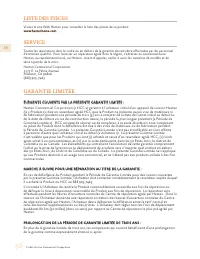
FR © 2021 Hestan Commercial Corporation 56 GARANTIE LIMITÉE ÉLÉMENTS COUVERTS PAR LA PRÉSENTE GARANTIE LIMITÉE : ÉLÉMENTS COUVERTS PAR LA PRÉSENTE GARANTIE LIMITÉE : Hestan Commercial Corporation (« HCC ») garantit à l’acheteur initial d’un appareil de cuisson Hestan (le « Produit ») chez un revende...
Page 117 - charge de l’acheteur.
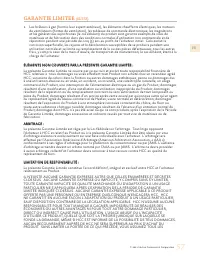
FR © 2021 Hestan Commercial Corporation 57 GARANTIE LIMITÉE (SUITE) 1. Les brûleurs à gaz (hormis leur aspect extérieur), les éléments chauffants électriques, les moteurs de ventilateurs (hottes de ventilation), les tableaux de commande électronique, les magnétrons et les génératrices asynchrones (l...
Page 118 - peuvent s’ajouter d’autres droits qui varient selon le lieu.
FR © 2021 Hestan Commercial Corporation 58 RISQUES ET LA RESPONSABILITÉ DES PERTES, DOMMAGES OU BLESSURES ET DÉGÂTS MATÉRIELS SUBIS PAR VOUS-MÊMES ET DES TIERS RÉSULTANT DE L’UTILISATION, DE L’USAGE ABUSIF OU DE L’INCAPACITÉ D’UTILISER CE PRODUIT, QUI NE SONT PAS CAUSÉS DIRECTEMENT PAR LA NÉGLIGENCE...
Page 120 - Hestan Commercial Corporation; RETAIN THIS MANUAL FOR FUTURE REFERENCE
Hestan Commercial Corporation 3375 E. La Palma Ave. Anaheim, CA 92806 (888) 905-7463 RETAIN THIS MANUAL FOR FUTURE REFERENCE CONSERVEZ CE MANUEL POUR UNE RÉFÉRENCE FUTURE ©2021 Hestan Commercial Corporation P/N 034584 REV B











 Hestan KRD304-NG
User Manual
Hestan KRD304-NG
User Manual
 Hestan KRD364GD-NG
User Manual
Hestan KRD364GD-NG
User Manual
 Hestan KRG304-NG
User Manual
Hestan KRG304-NG
User Manual
 Hestan KRG365-NG
User Manual
Hestan KRG365-NG
User Manual