Page 3 - CONTENTS; SAVE THESE INSTRUCTIONS; Registration
1 CONTENTS IMPORTANT! SAVE THESE INSTRUCTIONS The models shown in this user guide may not be available in all markets and are subject to change at any time. For current details about model and specification availability in your country, please go to our website www.fisherpaykel.com or contact your l...
Page 5 - INTRODUCTION; Thank you for buying this Fisher & Paykel integrated refrigerator.
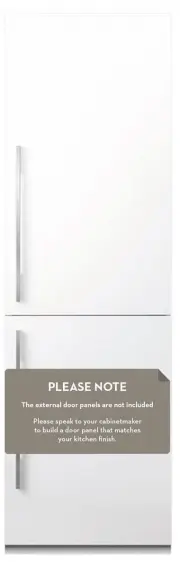
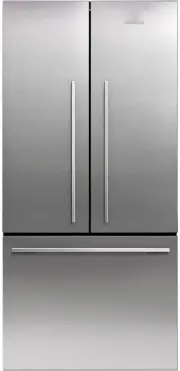
3 INTRODUCTION Thank you for buying this Fisher & Paykel integrated refrigerator. Introducing the next generation in Fisher & Paykel refrigeration. With new flush-fit design and the ability to easily slide into existing kitchen spaces or be integrated behind kitchen cabinetry, these family-s...
Page 6 - SAFETY AND WARNINGS; IMPORTANT SAFETY INSTRUCTIONS
4 SAFETY AND WARNINGS ! WARNING! Electric Shock Hazard Read and follow the safety and warnings outlined in this user guide before operating this appliance. Failure to do so can result in death, electric shock, fire or injury to persons. R600a This refrigerator contains flammable refrigerant isobutan...
Page 7 - Electrical
5 SAFETY AND WARNINGS • To avoid hazard due to instability of the appliance, it must be fixed in accordance with installation instructions. • Keep ventilation openings, in the appliance enclosure or in the built-in structure, clear of obstruction. • Do not use mechanical devices or other means to ac...
Page 8 - Cleaning
6 SAFETY AND WARNINGS • Repair or replace immediately all electric service cords that have become frayed or otherwise damaged. Do not use a cord that shows cracks or abrasion along its length or at either the plug or appliance end. • If the power supply cord is damaged, it must only be replaced by y...
Page 9 - Disposal
7 SAFETY AND WARNINGS Disposal • Extreme care must be taken when disposing of your old appliance to avoid hazards: – The flammable refrigerant gas must be safely removed. – The thermal insulation foam in this appliance contains flammable insulation blowing gases, any exposed foam may be highly flamm...
Page 10 - Power failure — food safety
8 SAFETY AND WARNINGS Power failure — food safety • Do not refreeze frozen foods that have thawed completely. The food may be dangerous to eat. Follow the recommendations below if you discover food in your freezer has thawed: – Ice crystals still visible — food may be refrozen but should be stored f...
Page 11 - Refrigerator compartment; Single bottle holders; STORAGE FEATURES
9 Refrigerator compartment Accessories (not shown) ● ● Single bottle holders Water tank (Ice & Water model only) Large aluminium extrusion door shelf Fruit and vegetable bins with humidity control lids Half-width cantilever glass shelves Full-width cantilever glass shelves Mid door shelves Bottl...
Page 12 - Freezer compartment; Cantilever glass shelves — half-width and full-width; Ice storage bin with scoop
10 Freezer compartment Ice maker (top left of freezer) Ice storage bin with scoop Top bin Mid trayLarge bottom bin Cantilever glass shelves — half-width and full-width ● ● The cantilever glass shelves have been designed with strength and versatility in mind. ● ● The half-width and full-width shelves...
Page 13 - SmartTouchTM control panel; ACTIVESMARTTM SPECIAL FEATURES
11 SmartTouch TM control panel SmartTouch™ control panel The control panel is located in the inside front of the refrigerator for easy access. It enables you to view and modify all the features and options of your refrigerator. SmartTouch™ CONTROL PANEL FEATURES Compartment Allows you to select whic...
Page 14 - EXTERNAL DISPLAY FEATURES; Dispenser lock button
12 External display (Ice & Water model only) The external display enables you to lock the water dispenser, indicates when ‘Bottle Chill’ is activated and when to replace your water filter. EXTERNAL DISPLAY FEATURES Dispenser lock button and LED light Locks/unlocks the water dispenser.When locked...
Page 15 - Humidity control system; Humidity control lids
13 Humidity control system Humidity control lids ● ● The control lids are fitted to the fruit and vegetable bins and slim bin of your refrigerator. ● ● These lids seal the bins and provide a humid microclimate to extend the storage times of fruit and vegetables. ● ● The lids have specially designed ...
Page 16 - OPERATING INSTRUCTIONS
14 Door alarms ● ● If the fresh food compartment door is left open, the alarm will beep after 90 seconds, if the freezer door is left open, the alarm will beep after 60 seconds. ● ● If either of the doors remains open, subsequent beeps will sound every 30 seconds for 5 minutesIf either door remains ...
Page 17 - To silence the alarm — Automatic ice model; external
15 Fast Freeze ‘Fast Freeze’ boosts the freezing speed by dropping the freezer to its coldest temperature for 12 hours. This helps retain the freshness, texture and taste during the freezing process. ● ● To activate, press the button on the control panel. The ‘Fast Freeze’ light above the button ill...
Page 18 - Once in Sabbath mode:; Temperature control; Adjusting the fresh food compartment temperature
16 OPERATING INSTRUCTIONS Sabbath mode activation (all models) ● ● To activate Sabbath mode, press and hold , and buttons for 4 seconds. ● ● The icon on the control panel will illuminate. Once in Sabbath mode: ● ● The interior light will not turn on when you open the refrigerator. ● ● The door alarm...
Page 19 - up the dispenser opening.; Dispenser lock
17 Water dispenser (Ice & Water model only) Ensure your ice and water system is correctly installed by following the Installation guide supplied with this User guide. Before using your ice and water system, flush out water to displaced trapped air in the water tank and filter system. Flushing th...
Page 20 - Automatic ice maker; Initial setup; Fisher & Paykel trained and supported service technician.
18 Automatic ice maker Your automatic ice maker is designed to dispense ice cubes into the ice storage bin below until it detects the bin is full. If you need more ice, remove the ice storage bin and allow ice to fill the top freezer bin. Initial setup ● ● To activate your automatic ice maker, press...
Page 21 - Water filter; on the internal control panel and external display.; Removing the old water filter
19 Water filter The water supplied to your refrigerator is filtered by a filter cartridge located behind the kickstrip grille. This helps remove unwanted impurities to maintain water quality. We recommend to replace your filter cartridge every 6 months.Note: The unit will not dispense water or ice i...
Page 22 - Reset indicator; To reset, press the and + buttons for 4 seconds on the control panel.; your filter cartridge to be changed more frequently.
20 OPERATING INSTRUCTIONS Reset indicator Use the water filter of your refrigerator as soon as possible after installation. A reset indicator on the internal control panel and/or external display illuminates when you need to replace the filter. Reset the indicator only after replacing the filter. 1 ...
Page 23 - Exterior; Stainless exterior doors; CLEANING CARE
21 Exterior Stainless exterior doors ● ● Clean the exterior door with liquid dishwashing detergent dissolved in warm water and a soft cloth. ● ● Dry the door with a lint-free cloth. ● ● Do NOT use any abrasive, stainless steel cleaners or solvents on the door surface. Other exterior surfaces ● ● Cle...
Page 25 - Interior; Cantilever glass shelves
23 Interior ● ● It is important to keep the interior of the refrigerator clean to help prevent food from becoming contaminated during storage. ● ● The amount and types of food stored determines how often cleaning should be carried out in the refrigerator (ideally once every 1 – 2 weeks). ● ● For eas...
Page 26 - smooth function. Do not immerse the runners in water.; Freezer bins and freezer tray
24 Fruit and vegetable bins and slim bin When cleaning, use only liquid detergent dissolved in warm water and a soft lint-free cloth. Rinse with clean water and dry with a clean, lint-free cloth. 1 To remove a bin, extend the bin on its runners, and make sure you empty the bin. 2 Hold both sides of ...
Page 27 - General fresh food care; We recommend that you store only high quality and fresh food.; STORING FOOD IN YOUR REFRIGERATOR
25 Your refrigerator has compartments with specialised zones having constant cold temperatures that delay food spoilage. General fresh food care The quality of food affects how long it will remain fresh in your refrigerator. For best results: ● ● We recommend that you store only high quality and fre...
Page 29 - General fresh frozen food care; Store only high quality and fresh food.; MONTHS; STORING FOOD IN YOUR FREEZER
27 Freezing and storing foods at temperatures -18°C or colder helps retain the physical quality and nutritional value of foods. Low temperatures inhibit the growth of bacteria, moulds and yeasts, thereby restricting chemical and physical reactions to extend the food’s storage life. General fresh fro...
Page 30 - Ensure vegetables are sorted and damaged parts are discarded.
28 Red meats, poultry and game ● ● We recommend selecting lean meats as opposed to fatty meats. These have a lower fat content, freeze much better and can be stored longer. ● ● When packaging meats (chops, steaks, cutlets) separate with sheets of plastic freezer film, then package all together. This...
Page 31 - DEFROSTING FOOD IN YOUR REFRIGERATOR
29 Your refrigerator is also designed to help defrost/thaw foods in a safe manner by avoiding the growth of bacteria, moulds and yeasts — which are the major causes of food spoilage. General defrosting food care For best results: ● ● Ensure foods are defrosted in the refrigerator, microwave oven or ...
Page 32 - Move the refrigerator gently out of its position.; Storing your refrigerator; MOVING AND STORING YOUR REFRIGERATOR
30 TO ENSURE YOUR APPLIANCE OPERATES CORRECTLY, PLEASE REFER TO THE INSTALLATION GUIDE SUPPLIED WITH THIS REFRIGERATOR. If your refrigerator is turned off for any reason, wait 10 minutes before turning it back on. This will allow the refrigeration system pressures to equalise before restarting. Movi...
Page 33 - USER WARNINGS AND SOUNDS; Normal operational sounds include:
31 USER WARNINGS AND SOUNDS User warnings Faults If a fault occurs when you open the fresh food compartment door, the icon will illuminate on the internal control panel and an alarm will sound. ● ● Please count the number of beeps made when the fresh food compartment door is opened. ● ● Please recor...
Page 34 - TROUBLESHOOTING; All models
32 TROUBLESHOOTING If there is a problem with your appliance, please check the following points before contacting your local Fisher & Paykel trained and supported service technician or the Customer Care Centre. Product parts and accessories can be purchased through the Fisher & Paykel Custom...
Page 35 - Cabinet not stable or level.; internal; Minimise door openings.
33 TROUBLESHOOTING All models PROBLEM POSSIBLE CAUSES WHAT TO DO Unfamiliar noises. Cabinet not stable or level. See ‘Installation guide’ supplied with refrigerator. Freezer is defrosting. This is normal. Ice maker sounds. Normal ice maker operation. See ‘User warnings and sounds’ section. Fault ico...
Page 37 - Ice & Water model only; Water has poor
35 TROUBLESHOOTING Ice & Water model only PROBLEM POSSIBLE CAUSES WHAT TO DO Water has poor taste/odour. Refrigerator not used for an extended period. Flush the water filtration system. Dispense and discard 4L of water, this will ensure the water tank is refilled with fresh water. Water dispense...
Page 38 - CUSTOMER CARE; Your product is correctly installed.; In New Zealand if you need assistance...*; If you need service...*; In Australia if you need assistance...*; Fisher & Paykel Appliances Australia Pty Ltd, PO Box 798, Cleveland; In the United Kingdom if you need assistance...*
36 CUSTOMER CARE Before you call for service or assistance... Check the things you can do yourself. Refer to the Installation guide and your User guide and check that: 1 Your product is correctly installed. 2 You are familiar with its normal operation. 3 You have read the ‘Troubleshooting’ section a...
Page 39 - In Ireland if you need assistance...*; New Zealand
37 CUSTOMER CARE In Ireland if you need assistance…* Call the Fisher & Paykel Customer Care Centre and talk to one of our Customer Care Consultants. Phone: 1800 625 174 or 01-8077960 Fax: 1800 635 012 Website: www.fisherpaykel.com Postal address: Fisher & Paykel Appliances, Unit D2, North Du...
Page 40 - WASTE ELECTRICAL AND ELECTRONIC EQUIPMENT (WEEE); EU; The symbol
38 EUROPEAN DIRECTIVE 2012/19/EU ON WASTE ELECTRICAL AND ELECTRONIC EQUIPMENT (WEEE) EU This appliance is marked according to the European directive 2012/19/EU on Waste Electrical and Electronic Equipment (WEEE). By ensuring this product is disposed of correctly, you will help prevent potential nega...