Page 2 - Declaration of Conformity
Declaration of Conformity The manufacturer of the product/s described herein, to which this description refers, declares on its sole responsibility that the product/s meet the relevant fundamental safety, health and protection requirements of the relevant EU guidelines and that the corresponding tes...
Page 3 - Contents; SAVE THESE INSTRUCTIONS; contact your local Fisher & Paykel dealer.
1 Safety and warnings 2 Installation instructions 6 Moving or storing your refrigerator 22 Operating instructions 23 Interior features 29 Maintenance 31 Cleaning care – interior/exterior 32 Storing food in your refrigerator 33 Storing food in your refrigerator compartment and variable-temperature dr...
Page 4 - Safety and warnings; Electric Shock Hazard; Use this appliance only for its intended purpose as described in; Important safety instructions; Warning
2 Safety and warnings WARNING! Electric Shock Hazard Read and follow the SAFETY AND WARNINGS outlined in this User Guide before operating this appliance.Failure to do so can result in death, electric shock, fire or injury to persons. Use this appliance only for its intended purpose as described in t...
Page 5 - Disposal
3 lack of experience and knowledge, unless they have been given supervision or instruction concerning use of the appliance by a person responsible for their safety. ■ ■ Young children should be supervised to ensure they do not play with the appliance. ■ ■ Risk of child entrapment. Before you throw a...
Page 8 - Installation instructions; Location; It is essential that the appliance be properly grounded (earthed).; Exploded view
6 Installation instructions Please follow the steps for installation to ensure your appliance operates correctly. Location ■ ■ Your refrigerator should not be located in direct sunlight or next to any heat generating appliance such as a cooktop, oven or dishwasher. Power ■ ■ To ensure that the appli...
Page 9 - Components list
7 Installation instructions Components list 1. Clearance adjustment plate 2. Top attachment bracket and ruler 3. Bottom attachment bracket 4. Top attachment bracket cover 4 pieces 2 pieces (installed) 4 pieces 2 pieces (installed) 5. Hinge cover 6. Bottom attachment bracket cover 7. Upper fastenings...
Page 10 - Minimum clearances
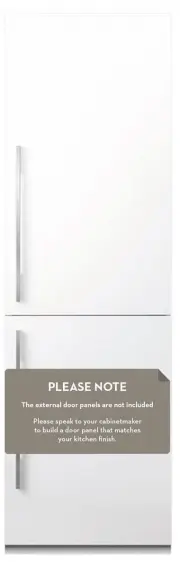
8 1. Basic dimensions Product dimensions (mm) RB60V18 A total height 1773 B total width 555 C total depth 540 D top door height 1066 E hinge gap height 12 F bottom door height 692 Cabinetry dimensions (mm) (including minimum clearances) G inside height 1782 – 1786 H inside width 564 – 570 I total de...
Page 11 - Preparations before installation; Door hinge
9 Installation instructions 2. Preparations before installation 2a Door hinge This model is right-hand hinged, with a left-hand door opening. If you require left-hand hinged with right hand door opening, remove the upper and lower hinges and refit them to the opposite side. 2b Clearance adjustment p...
Page 12 - Air flow stops; Door gasket baffle
10 Installation instructions 2d Air flow stops The air flow stops are located on the back cover of the compressor. Adjust these air flow stops to ensure they make contact with the cabinet. Air flow stops Fig.4 Adjusting the air flow stops 2e Door gasket baffle Remove the door gasket baffle from the ...
Page 13 - Placing the refrigerator into the cabinet
11 Installation instructions 3. Placing the refrigerator into the cabinet 3a Pull the power cord through the hole at the back of the cabinet or if the power socket is inside the cabinet, plug in the refrigerator before installing it into the cabinet. ■ ■ Take care not to kink or bend the power cord ...
Page 14 - Dismantling the top and bottom attachment brackets; Do the same for the freezer.
12 Installation instructions 4. Dismantling the top and bottom attachment brackets 4a Open the refrigerator door and remove the top attachment bracket cover by drawing it upwards. Do the same for the freezer. 4b Move the rulers vertically so the top of the rulers latch onto the cabinet above. Top of...
Page 15 - Attaching the top attachment bracket to the top cabinet door; Pull out the rulers on the top attachment bracket.
13 Installation instructions 5. Attaching the top attachment bracket to the top cabinet door 5a Lay the top cabinet door (face down) onto a clean floor. 5b Attach the top attachment bracket to the top of the cabinet door. Adjust to ensure the centre line of the top attachment bracket aligns with the...
Page 16 - Attaching the top cabinet door; upper sides of the refrigerator) and fix with hex screws.
14 Installation instructions 6. Attaching the top cabinet door 6a Open the refrigerator door, hang the cabinet door onto the height adjustment screws (at the upper sides of the refrigerator) and fix with hex screws. ■ ■ Do not fasten the screws too tightly as to allow for some horizontal movement of...
Page 17 - Attaching the top attachment bracket to the bottom cabinet door; Lay the bottom cabinet door (face down) onto a clean floor.
15 Installation instructions 7. Attaching the top attachment bracket to the bottom cabinet door 7a Lay the bottom cabinet door (face down) onto a clean floor. 7b Attach the top attachment bracket to the top of the cabinet door. 7c Adjust to make the centre line of the top attachment bracket align wi...
Page 18 - Attaching the bottom cabinet door; attachment bracket to fix the freezer and cabinet door.
16 Installation instructions 8. Attaching the bottom cabinet door 8a Open the freezer door, hang the cabinet door onto the height adjustment screws and fix with a hex screw. ■ ■ Do not fasten screws too tightly, allow for some horizontal movement of the cabinet door. Fig.15 Hanging the bottom cabine...
Page 19 - Top adjustment of the cabinet doors; Bottom adjustment of the cabinet doors
17 Installation instructions 9. Top adjustment of the cabinet doors 9a Fix the upper hook of the door to the cabinet door. 9b Use a spanner to turn height adjustment nut ( X ) approximately 5 mm. ■ ■ If the height adjusting nut is difficult to adjust, check the left and right clearances of the top a...
Page 21 - Diagram; Insert the hinge cover (4 places, refer to Diagram
Installation instructions 19 11a Insert the top adjustment bracket cover onto the top adjustment bracket (2 places, refer to Diagram A ). Lower door Upper door Diagram A For installation of aluminium trim, please see separate Trim Kit Installation sheet. 11b When changing the hinge position, remembe...
Page 23 - Energy saving tips; There are many simple things that can be done to save energy.; During installation; Avoid overcrowding shelves, as this reduces airflow.; Before placing food in the fresh food or freezer compartments
21 Installation instructions Energy saving tips There are many simple things that can be done to save energy. During installation ■ ■ Locate refrigerator to the coolest part of the room. Avoid areas of direct sunlight, or near heating ducts, registers, or other heat producing appliances. ■ ■ Ensure ...
Page 24 - Moving or storing your refrigerator; Moving your refrigerator; Turn off the appliance by pressing the; Storing your refrigerator
22 Moving or storing your refrigerator If your refrigerator is turned off for any reason, wait 10 minutes before turning it back on. This will allow the refrigeration system pressures to equalise before restarting. Moving your refrigerator ■ ■ Turn off the appliance by pressing the button for 3 seco...
Page 25 - Operating instructions; Control panel; Compartment select button
23 Operating instructions Control panel Fig.20 Control Panel A B C D E F G Note: Figure 20 shows all icons and options available on the control panel where in fact icons and options will only be visible when they have been selected or interacted with. A Power Off/On Touch to turn the appliance off o...
Page 26 - Setting / changing the temperature of a compartment; Setting a special function; Fast Freeze
24 Operating instructions Setting / changing the temperature of a compartment 1 Touch the COMPARTMENT select button to scroll through the compartments indicated on the compartment icon. Stop when the compartment you wish to set is illuminated eg the refrigerator compartment. Fig.21 Selecting the ref...
Page 27 - Max Cool; Holiday Mode; icon will start to
25 Operating instructions 2 Fast Freeze will automatically deactivate. However if you wish to manually deactivate Fast Freeze touch the MENU select button once. The icon will flash then turn off and the freezer compartment will return to its previously set temperature. For best results we recommend ...
Page 28 - Fridge Off
26 Operating instructions 2 Holiday Mode will not deactivate automatically. Once you return from holiday, touch the MENU select button three times. The icon will flash then turn off and the appliance will return to normal operation. Fridge Off This function turns the refrigerator compartment and var...
Page 29 - The; Display screen
27 Operating instructions Important! The Power button is not equivalent to turning off the power at the wall. ■ ■ For cleaning and maintenance, the appliance must be disconnected from the power supply atthe wall socket. Display screen ■ ■ The display screen will remain illuminated while the refriger...
Page 30 - Using your refrigerator; When switched on, the refrigerator will take several hours to cool.; Loading the refrigerator with food
28 Operating instructions Using your refrigerator ■ ■ When switched on, the refrigerator will take several hours to cool. ■ ■ You can start to store food in it 2 – 3 hours after it has been turned on. ■ ■ The refrigerator and variable-temperature drawer compartment temperatures will automatically de...
Page 31 - Interior features; Variable-temperature drawer
29 Interior features Variable-temperature drawer This drawer is controlled by a separate system to the refrigerator and freezer compartments to provide you with greater flexibility of food storage. Different foods require different storage temperatures so we have designed this drawer to operate from...
Page 33 - Maintenance; Replacement of the interior light
31 Maintenance Replacement of the interior light The LED lighting in your refrigerator saves energy and has a long lifetime. However, if replacement of an LED is required, simply call your Fisher & Paykel Authorised Service Centre and they will replace it for you. Interior light: 12 V, max 2.5W....
Page 34 - Cleaning care – interior/exterior; Interior; Clean exterior surfaces with warm water and detergent only.
32 Cleaning care – interior/exterior Interior ■ ■ It is important to keep the interior of the refrigerator and freezer clean to help prevent food from becoming contaminated during storage. ■ ■ The amount and types of food stored determines how often cleaning should be carried out (ideally once every...
Page 35 - Storing food in your refrigerator; Storage areas
33 Storing food in your refrigerator Storage areas There are recommended storage areas for various foods. As cold air circulates inside the refrigerator, there is a temperature difference within both the fresh food and freezer compartments. Different foods should be placed in different areas accordi...
Page 36 - Fresh food care; Select foods that are very fresh and of good quality.; Dairy foods and eggs
34 Storing food in your refrigerator compartment and variable-temperature drawer Storing fresh, perishable foods in your refrigerator helps to extend storage times. The cold temperatures slow down the major causes of food spoilage – possible growth of bacteria, moulds and yeasts, and microbial chemi...
Page 37 - Red meat; Keep shellfish chilled at all times. Use within 1 – 2 days.; Precooked foods and leftovers; Keep for only 1 – 2 days.; Fruit and vegetable bins
35 Storing food in your refrigerator compartment and variable-temperature drawer Red meat ■ ■ Place fresh red meat on a plate and loosely cover with waxed paper, plastic wrap or foil. ■ ■ Store cooked and raw meat on separate plates. This will prevent any juices lost from the raw meat from contamina...
Page 38 - Frozen food care; Choose only high quality foods that freeze well.; Recommended freezer storage times; These times should not be exceeded.; on
36 Storing food in your freezer and variable-temperature drawer The use of temperatures of -18°C or colder to store food means that the food can be kept for longer periods than when refrigeration temperatures are used. This is because the growth of bacteria, moulds and yeasts are stopped, and microb...
Page 39 - Meat, poultry and game; Do not stuff poultry before freezing.; Fish; Sort and discard any that are damaged.; It is necessary to blanch most raw vegetables prior to freezing.; Prepared and cooked foods
37 Storing food in your freezer and variable-temperature drawer Meat, poultry and game ■ ■ Do not try to freeze more than 1 kg meat per 25 L freezer capacity. Meat must be frozen quickly in order to maintain its texture. ■ ■ Do not stuff poultry before freezing. ■ ■ Red meat can be cooked from froze...
Page 40 - Problem solving checklist; Problem; Appliance does
38 Problem solving checklist If there is a problem with your appliance, please check the following points before contactingyour local Fisher & Paykel Authorised Service Centre or Customer Care Centre. Problem Possible causes What to do Appliance does not operate. No electricity at power outlet. ...
Page 41 - Water in the; Freezer door not closing tightly.
39 Problem solving checklist Problem Possible causes What to do Water in the vegetable bins. Condensation is formed by the water produced by fruit and vegetables. A small amount of condensation is beneficial for fruit and vegetable storage.If there is too much water, store fruit and vegetables loose...
Page 42 - Wiring diagram
40 Wiring diagram A Power cord plug B FC Fan C Cooling Fan D PC Damper E Display Panel SW PC Door switch SNR1 PC Temperature sensor SNR2 FC Temperature sensor SNR3 Ice Temperature sensor SNR4 Defrost sensor F Main control board L1 PC Light L2 Variable temperature compartment light H Compressor I VCC...
Page 43 - Manufacturer’s Warranty; NZ AU GB IE HK IN SG; Note; This Warranty DOES NOT cover
41 Manufacturer’s Warranty NZ AU GB IE HK IN SG You automatically receive a 2 year Manufacturer’s Warranty with the purchase of this Product covering parts and labour for servicing within the country of purchase. Fisher & Paykel undertakes to: Repair or, at its option, replace without cost to th...
Page 44 - For Australian Customers
42 Manufacturer’s Warranty For Australian Customers This Warranty is an extra benefit and does not affect your legal rights. Our goods come with guarantees that cannot be excluded under the Australian Consumer Law. You are entitled to a replacement or refund for a major failure and for compensation ...
Page 45 - Customer Care; Your appliance is correctly installed.; In New Zealand if you need assistance...*; In Australia if you need assistance...*; If you need service...*; In United Kingdom if you need assistance...*; Buckinghamshire, MK10 0BD
43 Customer Care NZ AU GB IE HK IN SG Before you call for service or assistance… Check the things you can do yourself. Refer to your User Guide and check: 1 Your appliance is correctly installed. 2 You are familiar with its normal operation. 3 You have read the problem solving at the back of the boo...
Page 46 - In Ireland if you need assistance...*; Please call our Fisher & Paykel Service line.; For the rest of the world...*; Auckland, New Zealand; Product details; Fisher & Paykel Appliances
44 Customer Care In Ireland if you need assistance…* Phone: 1800 625 174 or 01-8077960 Fax: 1800 635 012 Email: [email protected] Postal address: Fisher & Paykel Appliances, Unit D2, North Dublin Corporate Park, Swords, Co. Dublin In Singapore if you need assistance...* Please call our Fisher &a...
Page 47 - Warranty and service; CN; your product is correctly installed
45 Warranty and service CN Before you call for service or assistance ... Check the things you can do yourself. Refer to the installation instructions and your user guide and check that: 1 your product is correctly installed 2 you are familiar with its normal operation. If after checking these points...




 Fisher & Paykel RS90A1 User Manual
 Fisher & Paykel RS9120WLJ1 User Manual
 Fisher & Paykel RS9120WRJ1 User Manual
 Fisher & Paykel E442BRXFDU5 User Manual
 Fisher & Paykel RF170ADJX4 User Manual
 Fisher & Paykel RF442BRPW6 User Manual
 Fisher & Paykel RF442BRPX6 User Manual
 Fisher & Paykel RF500QNUB1 User Manual
 Fisher & Paykel RF500QNUX1 User Manual
 Fisher & Paykel RF500QNX1 User Manual
 Fisher & Paykel RF522ADUB5 User Manual
 Fisher & Paykel RF522ADUX5 User Manual