Dell 2508- Manuals
Dell 2508– User Manual, Manual in PDF format online.
Manuals:
User Manual Dell 2508
Summary
w w w . d e l l . c o m | s u p p o r t . d e l l . c o m Dell™ PowerConnect™ 2124 and 2508 Systems User’s Guide
C o n t e n t s 3 C o n t e n t s Safety Instructions . . . . . . . . . . . . . . . . . . . . . . . . . 5 Caution: Safety Precautions . . . . . . . . . . . . . . . . . . . 5 1 Introduction Package Contents . . . . . . . . . . . . . . . . . . . . . . . . . 12 Front Panel Indicators . . . . . . . . . ...
S a f e t y I n s t r u c t i o n s 5 Safety Instructions Use the following safety guidelines to ensure your own personal safety and to help protect your server, storage system, or appliance from potential damage. Caution: Safety Precautions To reduce the risk of bodily injury, electrical shock, fir...
8 S a f e t y I n s t r u c t i o n s www .dell.com | support.dell.com • System rack kits are intended to be installed in a Dell rack by trained service technicians. If you install the kit in any other rack, be sure that the rack meets the specifications of a Dell rack. C A U T I O N : D o n o t m o...
www .dell.com | support.dell.com S E C T I O N 1 I n t r o d u c t i o n Package Contents Front Panel Indicators Connecting Devices Aggregating Traffic at 1000-Mbps Gigabit Ethernet Class-of-Service Redundant Power System PowerConnect RPS-60 Mounting Kit Instructions Technical Information
12 I n t r o d u c t i o n www .dell.com | support.dell.com The PowerConnect 2124 and 2508 switches provide 24 10/100-Mbps Fast Ethernet ports plus 1 10/100/1000-Mbps Gigabit Ethernet port and 8 10/100/1000-Mbps Gigabit Ethernet ports, respectively. With complete switching features, including auto-s...
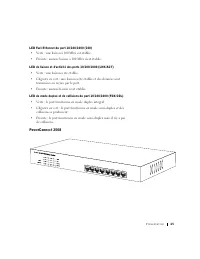
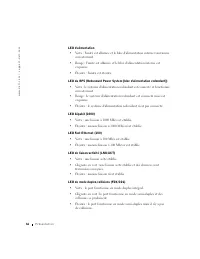
I n t r o d u c t i o n 13 • Rack-mount kit for rack installation • PowerConnect 2124 and 2508 User’s Guide • AC power cord Front Panel Indicators The LEDs on the front panel display the following information: • Status of the power supply • Status of the optional external redundant power supply • Co...
I n t r o d u c t i o n 17 Connecting Devices RJ-45 Switch Ports There are RJ-45 connectors on the front panel of the switch. The PowerConnect 2124 provides 24 10/100-Mbps ports that can sense 10/100-Mbps speeds and 1 10/100/1000-Mbps port that can sense 10/100/1000-Mbps speeds. The PowerConnect 250...
I n t r o d u c t i o n 19 Redundant Power System PowerConnect RPS-60 The optional external redundant power system PowerConnect RPS-60 provides a second, redundant power supply for your switch, eliminating the power supply as a single point of failure. To use the RPS-60: 1 Attach the adapter tray to...
20 I n t r o d u c t i o n www .dell.com | support.dell.com Installing in a Rack The switch can be installed in most standard 19-inch racks. N O T E : For racks that are not prethreaded, cage nuts are provided. To install the switch in a rack, complete the following steps: 1 Use the supplied screws ...
www .dell.com | support.dell.com S E C T I O N 2 H e l p a n d W a r r a n t i e s Help Overview Dell Contact Numbers Limited Warranties and Return Policy Regulatory Notices
22 H e l p a n d W a r r a n t i e s www .dell.com | support.dell.com Help Overview This section describes the tools Dell provides to help you when you have a problem with your switch. It also tells you when and how to contact Dell for technical or customer assistance. Technical Assistance If you ne...
24 H e l p a n d W a r r a n t i e s www .dell.com | support.dell.com To contact Dell's technical support service, see "Before You Call" and then call the number for your country as listed in "Dell Contact Numbers." Problems With Your Order If you have a problem with your order, such...
H e l p a n d W a r r a n t i e s 25 Returns that are missing any of the preceding requirements will be refused at our receiving dock and returned to you. Before You Call Remember to fill out the Diagnostics Checklist. If possible, turn on your system before you call Dell for technical assistance an...
H e l p a n d W a r r a n t i e s 27 Dell Contact Numbers The following table provides country-specific access codes and telephone numbers, websites, and e-mail addresses that you can use to contact Dell. The codes required depend on where you are calling from as well as the destination of your call...
H e l p a n d W a r r a n t i e s 31 Limited Warranties and Return Policy To determine which warranty you purchased, see the Dell invoice that accompanied your computer. The following sections describe these limited warranties, the manufacturer guarantee for Latin America and the Caribbean, and the ...
46 H e l p a n d W a r r a n t i e s www .dell.com | support.dell.com Regulatory Notices FCC Notices (U.S. Only) Most Dell computer systems are classified by the Federal Communications Commission (FCC) as Class B digital devices. To determine which classification applies to your computer system, exa...
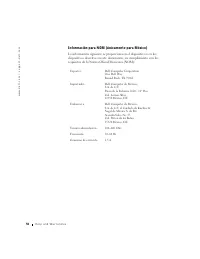
50 H e l p a n d W a r r a n t i e s www .dell.com | support.dell.com Información para NOM (únicamente para México) La información siguiente se proporciona en el dispositivo o en los dispositivos descritos en este documento, en cumplimiento con los requisitos de la Norma Oficial Mexicana (NOM): Expo...
Remarques, avis et précautions R E M A R Q U E : Une REMARQUE indique une information importante qui peut vous aider à mieux utiliser votre ordinateur. A V I S : Un AVIS vous avertit d’un risque de dommage matériel ou de perte de données et vous indique comment éviter le problème. P R É C A U T I O ...
Ta b l e d e s m a t i è r e s 5 3 Ta b l e d e s m a t i è r e s Consignes de sécurité . . . . . . . . . . . . . . . . . . . . . . . 55 Précaution : Précautions de sécurité . . . . . . . . . . . . . . 55 1 Pr é s e n t a t i o n Contenu de la boîte . . . . . . . . . . . . . . . . . . . . . . . . 63...
C o n s i g n e s d e s é c u r i t é 55 Consignes de sécurité Suivez les consignes de sécurité suivantes pour assurer votre sécurité personnelle et aider à protéger vos serveur, système de stockage ou appareil d'éventuels dommages. Précaution : Précautions de sécurité Pour diminuer le risque de ble...
C o n s i g n e s d e s é c u r i t é 59 • Une fois un composant inséré dans le rack, étirez la glissière avec précaution jusqu'à ce qu'elle se bloque puis faites glisser le composant dans le rack. • Ne surchargez pas le circuit de dérivation de CA qui alimente le rack. La charge totale du rack ne d...
www .dell.com | support.dell.com S E C T I O N 1 P r é s e n t a t i o n Contenu de la boîte Voyants du panneau avant Connexion de périphériques Agrégation du trafic à Gigabit Ethernet 1000 Mb/s Classe de service Système d'alimentation redondant PowerConnect RPS-60 Instructions du kit de montage Inf...
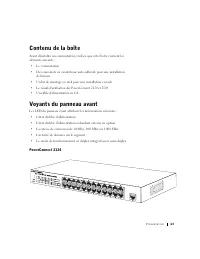
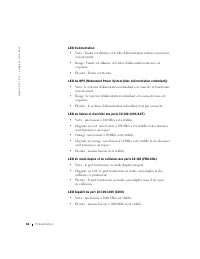
P r é s e n t a t i o n 63 Contenu de la boîte Avant d'installer un commutateur, vérifiez que votre boîte contient les éléments suivants : • Le commutateur • Des coussinets en caoutchouc auto-adhésifs pour une installation de bureau • Un kit de montage en rack pour une installation en rack • Le Guid...
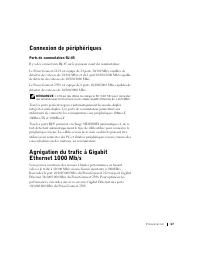
P r é s e n t a t i o n 67 Connexion de périphériques Ports de commutation RJ-45 Il y a des connecteurs RJ-45 sur le panneau avant du commutateur. Le PowerConnect 2124 est équipé de 24 ports 10/100 Mb/s capables de détecter des vitesses de 10/100 Mb/s, et de 1 port 10/100/1000 Mb/s capable de détect...
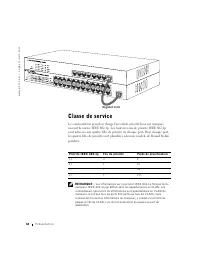
68 P r é s e n t a t i o n www .dell.com | support.dell.com Classe de service Le commutateur prend en charge l'accord de priorité basé sur marques suivant la norme IEEE 802.1p. Les huit niveaux de priorité IEEE 802.1p sont adressés aux quatre files de priorité de chaque port. Pour chaque port, les q...
P r é s e n t a t i o n 69 Système d'alimentation redondant PowerConnect RPS-60 Le système d'alimentation redondant PowerConnect RPS-60 externe en option fournit un second bloc d'alimentation redondant à votre commutateur, permettant ainsi au bloc d'alimentation de ne pas être un point unique de déf...
70 P r é s e n t a t i o n www .dell.com | support.dell.com Pour installer le commutateur sur une surface plate, effectuez les étapes suivantes : 1 Placez le commutateur sur la surface plate et vérifiez que la ventilation est appropriée. Laissez au moins 5,1 cm de chaque côté pour une ventilation co...
www .dell.com | support.dell.com S E C T I O N 2 A i d e e t g a r a n t i e s Présentation générale de l'aide Numéros de contact Dell Garanties limitées et règles de retour Réglementations
74 A i d e e t g a r a n t i e s www .dell.com | support.dell.com Présentation générale de l'aide Cette section chapitre décrit les outils que Dell fournit pour vous aider lorsqu'un problème survient avec votre commutateur. Il vous dit aussi quand et comment contacter Dell pour recevoir une assistan...
76 A i d e e t g a r a n t i e s www .dell.com | support.dell.com Système automatisé de suivi des commandes Vous pouvez appeler ce service automatisé pour vérifier l'état de vos commandes de produits Dell. Un message préenregistré vous invite à entrer les informations concernant votre commande afin ...
A i d e e t g a r a n t i e s 79 Numéros de contact Dell Le tableau suivant fournit les indicatifs d'accès, les numéros de téléphone, les sites Web et les adresses e-mail, spécifiques à chaque pays, dont vous aurez besoin pour contacter Dell. Les indicatifs requis dépendent d'où vous appelez ainsi q...
A i d e e t g a r a n t i e s 83 Garanties limitées et règles de retour Pour déterminer quelle garantie vous avez acheté, consultez la facture que Dell a fournie avec votre ordinateur. Les sections suivantes décrivent les garanties limitées, la garantie de fabrication pour l'Amérique Latine et les C...
92 A i d e e t g a r a n t i e s www .dell.com | support.dell.com LA RESPONSABILITÉ DE DELL POUR LE FONCTIONNEMENT DÉFECTUEUX ET LES DÉFAUTS DU MATÉRIEL SE LIMITE À LA RÉPARATION OU AU REMPLACEMENT COMME INDIQUÉ DANS CE CONTRAT DE GARANTIE LIMITÉE. CES GARANTIES VOUS DONNENT DES DROITS SPÉCIFIQUES E...
A i d e e t g a r a n t i e s 99 Dell Computer de Chile Ltda Coyancura 2283, Piso 3- Of.302,Providencia, Santiago - Chili Dell Computer de Colombia Corporation Carrera 7 #115-33 Oficina 603Bogota, Colombie Dell Computer de Mexico SA de CV Paseo de la Reforma 2620 - 11° PisoCol. Lomas Altas 11950 Méx...
A i d e e t g a r a n t i e s 103 Informations sur les NOM (Mexique uniquement) Les informations suivantes sont inscrites sur le ou les appareils décrits dans ce document conformément aux exigences des normes officielles mexicaines (NOM) : Exportateur : Dell Computer CorporationOne Dell WayRound Roc...
w w w . d e l l . c o m | s u p p o r t . d e l l . c o m Sistemas Dell™ PowerConnect™ 2124 y 2508 Guía del usuario
Notas, avisos y precauciones NOTA : Una NOTA indica información importante que le ayuda a utilizar su equipo de la mejor manera. AVISO: Un AVISO indica la posibilidad de daños al hardware o pérdida de datos y le explica cómo evitar el problema. PRECAUCIÓN: Una PRECAUCIÓN indica daño potencial a la p...
C o n t e n i d o 1 0 7 C o n t e n i d o Instrucciones de seguridad . . . . . . . . . . . . . . . . . . . . 109 Precaución: Precauciones de seguridad . . . . . . . . . . . . . 109 1 I n t r o d u c c i ó n Contenido del paquete . . . . . . . . . . . . . . . . . . . . . . . 117 Indicadores del panel...
I n s t r u c c i o n e s d e s e g u r i d a d 109 Instrucciones de seguridad Utilice las pautas de seguridad siguientes para garantizar su seguridad personal y ayudar a proteger su servidor, sistema de almacenamiento o aparato servidor contra un daño potencial. Precaución: Precauciones de segurida...
I n s t r u c c i o n e s d e s e g u r i d a d 113 • Cerciórese de que el estante esté nivelado y estable antes de extender un componente fuera del estante. • Tenga cuidado al presionar los seguros de liberación de los rieles del componente y deslizar un componente dentro o fuera de un estante; los...
I n t r o d u c c i ó n 117 Contenido del paquete Antes de instalar un conmutador, verifique que su paquete contenga los artículos siguientes: • Interruptor • Almohadillas de goma autoadhesivas para la instalación en escritorio • Paquete de montaje en estante para la instalación en estante • Guía de...
I n t r o d u c c i ó n 121 Dispositivos de conexión Puertos de conmutación RJ-45 Hay conectores RJ-45 en el panel anterior del conmutador. El PowerConnect 2124 proporciona 24 puertos de 10/100 Mbps que pueden detectar velocidades de 10/100 Mbps y 1 puerto de 10/100/1000 Mbps que puede detectar velo...
I n t r o d u c c i ó n 123 Sistema de energía redundante PowerConnect RPS-60 El sistema de energía redundante externo opcional PowerConnect RPS-60 proporciona un segundo suministro de energía redundante a su conmutador, eliminando el suministro de energía como un punto único de falla. Para utilizar...
124 I n t r o d u c c i ó n www .dell.com | support.dell.com Para instalar el conmutador sobre una superficie plana, complete los pasos siguientes: 1 Coloque el conmutador sobre la superficie plana y verifique que tenga una buena ventilación. Deje al menos 5,1 cm a cada lado para que haya una ventil...
I n t r o d u c c i ó n 125 Información técnica Compatibilidad con el protocolo y los estándares de red IEEE 802.3 CSMA/CD IEEE 802.3 10Base-T IEEE 802.3u 100Base-TX IEEE 802.3z/ab 1000Base-T IEEE 802.3x Control de flujo Prioridad 802.3p del IEEE Inter faz Conector RJ-45 Suministro de energía Entrad...
www .dell.com | support.dell.com S E C C I Ó N 2 A y u d a y g a r a n t í a s Generalidades de la ayuda Números de contacto de Dell Garantía limitada y política de devoluciones Notificaciones reglamentarias
128 A y u d a y g a r a n t í a s www .dell.com | support.dell.com Generalidades de la ayuda Esta sección describe los medios que Dell proporciona para ayudarlo cuando tiene un problema con el conmutador. También le indica cuándo y cómo ponerse en contacto con Dell para obtener asistencia técnica o ...
130 A y u d a y g a r a n t í a s www .dell.com | support.dell.com Servicio de asistencia técnica El servicio de asistencia técnica — líder de la industria — de Dell está disponible las 24 horas del día y los siete días de la semana para responder sus preguntas acerca del hardware de Dell. Nuestro p...
A y u d a y g a r a n t í a s 131 3 Incluya una copia de la Lista de verificación de diagnósticos indicando las pruebas que haya realizado y cualquier mensaje de error reportado por los Diagnósticos Dell. 4 Incluya todos los accesorios relacionados con los artículos que desea devolver (tal como cabl...
A y u d a y g a r a n t í a s 133 Números de contacto de Dell La siguiente tabla proporciona códigos de acceso y números de teléfono, sitios web y direcciones de correo electrónico, específicos para cada país, que puede usar para ponerse en contacto con Dell. Los códigos requeridos dependen del luga...
A y u d a y g a r a n t í a s 139 Dell Computer de Chile Ltda Coyancura 2283, Piso 3- Of.302,Providencia, Santiago - Chile Dell Computer de Colombia Corporation Carrera 7 #115-33 Oficina 603Bogotá, Colombia Dell Computer de México S.A. de C.V. Paseo de la Reforma 2620 - 11° PisoCol. Lomas Altas 1195...
Manual Dell 2508
Summary
C o n t e n t s 3 Contents 1 Caution: Safety Instr uctions 5 2 Features 11 Package Contents 12 Front Panel Indicators 13 Connecting Devices 16 Aggregating Traffic at 1000-Mbps Gigabit Ethernet 17 Class-of-Service 18 Redundant Power System PowerConnect RPS-60 19 Mounting Kit Instructions 19 Technical...
S a f e t y I n s t r u c t i o n s 5 C a u t i o n : S a f e t y I n s t r u c t i o n s Use the following safety guidelines to ensure your own personal safety and to help protect your system from potential damage. General • Observe and follow service markings. Do not service any product except as ...
6 S a f e t y I n s t r u c t i o n s www .dell.com | support.dell.com • Use only approved power cable(s). If you have not been provided with a power cable for your system or for any AC-powered option intended for your system, purchase a power cable that is approved for use in your country. The powe...
8 S a f e t y I n s t r u c t i o n s www .dell.com | support.dell.com • Use caution when pressing the component rail release latches and sliding a component into or out of a rack; the slide rails can pinch your fingers. • After a component is inserted into the rack, carefully extend the rail into a...
S a f e t y I n s t r u c t i o n s 9 When Working Inside Your System Protecting Against Electrostatic Discharge Static electricity can harm delicate components inside your system. To prevent static damage, discharge static electricity from your body before you touch any of the electronic components...
www .dell.com | s u pport.dell.com 1 S E C T I O N 1 F e a t u r e s Package ContentsFront Panel IndicatorsConnecting DevicesAggregating Traffic at 1000-Mbps Gigabit EthernetClass-of-ServiceRedundant Power System PowerConnect RPS-60Mounting Kit InstructionsTechnical Information
12 F e a t u r e s www .dell.com | support.dell.com The PowerConnect 2124 and 2508 switches provide 24 10/100-Mbps Fast Ethernet ports plus 1 10/100/1000-Mbps Gigabit Ethernet port and 8 10/100/1000-Mbps Gigabit Ethernet ports, respectively. With complete switching features, including auto-sensing o...
F e a t u r e s 13 • Rack-mount kit for rack installation• PowerConnect 2124 and 2508 User’s Guide • AC power cord Front Panel Indicators The LEDs on the front panel display the following information: • Status of the power supply• Status of the optional external redundant power supply• Connection sp...
16 F e a t u r e s www .dell.com | support.dell.com Redundant Power System (RPS) LED • Green — The redundant power system is connected and working properly. • Red — The redundant power system is connected, but failed.• Off — The redundant power system is not connected. Gigabit (1000) LED • Green — A...
F e a t u r e s 17 The PowerConnect 2124 provides 24 10/100-Mbps ports that can sense 10/100-Mbps speeds and 1 10/100/1000-Mbps port that can sense 10/100/1000-Mbps speeds. The PowerConnect 2508 provides 8 10/100/1000-Mbps ports that can sense 10/100/1000-Mbps speeds. NOTE: Ensure that Category 5E (...
F e a t u r e s 19 Redundant Power System PowerConnect RPS-60 The optional external redundant power system PowerConnect RPS-60 provides a second, redundant power supply for your switch, eliminating the power supply as a single point of failure. To use the RPS-60: 1 Attach the adapter tray to the bac...
20 F e a t u r e s www .dell.com | support.dell.com Installing in a Rack The switch can be installed in most standard 19-inch racks. NOTE: For racks that are not prethreaded, cage nuts are provided. To install the switch in a rack, complete the following steps: 1 Use the supplied screws to attach a ...
www .dell.com | support.dell.com 2 S E C T I O N 2 H e l p a n d R e g u l a t o r y N o t i c e s Technical AssistanceContacting DellRegulatory Notices
22 H e l p a n d Re g u l a t o r y N o t i c e s www .dell.com | support.dell.com Technical Assistance If you need help with a technical problem, Dell is ready to assist you. CAUTION: If you need to remove the computer covers, first disconnect the computer power and modem cables from all electrical...
H e l p a n d Re g u l a t o r y N o t i c e s 23 You can contact Dell electronically using the following addresses: • World Wide Web www.dell.com/ www.dell.com/ap/ (for Asian/Pacific countries only) www.euro.dell.com (for Europe only) www.dell.com/la/ (for Latin American countries) • Anonymous file...
24 H e l p a n d Re g u l a t o r y N o t i c e s www .dell.com | support.dell.com Automated Order-Status Service To check on the status of any Dell products that you have ordered, you can go to support.dell.com , or you can call the automated order-status service. A recording prompts you for the in...
H e l p a n d Re g u l a t o r y N o t i c e s 25 For the telephone number to call, see the contact numbers for your region. 2 Include a copy of the invoice and a letter describing the reason for the return. 3 Include a copy of the Diagnostics Checklist indicating the tests you have run and any erro...
26 H e l p a n d Re g u l a t o r y N o t i c e s www .dell.com | support.dell.com Contacting Dell To contact Dell electronically, you can access the following websites: • www.dell.com • support.dell.com (technical support) • premiersupport.dell.com (technical support for educational, government, he...
42 H e l p a n d Re g u l a t o r y N o t i c e s www .dell.com | support.dell.com Regulatory Notices FCC Compliance Statement This equipment generates and uses radio frequency energy. If not installed and used properly, in strict accordance with the instructions provided with the equipment, it migh...
46 H e l p a n d Re g u l a t o r y N o t i c e s www .dell.com | support.dell.com Información para NOM (únicamente para México) La información siguiente se proporciona en el dispositivo o en los dispositivos descritos en este documento, en cumplimiento con los requisitos de la Norma Oficial Mexican...
H e l p a n d Re g u l a t o r y N o t i c e s 47 VCCI Notice (Japan Only) Class A ITE This is a Class A product based on the standard of the Voluntary Control Council for Interference (VCCI) for information technology equipment. If this equipment is used in a domestic environment, radio disturbance...
Dell Manuals
-
Dell 04YJJ6A00
User Manual
-
Dell 04YJJ6A00
Manual
-
Dell 10 Pro
User Manual
-
Dell 10
Manual
-
Dell 1000
User Manual
-
Dell 1000
Manual
-
Dell 1014
User Manual
-
Dell 1000W
User Manual
-
Dell 1000W
Manual
-
Dell 0JH552A01
User Manual
-
Dell 10g
User Manual
-
Dell 1100
User Manual
-
Dell 1100
Manual
-
Dell 11
User Manual
-
Dell 11
Manual
-
Dell 11 Pro
User Manual
-
Dell 110T
User Manual
-
Dell 110T DLT1 Drive
User Manual
-
Dell 1100 Laser Mono Printer
User Manual
-
Dell 1100MP
User Manual