Page 2 - the; Quick Touch; Instruction Book - BMO625
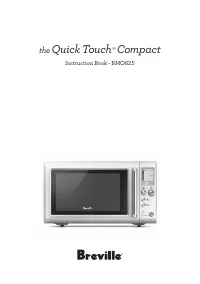
the Quick Touch ™ Compact Instruction Book - BMO625
Page 3 - WARNING; • Remove and safely discard; A BIT MORE; Contents
2 BREVILLE RECOMMENDS SAFETY FIRST At Breville we are very safety conscious. We design and manufacture consumer products with the safety of you, our valued customer, foremost in mind. In addition we ask that you exercise a degree of care when using any electrical appliance and adhere to the followin...
Page 12 - RADIO INTERFERENCE; • Operation of the microwave; CAUTION
11 RADIO INTERFERENCE • Operation of the microwave oven may cause interference to your radio, TV or similar equipment. • When there is interference, it may be reduced or eliminated by taking the following measures: − Clean door and sealing surface of the oven. − Reorient the receiving antenna of rad...
Page 13 - NOTE; • This equipment generates, uses; SPECIFICATION; Output
12 NOTE • This equipment generates, uses and can radiate radio frequency energy and, if not installed and used in accordance with the instructions, may cause harmful interference to radio communications. However, there is no guarantee that interference will not occur in a particular installation. If...
Page 14 - Components
13 Components D H E G F A B C A. Viewing window B. Door handle Pull handle to open. C. LCD screen D. POWER/Amount dial Turn dial to adjust the power level, weight & quantity that corresponds with the food type selected. E. +30 INSTANT START button & START/ FOOD TYPE/ TIME dial Each press add...
Page 15 - Assembly; BEFORE FIRST USE
14 Assembly BEFORE FIRST USE Before first use remove all promotional stickers and packaging material. Carefully unpack the microwave oven and keep all the packing material until all the parts of the microwave oven have been found and the appliance has been assembled. It is recommended to keep all the...
Page 16 - Functions; SETTING THE CLOCK; Setting The Clock - 12 Hour Clock Display
15 Functions SETTING THE CLOCK Press SET CLOCK on shortcuts panel. The default time is 12hr. The highlighted digits will flash to show it can be adjusted. Turn the TIME dial to change between 12hr and 24hr time. Press START to confirm your selection. Setting The Clock - 12 Hour Clock Display The defau...
Page 17 - Setting The Clock - 24 Hour Clock Display
16 Setting The Clock - 24 Hour Clock Display The default time is 1:00. The highlighted digits flash to show it can be adjusted. Turn the TIME dial to adjust the hours and Press START button to confirm. Minutes now flash to show they can be adjusted. Turn TIME dial to adjust minutes and press START butt...
Page 18 - Unit Weight Conversion During Operation; SETTING CHILD LOCK; STANDBY
17 SETTING THE UNIT WEIGHT CONVERSION MEASURE Press UNITS on shortcuts panel. The highlighted ounces (oz) will flash to show it can be adjusted. Turn START/TIME dial to toggle between ounces (oz) and grams (g). Press START button to confirm. Unit Weight Conversion During Operation When weight is on th...
Page 19 - INDEPENDENT KITCHEN TIMER; Setting the count up timer
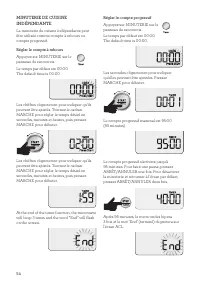
18 INDEPENDENT KITCHEN TIMER The independent kitchen timer can be used as either a count down or count up timer. Setting the count down timer Press TIMER on control panel. The default time is 00:00. The highlighted digits flash to show it can be adjusted. Turn START dial to adjust to your desired tim...
Page 20 - TIME & POWER LEVEL ADJUSTMENT; Turning the TIME Dial
19 TIME & POWER LEVEL ADJUSTMENT Select different times and microwave power levels by simply turning the TIME and POWER dials. The maximum microwave cooking time is 95 minutes (95:00). There are 10 power levels available. Turning the TIME Dial Turn TIME dial to adjust the time. The default time ...
Page 23 - Beverage
22 All unselected FOOD TYPES, the Press Start and Input Quantity prompts are no longer displayed on the LCD screen. The TIME appears and begins to countdown. NOTE While the microwave is heating time can be increased or decreased. Adjusting the heating time does not affect selected weight or quantity...
Page 24 - Soup; SMART DEFROST
23 Soup Suitable for reheating canned soups at room temperature.Place soup into a microwave-safe bowl and cover with a vented microwave-safe lid or microwave-safe plastic wrap.Halfway through the reheat program, the oven will beep and will flash “stir/turn food”Pause and stir, starting from the outsi...
Page 25 - Frozen meals
24 All unselected FOOD TYPES, the Press Start and Input Quantity prompts are no longer displayed on the LCD screen. The TIME appears and begins to countdown. NOTE While the microwave is defrosting time can be increased or decreased. Adjusting the defrosting time does not affect selected weight or qu...
Page 27 - A BIT MORETM BUTTON; For example
26 A BIT MORE™ BUTTON Use A BIT MORE™ when cooking is finished and your food is not quite cooked or hot enough. One simple press of A BIT MORE™ will add a little extra cooking time. If A BIT MORE™ is pressed and there is no previous SMART REHEAT, DEFROST or shortcut setting the microwave will default...
Page 29 - OPERATING YOUR SHORTCUTS PANEL; Oatmeal; Veggies
28 OPERATING YOUR SHORTCUTS PANEL Oatmeal The shortcuts oatmeal setting is designed to gently cook your oats to tender without drying or becoming lumpy. The shortcuts oatmeal setting uses 2 power levels, firstly 100% to get the starches activated and then 50% to gently cook to tender. This setting is...
Page 32 - Bacon; Melt chocolate
31 Bacon The shortcut to bacon setting is programmed to cook bacon slices. 1. In a single layer, place sliced bacon onto a microwave safe dish lined with paper towel. 2. Open the door and press BACON button on shortcuts panel. 3. Turn the AMOUNT DIAL to select the number of bacon slices and press ST...
Page 33 - Soften butter
32 Soften butter The shortcuts melt chocolate setting is designed to melt chocolate without overheating and seizing of the chocolate.The shortcuts soften butter setting is designed to soften butter so it is suitable to cream immediately in a mixer.The soften butter setting will soften butter that ha...
Page 34 - MICROWAVE UTENSILS
33 SOME IMPORTANT TIPS FOR MICROWAVE COOKING To help equalize energy in the food so that it cooks evenly follow these helpful tips. 1. Arrange foods with varying size ends, such as chicken drumsticks and broccoli with the thicker or tougher part positioned to the outside of the dish. This ensures th...
Page 36 - Troubleshooting; PROBLEM
35 Troubleshooting PROBLEM EASY SOLUTION Microwave oven interfering with radio, TV or similar equipment. • Clean door and sealing surface of the oven. • Reorient the receiving antenna of radio or television. • Relocate the microwave oven with respect to the receiver. • Move the microwave oven away f...
Page 37 - Quick Touch
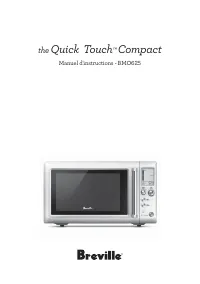
the Quick Touch ™ Compact Manuel d'instructions - BMO625
Page 38 - AVERTISSEMENT; • Retirez et jetez tout matériel; Entretien & nettoyage
37 BREVILLE VOUS RECOMMANDE LA SÉCURITÉ AVANT TOUT Chez Breville, la sécurité occupe une place de choix. Nous concevons et fabriquons des produits de consommation sans jamais perdre de vue la sécurité de notre précieuse clientèle. De plus, nous vous demandons d’être très vigilant lorsque vous utilis...
Page 47 - ATTENTION
46 • Si vous voyez de la fumée, éteignez l'appareil et débranchez-le. Gardez la porte fermée pour étouffer les flammes. • Si vous voyez des étincelles, flammèches ou clignotements dans les four, appuyez sur le bouton ARRÊT/ANNULER et remédiez au problème ou contactez le Soutien aux consommateurs de Br...
Page 48 - LIQUIDES SURCHAUFFÉS
47 • Les réparations et réglages de votre four doivent être faits uniquement par un personnel dûment qualifié pour ce faire. LIQUIDES SURCHAUFFÉS Pour réduire les risques de blessures corporelles: − Ne surchauffez pas le liquide. − Remuez le liquide avant et en cours de réchauffage. − N'utilisez pas ...
Page 49 - • Faire fonctionner le; • N'utilisez pas de fiche; SPÉCIFICATIONS; Poids Net
48 USAGE DOMESTIQUE SEULEMENTCONSERVEZ CES INSTRUCTIONS INTERFÉRENCE AVEC LES ONDES RADIO • Faire fonctionner le micro-ondes peut causer de l'interférence à votre radio, téléviseur ou équipement similaire. • En cas d'interférence, prenez les mesures suivantes pour la réduire ou l'éliminer: − Nettoye...
Page 50 - Composants
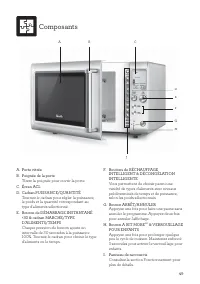
49 Composants D H E G F A B C A. Porte vitrée B. Poignée de la porte Tirerz la poignée pour ouvrir la porte. C. Écran ACL D. Cadran PUISSANCE/QUANTITÉ Tournez le cadran pour régler la puissance, le poids et la quantité correspondant au type d'aliments sélectionné. E. Bouton de DÉMARRAGE INSTANTANÉ +...
Page 51 - Assemblage; AVANT LA PREMIÈRE UTILISATION
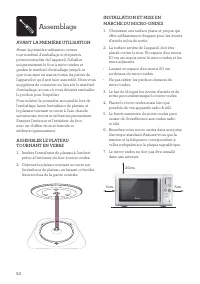
50 Assemblage AVANT LA PREMIÈRE UTILISATION Avant la première utilisation, retirez tout matériel d'emballage et étiquettes promotionnelles de l'appareil. Déballez soigneusement le four à micro-ondes et gardez le matériel d'emballage jusqu'à ce que vous ayez en mains toutes les pièces de l'appareil e...
Page 52 - Fonctions; Régler l'horloge - Affichage sur 12 heures
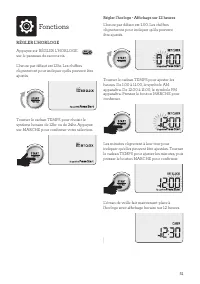
51 Fonctions RÉGLER L'HORLOGE Appuyez sur RÉGLER L'HORLOGE sur le panneau de raccourcis. L'heure par défaut est 12hr. Les chiffres clignoteront pour indiquer qu'ils peuvent être ajustés. Tourner le cadran TEMPS pour choisir le système horaire de 12hr ou de 24hr. Appuyez sur MARCHE pour confirmer votr...
Page 53 - Régler l'horloge - Affichage sur 24 heures
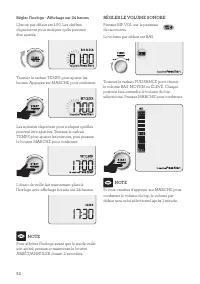
52 Régler l'horloge - Affichage sur 24 heures L'heure par défaut est 1.00. Les chiffres clignoteront pour indiquer qu'ils peuvent être ajustés. Tourner le cadran TEMPS pour ajuster les heures. Appuyez sur MARCHE pour confirmer. Les minutes clignotent pour indiquer qu'elles peuvent être ajustées. Tourn...
Page 54 - MODE ATTENTE
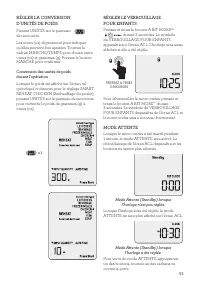
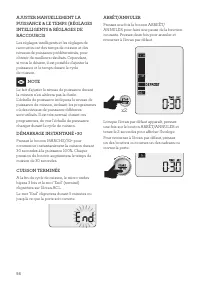
53 RÉGLER LA CONVERSION D'UNITÉS DE POIDS Pressez UNITÉS sur le panneau de raccourcis. Les onces (oz) clignoteront pour indiquer qu'elles peuvent être ajustées. Tournez le cadran MARCHE/TEMPS pour choisir entre onces (oz) et grammes (g). Pressez le bouton MARCHE pour confirmer. Conversion des unités ...
Page 56 - Tourner le cadran TEMPS
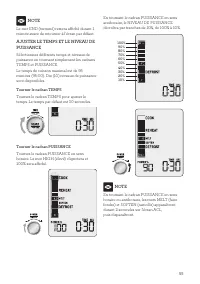
55 NOTE Le mot END (terminé) restera affiché durant 1 minute avant de retourner à l'écran par défaut. AJUSTER LE TEMPS ET LE NIVEAU DE PUISSANCE Sélectionnez différents temps et niveaux de puissance en tournant simplement les cadrans TEMPS et PUISSANCE. Le temps de cuisson maximal est de 95 minutes (...
Page 59 - Boissons
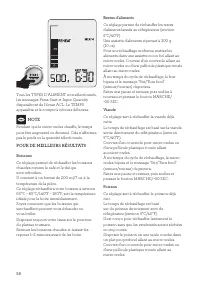
58 Tous les TYPES D'ALIMENT non sélectionnés, les messages Press Start et Input Quantity disparaîtront de l'écran ACL. Le TEMPS apparaîtra et le compte à rebours débutera. NOTE Pendant que le micro-ondes chauffe, le temps peut être augmenté ou diminué. Cela n'affectera pas le poids ou la quantité sé...
Page 60 - Soupe; DÉCONGÉLATION INTELLIGENTE
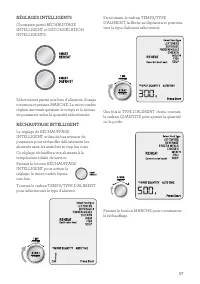
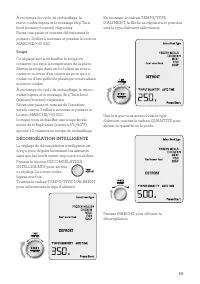
59 À mi-temps du cycle de réchauffage, le micro-ondes bipera et le message Stir/Turn food (remuer/tourner) clignotera.Faites une pause et tournez délicatement le poisson. Scellez à nouveau et pressez le bouton MARCHE/+30 SEC. Soupe Ce réglage sert à réchauffer le soupe en conserve qui est à la tempé...
Page 61 - Mets congelés
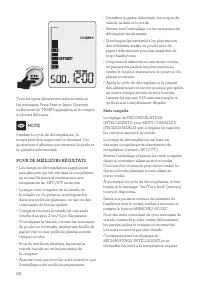
60 Tous les types aliment non sélectionnés et les messages Press Start et Input Quantity s'effaceront, le TEMPS apparaîtra et le compte à rebours débutera. NOTE Pendant le cycle de décongélation, le temps peut être augmenté ou diminué. Cet ajustement n'affectera aucunement le poids et la quantité sé...
Page 63 - BOUTON A BIT MORE
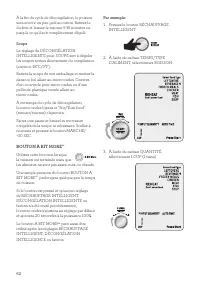
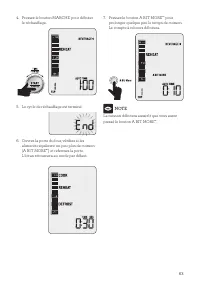
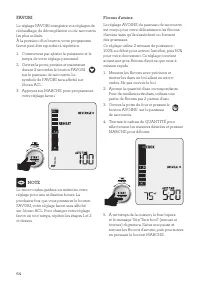
62 À la fin du cycle de décongélation, le poisson sera encore un peu gelé au centre. Retirez-le du four et laissez-le reposer 5-15 minutes ou jusqu'à ce qu'il soit complètement dégelé. Soupe Le réglage de DÉCONGÉLATION INTELLIGENTE pour SOUPE sert à dégeler les soupes sorties directement du congélate...
Page 66 - Légumes; Riz
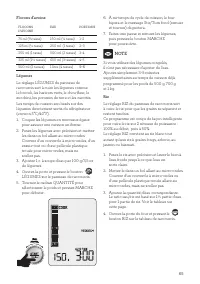
65 Flocons d'avoine FLOCONS D'AVOINE EAU PORTIONS 75 ml ( L tasse) 150 ml (¾ tasse) 1–2 125 ml (½ tasse) 250 ml (1 tasse) 2–3 250 ml (1 tasse) 500 ml (2 tasses) 3–4 325 ml (1½ tasses) 650 ml (3 tasses) 4–5 500 ml (2 tasses) 1 litre (4 tasses) 5–6 Légumes Le réglage LÉGUMES du panneau de raccourcis s...
Page 67 - Pizza
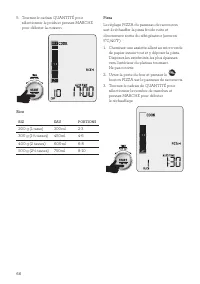
66 5. Tournez le cadran QUANTITÉ pour sélectionner le poids et pressez MARCHE pour débuter la cuisson. Rice RIZ EAU PORTIONS 200 g (1 tasse) 300ml 2-3 300 g (1½ tasses) 450ml 4-6 400 g (2 tasses) 600ml 6-8 500 g (2½ tasses) 750ml 8-10 Pizza Le réglage PIZZA du panneau de raccourcis sert à réchauffer...
Page 68 - Popcorn
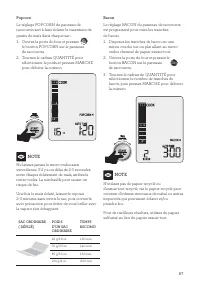
67 Popcorn Le réglage POPCORN du panneau de raccourcis sert à faire éclater le maximum de grains de maïs dans chaque sac. 1. Ouvrez la porte du four et pressez le bouton POPCORN sur le panneau de raccourcis. 2. Tournez le cadran QUANTITÉ pour sélectionner le poids et pressez MARCHE pour débuter la c...
Page 69 - Chocolat fondu; Beurre ramolli
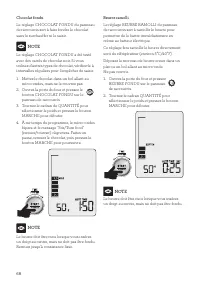
68 Chocolat fondu Le réglage CHOCOLAT FONDU du panneau de raccourcis sert à faire fondre le chocolat sans le surchauffer ni le saisir. NOTE Le réglage CHOCOLAT FONDU a été testé avec des carrés de chocolat noir. Si vous utilisez d'autres types de chocolat, vérifiez-le à intervalles réguliers pour l'e...
Page 71 - USTENSILES POUR MICRO-ONDES
70 6. Déposez le pain, les biscuits ou les aliments gras sur du papier essuie-tout. Cela préviendra l'accumulation de vapeur entre les aliments et le plateau tournant et les gardera croustillants et secs. Recouvrez les aliments de papier essuie-tout pour éviter les éclaboussures. 7. Remuez les alime...
Page 73 - Guide de Dépannage; PROBLÈME POSSIBLE
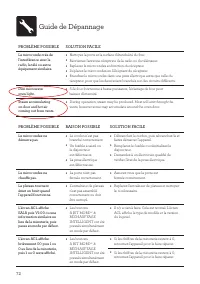
72 Guide de Dépannage PROBLÈME POSSIBLE SOLUTION FACILE Le micro-onde crée de l'interférence avec la radio, la télé ou autre équipement similaire. • Nettoyez la porte et la surface d'étanchéité du four. • Réorientez l'antenne réceptrice de la radio ou du téléviseur. • Replacez le micro-ondes en fonc...
Page 74 - Notes