Page 2 - IMPORTANT; READ ALL; Contents
2 BREVILLE RECOMMENDS SAFETY FIRST At Breville we are very safety conscious. We design and manufacture consumer products with the safety of you, our valued customer, foremost in mind. In addition we ask that you exercise a degree of care when using any electrical appliance and adhere to the followin...
Page 5 - SHORT CORD
5 SPECIFIC INSTRUCTIONS FOR WATER FILTER • Filter cartridge should be kept out of reach of children. • Store filter cartridges in a dry place in the original packaging. • Protect cartridges from heat and direct sunlight. • Do not use damaged filter cartridges. • Do not open filter cartridges. • If y...
Page 6 - BREVILLE ASSIST
6 FOR HOUSEHOLD USE ONLY SAVE THESE INSTRUCTIONS BREVILLE ASSIST ® PLUG Your Breville appliance comes with a unique Assist ® Plug, conveniently designed with a finger hole to ease removal from the power outlet. CSA DUTY CYCLE MARKING The Canadian Standards Authority requires any appliances capable o...
Page 7 - Components
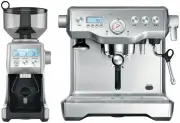
7 Components A. Integrated conical burr grinder with removable ½lb bean hopper B. Top-fill 84 fl.oz (2.5L) removable water tank with integrated water filter and backlit level indicator C. Grind size dial adjust grind size to suit your coffee beans D. Touch screen control panel displays current setti...
Page 8 - ACCESSORIES
8 A E F I G H J D C K L M B A. Stainless steel milk jugB. 2 cup filter basketC. 1 cup filter basketD. Water filter holder with filterE. Cleaning discF. Mini grinds binG. Grinder burr brush H. Grind outlet brush & tamp removal magnet I. Cleaning tool for steam wand tipJ. Two allen keysK. Steam wa...
Page 10 - Assembly; BEFORE FIRST USE; Machine Preparation; TIP
10 Assembly BEFORE FIRST USE Machine Preparation Remove and discard all labels and packaging materials attached to your espresso machine. Ensure you have removed all parts and accessories before discarding the packaging.Remove the plastic bag containing the water filter and water filter holder. Clea...
Page 11 - Functions; FIRST USE; NOTE
11 Functions FIRST USE 1. Press POWER button to turn the machine on. 2. Follow the instructions on screen to guide you through first use setup. 3. After completing setup, the machine will tell that it is ready to use. Select the guide to find out more about your Oracle Touch or to exit and proceed t...
Page 12 - DRINK SELECTION; Select your drink; Cappuccino; Single
12 DRINK SELECTION To enter Drinks Menu screen, touch the Home icon . Swipe & select your drink. Touch the 'Help & Tip' icon to see Oracle Touch Guide. Americano Select your drink Espresso Latte Flat White Cappuccino NOTE Please keep the touch screen dry and clean to ensure that the machine ...
Page 14 - TEXTURING MILK; Wipe the; Wipe the wand & tip with a clean damp cloth.; AMERICANO; PRESET
14 TEXTURING MILK Different brands and types of milk and milk alternatives will texture differently. You may need to adjust the froth level accordingly. Start with fresh cold milk. Fill milk jug to below the spout position. Lift steam wand and insert into milk jug. Lower steam wand, ensuring it is f...
Page 15 - Add New; SETTINGS
15 HOT WATER The HOT WATER function can be used to pre- heat cups or add hot water manually.To start & stop hot water, touch 'Hot Water' on the screen. Hot water limit is approximately 90 seconds. Depending on the size of your cup, you may need to touch the 'Hot Water' button to stop pouring. NO...
Page 16 - ADJUSTING CONICAL BURRS; TRANSPORTING AND STORING
16 ADJUSTING CONICAL BURRS Some types of coffee may require a wider grind range to achieve an ideal extraction or brew. A feature of the built-in grinder is the ability to extend this range with an adjustable upper burr. We recommend making only one adjustment at a time. Move adjustable top burr, 1 ...
Page 17 - Tips; Heating your cup or glass; THE GRIND; PURGING THE GROUP HEAD
17 Tips PRE-HEATING Heating your cup or glass A warm cup will help maintain the coffee’s optimal temperature. Pre-heat your cup by rinsing with hot water from the hot water outlet and place on the cup warming tray. Heating the portafilter and filter basket A cold portafilter and filter basket can re...
Page 18 - EXTRACTION GUIDE; After texturing is complete
18 The flavor of your coffee will depend on many factors, such as the type of coffee beans, degree of roast, freshness, coarseness or fineness of the grind. Experiment by adjusting these factors just one at a time to achieve the taste of your preference. EXTRACTION GUIDE EXTRACTION TYPES GRIND SHOT ...
Page 19 - COFFEE BEAN HINTS & TIPS
19 COFFEE BEAN HINTS & TIPS • Fresh, quality coffee beans will give you the best possible extraction. • We recommend quality 100% Arabica beans with a ‘Roasted On’ date stamped on the bag, not a ‘Best Before’ or ‘Use By’ date. • Coffee beans are best consumed between 5-20 days after the ‘Roasted...
Page 21 - CLEANING CONICAL BURRS
21 CLEANING CONICAL BURRS Regular cleaning helps the burrs achieve consistent grinding results which is especially important when grinding for espresso. 13 Replace & lock hopper Remove beans Run grinder until empty Unlock & remove hopper Remove upper burr Unlock hopper 1 2 3 4 5 6 Clean lowe...
Page 22 - Steam Wand Cleaning Powder
22 CLEANING THE STEAM WAND IMPORTANT After every use, thoroughly wipe the steam wand and tip with a damp cloth & purge immediately. Failure to clean the steam wand may affect the milk texturing performance. • If any of the holes in the tip of the steam wand become blocked, ensure the machine sto...
Page 23 - If you’ve just finished using
23 CLEAR WATER BACKFLUSH • After each coffee making session we recommend doing a clear water backflush before you turn off the machine. Empty drip tray. Insert the cleaning disc into the filter basket then insert the portafilter into the group head. Touch the 'Brew' button and allow pressure to buil...
Page 24 - Troubleshooting; PROBLEM
24 Troubleshooting PROBLEM POSSIBLE CAUSE WHAT TO DO Grinder Motor starts but no ground coffee coming from grind outlet • No coffee beans in bean hopper. • Grinder/bean hopper is blocked. • Coffee bean may have become stuck in hopper. • Fill bean hopper with fresh coffee beans. • Remove bean hopper....
Page 28 - the; Oracle
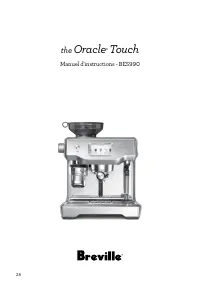
28 the Oracle ‰ Touch Manuel d'instructions - BES990
Page 29 - IMPORTANTES; LISEZ TOUTE LES
29 BREVILLE VOUS RECOMMANDE LA SÉCURITÉ AVANT TOUT Chez Breville, la sécurité occupe une place de choix. Nous concevons et fabriquons des produits de consommation sans jamais perdre de vue la sécurité de notre précieuse clientèle. De plus, nous vous demandons d'être très vigilant lorsque vous utilis...
Page 33 - USAGE DOMESTIQUE SEULEMENT
33 FICHE ASSIST ® DE BREVILLE Votre appareil Breville est muni d’une fiche exclusive Assist ® conçue spécialement avec anneau pour laisser passer un doigt et faciliter le retrait sécuritaire de la prise électrique. INDICATION DU FACTEUR D’UTILISATION ‘CSA’ L’Association canadienne de normalisation (...
Page 34 - Composants; Moulin à meules coniques intégré
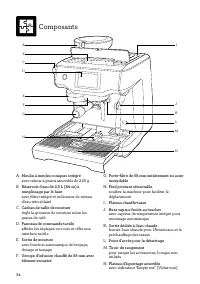
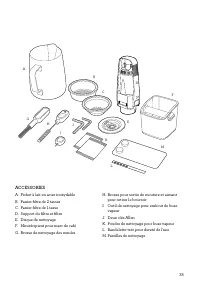
34 Composants A. Moulin à meules coniques intégré avec trémie à grains amovible de 225 g B. Réservoir d'eau de 2,5 L (84 oz) à remplissage par le haut avec filtre intégré et indicateur de niveau d'eau rétroéclairé C. Cadran de taille de mouture règle la grosseur de mouture selon les grains de café D...
Page 37 - Assemblage; AVANT LA PREMIÈRE UTILISATION; Préparation de la machine; TRUC
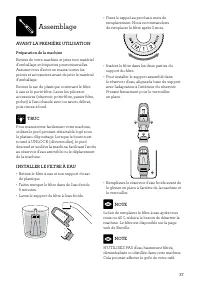
37 Assemblage AVANT LA PREMIÈRE UTILISATION Préparation de la machine Retirez de votre machine et jetez tout matériel d’emballage et étiquettes promotionnelles. Assurez-vous d’avoir en mains toutes les pièces et accessoires avant de jeter le matériel d’emballage.Retirez le sac de plastique contenant...
Page 38 - Fonctions; PREMIÈRE UTILISATION
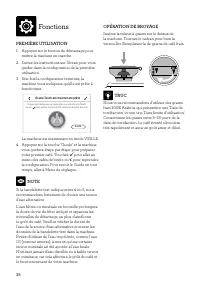
38 Fonctions PREMIÈRE UTILISATION 1. Appuyez sur le bouton de démarrage pour mettre la machine en marche. 2. Suivez les instructions sur l'écran pour vous guider dans la configuration de la première utilisation. 3. Une fois la configuration terminée, la machine vous indiquera qu'elle est prête à fon...
Page 39 - SÉLECTION DE BOISSON; Sélectionner votre boisson; Simple
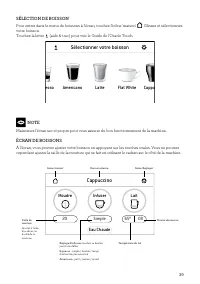
39 SÉLECTION DE BOISSON Pour entrer dans le menu de boissons à l'écran, touchez l’icône 'maison' . Glissez et sélectionnez votre boisson. Touchez la lettre (aide & truc) pour voir le Guide de l'Oracle Touch. Americano Sélectionner votre boisson Espresso Latte Flat White Cappuccino NOTE Maintenez...
Page 40 - EXTRACTION DE L'ESPRESSO; COMMANDE MANUELLE
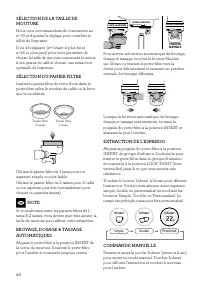
40 SÉLECTION DE LA TAILLE DE MOUTURE Nous vous recommandons de commencer au n o 30 et d'ajuster le réglage pour contrôler le débit de l'espresso. Il y a 45 réglages (n o 1 étant le plus fin et n o 45, le plus gros) pour vous permettre de choisir la taille de mouture convenant le mieux à vos grains d...
Page 41 - MOUSSAGE DU LAIT; Surveillez toujours les enfants.; FORMAT DE
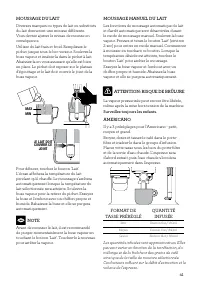
41 MOUSSAGE DU LAIT Diverses marques ou types de lait ou substituts du lait donneront une mousse différente. Vous devrez ajuster le niveau de mousse en conséquence.Utilisez du lait frais et froid. Remplissez le pichet jusque sous le bec verseur. Soulevez la buse vapeur et insérez-la dans le pichet à...
Page 42 - Nouveau café; RÉGLAGES
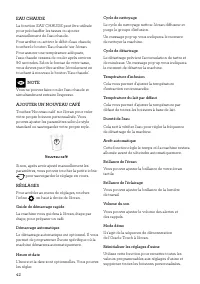
42 EAU CHAUDE La fonction EAU CHAUDE peut être utilisée pour préchauffer les tasses ou ajouter manuellement de l'eau chaude.Pour arrêter ou activer le débit d'eau chaude, touchez le bouton 'Eau chaude' sur l'écran.Pour assurer une température adéquate, l'eau chaude cessera de couler après environ 90...
Page 43 - AJUSTER LES MEULES CONIQUES; TRANSPORT ET RANGEMENT
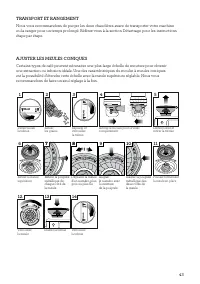
43 AJUSTER LES MEULES CONIQUES Certains types de café peuvent nécessiter une plus large échelle de mouture pour obtenir une extraction ou infusion idéale. Une des caractéristiques du moulin à meules coniques est la possibilité d'étendre cette échelle avec la meule supérieure réglable. Nous vous reco...
Page 44 - Trucs; PRÉCHAUFFAGE; Préchauffer votre tasse ou votre verre
44 Trucs PRÉCHAUFFAGE Préchauffer votre tasse ou votre verre Une tasse chaude permet de maintenir la température optimale du café. Préchauffez votre tasse en la rinçant directement sous la sortie d’eau chaude et placez-la sur le chauffe-tasse. Préchauffer le porte-filtre et le panier filtre Un porte...
Page 45 - Une fois le moussage terminé
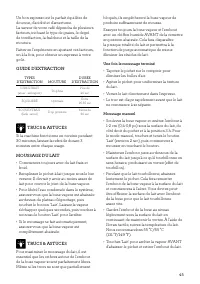
45 Un bon espresso est le parfait équilibre de douceur, d'acidité et d'amertume. La saveur de votre café dépendra de plusieurs facteurs, incluant le type de grains, le degré de torréfaction, la fraîcheur et la taille de la mouture.Faites-en l'expérience en ajustant ces facteurs, un à la fois, pour o...
Page 48 - NETTOYAGE DES MEULES CONIQUES
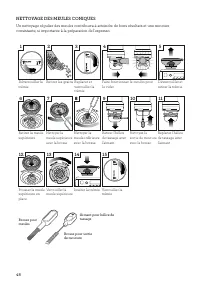
48 NETTOYAGE DES MEULES CONIQUES Un nettoyage régulier des meules contribuera à atteindre de bons résultats et une mouture consistante, si importante à la préparation de l'espresso. Brosse pour meules Brosse pour sortie de mouture Aimant pour hélice de tassage 13 Retirer les grains Faire fonctionner...
Page 49 - Poudre de nettoyage de la buse vapeur
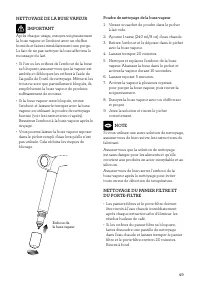
49 NETTOYAGE DE LA BUSE VAPEUR IMPORTANT Après chaque usage, essuyez soigneusement la buse vapeur et l'embout avec un chiffon humide et faites immédiatement une purge. Le fait de ne pas nettoyer la buse affectera le moussage du lait. • Si l'un ou les orifices de l'embout de la buse se bloquent, assu...
Page 50 - RINÇAGE À L'EAU CLAIRE; NETTOYAGE DE L'ÉCRAN DIFFUSEUR; Si vous venez de
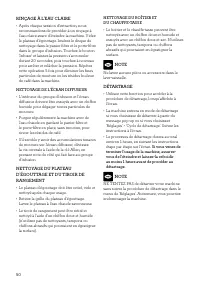
50 RINÇAGE À L'EAU CLAIRE • Après chaque session d'extraction, nous recommandons de procéder à un rinçage à l'eau claire avant d'éteindre la machine. Videz le plateau d'égouttage. Insérez le disque de nettoyage dans le panier filtre et le porte-filtre dans le groupe d'infusion. Touchez le bouton 'In...
Page 55 - Notes
Page 56 - USA; Breville USA; Canada; Breville Canada; Breville Consumer Support
Breville is a registered trademark of Breville Pty. Ltd. A.B.N. 98 000 092 928. Copyright Breville Pty. Ltd. 2018. Due to continued product improvement, the products illustrated/photographed in this brochure may vary slightly from the actual product. BES990 USC – F18 Web: www.breville.ca/support Web...