Page 2 - EN; Manual; Pictograms used; Important information
EN Manual EN 3 - EN 23 Pictograms used Important information Tip
Page 3 - CONTENTS
EN 3 CONTENTS Your induction hob Introduction 4 Description 5 Control panel 6 Safety instructions Temperature safety 7 Cooking-time limiter 7 Healthy cooking 7 Use Induction noises 8 Pans 8 Power levels 9 Pan detection 10 Using the touch keys 10 Indications in the display 10 Hob functions table 11 C...
Page 4 - Introduction; YOUR INDUCTION HOB
EN 4 Introduction This hob has been designed for the real lover of cooking. Cooking on an induction hob has a number of advantages. It is easy, because the hob reacts quickly and can also be set to a very low power level. Because, moreover, it can also be set to a high power level, it can bring dish...
Page 5 - Description
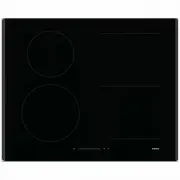
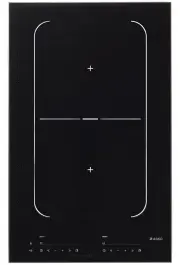
EN 5 Description 1. Cooking zone ‘Flex Induction”: 180x220 mm / 2.1 kW (3.0 kW in Boost)2. Cooking zone ‘Flex Induction”: 180x220 mm / 1.6 kW (1.85 kW in Boost) ▷ Bridge zone Left (zone 1+2): 400x220 mm / 3,0 kW 3. Cooking zone ‘Flex Induction”: 180x220 mm / 1.6 kW (1.85 kW in Boost)4. Cooking zone ...
Page 6 - Control panel
EN 6 YOUR INDUCTION HOB Control panel 01 02 03 04 05 14 06 08 12 10 07 13 09 11 1. On/Off key 2. Slide control (9 Cooking levels + boost P)3. Cooking level indicator + boost4. Child lock key5. Pause key6. Cooking zone front left key (cooking level display)7. Cooking zone rear left key (cooking level...
Page 7 - Read the separate safety instructions before use.; Temperature safety; Healthy cooking; Burning point of different types of oil; SAFETY
EN 7 Read the separate safety instructions before use. Temperature safety Each cooking zone is equipped with a sensor. This sensor measures the temperature of the base of the pan and the sections of the hob to avoid any risk of overheating, for example, a pan boiling dry. In case of temperatures ris...
Page 8 - USE; Induction noises
EN 8 USE Induction noises Ticking sound • A light ticking sound is caused by the capacity limiter on the front and back zones. A soft ticking sound can also occur at lower settings. Pans are making noise • The pan can make sounds during cooking. This is caused by the energy flowing from the hob to t...
Page 9 - The enamel may become damaged; Power level setting
EN 9 USE Be careful with thin enamelled sheet-steel pans! The enamel may become damaged at high settings if the pan is too dry; High power level settings may cause the base of the pan to warp. • Never use pans with a misshapen base. A hollow or rounded base can interfere with the operation of the ov...
Page 10 - In display; Status
EN 10 Pan detection If the hob does not detect a (ferrous) pan after the cooking power has been set, the pan detection symbol and the selected power setting will flash alternately in the display and the hob will remain cold. If a (ferrous) pan is not placed on the cooking zone within 1 minute, the c...
Page 11 - Hob functions table; Function; Bridge
EN 11 USE Hob functions table Function Key(s) to use Description Bridge Simultaneously touch the left- hand side or right-hand side cooking zone keys. The cooking zones can be bridged (linked) to each other. This creates one large zone that can be used for example for a large fish pan or one large c...
Page 12 - Cooking settings; Use setting ‘boost’
EN 12 Cooking settings Because the settings depend on the quantity and composition of the contents of the pan, the table below is intended as a guideline only. Use setting ‘boost’ to: • bring the food or liquid to the boil quickly;• ‘shrink’ greens;• heat oil and fat;• wok Use setting 9 to: • sear m...
Page 13 - Switching on and power setting; automatically switched off.; OPERATION
EN 13 Switching on and power setting The power can be set to 9 different levels. The hob also has a ‘boost’ setting which is indicated by a ‘P’ on the display (see ‘Boost’). 1. Place the pan in the middle of a cooking zone.2. Press the On/Off key for at least 1 second. ▷ A single beep sounds. The ho...
Page 14 - Changing the cooking zone power setting; Press the cooking zone key of the desired cooking zone.; Switching off; Switching off one cooking zone; The cooking zone switches off.; Switching off all cooking zones; Several cooking zones are active.; Bridged induction zones; Activating the bridged cooking zone
EN 14 Changing the cooking zone power setting 1. Press the cooking zone key of the desired cooking zone. ▷ The dot directly below the corresponding display will light up and is assigned to the visual slide control. 2. Slide your finger over the slide control to change the power setting. Please note!...
Page 15 - De- activating the bridged cooking zone; Child lock; Activate the child lock; Switch the appliance off and on again using the on/off key.; De-activate the child lock; The cooking zone display will show ‘0’. The child lock is de-activated.; Pause mode; Activate pause mode; Press the pause key until you hear a beep.
EN 15 De- activating the bridged cooking zone 1. Simultaneously touch the left-hand side or right-hand side cooking zone keys. ▷ The ‘bridged indicator’ will disappear on the rear left zone display. Child lock Activate the child lock 1. Switch the appliance off and on again using the on/off key. ▷ P...
Page 16 - De-activate pause mode; The indicator above the pause key will flash.; Setting the cooking-timer; The timer indicator of the relevant cooking zone flashes.; Setting the kitchen timer; An alarm signal will sound once the set time has elapsed
EN 16 De-activate pause mode 1. Press the pause key until you hear a beep. ▷ The indicator above the pause key will flash. 2. Press somewhere on the slide control or cooking level display. ▷ The active settings can be read in the display. Cooking-timer/alarm Setting the cooking-timer 1. Select the d...
Page 17 - Autocook function; Switching on; A single beep sounds.; The boost switches off automatically.; Recall function
EN 17 Autocook function Switching on 1. Place the pan in the middle of a cooking zone.2. Press the On/Off key. ▷ A single beep sounds. 3. Press the desired cooking zone key. ▷ A single beep sounds. The indicator directly below the corresponding display will light up. 4. Slide your finger over the sl...
Page 18 - Cleaning; Daily cleaning; the hob immediately after use.; Stubborn stains; with a glass scraper.; MAINTENANCE
EN 18 Cleaning Daily cleaning • Although food spills cannot burn into the glass, we nevertheless recommend you to clean the hob immediately after use. • Best for daily cleaning is a damp cloth with a mild cleaning agent.• Dry with kitchen paper or a dry teacloth. Stubborn stains • Stubborn stains ca...
Page 19 - Symptom; The preset time has ended.; TROUBLESHOOTING
EN 19 General If you notice a crack in the glass top (however small), switch the hob off immediately, unplug the hob, turn off the (automatic) fuse switch(es) in the meter cupboard or, in the event of a permanent connection, set the switch in the power supply lead to zero.) Contact the service depar...
Page 20 - Clean the control panel.
EN 20 Symptom Possible cause Solution Continuous beep and Er03 flashing on the display. The control panel is dirty or has water lying on it. Clean the control panel. Error code E5 and E6. Defective generator. Contact the service department. Error code E2. Appliance over heated. The appliance has bee...
Page 21 - TECHNICAL DATA; This appliance meets all relevant CE guidelines.; Operate appliance on 1 phase; The setting will be displayed on the timer function display.
EN 21 TECHNICAL DATA This appliance meets all relevant CE guidelines. Hob type HI1631G/HI1731G HI1621G Induction x x Connection 220/240-50/60Hz 220/240-50/60Hz Maximum power cooking zones and diameters Front left 2100 W / (3000 W Boost)18 x 22 cm 1400 W / ø 16 cm Rear left 1600 W / (1850 W Boost) 18...
Page 22 - Model identification; Tips for energy-efficient cooking with hobs
EN 22 Information according regulation (EU) 66/2014 Measurements according EN60350-2 Model identification HI1631GHI1731G HI1621G Type of hob Induction hob Induction hob Number of cooking zones and/or areas 4 4 Heating technology Induction cooking zones and cooking areas Induction cooking zones and c...
Page 23 - ENVIRONMENTAL ASPECTS; Disposal of packaging and appliance; Declaration of conformity
EN 23 ENVIRONMENTAL ASPECTS Disposal of packaging and appliance Sustainable materials have been used during manufacture of this appliance. This appliance must be disposed of responsibly at the end of its service life. The government can provide you with information about this. The appliance packagin...
Page 24 - Stick the appliance identification card here.
706705 / VER 1 / 21-03-2018 The appliance identification card is located on the bottom of the appliance. Stick the appliance identification card here. When contacting the service department, have the complete type number to hand. You will find the addresses and phone numbers of the service organisat...