Bosch WAS28461AU - User Manual
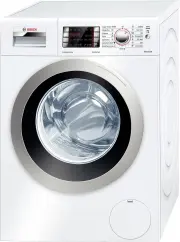
A user manual for a modern front-loading washing machine covers essential operational aspects, including safety protocols, cycle configurations, detergent handling, and maintenance routines. The guide emphasizes proper laundry sorting, program selection tailored to fabric types (e.g., cottons, delicates), and troubleshooting common issues like drainage failures or display errors. Safety is prioritized with warnings about electric hazards and suffocation risks during operation.


Table of Contents:
- Page 1 – Washing Machine Operation and Management
- Page 2 – Safety, Maintenance, and Troubleshooting
- Page 3 – Initial Setup and Program Overview
- Page 4 – Washing Cycle Procedures
- Page 5 – Display Functions and Control Panel
- Page 6 – Wash Programme Specifications
- Page 7 – Safety Guidelines and Laundry Preparation
- Page 8 – Maintenance and Advanced Troubleshooting
- Page 9 – Error Resolution and Support
- Page 10 – Product Identification
1
2
3
4
5
6
Programme ended when ...
...
Start/Reload
goes out and
or
(if
was
selected, no final drain/spin) is indicated on the display
panel, the buzzer sounds.
Set the volume of the buzzer.
a
page 6
Changing the programme ...
If you have selected the wrong programme by mistake:
Reselect the programme.
Select
Start
/Reload
$
.
Pausing the programme ...
Touch the Start/
Reload
$
button.
Follow the instructions in the display field: when
lights
up and
appears in the display, the door can be
opened. If required, add /remove a laundry item; if
and
are displayed alternately, the door cannot be
opened due to a high water level in the drum or a high
temperature.
Touch
Start/
Reload
$
button to continue the
programme.
... or terminate the programme
Programmes with high temperature:
Cool down laundry: Select
Rinse/Freshen up
2
.
Select
Start/
Reload
$
.
Programmes at lower temperature:
Select
Drain
>
or
Spin
.
Select
Start
/Reload
$
.
(
(Childproof lock)
Programme cannot be changed by accidental operation.
To activate the childproof lock:
After the programme starts, press and hold the
(
button for 5 seconds;
Release when the
(
symbol lights up.
When the programme ends, the
Start/Reload
$
indicator remains on to remind you to
deactivate the childproof lock.
*
(
symbol flashes if the programme has been changed while childproof lock is activated.
To deactivate the childproof lock:
Touch and hold the
(
button until the
(
symbol turns off;
Release the button.
If the childproof lock is deactivated while the programme selector is in a different position
from when the childproof lock was activated*, the current programme will be halted.
ʑ
Additional functions
See also Programme overview
a
page 7
Ĉ
SpeedPerfect
For washing in a shorter time with a washing result
comparable to that of the standard programme.
ć
EcoPerfect
For saving energy with a washing performance
comparable to that of the standard programme.
2
Extra Rinse
Additional rinse cycle. Prolonged programme duration.
For areas with very soft water or for further improving the
washing result.
7
Prewash
Activate prewash. For heavily soiled, hard-wearing
textiles, e.g. made of cotton or linen.
The additional function indicator light is on when this option is selected; if this option cannot
be selected for the programme, this is indicated by a short flashing of the light and an
acoustic signal.
ʑ
$
Start/Reload
To start or pause the programme.
ʑ
Signals
Set to
Â
Press and
hold
1 step
clockwise
Button signals
Information signals
Set volume*
Set volume*
1 step
clockwise
Set to
Â
1. Start signal mode
2. Set volume for ...
Release
#
*If required, set repeatedly
1 step
clockwise
direct
Sorting and loading the laundry
Observe the care information provided by the manufacturer.
Sort the laundry according to the information on the care labels.
Sort the laundry according to type, colour, degree of soiling and
temperature.
Remove any foreign objects as there is a risk of rusting.
Do not exceed the maximum load.
a
page 7
Observe the instructions in the Important information section.
a
page 9
Load both large and small items of laundry.
Close the washing machine door. Take care not to trap any items of clothing
between the loading door and rubber seal.
Add detergent and care product
Add the appropriate amount according to:
Amount of laundry, soiling, water hardness (ask your water supply
company) and manufacturers instructions.
Models without insert for liquid detergent: pour liquid detergent into an
appropriate dispenser and place in the drum.
During operation: close the detergent drawer.
Correct installation according to
separate installation instructions.
Check the machine
Never switch on a damaged machine.
Inform your after-sales service.
Insert the mains plug
With dry hands only.
Only hold the plug by the plug
body.
Turn on the tap
To achieve the labeling comsumption
values, two cycles of
Cottons
L
90 °C
programme without laundry are required
to be run at initial setup.
Note
: This operation only needs to be
completed once.
Compartment II
: Detergent for the main wash, water softener,
bleacher, stain remover
Your washing machine
Congratulations
You have opted for a modern, high-quality
domestic appliance manufactured by BOSCH. The washing machine
is distinguished by its economical use of water and energy.
Every appliance that leaves our factory has been inspected thoroughly
to ensure that it functions properly and is in perfect condition.
For further information about products, accessories, spare parts and
services, visit our website: www.bosch-home.com or contact our after-
sales service centres.
Environmentally friendly waste disposal
All packaging must be disposed of in accordance with environmental
guidelines. This appliance is certified in accordance with European
Directive 2002/96/EEC on Waste Electrical and Electronic Equipment
(WEEE).
This directive provides the framework for the EU-wide collection and
reuse of used appliances.
Intended use
Contents
Page
ʋ
Intended use ...................................... ................................................ 1
ʋ
Programmes ...................................................................................... 1
ʋ
Preparation ..................................................................................... 2/3
ʋ
Setting and adjusting programmes ............................................... 3
ʋ
Washing ........................................................................................... 3/4
ʋ
Removing the laundry ...................................................................... 4
ʋ
Display information, Options, Functions ................................... 5/6
ʋ
Programme overview ........................................................................ 7
ʋ
Safety instructions .............................................................................. 8
ʋ
Consumption values .......................................................................... 8
ʋ
Important information ............................. .......................................... 9
ʋ
Insert for liquid detergent.................................................................. 9
ʋ
Care ................................................................................................... 10
ʋ
Information on the display panel ................................................... 10
ʋ
Maintenance ....................................... .............................................. 11
ʋ
What to do if .................................................................................... 12
ʋ
Emergency release .................................. ........................................ 13
ʋ
Customer service ............................................................................ 13
Protection of the environment/Conservation tips
Always fill the washing machine with a maximum amount of
laundry for the relevant programme.
Do not use prewash when washing laundry that is soiled normally.
Instead of the
Cottons
L
90°C
programme, select
Cottons
L
60°C
with additional function
ć
Eco Perfect
.
Comparable cleaning result with significantly lower energy
consumption.
Dose detergent according to the manufacturers instructions
and water hardness.
If the laundry is to be subsequently dried in a tumble dryer, select
a spin speed as specified by the dryer manufacturer.
Preparation
Before washing for the first time,
run a wash once without any laundry in the machine
a
page 9
Setting and adjusting programmes
Display panel/
Option buttons/
Additional functions
Programme selector
Start/
Reload
1
2
3
Washing
Compartment
~
: Fabric softener, impregnating agent, starch
Compartment I
: Detergent for prewash
ʋ
For domestic use only.
ʋ
For washing machine-washable fabrics in a detergent
solution.
ʋ
To be operated with cold mains water and
commercially available low foam detergents and care
products which are suitable for use in washing
machines.
Do not leave children unattended near the
washing machine.
The washing machine is not to be used by
children or persons not familiar with the
operating instructions.
Keep pets away from the washing machine.
Dilute viscous fabric softener and fabric conditioner with water.
This prevents blockages.
ʑ
Display symbols
ʑ
Display information
Before starting a programme, the max. load
for the selected programme is displayed
when the door is open. The remaining time
or finish-in time is displayed when the door
is closed.
*Display shown may vary depending on the
model and selected programme
.
ʑ
Option buttons
You can change the spin speed and temperature beforehand and while the selected programme is running. The effects
depend on the progress of the programme.
°C
(
Temp.
)
You can change the indicated washing temperature. The maximum washing temperature that can be selected
depends on the programme that has been selected
.
(Finish in)
When you select a programme, the respective programme duration is displayed. You can delay the start of the
programme before it begins. The finish-in time indicates when the programme will be finished. It can be set in hourly
increments up to a maximum of 24 hours. Press and hold the
(
Finish-in
)
button until the required number of hours
is shown
(
h=hour
).
Select
Start
/
Reload
$
.
(Spin speed)
You can change the indicated spin speed. The maximum spin speed which can be selected depends on the selected
programme
.
If
is selected, the load is held in the rinsing water
.
1
Wash
:
On if wash process is running
.
Rinse
:
On if rinse process is running
.
Spin
:
On if spin process is active
if the symbol
c
flashes
a
page 10
+
Water tap
:
Flashing if tap not open or no water supply
.
Door
:
On if door can be opened
.
Overdosage
:
On if too much detergent used
.
Automatic load detection
:
Automatically detects the
load size after the water inlet phase and sets the accurate remaining
time. Symbols indicate small, medium and full loads measured*
according to the recommended max. load for the selected
programme
.
*
Automatic display of the detected load only for washing
programmes with a max. load recommendation > 3.0 kg except for
Rinse, Spin and Drain. Different types of textiles with different water
absorption rates may influence the load display
.
kg
,
e.g
.
kg
*:
max. recommended load for selected programme
a
page 7
,
Programme overview
time
,
e.g
.
*:
remaining time
*:
finish-in time defined by user
a
page 5
:
pause
:
door can be opened in Pause status
:
end of programme
:
end of programme with the
setting
:
set volume of signals
a
page 6
:
Information on the display
a
page 10
Removing laundry
Open the washing machine door and remove the
laundry.
If
(Rinse stop = no final drain/spin) is active: Select
the spin speed or set programme selector to
Drain
>
or
Spin
.
Select
Start
/Reload
$
.
Remove any foreign objects as there is a risk of rusting.
Turn off the tap
Switch off
Set the programme selector to
Â
Off
.
Programmes
Detailed programme overview.
a
page 7
The temperature and spin speed can be selected
individually, irrespective of the selected programme and
programme progress.
Cottons
L
Hardwearing textiles
Easy-Care
I
Synthetic fibres, easy-care textiles
Mix
1
Textiles made of cotton and synthetic fibres
Delicate/Silk
ߣ
Silk and delicate washable textiles
:
Wool
O
Hand and machine-washable wool or wool-rich
textiles
Spin
Additional spin cycle
Drum Clean
.
For drum hygiene or fluff removal
Drain
>
Draining of the water inside the drum
Rinse/Freshen up
2
Extra rinse with spin
Jeans/Dark Wash
K
Dark textiles
Sportswear
$
Sportswear made of microfibre
Shirts
Programme for Shirts/Blouses
Kidswear
E
Textiles for children
Allergy Plus
ā
Programme for allergic people and advanced
hygiene
Super 15/30
/
Extra short programme
Detergent drawer with
compartments I, II,
~
Control panel
Door handle
Drum
Display information, Options, Functions
Options, Functions
All buttons are sensitive and a
gentle tap is adequate.
If you press and hold the Option
buttons, the setting options
automatically scroll through.
Select Start/Reload
$
Washing
Service
flap
If the
(
symbol lights up or
flashes in the display panel, the
childproof lock is active.
a
deactivate, page 6
For additional functions and
option buttons, see the Individual
settings section.
a
page 5/6
Programme selector for
switching the machine on
and off and for selecting the
programme. Can be rotated
in either direction.
Read these instructions before switching on the washing
machine.
Also follow the separate installation instructions.
Observe the safety instructions on page 8.
Insert for liquid detergent (depending on model),
a
page 9
7
P
ro
g
ra
m
m
e
o
v
e
rv
ie
w
(s
e
e
a
ls
o
t
h
e
i
n
fo
rm
a
ti
o
n
o
n
p
a
g
e
5
,
6
)
P
ro
g
ra
m
m
es
°C
m
a
x.
(
kg
)
Ty
p
e
o
f
la
u
n
d
ry
A
d
d
it
io
n
a
l f
u
n
ct
io
n
s;
in
fo
rm
at
io
n
C
o
tt
o
n
s
L
D
-
9
0
7
.5
/
5
.0
*
S
ta
n
da
rd
w
as
hi
n
g
p
ro
gr
am
fo
r
h
ar
d
-w
ea
ri
n
g
te
xt
ile
s
m
ad
e
of
c
o
tt
on
o
r
lin
en
.
Ĉ
S
p
ee
d
P
e
rf
e
ct
*
,
ć
E
c
o
P
er
fe
ct
,
2
E
xt
ra
R
in
s
e
,
7
P
re
w
a
sh
A
lle
rg
y
P
lu
s
ā
D
-
6
0
P
ro
g
ra
m
m
e
sp
ec
ia
lly
d
es
ig
ne
d
fo
r
al
le
rg
ic
p
eo
pl
e
an
d
a
dv
an
ce
d
h
yg
ie
ne
, s
ui
t-
ab
le
fo
r
ha
rd
-w
ea
ri
ng
te
xt
ile
s
m
ad
e
of
c
ot
to
n
o
r
lin
en
.
K
id
sw
e
ar
E
D
-
4
0
7
.5
/
5
.0
*
P
ro
g
ra
m
m
e
su
ita
b
le
fo
r
w
as
h
in
g
ki
d
s
w
ea
r
m
ad
e
o
f c
ot
to
n
o
r
sy
n
th
et
ic
t
ex
-
til
es
.
Ĉ
S
p
ee
d
P
e
rf
e
ct
,
ć
E
co
P
e
rf
e
ct
,
2
E
xt
ra
R
in
se
,
7
P
re
w
a
sh
;
W
as
h
th
e
cl
ot
h
in
g
in
si
de
o
ut
.
Je
an
s/
D
ar
k
W
a
sh
3
.5
D
ar
k
co
lo
ur
ed
te
xt
ile
s
m
ad
e
of
c
ot
to
n
or
s
yn
th
et
ic
s.
E
a
sy
-C
ar
e
I
D
-
6
0
T
ex
til
es
m
ad
e
of
s
yn
th
et
ic
m
at
er
ia
ls
o
r
bl
en
d
ed
fa
b
ri
cs
.
Ĉ
S
p
ee
d
P
e
rf
e
ct
,
ć
E
co
P
er
fe
c
t
,
2
E
x
tr
a
R
in
s
e
,
7
P
re
w
a
sh
M
ix
1
M
ix
ed
lo
ad
c
o
ns
is
tin
g
o
f t
ex
til
es
m
ad
e
of
c
ot
to
n
a
n
d
sy
n
th
et
ic
fi
b
re
s.
S
h
ir
ts
D
-
6
0
2
.0
S
ui
ta
bl
e
fo
r
S
hi
rt
s/
B
lo
us
es
m
ad
e
of
c
ot
to
n,
li
n
en
, s
yn
th
et
ic
fi
br
es
o
r
b
le
nd
ed
fa
b
ri
cs
.
Ĉ
S
p
ee
d
P
e
rf
e
ct
,
ć
E
co
P
e
rf
e
ct
,
2
E
xt
ra
R
in
se
,
7
P
re
w
a
sh
D
el
ic
at
e/
S
ilk
D
-
4
0
Fo
r
d
el
ic
at
e,
w
as
ha
b
le
te
xt
ile
s,
e
.g
.m
ad
e
of
s
ilk
, s
at
in
, s
yn
th
et
ic
fi
b
re
s
o
r
b
le
n
de
d
fa
b
ri
cs
.
S
p
o
rt
s
w
ea
r
$
S
ui
ta
bl
e
fo
r
sp
o
rt
sw
ea
r
m
ad
e
of
m
ic
ro
fib
re
e
.g
A
cr
yl
ic
, N
yl
on
, S
p
an
de
x,
e
tc
.
:
W
o
o
l
O
H
an
d
a
nd
m
ac
hi
ne
-w
as
ha
bl
e
w
oo
l o
r
w
oo
l-r
ic
h
te
xt
ile
s.
E
sp
ec
ia
lly
g
en
tle
w
as
hi
ng
p
ro
g
ra
m
m
e
to
p
re
ve
n
t s
hr
in
ka
ge
,
lo
ng
er
p
ro
g
ra
m
m
e
pa
us
es
(t
ex
til
es
r
es
t i
n
de
te
rg
en
t s
ol
u
tio
n
)
e.
g.
c
as
hm
er
e,
m
oh
ai
r
or
a
ng
o
ra
. A
ls
o
s
ui
te
d
fo
r
ha
nd
w
as
ha
b
le
s
ilk
.
S
u
p
e
r
15
/3
0
/
D
-
4
0
2
.0
/
3
.5
*
E
xt
ra
s
h
or
t p
ro
gr
am
m
e
ap
p
ro
x.
1
5
-3
0
m
in
ut
es
, s
ui
ta
bl
e
fo
r
lig
h
tly
s
oi
le
d
a
nd
sm
al
l a
m
ou
nt
s
of
la
un
dr
y.
Ĉ
S
p
ee
d
P
e
rf
e
ct
*
,
2
E
xt
ra
R
in
se
D
ru
m
C
le
an
.
D
,
4
0
,
9
0
0
S
p
ec
ia
l p
ro
gr
am
m
e
fo
r
dr
um
h
yg
ie
n
e
o
r
flu
ff
r
em
o
va
l
9
0
°
=
a
nt
ib
ac
te
ri
al
p
ro
g
ra
m
m
e,
u
se
n
o
de
te
rg
en
t
4
0
°
=
a
nt
ib
ac
te
ri
al
p
ro
g
ra
m
m
e,
s
pe
ci
al
d
ru
m
c
le
an
in
g
d
et
er
ge
n
t c
an
b
e
us
ed
D
=
n
o
an
tib
ac
te
ri
al
p
ro
g
ra
m
m
e,
t
o
re
m
ov
e
ha
ir
o
r
flu
ff
fr
om
t
he
tu
b
.
S
p
in
7
.5
E
xt
ra
s
p
in
w
ith
s
el
ec
ta
b
le
s
p
in
s
pe
ed
.
Ĉ
S
p
ee
d
P
er
fe
ct
R
in
se
/F
re
sh
e
n
u
p
2
E
xt
ra
r
in
se
w
ith
s
pi
n.
2
E
xt
ra
R
in
se
D
ra
in
>
D
ra
in
in
g
of
th
e
w
at
er
in
si
d
e
th
e
dr
um
, e
.g
. a
ft
er
r
in
se
s
to
p
.
T
he
p
ro
g
ra
m
m
es
a
re
ti
m
e-
co
n
tr
ol
le
d
fo
r
lig
h
tly
s
oi
le
d
te
xt
ile
s.
If
te
xt
ile
s
ar
e
he
av
ily
s
o
ile
d
, r
ed
uc
e
th
e
lo
ad
a
n
d
se
le
ct
a
dd
iti
on
al
fu
nc
tio
n
, e
.g
.
7
P
re
w
as
h
.
P
ro
gr
am
m
es
w
ith
ou
t p
re
w
as
h
- p
ou
r
de
te
rg
en
t i
nt
o
co
m
p
ar
tm
en
t
II
; P
ro
gr
am
m
es
w
ith
pr
ew
as
h
-
di
vi
de
d
et
er
g
en
t b
et
w
ee
n
c
om
p
ar
tm
en
ts
I
a
nd
II
.
*
R
ed
uc
ed
lo
ad
fo
r
Ĉ
S
p
ee
d
P
er
fe
c
t
o
p
tio
n
.
Fo
r
fu
rt
h
er
in
fo
rm
at
io
n
a
nd
a
s
el
ec
tio
n
o
f o
ur
p
ro
du
ct
s,
go
to
o
ur
w
eb
si
te
: h
tt
p
:/
/w
w
w
.b
o
sc
h-
ho
m
e.
co
m
or
c
on
ta
ct
o
ur
a
ft
er
-s
al
es
s
er
vi
ce
c
en
tr
es
R
ob
er
t B
os
ch
H
au
sg
er
ät
e
G
m
b
H
C
ar
l -
W
er
y-
S
tr
.3
4
D
-8
1
7
3
9
M
un
ic
h
/G
er
m
an
y
W
A
S
2
8
4
6
1
A
U
9
0
0
0
8
5
7
0
1
6
9
3
0
2
"Loading the manual" means you need to wait until the file loads and becomes available for online reading. Some manuals are very large, and the time they take to appear depends on your internet speed.
Was this manual helpful?
About this manual
- Brand
- Bosch
- Model
- WAS28461AU
- Document type
- User Manual
- Category
- Washing Machine
- Language(s)
- English
- Pages
- 10
- File size
- 3.2 MB
- Format
Summary
Step-by-step guidance for preparing, operating, managing the machine, washing cycles, removing laundry, and displaying information and functions, including diagrams and program settings.
Essential safety instructions, maintenance procedures, troubleshooting steps for common issues, emergency release procedures, detergent usage guidelines, and display function explanations.
Introduction to the appliance, safety precautions, table of contents, setup procedures for mains connection, program options, and diagrams illustrating the selector and display panel.
Ask a question
Related manuals
Popular Bosch Washing Machines


More Bosch Washing Machines models
 Bosch WAN24120AU User Manual
 Bosch WAN24121AU User Manual
 Bosch WAN24124AU User Manual
 Bosch WAP24160AU User Manual
 Bosch WAP28482AU User Manual
 Bosch WAS28440AU User Manual
 Bosch WAT24261AU User Manual
 Bosch WAT28620AU User Manual
 Bosch WAU28490AU User Manual
 Bosch WAV28M40AU User Manual
 Bosch WAW285H1UC User Manual
 Bosch WAW285H2UC User Manual
 Bosch WAW28420AU User Manual
 Bosch WAW28460AU User Manual
 Bosch WAW28620AU User Manual
 Bosch WAW28740OE Manual
 Bosch WAW32640AU User Manual