Page 2 - Table of contents; Safety; Observe the following safety instructions.
en Safety 2 Table of contents USER MANUAL 1 Safety .................................................................... 2 2 Preventing material damage ............................... 4 3 Environmental protection and saving en-ergy .....................................................................
Page 3 - WARNING ‒ Risk of burns!
Safety en 3 Opening the appliance door creates adraught. Greaseproof paper may come intocontact with the heating element and catchfire. ▶ Never place greaseproof paper looselyover accessories when preheating the ap-pliance and while cooking. ▶ Always cut greaseproof paper to size anduse a plate or ...
Page 4 - Keep small parts away from children.; Preventing material damage
en Preventing material damage 4 ▶ Do not let children play with packaging ma-terial. Children may breathe in or swallow smallparts, causing them to suffocate. ▶ Keep small parts away from children. ▶ Do not let children play with small parts. 1.5 Halogen bulb WARNING ‒ Risk of burns! The bulbs in t...
Page 5 - Environmental protection and saving energy; Disposing of packaging
Environmental protection and saving energy en 5 3 Environmental protection and saving energy Help protect the environment by using your appliancein a way that conserves resources and by disposing ofreusable materials properly. 3.1 Disposing of packaging The packaging materials are environmentally ...
Page 6 - Familiarising yourself with your appliance
en Familiarising yourself with your appliance 6 4 Familiarising yourself with your appliance 4.1 Controls You can use the control panel to configure all functions of your appliance and to obtain information about the operat-ing status. Note: On certain models, specific details such as col- our an...
Page 7 - Buttons and display; Types of heating and functions
Familiarising yourself with your appliance en 7 9 Temperature selector Use the temperature selector to set the temper-ature for the type of heating and select settingsfor other functions.You can only turn the temperature selectorclockwise from the zero setting until it offersresistance. You cann...
Page 8 - Other functions; Temperature and setting levels
en Familiarising yourself with your appliance 8 Symbol Type of heating What it's used for/how it works This type of heating is used to measure the energy consumption in the conven-tional mode. Top oven Symbol Type of heating What it's used for/how it works Top/bottom heating Bake on one level.The ...
Page 9 - Cooking compartment; Rails; Self-cleaning surfaces; Lighting; Cooling fan; Accessories
Accessories en 9 4.5 Cooking compartment The functions in the cooking compartment make yourappliance easier to use. Rails The rails in the cooking compartment enable you toplace accessories at different heights. → "Accessories", Page 9 The shelf positions are numbered from bottom to top.Yo...
Page 10 - Combining accessories; Other accessories
en Accessories 10 Accessories Use Wire rack ¡ Cake tins ¡ Ovenproof dishes ¡ Cookware ¡ Meat, e.g. roasting joints or steak ¡ Frozen meals Universal pan ¡ Moist cakes ¡ Baked items ¡ Bread ¡ Large roasts ¡ Frozen meals ¡ Catching dripping liquids, e.g. fat whengrilling food on the wire rack. Grill ...
Page 11 - Before using for the first time; Setting the time on the clock; Basic operation; Switching on the appliance; Changing the type of heating
Before using for the first time en 11 6 Before using for the first time Configure the settings for initial start-up. Clean the ap-pliance and accessories. 6.1 Initial use You need to make settings for initial use before youcan use your appliance. Setting the time on the clock Once the appliance ha...
Page 12 - Time-setting options; Setting the timer; Changing the timer; Setting the cooking time; Changing the cooking time; Setting the end time
en Time-setting options 12 8 Time-setting options Your appliance has different time-setting options, withwhich you can control its operation. 8.1 Overview of the time-setting options With the button, select the different time-setting op-tions. Time-settingoption Use Timer The timer can be set inde...
Page 13 - Changing the end time; Setting the time on the clock; Changing the time on the clock; Childproof lock; Setting rapid heating
Childproof lock en 13 Requirements ¡ A type of heating and a temperature or setting areset for the main oven . ¡ A cooking time is set. 1. Press the button repeatedly until is highlighted in the display. 2. Press the or button. a The display shows the calculated end time. 3. Use the or button t...
Page 14 - 1 Cleaning and servicing; Cleaning products; Suitable cleaning agents
en Cleaning and servicing 14 11 Cleaning and servicing To keep your appliance working efficiently for a longtime, it is important to clean and maintain it carefully. 11.1 Cleaning products In order to avoid damaging the various oven surfaceson the appliance, do not use unsuitable cleaningproducts....
Page 15 - Cleaning the appliance
Cleaning and servicing en 15 Cooking compartment Area Suitable cleaning agents Notes Enamel surfaces ¡ Hot soapy water ¡ Vinegar water ¡ Oven cleaner Soak any heavily soiled areas and use a brush or steel wool.Leave the appliance door open to dry the cooking compartmentafter cleaning it. Notes ¡ En...
Page 16 - 2 Cleaning assistance; Setting the cleaning assistance; Recleaning the cooking compartment; 3 Shelf supports
en Cleaning assistance 16 Note: Reddish marks may appear on the self-clean- ing surfaces. This is residue from food. These spotsare not harmful and are not rust. These marks donot impair the cleaning ability of the self-cleaningsurfaces. 9. Attach the rails. 12 Cleaning assistance The cleaning as...
Page 17 - 4 Appliance door; Detaching the lower appliance door
Appliance door en 17 13.2 Attaching the rails in the main cookingcompartment Notes ¡ The rails only fit on the right or left. ¡ For both rails, ensure that the curved rods are at thefront. 1. First, push the rail into the middle of the rearsocket until the rail rests against the cookingcompartmen...
Page 18 - Attaching the lower appliance door
en Appliance door 18 2. WARNING ‒ Risk of injury! When the hinges are not secured, they can snapshut with great force. ▶ Make sure that the locking levers are alwayseither fully closed or (when detaching the ovendoor) fully open. Open the locking levers on the left- and right-handhinges. Locking le...
Page 20 - Detaching the upper appliance door; Attaching the upper appliance door
en Appliance door 20 5. Slide the inner pane into the left- and right-handretainers . 6. Push the inner pane upwards until it is in the left-and right-hand retainers . 7. Put the door cover in position and push down onit until you hear it click into place. 8. Open the appliance door fully. 9. ...
Page 23 - 5 Troubleshooting; Replacing the oven light bulb
Troubleshooting en 23 Note: Do not use the cooking compartment again until the door panes have been correctly fitted. 15 Troubleshooting You can rectify minor faults on your appliance yourself.Read the troubleshooting information before contactingafter-sales service. This will avoid unnecessary c...
Page 24 - Disposing of old appliance; 7 Customer Service
en Disposal 24 3. Pull out the halogen bulb without turning it . 4. Insert the new halogen lamp and press it firmly intothe socket.Make sure the pins are positioned correctly. 5. Depending on the appliance model, the glass covermay have a sealing ring. Put the sealing ring in posi-tion. 6. Screw ...
Page 25 - 8 How it works; Notes on roasting and grilling; Roasting and grilling on the wire rack
How it works en 25 18 How it works Here, you can find the ideal settings for various typesof food as well as the best accessories and cookware.We have perfectly tailored these recommendations toyour appliance. 18.1 Cooking tips Observe this information when preparing food. ¡ The temperature and co...
Page 27 - Preparing yoghurt; Baking
How it works en 27 Food Accessories/cookware Shelf pos-ition Type ofheating Temperaturein °C/grill set-ting Cookingtime in mins Chicken, whole Cookware without lid 2 170-180 20+20 7 1 Preheat the appliance. Do not use the rapid heating function. 2 Preheat the appliance. 3 Preheat the appliance for ...
Page 28 - Grilling
en How it works 28 ¡ Universal pan: Level 3Baking tray: Level 1 ¡ Baking tins/dishes on the wire rackFirst wire rack: Level 3Second wire rack: Level 1 Shelf positions for baking on three levels: ¡ Baking tray: Level 5Universal pan: Level 3Baking tray: Level 1 Baking with two springform cake tins: P...
Page 29 - 9 Installation instructions; General installation instructions
Installation instructions en 29 Grilling Selection for the top oven Food Accessories/cookware Shelf pos-ition Type ofheating Temperature in°C Cook-ing timein mins Browning toast Wire rack 3 3 4-6 19 Installation instructions Observe this information when installing the appliance. 19.1 General ins...
Page 30 - Installation in a tall unit; Installing the appliance
en Installation instructions 30 19.3 Installation in a tall unit Observe the installation dimensions and the installationinstructions when installing in a tall unit. ¡ To ventilate the appliance, there must be a gap of20 mm between all intermediate floors and the wall. ¡ If the tall unit has anothe...
Page 31 - Removing the appliance
Installation instructions en 31 2. The appliance must be transported by two peopleusing the carry handles on the right and left, whilesecuring the front of the appliance with one hand. 3. Place the appliance in the unit and fold the carryhandles down. 4. Push the appliance in fully.Do not kink or t...
Page 32 - Register your new device on MyBosch now and profit directly from:; • Expert tips & tricks for your appliance; Free and easy registration – also on mobile phones:; Robert Bosch Hausgeräte GmbH; GERMANY
Thank you for buying a Bosch Home Appliance! Register your new device on MyBosch now and profit directly from: • Expert tips & tricks for your appliance • Warranty extension options • Discounts for accessories & spare-parts • Digital manual and all appliance data at hand • Easy access to Bos...
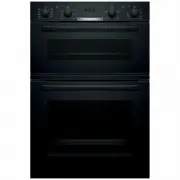


 Bosch HSG656XB6A User Manual
 Bosch HSG958DB1A User Manual
 Bosch HSLP451UC User Manual
 Bosch HSLP751UC User Manual
 Bosch HXR39KI50A User Manual
 Bosch HXU09AH50A User Manual
 Bosch MBA534BS0A User Manual
 Bosch MBG5787S0A User Manual
 Bosch VBC5540S0 User Manual
 Bosch VBD554FS0 User Manual
 Bosch VBD578FS0 User Manual
 Bosch CMG633BB1A User Manual
 Bosch CMG633BS1B User Manual
 Bosch CMG636BS1 Manual