Black & Decker BH1607 - User Manual
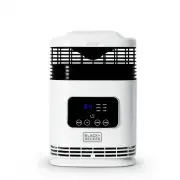
Black & Decker BH1607 Heater Fan – User Manual, read for free online in PDF format. We hope this helps you resolve any issues you may have. If you have further questions, please contact us through the contact form.


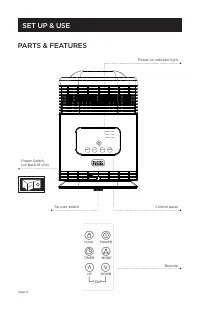




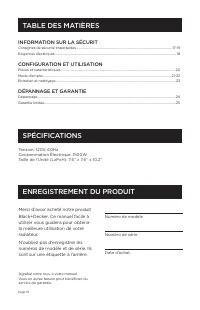
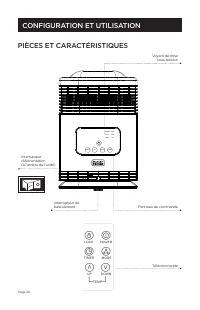
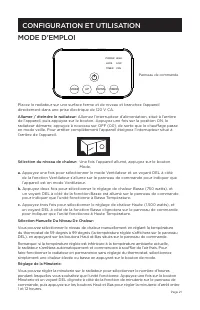
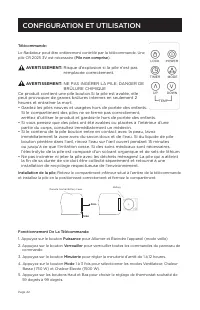





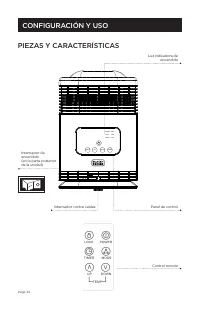



Table of Contents:
- Page 2 – SAfeTy WARNINGS ANd; To Reduce RISk of INjuRy:; dANGeR: ImpoRTANT SAfe; GeNeRAL opeRATIoN; SAFETY GUIDELINES - DEFINITIONS
- Page 5 – fuNcTIoNAL deScRIpTIoN; WARNINGS foR moWeRS; • Keep blades sharp.
- Page 6 – ReAd ALL INSTRucTIoNS
- Page 8 – mAke CeRTAIN The; To INSTALL BATTeRy pAck:
- Page 9 – ASSemBLy; ensure each side of the; LI-IoN Battery packs and chargers
- Page 11 – opeRATIoN; READ THIS INSTRUCTION MANUAL
- Page 12 – edGemAxTM
- Page 14 – To SHARpeN BLAde IN A VISe:
- Page 15 – IMPORTANT
- Page 16 – TROUBLESHOOTING; em
- Page 17 – fREE waRNING LaBEL REpLacEmENT
- Page 18 – pour enregistrer votre nouveau produit.; MODe D’eMPLOI; TONDeUSe SANS fIL AveC BLOC-; à LIRe AvANT De ReTOURNeR Ce PRODUIT POUR qUeLqUe; LIGNES DIRECTRICES EN MATIèRE DE SéCURITé - DéFINITIONS
- Page 21 – RemARQue : ce matériel a été testé; AVeRTISSemeNTS eT; dANGeReux. Respecter tous les
- Page 22 – nanomètres
- Page 23 – AVeRTISSemeNT
- Page 24 – LIRe TouTeS LeS
- Page 26 – RISQue de; cHoc ÉLecTRIQue. évITeR LA; INdIcATeuR de L’ÉTAT de; Vérification de l’état de charge durant; INSeRTIoN eT ReTRAIT du
- Page 27 – ASSemBLAGe; RemARQue : S’assurer que le cordon
- Page 29 – cLÉ de SûReTÉ
- Page 30 – RemARQue : Une fois l’anse en position; SuRcHARGe de LA ToNdeuSe; RemARQue : Lorsque le module; RANGemeNT de LA
- Page 32 – AffûTAGe de LA LAme
- Page 33 – ImpoRTANT : pour garantir la SÉcURiTÉ
- Page 34 – Le SceAu SRpRc; INfoRmATIoN SuR LeS; ÉTIQueTTeS d’AVeRTISSemeNT : si; Garantie du châssis
- Page 36 – MANUAL De INSTRUCCIONeS; CORTADORA De CÉSPeD INALáMBRICA CON; LeA eL MANUAL ANTeS De DevOLveR eSTe PRODUCTO POR; CONSeRve eSTe MANUAL PARA fUTURAS CONSULTAS.
- Page 37 – peLIGRo: pRÁcTIcAS de
- Page 39 – NoTA: Este equipo ha sido probado y se; INSTRuccIoNeS y; peLIGRoSA. Respete todas las
- Page 40 – peLIGRo: AdVeRTeNcIAS
INSTRUCTION MANUAL
PORTABLE DESKTOP CERAMIC HEATER
Thank you for choosing BLACK+DECKER!
PLEASE READ BEFORE RETURNING THIS PRODUCT FOR
ANY REASON.
If you have a question or experience a problem with your BLACK+DECKER
purchase, go to www.blackanddecker.com/instantanswers
If you can’t find the answer or do not have access to the Internet, call
844-299-0879 from 10:30 a.m. to 6:30 p.m. EST Mon. - Fri. to speak with an
agent. Please have the catalog number available when you call.
SAVE THIS MANUAL FOR FUTURE REFERENCE.
CATALOG NUMBER
BH1607
POWER
LOCK
TIMER
FAN
MODE
UP
DOWN
TIMER
LOW
HIGH
"Loading the manual" means you need to wait until the file loads and becomes available for online reading. Some manuals are very large, and the time they take to appear depends on your internet speed.
Summary
Page 2 Thank you for purchasing our BLACK+DECKER product. This easy-to-use manual will guide you in getting the best use of your heater.Remember to record the model and serial numbers. They are on a label on the rear. Staple your receipt to your manual. You will need it to obtain warranty service. M...
Page 5 OVERHEAT SAFETY FEATURE The heater is equipped with a overheat safety feature. When the Heater’s internal components reach certain temperature that could cause overheating and the unit will automatically shut off. The heater can be reset by unplugging it from the wall outlet. After it has coo...
Page 6 PARTS & FEATURES Control panel Remote SET UP & USE Power on indicator light Tip over switch POWER LOCK TIMER FAN MODE UP DOWN TIMER LOW HIGH Power Switch (on back of unit)


