Page 2 - EN; Contents
1 EN Contents Safety Information .............................................................................................................................. 2 Safety Instructions .........................................................................................................................
Page 3 - Safety Information; GENERAL SAFETY
2 EN Safety Information Before the installation and use of the appliance, carefully read the supplied instructions. The manufacturer is not responsible if an incorrect installation and use causes injuries and damages. Always keep the instructions with the appliance for future reference. CHILDREN AND...
Page 4 - The oven cannot be used if:; INSTALLATION; from the mains with a minimum 3mm all-pole contact separation.
3 EN Safety Information Warning! The oven cannot be used if: - The door is not closed correctly; - The door hinges are damaged; - The surfaces of the contact between the door and the oven front are damaged; - The door window glass is damaged; - There is frequent electrical arcing inside the oven e...
Page 6 - Safety Instructions
5 EN Safety Instructions Warning! Do not heat pure alcohol or alcoholic drinks in the microwave. FIRE RISK! Beware! To avoid food overheating or burning it is very important not to select long time periods or power levels that are too high when heating small quantities of food. For example, a ...
Page 7 - The advantages of microwaves; How a microwave oven works
6 EN The advantages of microwaves In conventional ovens, heat radiated by electrical elements or gas burners slowly penetrates the food from outside to inside. On account of this there is a major amount of energy is wasted heating the air, the oven components and the food containers. In a microwave ...
Page 8 - Description of your oven
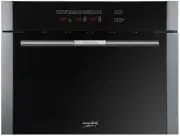
7 EN Description of your oven 1 5 2 3 4 6 7 9 8 1 0 1. – Control panel 6. – Turntable support 2. – Door window glass 7. – Turntable ring 3. – Lateral supports 8. – Turntable plate 4. – Catches 9. – Glass tray 5. – Hot Air Output 10. – Trivet 800 600 A B I C D E F G H A. – Function keys F. – Power/We...
Page 9 - Description of Functions
8 EN Description of your oven Description of Functions Symbol Function Microwave Power Output Foods Microwave 200 W Slow defrosting for delicate foods; keeping food hot. 400 W Cooking with little heat; boiling rice. Rapid defrosting, heating baby food. 600 W Heating and cooking food. 800 W Cooking v...
Page 10 - Basic controls; Setting the clock; safe
9 EN Basic controls Setting the clock 1,3,5 2,4 After your microwave oven is first plugged in or after a power failure, the clock display will flash to indicate that the time shown is not correct. To set the clock, proceed as follows: 1. Press the Clock key. The hour numbers will start to flash. 2. ...
Page 11 - Basic Functions; Microwave oven
10 EN Basic Functions Microwave oven Use this function to cook and heat vegetables, potatoes, rice, fish and meat. 800 6 3,5 1:00 1 2 4 1 . Press the Microwave function key. The function key lights up. 2. Press the Power Selection key to change the microwave power. The respective light will start to...
Page 12 - Grill
11 EN Basic Functions Grill Use this function to brown the top of food quickly. 4 3 15:00 2 1 1 . Press the function key Grill . The function key lights up. 2. Press the Time Selection key to change the operating time. The correspondent light will start to flash. 3. Press key “-” and “ + ”, to chang...
Page 13 - Hot air
12 EN Basic Functions Hot air Use this function to bake and roast . 6 3,5 10:00 4 1 600 2 1. Press the function key Hot air . The function key lights up. 2. Press the temperature key to change the temperature. The respective light will flash. If you do not press this key, the oven operates at 160 ºC...
Page 14 - Grill with Fan
13 EN Basic Functions Grill with Fan Use this function for crispy roast meat, fish, poultry or French fries 3,5 12:00 4 1 160 2 6 1. Press the function key Grill with Fan . The function key lights up. 2. Press the temperature key to change the temperature. The respective light will flash. If you do ...
Page 16 - Special functions; Special Function A1: Heating food
15 EN Special functions Special Function A1: Heating food Use this function to heat various types of food. 3,5 A 01 1 200 2 4 6 1 . Press the function key Special function 1 . The function key lights up. 2. Press the Food Type selection key to change the food type. The respective lights will flash. ...
Page 17 - Special Function b2: Cooking
16 EN Special functions Special Function b2: Cooking Use this function to cook fresh food. 3,5 B 01 1 200 2 4 6 1 . Press the function key Special function 2 . The function key lights up. 2. Press the Food Type selection key to change the food type. The respective lights will flash. 3. Press key “-”...
Page 18 - Special Function C3: Defrosting & Toasting
17 EN Special functions Special Function C3: Defrosting & Toasting Use this function to cook and toast various types of food. 3,5 C 01 1 300 2 4 6 1. Press the function key Special function 3 . The function key lights up. 2. Press the Food Type selection key to change the food type. The respecti...
Page 20 - Defrosting
19 EN Defrosting The table below shows different defrosting and standing times (in order to ensure the food temperature is evenly distributed) for different types and weights of food, plus recommendations. Food Weight (g) Defrosting time (min) Standing time (min) Recommendation Portions of meat, vea...
Page 21 - General instructions for defrosting
20 EN Defrosting General instructions for defrosting 1. When defrosting, use only dishes that are appropriate for microwaves (china, glass, suitable plastic). 2. The defrost function by weight and the tables refer to the defrosting of raw food. 3. The defrosting time depends on the quantity and thic...
Page 22 - Cooking with a microwave oven
21 EN Cooking with a microwave oven Warning! Read the section “Microwave Safety” before cooking with your microwave. Follow these recommendations when cooking with your microwave: Before heating or cooking foods with peel or skin (e.g. apples, tomatoes, potatoes, sausages) prick them so that they ...
Page 24 - Tables and suggestions
23 EN Cooking with a microwave oven Tables and suggestions – Cooking vegetables Food Quantity (g) Addition of liquids Power (Watt) Time (min.) Standing Time (min.) Instructions Cauliflower Broccoli Mushrooms 500 300 250 100ml 50ml 25ml 800 800 800 9-11 6-8 6-8 2-3 2-3 2-3 Cut into slices. Keep cover...
Page 25 - Cooking with the grill
24 EN Cooking with the grill For good results with the grill, use the Trivet supplied with the oven. Fit the Trivet in such a way that it doesn’t come into contact with the metal surfaces of the oven cavity since if it does there is a danger of electric arcing which may damage the oven. We would adv...
Page 26 - Cooking with the Grill
25 EN Cooking with the Grill Tables and suggestions – Microwave + Grill The microwave + grill function is ideal for cooking quickly and, at the same time, browning foods. Furthermore, you can also grill and cook cheese covered food. The microwave and the grill work simultaneously. The microwave cook...
Page 27 - Roasting and baking
26 EN Roasting and baking Tables and suggestions – Microwave / Hot air Food Quantity (g) Power (W) Temperature ºC Time (Min.) Standing time (min.) Instructions Roast beef 1000-1500 400 200 30-40 20 Do not put lid on container Turn once Pork loin / Cutlet or bones Pork roast 800-1000 200 180-190 50-6...
Page 28 - Baking
27 EN Baking Tables and suggestions – Baking/Hot air Type Container Level Temperature Time (min.) Walnut cake Spring-form type tin Turntable 170/180 30/35 Fruit tart Spring-form type tin Ø 28 cm Turntable 150/160 35/45 Ring cake Spring-form type tin Turntable 170/190 30/45 Piquant cakes e.g. Pizza m...
Page 29 - What kind of ovenware can be used?
28 EN What kind of ovenware can be used? Microwave function For the microwave function, keep in mind that microwaves are reflected by metal surfaces. Glass, china, clay, plastic, and paper let microwaves pass. For this reason, metal pans and dishes or containers with metal parts or decorations canno...
Page 30 - Table of Ovenware
29 EN What kind of ovenware can be used? Table of Ovenware The table below gives you a general idea of what type of ovenware is suitable for each situation. Operating mode Type of ovenware Microwave Grill and Hot Air Combined functions Defrosting / heating Cooking Glass and china 1) Home use, not fl...
Page 31 - Oven Cleaning and Maintenance; Front surface; Oven interior
30 EN Oven Cleaning and Maintenance Cleaning is the only maintenance normally required. Warning! Your microwave oven should be cleaned regularly, with all food remains being removed. If the oven is not kept clean its surfaces may deteriorate, reducing the oven’s working life and possibly resulting i...
Page 32 - Oven ceiling; Accessories
31 EN Oven Cleaning and Maintenance Oven ceiling If the oven ceiling is dirty, the grill can be lowered to make cleaning easier. To avoid the danger of burning, wait until the grill is cold before lowering it. Proceed as follows: 1. Turn the grill support by 180º (1) . 2. Lower the grill gently (2) ...
Page 33 - What should I do if the oven doesn’t work?; Substitution of light bulb
32 EN What should I do if the oven doesn’t work? WARNING! Any type of repair must only be done by a specialised technician. Any repair done by a person not authorised by the manufacturer is dangerous. You do not need to contact Technical Assistance to resolve the following questions: The display i...
Page 34 - Technical characteristics; Specifications; Environmental protection
33 EN Technical characteristics Specifications AC Voltage ...................................................................................... (see characteristics plate) Power required ................................................................................ 3400 W Grill power. ........
Page 35 - Installation instructions; Before installation; follow the instructions supplied separately.
34 EN Installation instructions Before installation Check that the input voltage indicated on the characteristics plate is the same as the voltage of the power outlet you are going to use. Open the oven door and take out all the accessories and remove the packing material. Do not remove the mica cov...
Page 36 - Installation
35 Installation EN Push oven completely into the cabinet and centre it. Open microwave door and fasten the appliance to the cabinet using the four screws provided. Insert the screws through the front holes.