Page 2 - User Manual for your Baumatic; Freestanding 1 zone induction; NOTE; This User Instruction Manual contains important
2 User Manual for your Baumatic BHI100-AUS Freestanding 1 zone induction hob NOTE : This User Instruction Manual contains important information, including safety & installation points, which will enable you to get the most out of your appliance. Please keep it in a safe place so that it is easil...
Page 4 - Contents
4 Contents Environmental note 5 Important safety information 6 – 8 Specifications 9 -11 Product dimensions 9 Product specifications 9 Electrical details 9 Ceramic hob surface layout 10 Control panel layout 10-11 Using the induction hob 11-15 Before first use 11 Cooking on the induction zone 11 Heat ...
Page 5 - Environmental note; The packaging materials that Baumatic uses are environmentally
5 Environmental note o The packaging materials that Baumatic uses are environmentally friendly and can be recycled. o Please discard all packaging material with due regard for the environment.
Page 6 - Important safety information; before
6 Important safety information Your safety is of the utmost importance to Baumatic. Please make sure that you read this instruction booklet before attempting to install or use the appliance. If you are unsure of any of the information contained in this booklet, please contact the Retailer where you ...
Page 7 - General Safety; If you notice any
7 General Safety o If you notice any scratches, splits or cracks in the ceramic glass, you should immediately switch off the appliance and disconnect it from your mains supply. Otherwise there is the risk of electric shock occurring. o DO NOT insert any foreign objects into, or block, the air ventil...
Page 8 - Cleaning; Before
8 o If an object made of metal, (e.g. saucepan lid, knife, fork or spoon) is placed on a cooking zone that is switched on, it can get hot. o Do not place the induction hob onto a surface made from iron, stainless steel or aluminium during use as this could cause the surface to heat up. Cleaning o Cl...
Page 9 - Specifications; Product specifications:; Front touch control operation; Serial Number
9 Specifications Product dimensions Depth: 345 mm Width: 280 mm Height: 60 mm Product specifications: o 1 x 2.00 kW standard induction zone (Ø 190 mm) o Front touch control operation o Electronic timer Electrical details Rated Voltage: 220 - 240 Vac 50/60 Hz Supply Connection: 10 A Max Rated Inputs:...
Page 10 - Ceramic hob surface layout
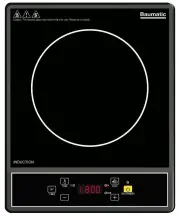
10 Ceramic hob surface layout Control panel layout 1. ON/STANDBY button 2. Power light 3. Heat button 4. Heat “W” light 5. LED display 6. Temperature light 7. Temperature button
Page 11 - Before first use; You should clean the ceramic hob surface (see
11 8. Timer button 9. Minus button 10. Timer “min” light 11. Plus button Using the induction hob Before first use IMPORTANT: You should clean the ceramic hob surface (see “Cleaning and maintenance” section). o You should switch on the hob for 5 minutes at the maximum setting. This will help to elimi...
Page 14 - You should make sure that all pans are placed in
14 Cookware that is suitable for an induction hob The table below shows cookware that is normally suitable for use on an induction zone hob:- Cookware Suitable Steel, enamelled steel Yes Cast iron Yes Stainless steel Yes (if stated by the pan manufacturer) Aluminium, copper, brass No Glass, ceramic,...
Page 16 - Installation; temperature rise of 85°C
16 After each use o Wipe the appliance over with a damp cloth. o Dry the appliance by rubbing the surface with a clean cloth. Using a specialist ceramic hob cleaner It is possible to purchase specialist ceramic hob cleaner/conditioner. You should follow the instructions given by the manufacturer of ...
Page 18 - My appliance isn’t working correctly; Error; General troubleshooting
18 My appliance isn’t working correctly Error codes If you appliance senses an abnormality, the hob will enter stand-by mode and will display a corresponding error code. Error code Possible causes What to do E3, E6 Temperature sensor error. Wait a moment and then press the ON/STANDBY button (1) . Wh...
Page 19 - DO NOT ATTEMPT TO REPAIR
19 setting. power level. Fan noise coming from the induction hob. A cooling fan built into your induction hob has come on to prevent the electronics from overheating. It may continue to run even after you’ve turned the induction hob off. This is normal and needs no action. Do not switch the power to...