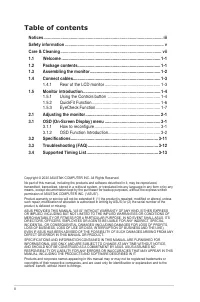
Page 2 - ii; Table of contents; How to reconfigure; Specifications
ii Copyright © 2020 ASUSTeK COMPUTER INC. All Rights Reserved.No part of this manual, including the products and software described in it, may be reproduced, transmitted, transcribed, stored in a retrieval system, or translated into any language in any form or by any means, except documentation kept...
Page 3 - iii; Notices; Federal Communications Commission Statement
iii Notices Federal Communications Commission Statement This device complies with Part 15 of the FCC Rules. Operation is subject to the following two conditions: • This device may not cause harmful interference. • This device must accept any interference received including interference that may caus...
Page 4 - iv; TCO Information; This display is designed for both you and the planet!; Some of the Usability features of the TCO Certified for displays:
iv TCO Information Congratulations! This display is designed for both you and the planet! CERTIFIED The display you have just purchased carries the TCO Certified label. This ensures that your display is designed, manufactured and tested according to some of the strictest quality and environmental re...
Page 5 - Safety information
v Safety information • Before setting up the monitor, carefully read all the documentation that came with the package. • To prevent fire or shock hazard, never expose the monitor to rain or moisture. • Never try to open the monitor cabinet. The dangerous high voltages inside the monitor may result i...
Page 6 - WARNING; loss due to excessive sound pressures.
vi • Please use ADP-40KD BB of DELTA adapter(VZ279H/N/Q/HE). • Please use ADP-33AW of DELTA adapter(VZ279HE). WARNING Usage of other than specified head- or earphones can result in hearing loss due to excessive sound pressures.
Page 7 - vii; The following symptoms are normal with the monitor:
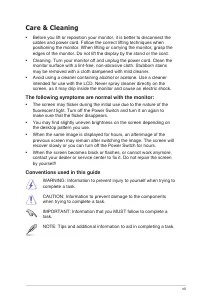
vii Care & Cleaning • Before you lift or reposition your monitor, it is better to disconnect the cables and power cord. Follow the correct lifting techniques when positioning the monitor. When lifting or carrying the monitor, grasp the edges of the monitor. Do not lift the display by the stand o...
Page 8 - viii; Where to find more information; and software updates.; Optional documentation; have been added by your dealer. These documents are not part of
viii Where to find more information Refer to the following sources for additional information and for product and software updates. 1. ASUS websites The ASUS websites worldwide provide updated information on ASUS hardware and software products. Refer to http://www.asus.com 2. Optional documentation ...
Page 9 - Package contents
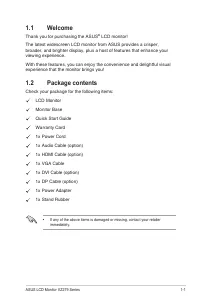
1-1 ASUS LCD Monitor VZ2 79 Series 1.1 Welcome Thank you for purchasing the ASUS ® LCD monitor! The latest widescreen LCD monitor from ASUS provides a crisper, broader, and brighter display, plus a host of features that enhance your viewing experience.With these features, you can enjoy the convenien...
Page 10 - Chapter 1: Product Introduction; Assembling the monitor; To assemble the monitor; Place the display flat on a cloth on the table, Then attach the base
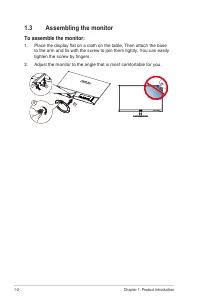
1-2 Chapter 1: Product Introduction 1.3 Assembling the monitor To assemble the monitor : 1. Place the display flat on a cloth on the table, Then attach the base to the arm and fix with the screw to join them tightly. You can easily tighten the screw by fingers. 2. Adjust the monitor to the angle tha...
Page 11 - Connect cables; Rear of the LCD monitor
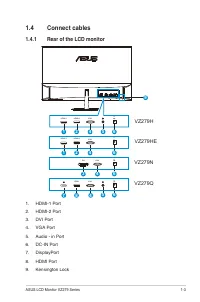
1-3 ASUS LCD Monitor VZ2 79 Series 1.4 Connect cables 1.4.1 Rear of the LCD monitor 9 VGA HDMI-1 HDMI-2 2 5 4 6 1 2 4 6 1 VZ279N VZ279H VZ279HE 6 4 3 VGA DVI DCIN VGA HDMI-1 HDMI-2 DCIN VGA HDMI DCIN DCIN VZ279Q 6 5 4 8 7 1. HDMI-1 Port2. HDMI-2 Port3. DVI Port4. VGA Port 5. Audio - in Port6. DC-IN ...
Page 12 - Monitor introduction; Using the Controls button
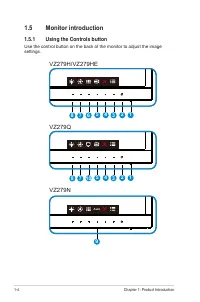
1-4 Chapter 1: Product Introduction 1.5 Monitor introduction 1.5.1 Using the Controls button Use the control button on the back of the monitor to adjust the image settings. 3 4 7 5 6 8 2 1 9 VZ279N VZ279H/VZ279HE 3 4 7 5 10 8 2 1 VZ279Q Auto
Page 13 - QuickFit
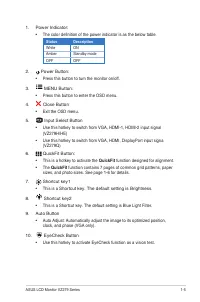
1-5 ASUS LCD Monitor VZ2 79 Series 1. Power Indicator: • The color definition of the power indicator is as the below table. Status Description White ON Amber Standby mode OFF OFF 2. Power Button: • Press this button to turn the monitor on/off. 3. MENU Button: • Press this button to enter the OSD men...
Page 14 - QuickFit Function; layout on one page and achieve a consistent look and feel.; Alignment Grid 2; view and edit their photos in real size on the screen.
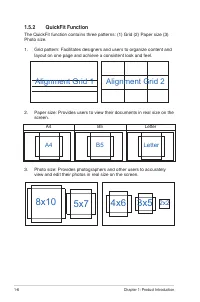
1-6 Chapter 1: Product Introduction 1.5.2 QuickFit Function The QuickFit function contains three patterns: (1) Grid (2) Paper size (3) Photo size. 1. Grid pattern: Facilitates designers and users to organize content and layout on one page and achieve a consistent look and feel. Alignment Grid 2 Alig...
Page 15 - EyeCheck Function; The EyeCheck function contains three patterns: (1) Snellen Chart
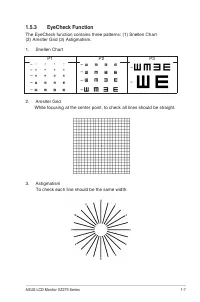
1-7 ASUS LCD Monitor VZ2 79 Series 1.5.3 EyeCheck Function The EyeCheck function contains three patterns: (1) Snellen Chart (2) Amslter Grid (3) Astigmatism. 1. Snellen Chart P1 P2 P3 2. Amslter Grid While focusing at the center point, to check all lines should be straight. 3. Astigmatism To check e...
Page 16 - Adjusting the monitor; • You can adjust the monitor’s angle from +20 ̊ to -5 ̊; Be careful not to touch or press the screen area when adjusting the
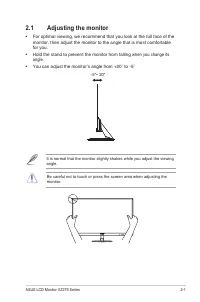
2-1 ASUS LCD Monitor VZ2 79 Series 2.1 Adjusting the monitor • For optimal viewing, we recommend that you look at the full face of the monitor, then adjust the monitor to the angle that is most comfortable for you. • Hold the stand to prevent the monitor from falling when you change its angle. • You...
Page 18 - Chapter 3: General Instruction; OSD Function Introduction; Contrast and ASCR functions are not user-configurable.
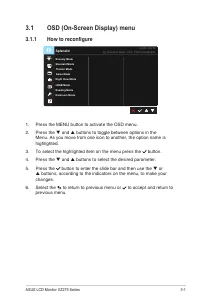
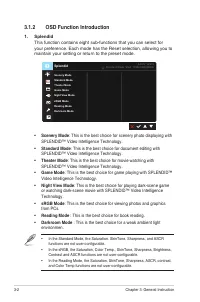
3-2 Chapter 3: General Instruction 3.1.2 OSD Function Introduction 1. Splendid This function contains eight sub-functions that you can select for your preference. Each mode has the Reset selection, allowing you to maintain your setting or return to the preset mode. Reading ModeDarkroom Mode Splendid...
Page 19 - Adjust the energy level of blue light emitted from LED backlight.; be automatically imported.
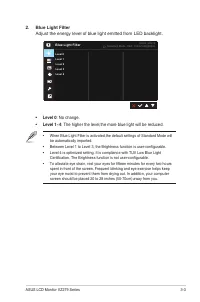
3-3 ASUS LCD Monitor VZ2 79 Series 2. Blue Light Filter Adjust the energy level of blue light emitted from LED backlight. Blue Light Filter Level 0 Level 3Level 4 Level 2 Level 1 Standard Mode VGA 1920x1080@60Hz ASUS VZ279 • Level 0 : No change. • Level 1~4 : The higher the level,the more blue light...
Page 20 - Select the image color you like from this function.; and
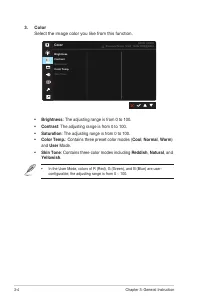
3-4 Chapter 3: General Instruction 3. Color Select the image color you like from this function. Color Brightness Color Temp.Skin Tone Saturation Contrast Standard Mode VGA 1920x1080@60Hz ASUS VZ279 • Brightness : The adjusting range is from 0 to 100. • Contrast : The adjusting range is from 0 to 100...
Page 22 - Adjust the sound settings to your preference.; Adjusts the output volume level.
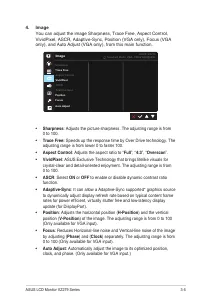
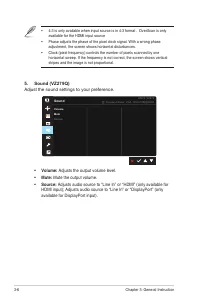
3-6 Chapter 3: General Instruction • 4:3 is only available when input source is in 4:3 format 。 OverScan is only available for the HDMI input source • Phase adjusts the phase of the pixel clock signal. With a wrong phase adjustment, the screen shows horizontal disturbances. • Clock (pixel frequency)...
Page 23 - Select the input source from; Adjusts the system configuration.
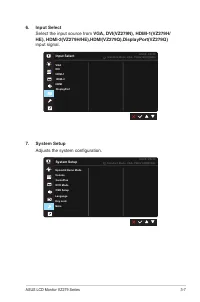
3-7 ASUS LCD Monitor VZ2 79 Series 6. Input Select Select the input source from VGA, DVI(VZ279N), HDMI-1(VZ279H/ HE), HDMI-2(VZ279H/HE),HDMI(VZ279Q),DisplayPort(VZ279Q) input signal. Input Select VGADVI HDMI-2 HDMI-1 DisplayPort HDMI Standard Mode VGA 1920x1080@60Hz ASUS VZ279 7. System Setup Adjust...
Page 24 - Splendid Demo Mode; ECO Mode
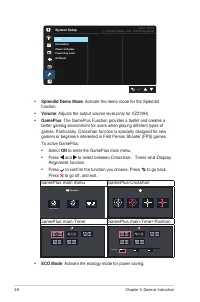
3-8 Chapter 3: General Instruction System Setup Back Power Indicator Information Standard Mode VGA 1920x1080@60Hz ASUS VZ279 Power Key LockAll Reset • Splendid Demo Mode : Activate the demo mode for the Splendid function. • Volume : Adjusts the output volume level . (only for VZ279H) • GamePlus : Th...
Page 26 - Selecting this option allows you to set two shortcut keys.; Shortcut 1; Shortcut 2; : User can select from “Blue Light Filter” “Splendid”,
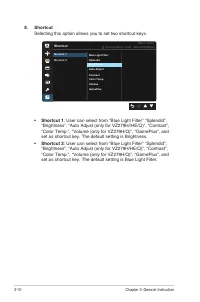
3-10 Chapter 3: General Instruction 8. Shortcut Selecting this option allows you to set two shortcut keys. Shortcut Shortcut 1Shortcut 2 Standard Mode VGA 1920x1080@60Hz ASUS VZ279 Blue Light FilterSplendidBrightnessAuto AdjustContrastColor Temp.VolumeGamePlus • Shortcut 1 : User can select from “Bl...
Page 27 - Model
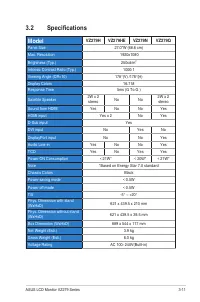
3-11 ASUS LCD Monitor VZ2 79 Series 3.2 Specifications Model VZ279H VZ279HE VZ279N VZ279Q Panel Size 27.0”W (68.6 cm) Max. Resolution 1920x1080 Brightness (Typ.) 250cd/m 2 Intrinsic Contrast Ratio (Typ.) 1000:1 Viewing Angle (CR>10) 178°(V) /178°(H) Display Colors 16.7 M Response Time 5ms (G To G...
Page 29 - Supported Timing List; PC Supported Primary Timing
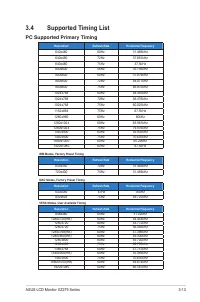
3-13 ASUS LCD Monitor VZ2 79 Series 3.4 Supported Timing List PC Supported Primary Timing Resolution Refresh Rate Horizontal Frequency 640x480 60Hz 31.469kHz 640x480 72Hz 37.861kHz 640x480 75Hz 37.5kHz 800x600 56Hz 35.156kHz 800x600 60Hz 37.879kHz 800x600 72Hz 48.077kHz 800x600 75Hz 46.875kHz 1024x7...
Page 30 - recommend that you choose a mode listed in the above tables.
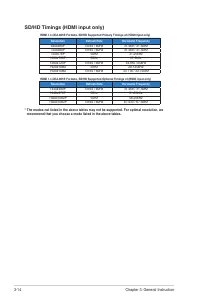
3-14 Chapter 3: General Instruction SD/HD Timings (HDMI input only) HDMI 1.3,CEA-861B Formats, SD/HD Supported Primary Timings of (HDMI input only) Resolution Refresh Rate Horizontal Frequency 640x480P 59.94 / 60Hz 31.469 / 31.5kHz 720x480P 59.94 / 60Hz 31.469 / 31.5kHz 720x576P 50Hz 31.25kHz 1280x7...