Page 2 - ASUS contact information
i i i i i i i i i i Q u i c k S t a r t G u i d e Q u i c k S t a r t G u i d e Q u i c k S t a r t G u i d e Q u i c k S t a r t G u i d e Q u i c k S t a r t G u i d e ASUS contact information A S U S T e K C O M P U T E R I N C . A S U S T e K C O M P U T E R I N C . A S U S T e K C O M P U T E R...
Page 3 - li; LCD Monitor; Quick Start Guide
En g li s h VW192 Series LCD Monitor Quick Start Guide
Page 4 - lis; Safety information; Monitor introduction
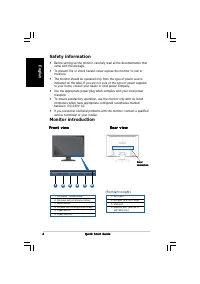
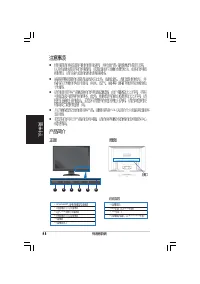
2 2 2 2 2 Q u i c k S t a r t G u i d e Q u i c k S t a r t G u i d e Q u i c k S t a r t G u i d e Q u i c k S t a r t G u i d e Q u i c k S t a r t G u i d e Eng lis h Safety information • Before setting up the monitor, carefully read all the documentation that came with the package. • To prevent ...
Page 5 - Connecting the cables
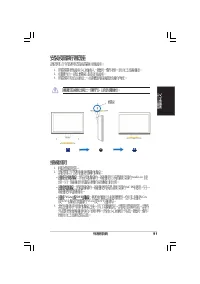
3 3 3 3 3 Q u i c k S t a r t G u i d e Q u i c k S t a r t G u i d e Q u i c k S t a r t G u i d e Q u i c k S t a r t G u i d e Q u i c k S t a r t G u i d e En g li s h Connecting the cables 1. Remove the rear cover. 2. Connect the cables as the following instructions: • T o c o n n e c t t h e a...
Page 6 - Adjusting the monitor
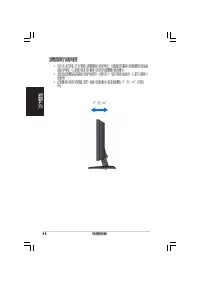
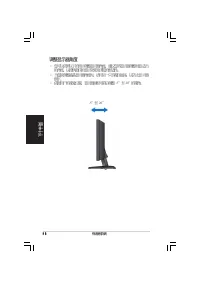
4 4 4 4 4 Q u i c k S t a r t G u i d e Q u i c k S t a r t G u i d e Q u i c k S t a r t G u i d e Q u i c k S t a r t G u i d e Q u i c k S t a r t G u i d e Eng lis h Adjusting the monitor • For optimal viewing, we recommend that you look at the full face of the monitor, then adjust the monitor t...
Page 7 - Moniteur LCD; Guide de démarrage rapide
F ra n ç a is Séries VW192 Moniteur LCD Guide de démarrage rapide
Page 8 - ra; Informations sur la sécurité; Vue avant
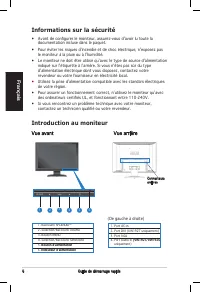
Guide de démarrage rapide F ra n ç a is 1. Port AC-in2. Port DVI (VW192T uniquement)3. Port VGA4. Port Audio-in (VW192T�VW192� (VW192T�VW192� uniquement) Informations sur la sécurité • Avant de conigurer le moniteur, assurez-vous d’avoir lu toute la documentation incluse dans le paquet. • Pour évite...
Page 9 - Assembler la base du moniteur; Connecter les câbles
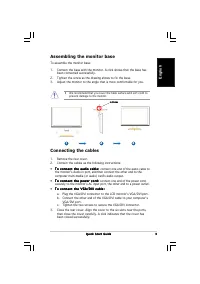
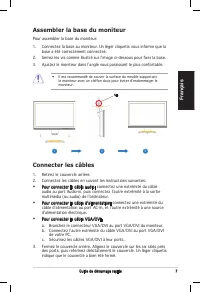
Guide de démarrage rapide F ra n ç a is Assembler la base du moniteur Pour assembler la base du moniteur: 1. Connectez la base au moniteur. Un léger cliquetis vous informe que la base a été correctement connecteé. 2. Serrez les vis comme illustré sur l’image ci-dessous pour ixer la base. 3. Ajustez ...
Page 10 - Ajuster l’inclinaison
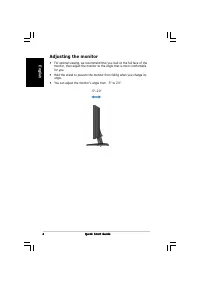
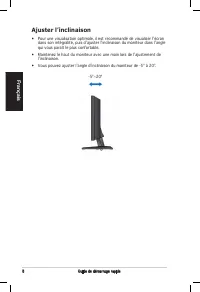
Guide de démarrage rapide F ra n ç a is Ajuster l’inclinaison • Pour une visualisation optimale, il est recommandé de visualiser l’écran dans son intégralité, puis d’ajuster l’inclinaison du moniteur dans l’angle qui vous paraît le plus confortable. • Maintenez le haut du moniteur avec une main lors...
Page 11 - ts; Schnellstarthilfe
D e u ts c h VW192-Serie LCD-Monitor Schnellstarthilfe
Page 12 - Sicherheitsinformationen; Vorderansicht
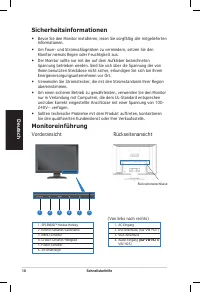
10 Schnellstarthilfe D e u ts c h 1. SPLEND�D™-Modus-Hotkey2. Kleiner-Schalter/Lautstärke3. MENU-Schalter4. Größer-Schalter/Helligkeit5. Power-Schalter 6. Stromanzeige 1. AC-Eingang 2. DV�-Anschluss (nur VW192T)3. VGA-Anschluss 4. Audio-Eingang (nur VW192T� (nur VW192T� VW192�) Sicherheitsinformatio...
Page 13 - Anschließen der Kabel
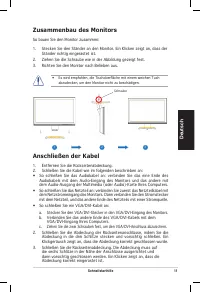
11 Schnellstarthilfe D e u ts c h Anschließen der Kabel 1. Entfernen Sie die Rückseitenabdeckung.2. Schließen Sie die Kabel wie im folgenden beschrieben an: • So schließen Sie das Audiokabel an: verbinden Sie das eine Ende des Audiokabels mit dem Audio-Eingang des Monitors und das andere mit dem Aud...
Page 14 - Veränderung des Neigungswinkels
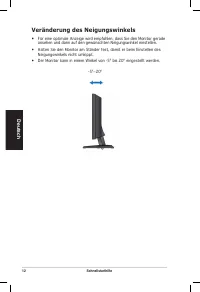
12 Schnellstarthilfe D e u ts c h Veränderung des Neigungswinkels • Für eine optimale Anzeige wird empfohlen, dass Sie den Monitor gerade ansehen und dann auf den gewünschten Neigungswinkel einstellen. • Halten Sie den Monitor am Ständer fest, damit er beim Einstellen des Neigungswinkels nicht umkip...
Page 15 - Monitor LCD; Guida Rapida
Page 16 - Ita; Informazioni di Sicurezza; Presentazione del Monitor; Prospetto Frontale
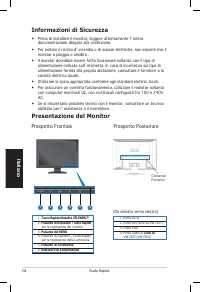
Guida Rapida Ita lia n o 14 Informazioni di Sicurezza • Prima di installare il monitor, leggere attentamente l’ intera documentazione allegata alla confezione. • Per evitare il rischio d’ incendio o di scosse elettriche, non esporre mai il monitor a pioggia o umidità . • �l monitor dovrebbe essere f...
Page 17 - Connessioni Cavi
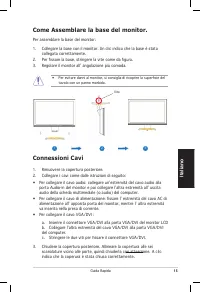
Guida Rapida Ita li a n o 15 Connessioni Cavi 1. Rimuovere la copertura posteriore.2. Collegare i cavi come dalle istruzioni di seguito: • Per collegare il cavo audio: collegare un’estremità del cavo audio alla porta Audio-in del monitor e poi collegare l’altra estremità all’ uscita audio della sche...
Page 18 - Regolazione del Monitor
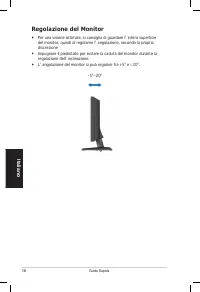
Guida Rapida Ita lia n o 16 Regolazione del Monitor • Per una visione ottimale, si consiglia di guardare l’ intera supericie del monitor, quindi di regolarne l’ angolazione, secondo la propria discrezione • �mpugnare il piedistallo per evitare la caduta del monitor durante la regolazione dell’ incli...
Page 19 - Guía de Instalación
Es p a ñ o l VW192 Series Monitor LCD Guía de Instalación Rápida
Page 20 - Precauciones de Seguridad; Descripción del Monitor; Parte frontal
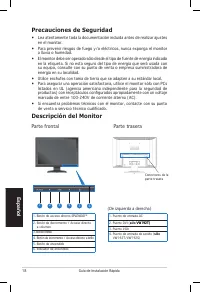
1 Guía de Instalación Rápida Esp a ñ o l Precauciones de Seguridad • Lea atentamente toda la documentación incluida antes de realizar ajustes en el monitor. • Para prevenir riesgos de fuego y�o eléctricos, nunca exponga el monitor a lluvia o humedad. • El monitor debe ser operado sólo desde el tipo ...
Page 21 - Conectando los cables
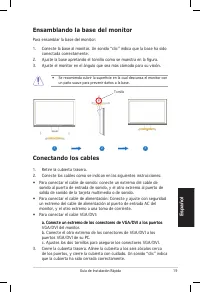
19 Guía de �nstalación Rápida Es p a ñ o l Conectando los cables 1. Retire la cubierta trasera.2. Conecte los cables como se indican en las siguientes instrucciones: • Para conectar el cable de sonido: conecte un extremo del cable de sonido al puerto de entrada de sonido, y el otro extremo al puerto...
Page 22 - Ajustando el monitor
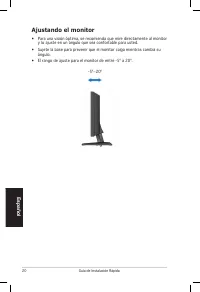
20 Guía de �nstalación Rápida Esp a ñ o l Ajustando el monitor • Para una visión óptima, se recomienda que mire directamente al monitor y lo ajuste en un ángulo que sea confortable para usted. • Sujete la base para prevenir que el monitor caiga mientras cambia su ángulo. • El rango de ajuste para el...
Page 23 - LCD монитор; Руководство
Ру сс кий LCD монитор серий VW192 Руководство по быстрой установке
Page 24 - Ру; Техника безопасности; Изучение монитора; Вид спереди
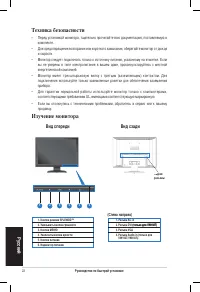
22 Руководство по быстрой установке Ру сск ий Техника безопасности • Перед установкой монитора, тщательно прочитайте всю документацию, поставляемую в комплекте. • Для предотвращения возгорания или короткого замыкания, оберегайте монитор от дождя и сырости. • Монитор следует подключать только к источ...
Page 25 - Подключение кабелей; Установка основания монитора
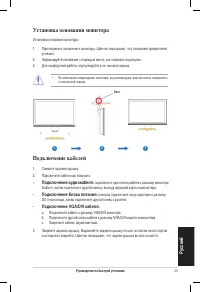
23 Руководство по быстрой установке Ру сс кий Подключение кабелей 1. Снимите заднюю крышку.2. Подключите кабели как показано: • Подключение аудиокабеля: подключите один конец кабеля к разъему монитора Audio-in, затем подключите другой конец к выходу звуковой карты компьютера. • Подключение блока пит...
Page 26 - Регулировка монитора
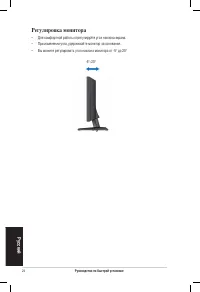
24 Руководство по быстрой установке Ру сск ий Регулировка монитора • Для комфортной работы отрегулируйте угол наклона экрана.• При изменении угла, удерживайте монитор за основание.• Вы можете регулировать угол наклона монитора от -5° до 20° -5° ~ 20°
Page 27 - rl; Serie; Snelstartgids
N e d e rl a n d s VW192 Serie Serie LCD-scherm Snelstartgids
Page 28 - rla; Veiligheidsinformatie; Achterkant van de LCD-scherm
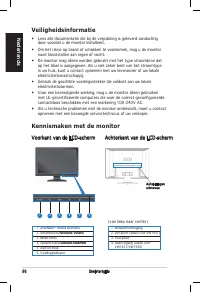
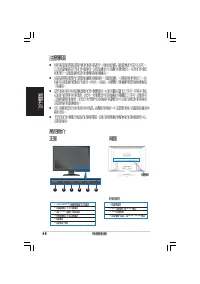
2 Snelstartgids N e d e rla n d s 1. SPLEND�D™ modus sneltoets2. Afnametoets/Sneltoets Volume /Sneltoets Volume 3. MENU-toets4. Opnametoets/Sneltoets helderheid /Sneltoets helderheid 5. Aan/uit knop6. Voedingsindicator Veiligheidsinformatie • Lees alle documentatie die bij de verpakking is geleverd ...
Page 29 - De kabels aansluiten
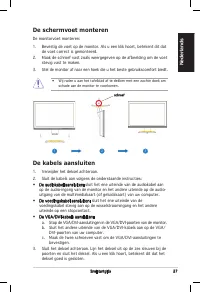
2 Snelstartgids N e d e rl a n d s De kabels aansluiten 1. Verwijder het deksel achteraan.2. Sluit de kabels aan volgens de onderstaande instructies: De schermvoet monteren De monitorvoet monteren: 1. �evestig de voet op de monitor. Als u een klik hoort, betekent dit dat de voet correct is gemonteer...
Page 30 - De monitor afstellen
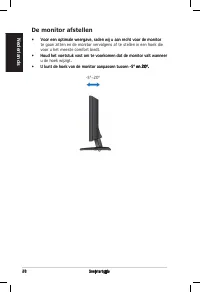
2 Snelstartgids N e d e rla n d s De monitor afstellen • Voor een optimale weergave, raden wij u aan recht voor de monitor Voor een optimale weergave, raden wij u aan recht voor de monitor te gaan zitten en de monitor vervolgens af te stellen in een hoek die voor u het meeste comfort biedt. • Houd h...
Page 39 - 液晶ディスプレイ; クイックスタートガイド
Page 40 - 安全にお使いいただくために; ディスプレイ
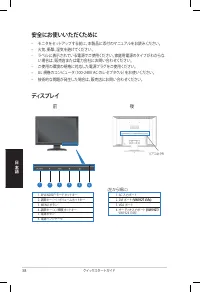
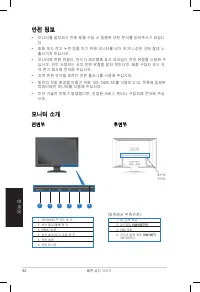
3 クイックスタートガイド 日 本 語 安全にお使いいただくために • モニタをセットアップする前に、本製品に添付のマニュアルをお読みください。 • 火気、衝撃、湿気を避けてください。 • ラベルに表示されている電源でご使用ください。家庭用電源のタイプがわからな い場合は、販売店または電力会社にお問い合わせください。 • ご使用の環境の規格に対応した電源プラグをご使用ください。• UL 規格のコンピュータ(100-240V AC のレセプタクル)をお使いください。 • 技術的な問題が発生した場合は、販売店にお問い合わせください。 ディスプレイ 前 後 1. SPLENDID™ モードホットキー...
Page 41 - ケーブルを接続する
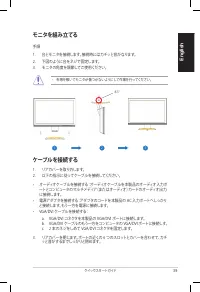
39 クイックスタートガイド En g li s h ケーブルを接続する 1. リアカバーを取り外します。2. 以下の指示に従ってケーブルを接続してください。 • オーディオケーブルを接続する:オーディオケーブルを本製品のオーディオ入力ポ ートとコンピュータのマルチメディア(またはオーディオ)カードのオーディオ出力 に接続します。 • 電源アダプタを接続する:アダプタのコードを本製品の AC 入力ポートへしっかり と接続します。もう一方を電源に接続します。 • VGA/DVI ケーブルを接続する: a. VGA/DVI コネクタを本製品の VGA/DVI ポートに接続します。 b. VGA/D...
Page 42 - ディスプレイを調節する
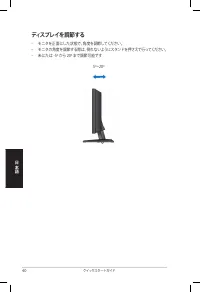
40 クイックスタートガイド 日 本 語 ディスプレイを調節する • モニタを正面にした状態で、角度を調節してください。• モニタの角度を調節する際は、倒れないようにスタンドを押さえて行ってください。• 未にたは -5º から 20º まで調節可能です 5º~20º
Page 43 - 한국어; LCD 모니터; 빠른 설치 가이드
Page 44 - 안전 정보; 전면부
42 빠른 설치 가이드 한국어 안전 정보 • 모니터를 설치하기 전에 제품 구입 시 동봉된 모든 문서를 읽어주시기 바랍니 다. • 화재 또는 전기 누전 등을 막기 위해 모니터를 비가 오거나 습한 곳에 절대 노 출시키지 마십시오. • 모니터에 전원 연결시, 반드시 레이블에 표시 되어있는 전력 유형을 사용해 주 십시오. 만약 사용하는 곳의 전원 유형을 알지 못한다면, 제품 구입자 또는 지역 전기 회사에 문의해 주십시오. • 지역 전원 규격을 따르는 전원 플러그를 사용해 주십시오.• 최적의 작동 환경을 만들기 위해 100-240V AC를 ...
Page 45 - 케이블 연결
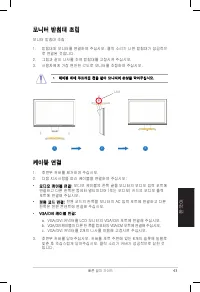
43 빠른 설치 가이드 한국어 케이블 연결 1. 후면부 커버를 제거하여 주십시오. 2. 다음 지시사항을 따라 케이블을 연결하여 주십시오: • 오디오 케이블 연결: 오디오 케이블의 한쪽 끝을 모니터의 오디오 입력 포트에 연결하고 다른 한쪽은 컴퓨터 멀티미디어 �또는 오디오� 카드의 오디오 출력 포트에 연결해 주십시오. • 전원 코드 연결: 전원 코드의 한쪽을 모니터의 AC 입력 포트에 연결하고 다른 한쪽은 전원 콘센트에 연결해 주십시오. • VGA/DVI 케이블 연결: a. VGA/DVI 커넥터를 LCD 모니터의 VGA/DVI 포트에...
Page 46 - 모니터 조정
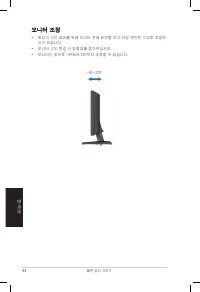
44 빠른 설치 가이드 한국어 모니터 조정 • 최상의 시각 효과를 위해 모니터 전체 화면을 보고 가장 편안한 각도로 조정하 시기 바랍니다. • 모니터 각도 변경 시 받침대를 잡아주십시오. • 모니터는 앞뒤로 -5º에서 20º까지 조정할 수 있습니다. -5º~20º
Page 47 - Guia de consulta rápida
Po rtu g u ê s Série VW192 Monitor LCD Guia de consulta rápida
Page 48 - Informações de segurança; Parte da frente
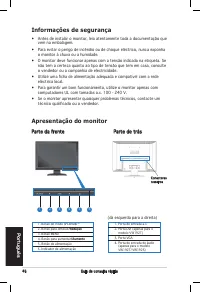
4 Guia de consulta rápida Portu g u ê s 1. Botão do modo �PLENDID™2. Botão para diminuir�Redu�ão �Redu�ão 3. Botão MENU4. Botão para aumentar�Aumento �Aumento 5. �otão de alimentação6. �ndicador de alimentação Informações de segurança • Antes de instalar o monitor, leia atentamente toda a documentaç...
Page 49 - Po; Ligação dos cabos
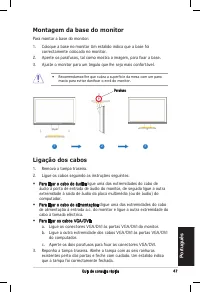
4 Guia de consulta rápida Po rtu g u ê s Ligação dos cabos 1. Remova a tampa traseira.2. Ligue os cabos seguindo as instruções seguintes: Montagem da base do monitor Para montar a base do monitor: 1. Coloque a base no monitor Um estalido indica que a base foi correctamente colocada no monitor. 2. Ap...
Page 50 - Ajuste do monitor
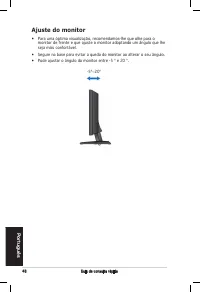
4 Guia de consulta rápida Portu g u ê s Ajuste do monitor • Para uma óptima visualização, recomendamos-lhe que olhe para o monitor de frente e que ajuste o monitor adoptando um ângulo que lhe seja mais confortável. • Segure na base para evitar a queda do monitor ao alterar o seu ângulo.• Pode ajusta...
Page 51 - Türkçe; LCD Monitör; H›zl› Bafllatma K›lavuzu
Türkçe VW192 Serisi LCD Monitör H›zl› Bafllatma K›lavuzu
Page 52 - Güvenlik Bilgisi; Ön görünüm
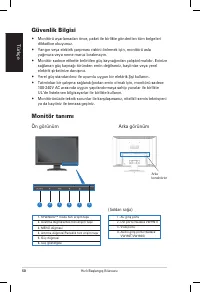
50 H›zl› Bafllang›ç K›lavuzu Türkçe Güvenlik Bilgisi • Monitörü ayarlamadan önce, paket ile birlikte gönderilen tüm belgeleri dikkatlice okuyunuz. • Yang›n veya elektrik çarpmas› riskini önlemek için, monitörü asla ya¤mura veya neme maruz b›rakmay›n. • Monitör sadece etikette belirtilen güç kayna¤›nd...
Page 53 - Kablolar›n ba¤lanmas›; Monitör tabanının takılması
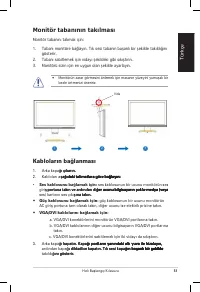
51 H›zl› Bafllang›ç K›lavuzu Türkçe • Ses kablosunu ba¤lamak için� ses kablosunun bir ucunu monitörün ses girifl portuna takın ve ardından di¤er ucunu bilgisayarın çoklu-medya (veya fl portuna takın ve ardından di¤er ucunu bilgisayarın çoklu-medya (veya portuna takın ve ardından di¤er ucunu bilgisayarı...
Page 54 - Monitörün ayarlanmas›
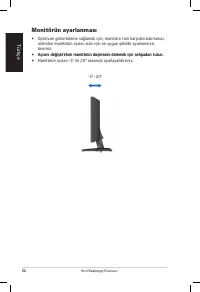
52 H›zl› Bafllang›ç K›lavuzu Türkçe Monitörün ayarlanmas› • Optimum görüntüleme sağlamak için, monitöre tam karşıdan bakmanızı, ardından monitörün açısını sizin için en uygun şekilde ayarlamanızı öneririz. • Açısını değiştirirken monitörün düşmesini önlemek için sehpadan tutun. Açısını değiştirirken ...
Page 59 - ไทย; ซีรีส; จอภาพ; คูมือเริ่มตนอยางเร็ว
Page 60 - ขอมูลเพื่อความปลอดภัย; แนะนําจอภาพ; มุมมองดานหนา
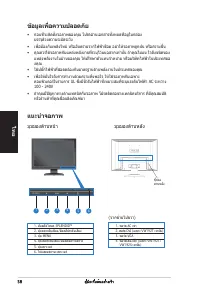
ไทย 5 คู่มือเริ่มต้นอย่างเร็ว 1. ฮ็อตคีย์โหมด �PLENDID™ 2. ปุ่มลดระดับเสียง � ฮ็อตคียระดับเสียง 3. ปุ่ม MENU 4. ปุ่มเพิ่มระดับเสียง � ฮ็อตคียความสวาง 5. ปุ่มเพาเวอร์ 6. ไฟแสดงสถานะเพาเวอร์์ ขอมูลเพื่อความปลอดภัย • กอนที่จะติดตั้งจอภาพของคุณ โปรดอานเอกสารทั้งหมดที่อยูในกลอง บรรจุดวยความระมัด...
Page 61 - การเชื่อมตอสายเคเบิล; การประกอบฐานจอภาพ
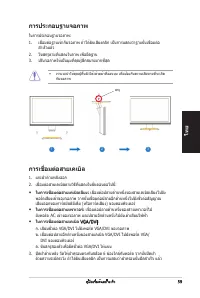
ไทย 59 คู่มือเริ่มต้นอย่างเร็ว การเชื่อมตอสายเคเบิล 1. แกะฝาด้านหลังออก2. เชื่อมต่อสายเคเบิลตามวิธีที่แสดงในขั้นตอนต่อไปนี้: • ในการเชื่อมต่อสายเคเบิลเสียง: เชื่อมต่อปลายด้านหนึ่งของสายเคเบิลเสียงไปยัง พอร์ตเสียงเข้าของจอภาพ จากนั้นเชื่อมต่อปลายอีกด้านหนึ่งไปยังขั้วต่อสัญญาณ เสียงออกของการ์ดมัลติมี...
Page 62 - การปรับจอภาพ
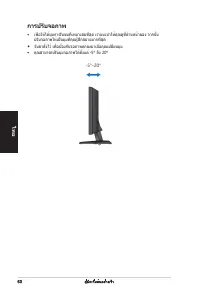
ไทย 0 คู่มือเริ่มต้นอย่างเร็ว การปรับจอภาพ • เพื่อให้ได้มุมการรับชมที่เหมาะสมที่สุด เราแนะนำให้คุณดูที่ด้านหน้าของ จากนั้น ปรับจอภาพให้เป็นมุมที่คุณรู้สึกสบายมากที่สุด • จับขาตั้งไว้ เพื่อป้องกันจอภาพตกลงมาเมื่อคุณเปลี่ยนมุม • คุณสามารถปรับมุมจอภาพได้ตั้งแต่ -5° ถึง 20° -5º~20º
Page 63 - Quick Start-vejledning
D a n s k VW192 Serie LCD-Monitor Quick Start-vejledning
Page 64 - Sikkerhedsforanstaltninger; Set forfra
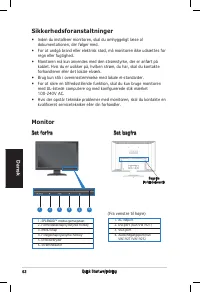
2 D a n s k Quick Start-vejledning 1. AC-indport2. DVI-port (Kun VW192T)3. VGA-port 4. Audioindgangsport(Kun VW192T�VW192�) 1. SPLEND�D™ modus genvejstast2. Formindskeknap/lydstyrke-hotkey3. MENU knap4. Forøgeknap/lysstyrke-hotkey5. Effektafbryder6. Strømindikator Sikkerhedsforanstaltninger • �nden ...
Page 65 - Tilslutning af kabler
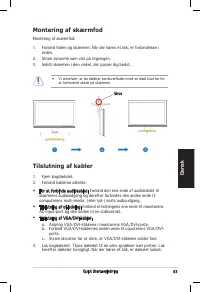
3 D a n s k Quick Start-vejledning Tilslutning af kabler 1. Fjern bagdækslet.2. Forbind kablerne således: Montering af skærmfod Montering af skærmfod: 1. Forbind foden og skærmen. Når der høres et klik, er forbindelsen i orden. 2. Stram skruerne som vist på tegningen.3. �ndstil skærmen i den vinkel,...
Page 66 - Justering af monitor
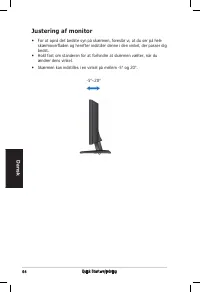
4 D a n s k Quick Start-vejledning Justering af monitor • For at opnå det bedste syn på skærmen, foreslår vi, at du ser på hele skærmoverladen og herefter indstiller denne i den vinkel, der passer dig bedst. • Hold fast om standeren for at forhindre at skærmen vælter, når du ændrer dens vinkel. • Sk...
Page 67 - Su; Pikakäynnistysopas
Su o m i VW192-sarja LCD-monitori Pikakäynnistysopas
Page 68 - Turvallisuustietoja; Etupuolen näkymä
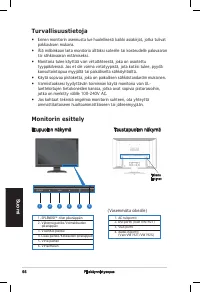
Pikakäynnistysopas Suo m i 1. AC-tuloportti 2. DVI-portti (Vain VW192T)3. VGA-portti4. Audio-in-portti (Vain VW192T�VW192�) 1. SPLEND�D™ -tilan pikanäppäin2. Vähennä-painike/Voimakkuuden pikanäppäin3. VAL�KKO-painike4. Lisää-painike/Kirkkauden pikanäppäin5. Virta-painike6. Virtailmaisin Turvallisuus...
Page 69 - Kaapeleiden liittäminen
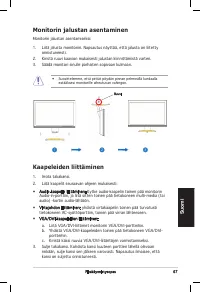
Pikakäynnistysopas Su o m i Kaapeleiden liittäminen 1. �rrota takakansi.2. Liitä kaapelit seuraavan ohjeen mukaisesti: Monitorin jalustan asentaminen Monitorin jalustan asentamiseksi: 1. Liitä jalusta monitoriin. Napsautus näyttää, että jalusta on liitetty onnistuneesti. 2. Kiristä ruuvi kaavion muk...
Page 70 - Monitorin säätäminen
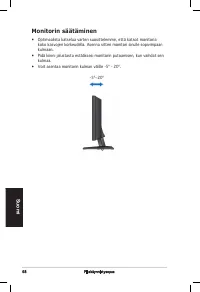
Pikakäynnistysopas Suo m i Monitorin säätäminen • Optimaalista katselua varten suosittelemme, että katsot monitoria koko kasvojen korkeudella. Asenna sitten monitori sinulle sopivimpaan kulmaan. • Pidä kiinni jalustasta estääksesi monitorin putoamisen, kun vaihdat sen kulmaa. • Voit asentaa monitori...
Page 71 - rs; Hurtigstart
Page 72 - Sikkerhetsinformasjon; Introduksjon til monitoren; Visning forfra
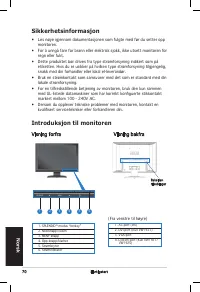
70 Hurtigstart N o rs k 1. AC-port (inn)2. DVI-port (Kun VW192T)3. VGA-port 4. Lyd-inn port (Kun VW192T/ VW192�) 1. SPLEND�D™ modus “hotkey”2. Ned-knapp/volum3. MENY knapp4. Opp-knapp/klarhet5. Strømbryter6. Strømindikator Sikkerhetsinformasjon • Les nøye igjennom dokumentasjonen som fulgte med før ...
Page 73 - Koble til kablene
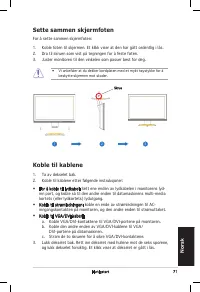
1 Hurtigstart N o rs k Koble til kablene 1. Ta av dekselet bak.2. Koble til kablene etter følgende instruksjoner: Sette sammen skjermfoten For å sette sammen skjermfoten: 1. Koble foten til skjermen. Et klikk viser at den har gått ordentlig i lås.2. Dra til skruen som vist på tegningen for å feste f...
Page 74 - Justere skjermen
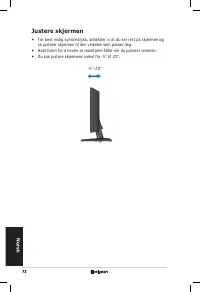
2 Hurtigstart N o rs k Justere skjermen • For best mulig synsinntrykk, anbefaler vi at du ser rett på skjermen og så justerer skjermen til den vinkelen som passer deg. • Hold foten for å hindre at monitoren faller når du justerer vinkelen.• Du kan justere skjermens vinkel fra -5º til 20º. -5º~20º
Page 75 - Snabbstartsguide
Sv e n s k a VW192 Serie LCD-skärm Snabbstartsguide
Page 76 - Säkerhetsinformation; Vy framifrån
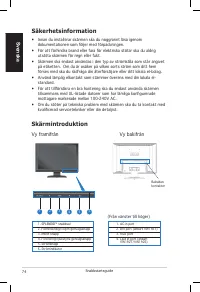
4 Sve n s k a Snabbstartsguide Säkerhetsinformation • �nnan du installerar skärmen ska du noggrannt läsa igenom dokumentationen som följer med förpackningen. • För att förhindra brand eller fara för elektriska stötar ska du aldrig utsätta skärmen för regn eller fukt. • Skärmen ska endast användas i ...
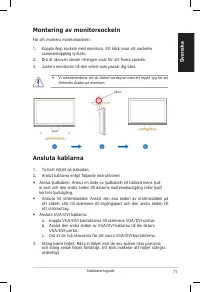
Page 77 - Ansluta kablarna
5 Sv e n s k a Snabbstartsguide • Anslut ljudkabeln: Anslut en ände av ljudkabeln till bildskärmens ljud- in port och den andra änden till datorns multimediautgång (eller ljud) kortets ljudutgång. • Ansluta till strömsladden: Anslut den ena änden av strömsladden på ett säkert sätt till skärmens AC-i...
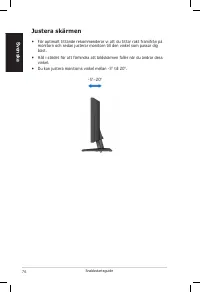
Page 78 - Justera skärmen
Sve n s k a Snabbstartsguide Justera skärmen • För optimalt tittande rekommenderar vi att du tittar rakt framifrån på monitorn och sedan justerar monitorn till den vinkel som passar dig bäst. • Håll i stödet för att förhindra att bildskärmen faller när du ändrar dess vinkel. • Du kan justera monitor...
Page 79 - Seria; Instrukcja szybkiej
Po ls k i Seria VW192 Monitor LCD Instrukcja szybkiej instalacji
Page 80 - Informacje dotyczące bezpieczeństwa; Widok z przodu
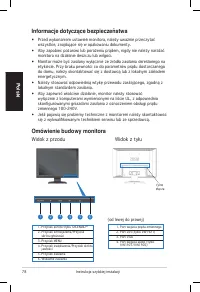
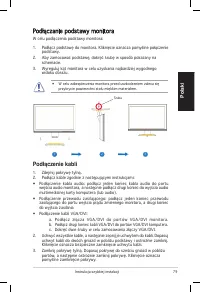
�nstrukcja szybkiej instalacji Pols k i Informacje dotyczące bezpieczeństwa • Przed wykonaniem ustawień monitora, należy uważnie przeczytać wszystkie, znajdujące się w opakowaniu dokumenty. • Aby zapobiec pożarowi lub porażeniu prądem, nigdy nie należy narażać monitora na działanie deszczu lub wilgo...
Page 81 - Podłączenie kabli; Podłączanie podstawy monitora
9 �nstrukcja szybkiej instalacji Po ls k i Podłączenie kabli 1. Zdejmij pokrywę tylną.2. Podłącz kable zgodnie z następującymi instrukcjami: • Podłączenie kabla audio: podłącz jeden koniec kabla audio do portu wejścia audio monitora, a następnie podłącz drugi koniec do wyjścia audio multimedialnej k...
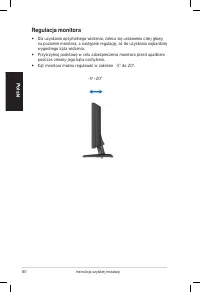
Page 82 - Regulacja monitora
80 �nstrukcja szybkiej instalacji Pols k i Regulacja monitora • Dla uzyskania optymalnego widzenia, zaleca się ustawienia całej głowy na poziomie monitora, a następnie regulację, aż do uzyskania najbardziej wygodnego kąta widzenia. • Przytrzymaj podstawę w celu zabezpieczenia monitora przed upadkiem...
Page 83 - Če; Řada; Stručná příručka
Page 84 - Bezpečnostní pokyny; Pohled zepředu
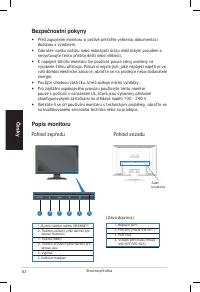
2 Če sk y Stručná příručka Bezpečnostní pokyny • Před zapojením monitoru si pečlivě přečtěte veškerou dokumentaci dodanou s výrobkem. • Zabraňte vzniku požáru nebo nebezpečí úrazu elektrickým proudem a nevystavujte tento přístroj dešti nebo vlhkosti. • K napájení tohoto monitoru lze používat pouze z...
Page 85 - Připojení kabelů; Sestavení podstavce monitoru
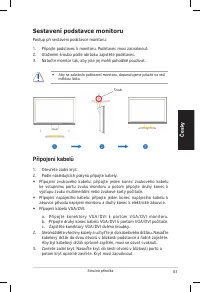
3 Če sk y Stručná příručka Připojení kabelů 1. Otevřete zadní kryt.2. Podle následujících pokynů připojte kabely:• Připojení zvukového kabelu: připojte jeden konec zvukového kabelu ke vstupnímu portu zvuku monitoru a potom připojte druhý konec k výstupu zvuku multimediální nebo zvukové karty počítač...
Page 86 - Nastavení monitoru
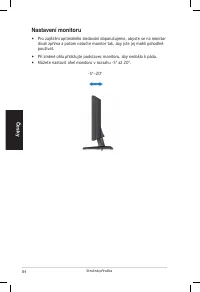
4 Če sk y Stručná příručka Nastavení monitoru • Pro zajištění optimálního sledování doporučujeme, abyste se na monitor dívali zpříma a potom natočte monitor tak, aby jste jej mohli pohodlně používat. • Při změně úhlu přidržujte podstavec monitoru, aby nedošlo k pádu.• Můžete nastavit úhel monitoru v...