ZOSI 8AL-2893W6-10-US-A3 - User Manual
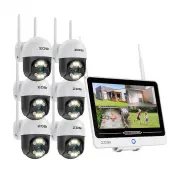
A Network Video Recorder (NVR) system is designed for comprehensive security monitoring, combining hardware components like cameras, recording units, and connectivity tools with software interfaces for remote access and management. This device covers essential topics such as setup–including physical connections of cameras, power supplies, and networking equipment–and configuring the system via a dedicated app or web interface. The manual also addresses core operational functions, including live viewing, playback, password security, time/date settings, and backup procedures to ensure reliable footage retention. Environmental safety and regulatory compliance are addressed for proper device handling and disposal.


Table of Contents:
- Page 1 – NVR System Contents and Components
- Page 2 – NVR System Setup and Connectivity
- Page 3 – System Access and Navigation
- Page 4 – System Menu and Login Information
- Page 5 – System Configuration Settings
- Page 6 – Video Footage Playback Features
- Page 7 – Video Playback Controls and Backup Procedure
- Page 8 – ZOSI Camera Specifications and Handling
- Page 9 – Compliance and Disposal Information
1
What
’
s in the box
Introduce the NVR
NOTE: The actual appearance and components may vary with different products, please
refer to the actual product.
Note: Products and accessories vary by product models, please refer to the actual product.
NVR
12V 2A Power Supply
USB Mouse
Ethernet Cable (1m)
HDMI Cable
Quick Start Guide
Quick Start Guide
Antenna
Bracket
12.5- inch Screen
Power Button
"Loading the manual" means you need to wait until the file loads and becomes available for online reading. Some manuals are very large, and the time they take to appear depends on your internet speed.
Was this manual helpful?
About this manual
- Brand
- ZOSI
- Model
- 8AL-2893W6-10-US-A3
- Document type
- User Manual
- Category
- Security Camera
- Language(s)
- English
- Pages
- 9
- File size
- 9.6 MB
- Format
Summary
Details of items included in the box, including the NVR unit, power supply, mouse, cables, and guide. Includes a diagram showing key NVR parts like the antenna, screen, power button, and bracket.
Step-by-step instructions for setting up the NVR system, detailing connections to the router, monitor, mouse, power supply, and IP cameras. Recommends powering on the NVR first for testing.
Instructions for accessing the system using a smartphone or PC, including downloading the application via QR codes or web links, and details on mouse operations for navigating the interface.
Ask a question
Related manuals
Popular ZOSI Security Cameras


More ZOSI Security Cameras models
 ZOSI 1AC-2612C-WS-A1 User Manual
 ZOSI 1NC-2965Y-W-US-A2 User Manual
 ZOSI 4AK-4192B-BS-US User Manual
 ZOSI 8VM-261W8S-20-US User Manual
 ZOSI 16HK-2965W8-40-US-A2 User Manual
 ZOSI 85V2-2204W8-US-A2 User Manual
 ZOSI IPC-1825A-W-A2 User Manual
 ZOSI ZSS-SP2 User Manual
 ZOSI ZSWNVK-A83041-B-US User Manual
 ZOSI ZSWNVK-J83082-W User Manual
 ZOSI 8SN-2258AB6-20-US1 User Manual
 ZOSI 1AC-2112B-WS-N User Manual