ZOSI 1NC-2965Y-W-US-A2 - User Manual
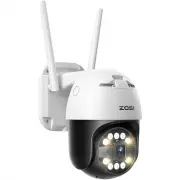
This Quick Guide covers the setup and basic operation of a smart security camera system, including its key components like lenses, sensors, power adapters, and mounting hardware. The document highlights essential topics such as installation best practices–including proper placement, weatherproofing, and avoiding interference–and explains how to configure connectivity (PoE or WiFi) via smartphone apps. It also addresses environmental safety requirements, compliance standards, and troubleshooting common issues like connection failures or motion detection problems. The guide emphasizes user-friendly setup while ensuring the camera functions reliably in outdoor environments.


Table of Contents:
- Page 1 – Quick Start Guide Introduction
- Page 2 – Terms of Use and Operational Precautions
- Page 3 – Package Contents Listing
- Page 4 – Camera Component Overview and Types
- Page 5 – Network Setup and Application Connection
- Page 6 – Outdoor Camera Installation Procedure
- Page 7 – Camera Mounting Guidelines
- Page 8 – Optimal Detection Range and Troubleshooting
- Page 9 – WiFi Camera Troubleshooting
- Page 10 – Compliance and Disposal Notice
Smart Camera
Quick Start Guide
This guide will get you going with your camera. For more details and information
of the camera, please contact us or your dealer.
"Loading the manual" means you need to wait until the file loads and becomes available for online reading. Some manuals are very large, and the time they take to appear depends on your internet speed.
Was this manual helpful?
About this manual
- Brand
- ZOSI
- Model
- 1NC-2965Y-W-US-A2
- Document type
- User Manual
- Category
- Security Camera
- Language(s)
- English
- Pages
- 10
- File size
- 1.1 MB
- Format
Summary
Introduction to the Smart Camera Quick Start Guide and contact information for further details.
Rules governing camera usage, environmental conditions, accessory requirements, safety warnings regarding water exposure, recording legality, and indicator meanings.
List of items included in the box, such as the camera, power adapter, mounting hardware, antennas, and optional cables.
Ask a question
Related manuals
Popular ZOSI Security Cameras


More ZOSI Security Cameras models
 ZOSI ZSWNVK-J83082-W User Manual
 ZOSI 8SN-2258AB6-20-US1 User Manual
 ZOSI 1AC-2112B-WS-N User Manual
 ZOSI 1AC-2612C-WS-A1 User Manual
 ZOSI 4AK-4192B-BS-US User Manual
 ZOSI 8AL-2893W6-10-US-A3 User Manual
 ZOSI 8VM-261W8S-20-US User Manual
 ZOSI 16HK-2965W8-40-US-A2 User Manual
 ZOSI 85V2-2204W8-US-A2 User Manual
 ZOSI IPC-1825A-W-A2 User Manual
 ZOSI ZSS-SP2 User Manual
 ZOSI ZSWNVK-A83041-B-US User Manual