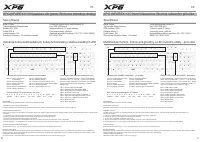
XPG Precog Analog - User Manual
A quick start guide for the XPG Precog Analog Gaming Headset covers its core design and essential connectivity features. The document highlights key components–such as the 3.5mm audio jack, detachable microphone, and ergonomic cushions–and explains how to pair it with PCs, laptops, and gaming consoles via analog cables or USB Type-C controllers. It emphasizes compatibility across multiple platforms while focusing on setup and basic operation rather than detailed troubleshooting.
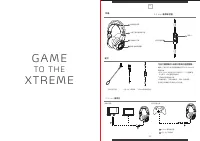
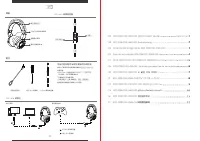

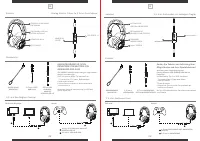
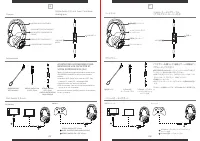
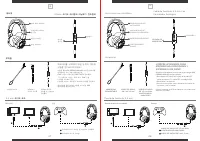
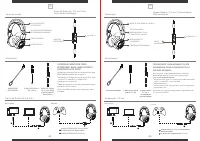
Table of Contents:
- Page 1 – Product Identification and Quick Start Guide
- Page 2 – Headset Components and Connectivity Options
- Page 3 – Quick Start Guide and Device Compatibility
- Page 4 – Analog Headset Connection Methods
- Page 5 – Headset Usage Instructions and Component Labeling
- Page 6 – Headset Features and Optional Accessories
- Page 7 – Connecting Headset with Microphone and Accessories
- Page 8 – Analog Headset Connection Instructions
Q U I C K
STA RT
G U I D E
XPG PRECOG ANALOG GAMING HEADSET
Q U I C K
STA RT
G U I D E
XTREME PERFORMANCE GEAR
www.xpg.com
"Loading the manual" means you need to wait until the file loads and becomes available for online reading. Some manuals are very large, and the time they take to appear depends on your internet speed.
Was this manual helpful?
About this manual
- Brand
- XPG
- Model
- Precog Analog
- Document type
- User Manual
- Category
- Headphones
- Language(s)
- German, English, Spanish, French, Russian
- Pages
- 8
- File size
- 2.4 MB
- Format
Summary
Cover page featuring the brand logo, product name, and identification details for the XPG Precog Analog Gaming Headset.
Details regarding headset components, 3.5mm audio jack, detachable microphone, Y-splitter cable, and connection methods using 3.5mm jacks or USB Type-C controllers for PCs and consoles.
Instructions for setting up the XPG PRECOG ANALOG headset, detailing components, 3.5mm jack connections, accessories, and connection setups for PCs and gaming consoles.