Whirlpool WUI75X15HB - Installation Manual
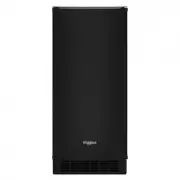
A repair manual for reversing or disassembling refrigerator doors, focusing on safety hazards like crush injuries and electrical risks. The instructions cover removing hinges, flipping components, reinstalling parts, and ensuring proper alignment–including warnings about self-closing mechanisms and exposed hardware. Key topics include door hinge reversal, panel reassembly, and final safety checks before reattaching components.


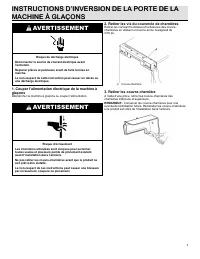
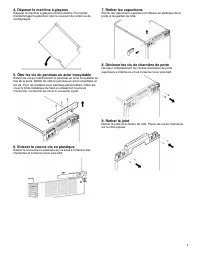
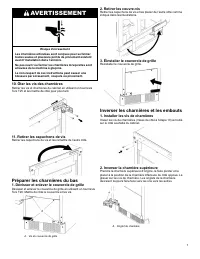
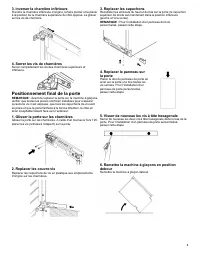
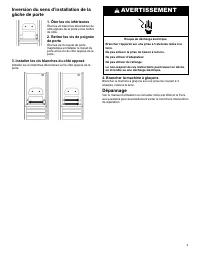




Table of Contents:
- Page 1 – Ice Maker Door Reversal and Removal Procedures
- Page 2 – Refrigerator Door Disassembly and Hinge Safety
- Page 3 – Refrigerator Door Hinge Reversal and Installation
- Page 4 – Ice Maker Reinstallation and Door Catch Adjustment
- Page 5 – Ice Machine Hinge Cover Removal Safety
- Page 6 – Freezer Door Disassembly Procedure
- Page 7 – Cabinet Hinge and Grille Cover Manipulation
- Page 8 – Snow Crusher Machine Door Installation
- Page 9 – Door Handle Reversal and Electrical Safety
- Page 10 – Ice Maker Door Direction Reversal
- Page 11 – Refrigerator Door Disassembly and Hinge Warnings
- Page 12 – Cabinet Hinge Reassembly Procedure
- Page 13 – Refrigerator Door Final Installation
- Page 14 – Refrigerator Lock Mechanism Inversion and Troubleshooting
1
IIC
CE
E M
MA
AK
KE
ER
R D
DO
OO
OR
R R
RE
EV
VE
ER
RS
SA
AL
L IIN
NS
ST
TR
RU
UC
CT
TIIO
ON
NS
S
WARNING
Electrical Shock Hazard
Disconnect power before servicing.
Replace all parts and panels before operating.
Failure to do so can result in death or electrical shock.
1. Disconnect power to ice maker
Unplug ice maker or disconnect power.
WARNING
Crush Hazard
Articulated hinges are self closing and many pinch points
exist prior to cabinet installation.
Do not remove hinge covers until product is ready to be
installed.
Failure to follow these instructions can result in crush, cut,
or pinch injuries.
2. Remove hinge cover screws
Remove the screws attaching top and bottom hinge covers using a
3/16ʺ hex driver.
A. Hinge cover
3. Remove hinge covers
Using pliers, remove the hinge covers from the top and bottom
hinges.
NOTE:
Save the hinge covers for future use. Reinstall the hinge
covers if product is removed from cabinet installation.
4. Lay down ice maker
Lay down the ice maker as shown in the illustration. Be sure to
cover the floor with cardboard or hardboard to avoid damaging
the floor.
5. Remove stainless steel panel screws
Remove the screws holding the stainless steel panel from the
bottom of the door. Set the stainless steel panel and screws
aside. For custom panel model, remove the screws and the top
metal bracket using the Phillips screwdriver. Set the screws and
bracket aside.
"Loading the manual" means you need to wait until the file loads and becomes available for online reading. Some manuals are very large, and the time they take to appear depends on your internet speed.
Was this manual helpful?
About this manual
- Brand
- Whirlpool
- Model
- WUI75X15HB
- Document type
- Installation Manual
- Category
- Ice Maker
- Language(s)
- English, Spanish, French
- Pages
- 16
- File size
- 1.3 MB
- Format
Other Manuals for Whirlpool WUI75X15HB
Summary
Step-by-step instructions for reversing the ice maker door, including safety warnings regarding electrical shock and crush hazards, and diagrams for removing hinge covers and laying down the unit.
Instructions for disassembling refrigerator door components, including removing screw covers, end caps, hinge screws, and the door itself, along with warnings about crush hazards from self-closing hinges.
Instructions for reversing refrigerator door hinges and end caps, flipping hinges to opposite positions, and properly installing the door, including checking for exposed screws and correct orientation.
Ask a question
Related manuals
More Whirlpool Ice Makers models


Other Whirlpool appliances
 Whirlpool 1 Manual
 Whirlpool 1CWTW4815EW1 Installation Manual
- Whirlpool 1CWTW4845EW1 Installation Manual
 Whirlpool 3 Manual
 Whirlpool 3LER5436EQ0 Manual
 Whirlpool 3LWED4815FW0 Installation Manual
 Whirlpool 3LWTW4740YQ Manual
 Whirlpool 3RGSC9400 Manual
 Whirlpool 4 Manual
 Whirlpool 4KWFE7685EW0 Installation Manual
 Whirlpool 8 Manual
 Whirlpool 015-0005 Manual
- Whirlpool 22 Manual
 Whirlpool 30 Manual
 Whirlpool 33 Manual
 Whirlpool 48" Manual
 Whirlpool 51 Manual