Whirlpool WTW6120HW - User Manual
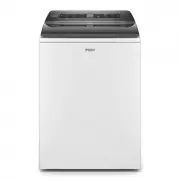
This user manual covers the Whirlpool top-loading washing machine’s core functionalities, including control panel operation–such as wash settings, cycle modifiers (spin, temperature, soil level), start/pause functions, and remote controls–and how to configure its smart features via the Whirlpool app. The guide also addresses key operational topics like loading laundry, adjusting water levels, managing detergent dispensers, and selecting appropriate wash cycles based on fabric type, supported by visual aids and cross-language references. Additionally, it highlights safety considerations (e.g., fire hazards) and troubleshooting support for maintenance, diagnostics, and connectivity to the appliance’s smart ecosystem. Customer service resources are also included for model identification, warranty inquiries, and technical assistance.


Table of Contents:
- Page 1 – Control Panel Functions Overview
- Page 2 – App Connection and Initial Operation Safety
- Page 3 – Loading and Dispensing Procedures
- Page 4 – Optimal Wash Cycle Selection Guide
- Page 5 – Control Panel Icon Reference
- Page 6 – Service and Support Information
- Page 7 – Detailed Control Panel Features
- Page 8 – Remote Operation and Safety Procedures
- Page 9 – Detergent Dispensing and Loading Techniques
- Page 10 – Wash Program Selection Chart
- Page 11 – Control Panel Status Icons Reference
- Page 12 – Customer Support and Service Options
- Page 13 – Cycle Status and Modifier Reference
- Page 14 – Smart Appliance Internet Operation
- Page 15 – Water and Detergent Dosing Procedures
- Page 16 – Wash Cycle Matching Guide
- Page 17 – Multi-lingual Control Panel Icon Reference
- Page 18 – Technical Support and Accessories
1
QUICK REFERENCE GUIDE
QUICK REFERENCE GUIDE
WHIRLPOOL
WHIRLPOOL
®
TOP LOADING WASHING MACHINE
TOP LOADING WASHING MACHINE
CONTROL PANEL AND FEATURE
POWER
Touch to turn on/off or to stop/cancel a cycle.
WHAT TO WASH/HOW TO WASH
First select a cycle from the “What to Wash” and then select the
“How to Wash” to get the best combination cycle available for
the type of items you are going to wash. See “Cycle Guide” for
cycle details.
LCD TIME/STATUS DISPLAY
The display shows the time required for the cycle to complete.
Factors such as load size and water pressure may affect the
time shown in the display. Tightly packed loads, unbalanced
loads, or excessive suds may cause the washer to adjust the
cycle time as well.
If you have set a delay start to the cycle, the display will show
the delay time adjusted.
ADD GARMENT
When Add Garment is lit, you may pause the cycle, open the
lid, and add items. Touch and hold the START/PAUSE button to
start the cycle again.
START/PAUSE
Touch and hold the START/PAUSE to start cycle. Touch during
a cycle to pause cycle and unlock lid.
NOTE:
If machine is spinning it may take longer to unlock lid.
CYCLE MODIFIERS
(Not all modifiers are available on all
cycles)
SPIN
Touch to modify the cycle’s available spin speeds (Off, Medium,
Fast).
TEMP
Touch to modify the cycle’s available water temperatures
(Tap Cold, Cold, Cool, Warm, Hot).
SOIL
Touch to modify the cycle’s available soil levels. Increase soil
level for heavily soiled items and decrease soil level for lightly
soiled items (Extra Light, Light, Normal, Heavy, Extra Heavy).
1
2
3
4
5
W11445523A
1
4
2
6
5
6
3
CYCLE OPTIONS
(Not all options are available on all cycles)
REMOTE ENABLE
Touch each time you want to remotely control via the Whirlpool
®
app. Follow the instructions in the “GET THE WHIRLPOOL
®
APP AND GET CONNECTED” section below for more details.
Opening the lid cancels “remote enable”.
LOAD & GO™ Bulk Dispenser
The Load & Go
dispenser holds 1L of detergent and
determines the best time and amount to add detergent to the
load. See “Using the Dispensers” section for more information.
FABRIC SOFTENER
Touch “Fabric Softener” button to let the machine know when
you have added fabric softener to the appropriate dispenser.
DEEP WATER
Touch “Deep Water” button to add more water to the washer
from the cycle’s auto sensed level (Auto, Medium, High, Max Fill).
NOTE:
Expect longer cycle times due to extended fill times when
using the Deep Water option.
DELAY START
Touch to delay the start of the wash cycle for up to 12 hours.
PRESOAK
Touch to add a presoak period to any cycle to help loosen tough
stains. The washer will fill, pause to soak, and then begin the
selected cycle (15 mins, 30 mins, 60 mins, 120 mins).
EXTRA RINSE
Touch to automatically add a second rinse available on most
cycles.
CYCLE SIGNAL
Touch to turn the end of cycle signal on/off and adjust the tone
volume when a button is touched.
MORE OPTIONS
■
Drain & Spin
■
Rinse & Spin
■
Clean Washer with affresh
®
■
Favorite Cycle
6
Appearance may vary depending on model.
"Loading the manual" means you need to wait until the file loads and becomes available for online reading. Some manuals are very large, and the time they take to appear depends on your internet speed.
Was this manual helpful?
About this manual
- Brand
- Whirlpool
- Model
- WTW6120HW
- Document type
- User Manual
- Category
- Washing Machine
- Language(s)
- English, Spanish, French
- Pages
- 20
- File size
- 7.7 MB
- Format
Other Manuals for Whirlpool WTW6120HW
Summary
Reference guide detailing functions of control panel buttons and display areas, including power, wash settings, cycle modifiers, start/pause, and additional options.
Instructions for connecting the appliance to an application, basic operating steps, and critical fire hazard warnings.
Guidance on loading laundry, adjusting water levels, operating the faucet, using the fabric brush, and managing the detergent dispenser.
Ask a question
Related manuals
Popular Whirlpool Washing Machines


More Whirlpool Washing Machines models
 Whirlpool WTW5015LW User Manual
 Whirlpool WTW5057LW User Manual
 Whirlpool WTW5100HC User Manual
 Whirlpool WTW5100HW User Manual
 Whirlpool WTW5105HC User Manual
 Whirlpool WTW5105HW User Manual
 Whirlpool WTW6150PB Manual
 Whirlpool WTW6150PW Manual
 Whirlpool WTW7120HW User Manual
 Whirlpool WTW8127LC User Manual
 Whirlpool WTW8127LW User Manual
 Whirlpool WWEB9602IW User Manual