Whirlpool FSCR12420 - User Manual
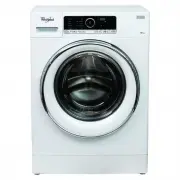
This user manual covers a Whirlpool washing machine’s core functions, including program selection, detergent management, and operational best practices. The guide highlights key areas like fabric-specific wash settings–such as temperature, spin speed, and prewash options–and energy/water efficiency ratings tied to Australian standards. It also addresses daily use details, such as loading laundry, detergent dispensing, and troubleshooting common issues (e.g., filter clogs or indicator lights). Safety and maintenance tips, like cleaning the water filter and sorting clothes by care labels, are included to ensure proper operation and longevity.


Table of Contents:
- Page 1 – Daily Reference Guide and Component Identification
- Page 2 – Detergent Dispenser and First-Time Operation
- Page 3 – Setting and Modifying Wash Programs
- Page 4 – Post-Cycle Procedures and Maintenance Tips
- Page 5 – Wash Programme Chart and Load Specifications
- Page 6 – Programme Consumption and Duration Data
- Page 7 – Advanced Wash Options and Detergent Management
- Page 8 – Machine Functions and Error Indicators
EN
1
DAILY REFERENCE
GUIDE
THANK YOU FOR PURCHASING A
WHIRLPOOL PRODUCT
To receive more comprehensive help and
support, please register your product at
www.whirlpool.com.au
WWW
You can download the Safety Instructions
and the Use and Care Guide by visiting our
website
http://docs.whirlpool.eu
and following
the instructions on the back of this booklet.
Before using the appliance carefully read the
Health and Safety guide.
Before using the machine, it is imperative that the
transport bolts are removed.
For more detailed instructions on how to remove
them, see the Installation Guide.
PRODUCT DESCRIPTION
CONTROL PANEL
APPLIANCE
1.
On/Off button
(Reset/Drain if pressed
and held down)
2.
Programme button
3.
Colours 15° button
4.
Fresh Care button
5.
Dosing Aid button
6.
Knob (Turn to select/
Press to confirm)
7.
Start delay button
8.
Temperature button
9.
Spin Speed button
10.
Options button
(Key lock if pressed and
held down)
11.
Start / Pause button
12.
Display
13.
Programmes area
1.
Worktop
2.
Detergent dispenser
3.
Control panel
4.
Door handle
5.
Door
6.
Water filter/
emergency drain hose
(if available) - behind
plinth -
7.
Plinth (removable)
8.
Adjustable feet (4)
MAX
30’
1.
7.
2.
13.
12.
6.
8.
4.
10.
3.
9.
5.
11.
1.
3.
2.
5.
7.
6.
8.
4.
"Loading the manual" means you need to wait until the file loads and becomes available for online reading. Some manuals are very large, and the time they take to appear depends on your internet speed.
Was this manual helpful?
About this manual
- Brand
- Whirlpool
- Model
- FSCR12420
- Document type
- User Manual
- Category
- Washing Machine
- Language(s)
- English
- Pages
- 8
- File size
- 4.2 MB
- Format
Summary
Labeled diagram of the machine exterior and control panel components, including worktop, door, detergent dispenser, and operational buttons like On/Off, Programme, Start/Pause. Includes safety guidance.
Instructions for using the detergent dispenser compartments, detergent recommendations based on laundry type, and procedures for first-time use and daily operation, including loading and starting the machine.
Details on setting wash programs using guided mode for selecting temperature, spin speed, and options, as well as individual mode. Covers adding detergent, managing cycle settings mid-cycle, and resetting programs.
Ask a question
Related manuals
Popular Whirlpool Washing Machines


More Whirlpool Washing Machines models
 Whirlpool CAE2795FQ User Manual
 Whirlpool CHW9150GW User Manual
 Whirlpool CHW9160GW User Manual
 Whirlpool FDLR70210 User Manual
 Whirlpool FDLR80210 User Manual
 Whirlpool FDLR80250 User Manual
 Whirlpool WB10037 User Manual
 Whirlpool WB70803 User Manual
 Whirlpool WET4024HW User Manual
 Whirlpool WET4027HW Manual
 Whirlpool WET4124HW User Manual
 Whirlpool WETLV27HW User Manual