Westinghouse WVG6314SD - User Manual
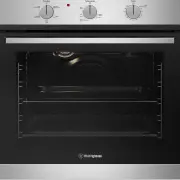
A Quick Guide for the Westinghouse WV6314 oven series covers essential setup and operation basics, including appliance registration via QR code and initial readiness confirmation. The document also outlines key functional areas like control panel layout–such as function selector, temperature controls, and auto-off timers–and provides instructions for installing accessories like side racks or shelves. Additionally, it explains core cooking modes (fan-forced, grill, defrost) and their operational workflows, including preheating, temperature settings, and timer configurations.


Quick Start Guide
WVG6314 oven series
Ready
Set...
Before you start, please make sure:
Your oven has been correctly installed by a qualified person.
Your oven has power and is switched on.
You’ve removed all relevant packaging.
Get to know your oven control panel:
To access your detailed user manual online, simply scan the QR code on your smart phone.
For more detailed information and installation guide refer to user manuals
at westinghouse.com.au/manuals
Quick Start Guide
WVG6314 oven series
and WESTINGHOUSE are trademarks of Westinghouse Electric Corporation. Used under license by Electrolux Home Products Pty Ltd. All Rights Reserved.
© 2023 Electrolux Home Products Pty Ltd. ABN 51 004 762 341 W_QSG_WVG6314_A4_Feb23 ANC A26700001 RevA (Assy ANC A26721501 RevA)
Auto off timer
Oven/grill
temperature
selector
Function selector
This is a Quick Start Guide. Please refer to user manual
online for detailed information and installation
Most of the packaging
materials can be recycled.
Please dispose of them at
your local recycling centre
or in your own recycling bin.
Dear Customer,
Thank you for purchasing a Westinghouse oven. You have chosen a product that comes
from a history of durable and reliable products loved by many families. We look to help
you make the most of your time at home, so you can spend your time doing what you
really love, with the ones you love.
Welcome to Westinghouse.
Electrolux Home Products Australia
telephone:
13 13 49
email: [email protected]
web: electrolux.com.au
Electrolux Home Products New Zealand
telephone:
0800 436 245
email: [email protected]
web: electrolux.co.nz
Contact us if you need more help
Customer Care Centre
Need more help?
To access your detailed user manual online, simply scan the
QR code on your smart phone. If you prefer a printed manual,
please contact our Customer Care Centre using details below.
Enjoy peace of mind.
Register your appliance today.
Stay updated on better living services, safety notices and shop for accessories.
1. Open the camera app on your smartphone and point at the QR code to scan
Product Registration QR code is located on the front of your appliance or
inside the door rim*.
2. Tap the notification or link to open the registration form
3. Complete your details and enjoy peace of mind
*Exact location of QR code may vary depending on oven model
"Loading the manual" means you need to wait until the file loads and becomes available for online reading. Some manuals are very large, and the time they take to appear depends on your internet speed.
Was this manual helpful?
About this manual
- Brand
- Westinghouse
- Model
- WVG6314SD
- Document type
- User Manual
- Category
- Oven
- Language(s)
- English
- Pages
- 2
- File size
- 685.7 KB
- Format
Ask a question
Related manuals
Popular Westinghouse Ovens


More Westinghouse Ovens models
 Westinghouse WVEP6716SD User Manual
 Westinghouse WVEP6717DD User Manual
 Westinghouse WVEP6727DD User Manual
 Westinghouse WVEP6918DD User Manual
 Westinghouse WVEP9716SD User Manual
 Westinghouse WVEP9917DD User Manual
 Westinghouse WVG6565SD User Manual
 Westinghouse GOR474SLPG User Manual
 Westinghouse GXR650WLPG User Manual
 Westinghouse PDR790S User Manual
 Westinghouse PGR659S User Manual
 Westinghouse POR663S User Manual