Page 2 - WARNING; WARNING; CAUTION; ENVIRONMENTAL TIPS; ENVIRONMENT; Conditions of use; CONTENTS
2 CONGRATULATIONS Please read the user manual carefully and store in a handy place for later reference. The symbols you will see in this booklet have these meanings: WARNING WARNING This symbol indicates information concerning your personal safety. WARNING CAUTION This symbol indicates information o...
Page 3 - Installation, cleaning and servicing; General warnings; IMPORTANT SAFETY INSTRUCTIONS; IMPORTANT INFORMATION THAT MAY IMPACT
3 IMPORTANT SAfETy INSTRUCTIONS Installation, cleaning and servicing • An authorised person must install this appliance. (Certificate of Compliance to be retained). • Before using the appliance, ensure that all packing materials are removed from the appliance. • In order to avoid any potential hazar...
Page 4 - Oven; Child safety
4 IMPORTANT SAfETy INSTRUCTIONS WARNING WARNING Oven • During use the appliance becomes hot. Care should be taken to avoid touching the hot surfaces inside the oven. • Switch the appliance off at the isolating switch before removing the oven light glass for globe replacement. • To avoid an accident,...
Page 5 - PRODUCT DESCRIPTION; Control Panel
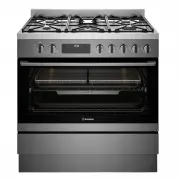
5 PRODUCT DESCRIPTION PRODUCT DESCRIPTION freestanding cooker with flame safeguard gas cooktop and multi-function electric oven Control Panel Model WFE9516DD Removable cast iron trivet Gas hob (Refer to Chapter ‘Get to know your cooktop’) Control panel Oven door Storage compartment (Selected model o...
Page 6 - Cabinet requirement; Gas model clearance requirements; INSTALLATION OF THE APPLIANCE
6 INSTALLATION Of ThE APPLIANCE Cabinet requirement Model WFE9516DD is designed to fit into a 900mm wide gap between standard kitchen cabinets. The appliance integrates with the kitchen cabinets by matching the height, depth and kick panel. The cooker may also be installed at the end of a line of ben...
Page 7 - Freestanding installation
7 INSTALLATION Of ThE APPLIANCE Freestanding installation Cabinet construction for freestanding installation The freestanding type installation requires four screw-in feet to be installed before it can be fitted in between cabinets, with cabinets on one side or without adjacent cabinets. There is no ...
Page 8 - Installation of screw-in feet; IMPORTANT; INSTALLATION OF THE APPLIANCE (CONTINUED)
8 INSTALLATION Of ThE APPLIANCE Freestanding installation (continued) Installation of screw-in feet • Freestanding appliance are supplied with four screw-in feet in the internal accessory pack. The screw-in feet can be adjusted by turning the lower half clockwise or anti-clockwise. TIPS & INFORM...
Page 9 - Leveling oven
9 INSTALLATION Of ThE APPLIANCE Bench height + 10mm minimum If your kitchen has a 900mm height kitchen bench top, follow the quick measurement guide below before putting the cooker upright For a 900mm height kitchen bench top, adjust the lower half of the feet to measure 50mm as shown in the illustr...
Page 10 - Installation the anti-tilt brackets
10 INSTALLATION Of ThE APPLIANCE Freestanding installation (continued) Installation the anti-tilt brackets To ensure cooker stability, the anti-tilt brackets must be installed.There are left and right engagement slots for the anti-tilt bracket at the bottom rear of the appliance. The following steps...
Page 12 - Installing the clip-on kick panel
12 INSTALLATION Of ThE APPLIANCE Freestanding installation (continued) • Connect services to the appliance prior to placing into cavity. • To locate appliance, slide into cavity ensuring the anti-tilt brackets fully engaged with the rear left and right engagement slots. • The unit must be pushed aga...
Page 16 - WIRING REQUIREMENTS; For New Zealand Only:; Rated power input; Connecting to services and commissioning; Hard wiring detail
16 WIRING REqUIREMENTS WIRING REQUIREMENTS The cooker MUST be installed in compliance with: • Wiring connections in AS/NZS 3000 Wiring Rules. • Local regulations, municipal building codes and other statutory regulations. For New Zealand Only: The cooking range must be connected to the supply by a su...
Page 17 - INSTALLING THE FREESTANDING COOKER; Checking piping size; Gas pressures; Injectors
17 INSTALLING ThE fREESTANDING COOKER INSTALLING THE FREESTANDING COOKER Checking piping size To work out a suitable pipe size for connection use the information in this table. GAS TyPE NATURAL GAS UNIVERSAL LPG WFE9516DD 54.2MJ/h 45.5MJ/h For information and requirements about construction and capa...
Page 18 - LPG CONVERSION GAS COOKTOP MODEL
18 LPG CONVERSION GAS COOKTOP MODEL LPG CONVERSION GAS COOKTOP MODEL A conversion kit is included with the product for Universal LPG usage. The conversion kit contains 5 or 7 injectors (refer to LPG conversion table) and 1 LPG sticker.Please follow the procedure below if a conversion to suit UNIVERS...
Page 19 - TESTING THE OPERATION OF THE GAS COOKER; Checking gas supply
19 TESTING ThE OPERATION Of ThE GAS COOKER TESTING THE OPERATION OF THE GAS COOKER Checking gas supply 1. Check the manometer zero point is correct. 2. Connect the manometer to the cooker pressure test point. This is located on the regulator or LPG inlet fitting. 3. Turn on the gas supply and the el...
Page 20 - BEFORE OPERATING YOUR APPLIANCE FOR THE FIRST TIME; Preparing your appliance for the first time
20 BEfORE OPERATING yOUR APPLIANCE fOR ThE fIRST TIME BEFORE OPERATING YOUR APPLIANCE FOR THE FIRST TIME Preparing your appliance for the first time • Please remove all internal boxes and bags from the oven before operation. • Please wipe out the oven interior prior to operation with warm soapy wate...
Page 21 - INSTALLING YOUR OVEN ACCESSORIES; Installing the slides (telescopic runners); Fitting grill dish and insert
21 INSTALLING yOUR OVEN ACCESSORIES INSTALLING YOUR OVEN ACCESSORIES Slides (telescopic runners) 1. The selected models are supplied with a set of slides and instructions on how to assemble. Ensure the rack and slides are of the same hand. E.g. left hand slide should be fitted on the left hand rack....
Page 22 - Trivet installation sequence; INSTALLING BURNERS AND TRIVETS; Installing burners; Installing trivets
22 INSTALLING BURNERS AND TRIVETS Trivet installation sequence Install the middle trivet first by aligning the trivet with the wok burner and gently placing the trivet on hob. The middle trivet is designed to guide the location of the side trivets. Gently place the side trivets in the orientation sh...
Page 23 - GETTING TO KNOW YOUR COOKTOP; Using your gas hot plates
23 GETTING TO KNOW yOUR COOKTOP GETTING TO KNOW YOUR COOKTOP Model WFE9516DD 2 1 4 3 1. Low heat burner (5.1MJ/h) Used for simmering with small cookware items. 2. Medium heat burner (9.0MJ/h) Used for normal cooking and simmering with mid size cookware items. 3. High heat burner (12.1MJ/h) Used for ...
Page 24 - USING YOUR OVEN
24 USING yOUR OVEN USING YOUR OVEN Understanding your oven functions Fan Bake Heat comes from the elements surrounding the fans. The fans circulate the hot air around the oven cavity so that you can put your food in different places in the oven and still cook them at the same time. You can use the “...
Page 25 - Condensation; OPERATING SEQUENCE; Rapid Heat; On completion of cooking
25 USING yOUR OVEN Cooling/Venting fan Your built-in appliance is fitted with a cooling fan. This prevents your kitchen cabinet from overheating and reduces the condensation inside the oven. It will operate whenever you are using your oven or grill and will blow warm air across the top of the oven d...
Page 27 - Get to know your new oven with this; COOKING TEST; Oven shelf location
27 USING yOUR OVEN Get to know your new oven with this ‘Simple Test Cake’ Although we strive for a perfect performing oven, it’s possible that there will be some variation in colour when baking. Therefore, we suggest this simple, easy and delicious to make Simple Test Cake, it can help you understan...
Page 28 - Choosing the best oven settings; COOKING GUIDE
28 COOKING GUIDE Choosing the best oven settings The following table is intended as a guide and experience may show some variation in cooking times necessary to meet individual requirements. We recommend that you preheat your oven for 30 minutes. Modes without Oven Fan fOOD TEMPERATURE ˚C OVEN ShELf...
Page 29 - Air Fry Cooking (for applicable models only); To Set the Air Fry Function:; AirFry Cooking Guide
29 COOKING GUIDE Air Fry Cooking (for applicable models only) The Air Fry feature works best for single shelf baking. Air Fry is suitable for French Fries, Chicken Wings, Chicken Nuggets and similar products, See settings in the table below: TIPS & INFORMATION IMPORTANT • Air Fry is designed for...
Page 30 - Grilling Guide; Grilling is conducted with the oven door closed
30 COOKING GUIDE (CONTINUED) Grilling Guide WARNING WARNING Always clean the grill/oven dish after every use. Excessive fat build up may cause a fire. Grilling is conducted with the oven door closed As a method of cooking, grilling can be used to:• Enhance the flavours of vegetables, fish, poultry a...
Page 31 - DEALING WITH COOKING PROBLEMS
31 DEALING WITh COOKING PROBLEMS (see also TROUBLESHOOTING) PROBLEM CAUSES REMEDIES Uneven cooking: • Incorrect shelf position. • Oven tray too large.• Trays not centralised.• Air flow in oven uneven.• Grill dish affecting thermostat. – Select shelf that puts food in the centre of the oven. – Experi...
Page 32 - CLEANING YOUR OVEN
32 CLEANING yOUR OVEN WARNING WARNING • Always make sure that the oven is electrically isolated before cleaning. This can be done by the functional switch nearby. • Do not line the bottom of the oven with foil or cookware. • Do not use steam cleaners. Stainless steel WARNING WARNING • The oven door ...
Page 33 - Ensure the appliance is off and cool before cleaning.; Harsh abrasive cleaners, powder; Trivets and burners; These can all be lifted off and removed for separate cleaning.; Ignition spark plug and flame safeguard sensor; GENTLY; Ensure that they are dry before use.
33 CLEANING yOUR OVEN CAUTION Ensure the appliance is off and cool before cleaning. Enamel (on burner skirts and trivets) Persistent stains may require rubbing with a nylon scourer or creamed powder cleansers. Household enamel cleaners are available, follow the manufacturer’s instructions in their u...
Page 34 - Removing the trays and shelves from your; CLEANING YOUR OVEN ACCESSORIES
34 CLEANING yOUR OVEN Removing the trays and shelves from your appliance • Slide the dish and grill tray towards you until they reach the front stop. • Tilt them up at the front to clear the side supports, taking care not to spill the contents. • Lift them clear. • Wash the tray and shelves in hot s...
Page 35 - Cleaning your oven door; Changing the light globes
35 CLEANING yOUR OVEN Cleaning your oven door WARNING WARNING • DO NOT use the oven without the inner and middle door glass fitted. • NEVER spray any caustic cleaners on any surface of the door or damage to the surface coatings will result. • DO NOT use metal utensils, scrapers, scourers, or abrasiv...
Page 36 - STEAM ASSISTED CLEANING; Steam Assisted Clean; OFF; Cleaning the cavity well
36 CLEANING yOUR OVEN STEAM ASSISTED CLEANING Steam Assisted Clean This function assists in the removal of food residue from inside the oven. This method is effective in removing light soiling only. It is not effective in removing stubborn baked-on stains. This function can only be used when the ove...
Page 37 - TROUBLESHOOTING; Faults
37 TROUBLEShOOTING TROUBLESHOOTING Faults If there is a problem with the oven and/or grill, please: • Check the points listed below before calling for service. It may be possible to avoid a call by fixing the problem yourself – and so continue cooking. PROBLEM POSSIBLE CAUSE WhAT TO DO Oven or grill...
Page 38 - Further information
38 TROUBLEShOOTING (CONTINUED) Further information When you need information, service or replacement parts or have a warranty enquiry, please contact the Customer Care Centre: • Australia - 13 13 49, 8.00am - 5.00pm EST Monday to Friday • New Zealand - 0800 10 66 10, 8.00am - 5.00pm EST Monday to Fr...
Page 39 - Warranty; Important Notice; AUSTRALIA; NEW ZEALAND
39 WARRANTy This document sets out the terms and conditions of the product warranties for Westinghouse Appliances. It is an important document. Please keep it with your proof of purchase documents in a safe place for future reference should there be a manufacturing defect in your Appliance. This war...


 Westinghouse WFE916DSD User Manual
 Westinghouse WFE916SA User Manual
 Westinghouse WFE946SA User Manual
 Westinghouse WFE946SB User Manual
 Westinghouse WFE946SD User Manual
 Westinghouse WFE9515SD User Manual
 Westinghouse WFE9546SD User Manual
 Westinghouse WFEP9717DD User Manual
 Westinghouse WLE525WA User Manual
 Westinghouse WLE525WB User Manual
 Westinghouse WLE547WA User Manual
 Westinghouse WVE613S User Manual