Page 2 - MANUAL INSTRUCTION
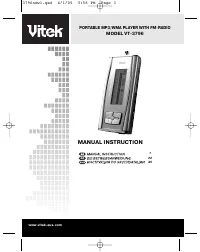
PORTABLE MP3/WMA PLAYER WITH FM-RADIO MODEL VT-3796 MANUAL INSTRUCTION www.vitek-aus.com 1 22 45 3796new1.qxd 4/1/05 5:56 PM Page 3
Page 5 - IMPORTANT TECHNICAL SAFETY RECOMMENDATIONS; SAFETY MEASURES; About 8 hours; Battery life (in accordance with EIAJ standards)
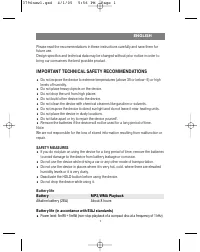
Please read the recommendations in these instructions carefully and save them forfuture use.Design specifics and technical data may be changed without prior notice in order tobring our consumers the best possible product. IMPORTANT TECHNICAL SAFETY RECOMMENDATIONS Do not expose the device to extreme...
Page 6 - PLAYER FUNCTIONS AND CONTROL ELEMENTS; Accessories
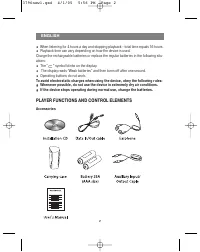
When listening for 4 hours a day and stopping playback - total time equals 16 hours. Playback time can vary depending on how the device is used. Charge the rechargeable batteries or replace the regular batteries in the following situ-ations: The " " symbol blinks on the display. The display ...
Page 7 - CONTROL ELEMENTS; Front / Rear panel Side panel; POWER; REC
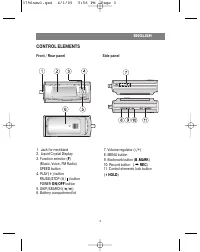
3 CONTROL ELEMENTS Front / Rear panel Side panel 1. Jack for neckband2. Liquid Crystal Display3. Function selector ( F ) (Music, Voice, FM Radio)SPEED button 4. PLAY ( ) button PAUSE/STOP ( / ) button POWER ON/OFF button 5. SKIP/SEARCH ( / ) 6. Battery compartment lid 7. Volume regulator ( -/+ ) 8. ...
Page 9 - Installing the battery; SYSTEM REQUIREMENTS; Operating characteristics
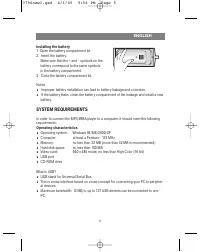
Installing the battery 1. Open the battery compartment lid.2. Insert the battery. Make sure that the + and - symbols on the battery correspond to the same symbolsin the battery compartment. 3. Close the battery compartment lid. Notes Improper battery installation can lead to battery leakage and corr...
Page 10 - Connecting the MP3/WMA player to a computer; Connect the player to the computer using the supplied USB cable.; ENGLISH
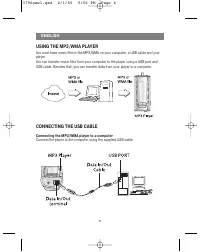
USING THE MP3/WMA PLAYER You must have music files in the MP3/WMA on your computer, a USB cable and yourplayer.You can transfer music files from your computer to the player using a USB port andUSB cable. Besides that, you can transfer data from your player to a computer. CONNECTING THE USB CABLE Con...
Page 11 - BEFORE USING; Turning the unit On/Off
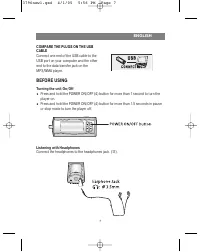
COMPARE THE PLUGS ON THE USBCABLE Connect one end of the USB cable to theUSB port on your computer and the otherend to the data transfer jack on theMP3/WMA player. BEFORE USING Turning the unit On/Off Press and hold the POWER ON/OFF (4) button for more than 1 second to turn theplayer on. Press and h...
Page 12 - Hold function; Before using the player; HOLD; You can adjust the volume using the (; For your reference
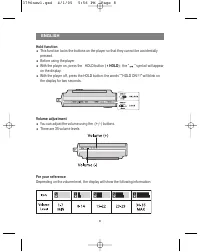
Hold function This function locks the buttons on the player so that they cannot be accidentallypressed. Before using the player With the player on, press the HOLD button ( HOLD ); the " " symbol will appear on the display. With the player off, press the HOLD button; the words ""HOLD ...
Page 13 - USING THE PLAYER; Press the Power On/Off button to turn the player on.; Pausing file playback; you may notice a delay when pressing buttons.; Skipping to the next or previous file; ) button twice to skip to the previous file.
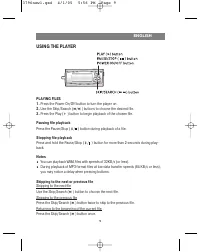
USING THE PLAYER PLAYING FILES1. Press the Power On/Off button to turn the player on. 2. Use the Skip/Search ( / ) buttons to choose the desired file. 3. Press the Play ( ) button to begin playback of the chosen file. Pausing file playback Press the Pause/Stop ( / ) button during playback of a file....
Page 14 - ADDITIONAL FUNCTIONS; Bookmarks
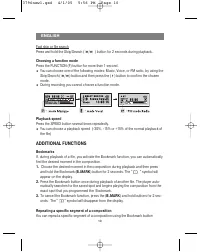
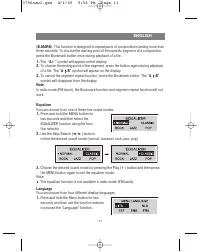
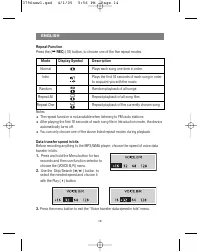
Fast skip or file searchPress and hold the Skip/Search ( / ) button for 2 seconds during playback. Choosing a function mode Press the FUNCTION (F) button for more than 1 second. You can choose one of the following modes: Music, Voice, or FM radio, by using theSkip/Search ( / ) button and then press ...
Page 17 - Notes; Backlight; ) button to program the desired color and then press Menu to exit; Dictaphone Function
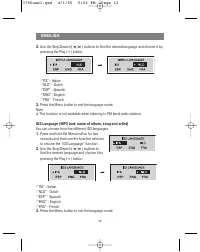
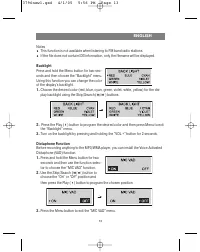
Notes This function is not available when listening to FM band radio stations. If the file does not contain ID3 information, only the filename will be displayed. Backlight Press and hold the Menu button for two sec-onds and then choose the “Backlight” menu.Using this function you can change the colo...
Page 19 - Speed of data recording from line input; Press and hold the Menu button for two
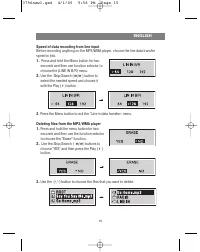
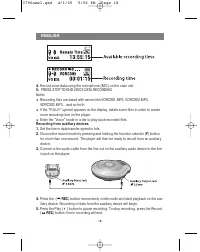
Speed of data recording from line input Before recording anything on the MP3/WMA player, choose the line data transferspeed in bits. 1. Press and hold the Menu button for two seconds and then use function selector tochoose the (LINE IN B/R) menu. 2. Use the Skip/Search ( / ) button to select the nee...
Page 21 - Checking the memory level and the operating system version; choose the desired position and then press Play (
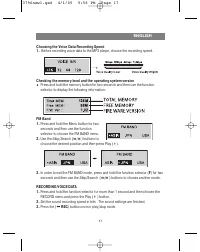
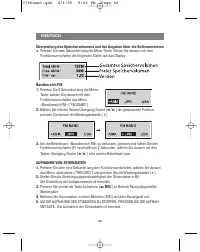
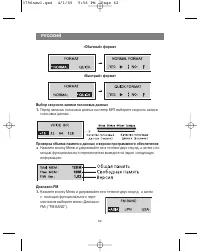
Choosing the Voice Data Recording Speed1. Before recording voice data to the MP3 player, choose the recording speed. Checking the memory level and the operating system version Press and hold the memory button for two seconds and then use the functionselector to display the following information: FM ...
Page 25 - SPECIFICATION; GUARANTEE
Enter the “Radio” folder to play back recorded files. TROUBLESHOOTING1. The MP3 player doesn't work or nothing appears on the display. - Check the polarity of the installed battery. 2. The buttons don't work - Make sure the button block function is not activated.- The battery is missing or weak. 3. ...
Page 26 - WICHTIGE SICHERHEITSANWEISUNGEN; VORSICHTSMASSNAHMEN
22 Lesen Sie bitte aufmerksam die Anweisungen dieser Anleitung durch und bewahrenSie sie auf. Die Bau-und Kenndaten können zwecks Verbesserung ohne Vorbescheid geändertwerden. WICHTIGE SICHERHEITSANWEISUNGEN Schützen Sie das Gerät vor der Einwirkung von hohen oder niedrigen Temperaturen(über 35 oder...
Page 27 - Etwa 8 Stunden; DEUTSCH
Lebensdauer der Batterien Batterie Wiedergabe MP3/WMA Alkalibatterie (2EA) Etwa 8 Stunden Betriebsdauer der Batterien (nach dem EIAJ-Standard) Leistungskraft: 5mW + 5mW (ununterbrochene Wiedergabe der CD mit Frequenz 1 kHz) Beim 4 Stunden langem Anhören pro Tag mit Übergang in den Stoppbetrieb derWi...
Page 28 - Installations-CD USB-Kabel Kopfhörer
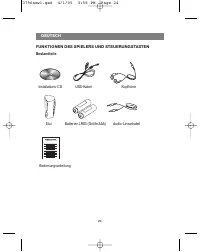
FUNKTIONEN DES SPIELERS UND STEUERUNGSTASTEN Bestandteile DEUTSCH 24 Installations-CD USB-Kabel Kopfhörer Etui Batterien LR03 (Größe AAA) Audio-Linearkabel Bedienungsanleitung 3796new1.qxd 4/1/05 5:56 PM Page 24
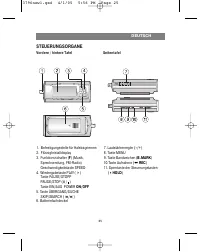
Page 29 - STEUERUNGSORGANE; Vordere / hintere Tafel Seitentafel; Sperrtaste der Steuerungstasten
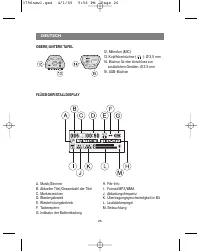
STEUERUNGSORGANE Vordere / hintere Tafel Seitentafel DEUTSCH 25 1. Befestigungsstelle für Halstragriemen2. Flüssigkristalldisplay3. Funktionsschalter ( F ) (Musik, Sprechsendung, FM-Radio)Geschwindigkeitstaste SPEED 4. Wiedergabetaste PLAY ( ) Taste PAUSE/STOPP PAUSE/STOP ( / ) Taste EIN/AUS POWER O...
Page 31 - SYSTEMFORDERUNGEN; Betriebsdaten
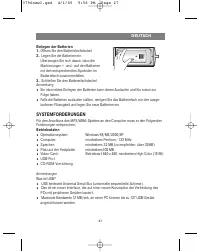
Einlegen der Batterien1. Öffnen Sie den Batteriefachdeckel. 2. Legen Sie die Batterien ein. Überzeugen Sie sich davon, dass die Markierungen + und - auf den Batterienmit den entsprechenden Symbolen imBatteriefach zusammenfallen. 3. Schließen Sie den Batteriefachdeckel Anmerkung Ein inkorrektes Einle...
Page 32 - ANSCHLUSS DES USB-KABELS
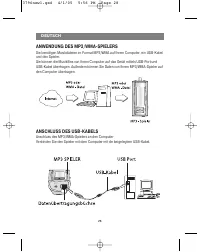
ANWENDUNG DES MP3/WMA-SPIELERS Sie benötigen Musikdateien im Format MP3/WMA auf Ihrem Computer, ein USB-Kabelund den Spieler.Sie können die Musikfiles von Ihrem Computer auf das Gerät mittels USB-Port undUSB-Kabel übertragen. Außerdem können Sie Daten von Ihrem MP3/WMA-Spieler aufden Computer übertr...
Page 33 - VERGLEICHEN SIEDIE STECKER DES USB-KABELS; VOR DER ANWENDUNG; Einschalten/Ausschalten
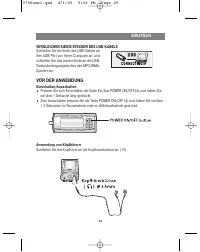
VERGLEICHEN SIEDIE STECKER DES USB-KABELS Schließen Sie ein Ende des USB-Kabels anden USB-Port von Ihrem Computer an, undschließen Sie das andere Ende an die USB-Datenübertragungsbüchse des MP3/WMA-Spielers an. VOR DER ANWENDUNG Einschalten/Ausschalten Pressen Sie zum Einschalten die Taste Ein/Aus P...
Page 34 - SPERRFUNKTION; Pressen Sie bei eingeschaltetem Gerät die Sperrtaste (; Es sind 35 Lautstärkestufen vorgesehen.; Zur Information
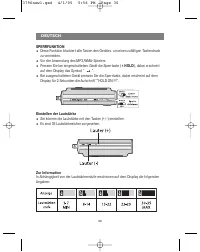
SPERRFUNKTION Diese Funktion blockiert alle Tasten des Gerätes, um einen zufälligen Tastendruckzu vermeiden. Vor der Anwendung des MP3/WMA-Spielers Pressen Sie bei eingeschaltetem Gerät die Sperrtaste ( HOLD ), dabei erscheint auf dem Display das Symbol " ". Bei ausgeschaltetem Gerät pressen...
Page 36 - Zurück zu Anfang des laufenden Files; Pressen Sie einmal die Taste Übergang/Suche (; Schnellübergang oder Filesuche; ) und halten Sie sie i; Funktionsbetriebwahl; Pressen Sie die Taste FUNCTION (; Wiedergabegeschwindigkeit; ZUSÄTZLICHE FUNKTIONEN; Bandmarkierung
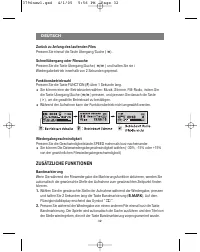
Zurück zu Anfang des laufenden Files Pressen Sie einmal die Taste Übergang/Suche ( ). Schnellübergang oder Filesuche Pressen Sie die Taste Übergang/Suche ( / ) und halten Sie sie i Wiedergabebetrieb innerhalb von 2 Sekunden gepresst. Funktionsbetriebwahl Pressen Sie die Taste FUNCTION ( F ) über 1 S...
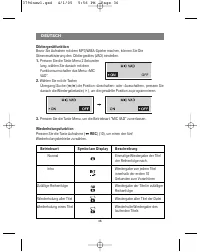
Page 39 - Beleuchtung; Durch ein Pressen der Wiedergabetaste (
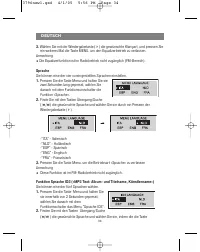
Wiedergabe ( ) pressen. -"ITA" - Italienisch -"NLD" - Holländisch-"ESP" - Spanisch-"ENG" - Englisch-"FRA" - Französisch 3. Pressen Sie die Taste Menu, um die Betriebsart «Sprache» zu verlassen Anmerkung Funktion ist im FM-Radiobetrieb nicht zugänglich. Wenn de...
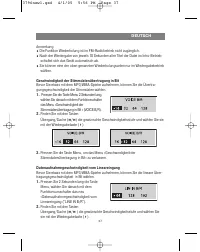
Page 43 - Anmerkung; Formatierung der Dateien im MP3/WMA-Spieler; Pressen Sie 2 Sekunden lang die Taste; «Normales» Format; Bevor Sie Stimmdaten mit dem MP3-Spieler machen, wählen Sie die
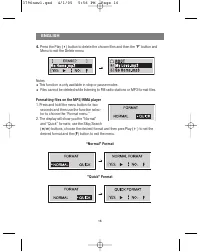
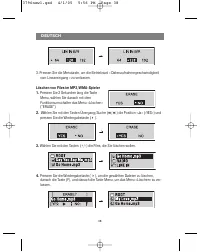
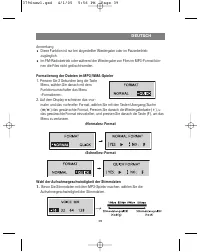
Anmerkung Diese Funktion ist nur bei abgestellter Wiedergabe oder im Pausebetriebzugänglich. Im FM-Radiobetrieb oder während der Wiedergabe von Files im MP3-Format kön-nen die Files nicht gelöscht werden. Formatierung der Dateien im MP3/WMA-Spieler 1. Pressen Sie 2 Sekunden lang die Taste Menu, wähl...
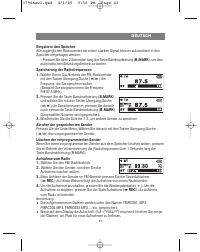
Page 46 - ANWENDUNG DES RADIOEMPFÄNGERS; Anhören von Radiosendern
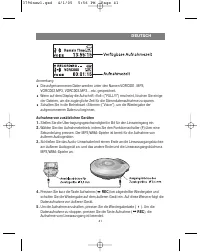
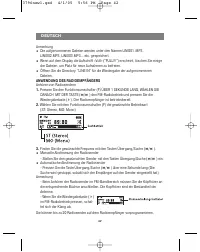
Anmerkung Die aufgenommenen Dateien werden unter den Namen LINI001 .MP3,LINI002.MP3, LINI003.MP3... etc. gespeichert. Wenn auf dem Display die Aufschrift «Voll» ("FULL!!!") erscheint, löschen Sie einigeder Dateien, um Platz für neue Aufnahmen zu befreien. Öffnen Sie die Directory "LINE I...
Page 48 - STÖRUNGEN; Die Tasten funktionieren nicht; SPEZIFIKATION
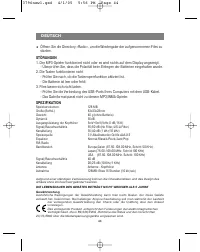
Öffnen Sie die Directory «Radio», um die Wiedergabe der aufgenommenen Files zustarten. STÖRUNGEN 1. Der MP3-Spieler funktioniert nicht oder es wird nichts auf dem Display angezeigt. - Überprüfen Sie, dass die Polarität beim Einlegen der Batterien eingehalten wurde. 2. Die Tasten funktionieren nicht ...
Page 49 - ВАЖНЫЕ РЕКОМЕНДАЦИИ ПО ТЕХНИКЕ БЕЗОПАСНОСТИ; МЕРЫ ПРЕДОСТОРОЖНОСТИ
Пожалуйста, внимательно ознакомьтесь с рекомендациями данной инструкции исохраните ее. Конструктивные особенности и технические данные с цельюусовершенствования могут быть изменены без предварительного уведомления. ВАЖНЫЕ РЕКОМЕНДАЦИИ ПО ТЕХНИКЕ БЕЗОПАСНОСТИ Не подвергайте устройство воздействию оче...
Page 50 - Около 8 часов; РУССКИЙ
Срок службы батарей Батарея Воспроизведение MP3/WMA Щелочная батарея (2EA) Около 8 часов Время использования батарей (согласно стандарту EIAJ) Мощность: 5мВт + 5мВт (непрерывное проигрывание компакт-диска причастоте 1 кГц) При прослушивании по 4 часа в день с переходом в режим остановкивоспроизведен...
Page 51 - ФУНКЦИИ ПЛЕЕРА И ОРГАНЫ УПРАВЛЕНИЯ; Комплектующие
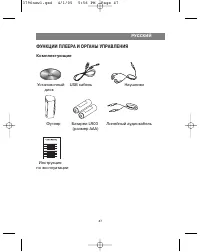
ФУНКЦИИ ПЛЕЕРА И ОРГАНЫ УПРАВЛЕНИЯ Комплектующие РУССКИЙ 47 Установочный USB кабель Наушники диск Футляр Батареи LR03 Линейный аудиокабель (размер AAA) Инструкция по эксплуатации 3796new1.qxd 4/1/05 5:56 PM Page 47
Page 52 - Кнопка скорости SPEED; Кнопка блокировки клавиш
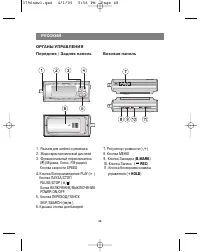
ОРГАНЫ УПРАВЛЕНИЯ Передняя / Задняя панель Боковая панель РУССКИЙ 48 1. Разъем для шейного ремешка 2. Жидкокристаллический дисплей3. Функциональный переключатель ( F ) (Музыка, Голос, FM радио) Кнопка скорости SPEED 4. Кнопка Воспроизведение PLAY ( ) Кнопка ПАУЗА/СТОП PAUSE/STOP ( / ) Копка ВКЛЮЧЕНИ...
Page 53 - Разъем для подключения
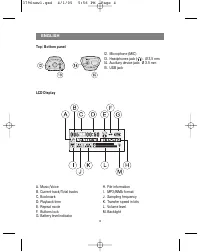
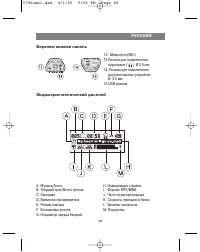
Верхняя/нижняя панель Жидкокристаллический дисплей РУССКИЙ 49 12. Микрофон (MIC)13.Разъем для подключения наушников ( ): Ø 3,5 мм 14. Разъем для подключения дополнительных устройств: Ø 3,5 мм 15.USB разъем A. Музыка/ГолосB. Текущий трек/Всего трековC. Закладка D. Время воспроизведенияE. Режим повтор...
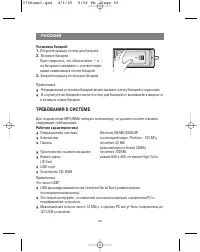
Page 54 - ТРЕБОВАНИЯ К СИСТЕМЕ; Рабочие характеристики
50 Установка батарей1. Откройте крышку отсека для батарей. 2. Вставьте батареи. Удостоверьтесь, что обозначения + и - на батареях совпадают с соответствую-щими символами в отсеке батарей. 3. Закройте крышку отсека для батарей Примечания Неправильная установка батарей может вызвать утечку батарей и к...
Page 56 - ПЕРЕД ИСПОЛЬЗОВАНИЕМ; Использование Наушников; Перед использованием плеера
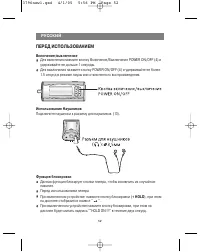
ПЕРЕД ИСПОЛЬЗОВАНИЕМ Включение/выключение Для включения нажмите кнопку Включение/Выключение POWER ON/OFF (4) иудерживайте ее дольше 1 секунды. Для выключения нажмите кнопку POWER ON/OFF (4) и удерживайте ее более1.5 секунд в режиме паузы или отключенного воспроизведения. Использование Наушников Подк...
Page 57 - Настройка громкости; Имеется 35 уровней громкости.; ЭКСПЛУАТАЦИЯ ПЛЕЕРА; Нажмите кнопку Включение/Выключение, чтобы включить устройство.
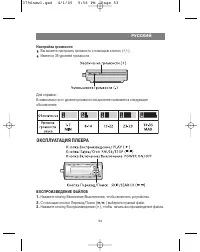
Настройка громкости Вы можете настроить громкость с помощью кнопок (+/-). Имеется 35 уровней громкости. Для справки :В зависимости от уровня громкости на дисплее появляется следующееобозначение: ЭКСПЛУАТАЦИЯ ПЛЕЕРА ВОСПРОИЗВЕДЕНИЕ ФАЙЛОВ1. Нажмите кнопку Включение/Выключение, чтобы включить устройст...
Page 59 - ДОПОЛНИТЕЛЬНЫЕ ФУНКЦИИ; Закладки
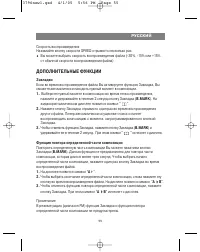
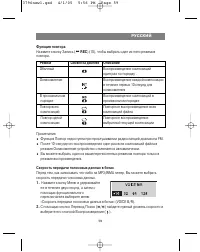
Скорость воспроизведенияНажимайте кнопку скорости SPEED отрывисто несколько раз. Вы можете выбрать скорость воспроизведения файла (-30%, -15% или +15%от обычной скорости воспроизведения файла) ДОПОЛНИТЕЛЬНЫЕ ФУНКЦИИ Закладки Если во время воспроизведения файла Вы активируете функцию Закладка, Высмож...
Page 60 - Эквалайзер; Вы можете выбрать один из пяти режимов звучания.; Язык; Вы можете выбрать нужный язык из четырех.
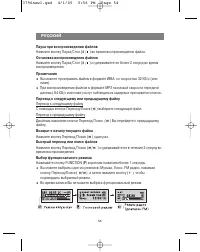
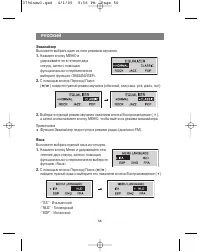
Эквалайзер Вы можете выбрать один из пяти режимов звучания. 1. Нажмите кнопку МЕНЮ иудерживайте ее в течение двухсекунд, затем с помощьюфункционального переключателявыберите функцию «ЭКВАЛАЙЗЕР». 2. С помощью кнопок Переход/Поиск ( / ) найдите нужный режим звучания (обычный, классика, рок, джаз, поп...
Page 61 - Подсветка
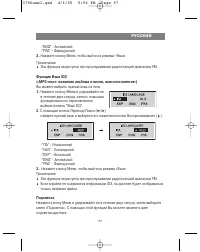
-"ENG" - Английский -"FRA" - Французский 3. Нажмите кнопку Меню, чтобы выйти из режима «Язык» Примечания Эта функция недоступна при прослушивании радиостанций диапазона FM. Функция Язык ID3 («MP3 текст: название альбома и песни, имя исполнителя») Вы можете выбрать нужный язык из пяти...
Page 62 - Функция диктофона; ) выберите позицию «Включить» или
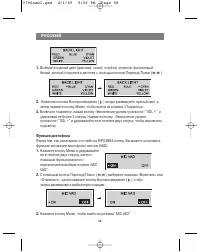
1. Выберите нужный цвет (красный, синий, голубой, зеленый, фиолетовый,белый, желтый) подсветки дисплея с помощью кнопок Переход/Поиск ( / ). 2. Нажатием кнопки Воспроизведение ( ) запрограммируйте нужный цвет, а затем нажмите кнопку Меню, чтобы выйти из режима «Подсветка». 3. Включите подсветку, наж...
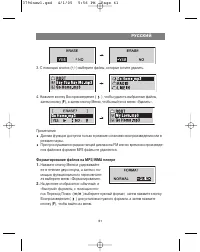
Page 64 - Cкорость записи данных с линейного входа; ) найдите нужный уровень скорости и; Удаление файлов на MP3/WMA плеере; Нажмите кнопку Меню и удерживайте ее
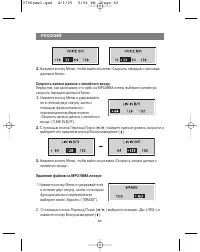
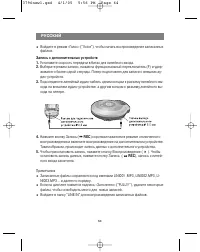
3. Нажмите кнопку Меню, чтобы выйти из меню «Скорость передачи голосовых данных в битах». Cкорость записи данных с линейного входа Перед тем, как записывать что-либо на MP3/WMA плеер, выберите линейнуюскорость передачи данных в битах. 1. Нажмите кнопку Меню и удерживайтеее в течение двух секунд, зат...
Page 69 - ИСПОЛЬЗОВАНИЕ РАДИОПРИЕМНИКА; Внесение в память
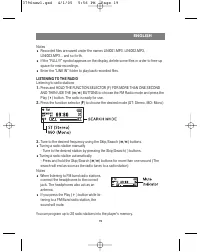
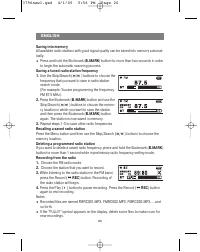
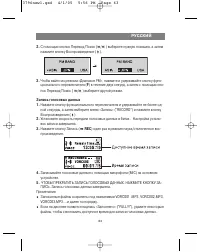
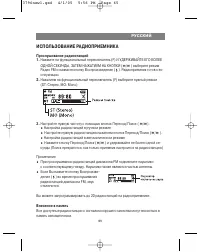
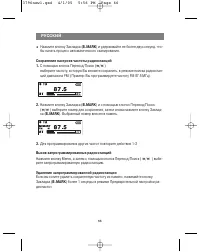
ИСПОЛЬЗОВАНИЕ РАДИОПРИЕМНИКА Прослушивание радиостанций1. Нажмите на функциональный переключатель (F) И УДЕРЖИВАЙТЕ ЕГО БОЛЕЕОДНОЙ СЕКУНДЫ, ЗАТЕМ НАЖАТИЕМ НА КНОПКИ ( / ) выберите режим Радио FM и нажмите кнопку Воспроизведение ( ). Радиоприемник готов к эк- сплуатации. 2. Нажатием на функциональный...