Page 3 - ENGLISH; Off By Timer button
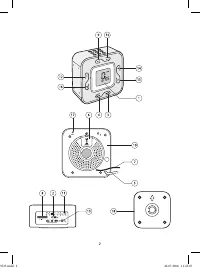
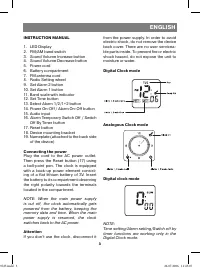
ENGLISH 3 INSTRUCTION MANUAL 1. LED Display 2. FM/AM band switch3. Sound Volume Increase button4. Sound Volume Decrease button5. Power cord6. Battery compartment7. FM antenna cord8. Radio Setting wheel9. Set Alarm 2 button10. Set Alarm 1 button11. Band scale with indicator12. Set Time button13. Sele...
Page 4 - Time Setting mode; Press and hold the Set Time button; Alarm 1 Setting mode
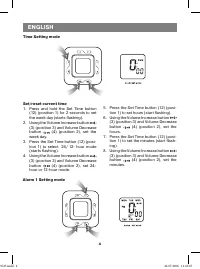
ENGLISH 4 4 Time Setting mode Set/reset current time 1. Press and hold the Set Time button (12) (position 1) for 2 seconds to set the week day (starts flashing). 2. Using the Volume Increase button (3) (position 3) and Volume Decrease button (4) (position 2), set the week day. 3. Press the Set Time ...
Page 5 - Alarm 1 setting; Alarm 1 Setting for a week
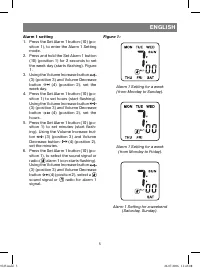
ENGLISH 5 Alarm 1 setting 1. Press the Set Alarm 1 button (10) (po- sition 1), to enter the Alarm 1 Setting mode. 2. Press and hold the Set Alarm 1 button (10) (position 1) for 2 seconds to set the week day (starts flashing). Figure 1. 3. Using the Volume Increase button (3) (position 3) and Volume ...
Page 6 - Alarm 2 Setting mode; Alarm 2 setting for a week
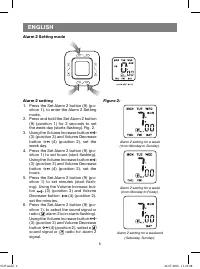
ENGLISH 6 Alarm 2 Setting mode Alarm 2 setting 1. Press the Set Alarm 2 button (9) (po- sition 1), to enter the Alarm 2 Setting mode. 2. Press and hold the Set Alarm 2 button (9) (position 1) for 2 seconds to set the week day (starts flashing). Fig. 2. 3. Using the Volume Increase button (3) (positi...
Page 7 - Setting the type of alarm signal and its switching on/off; Switch Off By Timer mode
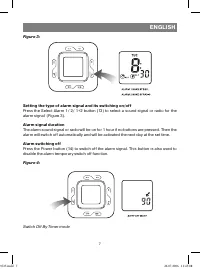
ENGLISH 7 Figure 3: Setting the type of alarm signal and its switching on/off Press the Select Alarm 1/ 2/ 1+2 button (13) to select a sound signal or radio for the alarm signal (Figure 3). Alarm signal duration The alarm sound signal or radio will be on for 1 hour if no buttons are pressed. Then th...
Page 8 - Connecting the sound signal source; - Make sure that the FM antenna cord; Reset
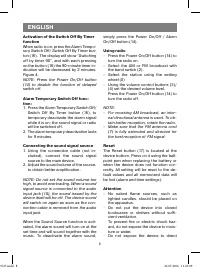
ENGLISH 8 Activation of the Switch Off By Timer function When radio is on, press the Alarm Tempo-rary Switch Off/ Switch Off By Timer but-ton (16). The display will show “Switching off by timer 90”, and with each pressing on the button (16) the 90-minute timer in-dication will be decreased by 2 minu...
Page 9 - - Do not attempt to insert cords, sharp; Attention: Safety rules
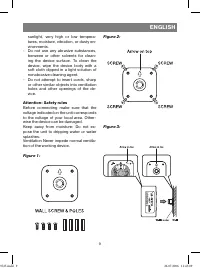
ENGLISH 9 sunlight, very high or low tempera-tures, moisture, vibration, or dusty en-vironments. - Do not use any abrasive substances, benzene or other solvents for clean-ing the device surface. To clean the device, wipe the device body with a soft cloth dipped in a light solution of nonabrasive cle...
Page 10 - Specifications; MINIMUM SERVICE LIFE - 3 YEARS; GUARANTEE
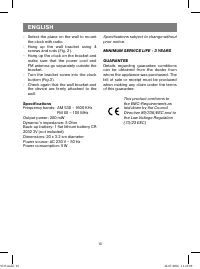
ENGLISH 10 - Select the place on the wall to mount the clock with radio. - Hang up the wall bracket using 4 screws and rods (Fig. 2). - Hang up the clock on the bracket and make sure that the power cord and FM antenna go separately outside the bracket. - Turn the bracket screw into the clock bottom ...
Page 11 - DEUTSCH; sung/ Abstellen des Weckers
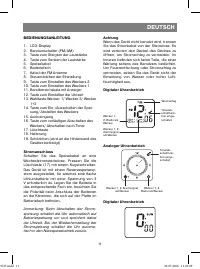
DEUTSCH 11 BEDIENUNGSANLEITUNG 1. LCD-Display 2. Bandumschalter (FM/AM)3. Taste zum Steigern der Lautstärke4. Taste zum Senken der Lautstärke5. Speisekabel6. Batteriefach7. Kabel der FM Antenne8. Steuerrädchen der Einstellung9. Taste zum Einstellen des Weckers 210. Taste zum Einstellen des Weckers 1...
Page 12 - Uhreneinstellungsbetrieb
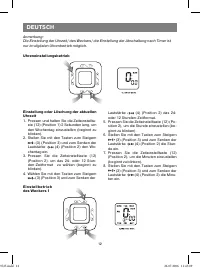
DEUTSCH 12 Uhreneinstellungsbetrieb Einstellung oder Löschung der aktuellen Uhrzeit 1. Pressen und halten Sie die Zeiteinstellta- ste (12) (Position 1) 2 Sekunden lang, um den Wochentag einzustellen (beginnt zu blinken). 2. Stellen Sie mit den Tasten zum Steigern (3) (Position 3) und zum Senken der ...
Page 13 - Einstellen des Weckers 1; Abbildung 1
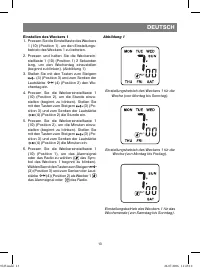
DEUTSCH 13 Einstellen des Weckers 1 1. Pressen Sie die Einstelltaste des Weckers 1 (10) (Position 1), um den Einstellungs-betrieb des Weckers 1 zu betreten. 2. Pressen und halten Sie die Weckerein- stelltaste 1 (10) (Position 1) 2 Sekunden lang, um den Wochentag einzustellen (beginnt zu blinken). (A...
Page 14 - Einstellbetrieb des Weckers 2; Abbildung 2
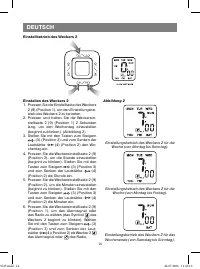
DEUTSCH 14 Einstellbetrieb des Weckers 2 Einstellen des Weckers 2 1. Pressen Sie die Einstelltaste des Weckers 2 (9) (Position 1), um den Einstellungsbe-trieb des Weckers 2 zu betreten. 2. Pressen und halten Sie die Weckerein- stelltaste 2 (9) (Position 1) 2 Sekunden lang, um den Wochentag einzustel...
Page 15 - Abbildung 3; Alarmzeitdauer; Abbildung 4
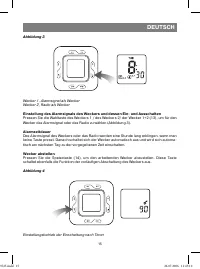
DEUTSCH 15 Abbildung 3 Wecker 1, Alarmsignal als WeckerWecker 2, Radio als Wecker Einstellung des Alarmsignals des Weckers und dessen Ein- und Ausschalten Pressen Sie die Wahltaste des Weckers 1 / des Weckers 2/ der Wecker 1+2 (13), um für den Wecker das Alarmsignal oder das Radio zu wählen (Abbildu...
Page 16 - Arbeit mit der Tonsignalquelle
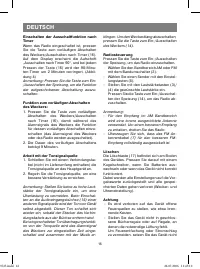
DEUTSCH 16 Einschalten der Ausschaltfunktion nach Timer Wenn das Radio eingeschaltet ist, pressen Sie die Taste zum vorläufigen Abschalten des Weckers/Ausschalten nach Timer (16). Auf dem Display erscheint die Aufschrift „Ausschalten nach Timer 90“, und bei jedem Pressen der Taste (16) wird der 90-M...
Page 17 - - Das Gerät darf nicht der Einwirkung von
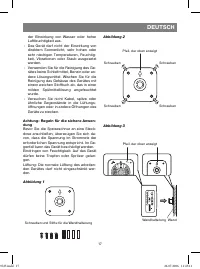
DEUTSCH 17 der Einwirkung von Wasser oder hoher Luftfeuchtigkeit aus. - Das Gerät darf nicht der Einwirkung von direktem Sonnenlicht, sehr hohen oder sehr niedrigen Temperaturen, Feuchtig-keit, Vibrationen oder Staub ausgesetzt werden. - Verwenden Sie für die Reinigung des Ge- rätes keine Schleifmit...
Page 18 - - Wählen Sie einen Platz zum Befestigen; Technische Kenndaten
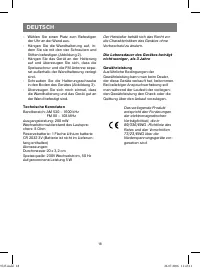
DEUTSCH 18 - Wählen Sie einen Platz zum Befestigen der Uhr an der Wand aus. - Hängen Sie die Wandhalterung auf, in- dem Sie sie mit den vier Schrauben und Stiften befestigen (Abbildung 2). - Hängen Sie das Gerät an der Halterung auf und überzeugen Sie sich, dass die Speiseschnur und die FM Antenne s...
Page 19 - РУССКИЙ; ИНСТРУКЦИЯ ПО ЭКСПЛУАТАЦИИ; ния/отключения будильника; Подключение электропитания
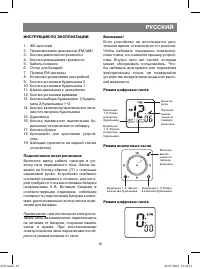
РУССКИЙ 19 ИНСТРУКЦИЯ ПО ЭКСПЛУАТАЦИИ 1. ЖК-дисплей 2. Переключатель диапазона (FM/AM) 3. Кнопка увеличения громкости 4. Кнопка уменьшения громкости 5. Кабель питания 6. Отсек для батарей 7. Провод FM-антенны 8. Колесико управления настройкой 9. Кнопка установки будильника 2 10. Кнопка установки буд...
Page 20 - Режим установки часов
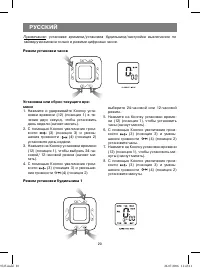
РУССКИЙ 20 Примечание: установка времени/установка будильника/настройка выключения по таймеру возможна только в режиме цифровых часов. Режим установки часов Установка или сброс текущего вре-мени 1. Нажмите и удерживайте Кнопку уста- новки времени (12) (позиция 1) в те-чение двух секунд, чтобы устано...
Page 21 - Установка будильника 1; кости
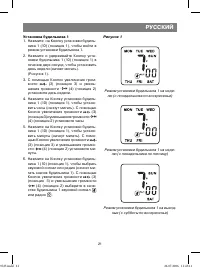
РУССКИЙ 21 Установка будильника 1 1. Нажмите на Кнопку установки будиль- ника 1 (10) (позиция 1), чтобы войти в режим установки будильника 1. 2. Нажмите и удерживайте Кнопку уста- новки будильника 1 (10) (позиция 1) в течение двух секунд, чтобы установить день недели (начнет мигать). (Рисунок 1). 3....
Page 22 - Режим установки будильника 2; Режим установки будильника 2 на неделю (с
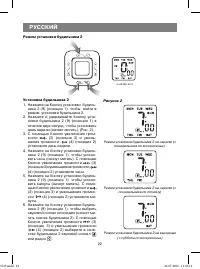
РУССКИЙ 22 Режим установки будильника 2 Установка будильника 2 1. Нажмите на Кнопку установки будиль- ника 2 (9) (позиция 1), чтобы войти в режим установки будильника 2. 2. Нажмите и удерживайте Кнопку уста- новки будильника 2 (9) (позиция 1) в течение двух секунд, чтобы установить день недели (начн...
Page 23 - Рисунок 3; Продолжительность звучания будильника; Рисунок 4
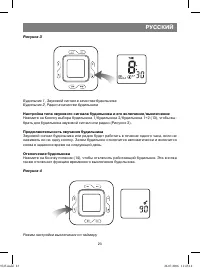
РУССКИЙ 23 Рисунок 3 Будильник 1, Звуковой сигнал в качестве будильника Будильник 2, Радио в качестве будильника Настройка типа звукового сигнала будильника и его включение/выключение Нажмите на Кнопку выбора будильника 1/будильника 2/будильника 1+2 (13), чтобы вы-брать для будильника звуковой сигна...
Page 24 - С помощью соединительного кабеля; Управление радио; - Запрещается ставить на устройство
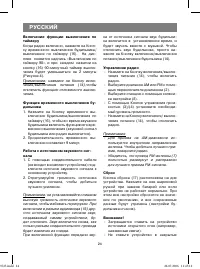
РУССКИЙ 24 Включение функции выключения по таймеру Когда радио включено, нажмите на Кноп-ку временного выключения будильника/выключения по таймеру (16). На дис-плее появится надпись «Выключение по таймеру 90», и при каждом нажатии на кнопку (16) 90-минутный таймер выклю-чения будет уменьшаться на 2 ...
Page 25 - - Устройство не должно подвергаться
РУССКИЙ 25 книжные шкафы или полки, в которых отсутствует необходимая вентиляция. - Чтобы избежать пожара или пораже- ния электрическим током не подвер-гайте устройство воздействию воды или высокой влажности. - Устройство не должно подвергаться воздействию прямого солнечного све-та, очень высоких ил...
Page 26 - Повесьте устройство на кронштейн; Технические характеристики; МГц
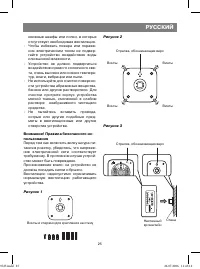
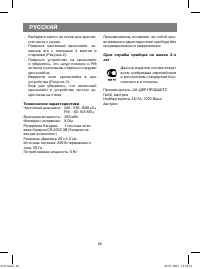
РУССКИЙ 26 - Выберите место на стене для крепле- ния часов с радио. - Повесьте настенный кронштейн, за- крепив его с помощью 4 винтов и стержней (Рисунок 2). - Повесьте устройство на кронштейн и убедитесь, что шнур питания и FM антенна проложены отдельно снаружи кронштейна. - Вверните винт кронштейн...
Page 27 - УКРАЇНЬСКИЙ; ня/ відключення будильника
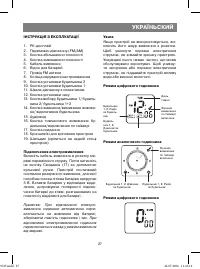
УКРАЇНЬСКИЙ 27 ІНСТРУКЦІЯ З ЕКСПЛУАТАЦІЇ 1. РК-дисплей 2. Перемикач діапазону (FM/AM) 3. Кнопка збільшення голосності 4. Кнопка зменшення голосності 5. Кабель живлення 6. Відсік для батарей 7. Провід FM антени 8. Коліща керування настроюванням 9. Кнопка установки будильника 2 10. Кнопка установки бу...
Page 28 - Режим установки годинника
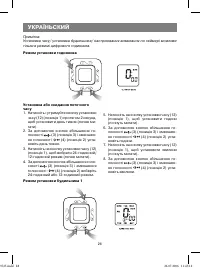
УКРАЇНЬСКИЙ 28 Примітка: Установка часу/ установка будильника/ настроювання вимикання по таймері можливе тільки в режимі цифрового годинника. Режим установки годинника Установка або скидання поточного часу 1. Натисніть і утримуйте кнопку установки часу (12) (позиція 1) протягом 2 секунд, щоб установ...
Page 29 - Малюнок 1
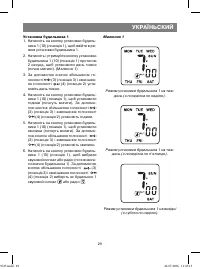
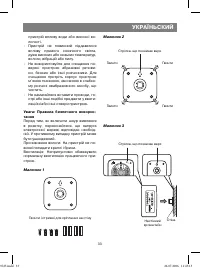
УКРАЇНЬСКИЙ 29 Установка будильника 1 1. Натисніть на кнопку установки будиль- ника 1 (10) (позиція 1), щоб ввійти в ре-жим установки будильника 1. 2. Натисніть і утримуйте кнопку установки будильника 1 (10) (позиція 1) протягом 2 секунд, щоб установити день тижня (почне мигати). (Малюнок 1) 3. За д...
Page 30 - Малюнок 2; Режим установки будильника 2 на тиждень
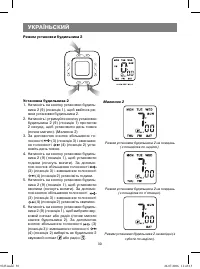
УКРАЇНЬСКИЙ 30 Режим установки будильника 2 Установка будильника 2 1. Натисніть на кнопку установки будиль- ника 2 (9) (позиція 1), щоб ввійти в ре-жим установки будильника 2. 2. Натисніть і утримуйте кнопку установки будильника 2 (9) (позиція 1) протягом 2 секунд, щоб установити день тижня (почне м...
Page 31 - Малюнок 3; Тривалість звучання будильника; Малюнок 4
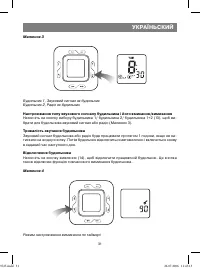
УКРАЇНЬСКИЙ 31 Малюнок 3 Будильник 1, Звуковий сигнал як будильник Будильник 2, Радіо як будильник Настроювання типу звукового сигналу будильника і його вмикання/вимикання Натисніть на кнопку вибору будильника 1/ будильника 2/ будильника 1+2 (13), щоб ви-брати для будильника звуковий сигнал або раді...
Page 32 - Робота з джерелом звукового сигналу; Забороняється ставити на пристрій
УКРАЇНЬСКИЙ 32 Включення функції вимикання по тай-мері Коли радіо включене, натисніть на кнопку тимчасового вимикання будильника/ви-микання по таймері (16). На дисплеї з’я-виться напис “вимикання по таймері 90”, і при кожнім натисканні на кнопку (16) 90-хвилинний таймер вимикання буде змен-шуватися ...
Page 33 - Пристрій не повинний піддаватися
УКРАЇНЬСКИЙ 33 пристрій впливу води або високої во-логості. - Пристрій не повинний піддаватися впливу прямого сонячного світла, дуже високих або низьких температур, вологи, вібрацій або пилу. - Не використовуйте для очищення по- верхні пристрою абразивні речови-ни, бензин або інші розчинники. Для оч...
Page 34 - - Виберіть місце на стіні для кріплення; Технічні характеристики; Вихідна потужність:; Гарантія
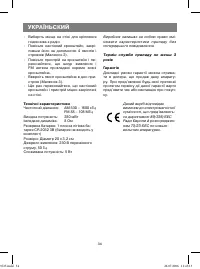
УКРАЇНЬСКИЙ 34 - Виберіть місце на стіні для кріплення годинника з радіо. - Повісьте настінний кронштейн, закрі- пивши його за допомогою 4 гвинтів і стрижнів (Малюнок 2). - Повісьте пристрій на кронштейн і пе- реконайтеся, що шнур живлення і FM антена прокладені окремо зовні кронштейна. - Вверніть г...
Page 35 - ҚАЗАҚ; ПАЙДАЛАНУ ЖӨНІНДЕГІ НҰСҚАУЛЫҚ
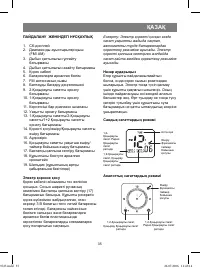
ҚАЗАҚ 35 ПАЙДАЛАНУ ЖӨНІНДЕГІ НҰСҚАУЛЫҚ 1. СК-дисплей 2. Диапазонды ауыстырыпқосқыш (FM/ AM) 3. Дыбыс қаттылығын ұлғайту батырмасы 4. Дыбыс қаттылығын азайту батырмасы 5. Қорек кабелі 6. Батареяларға арналған бөлім 7. FM антеннаның сымы 8. Баптауды басқару дөңгелекшесі 9. 2-Қоңыраулы сағатты орнату б...
Page 36 - Сандық сағаттардың режимі
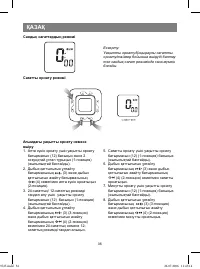
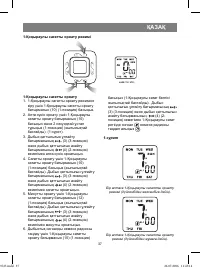
ҚАЗАҚ 36 Сандық сағаттардың режимі Сағатты орнату режимі Ескерту: Уақытты орнату/Қоңыраулы сағатты орнату/таймер бойынша өшіруді баптау тек сандық сағат режимінде ғана мүмкін болады. Ағымдағы уақытты орнату немесе өшіру 1. Апта күнін орнату үшін уақытты орнату батырмасын (12) басыңыз жəне 2 секундта...
Page 37 - -Қоңыраулы сағатты орнату режимі; Бір аптаға 1-Қоңыраулы сағатты орнату
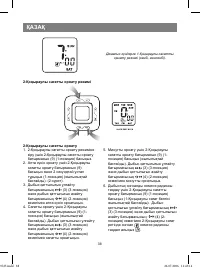
ҚАЗАҚ 37 1-Қоңыраулы сағатты орнату режимі 1-Қоңыраулы сағатты орнату 1. 1-Қоңыраулы сағатты орнату режиміне кіру үшін 1-Қоңыраулы сағатты орнату батырмасын (10) (1-позиция) басыңыз. 2. Апта күнін орнату үшін 1-Қоңыраулы сағатты орнату батырмасын (10) басыңыз жəне 2 секундтай ұстап тұрыңыз (1-позици...
Page 38 - -Қоңыраулы сағатты орнату режимі; Демалыс күндерге 1-Қоңыраулы сағатты
ҚАЗАҚ 38 2-Қоңыраулы сағатты орнату режимі 2-Қоңыраулы сағатты орнату 1. 2-Қоңыраулы сағатты орнату режиміне кіру үшін 2-Қоңыраулы сағатты орнату батырмасын (9) (1-позиция) басыңыз. 2. Апта күнін орнату үшін 2-Қоңыраулы сағатты орнату батырмасын (9) басыңыз жəне 2 секундтай ұстап тұрыңыз (1-позиция)...
Page 39 - Бір аптаға 2-Қоңыраулы сағатты; Қоңыраулы сағатты өшіру; Таймер бойынша өшіруді баптау режимі
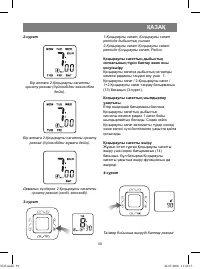
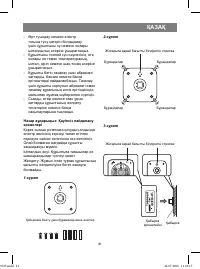
ҚАЗАҚ 39 2-сурет Бір аптаға 2-Қоңыраулы сағатты орнату режимі (дүйсенбіден жексенбіге дейін). Бір аптаға 2-Қоңыраулы сағатты орнату режимі (дүйсенбіден жұмаға дейін). Демалыс күндерге 2-Қоңыраулы сағатты орнату режимі (сенбі, жексенбі). 3-сурет 1-Қоңыраулы сағат, Қоңыраулы сағат ретінде дыбыстық сиг...
Page 40 - Дыбыстық сигналмен жұмыс істеу; - FM сигналды жақсы қабылдау үшін FM; Бастапқы қалпына келтіру
ҚАЗАҚ 40 Таймер бойынша өшіру функциясын қосу Радио қосулы болған кезде Қоңыраулы сағатты уақытша өшіру/ таймер бойынша өшіру батырмасын (16) басыңыз. Дисплейде «таймер бойынша өшіру 90» жазуы пайда болады, (16) батырманы əр басқан сайын 90-минуттық өшу таймері 2 минутқа өшетін болады (4-сурет). Еск...
Page 41 - - Өрт туындау немесе электр
ҚАЗАҚ 41 - Өрт туындау немесе электр тогына түсу қатерін болдырмау үшін құрылғыны су немесе жоғары ылғалдылық əсеріне ұшыратпаңыз. - Құрылғыны тікелей күн сəулесінің, өте жоғары не төмен температураның, ылғал, діріл немесе шаң-тозаң əсеріне ұшыратпаңыз. - Құрылғы бетін тазалау үшін абразивті заттард...
Page 42 - Техникалық сипаттамалары
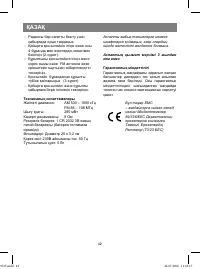
ҚАЗАҚ 42 - Радиосы бар сағатты бекіту үшін қабырғада орын таңдаңыз. - Қабырға кронштейнін іліңіз жəне оны 4 бұранда мен өзектердің көмегімен бекітіңіз (2-сурет). - Құрылғыны кронштейнге іліңіз жəне қорек сымы жəне FM антенна жеке кронштейн сыртынан жіберілгендігін тексеріңіз. - Кронштейн бұрандасын ...