Triplett CM24 - User Manual
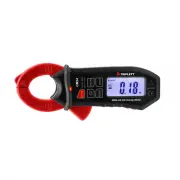
Triplett CM24 Multimeter – User Manual, read for free online in PDF format. We hope this helps you resolve any issues you may have. If you have further questions, please contact us through the contact form.


Table of Contents:
- Page 2 – Safety; International Safety Symbols; CAUTIONS
- Page 3 – Description; Meter Description
- Page 4 – Operation; AC/DC Current Measurements
- Page 5 – INRUSH; Button; Maintenance; Cleaning and Storage
- Page 6 – Specifications; Function; Unspecified
User Manual
CM24
400A AC/DC TRMS Clamp
Introduction
Congratulations on your purchase of the Triplett CM24 400A True RMS
AC/DC Current Clamp meter. The True RMS AC/DC Current Clamp meter
features:
Auto Power OFF
Inrush current measurement
Data Hold
DC zero function
Backlit LCD display
Non-contact AC voltage detection
"Loading the manual" means you need to wait until the file loads and becomes available for online reading. Some manuals are very large, and the time they take to appear depends on your internet speed.
Summary
Safety International Safety Symbols This symbol, adjacent to another symbol or terminal, indicates the user must refer to the manual for further information. This symbol, adjacent to a terminal, indicates that, under normal use, hazardous voltages may be present Double insulation SAFETY NOTES Do n...
Description Meter Description 1. Current Clamp 2. ON/OFF Button 3. Clamp Trigger 4. MODE Select Button 5. LCD Display 6. Battery Cover 7. DC ZERO Button 8. INRUSH Button 9. HOLD/Backlight Button 10. Non-contact AC Voltage Indicator LED Display icons Description Data Hold Minus sign Negative reading ...
Operation AC/DC Current Measurements 1. Instrument can automatically switch from 40.00A range to 400.0A range. 2. Use the MODE button to select AC or DC. 3. Press the DC Zero button to zero the meter display. 4. Press the trigger to open jaw. Fully enclose only one conductor. For optimum results, ce...


