Page 2 - Introduction; Table of Contents
EN-2 User’s Manual Introduction Welcome and thank you for choosing a TOSHIBA product. Table of Contents Safety Instructions . . . . . . . . . . . . . . . . . . . . . . . . . . . . . . . . . . . . . . . . . . . . 3 Before operating this unit (Journe F800/F801), please carefully read and follow the in...
Page 3 - Safety Instructions; please carefully read and follow the instructions
User’s Manual EN-3 Safety Instructions Before operating this unit (Journe F800/F801), please carefully read and follow the instructions below. n The operating temperature is between 0 and 40 degrees Celsius. n Do not use or store this unit in the environments listed below: n Direct sunlight n A high...
Page 4 - Follow the instructions below to install and operate
EN-4 User’s Manual Follow the instructions below to install and operate the unit. Step 1: Check the components Carefully open the packing box and ensure that you have the following items.1. Journe F800/F8012. Adjustable foot stand3. USB cable4. User’s Manual5. AC power adapter6. Software CD7. Warran...
Page 6 - Step 2: Install the adjustable foot stand.
EN-6 User’s Manual Step 2: Install the adjustable foot stand. 1. On the back of the unit, attach the foot stand to the lock slot. 2. To place the photo frame vertically, rotate the foot stand counter- clockwise until it is secured to the photo frame. Lock slot Adjustable foot stand GMH300056020.book...
Page 12 - Additional features (available on
EN-12 User’s Manual Additional features (available on PA3702*-1ET2 only) Built-in battery On the PA3702*-1ET2 model, the photo frame is equipped with a built-in lithium polymer battery.To charge the battery, follow the steps below:1. Connect one end of the AC power adapter to the power jack on the b...
Page 13 - Built-in light sensor
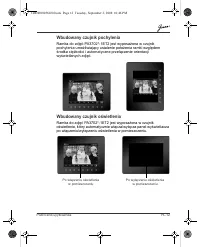
User’s Manual EN-13 Built-in tilt sensor On the PA3702*-1ET2 model, the photo frame has a built-in tilt sensor that allows the photo frame to determine its own orientation relative to gravity and thereby automatically switch from displaying pictures vertically to displaying pictures horizontally. Bu...
Page 14 - Frequently asked questions
EN-14 User’s Manual Frequently asked questions After copying photos, how can I check if files are already stored in this unit? Once photos are copied, a confirmation message will appear on the screen. What memory card types are compatible with the unit? Secure Digital™ Card (SD), xD-Picture Card™ (x...
Page 15 - TOSHIBA support; Regulatory Information; EU Conformity Statement
User’s Manual EN-15 TOSHIBA support Need help? For the latest driver updates, user manuals & FAQs please have a look at the TOSHIBA options & services support page: computers.toshiba.eu/options-support Please see computers.toshiba.eu/options-warranty for the TOSHIBA hotline numbers. Regulato...
Page 16 - Working Environment
EN-16 User’s Manual Working Environment The Electromagnetic Compliance (EMC) of this product has been verified typically for this product category for a so called Residential, Commercial & Light Industry Environment. Any other working environment has not been verified by Toshiba and the use of t...
Page 17 - Following information is only valid for; Disposal of products
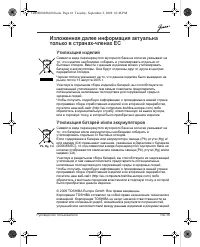
User’s Manual EN-17 Following information is only valid for EU-member states Disposal of products The crossed out wheeled dust bin symbol indicates that products must be collected and disposed of separately from household waste. Integrated batteries and accumulators can be disposed of with the produ...
Page 18 - Увод; Съдържание
BG-1 Ръководство по експлоатация Ръководство по експлоатация Увод Добре дошли и благодарим Ви , че избрахте продукт на TOSHIBA Съдържание Инструкции за безопасност . . . . . . . . . . . . . . . . . . . . . . . . . . . . . . . . . . . 2 Преди да включите устройството (Journe F800/F801), внимателно пр...
Page 19 - Инструкции
Ръководство по експлоатация BG-2 Инструкции за безопасност Преди да включите устройството (Journe F800/F801), внимателно прочетете и спазвайте дадените по - долу инструкции . n Работната температура на устройството е между и 40 градуса по Целзий . n Не използвайте и не съхранявайте устройството при ...
Page 20 - Системни
BG-3 Ръководство по експлоатация За инсталиране и работа с устройството следвайте инструкциите , изложени долу . Стъпка 1: Проверете компонентите Внимателно отворете опаковъчната кутия и се уверете , че тя съдържа следните неща : 1. Journe F800/F8012. Нагласяща се стойка 3. Кабел USB 4. Ръководство ...
Page 23 - Стъпка
Ръководство по експлоатация BG-6 3. За да поставите фото рамката хоризонтално , завъртете стойката по посока на часовниковата стрелка , докато тя не се закрепи към фото рамката . Стъпка 3: Свързване на AC захранване . 1. Свържете единия край на мрежовия AC- адаптер към буксата за захранване на задни...
Page 28 - Допълнителни; Вградена
BG-11 Ръководство по експлоатация Допълнителни функции ( само за PA3702*-1ET2) Вградена батерия Фото рамка модел PA3702*-1ET2 е снабдена с вградена литиево - полимерна батерия . За да заредите батерията , спазвайте следните стъпки : 1. Свържете единия край на мрежовия AC- адаптер към буксата за захр...
Page 30 - Често
BG-13 Ръководство по експлоатация Често задавани въпроси Мога ли да проверя дали след копиране на снимки файловете са се съхранили в устройството ? Веднага след копиране на снимките на екрана се появява потвърждаващо съобщение . Какви карти за памет са съвместими с устройството ? Следните типове кар...
Page 31 - Поддръжка; Съответствие; Декларация
Ръководство по експлоатация BG-14 Поддръжка от TOSHIBA Нужна ви е помощ ? За най - нови версии на драйвери , ръководства по експлоатация и ЧЗВ вижте страницата на опциите и сервизната поддръжка на TOSHIBA: computers.toshiba.eu/options-support Моля , вижте в сайта computers.toshiba.eu/options-warrant...
Page 34 - Úvod; Obsah
CZ-1 Uživatelská p ř íru č ka Uživatelská p ř íru č ka Úvod Vítejte a d ě kujeme, že jste si vybrali produkt TOSHIBA. Obsah Bezpe č nostní pokyny . . . . . . . . . . . . . . . . . . . . . . . . . . . . . . . . . . . . . . . . . . 2 Než za č nete používat tento p ř ístroj (Journe F800/F801), pe č liv...
Page 36 - Instalaci a provoz za
CZ-3 Uživatelská p ř íru č ka Instalaci a provoz za ř ízení provád ě jte podle pokyn ů uvedených níže. Krok 1: Zkontrolujte sou č ásti Opatrn ě otev ř ete krabici a zkontrolujte, zda máte následující sou č ásti. 1. Journe F800/F8012. Nastavitelný stojánek3. Kabel USB4. Uživatelská p ř íru č ka 5. Na...
Page 38 - Krok 2: Namontujte nastavitelný stojánek
CZ-5 Uživatelská p ř íru č ka Krok 2: Namontujte nastavitelný stojánek 1. Na zadní stran ě za ř ízení p ř ipevn ě te stojánek do zajiš ť ovacího otvoru. 2. Chcete-li umístit fotoráme č ek svisle, oto č te stojánek proti sm ě ru hodinových ru č i č ek, aby byl upevn ě n k fotoráme č ku. Zajiš ť ovací...
Page 39 - ipojte napájecí adaptér.
Uživatelská p ř íru č ka CZ-6 3. Chcete-li umístit fotoráme č ek vodorovn ě , oto č te stojánek ve sm ě ru hodinových ru č i č ek, aby byl upevn ě n k fotoráme č ku. Krok 3: P ř ipojte napájecí adaptér. 1. Zasu ň te jeden konec napájecího adaptéru do napájecí zdí ř ky v zadní č ásti za ř ízení. 2. D...
Page 40 - te pam
CZ-7 Uživatelská p ř íru č ka 3. Postavte za ř ízení horizontáln ě (doporu č ená poloha) nebo vertikáln ě na stabilní plochu. Krok 4: (volitelný) Zasu ň te pam ěť ovou kartu. Toto za ř ízení má ve své vnit ř ní pam ě ti p ř edem nahrané ukázky obrázk ů a hudby. V zadní č ásti za ř ízení je možné zas...
Page 41 - te za
Uživatelská p ř íru č ka CZ-8 Krok 5: Zapn ě te za ř ízení. Posunutím vypína č e do polohy ZAP se za ř ízení zapne. Krok 6: Ovládání za ř ízení. Po zapnutí se na obrazovce objeví funkce, které jsou k dispozici (uvedené pod jménem nebo v podob ě ikony). Na ur č itou dobu se také na ovládacím panelu r...
Page 44 - Vestav
CZ-11 Uživatelská p ř íru č ka Další funkce (k dispozici pouze u PA3702*-1ET2) Vestav ě ná baterie V p ř ípad ě modelu PA3702*-1ET2 je fotoráme č ek vybaven vestav ě nou lithium-polymerovou baterií. Chcete-li nabít baterii, postupujte takto:1. P ř ipojte jeden konec napájecího AC adaptéru do zdí ř k...
Page 46 - asté dotazy
CZ-13 Uživatelská p ř íru č ka Č asté dotazy Jak mohu po zkopírování fotografií zjistit, zda jsou soubory uloženy v tomto p ř ístroji? Po zkopírování fotografií se na obrazovce objeví potvrzující zpráva. Jaké typy pam ěť ových karet jsou kompatibilní s p ř ístrojem? S tímto p ř ístrojem jsou kompati...
Page 47 - Podpora TOSHIBA; Regula; Prohlášení o spln
Uživatelská p ř íru č ka CZ-14 Podpora TOSHIBA Pot ř ebujete poradit? Nejnov ě jší aktualizace ovlada čů , uživatelské p ř íru č ky a odpov ě di na č asto kladené dotazy najdete na stránce možností a servisní podpory TOSHIBA: computers.toshiba.eu/options-support Viz stránka computers.toshiba.eu/opti...
Page 48 - Pracovní prost
CZ-15 Uživatelská p ř íru č ka Pracovní prost ř edí Elektromagnetická kompatibilita (EMC) tohoto produktu byla pro tuto produktovou kategorii ov ěř ena pro tzv. bytové a komer č ní prost ř edí a prost ř edí lehkého pr ů myslu. Všechna další prost ř edí nebyla spole č ností Toshiba ov ěř ena a použív...
Page 49 - Následující informace jsou ur; Likvidace produkt
Uživatelská p ř íru č ka CZ-16 Následující informace jsou ur č eny pouze pro č lenské státy EU Likvidace produkt ů Symbol p ř eškrtnuté odpadní nádoby s kole č ky znamená, že produkty je nutné shromaž ď ovat a likvidovat odd ě len ě od domácího odpadu. Integrované baterie a akumulátory je možné likv...
Page 50 - Table des matières
FR-1 Manuel de l’utilisateur Manuel de l’utilisateur Introduction Bienvenue et merci d’avoir choisi un produit TOSHIBA. Table des matières Consignes de sécurité . . . . . . . . . . . . . . . . . . . . . . . . . . . . . . . . . . . . . . . . . 2 Avant d’utiliser cet appareil (Journe F800/F801), veill...
Page 51 - Consignes de sécurité; veillez à consulter les instructions ci-dessous.
Manuel de l’utilisateur FR-2 Consignes de sécurité Avant d’utiliser cet appareil (Journe F800/F801), veillez à consulter les instructions ci-dessous. n La température de fonctionnement est comprise entre 0 et 40 degrés Celsius. n Ne stockez ou n’utilisez pas cet appareil dans les environnements indi...
Page 52 - Suivez les instructions ci-dessous pour installer et; Configuration requise:
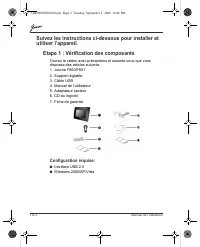
FR-3 Manuel de l’utilisateur Suivez les instructions ci-dessous pour installer et utiliser l’appareil. Etape 1 : Vérification des composants Ouvrez le carton avec précautions et assurez-vous que vous disposez des articles suivants.1. Journe F800/F8012. Support réglable3. Câble USB4. Manuel de l’util...
Page 54 - Étape 2 : Installation du support réglable
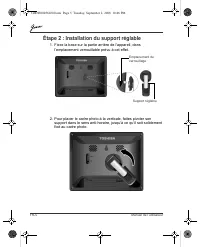
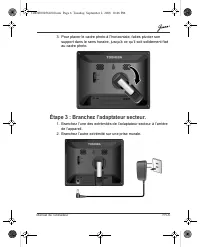
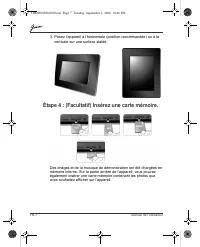
FR-5 Manuel de l’utilisateur Étape 2 : Installation du support réglable 1. Fixez la base sur la partie arrière de l’appareil, dans l’emplacement verrouillable prévu à cet effet. 2. Pour placer le cadre photo à la verticale, faites pivoter son support dans le sens anti-horaire, jusqu’à ce qu’il soit ...
Page 57 - Étape 5 : Mettez l’appareil sous tension.
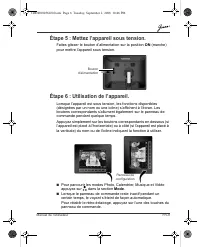
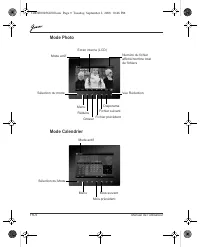
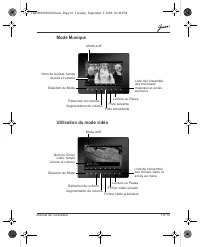
Manuel de l’utilisateur FR-8 Étape 5 : Mettez l’appareil sous tension. Faites glisser le bouton d’alimentation sur la position ON (marche) pour mettre l’appareil sous tension. Étape 6 : Utilisation de l’appareil. Lorsque l’appareil est sous tension, les fonctions disponibles (désignées par un nom ou...
Page 60 - Fonctions supplémentaires (disponible sur; Batterie interne
FR-11 Manuel de l’utilisateur Fonctions supplémentaires (disponible sur le modèle PA3702*-1ET2 uniquement) Batterie interne Sur le modèle PA3702*-1ET2, le cadre photo dispose d’une batterie polymère intégrée au lithium.Pour charger la batterie, procédez comme suit :1. Connectez l’une des extrémités ...
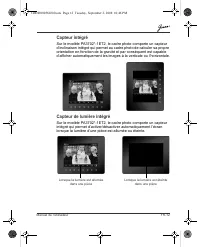
Page 61 - Capteur intégré
Manuel de l’utilisateur FR-12 Capteur intégré Sur le modèle PA3702*-1ET2, le cadre photo comporte un capteur d’inclinaison intégré qui permet au cadre photo de calculer sa propre orientation en fonction de la gravité et par conséquent est capable d’afficher automatiquement les images à la verticale ...
Page 62 - Foire Aux Questions
FR-13 Manuel de l’utilisateur Foire Aux Questions Après avoir copié les photos, comment puis-je m’assurer que les fichiers sont déjà stockés sur cette unité ? Lorsque les photos sont copiées, un message de confirmation s’affiche à l’écran. Quels types de carte mémoire sont compatibles avec l’unité ?...
Page 63 - Assistance TOSHIBA; Règlements; Déclaration européenne de conformité
Manuel de l’utilisateur FR-14 Assistance TOSHIBA Vous avez besoin d’aide ? Pour obtenir les pilotes les plus récents, consulter la documentation utilisateur et les questions les plus fréquentes, consultez la page TOSHIBA Options & Services Support sur : computers.toshiba.eu/options-support Pour ...
Page 64 - Environnement de travail
FR-15 Manuel de l’utilisateur Environnement de travail Ce produit a été conçu conformément à la norme EMC (compatibilité électromagnétique) et pour des applications de type résidentiel, commercial et industrie légère. Toshiba n’autorise pas ou déconseille l’utilisation de ce produit dans des environ...
Page 65 - Informations spécifiques aux pays de; Mise au rebut des produits; Mise au rebut des batteries et/ou accumulateurs
Manuel de l’utilisateur FR-16 Informations spécifiques aux pays de l’Union Européenne Mise au rebut des produits Le symbole de poubelle barrée indique que les produits ne doivent pas être jetés avec les ordures ménagères. Les piles et les accumulateurs peuvent être éliminés en même temps que le prod...
Page 66 - Εισαγωγή
GR-1 Εγχειρίδιο χρήσης Εγχειρίδιο χρήσης Εισαγωγή Καλώς ήλθατε και σας ευχαριστούμε που επιλέξατε ένα προϊόν της TOSHIBA. Πίνακας περιεχομένων Οδηγίες ασφαλείας . . . . . . . . . . . . . . . . . . . . . . . . . . . . . . . . . . . . . . . . . . . . 2 Προτού θέσετε σε λειτουργία αυτό το προϊόν (Journ...
Page 67 - Οδηγίες
Εγχειρίδιο χρήσης GR-2 Οδηγίες ασφαλείας Προτού θέσετε σε λειτουργία αυτό το προϊόν (Journe F800/F801), διαβάστε προσεκτικά και ακολουθήστε τις παρακάτω οδηγίες . n Η θερμοκρασία λειτουργίας κυμαίνεται μεταξύ 0 και 40 βαθμούς Κελσίου . n Μην χρησιμοποιείτε ή αποθηκεύετε το προϊόν αυτό στα περιβάλλον...
Page 68 - Απαιτήσεις
GR-3 Εγχειρίδιο χρήσης Ακολουθήστε τις παρακάτω οδηγίες για να εγκαταστήσετε και να λειτουργήσετε το προϊόν . Βήμα 1: Ελέγξτε τα λειτουργικά στοιχεία Ανοίξτε προσεκτικά τη συσκευασία και βεβαιωθείτε ότι υπάρχουν τα εξής στοιχεία : 1. Journe F800/F8012. Ρυθμιζόμενη βάση 3. Καλώδιο USB 4. Εγχειρίδιο χ...
Page 71 - Βήμα
Εγχειρίδιο χρήσης GR-6 3. Για να τοποθετήσετε το πλαίσιο φωτογραφιών οριζόντια , περιστρέψτε τη βάση δεξιόστροφα μέχρι να ασφαλίσει σε αυτό . Βήμα 3: Συνδέστε στο ρεύμα . 1. Συνδέστε το ένα άκρο του μετασχηματιστή AC στην υποδοχή στο πίσω μέρος του προϊόντος . 2. Συνδέστε το άλλο άκρο σε μια πρίζα ....
Page 76 - Ενσωματωμένη
GR-11 Εγχειρίδιο χρήσης Πρόσθετα χαρακτηριστικά ( διατίθενται μόνο στο μοντέλο PA3702*-1ET2) Ενσωματωμένη μπαταρία Στο μοντέλο PA3702*-1ET2, το πλαίσιο φωτογραφιών διαθέτει μια ενσωματωμένη μπαταρία πολυμερών λιθίου . Για να φορτίσετε την μπαταρία , ακολουθήστε τα παρακάτω βήματα : 1. Συνδέστε το έν...
Page 78 - Συχνές
GR-13 Εγχειρίδιο χρήσης Συχνές ερωτήσεις Μετά την αντιγραφή των φωτογραφιών , πώς μπορώ να ελέγξω αν τα αρχεία έχουν ήδη αποθηκευτεί στο προϊόν ; Μετά την αντιγραφή των φωτογραφιών , θα εμφανιστεί ένα μήνυμα επιβεβαίωσης στην οθόνη . Ποιοι τύποι καρτών επέκτασης μνήμης είναι συμβατοί με το προϊόν ; ...
Page 79 - Υποστήριξη; Κανονιστικές; Δήλωση; Περιβάλλον
Εγχειρίδιο χρήσης GR-14 Υποστήριξη της TOSHIBA Χρειάζεστε βοήθεια ; Για τις τελευταίες ενημερώσεις των προγραμμάτων οδήγησης , τα εγχειρίδια χρήσης και τις συχνές ερωτήσεις , ανατρέξτε στη σελίδα υποστήριξης επιλογών και υπηρεσιών της TOSHIBA: computers.toshiba.eu/options-support Ανατρέξτε στη διεύθ...
Page 82 - Uvod
HR-1 Korisni č ki priru č nik Korisni č ki priru č nik Uvod Dobrodošli i zahvaljujemo vam što ste izabrali TOSHIBIN proizvod Tablica sadržaja Sigurnosne upute . . . . . . . . . . . . . . . . . . . . . . . . . . . . . . . . . . . . . . . . . . . . . 2 Prije korištenja ove jedinice (Journe F800/F801),...
Page 83 - Sigurnosne upute; molimo vas pažljivo pro
Korisni č ki priru č nik HR-2 Sigurnosne upute Prije korištenja ove jedinice (Journe F800/F801), molimo vas pažljivo pro č itajte i pratite donje upute. n Radna temperatura mora biti izme đ u 0 i 40 Celzijevih stupnjeva. n Jedinicu nmojte koristiti niti č uvati u dolje navedenim okruženjima: n Nepos...
Page 84 - Slijedite donje upute kako biste instalirali
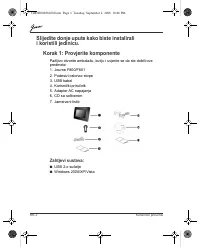
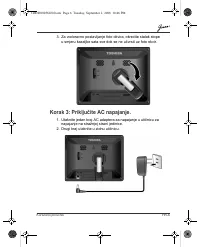
HR-3 Korisni č ki priru č nik Slijedite donje upute kako biste instalirali i koristili jedinicu. Korak 1: Provjerite komponente Pažljivo otvorite ambalažu, kutiju i uvjerite se da ste dobili ove predmete:1. Journe F800/F8012. Podesivi oslonac stope3. USB kabel4. Korisni č ki priru č nik 5. Adapter A...
Page 86 - Korak 2: Instalirajte podeisivi oslonac za stopu.
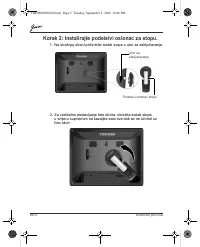
HR-5 Korisni č ki priru č nik Korak 2: Instalirajte podeisivi oslonac za stopu. 1. Na stražnjoj strani pri č vrstite stalak stope u utor za zaklju č avanje. 2. Za vertikalno postavljanje foto okvira, okre ć ite stalak stope u smjeru suprotnom od kazaljke sata sve dok se ne u č vrsti uz foto okvir. U...
Page 92 - Ugra
HR-11 Korisni č ki priru č nik Dodatne zna č ajke (dostupno samo na PA3702*-1ET2) Ugra đ ena baterija Na modelu PA3702*-1ET2 foto okvir je opremljen ugra đ enom litijskom polimerskom baterijom.Za punjenje baterije slijedite dolje navedene korake:1. Priklju č ite jedan kraj AC adaptera za napajanje u...
Page 94 - esto postavljana pitanja
HR-13 Korisni č ki priru č nik Č esto postavljana pitanja Kako ć u nakon kopiranja slika provjeriti da li su one stvarno kopirane u jedinici? Nakon završenog kopiranja slika na zaslonu ć e se pojaviti potvrdna poruka o uspješnom kopiranju. Koje su memorijske kartice kompatibilne s ovom jedinicom? S ...
Page 95 - TOSHIBINA podrška; Informacije o propisima; EU izjava o sukladnosti
Korisni č ki priru č nik HR-14 TOSHIBINA podrška Trebate li pomo ć ? Najanovija ažuriranja upravlja č kih programa, korisni č ke priru č nike i č esto postavljana pitanja potražite na TOSHIBINOJ stranici za podršku i opcije na: computers.toshiba.eu/options-support Molimo vas pogledajte computers.tos...
Page 96 - Radno okruženje
HR-15 Korisni č ki priru č nik Radno okruženje Elektromagnetska sukladnost (EMC) ovog proizvoda se obi č no verificira za kategoriju ovog proizvoda i vrijedi za takozvana stambena, komercijalna i lakoindustrijska okruženja. Sva druga okruženja u Toshibi nisu verificirana i upotreba ovog proizvoda u ...
Page 97 - Ove informacije vrijede samo za zemlje; Zbrinjavanje proizvoda
Korisni č ki priru č nik HR-16 Ove informacije vrijede samo za zemlje č lanice EU Zbrinjavanje proizvoda SImbol s prekriženom kantom za sme ć e na kota č ima pokazuje da se proizvod mora zbrinuti odvojeno od ku ć nog otpada. Integrirane baterije i akumulatori se mogu zbrinuti zajedno s proizvodom. O...
Page 98 - Bevezetés
HU-1 Felhasználói kézikönyv Felhasználói kézikönyv Bevezetés Üdvözöljük, és köszönjük, hogy TOSHIBA terméket vásárolt. Tartalomjegyzék Biztonsági utasítások . . . . . . . . . . . . . . . . . . . . . . . . . . . . . . . . . . . . . . . . . . 2 A készülék (Journe F800/F801) használatbavétele el ő tt f...
Page 99 - Biztonsági utasítások; tt figyelmesen olvassa el az alábbi útmutatást,
Felhasználói kézikönyv HU-2 Biztonsági utasítások A készülék (Journe F800/F801) használatbavétele el ő tt figyelmesen olvassa el az alábbi útmutatást, és tartsa be azt. n A m ű ködési h ő mérséklet 0–40 °C. n Ne használja vagy tárolja a készüléket olyan környezetben, amelyekre jellemz ő az alábbiak ...
Page 100 - A készülék telepítéséhez és kezeléséhez az alábbi; Rendszerkövetelmények:
HU-3 Felhasználói kézikönyv A készülék telepítéséhez és kezeléséhez az alábbi útmutatás alapján járjon el. 1. lépés: A csomag tartalmának ellen ő rzése Óvatosan nyissa fel a dobozt, és ellen ő rizze, hogy az tartalmazza-e a következ ő tételeket: 1. Journe F800/F8012. Állítható állvány3. USB-kábel4. ...
Page 102 - lépés: Az állítható állvány telepítése
HU-5 Felhasználói kézikönyv 2. lépés: Az állítható állvány telepítése 1. Illessze az állványt a készülék hátsó részén lév ő rögzít ő nyílásba. 2. A fényképkeret függ ő leges elhelyezéséhez fordítsa az állványt az óramutató járásával ellentétes irányba, amíg az nem rögzül a kereten. Lezárónyílás Állí...
Page 103 - lépés: A hálózati tápegység csatlakoztatása
Felhasználói kézikönyv HU-6 3. A fényképkeret vízszintes elhelyezéséhez fordítsa az állványt az óramutató járásával egyez ő irányba, amíg az nem rögzül a kereten. 3. lépés: A hálózati tápegység csatlakoztatása 1. Csatlakoztassa a hálózati tápegység egyik végét a fényképkeret hátsó részén lév ő tápcs...
Page 108 - Beépített akkumulátor
HU-11 Felhasználói kézikönyv Speciális funkciók (csak a PA3702*-1ET2 modell esetén) Beépített akkumulátor A PA3702*-1ET2 modell esetében a fényképkeret beépített lítiumpolimer akkumulátorral rendelkezik.Az akkumulátor töltése:1. Csatlakoztassa a hálózati tápegység egyik végét a fényképkeret hátsó ré...
Page 109 - Beépített d
Felhasználói kézikönyv HU-12 Beépített d ő lésérzékel ő A PA3702*-1ET2 modell esetében a fényképkeret beépített d ő lésérzékel ő vel rendelkezik. Az eszköz a nehézségi er ő alapján meg tudja határozni, milyen helyzetben van, és így automatikusan vált a képek álló és fekv ő megjelenítése között. Beép...
Page 110 - Gyakori kérdések
HU-13 Felhasználói kézikönyv Gyakori kérdések Honnan tudhatom, hogy a másolással az eszközre kerültek-e a fényképek? A képek másolásának végén meger ő sít ő üzenet jelenik meg a képerny ő n. Mely típusú memóriakártyák kompatibilisek az eszközzel? A kompatibilis memóriakártyák a következ ő k: Secure ...
Page 111 - TOSHIBA támogatás; Megfelel; EU megfelel
Felhasználói kézikönyv HU-14 TOSHIBA támogatás Segítségre van szüksége? A legújabb illeszt ő program-frissítéseket, felhasználói kézikönyveket és gyakori kérdéseket (FAQ) megtalálhatja a TOSHIBA opciók és szolgáltatások támogató oldalán: computers.toshiba.eu/options-support TOSHIBA forródrót: telefo...
Page 112 - Egyéb, az elektromágneses összeférhet
HU-15 Felhasználói kézikönyv vagy a jelen készülék zavarása annak közvetlen környezetében, ami átmeneti hibás m ű ködést vagy adatvesztést, illetve -sérülést okozhat. Példák a nem vizsgált m ű ködtetési környezetekre és a kapcsolódó tanácsok: n Ipari környezet (pl. ahol a hálózati feszültség háromfá...
Page 113 - Az alábbi tájékoztatás csak az; A termékek hulladékként való kezelése
Felhasználói kézikönyv HU-16 Az alábbi tájékoztatás csak az EU-tagállamoknak szól A termékek hulladékként való kezelése Az áthúzott kerekes szemétgy ű jt ő tartály azt jelenti, hogy a termékeket a háztartási hulladéktól elkülönítve kell gy ű jteni. Az integrált elemek és akkumulátorok a termékkel eg...
Page 114 - Wprowadzenie; Spis tre
PL-1 Podr ć cznik uýytkownika Podr ę cznik u ż ytkownika Wprowadzenie Witamy i dzi ę kujemy za wybór produktu firmy TOSHIBA. Spis tre ś ci Zalecenia dotycz ą ce bezpiecze ń stwa . . . . . . . . . . . . . . . . . . . . . . . . . . . . . 2 Przed uruchomieniem tego urz ą dzenia (Journe F800/F801) nale ...
Page 116 - Wykonaj poni
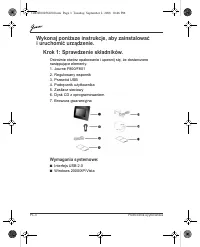
PL-3 Podr ć cznik uýytkownika Wykonaj poni ż sze instrukcje, aby zainstalowa ć i uruchomi ć urz ą dzenie. Krok 1: Sprawdzenie sk ł adników. Ostro ż nie otwórz opakowanie i upewnij si ę , ż e dostarczono nast ę puj ą ce elementy. 1. Journe F800/F8012. Regulowany wspornik3. Przewód USB4. Podr ę cznik ...
Page 118 - Krok 2: Instalacja regulowanego wspornika.
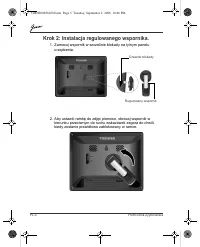
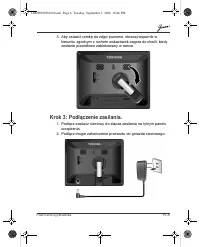
PL-5 Podr ć cznik uýytkownika Krok 2: Instalacja regulowanego wspornika. 1. Zamocuj wspornik w szczelinie blokady na tylnym panelu urz ą dzenia. 2. Aby ustawi ć ramk ę do zdj ęć pionowo, obracaj wspornik w kierunku przeciwnym do ruchu wskazówek zegara do chwili, kiedy zostanie prawid ł owo zablokowa...
Page 120 - enie karty pami
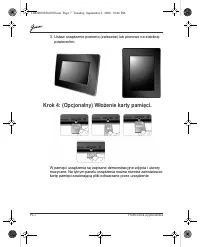
PL-7 Podr ć cznik uýytkownika 3. Ustaw urz ą dzenie poziomo (zalecane) lub pionowo na stabilnej powierzchni. Krok 4: (Opcjonalny) W ł o ż enie karty pami ę ci. W pami ę ci urz ą dzenia s ą zapisane demonstracyjne zdj ę cia i utwory muzyczne. Na tylnym panelu urz ą dzenia mo ż na równie ż zainstalowa...
Page 121 - Krok 6: Uruchomienie urz
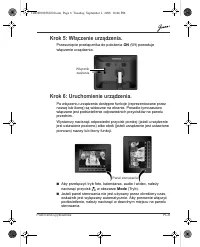
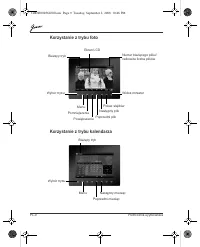
Podr ć cznik uýytkownika PL-8 Krok 5: W łą czenie urz ą dzenia. Przesuni ę cie prze łą cznika do po ł o ż enia ON (W ł ) powoduje w łą czenie urz ą dzenia. Krok 6: Uruchomienie urz ą dzenia. Po w łą czeniu urz ą dzenia dost ę pne funkcje (reprezentowane przez nazw ę lub ikon ę ) s ą widoczne na ekra...
Page 124 - Wbudowany akumulator
PL-11 Podr ć cznik uýytkownika Dodatkowe funkcje (tylko PA3702*-1ET2) Wbudowany akumulator Ramka do zdj ęć PA3702*-1ET2 jest wyposa ż ona we wbudowany akumulator litowo-polimerowy.Aby na ł adowa ć akumulator, wykonaj nast ę puj ą ce kroki: 1. Pod łą cz zasilacz sieciowy do z łą cza zasilania na tyln...
Page 126 - sto zadawane pytania
PL-13 Podr ć cznik uýytkownika Cz ę sto zadawane pytania Jak po skopiowaniu zdj ęć sprawdzi ć , czy pliki zosta ł y zapisane w pami ę ci urz ą dzenia? Po skopiowaniu zdj ęć potwierdzenie jest wy ś wietlane na ekranie. Jakie karty pami ę ci s ą zgodne z tym urz ą dzeniem? Karty pami ę ci Secure Digit...
Page 127 - Pomoc techniczna firmy TOSHIBA; Informacje prawne; Deklaracja zgodno; rodowisko pracy
Podr ć cznik uýytkownika PL-14 Pomoc techniczna firmy TOSHIBA Dodatkowe informacje Aby uzyska ć najnowsze aktualizacje sterowników, podr ę czniki u ż ytkownika i odpowiedzi na cz ę sto zadawane pytania, nale ż y skorzysta ć ze strony opcji i pomocy technicznej firmy TOSHIBA: computers.toshiba.eu/opt...
Page 129 - Likwidacja zu
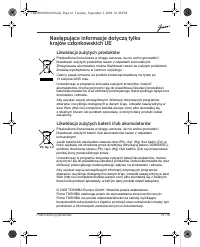
Podr ć cznik uýytkownika PL-16 Nast ę puj ą ce informacje dotycz ą tylko krajów cz ł onkowskich UE Likwidacja zu ż ytych produktów Przekre ś lona ikona kosza w okr ę gu oznacza, ż e nie wolno gromadzi ć i likwidowa ć zu ż ytych produktów razem z odpadami komunalnymi. Zintegrowane akumulatory mo ż na...
Page 130 - Introducere
RO-1 Manual de utilizare Manual de utilizare Introducere Bun g ă sit ş i v ă mul ţ umim c ă a ţ i ales un produs TOSHIBA. Cuprins Instruc ţ iuni de siguran ţă . . . . . . . . . . . . . . . . . . . . . . . . . . . . . . . . . . . . . . . 2 Înainte de a utiliza acest aparat (Journe F800/F801), v ă rug...
Page 132 - Urma; Cerin
RO-3 Manual de utilizare Urma ţ i instruc ţ iunile de mai jos pentru a instala ş i utiliza aparatul. Pasul 1: verifica ţ i componentele Deschide ţ i cu grij ă cutia de ambalaj ş i verifica ţ i dac ă ave ţ i urm ă toarele articole. 1. Journe F800/F8012. Suport cu talp ă reglabil 3. Cablu USB 4. Manua...
Page 134 - i suportul cu talp
RO-5 Manual de utilizare Pasul 2: instala ţ i suportul cu talp ă reglabil. 1. În partea din spate a aparatului, ata ş a ţ i suportul cu talp ă la loca ş ul de blocare. 2. Pentru a amplasa rama foto vertical, roti ţ i suportul cu talp ă în sens antiorar pân ă când se fixeaz ă de rama foto. Loca ş de ...
Page 135 - i alimentarea de curent
Manual de utilizare RO-6 3. Pentru a amplasa rama foto orizontal, roti ţ i suportul cu talp ă în sens orar pân ă când se fixeaz ă de rama foto. Pasul 3: conecta ţ i alimentarea de curent alternativ. 1. Introduce ţ i un cap ă t al adaptorului de curent alternativ în mufa de alimentare din spatele ace...
Page 136 - i un card
RO-7 Manual de utilizare 3. Amplasa ţ i acest aparat orizontal (direc ţ ia recomandat ă ) sau vertical pe o suprafa ţă stabil ă . Pasul 4: (op ţ ional) introduce ţ i un card de memorie. Acest aparat este preînc ă rcat cu câteva imagini ş i muzic ă în memoria intern ă . În partea din spate, pute ţ i ...
Page 140 - Caracteristici suplimentare (disponibile numai; Baterie încorporat
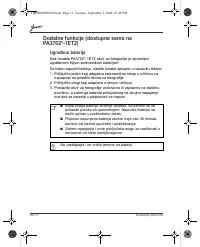
RO-11 Manual de utilizare Caracteristici suplimentare (disponibile numai la PA3702*-1ET2) Baterie încorporat ă La modelul PA3702*-1ET2, rama foto este echipat ă cu o baterie încorporat ă de litiu polimer. Pentru a înc ă rca bateria, urma ţ i pa ş ii de mai jos: 1. Conecta ţ i un cap ă t al adaptorul...
Page 142 - Întreb
RO-13 Manual de utilizare Întreb ă ri frecvente Dup ă copierea fotografiilor, cum pot verifica dac ă fi ş ierele sunt memorate în acest aparat? Dup ă copierea fotografiilor, va ap ă rea un mesaj de confirmare pe ecran. Ce tipuri de card de memorie sunt compatibile cu aparatul? Cardurile de memorie d...
Page 143 - Suport TOSHIBA; Informa; Declara
Manual de utilizare RO-14 Suport TOSHIBA Ave ţ i nevoie de ajutor? Pentru cele mai noi actualiz ă ri de drivere, manuale de utilizare ş i întreb ă ri frecvente, consulta ţ i pagina de suport cu op ţ iuni ş i servicii TOSHIBA: computers.toshiba.eu/options-support V ă rug ă m consulta ţ i computers.to...
Page 144 - Mediul de lucru; Domenii suplimentare neînrudite cu EMC
RO-15 Manual de utilizare Mediul de lucru Conformitatea electromagnetic ă (EMC) a acestui produs a fost verificat ă tipic pentru aceast ă categorie de produse pentru un mediu a ş a numit reziden ţ ial, comercial ş i de industrie u ş oar ă . Orice alt mediu de lucru nu a fost verificat de Toshiba ş i...
Page 145 - Urm; Salubrizarea produselor; Salubrizarea bateriilor
Manual de utilizare RO-16 Urm ă toarele informa ţ ii sunt valabile numai pentru statele membre UE Salubrizarea produselor Simbolul de co ş de gunoi pe ro ţ i t ă iat indic ă faptul c ă produsele trebuie colectate ş i salubrizate separat de gunoiul menajer. Bateriile ş i acumulatorii integra ţ i pot ...
Page 146 - Sadržaj
RS-1 Korisni č ki priru č nik Korisni č ki priru č nik Uvod Dobrodošli i hvala Vam na izboru proizvoda kompanije TOSHIBA. Sadržaj Sigurnosna uputstva . . . . . . . . . . . . . . . . . . . . . . . . . . . . . . . . . . . . . . . . . . 2 Pre koriš ć enja ovog ure đ aja (Journe F800/F801), molimo pažlj...
Page 147 - Sigurnosna uputstva; Pre koriš
Korisni č ki priru č nik RS-2 Sigurnosna uputstva Pre koriš ć enja ovog ure đ aja (Journe F800/F801), molimo pažljivo pro č itajte i sledite uputstva data u nastavku. n Radna temperatura je izme đ u 0 i 40 stepeni Celzijusa. n Ne koristite i ne skladištite ovaj ure đ aj u okruženjima kao što su sled...
Page 148 - Sledite uputstva data u nastavku da biste instalirali
RS-3 Korisni č ki priru č nik Sledite uputstva data u nastavku da biste instalirali i koristili ure đ aj. 1. korak: Proverite komponente Pažljivo otvorite kutiju i proverite da li se u njoj nalaze slede ć i artikli: 1. Journe F800/F8012. Prilagodljivi stalak sa postoljem3. USB kabl4. Korisni č ki pr...
Page 151 - ite napajanje naizmeni
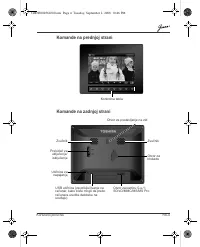
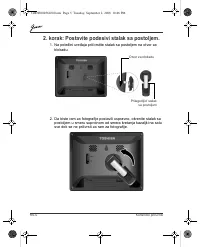
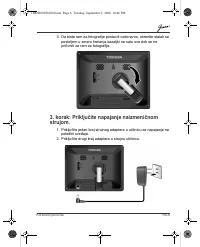
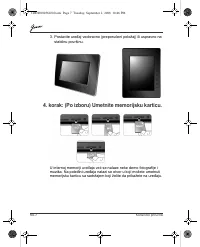
Korisni č ki priru č nik RS-6 3. Da biste ram za fotografije postavili vodoravno, okrenite stalak sa postoljem u smeru kretanja kazaljki na satu sve dok se ne pri č vrsti za ram za fotografije. 3. korak: Priklju č ite napajanje naizmeni č nom strujom. 1. Priklju č ite jedan kraj strujnog adaptera u ...
Page 153 - ite ure
Korisni č ki priru č nik RS-8 5. korak: Uklju č ite ure đ aj. Povla č enjem prekida č a za uklju č enje/isklju č enje u položaj ON ure đ aj se uklju č uje. 6. korak: Koristite ure đ aj. Nakon što se ure đ aj uklju č i, dostupne funkcije (predstavljene nazivom ili ikonicom) prikaza ć e se na ekranu. ...
Page 156 - Dodatne funkcije (dostupne samo na
RS-11 Korisni č ki priru č nik Dodatne funkcije (dostupne samo na PA3702*-1ET2) Ugra đ ena baterija Kod modela PA3702*-1ET2 okvir za fotografije je opremljen ugra đ enom litijum-polimerskom baterijom. Da biste napunili bateriju, sledite korake opisane u nastavku teksta:1. Priklju č ite jedan kraj ad...
Page 159 - Podrška kompanije „TOSHIBA“; Zakonske informacije; Izjava o uskla
Korisni č ki priru č nik RS-14 Podrška kompanije „TOSHIBA“ Potrebna Vam je pomo ć ? Za najnovija ažuriranja upravlja č kih programa, korisni č kih priru č nika i „ č esto postavljanih pitanja“, pogledajte Internet stranicu kompanije „Toshiba“ sa podrškom za opcije i usluge: computers.toshiba.eu/opti...
Page 161 - Informacije koje slede važe isklju; Odlaganje proizvoda na otpad
Korisni č ki priru č nik RS-16 Informacije koje slede važe isklju č ivo za korisnike u državama- č lanicama EU Odlaganje proizvoda na otpad Znak sa precrtanom kantom za sme ć e na to č kovima ozna č ava da se proizvodi moraju prikupljati i odlagati na otpad odvojeno od otpada doma ć instva. Ugra đ e...
Page 162 - Введение
RU-1 Руководство пользователя Руководство пользователя Введение Добро пожаловать ! Благодарим вас за выбор в пользу продукции TOSHIBA. Содержание Правила техники безопасности . . . . . . . . . . . . . . . . . . . . . . . . . . . . . . . . 2 Прежде чем приступить к эксплуатации устройства (Journe F80...
Page 163 - Правила
Руководство пользователя RU-2 Правила техники безопасности Прежде чем приступить к эксплуатации устройства (Journe F800/F801), внимательно ознакомьтесь с изложенными далее инструкциями и следуйте им в дальнейшем . n Рабочая температура : от 0 до 40 градусов Цельсия . n Не допускается эксплуатация и ...
Page 164 - Требования
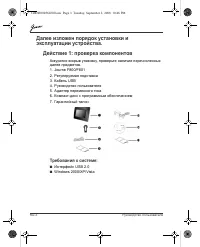
RU-3 Руководство пользователя Далее изложен порядок установки и эксплуатации устройства . Действие 1: проверка компонентов Аккуратно вскрыв упаковку , проверьте наличие перечисленных далее предметов . 1. Journe F800/F8012. Регулируемая подставка 3. Кабель USB 4. Руководство пользователя 5. Адаптер п...
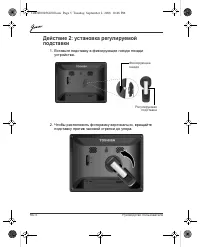
Page 167 - Действие
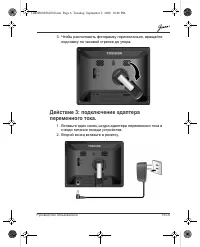
Руководство пользователя RU-6 3. Чтобы расположить фоторамку горизонтально , вращайте подставку по часовой стрелке до упора . Действие 3: подключение адаптера переменного тока . 1. Вставьте один конец шнура адаптера переменного тока в гнездо питания позади устройства . 2. Второй конец вставьте в роз...
Page 172 - Дополнительные; Встроенная
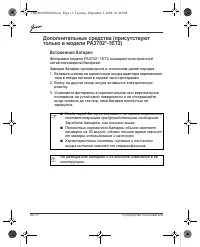
RU-11 Руководство пользователя Дополнительные средства ( присутствуют только в модели PA3702*-1ET2) Встроенная батарея Фоторамки модели PA3702*-1ET2 оснащаются встроенной литий - полимерной батареей . Зарядка батареи производится в описанном далее порядке . 1. Вставьте штекер на одном конце шнура ад...
Page 174 - Ответы
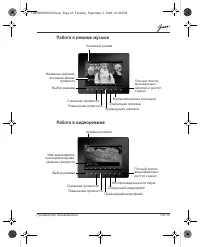
RU-13 Руководство пользователя Ответы на типичные вопросы Как после копирования фотографий проверить , сохранились ли файлы в устройстве ? После того , как фотографии будут скопированы , на экране появится подтверждающее сообщение . Какие типы карт памяти совместимы с устройством ? С данным устройст...
Page 179 - ítajte nasledujúce pokyny
Užívate ľ ská príru č ka SK-2 Bezpe č nostné pokyny Pred používaním zariadenia (Journe F800/F801) si, prosím, pozorne pre č ítajte nasledujúce pokyny a postupujte pod ľ a nich. n Prevádzková teplota zariadenia je od 0 do 40 °C. n Nepoužívajte a neskladujte zariadenie: n na priamom slne č nom svetle ...
Page 180 - Pri inštalácii a ovládaní zariadenia postupujte pod; Systémové požiadavky:
SK-3 Užívate ľ ská príru č ka Pri inštalácii a ovládaní zariadenia postupujte pod ľ a nasledujúcich pokynov. Krok 1: Skontrolujte, č i máte všetky komponenty Opatrne otvorte škatu ľ u obalu a uistite sa, že balenie obsahuje nasledujúce položky.1. Journe F800/F8012. Nastavite ľ ný stojan 3. USB kábel...
Page 182 - Krok 2: Nainštalujte nastavite
SK-5 Užívate ľ ská príru č ka Krok 2: Nainštalujte nastavite ľ ný stojan. 1. Stojan pripevnite k otvoru na zadnej strane zariadenia. 2. Aby ste umiestnili foto rámik vertikálne, otá č ajte stojanom proti smeru hodinových ru č i č iek, až kým nie je upevnený v zariadení. Otvor na upevnenie stojana Na...
Page 188 - Zabudovaná batéria
SK-11 Užívate ľ ská príru č ka Ď alšie funckie (k dispozícii len pre PA3702*-1ET2) Zabudovaná batéria Pri modeli PA3702*-1ET2 je foto rámik vybavený zabudovanou lítium-polymérovou batériou.Ak chcete batériu nabi ť , postupujte nasledovne: 1. Pripojte jeden koniec sie ť ového adaptéra do konektora na...
Page 190 - asto kladené otázky
SK-13 Užívate ľ ská príru č ka Č asto kladené otázky Ako si overím, č i už sú skopírované fotografie uložené v tomto zariadení? Po skopírovaní fotografií sa na obrazovke objaví správa s potvrdením. Aké typy pamä ť ových kariet sú kompatibilné s týmto zariadením? S týmto zariadením sú kompatibilné ti...
Page 191 - Podpora spolo; EÚ vyhlásenie o zhode
Užívate ľ ská príru č ka SK-14 Podpora spolo č nosti TOSHIBA Potrebujete pomoc? Na stránkach technickej a zákazníckej podpory spolo č nosti TOSHIBA nájdete najnovšie aktualizácie ovláda č ov, používate ľ ské príru č ky a odpovede na č asto kladené otázky. computers.toshiba.eu/options-support Pozrite...
Page 192 - Pracovné prostredie
SK-15 Užívate ľ ská príru č ka Pracovné prostredie Elektromagnetická kompatibilita (EMC) tohto výrobku bola schválená typickým spôsobom pre túto kategóriu výrobkov, ktoré sú potrebné pre tzv. „Domáce, komer č né a ľ ahko priemyselné prostredia“. Inakšie pracovné prostredie nebolo schválené spolo č n...
Page 193 - Nasledovné informácie sú platné len; Likvidácia výrobkov
Užívate ľ ská príru č ka SK-16 Nasledovné informácie sú platné len pre č lenské štáty EU Likvidácia výrobkov Pre č iarknutý symbol odpadkového koša znamená, že výrobky sa musia vyhadzova ť a likvidova ť oddelene od domového odpadu. Integrované batérie a akumulátory sa môžu likvidova ť spolo č ne s v...
Page 194 - Kazalo vsebine
SL-1 Uporabniški priro č nik Uporabniški priro č nik Uvod Dobrodošli in hvala, ker ste izbrali izdelek TOSHIBA. Kazalo vsebine Varnostna navodila . . . . . . . . . . . . . . . . . . . . . . . . . . . . . . . . . . . . . . . . . . . . 2 Pred uporabo te naprave (Journe F800/F801) skrbno preberite in u...
Page 195 - Varnostna navodila; preberite in upoštevajte spodnja navodila.
Uporabniški priro č nik SL-2 Varnostna navodila Pred uporabo te naprave (Journe F800/F801) skrbno preberite in upoštevajte spodnja navodila. n Delovna temperatura je med 0 in 40 stopinj Celzija. n Te enote ne uporabljajte in ne shranjujte v okoljih, navedenih spodaj: n Neposredna son č na svetloba n...
Page 196 - Navodila za namestitev in uporabo naprave
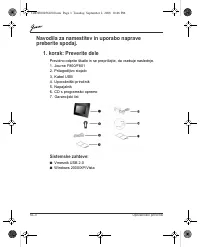
SL-3 Uporabniški priro č nik Navodila za namestitev in uporabo naprave preberite spodaj. 1. korak: Preverite dele Previdno odprite škatlo in se prepri č ajte, da vsebuje naslednje. 1. Journe F800/F8012. Prilagodljivo stojalo3. Kabel USB4. Uporabniški priro č nik 5. Napajalnik6. CD s programsko oprem...
Page 198 - korak: Namestitev prilagodljivegha stojala
SL-5 Uporabniški priro č nik 2. korak: Namestitev prilagodljivegha stojala 1. Pritrdite stojalo na zati č na hrbtni strani. 2. Č e želite okvir za fotografije postaviti v pokon č en položaj, zasukajte stojalo v smer, nasprotno urinemu kazalcu, da se zasko č i v okvir. Reža za zaklepanje Prilagodljiv...
Page 199 - itev na napajanje
Uporabniški priro č nik SL-6 3. Č e želite okvir za fotografije postaviti v leže č položaj, zasukajte stojalo v smer urinega kazalca, da se zasko č i v okvir. 3. korak: Priklju č itev na napajanje 1. En konec kabla napajalnika priklju č ite na ustrezen priklju č ek na hrbtni strani naprave. 2. Drugi...
Page 200 - pomnilniške kartice
SL-7 Uporabniški priro č nik 3. Napravo postavite vodoravno (priporo č eno) ali navpi č no na stabilno podlago. 4. korak: (neobvezno) Namestitev pomnilniške kartice V vgrajenem pomnilniku naprave je nekaj vzor č nih slik in glasbenih posnetkov. Na hrbtni strani naprave lahko vstavite tudi pomnilnišk...
Page 204 - Dodatne funkcije (na voljo samo pri; Vgrajena baterija
SL-11 Uporabniški priro č nik Dodatne funkcije (na voljo samo pri modelu PA3702*-1ET2) Vgrajena baterija Pro modelu PA3702*-1ET2 je okvir opremljen z vgrajeno polimersko baterijo iz litijevih ionov.Za polnjenje baterije uporabite ta postopek:1. En konec kabla napajalnika priklju č ite na ustrezen pr...
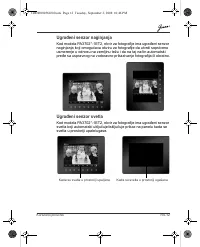
Page 205 - Vgrajen senzor nagiba; Vgrajen senzor svetlobe
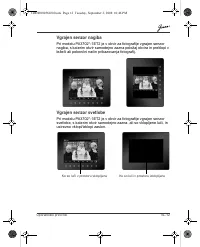
Uporabniški priro č nik SL-12 Vgrajen senzor nagiba Pri modelu PA3702*-1ET2 je v okvir za fotografije vgrajen senzor nagiba, s katerim okvir samodejno zazna položaj okvira in preklopi v leže č i ali pokon č ni na č in prikazovanja fotografij. Vgrajen senzor svetlobe Pri modelu PA3702*-1ET2 je v okvi...
Page 206 - Pogosta vprašanja
SL-13 Uporabniški priro č nik Pogosta vprašanja Kako lahko po kopiranju fotografij preverim, ali so v napravi že shranjene datoteke? Ko so fotografije kopirane, bo na zaslonu prikazano potrditveno sporo č ilo. S katerimi vrstami pomnilniških kartic je združljiva naprava? Naprava podpira pomnilniške ...
Page 207 - Podpora podjetja TOSHIBA; Upravne informacije; Evropska izjava o skladnosti
Uporabniški priro č nik SL-14 Podpora podjetja TOSHIBA Potrebujete pomo č ? Najnovejše posodobitve gonilnikov, uporabniške priro č nike in odgovore na pogosta vprašanja najdete na strani za podporo za dodatke in storitve TOSHIBA: computers.toshiba.eu/options-support Telefonske številke za stik s TOS...
Page 208 - Delovno okolje
SL-15 Uporabniški priro č nik Delovno okolje Elektromagnetna združljivost te te naprave je bila preverjena skladno z napravo, zna č ilno za to vrsto izdelkov, za tako imenovana bivalna in komercialna okolja ter okolja z lahko industrijo. Toshiba ni naprave preverila v nobenem drugem okolju in uporab...
Page 209 - Naslednje informacije veljajo samo za; Odlaganje odpadnega izdelka
Uporabniški priro č nik SL-16 Naslednje informacije veljajo samo za države č lanice EU Odlaganje odpadnega izdelka Znak prekrižanega smetnjaka na kolesih pomeni, da je treba izdelke zbrati in odložiti lo č eno od gospodinjskih odpadkov. Vgrajene baterije in akumulatorje lahko odvržete skupaj z izdel...
Page 210 - Giri; çindekiler
TR-1 Kullan ı c ı Elkitab ı Kullan ı c ı Elkitab ı Giri ş Ho ş geldiniz, bir TOSHIBA ürününü seçti ğ iniz için te ş ekkür ederiz. İ çindekiler Güvenlik Talimatlar ı . . . . . . . . . . . . . . . . . . . . . . . . . . . . . . . . . . . . . . . . . . . 2 Bu birimi (Journe F800/F801) çal ı ş t ı rmadan...
Page 212 - Sistem Gereksinimleri:
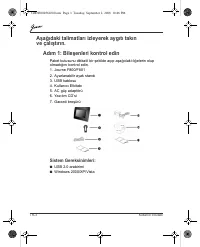
TR-3 Kullan ı c ı Elkitab ı A ş a ğ ı daki talimatlar ı izleyerek ayg ı t ı tak ı n ve çal ı ş t ı r ı n. Ad ı m 1: Bile ş enleri kontrol edin Paket kutusunu dikkatli bir ş ekilde aç ı p a ş a ğ ı daki ö ğ elerin olup olmad ı ğ ı n ı kontrol edin. 1. Journe F800/F8012. Ayarlanabilir ayak stand ı 3. ...
Page 214 - Ad
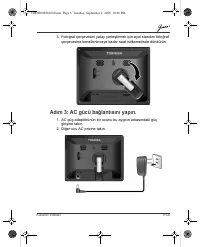
TR-5 Kullan ı c ı Elkitab ı Ad ı m 2: Ayarlanabilir ayak stand ı n ı kurun. 1. Ayak stand ı n ı ayg ı t ı n arkas ı ndaki kilit yuvas ı na tak ı n. 2. Foto ğ raf çerçevesini dikey yerle ş tirmek için ayal stand ı n ı foto ğ raf çerçevesine kenetleninceye kadar saatin aksi istikamette döndürün. Kilit...
Page 220 - Entegre pil
TR-11 Kullan ı c ı Elkitab ı Ek özellikler (sadece PA3702*-1ET2 için) Entegre pil PA3702*-1ET2 modelinde foto ğ raf çerçevesinde entegre lityum polimer pil bulunmaktad ı r. Pili ş arj etmek için a ş a ğ ı daki ad ı mlar ı izleyin: 1. AC güç adaptörünün bir ucunu resim çerçevesinin arkas ı ndaki güç ...
Page 222 - kça sorulan sorular
TR-13 Kullan ı c ı Elkitab ı S ı kça sorulan sorular Foto ğ raflar ı kopyalad ı ktan sonra dosyalar ı n bu ünitede zaten saklan ı p saklanmad ı ğ ı n ı nas ı l kontrol edebilirim? Foto ğ raflar kopyaland ı ktan sonra, ekranda bir onay mesaj ı görüntülenir. Hangi bellek kart ı türleri bu üniteyle uyu...
Page 223 - TOSHIBA deste; Yönetmelik Bilgileri; AB Uyumlulu Aç
Kullan ı c ı Elkitab ı TR-14 TOSHIBA deste ğ i Yard ı m ister misiniz? En yeni sürücü güncele ş tirmeleri, kullan ı c ı el kitaplar ı ve SSS (S ı kça Sorulan Sorular) için lütfen TOSHIBA seçenekler ve hizmetler desteks ayfas ı na bak ı n: computers.toshiba.eu/options-supportToshiba destek hatt ı num...
Page 224 - Çal
TR-15 Kullan ı c ı Elkitab ı Çal ı ş ma Ortam ı Bu ürün Mesken, T,car, ve Ayd ı nlatma Endüstri Ortam ı ürün kategorisiyle ilgili olarak Elektro Manyetik Uyum (EMC) konusunda onaylanm ı ş t ı r. Toshiba bu ürünün ba ş ka çal ı ş ma ortamlar ı nda kullan ı lmas ı konusunda tavsiyede bulunmamaktad ı r...
Page 225 - daki bilgiler sadece AB üyesi; Ürünlerin imha edilmesi
Kullan ı c ı Elkitab ı TR-16 A ş a ğ ı daki bilgiler sadece AB üyesi ülkeler için geçerlidir Ürünlerin imha edilmesi Üzerinde çarp ı i ş areti olan tekerlekli çöp kutusu simgesi ürünlerin toplanmas ı ve ev at ı klar ı ndan ayr ı olarak imha edilmesi gerekti ğ ini göstermektedir. Entegre piller ve ak...
Page 229 - תכימת; הניקת; יפוריאה
שמתשמל ךירדמ HE-16 TOSHIBA תכימת ? הרזעל קוקז תויורשפאה ףדב רקב , תוצופנ תולאשו שמתשמל םיכירדמ , םינכדועמ םינקתה ילהנמל : תבותכב TOSHIBA לש הכימתה תורישו computers.toshiba.eu/options-support תבותכב רקב TOSHIBA לש םחה וקה ירפסמ תלבקל . computers.toshiba.eu/options-warranty הניקת לע עדימ יפוריאה דוחיא...
Page 230 - תוצופנ
HE-15 שמתשמל ךירדמ תוצופנ תולאש םיצבקהש קודבל לכוא דציכ , םימולצת תקתעה רחאל ? הדיחיב רבכ םינסחואמ . ךסמה לע רושיא העדוה העיפומ , םיקתעומ םימולצתש רחאל ? הדיחיל םימאות ןורכיז יסיטרכ לש םיגוס הזיא Secure Digital™ Card (SD), : הדיחיל םימאות םיאבה ןורכיזה יסיטרכ xD-Picture Card™ (xD), Multi Media Card™...
Page 232 - רובע; תללכומ
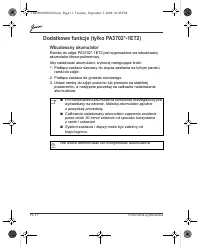
HE-13 שמתשמל ךירדמ PA3702*-1ET2 רובע תונימז ) תופסונ תונוכת ( דבלב תללכומ הללוס . תינבומ םויתיל רמילופ תללוסב תדיוצמ תונומתה תרגסמ , PA3702*-1ET2 םגדב : םיאבה םיבלשה תא עצב , הללוסה תא ןועטל ידכ תרגסמ לש ירוחאה קלחב למשחה עקשל חוכה קפס לש דחא הצק רבח -1 . תונומתה . למשח עקשל ינשה הצקה תא רבח -2 רבוח...
Page 233 - Music; Video; בצמב
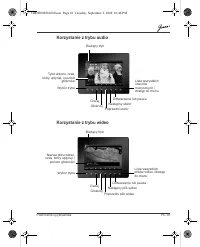
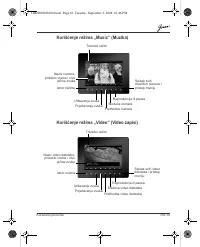
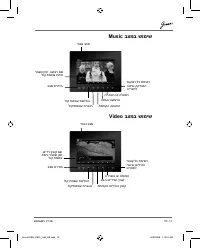
שמתשמל ךירדמ HE-12 Music בצמב שומיש יחכונ בצמ תועוצר לכ תמישר השיגו הקיזומה טירפתל הייהשה וא הלעפה האבה העוצרה תמדוקה העוצרה לוק • תמצוע תרבגה לוק תמצוע תשלחה בצמ תריחב רבעש ןמז , העוצר םש לוק תמצוע תמרו Video בצמב שומיש יחכונ בצמ יצבוק לכ תמישר השיגו ואידיווה טירפתל הייהשה וא הלעפה אבה ואידיווה ץבו...
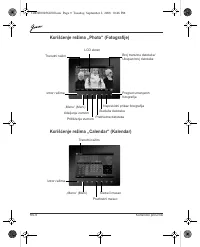
Page 234 - Photo; Calendar
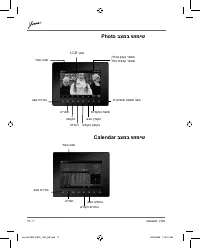
HE-11 שמתשמל ךירדמ Photo בצמב שומיש LCD ךסמ / יחכונ ץבוק רפסמ ללוכ םיצבק רפסמ יחכונ בצמ בצמ תריחב טירפת הנטקה הלדגה םדוקה ץבוקה אבה ץבוקה תויפוקש תגצמ תרעזוממ הנומת בצמ Calendar בצמב שומיש םדוקה שדוחה אבה שדוחה בצמ תריחב יחכונ בצמ טירפת JournE F800 (F801)_UM_HE.indd 11 JournE F800 (F801)_UM_HE.indd ...
Page 235 - הדיחיה
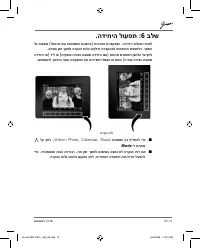
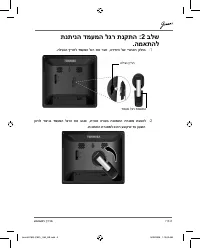
שמתשמל ךירדמ HE-10 . הדיחיה לועפת :6 בלש לע תוגצומ ( למס וא םש תועצמאב תוגצוימ ) תונימזה תויצקנופה , הדיחיה תלעפה רחאל . םיוסמ ןמז ךשמל הרקבה חולב םיקלדנ תויצקנופל םימאותה םינצחלה . ךסמה הדיחיה וא ) דיל וא ( תיקפוא הרוצב תבצומ הדיחיה םא ) תחתמ םיאתמה ןצחלה לע ץחל . שמתשהל ךנוצרב הבש היצקנופה תא םיני...
Page 237 - ןורכיזה
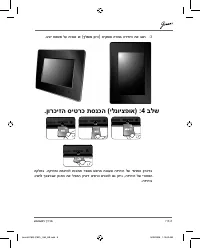
שמתשמל ךירדמ HE-8 . ביצי חטשמ לע תיכנא וא ( ץלמומ ןוויכ ) תיקפוא הרוצב הדיחיה תא בצה -3 . ןורכיזה סיטרכ תסנכה ( ילנויצפוא ) :4 בלש הקלחב . הקיזומו המגדהל תונומת רפסמ שארמ תונועט הדיחיה לש ימינפה ןורכיזב גיצהל ךנוצרבש ןכותה תא ליכמה ןורכיז סיטרכ סינכהל םג ןתינ , הדיחיה לש ירוחאה . הדיחיב JournE F800 ...
Page 238 - חוכה
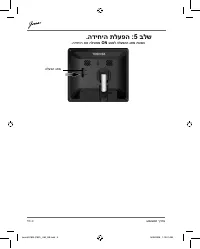
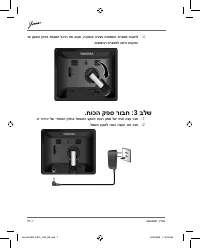
HE-7 שמתשמל ךירדמ דע ןועשה ןוויכב דמעמה לגרה תא בבוס , תיקפוא הרוצב תונומתה תרגסמ תבצהל -3 . תונומתה תרגסמל בטיה עבוקיש . חוכה קפס רובח :3 בלש . וז הדיחי לש ירוחאה קלחב למשחה עקשל חוכה קפס לש דחא הצק רבח -1 . למשח עקשל ינשה הצקה תא רבח -2 JournE F800 (F801)_UM_HE.indd 7 JournE F800 (F801)_UM_HE.indd...
Page 241 - םיביכרה; תכרעמה
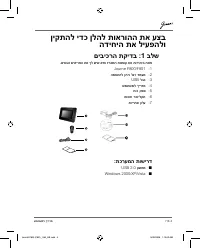
שמתשמל ךירדמ HE-4 ןיקתהל ידכ ןלהל תוארוהה תא עצב הדיחיה תא ליעפהלו םיביכרה תקידב :1 בלש . םיאבה םיטירפה תא ךל שיש אדוו זראמה תספוק תא תוריהזב חתפ Journe F800/F801 -1 המאתהל ןתינ לגר דמעמ -2 USB לבכ -3 שמתשמל ךירדמ -4 חוכ קפס -5 הנכות רוטילקת -6 תוירחא ןולע -7 : תכרעמה תושירד USB 2.0 קשממ ■ Windows 2...
Page 242 - תוחיטב
HE-3 שמתשמל ךירדמ תוחיטב תוארוה Journe F800/ ) הדיחיה תלעפה ינפל תוארוהה תא עצבו הדיפקב ארק ,( F801 . ןלהל . סויזלצ תולעמ 40 ןיבו 0 ןיב איה הלעפהה תרוטרפמט ■ . ןלהל תוטרופמה תוביבסב וז הדיחי ןסחאת לאו שמתשת לא ■ רישי שמש רוא ■ היטבמא תמגוד ההובג תוחל םע רוזא ■ םיקבואמ תומוקמ ■ םירחא םוח תורוקמ וא יל...
Page 243 - אובמ; םיניינעה
שמתשמל ךירדמ HE-2 אובמ . TOSHIBA לש רצומב םתרחבש לע הדותו םיאבה םיכורב םיניינעה ןכות 3 ........................................................................ תוחיטב תוארוה ,( Journe F800/F801 ) הדיחיה תלעפה ינפל 3 ......................................... . ןלהל תוארוהה תא עצבו הדיפקב ארק 4 .........