tekmar TEK557 - User Manual
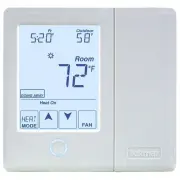
tekmar TEK557 Thermostat – User Manual, read for free online in PDF format. We hope this helps you resolve any issues you may have. If you have further questions, please contact us through the contact form.


Table of Contents:
- Page 2 – detailed information on this or any other tekmar product.; Touchscreen Adjustments
- Page 3 – Display Symbols; or
- Page 4 – Adjust the Temperature - Temporary Hold; Use the Up or Down
- Page 5 – To change the current time, touch the clock on the display.
- Page 6 – Programmable Schedule - Day
- Page 7 – Program Menu Settings
- Page 8 – Screen Clean Menu; and night temperature settings for both heating, cooling.; Air Temperature Only; Freeze protection for garages.
- Page 9 – Time Menu Settings; Set date, month and year; Schedule Menu Settings; Display; Day temperature; *Requires the thermostat to be connected to a tekmarNet
- Page 10 – Scene Menu Settings; Scenes; Display Menu Settings; Units; Select how the display backlight operates.; Secondary Item
- Page 11 – Monitor Menu; Access
- Page 12 – More Information; Symptom
© 2012
557_U - 08/12
1 of 12
A Watts Water Technologies Company
User Manual
tekmarNet
®
Thermostat 557
Zoning
557_U
08/12
Replaces: New
"Loading the manual" means you need to wait until the file loads and becomes available for online reading. Some manuals are very large, and the time they take to appear depends on your internet speed.
Summary
© 2012 557_U - 08/12 2 of 12 A Watts Water Technologies Company This brochure will provide you with the information you need to benefit the most from your tekmarNet ® thermostat. Please visit www.tekmarControls.com for more detailed information on this or any other tekmar product. This thermostat pr...
© 2012 557_U - 08/12 3 of 12 A Watts Water Technologies Company Display Symbols This thermostat will display symbols on its screen in order to indicate what mode it is in, what temperature it is operating at, or what equipment it is trying to turn on. This section describes each of those symbols. HE...
© 2012 557_U - 08/12 4 of 12 A Watts Water Technologies Company Adjust the Temperature - Temporary Hold Temporary hold allows a user to change the temperature for a period of time and then automatically return to the permanent temperature setting. This is especially useful in commercial buildings th...