Page 2 - detailed information on this or any other tekmar product.; Touchscreen Adjustments
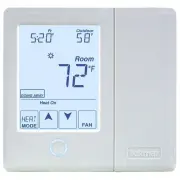
© 2012 557_U - 08/12 2 of 12 A Watts Water Technologies Company This brochure will provide you with the information you need to benefit the most from your tekmarNet ® thermostat. Please visit www.tekmarControls.com for more detailed information on this or any other tekmar product. This thermostat pr...
Page 3 - Display Symbols; or
© 2012 557_U - 08/12 3 of 12 A Watts Water Technologies Company Display Symbols This thermostat will display symbols on its screen in order to indicate what mode it is in, what temperature it is operating at, or what equipment it is trying to turn on. This section describes each of those symbols. HE...
Page 4 - Adjust the Temperature - Temporary Hold; Use the Up or Down
© 2012 557_U - 08/12 4 of 12 A Watts Water Technologies Company Adjust the Temperature - Temporary Hold Temporary hold allows a user to change the temperature for a period of time and then automatically return to the permanent temperature setting. This is especially useful in commercial buildings th...
Page 5 - To change the current time, touch the clock on the display.
© 2012 557_U - 08/12 5 of 12 A Watts Water Technologies Company Adjust the Time Secondary Temperature Display This thermostat can display the outdoor or floor temperature, relative humidity, or the room heating and cooling temperature settings in the smaller number area at the top right of the scree...
Page 6 - Programmable Schedule - Day
© 2012 557_U - 08/12 6 of 12 A Watts Water Technologies Company This thermostat is capable of running at a lower temperature setting when you are asleep or out of the building. When the schedule setting is on, day and night temperature settings will display on the screen. If you adjust the temperatu...
Page 7 - Program Menu Settings
© 2012 557_U - 08/12 7 of 12 A Watts Water Technologies Company Program Menu Settings To Enter the Programming Menus ---------------------------------- ---------------------------------- Press and hold the Home button for 3 seconds to enter the programming menus. Select a Programming Menu ----------...
Page 8 - Screen Clean Menu; and night temperature settings for both heating, cooling.; Air Temperature Only; Freeze protection for garages.
© 2012 557_U - 08/12 8 of 12 A Watts Water Technologies Company Screen Clean Menu Entering the Screen Clean menu gives you 30 seconds to clean the thermostat and display with a moist cloth. Do not use solvents to clean the thermostat. Set Temp Menu Entering the Set Temp menu allows you to permanentl...
Page 9 - Time Menu Settings; Set date, month and year; Schedule Menu Settings; Display; Day temperature; *Requires the thermostat to be connected to a tekmarNet
© 2012 557_U - 08/12 9 of 12 A Watts Water Technologies Company Time Menu Settings Set date, month and year Required for daylight savings time. Daylight Save Automatic daylight saving time update for the spring and fall. Time Mode Select either 12 or 24 hour time format. Clock Select on to display t...
Page 10 - Scene Menu Settings; Scenes; Display Menu Settings; Units; Select how the display backlight operates.; Secondary Item
© 2012 557_U - 08/12 10 of 12 A Watts Water Technologies Company Scene Menu Settings Scenes Scenes provide system-wide overrides to save energy. Select whether scenes are not used (none) or if the away scene is available. Away Key If scenes are available, select if the away key is available or not. ...
Page 11 - Monitor Menu; Access
© 2012 557_U - 08/12 11 of 12 A Watts Water Technologies Company Monitor Menu The monitor menu allows you to view the following temperatures and running hours: Outdoor temperature highs and lowsRoom temperature highs and lowsFloor temperature highs and lows (requires floor sensor to be installed)Fil...
Page 12 - More Information; Symptom
All specifications are subjectto change without notice 12 of 12 557_U - 08/12. Product design, software and literature are Copyright ©2012 by tekmar Control Systems Ltd., A Watts Water Technologies Company. Head Offi ce: 5100 Silver Star Road, Vernon, B.C. Canada V1B 3K4, 250-545-7749, Fax. 250-545-0...