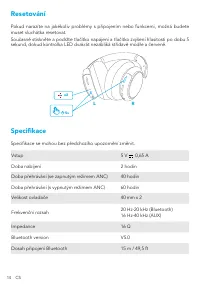
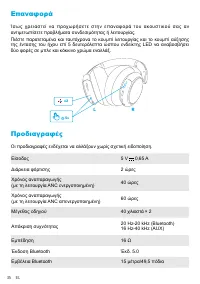
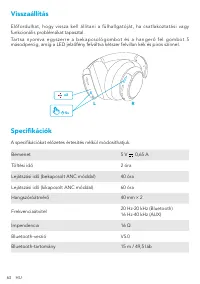
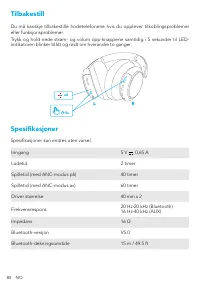
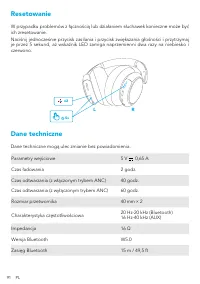
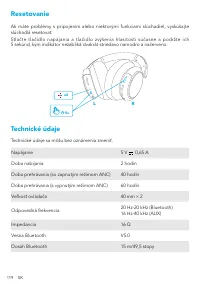
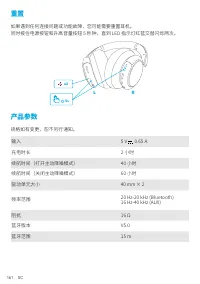
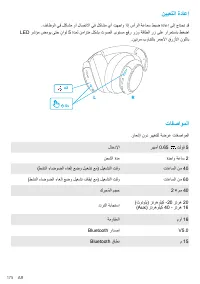
Page 3 - Charging
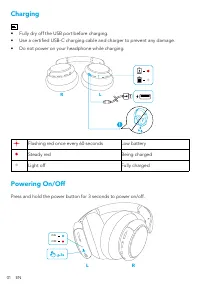
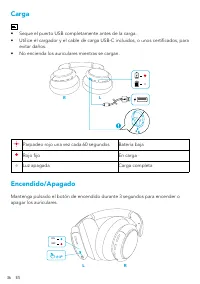
01 EN Charging • Fully dry off the USB port before charging. • Use a certified USB-C charging cable and charger to prevent any damage. • Do not power on your headphone while charging. R L Flashing red once every 60 seconds Low battery Steady red Being charged Light off Fully charged Powering On/Off ...
Page 4 - Bluetooth Pairing; Pairing with another device
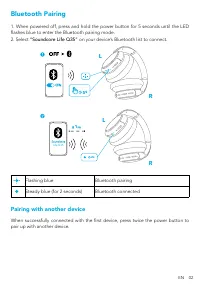
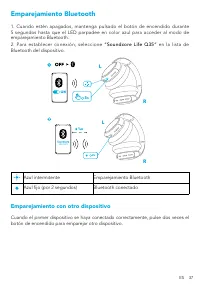
EN 02 Bluetooth Pairing 1. When powered off, press and hold the power button for 5 seconds until the LED flashes blue to enter the Bluetooth pairing mode. 2. Select “Soundcore Life Q35” on your device’s Bluetooth list to connect. 5s 1 L L R R Life Q35 2s Flashing blue Bluetooth pairing Steady blue (...
Page 5 - Button Controls
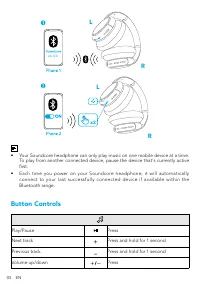
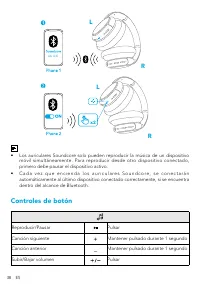
03 EN x2 L L Life Q35 R R • Your Soundcore headphone can only play music on one mobile device at a time. To play from another connected device, pause the device that's currently active first. • Each time you power on your Soundcore headphone, it will automatically connect to your last successfully c...
Page 6 - NFC Mode; NFC
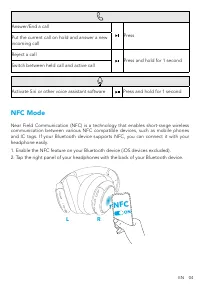
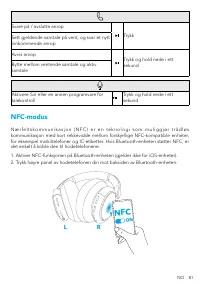
EN 04 Answer/End a call Press Put the current call on hold and answer a new incoming call Reject a call Press and hold for 1 second Switch between held call and active call Activate Siri or other voice assistant software Press and hold for 1 second NFC Mode Near Field Communication (NFC) is a techno...
Page 7 - Noise Cancellation Mode; Transparency Mode; AUX Mode
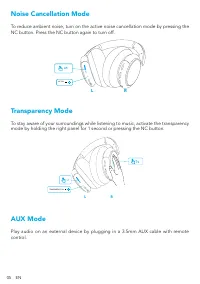
05 EN Noise Cancellation Mode To reduce ambient noise, turn on the active noise cancellation mode by pressing the NC button. Press the NC button again to turn off. NC ON x1 R L Transparency Mode To stay aware of your surroundings while listening to music, activate the transparency mode by holding th...
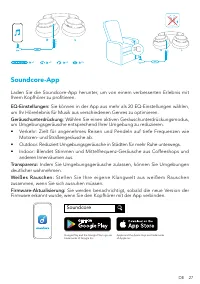
Page 8 - Soundcore App; Soundcore
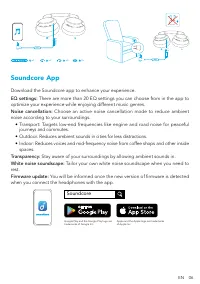
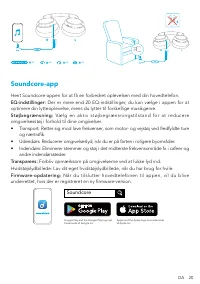
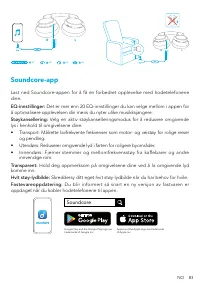
EN 06 m m 5. 3 R L m m 5. 3 R L x1 x3 x2 2s Soundcore App Download the Soundcore app to enhance your experience. EQ settings: There are more than 20 EQ settings you can choose from in the app to optimize your experience while enjoying different music genres. Noise cancellation: Choose an active nois...
Page 10 - Nabíjení
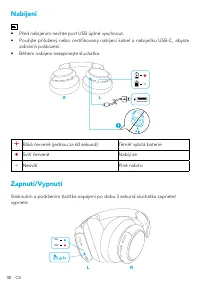
08 CS Nabíjení • Před nabíjením nechte port USB úplně vyschnout. • Použijte přiložený nebo certifikovaný nabíjecí kabel a nabíječku USB-C, abyste zabránili poškození. • Během nabíjení nezapínejte sluchátka. R L Bliká červeně (jednou za 60 sekund) Téměř vybitá baterie Svítí červeně Nabíjí se Nesvítí ...
Page 11 - Párování Bluetooth; Spárování s jiným zařízením
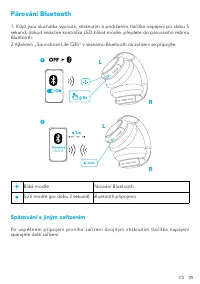
CS 09 Párování Bluetooth 1. Když jsou sluchátka vypnuta, stisknutím a podržením tlačítka napájení po dobu 5 sekund, dokud nezačne kontrolka LED blikat modře, přejdete do párovacího režimu Bluetooth. 2.Výběrem „Soundcore Life Q35“ v seznamu Bluetooth na zařízení se připojíte. 5s 1 L L R R Life Q35 2s...
Page 12 - Ovládací tlačítka
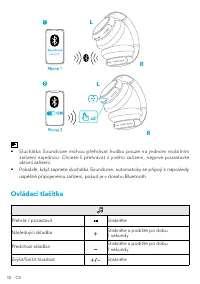
10 CS x2 L L Life Q35 R R • Sluchátka Soundcore mohou přehrávat hudbu pouze na jednom mobilním zařízení najednou. Chcete-li přehrávat z jiného zařízení, nejprve pozastavte aktivní zařízení. • Pokaždé, když zapnete sluchátka Soundcore, automaticky se připojí k naposledy úspěšně připojenému zařízení, ...
Page 13 - Režim NFC
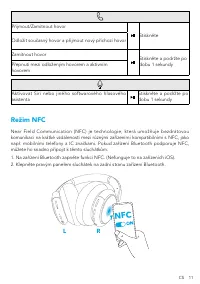
CS 11 Přijmout/Zamítnout hovor Stiskněte Odložit současný hovor a přijmout nový příchozí hovor Zamítnout hovor Stiskněte a podržte po dobu 1 sekundy Přepnutí mezi odloženým hovorem a aktivním hovorem Aktivovat Siri nebo jiného softwarového hlasového asistenta Stiskněte a podržte po dobu 1 sekundy Re...
Page 14 - Režim potlačení šumu; Transparentní režim; Režim AUX
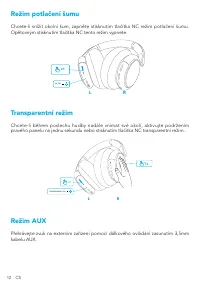
12 CS Režim potlačení šumu Chcete-li snížit okolní šum, zapněte stisknutím tlačítka NC režim potlačení šumu. Opětovným stisknutím tlačítka NC tento režim vypnete. NC ON x1 R L Transparentní režim Chcete-li během poslechu hudby nadále vnímat své okolí, aktivujte podržením pravého panelu na jednu seku...
Page 15 - Aplikace Soundcore
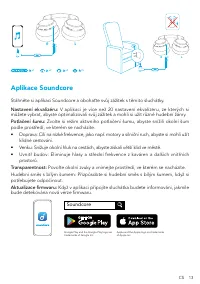
CS 13 m m 5. 3 R L m m 5. 3 R L x1 x3 x2 2s Aplikace Soundcore Stáhněte si aplikaci Soundcore a obohaťte svůj zážitek s těmito sluchátky. Nastavení ekvalizéru: V aplikaci je více než 20 nastavení ekvalizéru, ze kterých si můžete vybrat, abyste optimalizovali svůj zážitek a mohli si užít různé hudebn...
Page 17 - Oplader
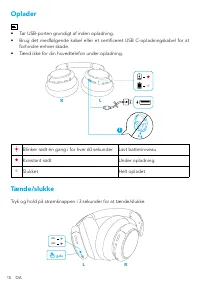
15 DA Oplader • Tør USB-porten grundigt af inden opladning. • Brug det medfølgende kabel eller et certificeret USB C-opladningskabel for at forhindre enhver skade. • Tænd ikke for din hovedtelefon under opladning. R L Blinker rødt én gang i for hver 60 sekunder Lavt batteriniveau Konstant rødt Under...
Page 18 - Parring med en anden enhed
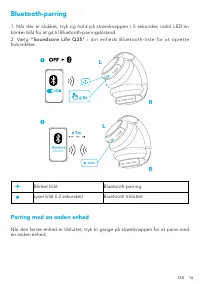
DA 16 Bluetooth-parring 1. Når der er slukket, tryk og hold på strømknappen i 5 sekunder, indtil LED’en blinker blåt for at gå til Bluetooth-parringstilstand. 2 . Væ l g “ S o u n d c o re L i f e Q 3 5 ” i d i n e n h e d s B l u e t o o t h - l i s t e f o r a t o p re t t e forbindelse. 5s 1 L L ...
Page 19 - Knapfunktioner
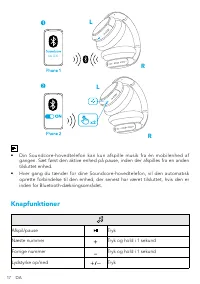
17 DA x2 L L Life Q35 R R • Din Soundcore-hovedtelefon kan kun afspille musik fra én mobilenhed af gangen. Sæt først den aktive enhed på pause, inden der afspilles fra en anden tilsluttet enhed. • Hver gang du tænder for dine Soundcore-hovedtelefon, vil den automatisk oprette forbindelse til den enh...
Page 21 - Støjbegrænsningstilstand; Transparenstilstand
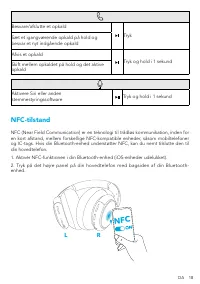
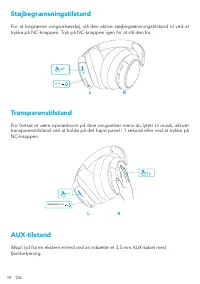
19 DA Støjbegrænsningstilstand For at begrænse omgivelsesstøj, slå den aktive støjbegrænsningstilstand til ved at trykke på NC-knappen. Tryk på NC-knappen igen for at slå den fra. NC ON x1 R L Transparenstilstand For fortsat at være opmærksom på dine omgivelser mens du lytter til musik, aktivér tran...
Page 24 - Ladevorgang
22 DE Ladevorgang • Trocknen Sie den USB-Anschluss vor dem Aufladen vollständig ab. • Verwenden Sie das mitgelieferte oder zertifizierte USB-C-Ladekabel und Ladegerät, um Schäden zu vermeiden. • Schalten Sie Ihre Kopfhörer während des Aufladens nicht ein. R L Blinkt alle 60 Sekunden rot Niedriger Ak...
Page 25 - Kopplung mit einem anderen Gerät
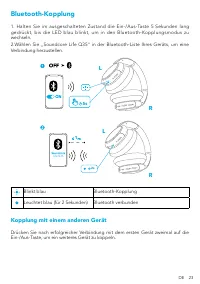
DE 23 Bluetooth-Kopplung 1. Halten Sie im ausgeschalteten Zustand die Ein-/Aus-Taste 5 Sekunden lang gedrückt, bis die LED blau blinkt, um in den Bluetooth-Kopplungsmodus zu wechseln. 2.Wählen Sie „Soundcore Life Q35“ in der Bluetooth-Liste Ihres Geräts, um eine Verbindung herzustellen. 5s 1 L L R R...
Page 26 - Bedienelemente
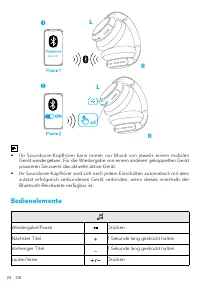
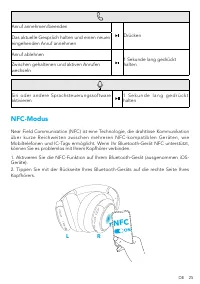
24 DE x2 L L Life Q35 R R • Ihr Soundcore-Kopfhörer kann immer nur Musik von jeweils einem mobilen Gerät wiedergeben. Für die Wiedergabe von einem anderen gekoppelten Gerät pausieren Sie zuerst das aktuelle aktive Gerät. • Ihr Soundcore-Kopfhörer wird sich nach jedem Einschalten automatisch mit dem ...
Page 28 - Geräuschunterdrückungsmodus; Transparenzmodus
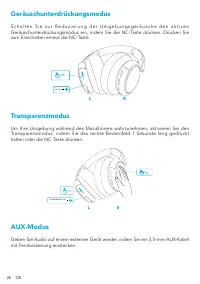
26 DE Geräuschunterdrückungsmodus S c h a l t e n S i e z u r R e d u z i e r u n g d e r U m g e b u n g s g e r ä u s c h e d e n a k t i v e n Geräuschunterdrückungsmodus ein, indem Sie die NC-Taste drücken. Drücken Sie zum Einschalten erneut die NC-Taste. NC ON x1 R L Transparenzmodus Um Ihre Um...
Page 32 - Διαδικασία αντιστοίχισης μέσω Bluetooth; Διαδικασία αντιστοίχισης με κάποια άλλη συσκευή
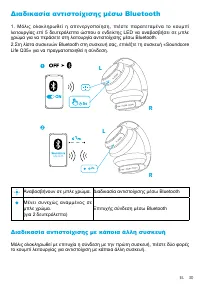
EL 30 Διαδικασία αντιστοίχισης μέσω Bluetooth 1. Μόλις ολοκληρωθεί η απενεργοποίηση, πιέστε παρατεταμένα το κουμπί λειτουργίας επί 5 δευτερόλεπτα ώσπου ο ενδείκτης LED να αναβοσβήσει σε μπλε χρώμα για να περάσετε στη λειτουργία αντιστοίχισης μέσω Bluetooth.2.Στη λίστα συσκευών Bluetooth στη συσκευή ...
Page 33 - Κουμπιά ελέγχου
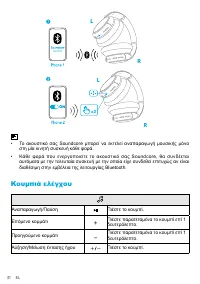
31 EL x2 L L Life Q35 R R • Το ακουστικό σας Soundcore μπορεί να εκτελεί αναπαραγωγή μουσικής μόνο στη μία κινητή συσκευή κάθε φορά. • Κάθε φορά που ενεργοποιείτε το ακουστικό σας Soundcore, θα συνδέεται αυτόματα με την τελευταία συσκευή με την οποία είχε συνδεθεί επιτυχώς αν είναι διαθέσιμη στην εμ...
Page 34 - Λειτουργία NFC
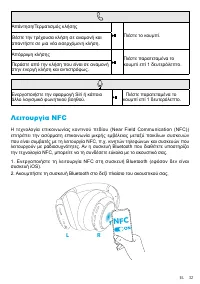
EL 32 Απάντηση/Τερματισμός κλήσης Πιέστε το κουμπί. Θέστε την τρέχουσα κλήση σε αναμονή και απαντήστε σε μια νέα εισερχόμενη κλήση. Απόρριψη κλήσης Πιέστε παρατεταμένα το κουμπί επί 1 δευτερόλεπτο. Περάστε από την κλήση που είναι σε αναμονή στην ενεργή κλήση και αντιστρόφως. Ενεργοποιήστε την εφαρμο...
Page 35 - Λειτουργία ακύρωσης θορύβου; Λειτουργία διαφάνειας; Λειτουργία AUX
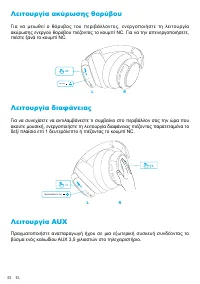
33 EL Λειτουργία ακύρωσης θορύβου Για να μειωθεί ο θόρυβος του περιβάλλοντος, ενεργοποιήστε τη λειτουργία ακύρωσης ενεργού θορύβου πιέζοντας το κουμπί NC. Για να την απενεργοποιήσετε, πιέστε ξανά το κουμπί NC. NC ON x1 R L Λειτουργία διαφάνειας Για να συνεχίσετε να αντιλαμβάνεστε τι συμβαίνει στο πε...
Page 36 - Εφαρμογή Soundcore; Ρ υ θ μ ί σ ε ι ς ι σ ο σ τα θ μ ι σ τ ή :
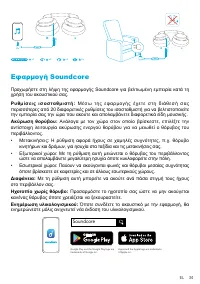
EL 34 m m 5. 3 R L m m 5. 3 R L x1 x3 x2 2s Εφαρμογή Soundcore Προχωρήστε στη λήψη της εφαρμογής Soundcore για βελτιωμένη εμπειρία κατά τη χρήση του ακουστικού σας. Ρ υ θ μ ί σ ε ι ς ι σ ο σ τα θ μ ι σ τ ή : Μ έ σ ω τ η ς ε φ α ρ μ ο γ ή ς έ χ ε τ ε σ τ η δ ι ά θ ε σ ή σ α ς περισσότερες από 20 διαφ...
Page 38 - Carga
36 ES Carga • Seque el puerto USB completamente antes de la carga. • Utilice el cargador y el cable de carga USB-C incluidos, o unos certificados, para evitar daños. • No encienda los auriculares mientras se cargan. R L Parpadeo rojo una vez cada 60 segundos Batería baja Rojo fijo En carga Luz apaga...
Page 39 - Emparejamiento Bluetooth; Emparejamiento con otro dispositivo
ES 37 Emparejamiento Bluetooth 1. Cuando estén apagados, mantenga pulsado el botón de encendido durante 5 segundos hasta que el LED parpadee en color azul para acceder al modo de emparejamiento Bluetooth.2. Para establecer conexión, seleccione “Soundcore Life Q35” en la lista de Bluetooth del dispos...
Page 40 - Controles de botón
38 ES x2 L L Life Q35 R R • Los auriculares Soundcore solo pueden reproducir la música de un dispositivo móvil simultáneamente. Para reproducir desde otro dispositivo conectado, primero debe pausar el dispositivo activo. • C a d a v e z q u e e n c i e n d a l o s a u r i c u l a r e s S o u n d c o...
Page 41 - Modo NFC
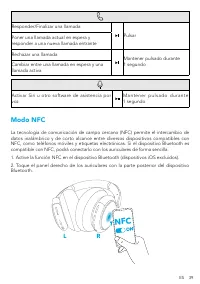
ES 39 Responder/Finalizar una llamada Pulsar Poner una llamada actual en espera y responder a una nueva llamada entrante Rechazar una llamada Mantener pulsado durante 1 segundo Cambiar entre una llamada en espera y una llamada activa Activar Siri u otro software de asistencia por voz M a n t e n e r...
Page 42 - Modo de cancelación de ruido; Modo de transparencia; Modo AUX
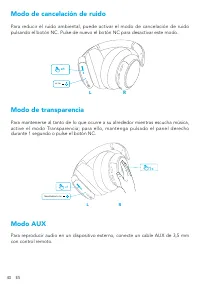
40 ES Modo de cancelación de ruido Para reducir el ruido ambiental, puede activar el modo de cancelación de ruido pulsando el botón NC. Pulse de nuevo el botón NC para desactivar este modo. NC ON x1 R L Modo de transparencia Para mantenerse al tanto de lo que ocurre a su alrededor mientras escucha m...
Page 43 - Aplicación Soundcore
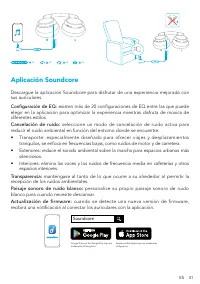
ES 41 m m 5. 3 R L m m 5. 3 R L x1 x3 x2 2s Aplicación Soundcore Descargue la aplicación Soundcore para disfrutar de una experiencia mejorada con sus auriculares. Configuración de EQ: existen más de 20 configuraciones de EQ entre las que puede elegir en la aplicación para optimizar la experiencia mi...
Page 45 - Lataaminen
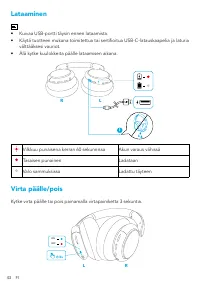
43 FI Lataaminen • Kuivaa USB-portti täysin ennen lataamista. • Käytä tuotteen mukana toimitettua tai sertifioitua USB-C-latauskaapelia ja laturia välttääksesi vauriot. • Älä kytke kuulokkeita päälle lataamisen aikana. R L Vilkkuu punaisena kerran 60 sekunnissa Akun varaus vähissä Tasaisen punainen ...
Page 46 - Laiteparin muodostaminen toisen laitteen kanssa
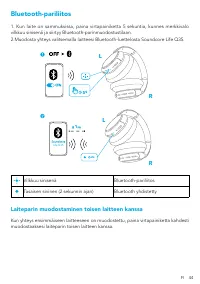
FI 44 Bluetooth-pariliitos 1. Kun laite on sammuksissa, paina virtapainiketta 5 sekuntia, kunnes merkkivalo vilkkuu sinisenä ja siirtyy Bluetooth-parinmuodostustilaan.2.Muodosta yhteys valitsemalla laitteesi Bluetooth-luettelosta Soundcore Life Q35. 5s 1 L L R R Life Q35 2s Vilkkuu sinisenä Bluetoot...
Page 47 - Ohjauspainikkeet
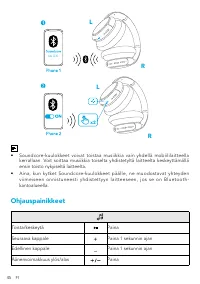
45 FI x2 L L Life Q35 R R • Soundcore-kuulokkeet voivat toistaa musiikkia vain yhdellä mobiililaitteella kerrallaan. Voit soittaa musiikkia toiselta yhdistetyltä laitteelta keskeyttämällä ensin toisto nykyiseltä laitteelta. • Aina, kun kytket Soundcore-kuulokkeet päälle, ne muodostavat yhteyden viim...
Page 49 - Vastamelutila; Läpinäkyvyystila
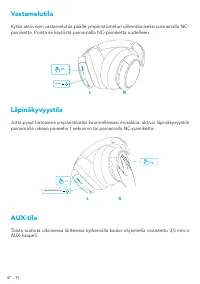
47 FI Vastamelutila Kytke aktiivinen vastamelutila päälle ympäristömelun vähentämiseksi painamalla NC-painiketta. Poista se käytöstä painamalla NC-painiketta uudelleen. NC ON x1 R L Läpinäkyvyystila Jotta pysyt tietoisena ympäristöstäsi kuunnellessasi musiikkia, aktivoi läpinäkyvyystila painamalla o...
Page 52 - Chargement de; Mise sous/hors tension
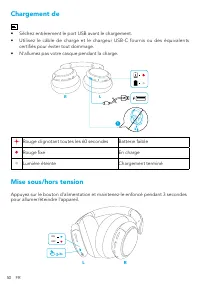
50 FR Chargement de • Séchez entièrement le port USB avant le chargement. • Utilisez le câble de charge et le chargeur USB-C fournis ou des équivalents certifiés pour éviter tout dommage. • N'allumez pas votre casque pendant la charge. R L Rouge clignotant toutes les 60 secondes Batterie faible Roug...
Page 53 - Couplage Bluetooth; Couplage avec un autre appareil
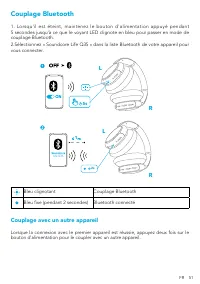
FR 51 Couplage Bluetooth 1. Lorsqu'il est éteint, maintenez le bouton d'alimentation appuyé pendant 5 secondes jusqu'à ce que le voyant LED clignote en bleu pour passer en mode de couplage Bluetooth. 2.Sélectionnez « Soundcore Life Q35 » dans la liste Bluetooth de votre appareil pour vous connecter....
Page 54 - Boutons de commande
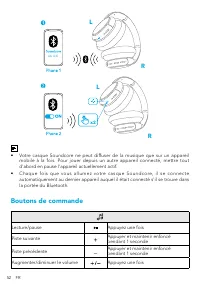
52 FR x2 L L Life Q35 R R • Votre casque Soundcore ne peut diffuser de la musique que sur un appareil mobile à la fois. Pour jouer depuis un autre appareil connecté, mettre tout d'abord en pause l'appareil actuellement actif. • Chaque fois que vous al lumez votre casque Soundcore, il se connecte aut...
Page 55 - Mode NFC
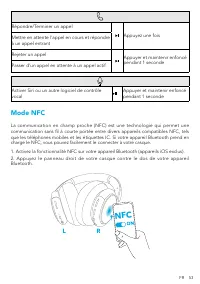
FR 53 Répondre/Terminer un appel Appuyez une fois Mettre en attente l'appel en cours et répondre à un appel entrant Rejeter un appel Appuyer et maintenir enfoncé pendant 1 seconde Passer d'un appel en attente à un appel actif Activer Siri ou un autre logiciel de contrôle vocal Appuyer et maintenir e...
Page 56 - Mode réduction du bruit; Mode transparence; Mode auxiliaire
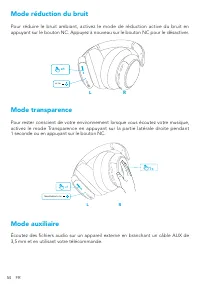
54 FR Mode réduction du bruit Pour réduire le bruit ambiant, activez le mode de réduction active du bruit en appuyant sur le bouton NC. Appuyez à nouveau sur le bouton NC pour le désactiver. NC ON x1 R L Mode transparence Pour rester conscient de votre environnement lorsque vous écoutez votre musiqu...
Page 57 - Application Soundcore
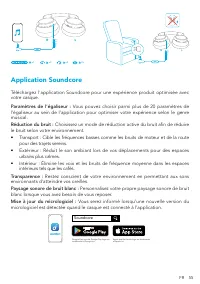
FR 55 m m 5. 3 R L m m 5. 3 R L x1 x3 x2 2s Application Soundcore Téléchargez l'application Soundcore pour une expérience produit optimisée avec votre casque. Paramètres de l’égaliseur : Vous pouvez choisir parmi plus de 20 paramètres de l’égaliseur au sein de l’application pour optimiser votre expé...
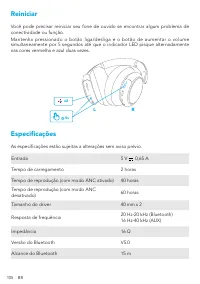
Page 58 - Réinitialisation; Spécifications
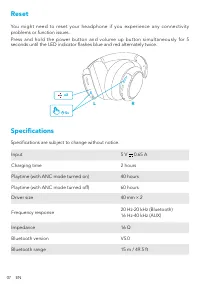
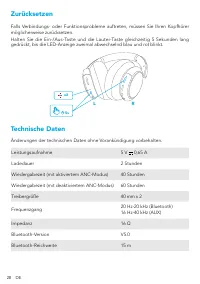
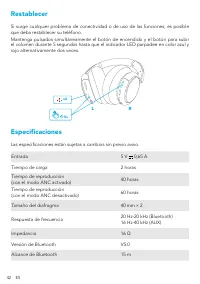
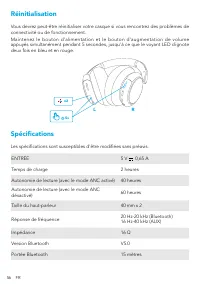
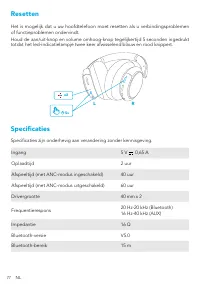
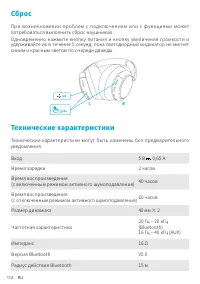
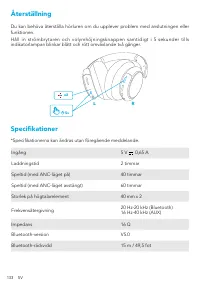
56 FR Réinitialisation Vous devrez peut-être réinitialiser votre casque si vous rencontrez des problèmes de connectivité ou de fonctionnement.Maintenez le bouton d'alimentation et le bouton d'augmentation de volume appuyés simultanément pendant 5 secondes, jusqu'à ce que le voyant LED clignote deux ...
Page 59 - Töltés; Bekapcsolás/kikapcsolás
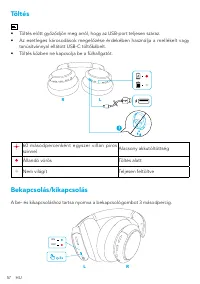
57 HU Töltés • Töltés előtt győződjön meg arról, hogy az USB-port teljesen száraz. • Az esetleges károsodások megelőzése érdekében használja a mellékelt vagy tanúsítvánnyal ellátott USB-C töltőkábelt. • Töltés közben ne kapcsolja be a fülhallgatót. R L 60 másodpercenként egyszer villan piros színnel...
Page 60 - Párosítás más készülékkel
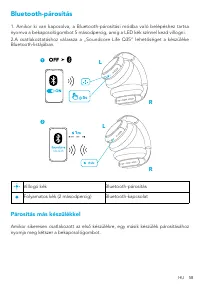
HU 58 Bluetooth-párosítás 1. Amikor ki van kapcsolva, a Bluetooth-párosítási módba való belépéshez tartsa nyomva a bekapcsológombot 5 másodpercig, amíg a LED kék színnel kezd villogni.2.A csatlakoztatáshoz válassza a „Soundcore Life Q35” lehetőséget a készüléke Bluetooth-listájában. 5s 1 L L R R Lif...
Page 61 - Vezérlőgombok
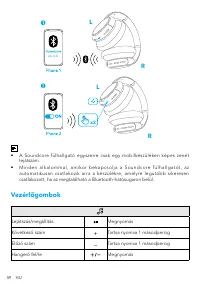
59 HU x2 L L Life Q35 R R • A Soundcore fülhallgató egyszerre csak egy mobilkészüléken képes zenét lejátszani. • M i n d e n a l k a l o m m a l , a m i k o r b e k a p c s o l j a a S o u n d c o re f ü l h a l l g a t ó t , a z automatikusan csatlakozik arra a készülékre, amelyre legutóbb sikerese...
Page 62 - NFC mód
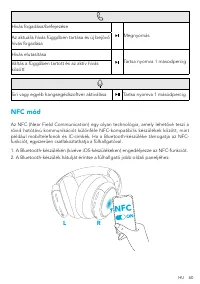
HU 60 Hívás fogadása/befejezése Megnyomás Az aktuális hívás függőben tartása és új bejövő hívás fogadása Hívás elutasítása Tartsa nyomva 1 másodpercig Váltás a függőben tartott és az aktív hívás között Siri vagy egyéb hangsegédszoftver aktiválása Tartsa nyomva 1 másodpercig NFC mód Az NFC (Near Fiel...
Page 63 - Zajszűrő mód; Áthallhatósági mód; AUX mód
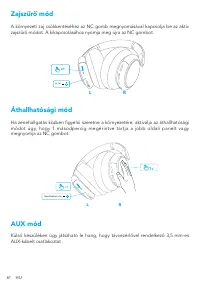
61 HU Zajszűrő mód A környezeti zaj csökkentéséhez az NC gomb megnyomásával kapcsolja be az aktív zajszűrő módot. A kikapcsolásához nyomja meg újra az NC gombot. NC ON x1 R L Áthallhatósági mód Ha zenehallgatás közben figyelni szeretne a környezetére, aktiválja az áthallhatósági módot úgy, hogy 1 má...
Page 66 - In carica; Accensione/Spegnimento
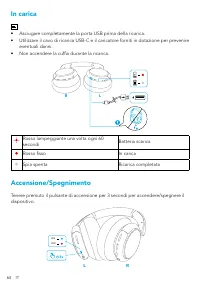
64 IT In carica • Asciugare completamente la porta USB prima della ricarica. • Utilizzare il cavo di ricarica USB-C e il caricatore forniti in dotazione per prevenire eventuali danni. • Non accendere la cuffia durante la ricarica. R L Rosso lampeggiante una volta ogni 60 secondi Batteria scarica Ros...
Page 67 - Associazione Bluetooth; Associazione con un altro dispositivo
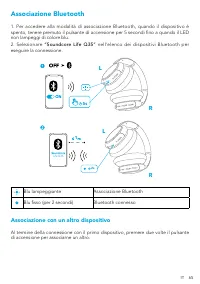
IT 65 Associazione Bluetooth 1. Per accedere alla modalità di associazione Bluetooth, quando il dispositivo è spento, tenere premuto il pulsante di accensione per 5 secondi fino a quando il LED non lampeggi di colore blu.2. Selezionare “Soundcore Life Q35” nell’elenco dei dispositivi Bluetooth per e...
Page 68 - Controlli Pulsanti
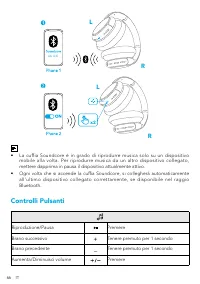
66 IT x2 L L Life Q35 R R • La cuffia Soundcore è in grado di riprodurre musica solo su un dispositivo mobile alla volta. Per riprodurre musica da un altro dispositivo collegato, mettere dapprima in pausa il dispositivo attualmente attivo. • Ogni volta che si accende la cuffia Soundcore, si colleghe...
Page 69 - Modalità NFC
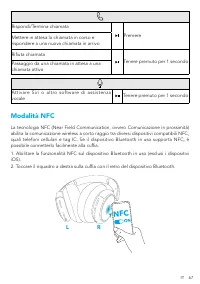
IT 67 Rispondi/Termina chiamata Premere Mettere in attesa la chiamata in corso e rispondere a una nuova chiamata in arrivo Rifiuta chiamata Tenere premuto per 1 secondo Passaggio da una chiamata in attesa a una chiamata attiva Attivare Siri o altro software di assistenza vocale Tenere premuto per 1 ...
Page 70 - Modalità Cancellazione del Rumore; Modalità Trasparenza; Modalità AUX
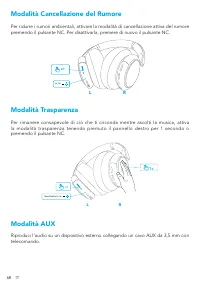
68 IT Modalità Cancellazione del Rumore Per ridurre i rumori ambientali, attivare la modalità di cancellazione attiva del rumore premendo il pulsante NC. Per disattivarla, premere di nuovo il pulsante NC. NC ON x1 R L Modalità Trasparenza Per rimanere consapevole di ciò che ti circonda mentre ascolt...
Page 71 - App Soundcore
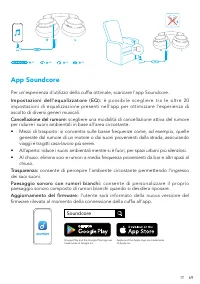
IT 69 m m 5. 3 R L m m 5. 3 R L x1 x3 x2 2s App Soundcore Per un’esperienza d’utilizzo della cuffia ottimale, scaricare l’app Soundcore. I m p o s t a z i o n i d e l l ’ e q u a l i z z a t o re ( E Q ) : è p o s s i b i l e s c e g l i e re t r a l e o l t re 2 0 impostazioni di equalizzazione pre...
Page 73 - Opladen
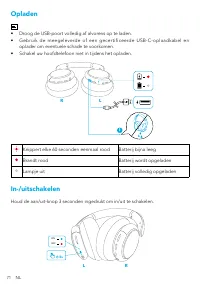
71 NL Opladen • Droog de USB-poort volledig af alvorens op te laden. • Gebruik de meegeleverde of een gecertificeerde USB-C-oplaadkabel en oplader om eventuele schade te voorkomen. • Schakel uw hoofdtelefoon niet in tijdens het opladen. R L Knippert elke 60 seconden eenmaal rood Batterij bijna leeg ...
Page 74 - Koppelen via Bluetooth; Koppelen met een ander apparaat
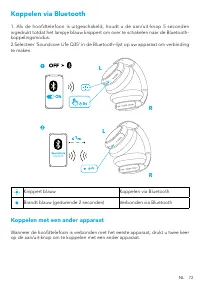
NL 72 Koppelen via Bluetooth 1. Als de hoofdtelefoon is uitgeschakeld, houdt u de aan/uit-knop 5 seconden ingedrukt totdat het lampje blauw knippert om over te schakelen naar de Bluetooth-koppelingsmodus.2.Selecteer 'Soundcore Life Q35' in de Bluetooth-lijst op uw apparaat om verbinding te maken. 5s...
Page 75 - Knoppen
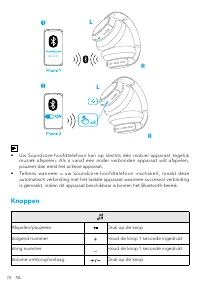
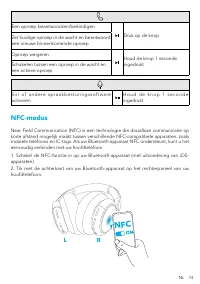
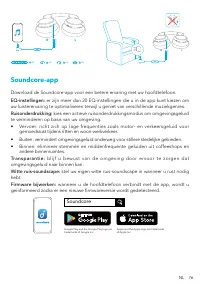
73 NL x2 L L Life Q35 R R • Uw Soundcore-hoofdtelefoon kan op slechts één mobiel apparaat tegelijk muziek afspelen. Als u vanaf een ander verbonden apparaat wilt afspelen, pauzeer dan eerst het actieve apparaat. • Telkens wanneer u uw Soundcore-hoofdtelefoon inschakelt, maakt deze automatisch verbin...
Page 77 - Ruisonderdrukkingsmodus; Transparantiemodus
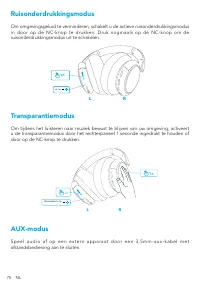
75 NL Ruisonderdrukkingsmodus Om omgevingsgeluid te verminderen, schakelt u de actieve ruisonderdrukkingsmodus in door op de NC-knop te drukken. Druk nogmaals op de NC-knop om de ruisonderdrukkingsmodus uit te schakelen. NC ON x1 R L Transparantiemodus Om tijdens het luisteren naar muziek bewust te ...
Page 80 - Lader
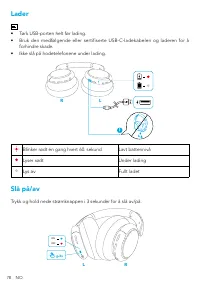
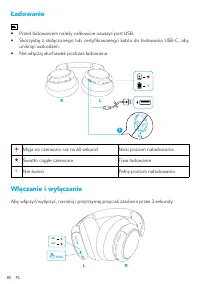
78 NO Lader • Tørk USB-porten helt før lading. • Bruk den medfølgende eller sertifiserte USB-C-ladekabelen og laderen for å forhindre skade. • Ikke slå på hodetelefonene under lading. R L Blinker rødt én gang hvert 60. sekund Lavt batterinivå Lyser rødt Under lading Lys av Fullt ladet Slå på/av Tryk...
Page 81 - Parer med en annen enhet
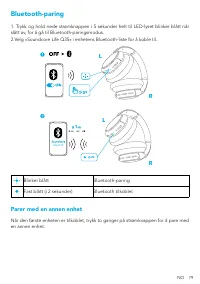
NO 79 Bluetooth-paring 1. Trykk og hold nede strømknappen i 5 sekunder helt til LED-lyset blinker blått når slått av, for å gå til Bluetooth-paringsmodus.2.Velg «Soundcore Life Q35» i enhetens Bluetooth-liste for å koble til. 5s 1 L L R R Life Q35 2s Blinker blått Bluetooth-paring Fast blått (i 2 se...
Page 82 - Knappekontroller
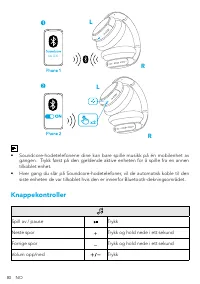
80 NO x2 L L Life Q35 R R • Soundcore-hodetelefonene dine kan bare spille musikk på én mobilenhet av gangen. Trykk først på den gjeldende aktive enheten for å spille fra en annen tilkoblet enhet. • Hver gang du slår på Soundcore-hodetelefoner, vil de automatisk koble til den siste enheten de var til...
Page 84 - Støykanselleringsmodus; Transparentmodus
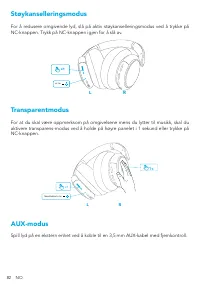
82 NO Støykanselleringsmodus For å redusere omgivende lyd, slå på aktiv støykanselleringsmodus ved å trykke på NC-knappen. Trykk på NC-knappen igjen for å slå av. NC ON x1 R L Transparentmodus For at du skal være oppmerksom på omgivelsene mens du lytter til musikk, skal du aktivere transparens-modus...
Page 88 - Parowanie Bluetooth; Parowanie z innym urządzeniem
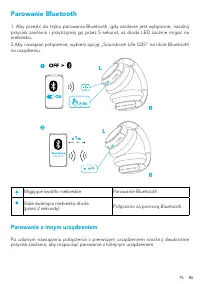
PL 86 Parowanie Bluetooth 1. Aby przejść do trybu parowania Bluetooth, gdy zasilanie jest wyłączone, naciśnij przycisk zasilania i przytrzymaj go przez 5 sekund, aż dioda LED zacznie migać na niebiesko. 2.Aby nawiązać połączenie, wybierz opcję „Soundcore Life Q35” na liście Bluetooth na urządzeniu. ...
Page 89 - Przyciski sterujące
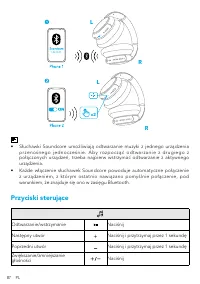
87 PL x2 L L Life Q35 R R • Słuchawki Soundcore umożliwiają odtwarzanie muzyki z jednego urządzenia p r z e n o ś n e g o j e d n o c z e ś n i e . A b y ro z p o c z ą ć o d t w a r z a n i e z d r u g i e g o z połączonych urządzeń, trzeba najpierw wstrzymać odtwarzanie z aktywnego urządzenia. • K...
Page 90 - Tryb NFC
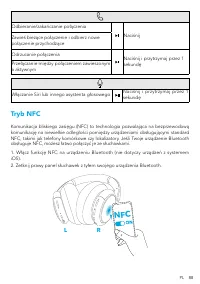
PL 88 Odbieranie/zakańczanie połączenia Naciśnij Zawieś bieżące połączenie i odbierz nowe połączenie przychodzące Odrzucanie połączenia Naciśnij i przytrzymaj przez 1 sekundę Przełączanie między połączeniem zawieszonym a aktywnym Włączanie Siri lub innego asystenta głosowego Naciśnij i przytrzymaj p...
Page 91 - Tryb redukcji szumów; Tryb transparentności; Tryb AUX
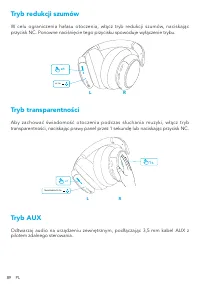
89 PL Tryb redukcji szumów W celu ograniczenia hałasu otoczenia, włącz tryb redukcji szumów, naciskając przycisk NC. Ponowne naciśnięcie tego przycisku spowoduje wyłączenie trybu. NC ON x1 R L Tryb transparentności Aby zachować świadomość otoczenia podczas słuchania muzyki, włącz tryb transparentnoś...
Page 92 - Aplikacja Soundcore
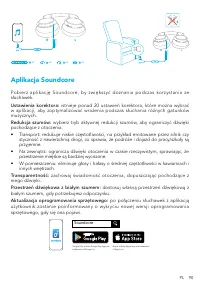
PL 90 m m 5. 3 R L m m 5. 3 R L x1 x3 x2 2s Aplikacja Soundcore Pobierz aplikację Soundcore, by zwiększyć doznania podczas korzystania ze słuchawek. Ustawienia korektora: istnieje ponad 20 ustawień korektora, które można wybrać w aplikacji, aby zoptymalizować wrażenia podczas słuchania różnych gatun...
Page 94 - Carregamento
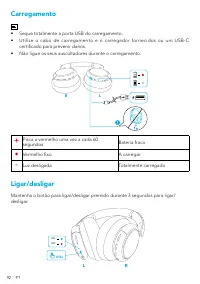
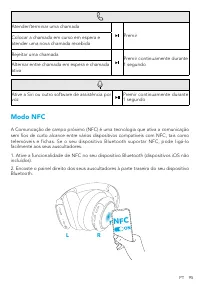
92 PT Carregamento • Seque totalmente a porta USB do carregamento. • Utilize o cabo de carregamento e o carregador fornecidos ou um USB-C certificado para prevenir danos. • Não ligue os seus auscultadores durante o carregamento. R L Pisca a vermelho uma vez a cada 60 segundos Bateria fraca Vermelho ...
Page 95 - Emparelhamento por Bluetooth; Emparelhar com outro dispositivo
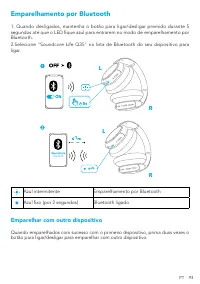
PT 93 Emparelhamento por Bluetooth 1. Quando desligados, mantenha o botão para ligar/desligar premido durante 5 segundos até que o LED fique azul para entrarem no modo de emparelhamento por Bluetooth. 2.Selecione "Soundcore Life Q35" na lista de Bluetooth do seu dispositivo para ligar. 5s 1 ...
Page 96 - Controlos de botão
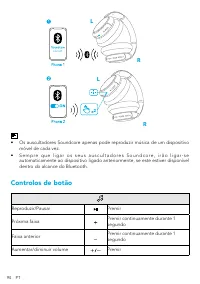
94 PT x2 L L Life Q35 R R • Os auscultadores Soundcore apenas pode reproduzir música de um dispositivo móvel de cada vez. • S e m p r e q u e l i g a r o s s e u s a u s c u l t a d o r e s S o u n d c o r e , i r ã o l i g a r- s e automaticamente ao dispositivo ligado anteriormente, se este estive...
Page 98 - Modo de Transparência
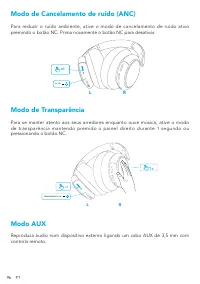
96 PT Modo de Cancelamento de ruído (ANC) Para reduzir o ruído ambiente, ative o modo de cancelamento de ruído ativo premindo o botão NC. Prima novamente o botão NC para desativar. NC ON x1 R L Modo de Transparência Para se manter atento aos seus arredores enquanto ouve música, ative o modo de trans...
Page 99 - Aplicação Soundcore
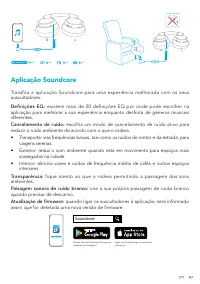
PT 97 m m 5. 3 R L m m 5. 3 R L x1 x3 x2 2s Aplicação Soundcore Transfira a aplicação Soundcore para uma experiência melhorada com os seus auscultadores. Definições EQ: existem mais de 20 definições EQ por onde pode escolher na aplicação para melhorar a sua experiência enquanto desfruta de géneros m...
Page 101 - Carregando
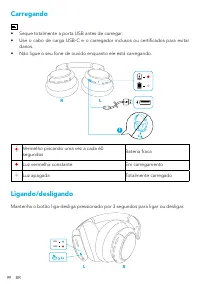
99 BR Carregando • Seque totalmente a porta USB antes de carregar. • Use o cabo de carga USB-C e o carregador inclusos ou certificados para evitar danos. • Não ligue o seu fone de ouvido enquanto ele está carregando. R L Vermelho piscando uma vez a cada 60 segundos Bateria fraca Luz vermelha constan...
Page 102 - Emparelhamento Bluetooth; Emparelhando com outro dispositivo
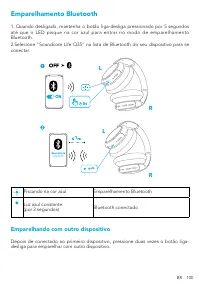
BR 100 Emparelhamento Bluetooth 1. Quando desligado, mantenha o botão liga-desliga pressionado por 5 segundos até que o LED pisque na cor azul para entrar no modo de emparelhamento Bluetooth. 2.Selecione "Soundcore Life Q35" na lista de Bluetooth do seu dispositivo para se conectar. 5s 1 L L...
Page 103 - Botões de controle
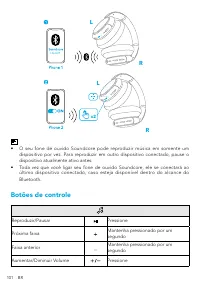
101 BR x2 L L Life Q35 R R • O seu fone de ouvido Soundcore pode reproduzir música em somente um dispositivo por vez. Para reproduzir em outro dispositivo conectado, pause o dispositivo atualmente ativo antes. • Toda vez que você ligar seu fone de ouvido Soundcore, ele se conectará ao último disposi...
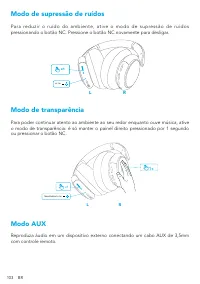
Page 105 - Modo de supressão de ruídos; Modo de transparência
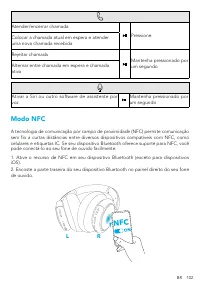
103 BR Modo de supressão de ruídos P a r a re d u z i r o r u í d o d o a m b i e n t e , a t i v e o m o d o d e s u p re s s ã o d e r u í d o s pressionando o botão NC. Pressione o botão NC novamente para desligar. NC ON x1 R L Modo de transparência Para poder continuar atento ao ambiente ao seu ...
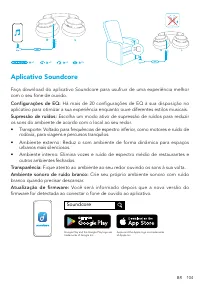
Page 106 - Aplicativo Soundcore
BR 104 m m 5. 3 R L m m 5. 3 R L x1 x3 x2 2s Aplicativo Soundcore Faça download do aplicativo Soundcore para usufruir de uma experiência melhor com o seu fone de ouvido. Configurações de EQ: Há mais de 20 configurações de EQ à sua disposição no aplicativo para otimizar a sua experiência enquanto ouv...
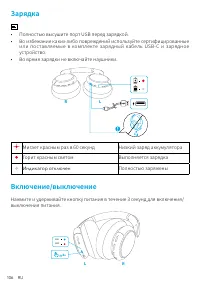
Page 108 - Зарядка
106 RU Зарядка • Полностью высушите порт USB перед зарядкой.• Во избежание каких-либо повреждений используйте сертифицированные или поставляемые в комплекте зарядный кабель USB-C и зарядное устройство. • Во время зарядки не включайте наушники. R L Мигает красным раз в 60 секунд Низкий заряд аккумуля...
Page 109 - Сопряжение Bluetooth; Сопряжение с другим устройством
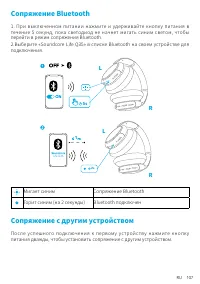
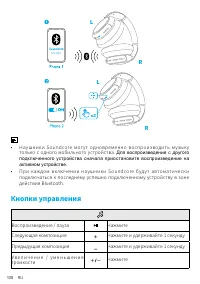
RU 107 Сопряжение Bluetooth 1. При выключенном питании нажмите и удерживайте кнопку питания в течение 5 секунд, пока светодиод не начнет мигать синим светом, чтобы перейти в режим сопряжения Bluetooth.2.Выберите «Soundcore Life Q35» в списке Bluetooth на своем устройстве для подключения. 5s 1 L L R ...
Page 110 - Кнопки управления
108 RU x2 L L Life Q35 R R • Наушники Soundcore могут одновременно воспроизводить музыку только с одного мобильного устройства. Для воспроизведения с другого подключенного устройства сначала приостановите воспроизведение на активном устройстве. • При каждом включении наушники Soundcore будут автомат...
Page 111 - Режим NFC
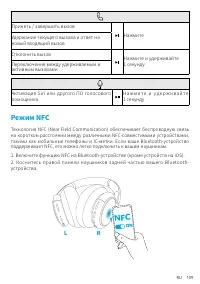
RU 109 Принять / завершить вызов Нажмите Удержание текущего вызова и ответ на новый входящий вызов Отклонить вызов Нажмите и удерживайте 1 секунду Переключение между удерживаемым и активным вызовами Активация Siri или другого ПО голосового помощника Н а ж м и т е и у д е р ж и в а й т е 1 секунду Ре...
Page 112 - Режим шумоподавления; Режим открытых наушников; Режим AUX
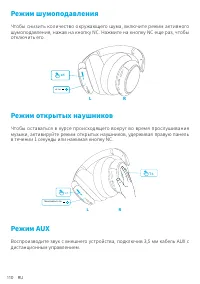
110 RU Режим шумоподавления Чтобы снизить количество окружающего шума, включите режим активного шумоподавления, нажав на кнопку NC. Нажмите на кнопку NC еще раз, чтобы отключить его. NC ON x1 R L Режим открытых наушников Чтобы оставаться в курсе происходящего вокруг во время прослушивания музыки, ак...
Page 113 - Приложение Soundcore
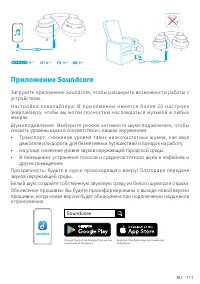
RU 111 m m 5. 3 R L m m 5. 3 R L x1 x3 x2 2s Приложение Soundcore Загрузите приложение Soundcore, чтобы расширить возможности работы с устройством.Н а ст р о й к и э к в а л а й з е ра : В п р и л о же н и и и м е ется б о л е е 2 0 н а ст р о е к эквалайзера, чтобы вы могли полностью наслаждаться м...
Page 115 - Nabíjanie
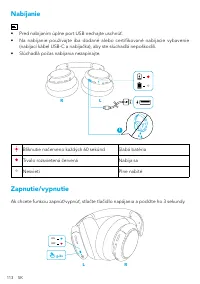
113 SK Nabíjanie • Pred nabíjaním úplne port USB nechajte uschnúť. • Na nabíjanie používajte iba dodané alebo certifikované nabíjacie vybavenie (nabíjací kábel USB-C a nabíjačka), aby ste slúchadlá nepoškodili. • Slúchadlá počas nabíjania nezapínajte. R L Bliknutie načerveno každých 60 sekúnd Slabá ...
Page 116 - Párovanie prostredníctvom pripojenia Bluetooth; Párovanie s ďalším zariadením
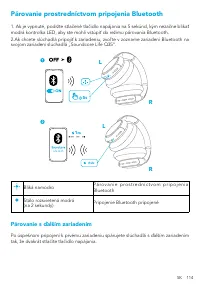
SK 114 Párovanie prostredníctvom pripojenia Bluetooth 1. Ak je vypnuté, podržte stlačené tlačidlo napájania na 5 sekúnd, kým nezačne blikať modrá kontrolka LED, aby ste mohli vstúpiť do režimu párovania Bluetooth.2.Ak chcete slúchadlá pripojiť k zariadeniu, zvoľ te v zozname zariadení Bluetooth na s...
Page 117 - Tlačidlové ovládacie prvky
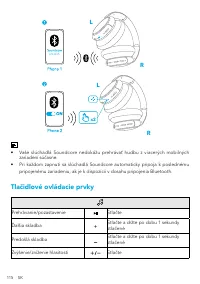
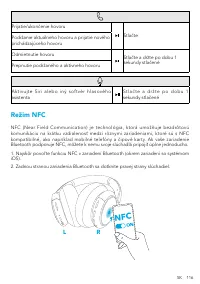
115 SK x2 L L Life Q35 R R • Vaše slúchadlá Soundcore nedokážu prehrávať hudbu z viacerých mobilných zariadení súčasne. • Pri každom zapnutí sa slúchadlá Soundcore automaticky pripoja k poslednému pripojenému zariadeniu, ak je k dispozícii v dosahu pripojenia Bluetooth. Tlačidlové ovládacie prvky Pr...
Page 119 - Režim redukcie hluku; Režim bez redukcie hluku
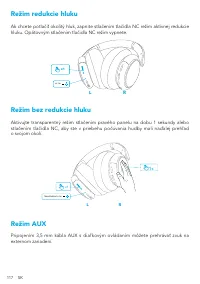
117 SK Režim redukcie hluku Ak chcete potlačiť okolitý hluk, zapnite stlačením tlačidla NC režim aktívnej redukcie hluku. Opätovným stlačením tlačidla NC režim vypnete. NC ON x1 R L Režim bez redukcie hluku Aktivujte transparentný režim stlačením pravého panelu na dobu 1 sekundy alebo stlačením tlač...
Page 120 - Aplikácia Soundcore
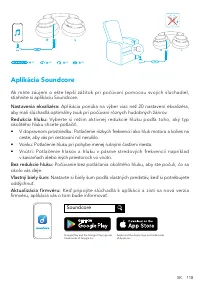
SK 118 m m 5. 3 R L m m 5. 3 R L x1 x3 x2 2s Aplikácia Soundcore Ak máte záujem o ešte lepší zážitok pri počúvaní pomocou svojich slúchadiel, stiahnite si aplikáciu Soundcore. Nastavenia ekvalizéra: Aplikácia ponúka na výber viac než 20 nastavení ekvalizéra, aby mali slúchadlá optimálny zvuk pri poč...
Page 122 - Polnjenje
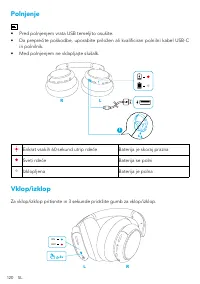
120 SL Polnjenje • Pred polnjenjem vrata USB temeljito osušite. • Da preprečite poškodbe, uporabite priložen ali kvalificiran polnilni kabel USB-C in polnilnik. • Med polnjenjem ne vklapljajte slušalk. R L Enkrat vsakih 60 sekund utrip rdeče Baterija je skoraj prazna Sveti rdeče Baterija se polni Iz...
Page 123 - Seznanjanje prek povezave Bluetooth; Povezava z drugo napravo
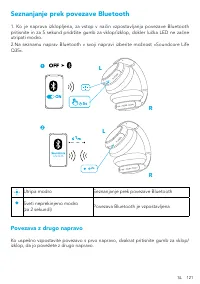
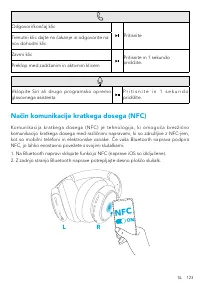
SL 121 Seznanjanje prek povezave Bluetooth 1. Ko je naprava izklopljena, za vstop v način vzpostavljanja povezave Bluetooth pritisnite in za 5 sekund pridržite gumb za vklop/izklop, dokler lučka LED ne začne utripati modro.2.Na seznamu naprav Bluetooth v svoji napravi izberite možnost »Soundcore Lif...
Page 124 - Gumbi za upravljanje
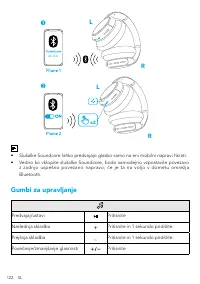
122 SL x2 L L Life Q35 R R • Slušalke Soundcore lahko predvajajo glasbo samo na eni mobilni napravi hkrati. • Vedno ko vklopite slušalke Soundcore, bodo samodejno vzpostavile povezavo z zadnjo uspešno povezano napravo, če je ta na voljo v dometu omrežja Bluetooth. Gumbi za upravljanje Predvajaj/usta...
Page 126 - Način odpravljanja hrupa; Način prosojnosti
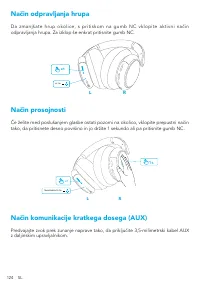
124 SL Način odpravljanja hrupa Da zmanjšate hrup okolice, s pritiskom na gumb NC vklopite aktivni način odpravljanja hrupa. Za izklop še enkrat pritisnite gumb NC. NC ON x1 R L Način prosojnosti Če želite med poslušanjem glasbe ostati pozorni na okolico, vklopite prepustni način tako, da pritisnete...
Page 127 - Aplikacija Soundcore
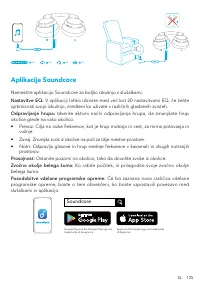
SL 125 m m 5. 3 R L m m 5. 3 R L x1 x3 x2 2s Aplikacija Soundcore Namestite aplikacijo Soundcore za boljšo izkušnjo s slušalkami. Nastavitve EQ: V aplikaciji lahko izbirate med več kot 20 nastavitvami EQ, če želite optimizirati svojo izkušnjo, medtem ko uživate v različnih glasbenih zvrsteh. Odpravl...
Page 129 - Laddar
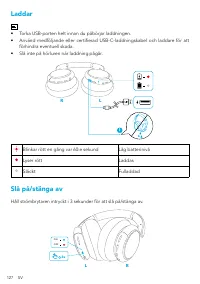
127 SV Laddar • Torka USB-porten helt innan du påbörjar laddningen. • Använd medföljande eller certifierad USB-C-laddningskabel och laddare för att förhindra eventuell skada. • Slå inte på hörluren när laddning pågår. R L Blinkar rött en gång var 60:e sekund Låg batterinivå Lyser rött Laddas Släckt ...
Page 130 - Bluetooth-parkoppling; Parkoppla med en annan enhet
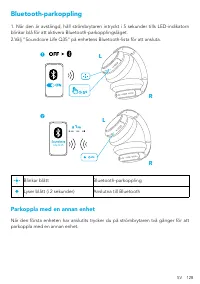
SV 128 Bluetooth-parkoppling 1. När den är avstängd, håll strömbrytaren intryckt i 5 sekunder tills LED-indikatorn blinkar blå för att aktivera Bluetooth-parkopplingsläget.2.Välj ”Soundcore Life Q35” på enhetens Bluetooth-lista för att ansluta. 5s 1 L L R R Life Q35 2s Blinkar blått Bluetooth-parkop...
Page 131 - Knappkontroller
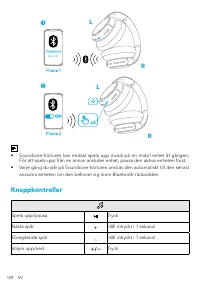
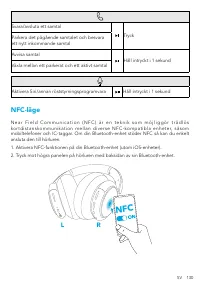
129 SV x2 L L Life Q35 R R • Soundcore-hörluren kan endast spela upp musik på en mobil enhet åt gången. För att spela upp från en annan ansluten enhet, pausa den aktiva enheten först. • Varje gång du slår på Soundcore-hörluren ansluts den automatiskt till den senast anslutna enheten om den befinner ...
Page 133 - Brusreduceringsläge; Transparensläge
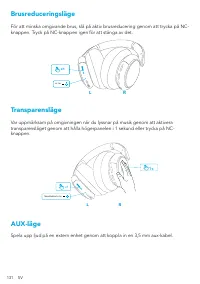
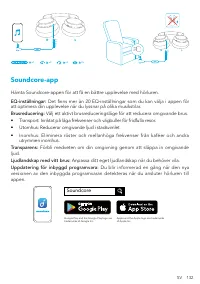
131 SV Brusreduceringsläge För att minska omgivande brus, slå på aktiv brusreducering genom att trycka på NC-knappen. Tryck på NC-knappen igen för att stänga av det. NC ON x1 R L Transparensläge Var uppmärksam på omgivningen när du lyssnar på musik genom att aktivera transparensläget genom att hålla...
Page 136 - Şarj etme
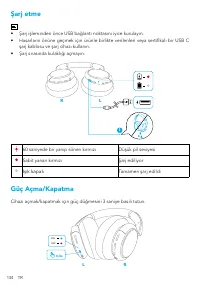
134 TR Şarj etme • Şarj işleminden önce USB bağlantı noktasını iyice kurulayın. • Hasarların önüne geçmek için ürünle birlikte verilenleri veya sertifikalı bir USB C şarj kablosu ve şarj cihazı kullanın. • Şarj sırasında kulaklığı açmayın. R L 60 saniyede bir yanıp sönen kırmızı Düşük pil seviyesi S...
Page 137 - Bluetooth Eşleştirme; Başka cihazla eşleştirme
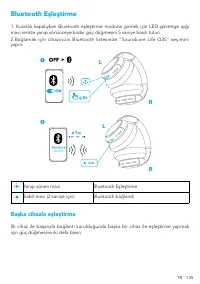
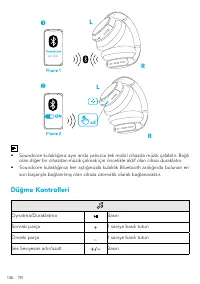
TR 135 Bluetooth Eşleştirme 1. Kulaklık kapalıyken Bluetooth eşleştirme moduna girmek için LED gösterge ışığı mavi renkte yanıp sönünceye kadar güç düğmesini 5 saniye basılı tutun.2.Bağlamak için cihazınızın Bluetooth listesinde "Soundcore Life Q35" seçimini yapın. 5s 1 L L R R Life Q35 2s Y...
Page 138 - Düğme Kontrolleri
136 TR x2 L L Life Q35 R R • Soundcore kulaklığınız aynı anda yalnızca tek mobil cihazda müzik çalabilir. Bağlı olan diğer bir cihazdan müzik çalmak için öncelikle aktif olan cihazı duraklatın. • Soundcore kulaklığınızı her açtığınızda kulaklık Bluetooth aralığında bulunan en son başarıyla bağlanılm...
Page 139 - NFC Modu
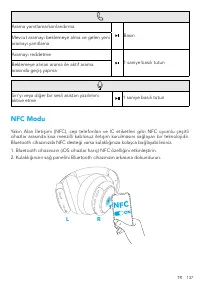
TR 137 Arama yanıtlama/sonlandırma Basın Mevcut aramayı beklemeye alma ve gelen yeni aramayı yanıtlama Aramayı reddetme 1 saniye basılı tutun Beklemeye alınan arama ile aktif arama arasında geçiş yapma Siri'yi veya diğer bir sesli asistan yazılımını aktive etme 1 saniye basılı tutun NFC Modu Yakın A...
Page 140 - Gürültü Önleme Modu; Geçirgenlik Modu; AUX Modu
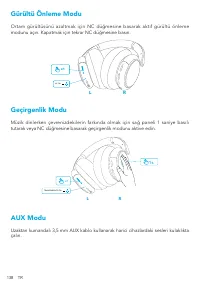
138 TR Gürültü Önleme Modu Ortam gürültüsünü azaltmak için NC düğmesine basarak aktif gürültü önleme modunu açın. Kapatmak için tekrar NC düğmesine basın. NC ON x1 R L Geçirgenlik Modu Müzik dinlerken çevrenizdekilerin farkında olmak için sağ paneli 1 saniye basılı tutarak veya NC düğmesine basarak ...
Page 141 - Soundcore Uygulaması
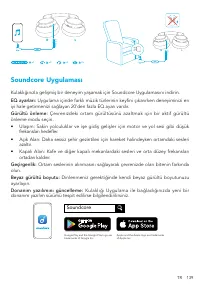
TR 139 m m 5. 3 R L m m 5. 3 R L x1 x3 x2 2s Soundcore Uygulaması Kulaklığınızla gelişmiş bir deneyim yaşamak için Soundcore Uygulamasını indirin. EQ ayarları: Uygulama içinde farklı müzik türlerinin keyfini çıkarırken deneyiminizi en iyi hale getirmenizi sağlayan 20'den fazla EQ ayarı vardır. Gürül...
Page 143 - 充電
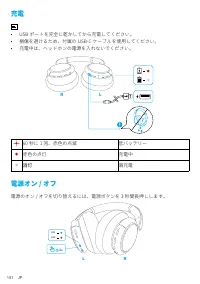
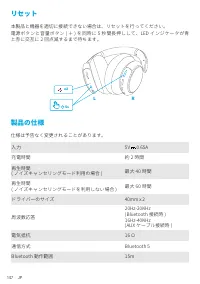
141 JP 充電 • USB ポートを完全に乾かしてから充電してください。• 損傷を避けるため、付属の USB-C ケーブルを使用してください。• 充電中は、ヘッドホンの電源を入れないでください。 R L 60 秒に 1 回、赤色の点滅 低バッテリー 赤色の点灯 充電中 消灯 満充電 電源オン / オフ 電源のオン / オフを切り替えるには、電源ボタンを 3 秒間長押しします。 ON OFF 3s R L
Page 145 - ボタンの操作方法
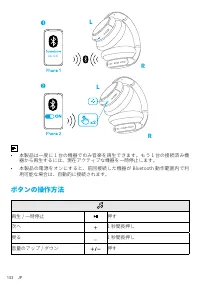
143 JP x2 L L Life Q35 R R • 本製品は一度に 1 台の機器でのみ音楽を再生できます。もう 1 台の接続済み機 器から再生するには、現在アクティブな機器を一時停止します。 • 本製品の電源をオンにすると、前回接続した機器が Bluetooth 動作範囲内で利 用可能な場合は、自動的に接続されます。 ボタンの操作方法 再生 / 一時停止 押す 次へ 1 秒間長押し 戻る 1 秒間長押し 音量のアップ / ダウン 押す
Page 146 - NFC モード
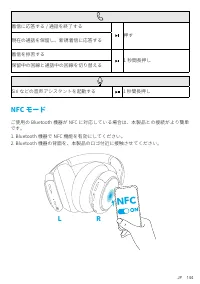
JP 144 着信に応答する / 通話を終了する 押す 現在の通話を保留し、新規着信に応答する 着信を拒否する 1 秒間長押し 保留中の回線と通話中の回線を切り替える Siri などの音声アシスタントを起動する 1 秒間長押し NFC モード ご使用の Bluetooth 機器が NFC に対応している場合は、本製品との接続がより簡単 です。1. Bluetooth 機器で NFC 機能を有効にしてください。2. Bluetooth 機器の背面を、本製品のロゴ付近に接触させてください。 R L NFC
Page 147 - ノイズキャンセリングモード; 外音取り込みモード; AUX モード
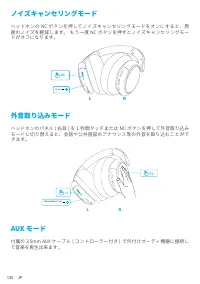
145 JP ノイズキャンセリングモード ヘッドホンの NC ボタンを押してノイズキャンセリングモードをオンにすると、周 囲のノイズを軽減します。 もう一度 NC ボタンを押すとノイズキャンセリングモー ドがオフになります。 NC ON x1 R L 外音取り込みモード ヘッドホンのパネル ( 右耳 ) を 1 秒間タッチまたは NC ボタンを押して外音取り込み モードに切り替えると、会話や公共施設のアナウンス等の外音を取り込むことがで きます。 R L 1s x1 TRANSPARENCY ON AUX モード 付属の 3.5mm AUX ケーブル ( コントローラー付き ) で外付けオーデ...
Page 148 - Soundcore アプリ
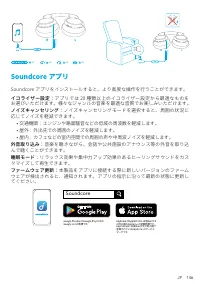
JP 146 m m 5. 3 R L m m 5. 3 R L x1 x3 x2 2s Soundcore アプリ Soundcore アプリをインストールすると、より高度な操作を行うことができます。 イコライザー設定: アプリでは 20 種類以上のイコライザー設定から最適なものを お選びいただけます。様々なジャンルの音楽を最適な音質でお楽しみいただけます。 ノイズキャンセリング: ノイズキャンセリングモードを選択すると、周囲の状況に 応じてノイズを軽減できます。 • 交通機関:エンジンや路面騒音などの低域の周波数を軽減します。• 屋外:外出先での周囲のノイズを軽減します。• 屋内:カフェな...
Page 150 - 충전
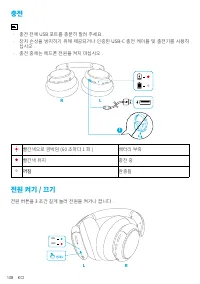
148 KO 충전 • 충전 전에 USB 포트를 충분히 말려 주세요 .• 장치 손상을 방지하기 위해 제공되거나 인증된 USB-C 충전 케이블 및 충전기를 사용하 십시오 . • 충전 중에는 헤드폰 전원을 켜지 마십시오 . R L 빨간색으로 깜박임 (60 초마다 1 회 ) 배터리 부족 빨간색 유지 충전 중 꺼짐 완충됨 전원 켜기 / 끄기 전원 버튼을 3 초간 길게 눌러 전원을 켜거나 끕니다 . ON OFF 3s R L
Page 151 - Bluetooth 페어링; 다른 장치 페어링
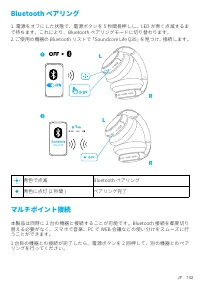
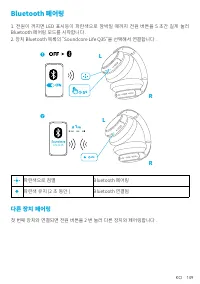
KO 149 Bluetooth 페어링 1. 전원이 꺼지면 LED 표시등이 파란색으로 깜박일 때까지 전원 버튼을 5 초간 길게 눌러 Bluetooth 페어링 모드를 시작합니다 .2. 장치 Bluetooth 목록의 “Soundcore Life Q35”을 선택해서 연결합니다 . 5s 1 L L R R Life Q35 2s 파란색으로 점멸 Bluetooth 페어링 파란색 유지 (2 초 동안 ) Bluetooth 연결됨 다른 장치 페어링 첫 번째 장치와 연결되면 전원 버튼을 2 번 눌러 다른 장치와 페어링합니다 .
Page 152 - 버튼 컨트롤
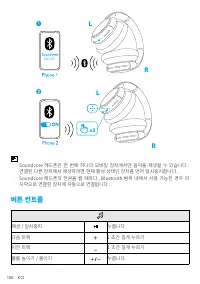
150 KO x2 L L Life Q35 R R • Soundcore 헤드폰은 한 번에 하나의 모바일 장치에서만 음악을 재생할 수 있습니다 . 연결된 다른 장치에서 재생하려면 현재 활성 상태인 장치를 먼저 일시중지합니다 . • Soundcore 헤드폰의 전원을 켤 때마다 , Bluetooth 범위 내에서 사용 가능한 경우 마 지막으로 연결된 장치에 자동으로 연결됩니다 . 버튼 컨트롤 재생 / 일시중지 누릅니다 . 다음 트랙 1 초간 길게 누르기 이전 트랙 1 초간 길게 누르기 볼륨 높이기 / 줄이기 누릅니다 .
Page 153 - NFC 모드
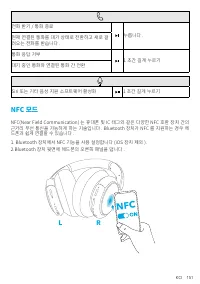
KO 151 전화 받기 / 통화 종료 누릅니다 . 현재 연결된 통화를 대기 상태로 전환하고 새로 걸 려오는 전화를 받습니다 . 통화 응답 거부 1 초간 길게 누르기 대기 중인 통화와 연결된 통화 간 전환 Siri 또는 기타 음성 지원 소프트웨어 활성화 1 초간 길게 누르기 NFC 모드 NFC(Near Field Communication) 는 휴대폰 및 IC 태그와 같은 다양한 NFC 호환 장치 간의 근거리 무선 통신을 가능하게 하는 기술입니다 . Bluetooth 장치가 NFC 를 지원하는 경우 헤 드폰과 쉽게 연결할 수 있습니다 ...
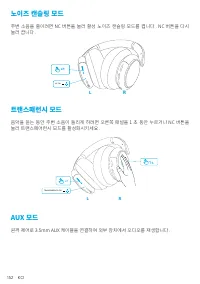
Page 154 - 노이즈 캔슬링 모드; 트랜스패런시 모드; AUX 모드
152 KO 노이즈 캔슬링 모드 주변 소음을 줄이려면 NC 버튼을 눌러 활성 노이즈 캔슬링 모드를 켭니다 . NC 버튼을 다시 눌러 끕니다 . NC ON x1 R L 트랜스패런시 모드 음악을 듣는 동안 주변 소음이 들리게 하려면 오른쪽 패널을 1 초 동안 누르거나 NC 버튼을 눌러 트랜스페어런시 모드를 활성화시키세요 . R L 1s x1 TRANSPARENCY ON AUX 모드 원격 제어로 3.5mm AUX 케이블을 연결하여 외부 장치에서 오디오를 재생합니다 .
Page 155 - 앱을
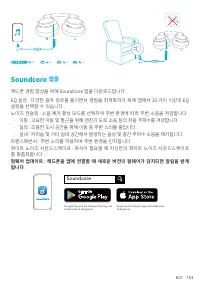
KO 153 m m 5. 3 R L m m 5. 3 R L x1 x3 x2 2s Soundcore 앱을 헤드폰 경험 향상을 위해 Soundcore 앱을 다운로드합니다 .EQ 설정 : 다양한 음악 장르를 즐기면서 경험을 최적화하기 위해 앱에서 20 가지 이상의 EQ 설정을 선택할 수 있습니다 .노이즈 캔슬링 : 소음 제거 활성 모드를 선택하여 주변 환경에 따라 주변 소음을 저감합니다 .• 이동 : 고요한 이동 및 통근을 위해 엔진과 도로 소음 등의 저음 주파수를 겨냥합니다 .• 실외 : 조용한 도시 공간을 위해 이동 중 주변 소리를 ...
Page 157 - 充电
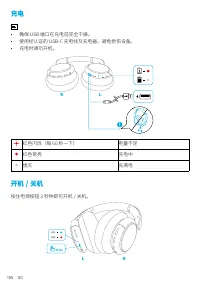
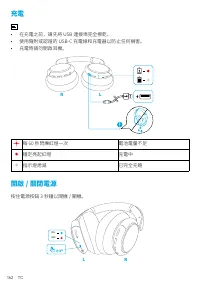
155 SC 充电 • 确保 USB 端口在充电前完全干燥。• 使用经认证的 USB-C 充电线及充电器,避免损伤设备。• 充电时请勿开机。 R L 红色闪烁(每 60 秒一下) 电量不足 红色常亮 充电中 熄灭 充满电 开机 / 关机 按住电源按钮 3 秒钟即可开机 / 关机。 ON OFF 3s R L
Page 158 - 蓝牙配对; 与其他设备配对
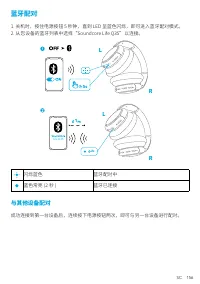
SC 156 蓝牙配对 1. 关机时,按住电源按钮 5 秒钟,直到 LED 呈蓝色闪烁,即可进入蓝牙配对模式。2. 从您设备的蓝牙列表中选择“Soundcore Life Q35”以连接。 5s 1 L L R R Life Q35 2s 闪烁蓝色 蓝牙配对中 蓝色常亮 (2 秒 ) 蓝牙已连接 与其他设备配对 成功连接到第一台设备后,连续按下电源按钮两次,即可与另一台设备进行配对。
Page 159 - 按钮控制
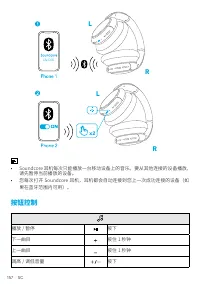
157 SC x2 L L Life Q35 R R • Soundcore 耳机每次只能播放一台移动设备上的音乐。要从其他连接的设备播放, 请先暂停当前播放的设备。 • 您每次打开 Soundcore 耳机,耳机都会自动连接到您上一次成功连接的设备(如 果在蓝牙范围内可用)。 按钮控制 播放 / 暂停 按下 下一曲目 按住 1 秒钟 上一曲目 按住 1 秒钟 调高 / 调低音量 按下
Page 160 - NFC 模式
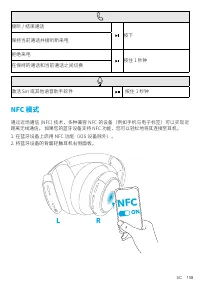
SC 158 接听 / 结束通话 按下 保持当前通话并接听新来电 拒绝来电 按住 1 秒钟 在保持的通话和当前通话之间切换 激活 Siri 或其他语音助手软件 按住 1 秒钟 NFC 模式 通过近场通信 (NFC) 技术,多种兼容 NFC 的设备(例如手机与电子标签)可以实现近 距离无线通信。 如果您的蓝牙设备支持 NFC 功能,您可以轻松地将其连接至耳机。1. 在蓝牙设备上启用 NFC 功能(iOS 设备除外)。2. 将蓝牙设备的背面轻触耳机右侧面板。 R L NFC
Page 161 - 降噪模式; 通透模式
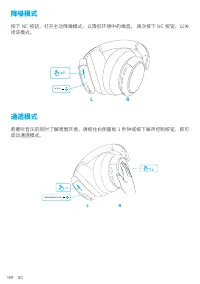
159 SC 降噪模式 按下 NC 按钮,打开主动降噪模式,以降低环境中的噪音。 再次按下 NC 按钮,以关 闭该模式。 NC ON x1 R L 通透模式 若要听音乐的同时了解周围环境,请按住右侧面板 1 秒钟或按下噪声控制按钮,即可 启动通透模式。 R L 1s x1 TRANSPARENCY ON
Page 162 - AUX 模式
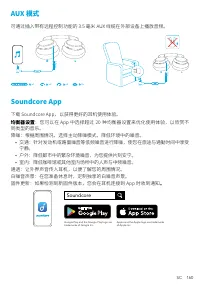
SC 160 AUX 模式 可通过插入带有远程控制功能的 3.5 毫米 AUX 线缆在外部设备上播放音频。 m m 5. 3 R L m m 5. 3 R L x1 x3 x2 2s Soundcore App 下载 Soundcore App,以获得更好的耳机使用体验。 均衡器设置 :您可以在 App 中选择超过 20 种均衡器设置来优化使用体验,以欣赏不 同类型的音乐。降噪:根据周围情况,选择主动降噪模式,降低环境中的噪音。 • 交通:针对发动机或路面噪音等低频噪音进行降噪,使您在旅途与通勤时间中享受 宁静。 • 户外:降低都市中的繁杂环境噪音,为您提供片刻安宁。• 室内:降低咖啡馆或其他...
Page 165 - 藍牙配對; 與其他裝置配對
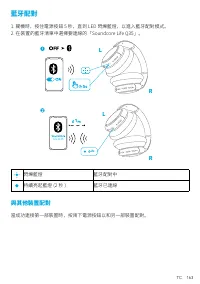
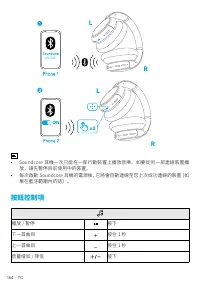
TC 163 藍牙配對 1. 關機時,按住電源按鈕 5 秒,直到 LED 閃爍藍燈,以進入藍牙配對模式。2. 在裝置的藍牙清單中選擇要連線的「Soundcore Life Q35」。 5s 1 L L R R Life Q35 2s 閃爍藍燈 藍牙配對中 持續亮起藍燈 (2 秒 ) 藍牙已連線 與其他裝置配對 當成功連接第一部裝置時,按兩下電源按鈕以和另一部裝置配對。
Page 166 - 按鈕控制項
164 TC x2 L L Life Q35 R R • Soundcore 耳機一次只能在一部行動裝置上播放音樂。如要從另一部連線裝置播 放,請先暫停目前使用中的裝置。 • 每次啟動 Soundcore 耳機的電源後,它將會自動連線至您上次成功連線的裝置(如 果在藍牙範圍內的話)。 按鈕控制項 播放 / 暫停 按下 下一首曲目 按住 1 秒 上一首曲目 按住 1 秒 音量增加 / 降低 按下
Page 168 - 透明度模式
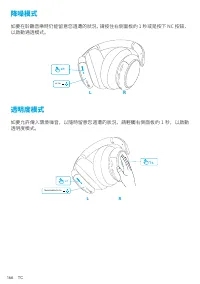
166 TC 降噪模式 如要在聆聽音樂時仍能留意您週遭的狀況,請按住右側面板約 1 秒或是按下 NC 按鈕, 以啟動通透模式。 NC ON x1 R L 透明度模式 如要允許傳入環境噪音,以隨時留意您週遭的狀況,請輕觸右側面板約 1 秒,以啟動 透明度模式。 R L 1s x1 TRANSPARENCY ON
Page 169 - Soundcore 應用程式
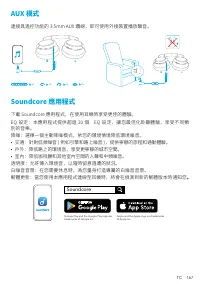
TC 167 AUX 模式 連接具遙控功能的 3.5mm AUX 纜線,即可使用外接裝置播放聲音。 m m 5. 3 R L m m 5. 3 R L x1 x3 x2 2s Soundcore 應用程式 下載 Soundcore 應用程式,在使用耳機時享受更佳的體驗。EQ 設定:本應用程式提供超過 20 個 EQ 設定,讓您最佳化聆聽體驗,享受不同類 別的音樂。降噪:選擇一個主動降噪模式,依您的環境情境降低環境噪音。• 交通:針對低頻噪音 ( 例如引擎和路上噪音 ),提供寧靜的旅程和通勤體驗。• 戶外:降低路上的環境音,享受更寧靜的城市空間。• 室內:降低咖啡廳和其他室內空間的人聲和中頻噪音...
Page 171 - نحشلا; ةأفطم ةءاضلإا
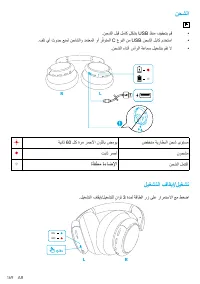
169 AR نحشلا • .نحشلا لبق لماك ٍلكشب USB ذفنم فيفجتب مق • .فلت يأ ثودح عنمل نحاشلاو دمتعملا وأ رّفوتملا C عونلا نم USB نحشلا لباك مدختسا • .نحشلا ءانثأ سأرلا ةعامس ليغشتب مقت لا R L ةيناث 60 لك ةرم رمحلأا نوللاب ضموي ضفخنم ةيراطبلا نحش ىوتسم تباث رمحأ نوحشم ةأفطم ةءاضلإا نحشلا لمتكا ليغشتلا فاقيإ/لي...
Page 172 - ثوتولبلا ربع نارتقلاا; رخآ زاهجب نارتقلاا
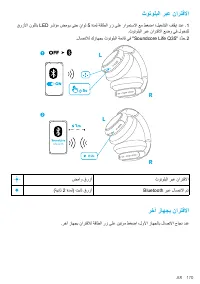
AR 170 ثوتولبلا ربع نارتقلاا قرزلأا نوللاب LED رشؤم ضموي ىتح ٍناوث 5 ةدمل ةقاطلا رز ىلع رارمتسلاا عم طغضا ؛ليغشتلا فاقيإ دنع . 1 .ثوتولبلا ربع نارتقلاا عضو يف لوخدلل .لاصتلال كزاهجب ثوتولبلا ةمئاق يف "Soundcore Life Q35" د ِّدح. 2 5s 1 L L R R Life Q35 2s ضماو قرزأ ثوتولبلا ربع نارتقلاا (ةين...
Page 173 - مكحتلا رارزأ
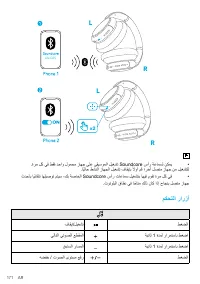
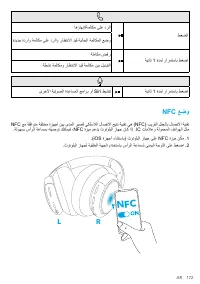
171 AR x2 L L Life Q35 R R • .ةرم لك يف طقف دحاو لومحم زاهج ىلع ىقيسوملا ليغشت Soundcore سأر ةعامسل نكمي .اًيلاح طشنلا زاهجلا ليغشت فاقيإب ًلاوأ مق ؛رخآ لصتم زاهج نم ليغشتلل • ثدحأب اًيئاقلت اهليصوت متيس ،كب ةصاخلا Soundcore سأر تاعامس ليغشتب اهيف موقت ةرم لك يف .ثوتولبلا قاطن يف ا ًحاتم كلذ ناك اذإ...
Page 175 - ءاضوضلا ءاغلإ عضو; ةيفافشلا عضو; AUX
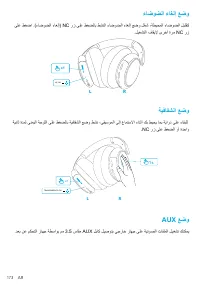
173 AR ءاضوضلا ءاغلإ عضو ىلع طغضا .(ءاضوضلا ءاغلإ) NC رز ىلع طغضلاب طشنلا ءاضوضلا ءاغلإ عضو ل ّغش ،ةطيحملا ءاضوضلا ليلقتل .ليغشتلا فاقيلإ ىرخأ ةرم NC رز NC ON x1 R L ةيفافشلا عضو ةيناث ةدمل ىنميلا ةحوللا ىلع طغضلاب ةيفافشلا عضو طشن ،ىقيسوملا ىلإ عامتسلاا ءانثأ كب طيحي امب ةيارد ىلع ءاقبلل .NC رز ىلع...
Page 178 - הניעט
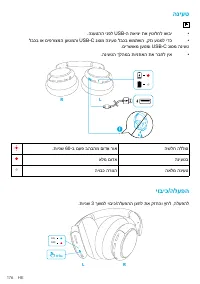
176 HE הניעט • .הנעטהה ינפל USB-ה תאיצי תא ןיטולחל ושבי • לבכב וא םיפרוצמה ןעטמהו USB-C גוסמ הניעט לבכב שמתשה ,קזנ עונמל ידכ .םירשואמ ןעטמו USB-C גוסמ הניעט • .הניעטה ךלהמב תוינזואה תא רבחל ןיא R L .תוינש 60-ב םעפ בהבהמ םודא רוא השלח הללוס אלמ םודא הניעטב היובכ הרונה האלמ הניעט יוביכ/הלעפה .תוינש 3 ...
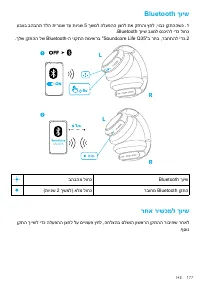
Page 179 - רחא רישכמל ךויש
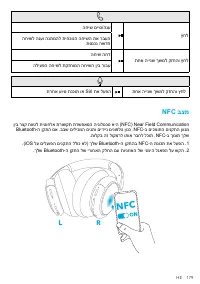
HE 177 Bluetooth ךויש עבצב בהבהת דלה תירונש דע תוינש 5 ךשמל הלעפהה ןצחל תא קזחהו ץחל ,יובכ ןקתההשכ . 1 .Bluetooth ךויש בצמל סנכיהל ידכ לוחכ .ךלש ןקתהה לש Bluetooth-ה ינקתה תמישרב "Soundcore Life Q35"ב רחב ,רבחתהל ידכ. 2 5s 1 L L R R Life Q35 2s בהבהמ לוחכ Bluetooth ךויש (תוינש 2 ךשמל) אלמ לו...
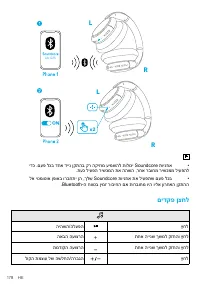
Page 180 - םידקפ ןצחל
178 HE x2 L L Life Q35 R R • ידכ .םעפ לכב דחא דיינ ןקתהב קר הקיזומ עימשהל תולוכי Soundcore תוינזוא .תעכ ליעפה רישכמה תא ההשה ,רחא רבוחמ רישכממ ליעפהל • לא יטמוטוא ןפואב ורבחתי ןה ,ךלש Soundcore תוינזוא תא ליעפתש םעפ לכב .Bluetooth-ה חווטב ןימז רוביחה םא תורבוחמ ויה וילא ןורחאה ןקתהה םידקפ ןצחל היהשה...
Page 182 - םישער לוטיב בצמ; תופיקש בצמ
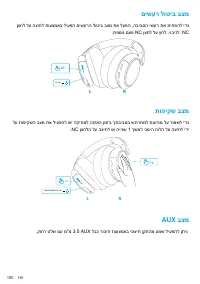
180 HE םישער לוטיב בצמ ןצחל לע הציחל תועצמאב ליעפה םישערה לוטיב בצמ תא לעפה ,הביבסה ישער תא תיחפהל ידכ .תפסונ םעפ NC ןצחל לע ץחל ,יוביכל .NC NC ON x1 R L תופיקש בצמ לע תופיקשה בצמ תא ליעפהל שי הקיזומל הנזאה ןמזב ךתביבסב שחרתמל תועדומ לע רומשל ידכ .NC ןצחלה לע הציחל וא היינש 1 ךשמל ינמיה חולה לע הציח...
Page 183 - סופיא
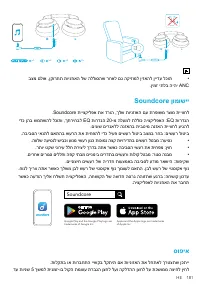
HE 181 m m 5. 3 R L m m 5. 3 R L x1 x3 x2 2s • בצמ םלוא ,ןקורתת תוינזואה לש הללוסהש רחאל םג הקיזומל ןיזאהל ןיידע לכות .ןימז יתלב היהי ANC Soundcore ןומושיי .Soundcore תייצקילפא תא דרוה ,ךלש תוינזואה םע תרפושמ רצומ תייווחל ידכ ןהב שמתשהל לכותו ,ךתריחבל EQ תורדגה 20-מ הלעמל תללוכ היצקילפאה :EQ תורדגה ...
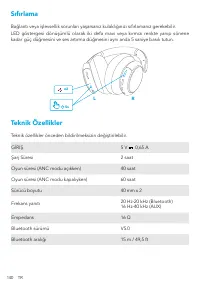
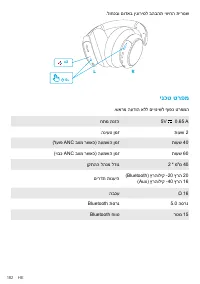
Page 184 - ינכט טרפמ
182 HE .לוחכבו םודאב ןיגוריסל בהבהת יוויחה תירונש 5s x2 R L ינכט טרפמ .שארמ העדוה אלל םייונישל ףופכ טרפמה חתמ תנזה 5V 0.65 A הניעט ןמז תועש 2 (לעופ ANC בצמ רשאכ) העמשה ןמז תועש 40 (יובכ ANC בצמ רשאכ) העמשה ןמז תועש 60 ןקתהה להנמ לדוג 2 * מ"מ 40 םירדת תונעיה ) Bluetooth) ץרהוליק -20 ץרה 20 ) Aux)...