Sony XDRS41DB - User Manual
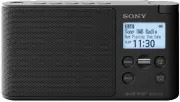
A user manual for the Sony Digital Radio DAB/FM device outlines essential operation and setup procedures, covering basic functions such as powering on, selecting stations via FM or DAB+, managing presets, and navigating its RDS capabilities. The guide also addresses troubleshooting common issues and provides technical details about compatibility with digital audio broadcasting standards. Key topics include station selection methods, control interface design, and system specifications relevant to its broadcast performance.

XDR-S41D_EU8 [GB/FR] 4-691-610-
11(1)
Listening to the Radio
1
Turn on the radio, and then select the
DAB or FM function.
Getting Started
To change button assignment
1
Tune to a new station.
2
Press and hold the preset button you want to
change until “Station saved to preset x.” appears
on the display.
The previously assigned station on the selected button
will be replaced by the new one.
Tip
The button assignment information remains in the radio’s
memory even after DAB and FM auto tunes are performed.
1
Connect the AC adaptor or insert four batteries.
Then, extend the antenna.
2
Turn on the radio.
AC adaptor
(supplied)
When the AC adaptor is connected, even if batteries
are inserted, the power source will automatically
switch from batteries to AC power.
To use the unit on batteries
See “Setup menu options” for manual tuning.
Assigning Stations to the Preset Buttons
Assign your favourite stations to the 5 preset buttons. You can assign
up to 5 stations each for DAB and FM functions.
1
Tune to the station you want to preset.
2
Press and hold the desired preset button (
1 – 5) until
“Station saved to preset x.” appears on the display.
2
Select the desired station or service.
Slide the jog lever up or down to make a
selection.
Follow the steps in “Listening to the Radio” above.
To assign other stations to the rest of the
preset buttons, repeat the same procedure.
To improve DAB/FM radio reception
To make a new DAB/FM station list
If you have moved to another region, perform DAB and FM auto tunes again. Select the DAB or FM function, then press
AUTO TUNE.
The radio receives
the first station in
the new station list.
Notes
• The currently stored station list will be cleared once the auto
tune process starts.
• When the setup menu is displayed, auto tune will not be
performed even if
AUTO TUNE is pressed.
Note on FM auto tuning
Be sure to select “By station list” in “FM tune mode” before
starting FM auto tune. When “Manual tune” is selected, scan
tuning will start instead. See “Setup menu options” for details.
Guide to parts and controls
(power) button
Antenna
Volume control
(headphones) jack
DC IN jack
DAB/FM button
AUTO TUNE button
Jog lever
BACK button
MENU button
Speaker
Preset buttons*
* Preset button
has a tactile dot.
Battery indicator
Battery indicator lights up when using the unit on batteries. The remaining battery power is displayed in
5 levels.
Replace all the
batteries with
new ones when
the low battery
warning message
flashes.
Battery indicator
Setup menu options
Example: When the DAB band is selected
BACK
Press
MENU to enter the setup menu.
Slide the jog lever up
or down to select the
desired menu item or
setting.
Press the lever to
confirm the selection.
To go back to the upper menu level
Press
BACK.
To exit the setup menu
Press
MENU again.
Wake-up timer
Be sure to connect the AC adaptor when using
the wake-up timer. Wake-up timer cannot be
used when using the unit on batteries.
Enable:
Select this option when using the
wake-up timer.
Disable:
Select this option when not using the
wake-up timer.
Wake-up timer setting:
Select this option
when setting the wake-up timer. You can set the
wake-up timer as follow.
1 Select “Timer setting” and set the
hour and minute.
Hour
Minute
2 Select “Wake station” and set a
station.
If selecting from the preset
station list
If setting to the last
received station
After you have selected the setting, press
BACK until the display returns to the
“Wake-up timer setting” menu.
3 Select “Volume setting” and adjust
the volume using the jog lever.
After you have adjusted the volume, press
BACK until the display returns to the
“Wake-up timer” menu.
4 Select “Enable,” and then press the
jog lever.
When the wake-up timer is set, “ ” lights up
on the display.
To search FM stations (scan tuning)
You can search receivable FM stations in 0.05 MHz steps.
Select the FM function, then press
AUTO TUNE. Be sure to select
“Manual tune”
in “FM tune mode” (See “Setup menu options.”) before using this function.
If a receivable station is found,
“[ENTER]:Select” appears on the
display. Press the jog lever to
receive the station. (If you do
not press the jog lever within
3 seconds, the search will
restart.)
Tips
• You can also search FM stations by sliding and holding the jog
lever up or down after selecting the FM function.
• Press
BACK to stop searching FM stations.
Press the desired preset button (
1 – 5).
Listening to an Assigned Station
Note
To prevent the assigned station from being
changed by mistake, do not hold the preset
button down.
Example: When the
preset button “
” is
pressed
Preset button number lights up
and the reception screen appears.
Example: Assigning a
station to the preset
button “
”
Sleep
The radio automatically turns off after a set time
has elapsed.
Select the desired timer setting (minutes) from
the following:
Off
(deactivated)/
15 min.
/
30 min.
/
45 min.
/
60 min.
When the sleep timer is set, “SLEEP” lights up on
the display.
Information
Displays information for the station to which you
are listening. Slide the jog lever up or down to
scroll through the following information:
Channel:
Channel and frequency (See the DAB
frequency table in “Specifications.”)
Multiplex name:
Ensemble label (up to
16 characters long)
Service name:
Station name
PTY:
PTY label (See “PTY (programme type)” in
Bit rate:
Bit rate
Signal level:
Displays the signal level for the
DAB station to which you are listening, ranging
from 0 (no signal) to 100 (maximum signal).
Note
If there is no ensemble label or no station name,
the space for label or name will be blank. If there
is no PTY label, “No PTY” will appear on the
display.
FM tune mode
Select the tuning mode for FM.
By station list:
You can select the desired
station from the list of FM stations stored by auto
tune.
When selecting this option, the display will
change to the FM station list. Select the desired
station from the list.
Manual tune:
You can manually tune to the
desired FM frequency in 0.05 MHz steps. Slide
the jog lever up or down to tune to the desired
frequency. In “Manual tune” mode, you can use
the scan tuning function (See “To search FM
stations (scan tuning)” for details.).
Edit FM station list
You can edit the FM station list.
Get FM station name:
Perform this
operation when you want to receive RDS
information such as station names. Select “OK” to
start scanning for RDS data.
Notes
• Set “FM tune mode” to “By station list” before
you perform this operation.
About the FM auto tune
process
You can cancel the FM auto tune process
that starts after the FM function is
selected for the first time. However, if you
want to tune to stations by station list,
you will need to perform FM auto tune.
For details on how to perform FM auto
tune later, see “To make a new DAB/FM
station list.”
To cancel the
auto tune
process while
in progress,
press
BACK.
Scrolling text (DLS: Dynamic Label
Segment of up to 128 characters)
“SC” lights up when
a secondary service
is received.
Station currently
being received
Secondary service
(after the “L” mark)
Selected station
When selecting the FM function for the first time
FM auto tune will start automatically when the FM function is selected for
the first time.
Tips
• Even if you select “Later” on the “Get FM station name” screen, FM station
names will be received and stored in the unit while you are listening to
broadcasts.
• FM station names may not be transmitted, depending on the station.
Station name*
Selected station
* Displayed only
when RDS data
has been
received.
Scrolling text
(RT: Radio Text of up to 64 characters)*
Station name*
Station currently
being received
Tips
• The backlight will turn off if no operation is performed for about 30 seconds to minimize power
consumption.
• Alkaline batteries are recommended. The use of manganese batteries is not recommended, since
this type of battery has an extremely short usage time.
• The currently stored RDS information will be
cleared once scanning starts.
• It may take a long time to receive all the
available RDS data.
Delete FM station:
You can delete any
unwanted stations from the FM station list.
1 Slide the jog lever up or down
to select the station you want to
delete, and then press the lever.
2 Slide the jog lever up or down to
“OK,” and then press the jog lever.
Add FM station:
When listening to a
manually tuned station, you can add the station
to the FM station list. Select “OK” to add the
station to the list. Be sure to set “FM tune mode”
to “Manual tune” before using this option.
Backlight
Auto:
The backlight will turn off automatically if
no operation is performed for 30 seconds.
Always ON:
The backlight will be on all the
time.
Time
Set time:
“Auto (DAB)” is set by default. This
enables the clock to synchronize with the DAB
data being received. Select “Time setting” to set
the clock manually using the jog lever.
12H/24H:
Select the clock display mode,
12-hour clock or 24-hour clock.
Beep
Select “On” to activate the beep sound when you
operate the radio.
DAB manual tune
If DAB reception by DAB auto tune is poor, try
manual tuning.
Slide the jog lever up or down to
select the desired DAB channel, then
press the lever.
The radio starts scanning for receivable stations
in the selected channel.
Tip
The new station received by manual tuning is
stored in the DAB station list.
Initialize
Select “OK” to initialize the radio to the factory
default settings. All settings, DAB and FM station
lists and assignment information on the preset
buttons will be deleted.
Listening through headphones
Connect headphones that have a stereo or
monaural* mini plug (not supplied).
To
(headphones)
Note
When connecting headphones to the unit, use
headphones with a stereo (3-pole) or monaural
(2-pole) mini plug. If you use headphones with
another type of plug, there may be noise
interference or no sound may be heard.
1 ring
2 rings
Other types of
plugs cannot
be used.
Compatible
plug types
3 or more rings
Monaural*
mini plug
Stereo
mini plug
* When listening to stereo sound using
monaural headphones, you will hear sound
from the left channel only.
Maintaining the moderate volume level
The radio limits the maximum volume to allow
you to listen to the sound at a moderate volume
level when using the headphones. When you try
to adjust the volume to a level that exceeds the
specified level, the “Check The Volume Level”
message appears.
Note
The volume is lowered automatically and the
“Volume Lowered” message appears, if you do
not lower the volume for the specified period of
time after the “Check The Volume Level”
message appears.
About RDS Features
What is RDS?
Introduced by the European Broadcasting Union
(EBU) in 1987, the Radio Data System (RDS) allows
information such as station names to be received
via the 57 kHz sub-carrier signal of FM
broadcasts. However, the availability of RDS data
varies depending on the area. It therefore may
not be always be possible to receive RDS
information.
Using the RDS functions
This radio supports the following RDS functions.
RDS function
Description
Station name
display
Displays the station name
you are listening to.
RT (radio text)
Displays the free-form
textual information.
Notes
• The RDS functions will not be activated if the
FM station being received is not transmitting
RDS data. They may also not work properly in
areas where RDS transmissions are in the
experimental stage.
• If the radio signal being received is weak, it
may take time to receive the RDS data.
Precautions
• Operate the unit only on the power sources
specified in “Specifications.” For battery
operation, it is recommended that you use four
LR6 (size AA) alkaline batteries. For AC
operation, use only the supplied AC adaptor.
Do not use any other type of AC adaptor.
• Failure to use the supplied AC adaptor may
cause the unit to malfunction, as the polarity
of the plugs of other manufacturers may be
different.
• To use the unit on battery power, unplug the
connector of the AC power adaptor from the
DC IN jack. The unit cannot be powered by
batteries if the connector of the AC adaptor is
plugged into the DC IN jack.
• Use the unit within a temperature range of 0°C
to 40°C. If it is used in temperatures higher
than this range, the display may gradually turn
black. If it is used in temperatures lower than
this range, the display may change very slowly.
(These irregularities will disappear and there
will be no damage to the unit when the unit is
used in the recommended temperature range
again.)
• Avoid exposure to temperature extremes,
direct sunlight, moisture, sand, dust or
mechanical shock. Never leave in a car parked
in the sun.
• Do not expose the unit to strong impact or
excessive force. A glass material is used for the
display in some models. If the glass chips or
cracks, it may cause injury. In that case, stop
using the unit immediately and make sure not
to touch the damaged parts.
• Should any solid object or liquid fall into the
unit, disconnect the AC adaptor and remove
the batteries, and have the unit checked by a
qualified personnel before operating it any
further.
• Since a strong magnet is used for the speakers,
keep personal credit cards using magnetic
coding or spring-wound watches away from
the unit to prevent possible damage from the
magnetism.
• To clean the casing, use a soft dry cloth. Do not
use any type of solvent, such as alcohol or
benzine, which may damage the finish.
• Do not operate the unit with wet hands since it
may cause a short circuit.
• Do not mix an old battery with a new one or
mix different type of batteries.
• When you are not going to use the unit for a
long time, remove the batteries to avoid
damage from battery leakage and corrosion.
• Check if the batteries are inserted in the
correct orientation (
and
) when the radio
does not turn on after battery replacement.
• Batteries have a recommended use-by date for
proper use. When using expired batteries,
battery life will be extremely short. Check the
use-by date on the batteries and if they are
expired, replace them with new ones.
• Make sure not to splash water on the unit. This
unit is not waterproof.
• Under certain circumstances, especially when
the air is very dry, it is not uncommon to
experience a discharge of static electricity, or
shock, when your body comes in contact with
another object, in this case the ear buds
touching your ear(s). The energy from this
natural discharge is extremely small and is not
emitted by your product but rather a natural
environmental occurrence.
• Listening at high volume levels over extended
periods of time may harm your hearing. Be
particularly careful when listening through
headphones.
• Sudden loud output may harm your ears.
Increase the volume gradually. Be particularly
careful when listening through headphones.
• Do not use headphones while walking, driving
a car or motorcycle, cycling, etc. A traffic
accident may result.
• Do not use headphones in situations where
being unable to hear ambient sound is
dangerous, such as at railroad crossings, on
train station platforms, and at construction
sites.
• Excessive sound pressure from earphones and
headphones can cause hearing loss.
If you have any questions or problems
concerning your unit, please consult your
nearest Sony dealer.
Troubleshooting
Should any problem persist after you have made
the following checks, consult your nearest Sony
dealer.
Display is dim, or no indication is
displayed.
• The radio is being used in extremely high or
low temperatures or in a place with excessive
moisture.
Very weak or interrupted sound, or
unsatisfactory reception.
• If you are in a building, listen near a window.
• Extend the antenna and adjust the length and
the angle for best reception. See “To improve
DAB/FM radio reception” for details.
• If a mobile phone is placed close to the radio,
a loud noise may be heard from the radio.
Keep the phone away from the radio.
Battery gets exhausted very quickly.
• Check the estimated battery life described in
“Specifications” and be sure to turn off the
radio when not using it.
A desired station cannot be received
when a preset button is pressed.
• You may have held down the preset button to
which the station was assigned, causing the
station to be replaced by a new one. Assign
the desired station again.
• Preset buttons cannot be used when the setup
menu is displayed.
The battery compartment lid has come
off.
• The battery compartment lid is designed to
come off when opened with excessive force.
Insert the right hinge of the lid into the right
hole of the compartment (
), then insert the
left hinge into the left hole (
).
If maintenance service is performed
All user-configured settings, such as preset radio
stations, the timer settings, and the clock, may
be initialized.
Please note your settings in case you need to
configure them again.
Messages
Low Battery (flashes, and the power is
turned off)
• The batteries are exhausted. Replace all the
batteries with new ones.
No preset
• No station in the selected band (DAB or FM)
has been preset to the pressed button.
Service not available
• The selected station or service is currently not
broadcasting.
Specifications
Frequency range
DAB (Band-III): 174.928 MHz
239.200 MHz
FM: 87.5 MHz
108 MHz (0.05 MHz step)
Intermediate frequency
DAB (Band-III): 2.048 MHz
FM: 1.943 MHz
DAB (Band-III) frequency table (MHz)
Channel
Frequency
Channel
Frequency
5A
174.928
10A
209.936
5B
176.640
10B
211.648
5C
178.352
10C
213.360
5D
180.064
10D
215.072
6A
181.936
11A
216.928
6B
183.648
11B
218.640
6C
185.360
11C
220.352
6D
187.072
11D
222.064
7A
188.928
12A
223.936
7B
190.640
12B
225.648
7C
192.352
12C
227.360
7D
194.064
12D
229.072
8A
195.936
13A
230.784
8B
197.648
13B
232.496
8C
199.360
13C
234.208
8D
201.072
13D
235.776
9A
202.928
13E
237.488
9B
204.640
13F
239.200
9C
206.352
9D
208.064
Speaker:
Approx. 80 mm dia., 4 Ω, monaural
Audio power output:
650 mW
Output:
(headphones) jack (ø 3.5 mm, stereo
mini jack)
Power requirements:
6 V DC, four LR6 (size AA)
alkaline batteries
External power source:
DC IN 5 V 0.5 A
Battery life (JEITA)
*
Approx. 25 hours for DAB, 27 hours for FM
(Using Sony (LR6SG) alkaline batteries)
Approx. 10 hours for DAB, 11 hours for FM
(Using Sony (NH-AA) Ni-MH 1,000 mAh
batteries)
Dimensions:
Approx. 180 mm × 95 mm × 36 mm
(W/H/D) excl. projecting parts and controls
Mass:
Approx. 430 g incl. batteries
Supplied accessories:
AC adaptor (1)
*
When “Auto” is selected for the backlight
setting and listening through the speaker.
Measured by JEITA (Japan Electronics and
Information Technology Industries Association)
standards. The actual battery life varies
significantly depending on battery type, usage
and circumstances.
Design and specifications are subject to change
without notice.
PTY (programme type)
This function indicates services in programme
type, such as News or Sports, transmitted in the
DAB.
If the service does not transmit the programme
type, “No PTY” appears.
Programme type
Display
No programme type
No PTY
News
News
Current Affairs
Current Affairs
Information
Information
Sport
Sport
Education
Education
Drama
Drama
Culture
Arts
Science
Science
Varied
Talk
Pop Music
Pop Music
Rock Music
Rock Music
Easy Listening Music
Easy Listening
Light Classical
Light Classical
Serious Classical
Classical Music
Other Music
Other Music
Weather
Weather
Finance
Finance
Children’s programmes
Children’s
Social Affairs
Factual
Religion
Religion
Phone In
Phone In
Travel
Travel
Leisure
Leisure
Jazz Music
Jazz and Blues
Country Music
Country Music
National Music
National Music
Oldies Music
Oldies Music
Folk Music
Folk Music
Documentary
Documentary
Alarm Test
Alarm Test
Alarm
Alarm – Alarm !
Note
When adjusting the antenna, be
sure to hold it by the bottom
part. The antenna may be
damaged if you move it with
excessive force while holding it
by the upper part.
DAB auto tune will start automatically when the radio is
turned on for the first time.
After DAB auto tune is
completed, the radio receives the first station in the
DAB station list stored by DAB auto tune.
If you want
to cancel DAB auto tune process, press
BACK.
To cancel the auto
tune process while
in progress, press
BACK.
Tip
To perform DAB auto
tune again later, see “To
make a new DAB/FM
station list” below.
When turning on the radio for the first time
Four LR6 (size AA) batteries (not supplied)
Rear side
To use the unit on battery
power, unplug the connector of
the AC power adaptor from the
DC IN jack. The unit cannot be
powered by batteries if the
connector of the AC adaptor is
plugged into the DC IN jack.
Insert the
side of the
battery first.
DIGITAL RADIO DAB/FM
Operating Instructions GB
Mode d’emploi FR
©2017 Sony Corporation Printed in China
4-691-610-
11(1)
XDR-S41D
"Loading the manual" means you need to wait until the file loads and becomes available for online reading. Some manuals are very large, and the time they take to appear depends on your internet speed.
Was this manual helpful?
About this manual
- Brand
- Sony
- Model
- XDRS41DB
- Document type
- User Manual
- Category
- Radio
- Language(s)
- English
- Pages
- 2
- File size
- 548.1 KB
- Format